

Do you have a collection of great speakers or a classic stereo system that feels trapped in the past? You love the sound quality, but the thought of running cables from your phone or laptop is a hassle that interrupts your listening flow. Modernizing your audio setup doesn’t require a full, expensive replacement. The solution is surprisingly simple and affordable: a wireless streaming adapter.
This guide is for anyone looking to breathe new life into their existing audio equipment. Whether you want to stream playlists to your living room stereo or connect computer speakers to a tablet across the room, we will help you understand the key features that matter. For more ideas on integrating streaming into specific setups, explore our guide on the best audio streamers for 2.1 channel systems.
Pros
- Extremely easy one-button setup with no app or complex configuration required
- Compatible with a wide range of legacy audio equipment thanks to both RCA and 3.5mm outputs
- Reliable automatic reconnection saves time and eliminates repeated pairing steps
- Affordable price point makes it one of the best value Bluetooth adapters available
- Includes all necessary cables and power adapters right out of the box
Cons
- No built-in battery, so it requires a constant power source via USB or AC adapter
- Can occasionally connect to an unintended previously paired device when multiple phones are nearby
- Does not function as a Bluetooth transmitter, limiting use to receiver-only applications
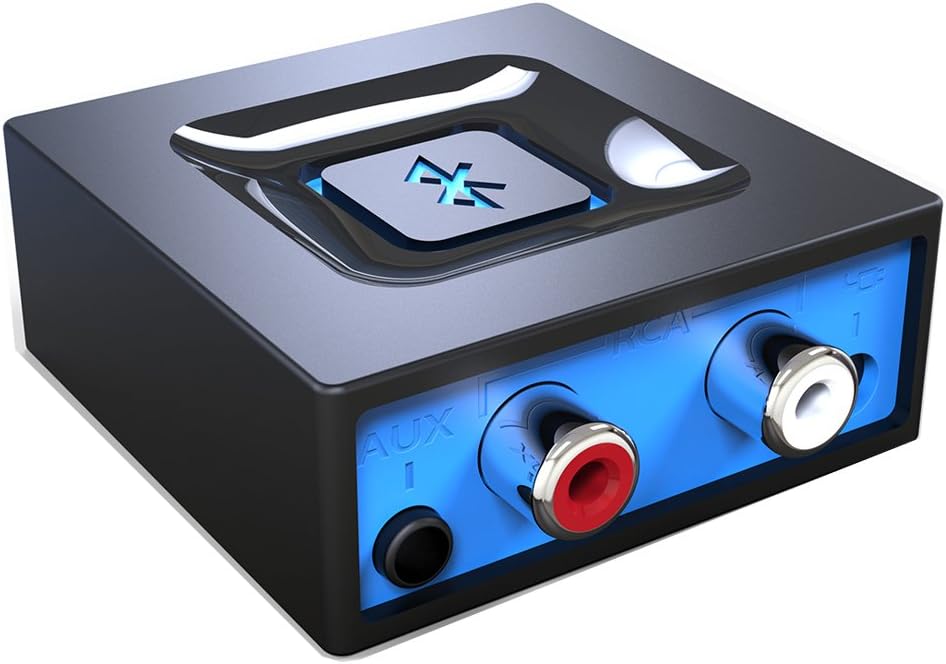
The Esinkin Bluetooth Audio Adapter is a compact wireless receiver designed to breathe new life into older stereo systems, powered speakers, and home audio setups that lack Bluetooth capability. It is ideal for anyone who wants to stream music from a smartphone or tablet without replacing their existing equipment. Whether you have a vintage hi-fi system, a Bose CD player, or a basic set of computer speakers, this adapter bridges the gap between legacy hardware and modern wireless convenience.
Setup is refreshingly straightforward. A single large Bluetooth button on the unit handles pairing, connection, and power, making the process accessible for users of all technical levels. The automatic reconnect feature is a genuine standout, as the adapter remembers the last paired device and reconnects instantly when powered on, eliminating the need to re-pair every session. The wireless range of 30 to 40 feet indoors is sufficient for most living rooms and home office environments.
The unit ships with everything needed to get started, including an AC/DC power adapter, a USB power cable, and an RCA-to-AUX cord. This flexibility in both power and audio connection options is a practical advantage. The build is lightweight and unobtrusive, with a subtle blue indicator light that confirms Bluetooth status without being distracting in a home setting.
There are a few limitations worth noting. The adapter requires a constant power source since it has no internal battery, which means it is best suited for fixed installations rather than portable use. It is also strictly a receiver and cannot transmit audio to wireless headphones or speakers. Occasional connection hiccups have been reported when multiple previously paired devices are in range simultaneously, though this is unlikely to affect most single-household users.
Overall, the Esinkin Bluetooth Audio Adapter delivers excellent value and reliable performance for its intended purpose. Its top-tier ranking in its category, combined with an outstanding volume of positive customer feedback, confirms it as one of the most trusted options for adding Bluetooth to an existing audio system. If you want a simple, affordable, and effective solution to modernize your speakers, this adapter is a smart choice.
ASIN: B016NUTG5K
Model Number: W29-US
Brand: Esinkin
Category: Bluetooth Network Adapters
Audio Outputs: 3.5mm stereo jack and RCA (Left and Right)
Wireless Range: Up to 30 to 40 feet (10 to 12 meters) indoors without obstacles
Power Source: USB cable or included AC/DC power adapter (no built-in battery)
Device Compatibility: Smartphones, tablets, computers, and laptops with Bluetooth enabled
Speaker Compatibility: Powered PC speakers, home stereo systems, A/V receivers, and any speaker system with 3.5mm or RCA input
Item Weight: 3.52 ounces
In the Box: Bluetooth receiver unit, AC/DC power adapter, USB power cable, RCA-to-AUX cord, instruction manual
Date First Available: October 15, 2015
Best Sellers Rank: Number 2 in Bluetooth Network Adapters
Before purchasing this adapter, confirm that your speaker system or stereo has either a 3.5mm auxiliary input or RCA input ports. These are the two connection types supported by this device, and without at least one of them, the adapter cannot be used. Most powered speakers, bookshelf stereos, home theater receivers, and vintage hi-fi units will have one or both of these inputs.
Keep in mind that this product is a Bluetooth receiver only. It allows a Bluetooth-enabled phone or tablet to send audio to your speakers wirelessly. It cannot be used to send audio from a wired source to wireless headphones or Bluetooth speakers. If you need a transmitter for that purpose, you will need a different type of adapter.
Because there is no internal battery, you will need to place the adapter near a USB port or power outlet. For living room setups, the included AC/DC adapter is the most convenient option. For desk setups near a computer, the USB cable works well and keeps the installation tidy. Plan your cable routing before committing to a permanent placement.
If you plan to use the adapter in a household with multiple Bluetooth devices, be aware that it may occasionally reconnect to a previously paired device rather than your preferred one. To avoid this, unpair unused devices from the adapter or ensure other devices have Bluetooth turned off when not in use. For single-device households, this is not a concern and the automatic reconnect feature works flawlessly.
Buying Guide
Connection Type and Compatibility
Your first consideration is how the adapter connects to your existing gear. Most devices offer a standard 3.5mm aux output, which is perfect for computer speakers or portable sound systems. For older home stereos or amplifiers, look for an adapter that includes RCA (red and white) outputs. This ensures a clean, direct connection to your receiver’s audio inputs.
Confirm the adapter is designed as a receiver, not a transmitter. A receiver takes a Bluetooth signal from your phone and sends audio to your speakers. A transmitter does the opposite, sending audio from a non-Bluetooth source to wireless headphones. Choosing the wrong type is a common mistake.
Power Source and Setup
Consider where your adapter will live. Some units are powered solely by a USB cable, which you can plug into a TV, console, or wall charger. Others require a dedicated AC power adapter. A USB-powered option offers more placement flexibility, especially near entertainment centers with available ports.
The setup process should be effortless. Look for features like one-button pairing and automatic reconnection. The best adapters remember your device, so audio starts playing the moment you power on your speakers, without needing to manually reconnect each time.
Range and Signal Stability
A reliable wireless connection is non-negotiable. Check the advertised operational range, typically between 30 to 40 feet in an open space. Walls and other obstacles will reduce this distance. A strong, stable Bluetooth connection prevents frustrating audio dropouts or stuttering when you move around your home with your phone.
For whole-home audio, you might consider a multi-room streaming ecosystem. While a basic Bluetooth adapter works for a single room, our resource on best audio streamers for ceiling speakers explores more advanced whole-home solutions.
Audio Quality and Codec Support
While most adapters support standard Bluetooth audio codecs like SBC, some advanced models support higher-quality codecs such as aptX or AAC. These can provide improved sound fidelity, reducing compression for a listening experience closer to a wired connection. If you are an audiophile, this specification is worth your attention.
The ultimate goal is to enjoy your music without compromise. A good adapter should be invisible in your audio chain, delivering your music clearly and reliably. For those building a premium home theater, integrating a high-quality streamer is key, as detailed in our review of the best audio streamers for Dolby Atmos.
Final Thoughts
Upgrading to wireless audio is one of the simplest ways to enhance your daily listening. For a straightforward, reliable solution that works with a vast array of speakers and stereos, the Esinkin Bluetooth Audio Adapter for Music is an excellent choice, validated by its widespread user satisfaction. If your primary need is connecting to a computer or TV via USB, you might also explore options like the Esinkin Bluetooth Audio Adapter for Music which offers similar plug-and-play convenience. Either path leads to a liberated, cable-free audio experience.
Frequently Asked Questions
Can I use a Bluetooth adapter with any speaker? Yes, as long as the speaker is powered (has its own power source or amplifier) and has an available aux (3.5mm) or RCA input. The adapter sends the audio signal to the speaker, which then amplifies and plays it.
What is the difference between a Bluetooth receiver and transmitter? A Bluetooth receiver (like the ones reviewed here) accepts a wireless signal from your phone or tablet and outputs audio to your wired speakers. A transmitter takes audio from a wired source, like a TV, and sends it wirelessly to your Bluetooth headphones.
Will using an adapter cause audio lag or delay? Most modern Bluetooth adapters have minimal latency, making them fine for music listening. However, for watching video, a slight delay between the audio and picture can sometimes occur. For a lag-free video experience, look for adapters specifically mentioning low-latency codecs or consider a dedicated audio streamer.
How do I improve the wireless range of my adapter? Ensure there are as few physical obstructions as possible between your streaming device and the adapter. Also, keep the adapter away from other electronics that might cause wireless interference, such as routers or microwaves. For whole-home coverage, a Wi-Fi-based streaming system, which you can learn more about on our Wireless & Streaming Audio hub, is often more robust.


Write Your Review
No reviews yet. Be the first to share your experience!