

Are you tired of straining to hear dialogue over movie soundtracks or feeling like your favorite music lacks depth? The culprit is often your TV or computer’s built-in speakers, which simply can’t deliver the rich, detailed audio a dedicated system provides. Upgrading to speakers with HDMI connectivity is one of the smartest moves for your home audio, offering a single-cable solution for superior sound quality.
This guide is for anyone looking to enhance their audio experience, whether you’re a cinephile craving theater-like immersion, a gamer needing precise audio cues, or a music lover wanting to hear every note. We have reviewed leading models to cut through the specs and help you find the perfect speaker system that connects seamlessly via HDMI. For a broader look at audio options, explore our Speakers – Home Audio category.

Pros
- Powerful, room-filling sound quality that exceeds expectations for the compact size and price point
- Exceptional versatility with five different connection options accommodates virtually any audio source
- Clear, detailed audio reproduction even at moderate volumes makes these ideal for discerning listeners
- Expandable subwoofer output allows you to upgrade to a full 2.1 system as your needs evolve
- Comprehensive accessory bundle includes all necessary cables and professional remote control
Cons
- HDMI eARC connection only supports PCM audio, not Dolby Digital or other advanced surround formats
- Requires manual setup via app to enable Bluetooth multipoint connection, which is off by default
- Substantial weight and footprint may challenge space-limited desktop setups despite compact marketing claims
The Edifier M90 is a premium desktop speaker system designed for music enthusiasts, gamers, and home theater fans who demand powerful audio without sacrificing desk space. These active speakers combine modern connectivity with audiophile-grade sound quality, making them suitable for PC gaming rigs, home offices, and entertainment setups where traditional bulky speakers won't fit.
What sets the M90 apart is its impressive sonic performance relative to its compact size. The dual Class-D amplifiers push 100W of genuine power through a carefully tuned 4-inch aluminum woofer and 1-inch silk dome tweeter, delivering full-bodied bass and crisp highs. Multiple reviewers praised the exceptional clarity at lower volumes, a critical feature for apartment dwellers and shared spaces. The Hi-Res audio support with Bluetooth 6.0 and LDAC codec ensures wireless streaming maintains audio fidelity when paired with compatible Android devices.
Build quality is solid with substantial weight distribution that feels premium without being excessive. The speaker includes five connection options (HDMI eARC, Optical, USB-C, AUX, and Bluetooth), transforming it into a genuine audio hub that connects seamlessly to TVs, computers, streaming devices, and mobile phones. The included remote and Edifier ConneX app provide granular EQ control and preset sound modes, though custom EQ editing via app is limited to Bluetooth connections.
The primary limitation is that HDMI eARC connectivity only decodes PCM audio, meaning Dolby Digital and DTS surround formats will not be supported when connecting to televisions. Additionally, Bluetooth multipoint connection requires manual enabling through the app rather than working automatically. The dedicated subwoofer output port is excellent for future expansion, though some may find the bass adequate without additional equipment.
The Edifier M90 represents exceptional value for desktop audio professionals and casual listeners alike. These speakers deliver genuine high-fidelity sound in a form factor that respects desk real estate while providing the connectivity flexibility modern media consumption demands. Recommended for anyone upgrading from budget computer speakers or soundbars seeking noticeably better audio quality.
Audio Performance: 100W RMS output, 40 kHz frequency response, 85 dB signal-to-noise ratio, 2.1 audio channels
Drivers: 4-inch aluminum woofer, 1-inch silk dome tweeter, dual Class-D amplifiers
Connectivity: Bluetooth 6.0 with LDAC codec, HDMI eARC with TV remote control, Optical (SPDIF), USB-C, 3.5mm AUX input
Control: 2.4GHz wireless remote, Edifier ConneX mobile app for iOS and Android
Expansion: Dedicated subwoofer output port for 2.1 system configuration
Dimensions: 15.62 inches deep, 11.96 inches wide, 13.18 inches high per unit
Weight: 8 kg per unit
Power: Corded electric with included power cable
Warranty: 2-year manufacturer limited warranty
Best For: Desktop music enthusiasts, PC gamers, home office professionals, apartment dwellers seeking quality audio, and anyone upgrading from basic computer speakers or soundbars.
Consider These Alternatives If: You need surround sound support beyond stereo, require wireless subwoofer connectivity, or need portability. The M90 is stationary and desk-focused.
Setup Tips: Download the Edifier ConneX app during initial setup to enable Bluetooth multipoint connection and customize EQ presets. The included cables cover most connection scenarios, though you may want an additional HDMI cable for TV connections. Position speakers at ear level for optimal soundstage imaging.
Expansion Options: Add any powered subwoofer via the dedicated SUB OUT port to create a full 2.1 system for enhanced bass response in movies and games.
Who Should Skip: Users primarily needing surround sound formats like Dolby Digital, those in extremely space-constrained areas, or listeners preferring portable wireless solutions.

Pros
- Genuine Dolby Atmos 5.1 surround sound without needing rear speakers, making setup simple and clutter-free
- Powerful 300W output with a tuned wooden subwoofer delivers impressive bass depth for its size and price point
- VoiceMX dialogue enhancement keeps vocals intelligible even at low volumes or during intense audio scenes
- Feature-rich companion app with extensive EQ customization gives users precise control over their listening experience
- Rated number one in its category with consistently strong customer praise for ease of setup and noticeable sound improvement over TV speakers
Cons
- Bass levels may feel underwhelming out of the box and require manual adjustment through the app or remote EQ settings
- Best suited for small to medium-sized rooms and secondary TVs rather than large dedicated home theater spaces
- Subwoofer is wired rather than wireless, which may limit placement flexibility in some room layouts
The ULTIMEA Poseidon M60 is a 5.1-channel Dolby Atmos soundbar system designed for home theater enthusiasts who want immersive, cinema-quality audio without the complexity of a full surround speaker setup. At $595, it targets buyers who are upgrading from basic TV speakers and want meaningful audio improvement without committing to a multi-speaker installation. It is equally at home in a bedroom, living room, or dedicated media space of small to medium size.
The standout feature here is the true 5.1-channel Dolby Atmos experience delivered through a single soundbar unit. Two side-firing drivers create a wide soundstage that mimics rear surround channels convincingly, while the dedicated wired wooden subwoofer adds genuine low-end weight. The VoiceMX dialogue enhancement is a real-world differentiator, keeping speech clear and natural even during loud cinematic scenes, a common frustration with standard TV audio. Customers consistently note the night-and-day difference compared to built-in TV speakers.
Build quality is solid for the price range. The soundbar has a slim, low-profile design at just 2.76 inches tall, fitting neatly under most televisions on a console or mounted to a wall. The subwoofer enclosure is constructed from wood, which contributes to its tighter, more accurate bass response compared to plastic alternatives. At 12.6 pounds total system weight, it feels substantial without being difficult to install.
There are a few honest considerations to keep in mind. The bass output at default settings has been noted by some users as requiring adjustment before it reaches its full potential, so expect a brief EQ tuning session after setup. The wired subwoofer connection, while providing a more reliable signal, does restrict placement options compared to wireless models. This system is also better matched to smaller or secondary rooms rather than large open-plan spaces where a more powerful dedicated system would serve better.
Overall, the ULTIMEA Poseidon M60 delivers exceptional value for buyers seeking a straightforward, feature-rich Dolby Atmos upgrade. The combination of app-based EQ control, HDMI eARC connectivity, Bluetooth 5.4, and a genuinely powerful 300W driver configuration makes it one of the most capable soundbar systems in its category. For anyone stepping up from TV speakers or looking for a capable bedroom or secondary room audio solution, this is a highly recommended purchase.
Audio Channels: 5.1-channel with Dolby Atmos
Peak Output Power: 300 watts
Frequency Response: 45 Hz to 18 kHz
Maximum SPL: 99 dB
Driver Configuration: Five full-range drivers plus one 5.25-inch subwoofer driver
Connectivity: HDMI eARC, Optical, Bluetooth 5.4
Subwoofer Connection: Wired
Control Methods: App (iOS and Android), Remote Control
Soundbar Dimensions: 31.5 inches x 3.54 inches x 2.76 inches
System Weight: 12.6 pounds
Mounting Options: Tabletop or Wall Mount (brackets included)
Enclosure Material: Wood (subwoofer)
Warranty: 1-year limited warranty
Compatible Devices: Television, Gaming Console, Desktop, Home Theater
In the Box: Soundbar, Wired Subwoofer, HDMI Cable, Remote Control, Power Adaptor, Wall Brackets, Mounting Hardware
If you are considering the ULTIMEA Poseidon M60, the most important question is what you are upgrading from and what room you plan to use it in. This system is an outstanding choice for anyone moving up from built-in TV speakers, a basic two-channel soundbar, or a budget single-unit system. The jump in audio quality, particularly in dialogue clarity and bass depth, will be immediately noticeable and satisfying.
For room sizing, this system performs best in spaces up to roughly 300 to 400 square feet. Bedrooms, home offices, and mid-sized living rooms are ideal environments. If you have a very large open-plan living area or a dedicated home theater room with high ceilings, you may want to consider a more powerful system or one with physical rear speakers to fill the space adequately.
Connectivity is a key strength here. If your TV supports HDMI eARC, use it. This connection unlocks the full lossless Dolby Atmos signal and provides the best possible audio quality the system can deliver. Optical is available as a fallback, and Bluetooth 5.4 handles wireless streaming from phones and tablets with minimal latency. Gaming console users will also appreciate the low-latency DSP processing, which keeps audio synchronized with fast-paced on-screen action.
Take time to explore the companion app after setup. The default sound profile is a reasonable starting point, but spending ten minutes adjusting the 10-band EQ and experimenting with the 121 presets will help you dial in a sound signature that suits your room acoustics and personal taste. Many users who initially found the bass underwhelming resolved this quickly through the app, so do not judge the system on its out-of-box defaults alone.
Pros
- Exceptional speech and dialogue clarity thanks to a dedicated center tweeter and Dialogue Mode
- Effortless setup with a single cable connection and included optical cable
- Versatile connectivity with HDMI-ARC, optical, AUX, and Bluetooth inputs
- Sleek, low-profile design blends seamlessly with any TV setup
- Expandable with optional Bose subwoofers for a fuller home theater experience
Cons
- HDMI cable is sold separately, which may add unexpected cost for users who prefer that connection method
- At 35 watts with no built-in subwoofer, bass performance may feel limited for action movies or music lovers without an upgrade
- Wall mounting brackets are sold separately, adding cost for those who want a cleaner installation
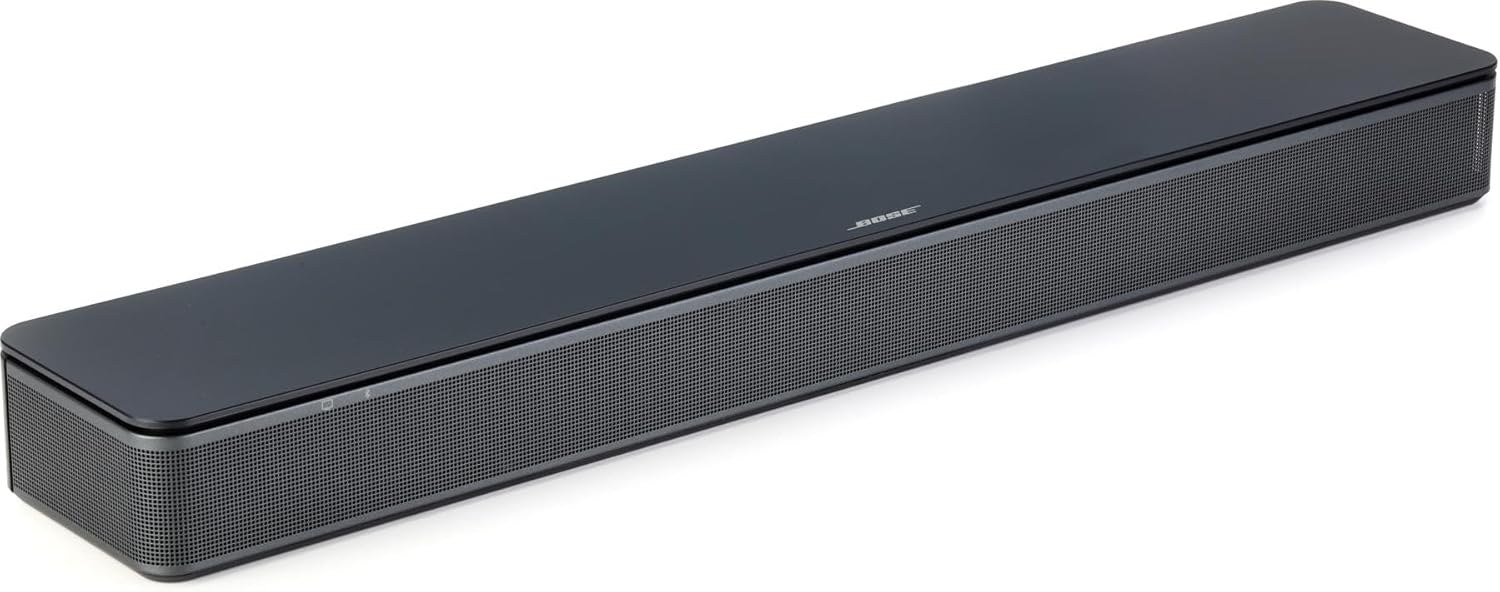
The Bose TV Speaker is a compact all-in-one soundbar built specifically to solve one of the most common frustrations with modern flat-screen TVs: poor audio quality and hard-to-understand dialogue. At just 2.21 inches tall and 23.38 inches wide, it is designed for everyday TV watchers, seniors, and anyone who wants a straightforward audio upgrade without the complexity of a full surround sound system.
The standout feature here is the Enhanced Dialogue Mode, which uses a dedicated center tweeter to sharpen vocal clarity and pronunciation. Combined with two angled full-range drivers and built-in Dolby decoding, the soundbar delivers surprisingly wide and natural-sounding audio for its compact size. Real-world performance is well-suited for news broadcasts, dramas, and talk shows where speech intelligibility is the priority.
Design-wise, Bose has kept things clean and minimal. The slim black enclosure is built from durable plastic and sits unobtrusively in front of a TV. Small LED indicators on the front provide subtle visual feedback for volume changes and feature activation. The included remote control is compact and straightforward, offering quick access to Dialogue Mode and a bass boost toggle.
There are a few honest limitations worth noting. The soundbar outputs 35 watts with no built-in subwoofer, so bass response is modest on its own. Users who enjoy action films or bass-heavy music will likely want to invest in the optional Bose Bass Module 500 or 700. Additionally, the HDMI cable is not included, and wall mounting brackets are sold separately, which can add to the overall cost.
Overall, the Bose TV Speaker earns its reputation as one of the best compact soundbars in its category. It excels at what it promises: clearer TV audio with minimal setup effort. It is a strong choice for anyone seeking a reliable, brand-trusted audio upgrade that is simple to use and easy to place in any living space.
Dimensions: 4.02 inches D x 23.38 inches W x 2.21 inches H. Weight: 8.2 pounds. The slim profile makes it easy to place on a TV stand or media console without obstructing the screen.
Audio: 35 watts maximum output power, stereo audio output mode, dynamic driver type with a 5.6 cm audio driver size and 1-inch tweeter diameter. Built-in Dolby decoding enhances audio realism.
Connectivity: HDMI-ARC with CEC support, optical audio input (cable included), AUX input (3.5mm), and Bluetooth with a 30-foot wireless range. Supports up to 3 paired Bluetooth devices simultaneously.
Compatibility: Works with all televisions. Expandable with Bose Bass Module 500 or 700 via Bose Bass Module Connection Cable or standard 3.5mm audio cable (both sold separately). Wall brackets also sold separately.
In the Box: Bose TV Speaker, remote control with pre-installed battery, optical cable, power cord (5 ft), and quick start guide. Model number: 838309-1100. Warranty: 1-year limited warranty from Bose.
If you are shopping for a soundbar primarily to improve TV dialogue clarity, the Bose TV Speaker is one of the most targeted solutions available. Its Dialogue Mode and center tweeter design make it especially well-suited for households where hearing speech on TV is the main concern, including older adults or those with mild hearing difficulties.
For buyers who want a simple plug-and-play experience, this soundbar delivers. Setup takes only minutes with the included optical cable, and HDMI-ARC connectivity means you can use your existing TV remote to control volume. There is no app required, no complex configuration, and no steep learning curve.
However, if you are a dedicated home theater enthusiast looking for booming bass and cinematic surround sound, this soundbar alone may not fully satisfy. Consider pairing it with the Bose Bass Module 500 or 700 for a more immersive experience. Budget-conscious buyers should also factor in the cost of an HDMI cable and optional wall brackets if needed.
Compared to generic budget soundbars, the Bose TV Speaker justifies its price through brand reliability, audio engineering quality, and the expandable ecosystem. It is a long-term investment for anyone who values clear, natural sound over raw volume or deep bass. It is best matched with small to medium-sized living rooms and TVs up to 55 inches.

Pros
- Extremely easy setup with most users reporting connection in under 5 minutes, including ARC TV remote compatibility
- 2-in-1 detachable form factor offers rare placement flexibility not found in most soundbars at this price
- Comprehensive connectivity with all required cables included in the box for ARC, Optical, and AUX hookups
- Auto Volume Boost feature effectively solves the common problem of fluctuating TV audio levels
- Strong value proposition with 80W output and multiple EQ modes at a sub-$50 price point
Cons
- Remote control does not include AAA batteries, which is an inconvenient omission that requires an extra purchase before first use
- ARC connection may require volume levels above 80% on some TV brands such as TCL Roku to achieve satisfactory loudness
- No wall-mount template is included in the box, making precise screw placement for wall installation more difficult
The Assistrust KY-8000 is a compact 80W soundbar designed for budget-conscious buyers who want a meaningful audio upgrade for their TV, PC, gaming setup, or projector. Priced well under $100, it targets everyday home theater users, renters, and students who need solid sound without a complex or expensive installation.
The standout feature here is the 2-in-1 detachable design, which allows the single 17-inch bar to split into two independent vertical tower speakers. This gives users a level of placement flexibility that is genuinely rare at this price tier. Combined with four high-performance dynamic drivers and 80W of output power, the soundbar produces noticeably fuller and more detailed audio than typical built-in TV speakers, with the Auto Volume Boost feature doing a commendable job of keeping dialogue audible without sudden loud spikes.
Build quality is respectable for the price, using a mix of recycled ABS plastic and metal components. The low-profile black finish looks clean and modern beneath most TVs, and at just under 3kg it is light enough to wall mount or reposition easily. The included remote provides straightforward control, and Bluetooth 5.0 ensures a stable wireless pairing experience across phones, tablets, and laptops.
There are a few genuine drawbacks worth noting. The remote ships without batteries, which is an unnecessary inconvenience. Some users on specific TV brands have reported that the ARC connection requires higher-than-expected volume levels to sound balanced. Additionally, no wall-mount template is provided, which complicates screw placement for those who want a clean wall installation.
Overall, the Assistrust KY-8000 is a compelling pick for anyone seeking an affordable, flexible, and easy-to-use soundbar upgrade. It punches above its weight in features and sound quality, and the comprehensive warranty and support package add meaningful peace of mind. Minor packaging omissions aside, this is one of the better budget soundbars available today.
Model: Assistrust KY-8000 | Speaker Output: 80W | Audio Channels: 2.0 Stereo | Drivers: 4 Dynamic Drivers | Frequency Response: up to 20 kHz
Connectivity: Bluetooth 5.0, HDMI ARC, Optical (Toslink), 3.5mm AUX | Power Source: AC Adapter (100V input) | Control: Included Remote Control
Dimensions: 17 inches (L) x 3.5 inches (W) x 2.5 inches (H) | Weight: 2.97 kg | Color: Black | Enclosure: 60% Recycled ABS, 25% Metal, 15% Other
Mounting Options: Tabletop, Horizontal, Vertical, Wall Mount | Compatible Devices: Smart TV, PC, Laptop, Smartphone, Tablet, Projector, Home Theater | EQ Modes: Movie, Music, News
In the Box: 1x Detachable Soundbar, 1x Power Adapter, ARC Cable, Optical Cable, 3.5mm AUX Cable, 1x Remote (batteries not included), 2x Bases | Warranty: 18-Month Limited plus 60-Day Replacement Policy
If you are shopping for a soundbar under $50, the most important factors to consider are connectivity options, ease of setup, and whether the form factor fits your space. The Assistrust KY-8000 excels in all three areas, making it a strong default choice for most casual buyers in this price range.
For TV users, the HDMI ARC connection is the most convenient option as it allows your existing TV remote to control the soundbar volume. Before purchasing, confirm that your TV has an ARC-labeled HDMI port. If not, the included Optical or AUX cables provide reliable wired alternatives. Bluetooth 5.0 is ideal for wireless use with phones or tablets, or for moving the speaker to a different room temporarily.
The 2-in-1 detachable feature is a genuine differentiator. If you have a wide TV setup or a gaming room where you want stereo separation, splitting the bar into two vertical towers can meaningfully improve the sense of audio width and immersion. This makes the KY-8000 a smarter buy than a similarly priced traditional single-bar unit.
Consider this soundbar if you need: an affordable first soundbar upgrade, a secondary room audio solution, a soundbar for a dorm or small apartment, or a gaming audio boost for a PC or console setup. It is less ideal for dedicated audiophiles or home theater enthusiasts who prioritize deep bass, as there is no subwoofer included or subwoofer output port.
Remember to pick up a pack of AAA batteries before your soundbar arrives, as they are not included with the remote. Also note that wall mounting will require you to measure and mark screw positions manually since no mounting template is provided in the box.
How to Choose Your HDMI Speaker
Understand Your HDMI Version
Not all HDMI ports are created equal. The standard you need depends on your audio goals. HDMI ARC (Audio Return Channel) is common and allows audio to travel from your TV to the speaker. For the highest quality, look for HDMI eARC (Enhanced ARC). This newer standard supports lossless, high-bitrate audio formats like Dolby Atmos, delivering cinema-grade sound. Confirm your TV’s output capability to ensure compatibility.
Evaluate Your Audio Format Support
If immersive, three-dimensional sound is your priority, prioritize speakers that decode advanced formats. Dolby Atmos and DTS:X create a soundscape with height and directionality, making effects like rain or helicopters feel like they’re happening around you. A basic stereo speaker cannot replicate this. For powerful low-end impact, consider systems with a dedicated subwoofer or a built-in subwoofer.
Consider Your Primary Use Case
Your main activity should guide your choice. A compact soundbar is ideal for simplifying TV audio and clarifying dialogue. For a desktop computer setup, powered bookshelf speakers with HDMI offer a significant upgrade for gaming and multimedia. For a dedicated home theater, a multi-channel system with a separate subwoofer provides the most immersive experience. Assess the size of your room; larger spaces may benefit from more powerful systems designed for large rooms.
Check for Additional Connectivity
While HDMI is your primary connection, extra ports add valuable flexibility. Optical audio is a reliable digital backup. An AUX input lets you connect older devices. Bluetooth capability, especially newer versions like 5.0 or higher, allows for convenient wireless streaming from your phone or tablet. Having multiple options ensures your speaker can handle all your audio sources. Discover more about wireless options in our guide to the best speakers with Bluetooth.
Final Thoughts
Upgrading to a dedicated speaker system with HDMI is a definitive step toward premium audio in your home. For users seeking a powerful, all-in-one cinematic experience with advanced Dolby Atmos support, the ULTIMEA 5.1CH Surround Sound Bar System with Dolby is a compelling choice. Alternatively, if your needs center on a versatile desktop hub that excels with both computers and TVs, the feature-rich Edifier M90 Computer Speakers offer exceptional value and connectivity. Whichever path you choose, you can find more specialized recommendations in our Home Audio Sound Bars section to complete your perfect setup.
Frequently Asked Questions
What is the difference between HDMI ARC and eARC?
HDMI ARC (Audio Return Channel) sends audio from your TV to your soundbar, eliminating a separate audio cable. HDMI eARC (Enhanced ARC) is a newer, improved standard. It supports much higher bandwidth, allowing for uncompressed and lossless audio formats like Dolby TrueHD and DTS-HD Master Audio. For the best possible sound quality, especially with Blu-ray players or high-end streaming, eARC is the preferred choice.
Can I use HDMI speakers with my gaming console?
Absolutely. Connecting a gaming console like a PlayStation or Xbox to speakers with HDMI is an excellent way to enhance your gaming audio. You typically connect the console to the TV via HDMI, and then use the TV’s HDMI ARC or eARC port to send the audio to the speaker system. This setup can provide more immersive surround sound, clearer directional cues, and more impactful effects, giving you a competitive and engaging edge.
Do I need a special HDMI cable for eARC?
To take full advantage of eARC capabilities, you should use a High-Speed HDMI cable. Most modern HDMI cables labeled “High Speed” or “Premium High Speed” will support eARC. You do not necessarily need the latest Ultra High Speed cable (designed for 8K) for eARC to function, but ensuring your cable is rated for high bandwidth is recommended for reliable performance in 2026.
Why is my HDMI soundbar not producing any sound?
First, ensure all cables are securely connected to the correct HDMI ports, typically labeled “ARC” or “eARC” on your TV. Next, access your TV’s audio settings menu and select the external speaker or audio system output, disabling the TV’s internal speakers. Also, verify that the soundbar itself is set to the correct input source. If issues persist, try a different HDMI cable or port, and consult the manuals for both your TV and soundbar for specific setup instructions.


Write Your Review
No reviews yet. Be the first to share your experience!