

You have your high-refresh-rate monitor and your mechanical keyboard. Your mouse glides on a perfect pad. Yet, something is missing from your ultimate PC gaming setup. Often, it is the audio. Built-in monitor speakers or a cheap desktop set simply cannot deliver the immersive, directional sound that modern games demand.
This guide is for gamers seeking to complete their battlestation with a dedicated soundbar. We have assessed several leading models to help you cut through the noise. You will find options that deliver powerful audio, sleek designs, and features tailored for your desktop, whether you are deep in an RPG or strategizing in a competitive match. For more audio solutions, explore our broader category of Home Audio Sound Bars.

Pros
- Exceptional sound quality for the price with crisp highs, clear mids, and punchy bass without muddiness
- Universal compatibility across multiple devices and connection types eliminates the need for separate speaker sets
- Compact footprint with premium design aesthetic looks great on any gaming or work desk without clutter
- Multiple EQ modes deliver noticeably different audio profiles optimized for gaming versus music listening
- Reliable brand reputation with consistent quality and long-term durability backed by limited warranty
Cons
- No integrated subwoofer, so bass-heavy content may feel limited compared to 2.1 speaker systems
- Requires external power source rather than USB power, adding one more cable to your desk setup
- Touch controls can be sensitive and lack physical buttons for those preferring tactile feedback
The Edifier G2000 is a premium 2-channel desktop speaker system designed for gamers, content creators, and PC users who demand quality audio without sacrificing desk space. These compact speakers pack impressive sound quality with 32W peak power output, making them suitable for everything from competitive gaming to music production to movie watching.
What sets the G2000 apart is its triple EQ tuning system with dedicated Game, Music, and Movie modes. Each mode is professionally calibrated by Edifier's acoustic team to deliver the best possible sound for that specific use case. Gamers get enhanced directional audio cues and dynamic range, music listeners enjoy balanced frequency response, and movie watchers benefit from enhanced dialogue clarity and immersive soundscapes. The 2.75-inch full-range drivers with backward mega bass ports deliver surprisingly deep bass for such a compact design.
Build quality is exceptional with a metal enclosure featuring laser engraving, elevated 10-degree design for better sound projection, and anti-slip foot pads to keep the speakers stable during intense gaming sessions. The RGB lighting system offers 12 customizable effects that sync beautifully with modern gaming setups. Connectivity options are comprehensive including Bluetooth, 3.5mm AUX, and USB inputs, ensuring compatibility with virtually any device from gaming PCs to smartphones to gaming consoles.
The main limitation is the lack of an integrated subwoofer, which means bass-heavy content may feel less impactful than larger 2.1 systems. However, Edifier thoughtfully included a subwoofer output port for users wanting to expand their setup. Additionally, these speakers require external AC power rather than USB power, so you'll need another outlet on your desk.
The Edifier G2000 represents excellent value for gamers and desktop users seeking quality audio with modern features. With strong customer satisfaction ratings and proven durability, these speakers deliver professional-grade sound quality at an accessible price point. Highly recommended for anyone upgrading their gaming or work setup.
Audio Specifications: 32W total peak power output, 16W RMS power per channel, 2.75-inch full-range woofers, 7cm audio drivers, stereo 2-channel system with subwoofer output port.
Connectivity: Bluetooth wireless, 3.5mm AUX input, USB input, compatible with PC, Mac, PS4, Xbox, laptops, TVs, CD players, and mobile phones.
Design & Build: Metal enclosure construction, 13.9cm speaker size, column-shaped cabinet with 10-degree elevation, matte panel finish with metal laser engraving, anti-slip foot pads, compact dimensions 4.1 inches D x 4.1 inches W x 5.1 inches H, weighs 1.91kg.
Controls & Features: Touch control interface, 12 RGB lighting effects, 3 EQ modes (Game, Music, Movie), power input 110 volts, limited warranty included.
Best For: Gamers seeking immersive audio with RGB lighting, PC and Mac users upgrading from basic speakers, content creators needing versatile multi-mode audio, anyone with limited desk space wanting premium sound quality.
Consider Alternatives If: You need an integrated subwoofer for deep bass music production, you prefer USB-powered speakers requiring no external power outlet, you want a remote control for convenience, you prioritize studio monitor accuracy over gaming-optimized sound.
Setup Tips: Position speakers at ear level for optimal sound imaging, use the appropriate EQ mode based on your current activity for best results, connect via Bluetooth for wireless convenience or USB for consistent audio quality, customize RGB effects to match your desk aesthetic.
Warranty & Support: Edifier provides limited warranty coverage on this product. Register your device on their website for extended support options. Customer service is responsive and helpful based on community feedback.

Pros
- Instant setup with no driver installation, USB-A and USB-C compatibility out of the box
- Excellent vocal clarity perfect for podcasts, audiobooks, and video calls
- Versatile mounting options with secure clip for monitors or flat desk placement
- Affordable price point with quality sound output that exceeds built-in monitor speakers
- Compact and lightweight design saves desk space while delivering immersive audio
Cons
- Limited bass response and mid-tone depth make it less ideal for music listening
- Downward angle adjustment is restricted, limiting speaker positioning flexibility
- 5W power output may require volume adjustment in very loud environments
The Inwa HKMZ106 is a compact USB-powered speaker designed for desktop and laptop users who need reliable audio without the hassle of complex installation. It caters to professionals, students, and content creators who spend significant time on video calls, watching videos, or listening to spoken content where clear dialogue matters most.
What sets this speaker apart is its genuine plug-and-play simplicity. With both USB-A and USB-C adapters included, it connects instantly to Windows PCs, Macs, iPads, and Android devices without requiring any driver downloads or configuration. The dual 5W drivers produce surprisingly balanced sound with excellent vocal clarity, making it particularly effective for podcasts, audiobooks, and virtual meetings where speech intelligibility is paramount.
The design prioritizes space efficiency with an ultra-narrow clip mount that secures firmly to monitor tops without obstructing the screen. It also sits flat on desks as a standalone option. The adjustable angle feature allows directional sound control, though downward angles have some limitations. At just 5 inches wide and 0.58 kg, it occupies minimal desk real estate while delivering audio that clearly outperforms built-in monitor speakers.
The main limitation is audio performance for music lovers. The speaker lacks deep bass and rich mid-tones, resulting in flatter musical reproduction. Users seeking a full-spectrum listening experience may find it underwhelming for genres requiring dynamic range. Additionally, the 5W output may need volume adjustment in particularly noisy environments.
Verdict: The Inwa HKMZ106 is an excellent value-for-money speaker for professionals and students prioritizing vocal clarity, easy setup, and space-saving design. If your primary use involves calls, videos, and spoken content rather than music, this speaker delivers reliable performance at an accessible price point.
Audio Performance: Dual 5W dynamic drivers, maximum output power 5 watts, high-sensitivity audio reproduction
Connectivity: USB-A and USB-C adapters included, compatible with Windows, macOS, ChromeOS, Linux, iOS, and Android
Physical Dimensions: 5 inches wide by 3 inches deep by 3 inches tall, weighing 0.58 kg
Mounting: Clip-on design with adjustable angle, compatible with monitor thicknesses, also functions as standalone desktop speaker
Controls: Push-button controls for power, volume, and mute on top panel
Package Contents: 1 computer speaker, USB-A to USB-C adapter, adhesive sticker, quick start guide, 1-year manufacturer warranty
Best For: Remote workers, students, content creators, and professionals who need clear audio for video calls, online meetings, podcasts, and video content. Ideal for anyone with a monitor lacking built-in speakers or seeking a compact audio upgrade.
Consider This Speaker If: You prioritize easy setup with zero configuration, need excellent dialogue and vocal clarity, want to save desk space with a clip-on design, and have a budget under $30. Perfect for minimalist desk setups.
Skip If: You're an audiophile seeking deep bass and rich musical tones, need high volume output for large rooms, or require extensive speaker angle adjustment. This speaker is optimized for speech and dialogue, not music production or entertainment.
Setup Tips: Ensure your computer's sound card drivers are current and the USB port functions properly. Check audio settings and volume mixer to confirm the speaker is selected as the playback device. Both USB-A and USB-C adapters are included, so compatibility is automatic.
Pros
- Superior sound quality compared to built-in laptop and monitor speakers, with noticeable bass enhancement
- Perfect fit under standard monitors with minimal desk footprint, ideal for space-conscious setups
- Seamless Bluetooth connectivity with 10-meter range and instant pairing reliability
- Attractive ambient lighting adds professional aesthetic to gaming and work environments
- Simple USB power delivery eliminates cable clutter with tidy nylon-braided Y-cable design
Cons
- No dedicated power button or sleep mode, speaker remains in standby with flashing lights when powered
- USB power dependency means speaker won't function without active USB port connection
- Not water-resistant, so placement near beverages or humid environments not recommended
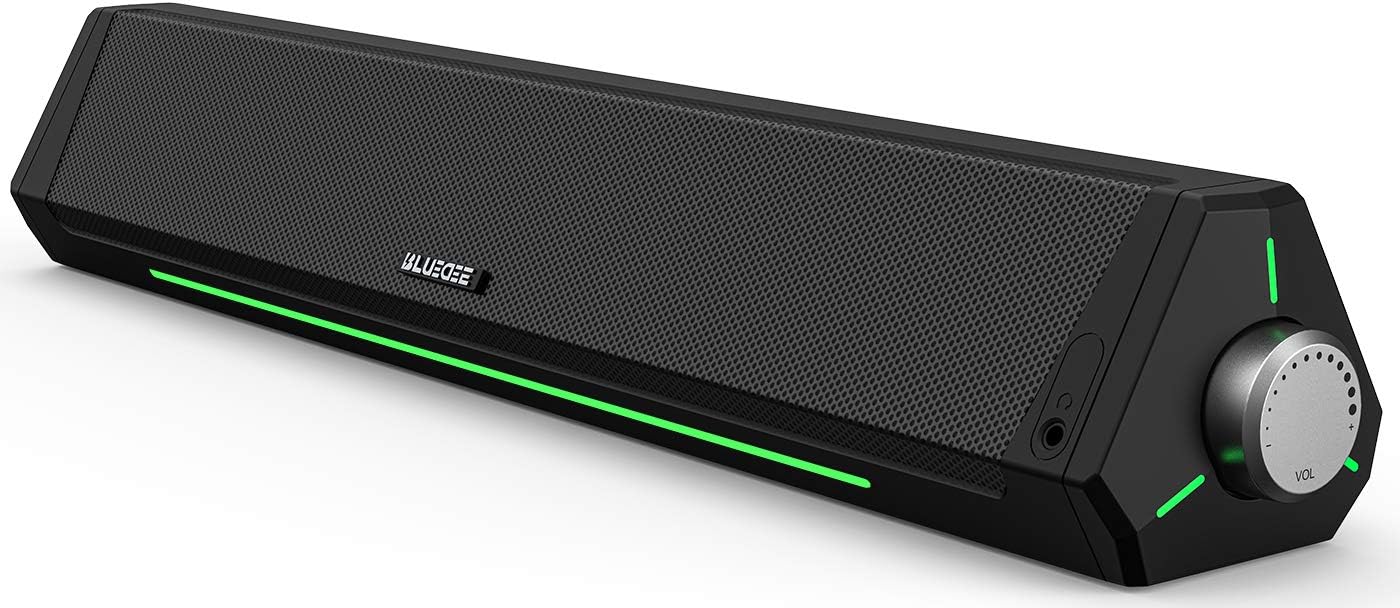
The Bluedee SK010 is a compact desktop soundbar engineered for professionals, gamers, remote workers, and anyone frustrated with inadequate built-in speaker performance. This 16.4-inch soundbar delivers a noticeable audio upgrade without monopolizing desk space, making it an ideal solution for modern workstations where real estate is premium.
The standout feature is its dual-driver, dual-diaphragm audio architecture that produces well-balanced sound across the frequency spectrum. Users consistently report impressive bass response and clear midrange clarity, particularly beneficial for video conferencing, gaming sessions, and multimedia consumption. The anti-magnetic technology effectively eliminates static interference, resulting in a noticeably crisper listening experience compared to standard computer speakers.
Design and build quality impress with the slim, futuristic profile that slides neatly beneath most monitors. The eco-friendly ABS plastic construction feels durable despite its lightweight 2-pound frame, and the ambient LED light strips add visual sophistication to your setup. The nylon-braided Y-cable consolidates power and audio into a single connection, maintaining workspace organization.
One notable limitation is the absence of a dedicated power button. When your PC remains powered, the speaker enters standby mode with flashing lights, which some users find distracting. Additionally, USB power dependency means you cannot use the speaker without an active USB port, limiting portability compared to battery-powered alternatives.
Overall, the Bluedee SK010 represents excellent value for desktop audio enhancement. Its combination of superior sound quality, compact design, dual connectivity, and eco-conscious construction makes it a compelling choice for anyone seeking professional-grade audio without premium pricing or space requirements.
Audio Performance: Stereo output with dual drivers and dual diaphragms, 10-meter Bluetooth 5.0 range, anti-magnetic technology for interference elimination.
Connectivity: Bluetooth 5.0 wireless and 3.5mm audio jack, USB-powered (compatible with laptops, PCs, power banks, and adapters), 1 built-in microphone for conferencing.
Physical Dimensions: 16.45 inches width x 2.67 inches depth x 2.67 inches height, weighs 2 pounds, tabletop mount design.
Materials and Sustainability: 85% eco-friendly ABS plastic, 5% metal components, eco-friendly cardboard packaging, nylon-braided Y-cable.
Warranty and Support: 18-month manufacturer warranty, lifetime after-sales technical support, includes setup video guide with QR codes.
Remote Workers and Video Conferencing: The built-in microphone and superior audio clarity significantly improve virtual meeting quality, making this ideal for professionals conducting frequent video calls.
Gaming Enthusiasts: Gamers appreciate the enhanced bass response and clear sound staging for immersive gameplay across PC, consoles, and streaming platforms.
Content Creators and Multimedia Users: Video editors, streamers, and content consumers benefit from the dual-driver audio quality and ambient lighting for extended work sessions.
Space-Conscious Users: Anyone with limited desk space who refuses to compromise on audio quality will appreciate the compact 16.4-inch footprint that fits beneath standard monitors.
Budget-Conscious Audiophiles: Those seeking professional-grade sound without premium pricing will find the Bluedee SK010 delivers impressive audio performance at an accessible price point.

Pros
- Exceptional audio clarity and dialogue intelligibility, ideal for movies, games, and video calls
- Surprisingly powerful bass response from a compact soundbar that belies its diminutive size
- Versatile RGB lighting can be customized or disabled entirely to match your aesthetic preferences
- Excellent value for the price with reliable Creative Labs brand backing and solid construction
- Minimal desk footprint with flexible mounting options under monitors or on shelves
Cons
- Not ideal for serious audiophiles or those seeking movie theater-quality surround sound experience
- Gaming performance is secondary to headphones for competitive multiplayer titles requiring spatial audio precision
- RGB lighting, while customizable, may distract some users despite toggle-off functionality
The Creative Sound Blaster GS3 is a compact desktop soundbar engineered for gamers, content creators, and office workers who refuse to sacrifice audio quality for desk space. This 24W powerhouse delivers clear, immersive sound in a refined black design that slides seamlessly under any monitor setup.
What truly sets the GS3 apart is its Superwide technology, which creates an expansive soundstage with pronounced bass that defies its compact 16-inch width. Reviewers consistently praise its dialogue clarity for movies and shows, making it ideal for watching films on ultrawide monitors without straining to hear conversations. The racetrack drivers and built-in port tube work together to produce balanced audio across gaming, music, and multimedia content.
Build quality is solid throughout, with intuitive controls and a refined aesthetic that complements modern gaming setups. Connectivity is genuinely flexible, offering USB-C, Bluetooth 5.4, standard AUX input, and a headphone-out port for direct headphone connection. Setup is remarkably simple, typically requiring just one cable from your computer for a clean desk environment.
The RGB lighting system features six presets including Chasers, Aurora, Peak Meter, Glowing, Wave, and Cycle modes. You can sync lighting with music or disable it entirely for a minimal aesthetic. However, this is not a replacement for dedicated gaming headphones if you play competitive multiplayer titles requiring precise spatial audio.
At its price point, the Sound Blaster GS3 offers exceptional value for desktop audio. It excels as a monitor soundbar for immersive single-player gaming, movie watching, and office work while maintaining the compact footprint modern setups demand. Highly recommended for anyone seeking powerful, clear desktop audio without the bulk.
Audio Performance
Peak Power: 24W
Driver Type: Full-range racetrack drivers with built-in port tube
Technology: Superwide soundstage enhancement
Connectivity
Wireless: Bluetooth 5.4
Wired: USB-C, 3.5mm AUX input
Output: 3.5mm headphone jack
Design
Dimensions: 3.64 x 16.14 x 2.9 inches
Weight: 2.33 pounds
Color: Black
RGB Lighting: 6 presets (Chasers, Aurora, Peak Meter, Glowing, Wave, Cycle)
Additional Info
Model: MF8465
Manufacturer: Creative Labs
Best Sellers Rank: #44 in Computer Speakers

Pros
- Exceptional value for money with audio quality comparable to premium brands like Bose
- Truly plug-and-play setup with single USB-C connection eliminates cable management headaches
- Crisp, clear audio with strong bass response enhances gaming and movie experiences
- Dual connectivity options via USB and Bluetooth provide maximum flexibility
- Sleek RGB lighting and compact design complement modern gaming setups perfectly
Cons
- No bass subwoofer included, so bass response relies entirely on built-in drivers and radiators
- Audio output can split between multiple devices, requiring manual toggling in some scenarios
- Limited to 10-meter Bluetooth range, so not ideal for larger rooms or distance streaming
The Razer Leviathan V2 X is a compact PC gaming soundbar engineered for desktop users and gamers who demand immersive audio without sacrificing workspace. It's purpose-built for streamlined setups where a single USB-C cable serves dual duty, powering the device and delivering crystal-clear audio to your monitor or gaming rig. This soundbar is perfect for anyone upgrading from tinny monitor speakers or downsizing from bulky multi-speaker systems.
Performance-wise, the Leviathan V2 X punches above its weight class. Its dual full-range drivers and passive radiators produce rich stereo sound with impressive clarity and bass response that rivals much pricier competitors. Gaming audio feels immersive with crisp details and dynamic range, while movies and music benefit from the 90dB output capability. Bluetooth 5.0 connectivity ensures lag-free audio when paired with mobile devices, and the seamless switching between PC and phone via the Razer Audio App adds genuine convenience to daily use.
Build quality reflects Razer's gaming heritage with a sleek black finish and a compact form factor that tucks neatly beneath most monitors. The 14-zone Chroma RGB lighting system syncs with your gaming peripherals through Razer Synapse, creating cohesive visual effects that enhance immersion without overwhelming your setup. The minimalist design prioritizes function over flash, keeping your desk clean and professional-looking.
The main limitation is the absence of a dedicated subwoofer, which means bass enthusiasts may find the low-frequency response somewhat constrained compared to larger 2.1 systems. Additionally, audio output occasionally splits between connected devices, requiring manual toggling through the app in certain scenarios. The 10-meter Bluetooth range is standard but worth noting if you plan to use it from across a larger room.
Verdict: The Razer Leviathan V2 X delivers exceptional audio quality and convenience for PC gamers and desktop users on a budget. Its single-cable setup, impressive sound stage, and RGB customization make it a worthy upgrade from monitor speakers. Recommended for anyone seeking a compact, clutter-free soundbar that doesn't compromise on performance.
Audio Output: Stereo, 90dB maximum volume
Drivers: 2x full-range drivers, 2x passive radiators
Connectivity: USB Type-C (wired), Bluetooth 5.0 (wireless)
Bluetooth Range: 10 meters
Frequency Response: 20 KHz
Audio Channels: 2.0 stereo
RGB Lighting: 14 customizable zones with Razer Chroma ecosystem support
Control: Razer Audio App and Razer Synapse software
Dimensions: Compact bar mount design fits beneath standard monitors
Power: USB Type-C single cable
Warranty: 1 year manufacturer limited warranty
Included: USB Type-C cable and product documentation
Who Should Buy: PC gamers with limited desk space, content creators needing monitor-mounted audio, and users upgrading from basic monitor speakers. Also ideal for anyone seeking a second soundbar for a secondary gaming or work setup.
Who Should Skip: Audiophiles requiring deep bass response should consider pairing this with a separate subwoofer or opt for larger 2.1 systems. Users with rooms larger than 10 meters who rely solely on Bluetooth connectivity may want to verify compatibility with their setup first.
Setup Considerations: Requires a USB-C port on your PC or motherboard. Older systems may need a USB-C adapter (sold separately). Optimal placement is directly beneath your monitor for balanced stereo imaging. Allow the device a full charge cycle before expecting maximum responsiveness from the power button.
Customization Tips: Download Razer Synapse to unlock full RGB lighting potential and sync with compatible gaming peripherals. Use the Razer Audio App to toggle between USB and Bluetooth inputs and customize audio profiles for different content types like gaming versus music streaming.
How to Choose Your PC Gaming Soundbar
Audio Quality and Power
Sound quality is paramount. Look for full-range drivers and passive radiators for a balanced soundscape with clear highs and present bass. Power output, measured in watts, indicates potential volume and headroom.
This ensures your soundbar can handle explosive game audio without distortion. A model with dedicated audio modes for gaming can further enhance spatial cues and dialogue clarity, giving you a competitive edge.
Connectivity and Compatibility
<!–Your soundbar should integrate seamlessly. USB connectivity is ideal for PCs, providing both power and audio through a single cable. Bluetooth offers wireless flexibility for streaming music from your phone.
A 3.5mm AUX input is a versatile fallback. Confirm the soundbar works with your operating system without requiring complex drivers. Simple plug-and-play setup gets you into the game faster.
Form Factor and Desk Space
<!–Desktop real estate is precious. A compact, low-profile soundbar should fit neatly under your monitor without blocking the screen. Some models feature a clip-on design that attaches directly to the monitor bezel.
This saves desk space and can help direct sound more accurately toward you. Consider the overall aesthetic, too, to ensure it complements your existing setup. For other space-conscious audio ideas, see our picks for the best high-end home audio speakers.
Extra Features and Ambiance
<!–Many gaming soundbars include RGB lighting that syncs with your gameplay or other peripherals. This adds a layer of immersion and personalization. Look for easy-access controls for volume and mute on the unit itself.
Some higher-end models offer companion software for deeper audio customization and lighting effects. These features enhance the experience but should not come at the cost of core audio performance. You can find more feature-rich options in our guide to the best gaming soundbars under 300.
Final Thoughts
Upgrading your PC audio with a dedicated soundbar is a transformative step for any gamer. After reviewing the top contenders, we find that the Edifier G2000 32W PC Gaming Computer Speakers deliver exceptional power and versatility for a premium desktop audio experience. For gamers prioritizing a supremely clean, minimalist setup with robust software control, the Razer Leviathan V2 X, PC Soundbar with Full-Range is an outstanding choice that blends seamlessly into any battlestation. Whichever you choose, you are investing in a more immersive and engaging gaming world. For further exploration of audio gear, visit our Speakers – Home Audio section.
Frequently Asked Questions
Is a soundbar better than traditional PC speakers for gaming?
For most desktop setups, a soundbar offers distinct advantages. Its single, compact unit saves considerable desk space compared to a two-speaker set. A well-designed soundbar can produce a convincing wide soundstage from a single position under your monitor, ideal for hearing directional cues in games.
Do I need a separate subwoofer with a PC gaming soundbar?
Not necessarily. Many modern PC soundbars, like those we have reviewed, incorporate passive radiators and tuned ports to deliver satisfying bass on their own. They are engineered to provide a full audio experience without the footprint of a separate subwoofer, which is perfect for desktop use.
Can I use a PC soundbar with my PlayStation or Xbox?
Yes, if the soundbar has the right connections. Most models with a 3.5mm AUX input or Bluetooth can connect directly to a controller or console. However, for the best audio experience from consoles in 2026, look for a soundbar with optical input or HDMI ARC, which are more common on home theater soundbars than compact PC models.
How do I get the best sound from my new gaming soundbar?
Start by ensuring it is positioned centrally under your monitor, directed toward your seating position. Use the highest-quality connection available, typically USB or a digital input, over a basic AUX cable if possible. Finally, explore any companion software or built-in EQ modes to switch to a dedicated gaming or movie profile for optimized sound.




Write Your Review
No reviews yet. Be the first to share your experience!