

You are deep into a campaign, the tension is high, and your success hinges on hearing that faint enemy reload or the precise direction of an incoming threat. If your TV’s built-in speakers leave those critical audio cues muffled or flat, you are playing at a disadvantage. The right audio gear pulls you directly into the game world, making every moment more intense and responsive.
This guide is for gamers ready to elevate their setup without complexity. We have reviewed five standout soundbars that deliver the immersive, cinematic sound essential for modern gaming, all designed for straightforward integration into your entertainment space. For a broader look at premium options, explore our guide to the best high-end soundbars.
Pros
- Exceptional speech and dialogue clarity thanks to a dedicated center tweeter and Dialogue Mode
- Effortless setup with a single cable connection and included optical cable
- Versatile connectivity with HDMI-ARC, optical, AUX, and Bluetooth inputs
- Sleek, low-profile design blends seamlessly with any TV setup
- Expandable with optional Bose subwoofers for a fuller home theater experience
Cons
- HDMI cable is sold separately, which may add unexpected cost for users who prefer that connection method
- At 35 watts with no built-in subwoofer, bass performance may feel limited for action movies or music lovers without an upgrade
- Wall mounting brackets are sold separately, adding cost for those who want a cleaner installation
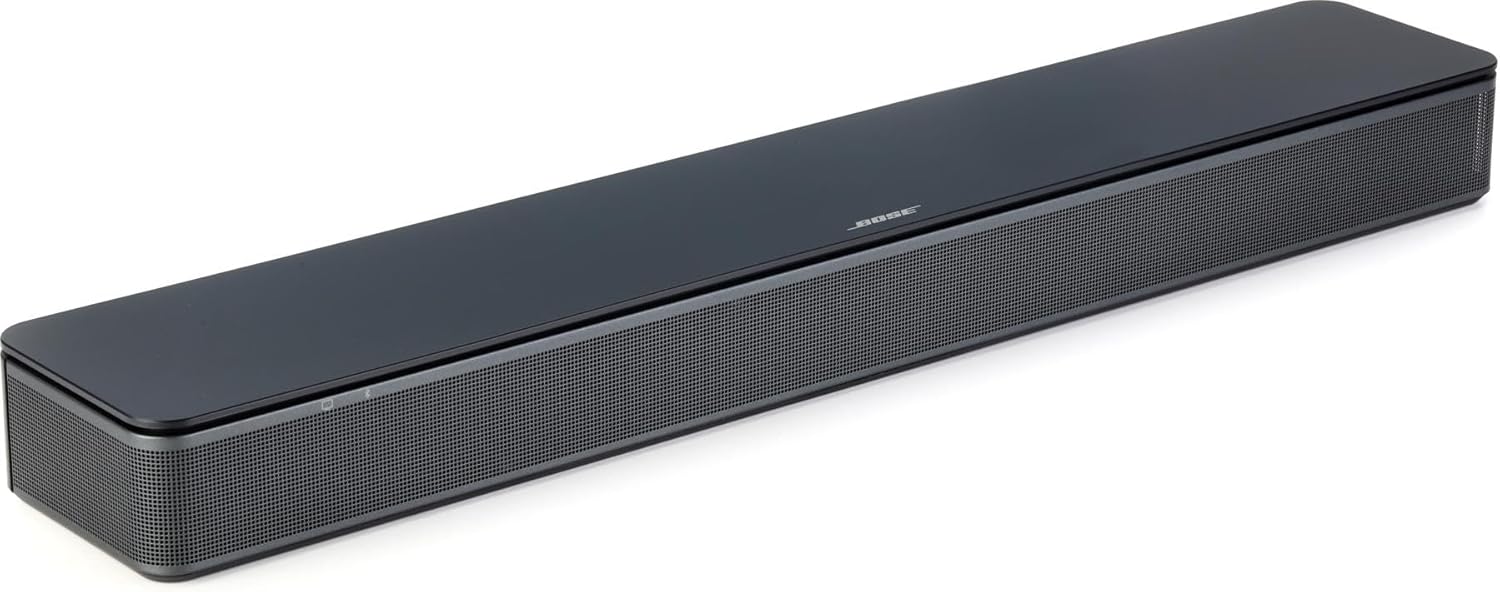
The Bose TV Speaker is a compact all-in-one soundbar built specifically to solve one of the most common frustrations with modern flat-screen TVs: poor audio quality and hard-to-understand dialogue. At just 2.21 inches tall and 23.38 inches wide, it is designed for everyday TV watchers, seniors, and anyone who wants a straightforward audio upgrade without the complexity of a full surround sound system.
The standout feature here is the Enhanced Dialogue Mode, which uses a dedicated center tweeter to sharpen vocal clarity and pronunciation. Combined with two angled full-range drivers and built-in Dolby decoding, the soundbar delivers surprisingly wide and natural-sounding audio for its compact size. Real-world performance is well-suited for news broadcasts, dramas, and talk shows where speech intelligibility is the priority.
Design-wise, Bose has kept things clean and minimal. The slim black enclosure is built from durable plastic and sits unobtrusively in front of a TV. Small LED indicators on the front provide subtle visual feedback for volume changes and feature activation. The included remote control is compact and straightforward, offering quick access to Dialogue Mode and a bass boost toggle.
There are a few honest limitations worth noting. The soundbar outputs 35 watts with no built-in subwoofer, so bass response is modest on its own. Users who enjoy action films or bass-heavy music will likely want to invest in the optional Bose Bass Module 500 or 700. Additionally, the HDMI cable is not included, and wall mounting brackets are sold separately, which can add to the overall cost.
Overall, the Bose TV Speaker earns its reputation as one of the best compact soundbars in its category. It excels at what it promises: clearer TV audio with minimal setup effort. It is a strong choice for anyone seeking a reliable, brand-trusted audio upgrade that is simple to use and easy to place in any living space.
Dimensions: 4.02 inches D x 23.38 inches W x 2.21 inches H. Weight: 8.2 pounds. The slim profile makes it easy to place on a TV stand or media console without obstructing the screen.
Audio: 35 watts maximum output power, stereo audio output mode, dynamic driver type with a 5.6 cm audio driver size and 1-inch tweeter diameter. Built-in Dolby decoding enhances audio realism.
Connectivity: HDMI-ARC with CEC support, optical audio input (cable included), AUX input (3.5mm), and Bluetooth with a 30-foot wireless range. Supports up to 3 paired Bluetooth devices simultaneously.
Compatibility: Works with all televisions. Expandable with Bose Bass Module 500 or 700 via Bose Bass Module Connection Cable or standard 3.5mm audio cable (both sold separately). Wall brackets also sold separately.
In the Box: Bose TV Speaker, remote control with pre-installed battery, optical cable, power cord (5 ft), and quick start guide. Model number: 838309-1100. Warranty: 1-year limited warranty from Bose.
If you are shopping for a soundbar primarily to improve TV dialogue clarity, the Bose TV Speaker is one of the most targeted solutions available. Its Dialogue Mode and center tweeter design make it especially well-suited for households where hearing speech on TV is the main concern, including older adults or those with mild hearing difficulties.
For buyers who want a simple plug-and-play experience, this soundbar delivers. Setup takes only minutes with the included optical cable, and HDMI-ARC connectivity means you can use your existing TV remote to control volume. There is no app required, no complex configuration, and no steep learning curve.
However, if you are a dedicated home theater enthusiast looking for booming bass and cinematic surround sound, this soundbar alone may not fully satisfy. Consider pairing it with the Bose Bass Module 500 or 700 for a more immersive experience. Budget-conscious buyers should also factor in the cost of an HDMI cable and optional wall brackets if needed.
Compared to generic budget soundbars, the Bose TV Speaker justifies its price through brand reliability, audio engineering quality, and the expandable ecosystem. It is a long-term investment for anyone who values clear, natural sound over raw volume or deep bass. It is best matched with small to medium-sized living rooms and TVs up to 55 inches.
What to Look for in a Gaming Soundbar
Audio Format and Immersion
For gaming, spatial awareness is everything. Look for soundbars that support advanced audio formats like Dolby Atmos or DTS:X. These technologies create a three-dimensional soundscape, allowing you to pinpoint sounds above, behind, and around you.
This immersion translates directly to gameplay advantage. You will hear exactly where that sniper shot originated or which corridor an enemy is approaching from, all without needing a complex multi-speaker setup.
Channel Configuration and Bass
The channel configuration dictates the soundbar’s capability. A 2.1 system with a wireless subwoofer is a great starting point, offering clear stereo separation and impactful bass for explosions. For a more enveloping experience, consider a 3.1 system with a dedicated center channel for crisp dialogue.
Some models, like the higher-end gaming soundbars, even include separate surround speakers. A dedicated subwoofer is non-negotiable for feeling the rumble of engines and the thud of in-game impacts, adding a physical layer to the audio experience.
Connectivity and Low Latency
<!–Seamless connectivity ensures your setup works without a hitch. HDMI eARC is the gold standard, transmitting high-quality audio from your TV with a single cable. Optical audio is a reliable fallback. Bluetooth is essential for quickly streaming music from your phone between gaming sessions.
For wireless gaming audio, low-latency Bluetooth codecs are crucial. They prevent a distracting delay between the action on screen and the sound in your ears, keeping audio perfectly synchronized with your gameplay.
Size and Room Integration
<!–Consider where the soundbar will live. A compact bar fits neatly under most monitors or in front of a wall-mounted TV without blocking the screen. If you have a larger entertainment center, you have more flexibility with longer models.
Also, assess your room size. A powerful system with a large subwoofer might overwhelm a smaller space, while a modest bar could get lost in a large room. Many modern soundbars feature auto-calibration technology to optimize their sound for your specific room’s acoustics. For tips on audio in compact living spaces, see our recommendations for the best speakers for apartments.
Final Thoughts
Upgrading your gaming audio is one of the most impactful changes you can make to your setup. After reviewing the options, two models stand out for different priorities. For gamers seeking a true cinematic surround experience right out of the box, the ULTIMEA 7.1ch Sound Bar with Dolby Atmos delivers with its included satellite speakers. If your focus is on pristine, balanced sound with legendary clarity for both games and movies, the compact Bose TV Speaker – Soundbar for TV with Bluetooth is an excellent choice. Whichever you choose, you are investing in a richer, more responsive gaming world. Discover more options in our full home audio sound bars category.
Frequently Asked Questions
Do I really need a soundbar for gaming, or are headphones enough?
Headphones offer excellent directional audio and privacy, but a soundbar provides a shared, room-filling experience that is more immersive for single-player adventures and ideal for local multiplayer. It also serves as your primary audio system for movies and music, making it a versatile upgrade for your entire entertainment center.
What is the difference between Dolby Atmos and standard surround sound?
Standard surround sound, like 5.1 or 7.1, channels audio to speakers around you on a horizontal plane. Dolby Atmos adds height channels, creating sound that moves in a three-dimensional sphere. This means you can hear rain falling from above or a helicopter circling overhead, adding a profound layer of realism especially noticeable in open-world games.
Can I use any soundbar with my gaming PC?
Yes, most modern soundbars connect easily to a PC. The simplest method is via HDMI from your graphics card, or you can use an optical connection from your motherboard if available. Many also support Bluetooth for a wireless connection, though for gaming, a wired HDMI connection is recommended to ensure the lowest possible audio latency.
How do I reduce audio lag between my game and the soundbar?
Audio lag, or latency, is often caused by TV processing. To minimize it, connect your soundbar directly to your console or PC using HDMI when possible, and set your TV to ‘Game Mode’ in its picture settings. This mode typically disables post-processing that can delay both video and audio signals, ensuring synchronization in 2026’s fast-paced titles.









Write Your Review
No reviews yet. Be the first to share your experience!