

Struggling with muffled audio on video calls or lackluster sound quality in your gaming streams? The built-in microphone on your laptop or webcam often falls short, picking up every keyboard clack and fan whir. A dedicated USB microphone can transform your audio, but a standard desk stand limits your positioning options. That’s where the unique flexibility of a gooseneck USB microphone comes in, allowing you to position the capsule exactly where your voice sounds its best.
This guide is for anyone who needs clear, reliable audio for remote work, online classes, content creation, or casual gaming. We have reviewed four popular gooseneck USB microphones, assessing their sound quality, build, and unique features to help you make an informed choice. For those seeking the ultimate in setup simplicity, you might also explore our guide on the best plug and play USB microphones.
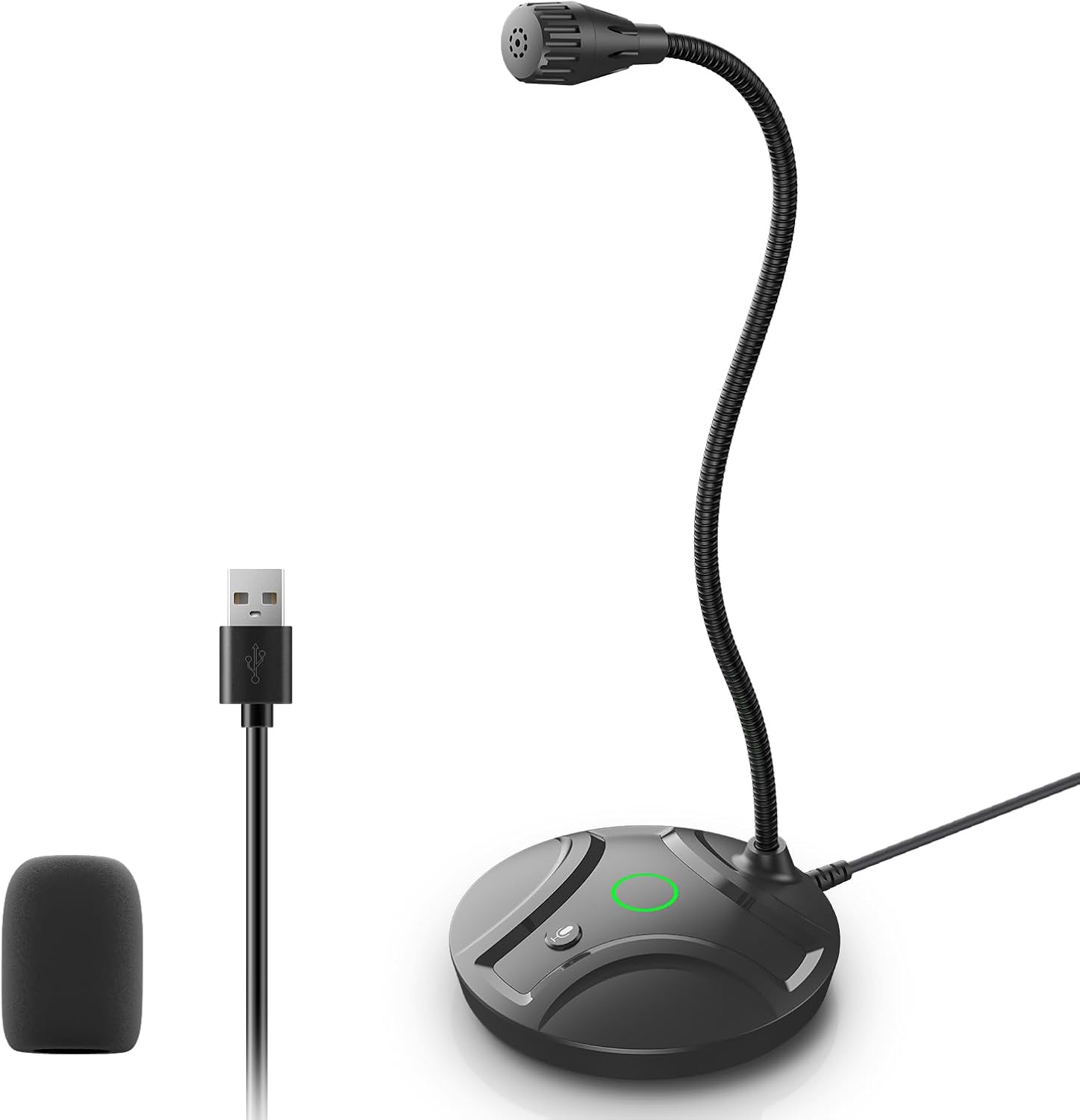
Pros
- No drivers or software required, works immediately when plugged into any USB port
- Crystal-clear omnidirectional sound capture within optimal 6-12 inch range
- Intuitive mute button with visual LED feedback prevents accidental audio mishaps
- Durable metal gooseneck and non-slip silicone base withstand desktop vibrations
- Lightweight and compact design makes it ideal for multiple workstations or portability
Cons
- Limited one-month warranty coverage compared to some competing microphones
- Omnidirectional pickup may pick up background noise in non-controlled environments
- Not suitable as a speaker, only functions as a microphone input device
The CMOCIIY USB Desktop Microphone is a straightforward, no-nonsense solution for anyone needing reliable audio input on their computer. Whether you're a gamer, content creator, remote worker, or podcaster, this microphone delivers professional-quality sound without requiring complex setup or specialized knowledge. Simply plug it into your USB port and start recording or streaming within seconds.
The standout feature is its omnidirectional pickup pattern, which captures clear, natural-sounding audio from a 6-12 inch range with impressive clarity. The included windproof pop filter effectively reduces wind and breath noise, while the 93 dB signal-to-noise ratio ensures your voice comes through clean and crisp. Real-world testing shows this microphone performs admirably for video conferencing, YouTube uploads, and gaming streams without requiring additional software or sound card investments.
Build quality is solid for the price point. The flexible metal gooseneck allows precise angle adjustment, while the ABS plastic base with non-slip silicone pads stays firmly in place even during passionate live broadcasts. The compact 190-gram design means you can easily transport this microphone between your home office, workplace, or conference room without adding bulk to your bag.
The mute button with LED indicator is genuinely useful, offering instant control over audio transmission and visual confirmation of your microphone status. Green indicates active recording, red shows mute mode, preventing embarrassing audio incidents during important calls or recordings. This simple but effective feature adds significant peace of mind during professional interactions.
The main limitation is the short one-month warranty, which is minimal compared to competitors. Additionally, the omnidirectional design may pick up ambient noise if you're not working in a relatively quiet space. Overall, this is an exceptional value microphone that delivers reliable performance for casual to intermediate users who prioritize simplicity and affordability.
Audio Performance: Omnidirectional polar pattern, 20Hz-20kHz frequency response, 38 dB audio sensitivity, 93 dB signal-to-noise ratio, 45 dB audible noise level.
Connectivity: USB corded connection with 1.8 meters (6 feet) cable, compatible with Windows and Mac computers, laptops, tablets, and personal computers.
Physical Design: Flexible metal gooseneck, ABS plastic shockproof base, non-slip silicone pads, compact form factor weighing 190 grams.
Controls and Indicators: Touch-sensitive mute button, dual-state LED indicator (green for active, red for mute mode).
Included Accessories: Pop filter, USB cable, product manuals, and microphone unit.
Warranty: One month manufacturer coverage.
Ideal Users: This microphone is perfect for gamers streaming on Twitch or YouTube, remote workers attending frequent video calls, podcasters recording at home, content creators on a budget, and anyone needing reliable audio input without technical complexity.
Best Use Cases: Video conferencing, gaming streams, podcast recording, YouTube video production, business negotiations, remote training sessions, court reporting, and general desktop audio capture.
Not Recommended For: Professional studio environments requiring XLR connectivity, users needing extended warranty coverage, or those working in extremely noisy environments where omnidirectional pickup becomes problematic.
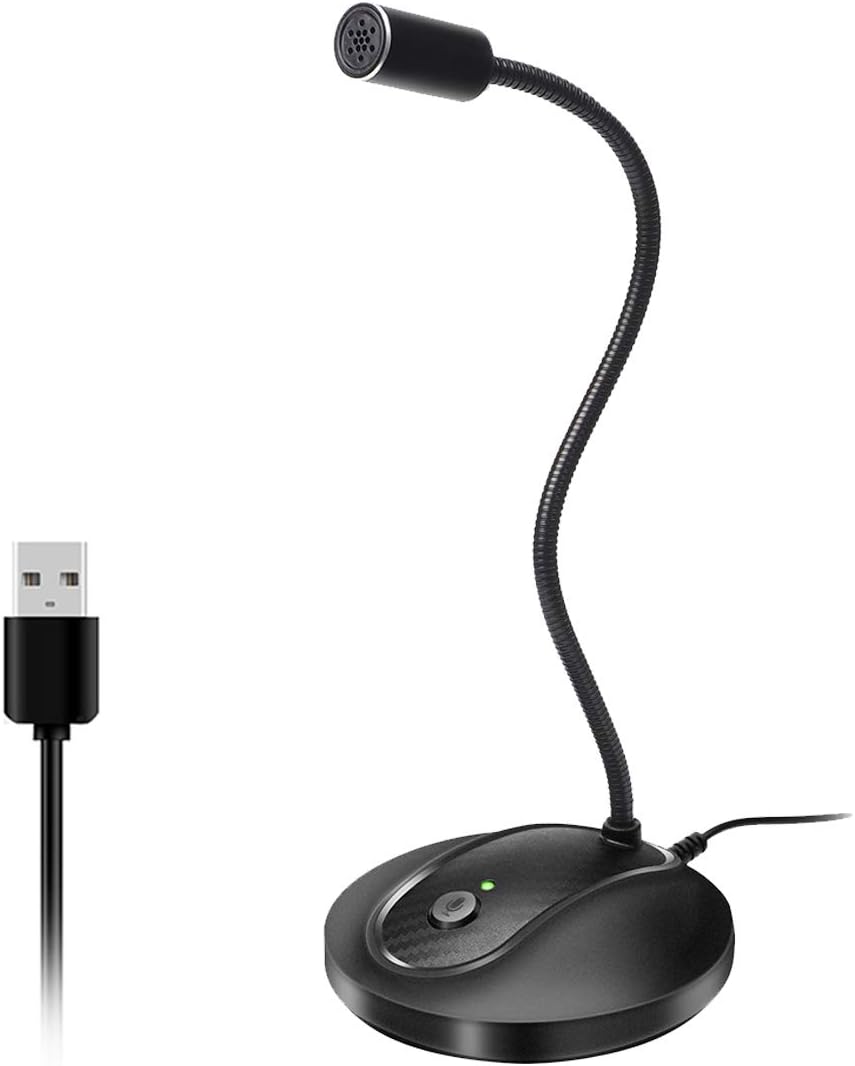
Pros
- Superior audio quality compared to laptop microphones and Bluetooth alternatives, verified by peer feedback
- Flexible gooseneck design eliminates workspace clutter and allows perfect mic positioning for any setup
- Truly plug-and-play with zero configuration, making it accessible for non-technical users
- Thoughtful mute button and LED indicator provide quick visual feedback and privacy control
- Solid metal and ABS construction feels premium and withstands daily use
Cons
- Not compatible with Xbox, Raspberry Pi, or Android devices, limiting versatility beyond PC and Mac
- Some users report occasional connection stability issues, though audio quality remains good when connected
- May require 10-15 minutes to fully understand setup despite plug-and-play simplicity
The JOUNIVO JV-601 is a compact USB microphone designed for professionals and casual users who need reliable audio capture without complexity. Whether you are taking Zoom calls, recording voice-to-text, gaming online, or conducting video conferences, this gooseneck microphone delivers the audio clarity users expect from higher-priced competitors.
The standout feature is the 360-degree adjustable gooseneck that lets you position the microphone exactly where you need it. Combined with the omnidirectional condenser mic and built-in noise-canceling technology, the JV-601 captures your voice with impressive clarity while filtering out background noise, keyboard clicks, and room hum. The one-click mute button with LED indicator adds a professional touch, letting you instantly control when the mic is active and providing visual confirmation of its status.
Build quality exceeds expectations at this price. The microphone uses premium metal piping paired with a heavy-duty ABS stand, creating a solid, professional appearance that looks good on any desk. The 1.8 to 6-foot USB cable provides flexibility in setup, and the compact 9-inch height keeps your workspace uncluttered while remaining fully visible and accessible.
The main limitation is compatibility, as the JV-601 only works with Windows and macOS computers, not mobile devices, gaming consoles, or Linux systems. Some users have reported occasional connection issues, though these appear to be rare and audio quality remains good when the connection is stable. Setup is truly plug-and-play, though first-time users may need 10-15 minutes to familiarize themselves with the controls.
The JOUNIVO JV-601 represents exceptional value for anyone seeking professional-grade audio on a budget. Real users consistently report that peers notice the dramatic improvement in call quality compared to built-in laptop mics. For video conferencing, content creation, or voice dictation on Windows or macOS, this microphone is a smart investment.
Connectivity and Compatibility: USB plug-and-play connection with 1.8 to 6-foot cable. Compatible with Windows 7, 8, 10, and 11, plus macOS. Not compatible with Xbox, Raspberry Pi, or Android devices.
Audio Performance: Omnidirectional condenser microphone with 76dB signal-to-noise ratio. Frequency range spans 20Hz to 20kHz for full-spectrum audio capture. Advanced noise-canceling technology reduces background noise and echo.
Design and Controls: 360-degree adjustable gooseneck design with metal pipe construction and heavy-duty ABS stand. One-click mute button with built-in LED indicator showing active/muted status. Compact dimensions of 3 x 3 x 9 inches.
Physical Specifications: Weight 7.06 ounces. Single-channel audio input. Enclosure material combines acrylonitrile butadiene styrene and metal for durability. Includes microphone and USB cable, no additional equipment required.

Pros
- Instant setup with no software installation or driver downloads required
- Crystal-clear omnidirectional sound quality significantly improves upon built-in laptop microphones
- Flexible gooseneck positioning allows optimal mic placement for any desk setup
- Extremely portable and lightweight at just 43 grams
- Affordable price point for professional-grade audio quality
Cons
- Frequency response limited to 60-12KHz, which may not capture full audio spectrum for music production
- Gooseneck requires careful positioning as it can be too soft if not properly adjusted
- USB hub or extension cable needed for desktop computers, not included in package
The CGChanGeek Mini USB Microphone is a compact, budget-friendly solution designed for remote workers, online students, and content creators who need clear audio without complicated setup. This gooseneck condenser mic connects directly to any laptop or desktop via USB and works immediately with zero driver installation required, making it ideal for anyone who values simplicity and reliability.
Audio performance is the standout feature here. The omnidirectional polar pattern captures crystal-clear sound equally from all directions, which translates to professional-quality audio during Zoom calls, webinar recordings, and online classes. The built-in USB sound card ensures compatibility with both Windows and Mac systems, and the microphone works flawlessly with popular conferencing platforms including Skype, Slack, and Google Hangouts. Users will notice an immediate improvement over their laptop's built-in microphone.
Design and portability shine with this model. The improved 2021 version features a more rigid gooseneck that holds its position securely while remaining flexible enough to adjust to your preferred angle. At just 43 grams, it's lightweight enough to slip into a computer bag, making it perfect for remote workers who travel between locations. The compact footprint keeps desks organized without requiring additional cables or base stands.
A few limitations worth noting: the frequency response tops out at 12KHz, which may not satisfy users recording music or requiring full audio spectrum capture. Desktop computer users will need to purchase a USB hub or extension cable separately. Additionally, while the gooseneck is improved, some users report it requires careful positioning to maintain its shape throughout the day.
Overall, the CGChanGeek Mini USB Microphone delivers exceptional value for remote professionals and students. Its combination of plug-and-play convenience, clear audio quality, and portable design makes it a smart upgrade from built-in microphones at an affordable price point.
Connectivity: USB direct connection with built-in sound card
Compatibility: Windows PC and Mac (MacOS) systems
Microphone Type: Omnidirectional condenser microphone
Form Factor: Gooseneck design with 360-degree adjustability
Frequency Range: 60-12KHz
Audio Sensitivity: 28 dB
Signal-to-Noise Ratio: 28 dB
Weight: 43 grams
Dimensions: 8.5 x 1 x 1 inches
Materials: Aluminum and engineering resin construction
Features: Mute function, voice-activated recording
Warranty: 12-month manufacturer warranty
Model: CGS-M1
Remote Workers: If you're spending hours on video calls and need professional audio without a complex setup, this microphone eliminates the frustration of being asked to repeat yourself. The omnidirectional design captures your voice clearly from any angle at your desk.
Online Students: For virtual classes and online learning platforms, this mic ensures instructors and classmates hear you clearly during participation and presentations. The compact design fits perfectly in a student's mobile workspace.
Content Creators: Podcasters, vloggers, and tutorial creators will appreciate the crystal-clear audio quality and flexible positioning. The gooseneck allows you to position the mic at the optimal distance and angle for consistent sound.
Budget-Conscious Professionals: You don't need to spend $100+ on a microphone for quality conferencing audio. This affordable option delivers professional results for a fraction of the cost of premium alternatives.

Pros
- Exceptional audio quality at an affordable price point, delivering professional-grade 192kHz/24-bit recordings
- Effective noise cancellation technology ensures clear vocals even in moderately noisy home or office environments
- Versatile connectivity with USB-C compatibility across multiple devices including PCs, Macs, phones, and tablets
- Thoughtful design features like the flexible gooseneck, headphone jack, and intuitive gain controls enhance usability
- Includes both USB-C to USB-C and USB-A cables for maximum compatibility with existing equipment
Cons
- 3.8/5 star rating suggests some users experienced quality control or durability issues that may warrant caution
- Omnidirectional polar pattern may pick up unwanted background sounds compared to cardioid alternatives
- Limited frequency response at 20 kHz may not capture the full audio spectrum that some professional applications require
The BOYA CM40 is a USB-C condenser microphone built for content creators, podcasters, remote workers, and online educators who demand professional audio quality without premium pricing. This gooseneck microphone bridges the gap between budget-friendly and studio-grade equipment, making it an excellent choice for anyone streaming, recording voiceovers, or conducting video conferences from home or small office spaces.
What truly sets the CM40 apart is its combination of high-resolution audio capture and intelligent noise cancellation. The 192kHz/24-bit recording capability rivals microphones costing twice as much, while the built-in ENC algorithm suppresses background noise by up to 35dB, ensuring your voice remains intelligible even in less-than-ideal acoustic environments. The sensitive 9.7mm condenser capsule captures fine vocal detail and handles loud inputs up to 130dB SPL without distortion, giving you flexibility for dynamic content.
The physical design reflects thoughtful engineering for real-world use. The flexible 360-degree gooseneck allows precise positioning without wobbling thanks to the anti-slip silicone base, while the stepless rotary gain knob and one-touch mute button put essential controls at your fingertips. The dedicated 3.5mm headphone jack enables zero-latency monitoring, crucial for live streaming and recording sessions where you need immediate audio feedback.
On the downside, the 3.8-star rating hints at potential quality consistency concerns some users have encountered. The omnidirectional pickup pattern, while versatile, may capture more ambient noise than cardioid alternatives in untreated rooms. Additionally, the 20 kHz frequency response ceiling means it may not capture ultra-high frequencies that certain professional applications demand.
The BOYA CM40 delivers impressive value for podcasters, streamers, and remote professionals seeking studio-quality audio at an accessible price. Its plug-and-play USB-C connectivity, effective noise cancellation, and intuitive controls make it immediately productive, though potential buyers should verify current build quality through recent customer feedback before purchasing.
Audio Performance: 192kHz/24-bit resolution, 75dB signal-to-noise ratio, 20 kHz frequency response, 130dB SPL maximum input
Connectivity: USB Type-C with included USB-C to USB-C and USB-C to USB-A cables, 3.5mm headphone jack for monitoring
Design: 9.7mm omnidirectional condenser capsule, 360-degree flexible gooseneck, anti-slip silicone base, stepless 0-30dB gain control, one-touch mute button
Compatibility: Windows PC, macOS, USB-C phones and tablets
Physical Specs: 4.02 x 4.02 x 11.42 inches, black ABS enclosure, single channel mono audio
Warranty: 2-year manufacturer warranty included
Content Creation: Ideal for podcasters and YouTube creators who need broadcast-quality audio without expensive studio equipment. The noise cancellation keeps background distractions minimal during long recording sessions.
Remote Work: Perfect for professionals conducting video calls, online meetings, and virtual presentations. The clear audio capture and noise suppression ensure colleagues hear you clearly regardless of your home environment.
Online Education: Teachers and instructors benefit from the microphone's ability to project clear, natural voice for virtual classrooms. The flexible positioning accommodates various desk setups and teaching styles.
Live Streaming: The real-time headphone monitoring and professional audio quality make this microphone suitable for gaming streams, music performances, and interactive broadcasts where immediate feedback matters.
Audiobook Recording: Voice actors and narrators appreciate the detailed vocal capture and distortion-free handling of dynamic speech patterns, delivering professional-sounding audiobooks and narrations.
How to Choose Your Gooseneck USB Microphone
Sound Quality and Pickup Pattern
Most gooseneck mics in this category use an omnidirectional polar pattern. This captures sound equally from all directions, which is ideal if you move around while speaking or have multiple people around a single mic.
Consider models with built-in noise-canceling technology or wind screens if your environment is noisy. For studio-grade audio resolution, look for microphones that support higher sampling rates, a feature detailed in our review of the best USB microphones with 192kHz sampling.
Build and Flexibility
The gooseneck itself is the core feature. A high-quality metal tube should hold its position firmly once shaped, without sagging over time. The base should be heavy or have a non-slip pad to prevent the microphone from tipping or sliding during use.
Evaluate the overall construction. A durable gooseneck and stable base ensure your microphone remains reliably positioned, which is crucial for consistent audio capture during long sessions.
Convenience Features
<!–On-microphone controls add significant value. A physical mute button with a clear LED indicator is essential for quickly silencing your audio during calls or recordings. Some advanced models may include gain control knobs or headphone monitoring jacks.
These integrated features reduce the need to fiddle with software settings. For more on microphones with advanced built-in processing, see our roundup of the best USB microphones with integrated DSP.
Compatibility and Use Case
All reviewed models offer simple USB plug-and-play operation for Windows and Mac. However, check for specific compatibility if you plan to use the microphone with a game console, phone, or tablet, as support can vary.
Match the microphone to your primary activity. A compact, lightweight model is perfect for travel and laptop use, while a sturdier desk-bound model with a larger base may be better for a permanent home office or streaming setup. You can find more options in our main USB Microphones category.
Final Thoughts
Upgrading to a dedicated gooseneck USB microphone is a simple yet effective way to achieve clearer, more professional audio. For most users seeking reliable performance and excellent value, the Plug & Play USB Computer Microphone from CMOCIIY is a standout choice with its robust build and clear omni-directional pickup. If your priority is maximum portability and a minimalist design for use with a laptop, consider the compact Mini USB Microphone for Laptop and Desktop from CGChanGeek. Whichever model you choose, you will appreciate the flexibility and enhanced audio clarity it brings to your digital communications.
Frequently Asked Questions
How far should I position a gooseneck USB microphone from my mouth?
For optimal clarity and to minimize plosives (popping ‘P’ sounds), position the microphone capsule 6 to 12 inches from your mouth. The flexible gooseneck allows you to place it to the side, keeping it out of your camera frame while still capturing your voice clearly.
Can I use a gooseneck USB microphone with my smartphone or tablet?
Compatibility varies. Some models with a USB-C connection may work directly with modern Android phones or tablets. Others designed solely for computers may require an adapter or may not function at all. Always check the manufacturer’s specifications for your specific device before purchasing.
Do I need a pop filter or shock mount with a gooseneck microphone?
Many gooseneck mics come with a basic foam wind screen to reduce plosives. For professional recording, adding a separate pop filter can further improve sound quality. A shock mount is less critical as the gooseneck itself often provides isolation from desk vibrations. Learn more about these accessories in our mic accessories guide.
Are these microphones good for recording musical instruments or singing?
While they can capture voice very well, these are primarily designed for speech. For recording high-fidelity music or vocals, a large-diaphragm condenser USB microphone or an XLR microphone with an audio interface is generally recommended for the wider frequency response and greater control.


Write Your Review
No reviews yet. Be the first to share your experience!