

Have you ever been on a video call where someone’s voice cuts in and out, or background noise drowns out the discussion? For remote teams, online classes, and virtual family gatherings, clear audio isn’t just nice to have, it’s essential for effective communication. A dedicated USB microphone can dramatically improve the experience for everyone on the call.
This guide focuses specifically on USB microphones engineered for group settings. We’ve reviewed models that capture multiple voices cleanly, reduce ambient noise, and offer hassle-free plug-and-play setup. Whether you’re outfitting a home office or a small conference room, you’ll find a suitable option here. For a deeper look at dedicated conference room solutions, explore our guide on the best USB conference microphones.

Pros
- Dual Bluetooth and USB connectivity provides maximum flexibility across devices
- Fast setup and intuitive controls make it accessible for all technical skill levels
- Compact, lightweight design fits easily in bags for mobile professionals
- Works with all major platforms including Zoom, Teams, Google Meet, and traditional desk phones
- Strong audio output and frequency response deliver professional-quality sound for presentations
Cons
- 10W output may not fill very large conference rooms or open spaces adequately
- No built-in battery for completely wireless operation, requires USB power or Bluetooth charging consideration
The Jabra Speak 510 2025 Edition is a portable conference speakerphone designed for remote workers, small teams, and professionals who need reliable audio for video calls and meetings. Whether you're working from home, traveling between offices, or joining calls from coffee shops, this speaker delivers the audio clarity that makes you sound professional and ensures you hear every word.
What sets this speaker apart is its combination of dual connectivity and instant usability. The Bluetooth and USB connections mean you can pair it with laptops, smartphones, tablets, or desk phones without fussing with drivers or complex setup routines. The 10W stereo output provides crisp, well-balanced sound across a 14 KHz frequency range, making voices sound natural and sharp during conversations. Real users consistently praise the audio quality during actual meetings.
The design prioritizes portability without sacrificing build quality. The compact form factor fits into laptop bags, backpacks, or even larger pockets, making it genuinely travel-friendly. The speaker feels solid and built to last, reflecting Jabra's reputation for durable audio equipment. Its lightweight construction means you won't feel burdened carrying it between locations.
One consideration is that the 10W output works best for small to medium meeting spaces. If you regularly conduct meetings in large conference rooms, you may find yourself wanting more volume. Additionally, while the speaker connects via Bluetooth, you'll need to keep it plugged into USB power or ensure your Bluetooth device has sufficient battery for extended use.
The Jabra Speak 510 2025 Edition is an excellent choice for remote workers, traveling professionals, and small teams seeking dependable conference audio. Its combination of ease of use, dual connectivity, and professional sound quality makes it a smart investment for anyone who takes their meetings seriously.
Brand: Jabra
Model: Speak 510 (2025 Edition)
Speaker Output: 10 watts maximum power
Audio Format: Stereo
Frequency Response: 14 KHz
Connectivity: Bluetooth and USB
Color: Black
Compatibility: Works with all major video conferencing platforms including Zoom, Microsoft Teams, Google Meet, Skype, and traditional desk phones
Setup Time: Seconds, no drivers required
Remote Workers: If you spend significant time on video calls and need professional audio quality from your home office, this speaker eliminates the need for expensive conference room equipment.
Traveling Professionals: Sales representatives, consultants, and frequent travelers benefit from the portable design and dual connectivity options that work with any device.
Small Teams: Startups and small businesses can equip meeting spaces with reliable audio without the cost of larger, permanent conference systems.
Hybrid Work Environments: Companies supporting flexible work arrangements can deploy these speakers across multiple spaces for consistent audio quality.
Not Ideal For: Large conference rooms or auditoriums where higher wattage and longer-range audio projection are necessary.

Pros
- Exceptional value at budget-friendly price with professional-grade audio quality
- Instant setup with no drivers needed, works immediately on Windows, Mac, and PS4
- Effective noise cancellation keeps background sounds out of recordings and calls
- Flexible gooseneck positioning allows perfect microphone placement for any user
- LED mute indicator provides clear visual feedback of microphone status
Cons
- Not compatible with Linux, Raspberry Pi, or Android devices despite some user reports
- Requires lithium ion battery despite USB power connection, adding maintenance step
- Omnidirectional pattern may pick up more ambient sound in very noisy environments
The CMTECK G009 is a compact USB desktop microphone designed for anyone needing reliable audio input without complexity. Whether you are working from home, attending online classes, streaming content, gaming, or recording podcasts, this plug-and-play microphone delivers professional results at an accessible price point.
The standout feature is the active noise cancellation powered by CMTECK's CCS2.0 SMART CHIP with omnidirectional polar pattern. Combined with the built-in pop filter, it effectively isolates your voice while blocking background noise, making it ideal for shared spaces. Real-world users consistently praise the crystal clear audio quality and accurate voice capture, with reviewers noting excellent clarity for language apps, video calls, and streaming applications.
Build quality is solid with a metal enclosure and adjustable gooseneck design that lets you position the microphone exactly where you need it. The compact footprint won't clutter your desk, and the long USB cable provides flexibility in placement. The convenient one-touch mute button with LED indicator (green for connected, red for muted) puts control at your fingertips without needing software adjustments.
The main limitation is that despite USB power, the microphone requires a lithium ion battery, which adds a maintenance consideration. Additionally, while most users report compatibility across systems, it is officially incompatible with Linux, Raspberry Pi, and Android devices, so verify your platform before purchasing.
Overall, the CMTECK G009 represents excellent value for remote workers, online students, content creators, and gamers seeking dependable microphone performance without premium pricing or complex setup requirements.
Connectivity and Compatibility: USB plug-and-play with Windows 7/8/10, Mac OS, and PS4 support. No drivers required. Not compatible with Linux, Raspberry Pi, or Android.
Audio Performance: Omnidirectional condenser microphone with 30 dB audio sensitivity and 76 dB signal-to-noise ratio. Active noise cancellation with CCS2.0 SMART CHIP and integrated pop filter.
Design and Controls: Adjustable 360-degree gooseneck with metal construction. Dimensions: 2.68 x 4.21 x 4.41 inches. One-touch mute button with LED status indicator (green connected, red muted). Single channel input.
Power and Warranty: Corded USB connection with lithium ion battery required. 2-year limited warranty included. Includes USB cable.
Remote Work and Video Calls: Crystal clear voice capture makes this ideal for Zoom meetings, Skype calls, and professional video conferences from home offices.
Online Learning: Accurate voice pickup and noise cancellation benefit language learning apps, virtual classrooms, and online tutoring sessions.
Content Creation: Podcasters, YouTubers, and streamers appreciate the affordable entry point with professional audio quality and convenient mute control.
Gaming: Compact design and clear voice transmission make it perfect for team communication during multiplayer gaming sessions.
Shared Spaces: Active noise cancellation ensures your voice comes through clearly even when others are nearby, making it ideal for busy households.

Pros
- Excellent 360-degree omnidirectional coverage ideal for small group meetings without speaker system
- Truly plug-and-play with zero driver installation required on Windows 7 and above or Mac OS X
- Effective noise reduction and echo cancellation create professional-sounding audio for conferences
- Lightweight and portable design makes it perfect for remote workers, educators, and traveling professionals
- Strong 4.5-star customer rating demonstrates consistent performance and reliability
Cons
- Microphone only, no built-in speaker, so you cannot use it as a standalone conference device
- Not compatible with Linux, Android, Raspberry Pi, or Xbox, limiting use cases for some users
- 3-meter pickup range may require optimal microphone placement for larger conference rooms
The ANSTEN OSM09 is a USB-C omnidirectional conference microphone designed specifically for small group meetings, online classes, and remote team collaboration. It targets professionals, educators, and home office workers who need reliable audio capture for 4-6 participants without investing in expensive conference room systems.
What sets this microphone apart is its 360-degree pickup pattern combined with intelligent noise reduction technology. The high-density sound-absorbing cotton interior captures voices clearly while the built-in smart chip blocks background noise and eliminates echoes, delivering the kind of audio clarity you'd expect from face-to-face conversations. The 3-meter pickup range and 88dB signal-to-noise ratio ensure consistent performance in typical office and home environments.
Design-wise, the ANSTEN OSM09 is impressively compact at just 50 grams, making it genuinely portable for remote workers and traveling professionals. The included 6-foot USB Type-C cable provides flexibility in microphone placement on your desk, and the tactile mute button offers quick privacy control during sensitive calls or breaks between meetings.
The main limitation is that this is a microphone-only device with no speaker functionality, so you'll need separate speakers or headphones for audio output. Additionally, compatibility is limited to Windows 7 and above plus Mac OS X, excluding Linux, Android, and gaming consoles from the supported platforms.
For small group conferencing and online education, the ANSTEN OSM09 delivers excellent value. Its true plug-and-play setup, proven noise reduction, and portable design make it a practical solution for anyone seeking professional-quality audio without complexity or high costs.
Audio Performance
Frequency Response: 20Hz-20kHz
Signal-to-Noise Ratio: 88dB weighted
Sensitivity: -38dB +/- 3dB
Bit Depth: 16-bit
Pickup Range: 3 meters (9.8 feet)
Polar Pattern: 360-degree omnidirectional
Connectivity & Compatibility
Connector: USB Type-C
Compatible: Windows 7, 8, 8.1, 10, Vista, XP and Mac OS X 7 or higher
Not Compatible: Linux, Android, Raspberry Pi, Xbox
Cable Length: 1.8 meters (6 feet)
Physical Specifications
Model: OSM09
Weight: 50 grams
Dimensions: 3.54 x 3.54 x 0.51 inches
Material: Cotton enclosure
Color: Black
Channels: 1
Included Components
USB-C microphone unit
6-foot USB Type-C cable
User manual
1-year warranty for replacement or refund
Who Should Buy This Microphone?
The ANSTEN OSM09 is ideal for remote workers, educators, small business teams, and anyone conducting online meetings with 4-6 participants. It's perfect for Zoom calls, Skype conferences, virtual classrooms, and court reporting where clear group audio is essential without the expense of professional conference systems.
When to Choose This Over Alternatives
Choose this microphone if you prioritize portability, ease of setup, and affordability over advanced features. It's better suited for small groups than large conference rooms, and works best when participants sit relatively close together within the 3-meter pickup range.
Important Considerations
Remember this is a microphone-only device, so you'll need headphones or external speakers for audio output. Verify your operating system compatibility before purchasing, as Linux and Android are not supported. The 3-meter range works best in quiet environments, though the noise reduction helps minimize background interference.
Setup and Optimization Tips
For best results, place the microphone centrally among participants and at ear level if possible. Use the mute button to prevent accidental audio capture during private moments. Keep USB ports and the cable connection clean for reliable power delivery. If audio seems weak, move participants closer to the microphone within its 3-meter optimal range.
Pros
- Superior audio quality compared to laptop microphones and Bluetooth alternatives, verified by peer feedback
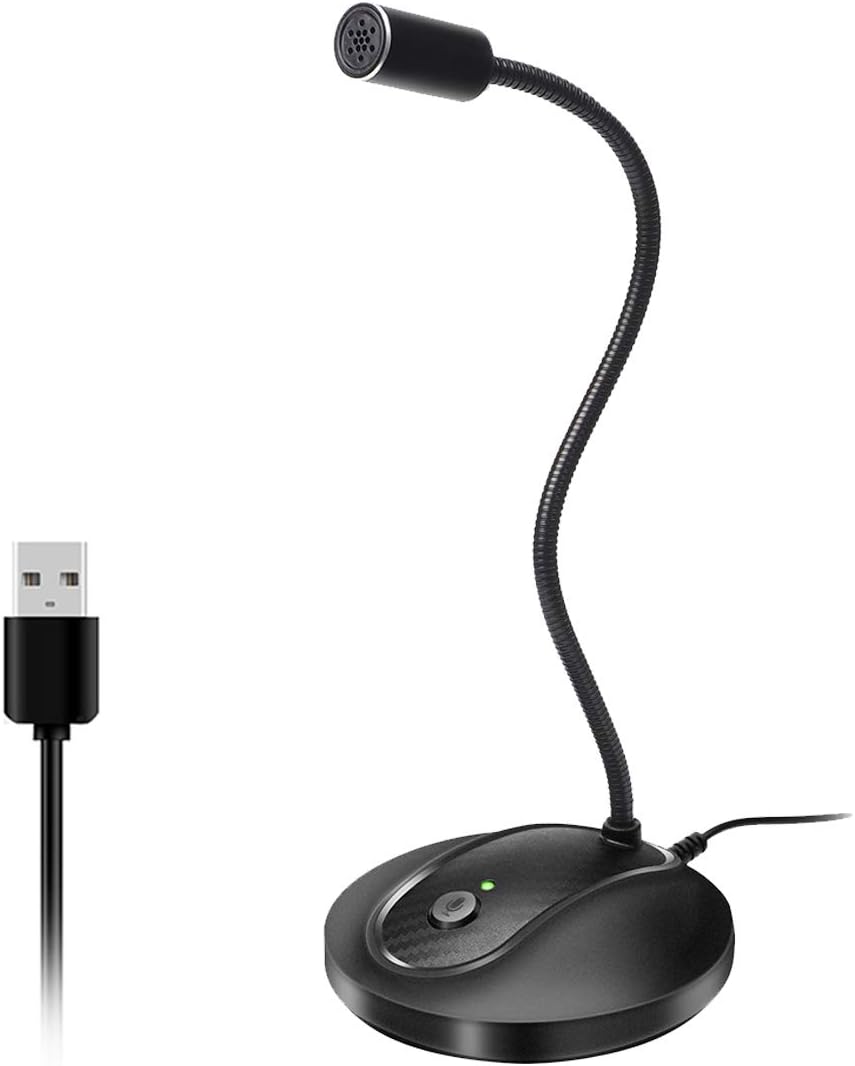
- Flexible gooseneck design eliminates workspace clutter and allows perfect mic positioning for any setup
- Truly plug-and-play with zero configuration, making it accessible for non-technical users
- Thoughtful mute button and LED indicator provide quick visual feedback and privacy control
- Solid metal and ABS construction feels premium and withstands daily use
Cons
- Not compatible with Xbox, Raspberry Pi, or Android devices, limiting versatility beyond PC and Mac
- Some users report occasional connection stability issues, though audio quality remains good when connected
- May require 10-15 minutes to fully understand setup despite plug-and-play simplicity
The JOUNIVO JV-601 is a compact USB microphone designed for professionals and casual users who need reliable audio capture without complexity. Whether you are taking Zoom calls, recording voice-to-text, gaming online, or conducting video conferences, this gooseneck microphone delivers the audio clarity users expect from higher-priced competitors.
The standout feature is the 360-degree adjustable gooseneck that lets you position the microphone exactly where you need it. Combined with the omnidirectional condenser mic and built-in noise-canceling technology, the JV-601 captures your voice with impressive clarity while filtering out background noise, keyboard clicks, and room hum. The one-click mute button with LED indicator adds a professional touch, letting you instantly control when the mic is active and providing visual confirmation of its status.
Build quality exceeds expectations at this price. The microphone uses premium metal piping paired with a heavy-duty ABS stand, creating a solid, professional appearance that looks good on any desk. The 1.8 to 6-foot USB cable provides flexibility in setup, and the compact 9-inch height keeps your workspace uncluttered while remaining fully visible and accessible.
The main limitation is compatibility, as the JV-601 only works with Windows and macOS computers, not mobile devices, gaming consoles, or Linux systems. Some users have reported occasional connection issues, though these appear to be rare and audio quality remains good when the connection is stable. Setup is truly plug-and-play, though first-time users may need 10-15 minutes to familiarize themselves with the controls.
The JOUNIVO JV-601 represents exceptional value for anyone seeking professional-grade audio on a budget. Real users consistently report that peers notice the dramatic improvement in call quality compared to built-in laptop mics. For video conferencing, content creation, or voice dictation on Windows or macOS, this microphone is a smart investment.
Connectivity and Compatibility: USB plug-and-play connection with 1.8 to 6-foot cable. Compatible with Windows 7, 8, 10, and 11, plus macOS. Not compatible with Xbox, Raspberry Pi, or Android devices.
Audio Performance: Omnidirectional condenser microphone with 76dB signal-to-noise ratio. Frequency range spans 20Hz to 20kHz for full-spectrum audio capture. Advanced noise-canceling technology reduces background noise and echo.
Design and Controls: 360-degree adjustable gooseneck design with metal pipe construction and heavy-duty ABS stand. One-click mute button with built-in LED indicator showing active/muted status. Compact dimensions of 3 x 3 x 9 inches.
Physical Specifications: Weight 7.06 ounces. Single-channel audio input. Enclosure material combines acrylonitrile butadiene styrene and metal for durability. Includes microphone and USB cable, no additional equipment required.

Pros
- Exceptional pickup range allows multiple people in the same room to be heard clearly on video calls
- True plug-and-play setup with zero configuration or driver software needed
- Intuitive one-button mute with visual LED status indicator for easy meeting management
- Compact, sleek design complements modern desk setups and remains unobtrusive
- Excellent value for group conferencing needs at an affordable price point
Cons
- Microphone only, does not include built-in speakers for audio output
- 5-inch diameter footprint may require desk space consideration in very cramped workstations
- Frequency range maxes out at 16 kHz, limiting use for specialized audio production applications
The TONOR TM20 is a USB-based boundary microphone designed specifically for video conferencing, online teaching, and remote collaboration. It works seamlessly with Zoom, Skype, Google Meet, WebEx, and other major communication platforms on both Windows and macOS systems. This microphone is perfect for professionals, educators, and remote teams who need reliable group audio capture without the complexity of traditional conference room setups.
What sets the TM20 apart is its genuine 360-degree omnidirectional pickup pattern combined with effective noise reduction technology. The microphone can capture voices from up to 16.4 feet away, making it ideal for conference tables or group settings where multiple people need to be heard equally. Real-world users report that it significantly outperforms standard webcam microphones, picking up conversations from across a room while minimizing background noise and echo for clearer audio delivery to remote participants.
The build quality reflects its professional design philosophy. The compact 5.79-inch boundary form factor sits flat on desks and blends into any workspace. The polycarbonate construction feels durable, and the included 2-meter USB cable provides flexibility in placement. The one-touch mute button with blue and red LED indicators gives users instant visual feedback about microphone status, which is essential during multitasking or sensitive conversations.
One limitation to note is that this is a microphone-only device with no integrated speaker functionality. Users will need separate speakers or headphones for audio output. Additionally, while the 78 dB signal-to-noise ratio performs excellently for conferencing, the frequency range of 60-16,000 Hz is optimized for voice rather than music or specialized audio work.
The TONOR TM20 delivers exceptional value for anyone seeking reliable group audio capture for video calls. Its ease of use, solid sound quality, and affordable pricing make it a standout choice for remote workers, educators, and small teams looking to upgrade from inadequate built-in microphones.
Connectivity and Compatibility
Connectivity: USB 2.0
Compatible Devices: Windows and macOS computers
Supported Platforms: Zoom, Skype, GoToMeeting, WebEx, Google Hangouts, Fuze, Discord, and other USB-compatible applications
Installation: Plug and play, no drivers required
Audio Performance
Polar Pattern: Omnidirectional 360-degree pickup
Pickup Range: 5 meters (16.4 feet)
Frequency Response: 60-16,000 Hz
Signal-to-Noise Ratio: 78 dB
Impedance: 2200 ohms
Number of Channels: 1
Physical Specifications
Form Factor: Boundary microphone
Dimensions: 5.79 x 5.79 x 1.3 inches
Weight: 400 grams (14 ounces)
Material: Polycarbonate enclosure
Color: Black
Features and Controls
Mute Function: One-button touch mute with LED indicator
LED Status: Blue light indicates working mode, red light indicates mute mode
Noise Reduction: Built-in technology to block background noise and eliminate echo
Power Source: Corded electric via USB
Included Components
1x USB Condenser Microphone (TM20)
1x USB Cable (2 meters)
1x User Manual
Who Should Buy This Microphone?
The TONOR TM20 is ideal for remote workers, online educators, small business teams, and anyone participating in frequent video conferences who needs better audio quality than their laptop or webcam provides. It is particularly valuable for group settings where multiple people in the same room need to be heard clearly by remote participants.
When to Choose the TM20
Choose this microphone if you host or participate in regular Zoom meetings, conduct online classes, run podcast discussions with multiple speakers, or manage conference calls with group participation. It is also excellent for content creators who need to capture ambient room audio or interview multiple people simultaneously.
Important Considerations
Remember that this is a microphone-only device without built-in speakers. You will need to use your computer speakers, external speakers, or headphones for audio output. The 16.4-foot pickup range is generous for most rooms, but very large conference halls may require additional microphones or a dedicated audio system. The microphone works best when placed centrally within the group to ensure even audio capture from all directions.
Setup and Placement Tips
For optimal performance, position the TM20 in the center of your conference table or meeting area. The flat boundary design allows it to sit flush on desks or tables. The included 2-meter cable gives you flexibility to place it away from your computer. Avoid placing it directly against walls, as this can affect the omnidirectional pickup pattern. Test the mute button and LED indicator during your first call to ensure you are familiar with the controls.

Pros
- Exceptional audio clarity and call quality with effective noise reduction and zero echo feedback
- True 360-degree voice pickup means the entire room can be heard equally well without positioning constraints
- Genuine plug-and-play installation with zero software or driver requirements
- Compact, portable design that fits easily in bags for meetings across multiple locations
- Comprehensive 2-year warranty demonstrates manufacturer confidence in product reliability
Cons
- Some users report occasional audio processing that can affect voice tone during calls
- Limited to wired USB connection only with no wireless or Bluetooth connectivity options
- 3-watt speaker output may require volume adjustment in larger conference rooms with ambient noise
The EMEET M1A is a professional-grade USB speakerphone designed for remote workers, hybrid teams, and anyone who conducts regular conference calls from home or office. It combines enterprise-level audio technology with consumer-friendly simplicity, making it an excellent choice for businesses, educational institutions, and government agencies seeking reliable video conferencing solutions.
The standout feature is the patented VoiceIA Tech with dual omnidirectional microphones that deliver true 360-degree voice pickup. This means everyone in the room is heard equally well regardless of where they sit, eliminating the need to huddle around the device. The advanced noise reduction and echo cancellation algorithms ensure crystal-clear audio transmission, while the nine adjustable volume levels with LED visual feedback give you precise control over output levels. Real-world testing confirms users experience significantly improved call quality compared to laptop microphones or lower-end speakerphones.
Design and build quality are solid for the price point. The compact 4-inch tabletop form factor fits naturally on any desk without consuming excessive space, and the plastic construction keeps weight minimal for portability. The included USB-C cable with USB-A adapter ensures compatibility with virtually any modern computer or device. The touch-based control panel is intuitive, and the instant mute button provides peace of mind during sensitive business calls.
The primary drawback is that some users report the audio processing can occasionally alter voice tone, though this is relatively rare based on user feedback. Additionally, the 3-watt speaker output may require volume adjustment in larger rooms with significant background noise. The wired-only connectivity means you cannot use this device wirelessly, though the stable USB connection is actually preferable for conference calls requiring consistent audio transmission.
Verdict: The EMEET M1A delivers professional conference call quality at a mid-range price point. Its 360-degree microphone pickup and advanced noise cancellation make it substantially better than built-in laptop audio, and the plug-and-play setup means you can be productive immediately. Highly recommended for remote workers, small teams, and anyone serious about call quality without complexity.
Audio Performance: Stereo output, 3-watt maximum power, dynamic driver, 1 audio channel, full-duplex capability with dual omnidirectional microphones (2 total), 360-degree voice pickup range
Connectivity: USB-C cable with USB-A adapter included, wired connection only, no wireless or Bluetooth support, plug-and-play installation with zero drivers required
Design: 4-inch speaker size (11.2cm woofer diameter), black plastic tabletop mount, compact portable form factor, touch-based control panel with 9 adjustable volume levels and LED indicators
Compatibility: Universal USB compatibility with Windows, Mac, and Linux systems. Works with Zoom, Webex, Microsoft Teams, Google Meet, Skype for Business, Microsoft Lync, GoToMeeting, BlueJeans, FaceTime, and other major conferencing platforms
Protection and Warranty: Instant mute button for speaker and microphones, 2-year full warranty, suitable for offices, home workspaces, huddle rooms, and travel
Who Should Buy This: Remote workers and hybrid teams conducting regular video calls, small business conference rooms and huddle spaces, educational institutions and government agencies, anyone upgrading from laptop microphones or low-quality speakerphones, professionals who travel between multiple meeting locations
Key Considerations: Verify your computer has a USB port or USB-C connection (adapter included for USB-A). The 3-watt output works well in typical office environments but may need volume adjustment in large rooms with high ambient noise. This is a wired-only device, so proximity to your computer or a USB hub is required. The 360-degree microphone is ideal for group calls but may pick up more background noise if you're in a loud environment.
Alternatives to Consider: If you need wireless capability, explore Bluetooth speakerphones. If you have a much larger conference room, consider higher-wattage options. If you're on a tight budget, basic USB speakerphones are cheaper but lack the advanced noise cancellation and 360-degree pickup of this model.
Setup Tips: Simply plug in the USB cable and your computer will recognize it automatically. Select it as your audio input and output device in your conferencing software settings. Position it in the center of your meeting area for optimal 360-degree pickup. Adjust the 9 volume levels using the control panel based on your typical call participants.
Pros
- Exceptional ease of setup with automatic connection upon plugging in, no drivers or complex configuration needed
- Outstanding call quality with AI noise reduction and 360-degree pickup ensures everyone in meetings is heard clearly
- Impressive 20-hour battery life provides all-day usage without frequent recharging
- Versatile connectivity options including Bluetooth, USB, and wired connections work with laptops, desktops, and smartphones
- Lightweight and portable with included carrying case makes it perfect for remote workers and frequent travelers
Cons
- Not waterproof or water-resistant, limiting use in wet environments or outdoor settings
- Dongle not included in this version, which may require separate purchase for some connectivity scenarios
- Limited to 30-meter Bluetooth range, so you need to stay relatively close to your connected device
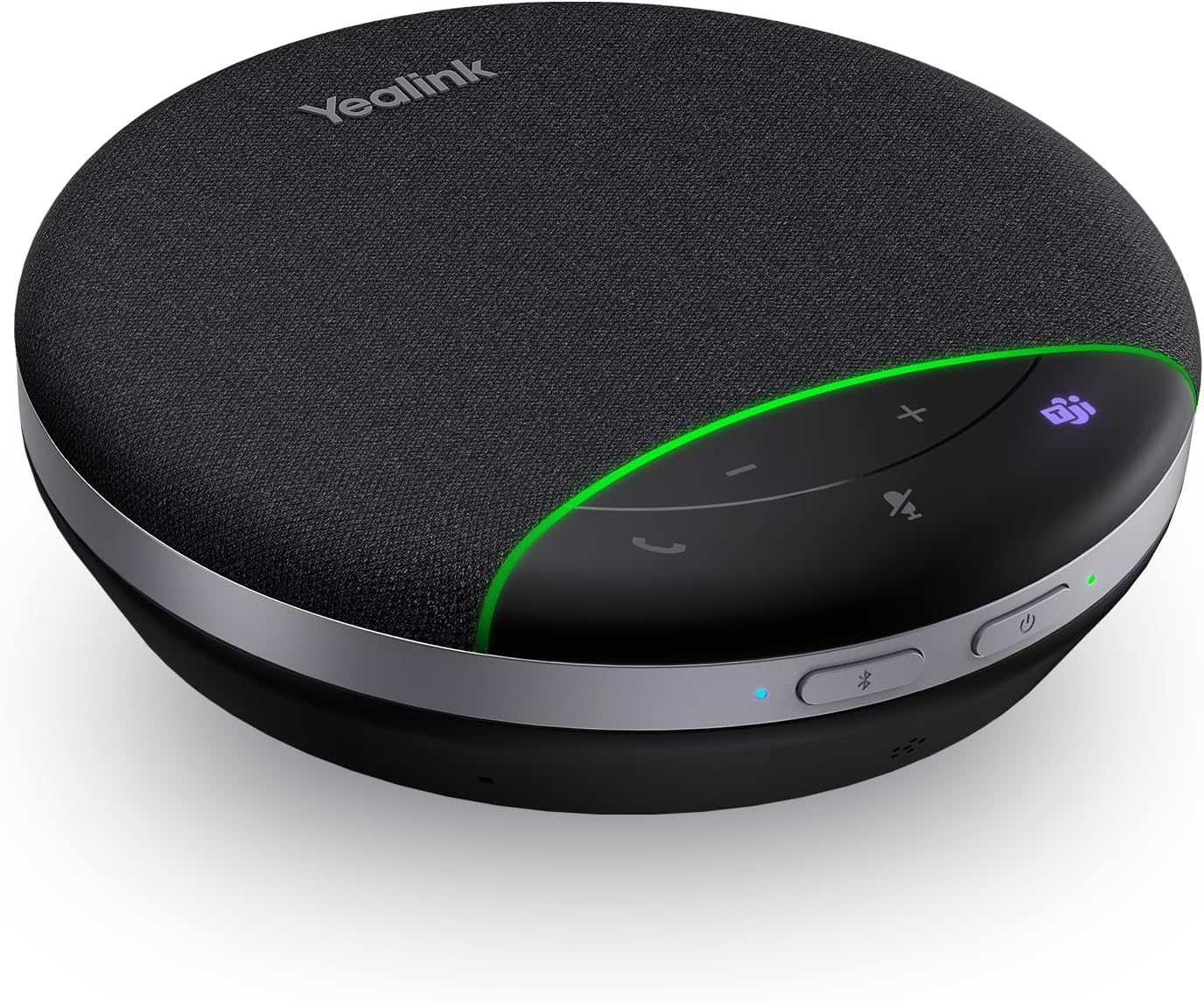
The Yealink SP92 is a portable conference speakerphone designed for remote workers, small teams, and professionals who need reliable audio for video calls and meetings. It combines AI noise cancellation, 360-degree audio pickup, and multi-platform compatibility to deliver a professional calling experience from anywhere. Whether you're using Zoom, Microsoft Teams, or other UC platforms, this speaker handles the demands of modern business communication.
The standout feature is the AI noise cancellation technology that actively identifies and filters background noise from all directions while preserving your voice clarity. Combined with the 360-degree microphone and full-duplex technology, multiple participants in a room can speak naturally without audio cutting out. The 50mm speaker with virtual bass technology ensures balanced sound quality for both business calls and casual listening, while the 20-hour battery life means you can work through an entire business day without recharging.
Build quality is solid with a compact 5-inch tabletop design that fits easily on desks or in bags. The lightweight plastic construction keeps it portable, and the included carrying case makes transport convenient. Setup is genuinely plug-and-play, automatically connecting to your device within seconds without requiring driver installation or complex configuration. Multiple connectivity options including Bluetooth, USB-C, and USB-A provide broad compatibility across laptops, desktops, and smartphones.
The main limitations are the lack of water resistance, the non-inclusion of a dongle in this version, and the 30-meter Bluetooth range which requires staying reasonably close to your device. These are minor constraints for office and home use but worth considering if you need weatherproof equipment or extended wireless range.
The SP92 delivers excellent value for professionals seeking a reliable, easy-to-use conference speaker. Customer reviews consistently praise its crystal-clear sound, effortless setup, and professional-grade performance. If you conduct regular video calls or need quality audio for remote collaboration, this speakerphone is a worthwhile investment that justifies its price through superior audio quality and build reliability.
Audio Performance: 50mm dynamic driver speaker, 5 watts maximum output power, 20 kHz frequency response, 2 audio channels, 4 ohm impedance, mono audio output mode.
Microphone: 360-degree pickup with full-duplex technology, AI noise cancellation with directional noise reduction.
Connectivity: Bluetooth (30-meter range), USB-C, USB-A, wired connection, USB-C to USB-C cable included, USB-C/A adapter included. Compatible with Desktop, iPhone, PC, and Laptop devices.
Battery: 20-hour talk time, 20-hour music time, charges quickly via USB-C.
Physical: Dimensions 5 inches D x 5 inches W x 1.3 inches H, weight 276 grams, plastic enclosure, tabletop mount, black color, touch and button controls.
Compatibility: Microsoft Teams, Zoom, and all leading UC platforms. Model SP92, 2-year manufacturer warranty, includes carrying case and quick start guide.
Ideal For: Remote workers conducting daily video calls, small team meeting spaces, freelancers needing professional audio quality, frequent travelers requiring portable conference equipment, and anyone upgrading from built-in laptop speakers.
Use Cases: Zoom meetings, Microsoft Teams calls, WebEx conferences, Skype conversations, remote collaboration sessions, client presentations, and distance learning scenarios where clear audio is essential.
Not Ideal For: Outdoor use in wet conditions, situations requiring waterproof equipment, users needing extended Bluetooth range beyond 30 meters, or those seeking a compact pocket-sized device.

Pros
- Crystal clear audio output with superior noise suppression even in challenging environments like offices with background noise
- Versatile connectivity options with both Bluetooth wireless and USB-C wired connections require no driver installation
- Extended battery life and power bank functionality make it perfect for mobile professionals and frequent travelers
- Proven durability with customers reporting excellent performance years after purchase
- Exceptional value compared to competing enterprise speakerphones like Jabra at a significantly lower price
Cons
- Occasional connectivity quirks where manual power cycling may be needed after computer shutdown or sleep mode
- Not waterproof, so not suitable for outdoor or wet environments despite portable design
- Plastic construction feels less premium than higher-end competitors, though build quality remains solid
The Anker PowerConf is a portable Bluetooth speakerphone engineered for remote workers, home office professionals, and frequent business travelers who demand crystal-clear conference audio. With its 360-degree microphone array and AI-powered noise cancellation, it transforms any space into a professional meeting room without complicated setup or driver installation.
What sets the PowerConf apart is its exceptional audio clarity powered by Voice Radar 3.0 technology. The 6-microphone system intelligently captures voices from all directions while automatically balancing volume and distance, making it particularly valuable for hearing-impaired users and anyone struggling with call clarity. Real-world users consistently praise how well the speakerphone isolates their voice while suppressing background noise, even in noisy office environments.
The design strikes an excellent balance between portability and functionality. At just 12.3 centimeters and featuring intuitive touch controls, it fits easily into travel bags or briefcases. The 24-hour battery life combined with USB-C power delivery capability means you can charge the device while simultaneously powering your phone or tablet, eliminating the need to carry multiple chargers during business travel.
Minor drawbacks include occasional connectivity quirks requiring manual power cycling and a plastic construction that feels less premium than enterprise-grade competitors. However, these compromises are reasonable given the significantly lower price point and proven long-term reliability reported by users who have owned the device for multiple years.
The Anker PowerConf delivers professional-grade conference audio at a consumer-friendly price, making it an excellent choice for anyone seeking reliable speakerphone performance without enterprise-level costs. Its Zoom certification, compatibility with all major platforms, and real-world performance make it a smart investment for remote work environments.
Microphone System: 6-microphone 360-degree array with AI-powered Voice Radar 3.0 technology for noise reduction, echo cancellation, and multi-speaker detection.
Connectivity: Dual connectivity with Bluetooth wireless (20-meter range) and USB-C wired connection. Compatible with Zoom, Microsoft Teams, Google Meet, and all major conferencing platforms. No driver installation required.
Battery & Power: Built-in 5,200mAh battery provides 24 hours of call time on a single charge. Features integrated Anker PowerIQ technology allowing you to charge other devices via USB-C output at optimized speeds.
Audio Performance: Stereo audio output with dynamic drivers, 20Hz frequency response, and automatic volume balancing. Touch panel controls with intuitive button interface.
Portability & Design: Compact 12.3cm tabletop mount design weighs minimally for easy travel. Premium plastic construction with durable build quality.
Warranty & Support: 18-month limited warranty with responsive, easy-to-reach Anker customer support team.
Remote Workers & Home Office Professionals: If you spend significant time on Zoom, Teams, or other video conferencing calls, the PowerConf eliminates audio quality issues that plague built-in laptop speakers and provides professional-grade clarity.
Frequent Business Travelers: The 24-hour battery life, compact design, and power delivery capability make this ideal for road warriors who need reliable conference audio without carrying multiple devices or chargers.
Hearing-Impaired Users: The exceptional audio clarity and intelligent voice detection have proven transformative for users with hearing challenges, enabling clear communication that was previously difficult.
Small Teams & Meeting Rooms: The 360-degree microphone coverage works perfectly for small conference rooms, home office meeting spaces, or team collaboration areas where multiple people need to be heard clearly.
Budget-Conscious Buyers: If you want enterprise-level conference audio quality without paying enterprise prices, the PowerConf delivers exceptional value compared to Jabra and Plantronics alternatives costing significantly more.

Pros
- Exceptional audio clarity and volume for group conference settings without participants needing to raise their voices
- Truly plug-and-play operation with zero driver requirements across Windows and Mac systems
- Solid metal build quality with thoughtful design details like the anti-slip base and shielded cable
- Versatile 11.5-foot pickup range makes it suitable for small conference rooms and multiple participants
- Excellent value for money with professional-quality audio at an accessible price point
Cons
- Not Microsoft Teams certified, so the hardware mute button won't sync with Teams mute status
- Omnidirectional design may pick up background noise in environments with significant ambient sound
- Fixed cable connection limits flexibility in positioning compared to wireless alternatives
The TONOR G11 is a USB-based omnidirectional condenser microphone engineered specifically for remote workers, small business teams, and professionals who conduct frequent video conferences. It's designed for use with Zoom, Microsoft Teams, Skype, WebEx, and similar platforms, making it a practical solution for anyone frustrated with laptop microphone quality during virtual meetings.
The standout feature is its 360-degree omnidirectional pickup pattern with an 11.5-foot capture radius. Real-world testing shows it performs exceptionally well in enclosed conference rooms, capturing crisp, loud audio from multiple participants without requiring anyone to lean toward the microphone. The audio quality is notably superior to built-in laptop mics, and users report excellent transcription quality when paired with AI meeting software.
Build quality is solid throughout. The microphone features a metal enclosure, anti-slip rubber base, and a 1.8-meter nylon shielded cable that effectively eliminates signal interference. The compact size means it won't clutter your desk, and it's portable enough to pack in a travel bag. The convenient mute button with blue LED indicator provides instant control, though note that Microsoft Teams users will need to unmute through the software rather than the hardware button.
The primary limitation is that omnidirectional design can pick up background noise in less-controlled environments. Additionally, the fixed cable connection offers less flexibility than wireless options. However, for the price point and intended use case of conference rooms and professional video calls, these are minor trade-offs.
Overall, the TONOR G11 delivers professional audio quality at an accessible price. It's an excellent upgrade for anyone whose built-in microphone underperforms during video calls, and it's particularly valuable for teams conducting multiple meetings daily. Setup takes literally one minute, and the learning curve is nonexistent.
Connectivity: USB wired connection with 1.8m nylon shielded cable
Pickup Pattern: Omnidirectional with 11.5-foot capture distance
Audio Performance: 78 dB signal-to-noise ratio for clean, professional audio
Compatibility: Windows PC, Mac, and all major video conferencing platforms including Zoom, Teams, Skype, WebEx, Google Meet, and more
Physical Design: Metal and nylon construction, compact form factor at 7.87 x 11.81 x 1.97 inches, weighs 135g with anti-slip rubber base
Controls: One-touch mute button with blue LED indicator light
Setup: Plug-and-play with no drivers required for Windows or Mac
Small to Medium Conference Rooms: The 11.5-foot omnidirectional range is perfect for capturing audio from 3-6 people seated around a table during video meetings.
Remote Workers: Upgrade from disappointing built-in laptop microphones to deliver professional-quality audio during daily video calls and presentations.
Traveling Professionals: Compact, lightweight design fits easily in bags, making it ideal for business travel or working from different locations.
Court Reporters and Transcriptionists: Clear audio capture and excellent transcription compatibility make it suitable for recording interviews, depositions, and professional meetings.
Online Training and Seminars: Reliable performance for instructors and presenters conducting virtual training sessions where audio clarity is essential.

Pros
- Exceptional value for the price, significantly outperforming built-in laptop and phone microphones
- AI noise cancellation genuinely reduces background interference without sacrificing voice clarity
- Truly plug-and-play with zero configuration needed for most users
- Solid metal build feels professional and durable compared to plastic competitors
- Versatile compatibility across PC, Mac, PS4/5, and Android devices with single cable solution
Cons
- Mute button placement on top can accidentally trigger when tapping the microphone body
- AI noise cancellation has occasional inconsistencies and may not handle all background noise types equally
- Not compatible with Xbox gaming consoles, limiting options for Xbox streamers and gamers
The NEEWER UM01 is a desktop USB microphone designed for content creators, gamers, streamers, and podcasters who want professional audio quality without the complexity or cost of traditional studio setups. It's perfect for anyone upgrading from built-in microphone quality and seeking a compact, versatile solution that works across multiple devices and platforms.
The standout feature is the AI-powered noise cancellation chip that actively filters out keyboard clicks, fan noise, AC hum, and ambient chatter. Users report noticeably cleaner recordings right out of the box, and the cardioid pickup pattern ensures your voice stays centered while rejecting side and rear noise. The microphone delivers studio-grade specs with 48 kHz/24-bit recording, 84 dB signal-to-noise ratio, and handles loud speaking without distortion, making it suitable for everything from intimate podcast recordings to energetic gaming commentary.
Build quality is impressive for the price point. The metal body feels durable and professional, avoiding the cheap plastic feel of budget competitors. The front-facing gain and headphone volume knobs provide tactile control, while the RGB lighting system offers three modes (solid, gradient, rhythm) that sync with your setup. The included desktop software gives you granular control over gain, EQ, and effects, though default settings work well for most users without tweaking.
The main drawback is the mute button location on top of the microphone, which can accidentally trigger when you tap the body during use. Additionally, while AI noise cancellation is effective, it occasionally struggles with certain background noise types, and the feature won't replace a treated recording space. Xbox compatibility is also missing, which limits options for console gamers.
The NEEWER UM01 represents exceptional value for content creators at any skill level. It's a confident step up from budget alternatives and delivers professional-sounding results without requiring technical expertise or expensive additional equipment. Highly recommended for streamers, podcasters, and gamers seeking reliable, quality audio in a compact package.
Audio Performance: 48 kHz/24-bit recording, 20 Hz to 20 kHz frequency response, 84 dB signal-to-noise ratio, 120 dB max SPL, -36 dB sensitivity
Connectivity: USB Type-C and USB Type-A cables included, 3.5mm TRS monitoring jack, compatible with Mac, Windows, PC, laptop, PS4, PS5, and Android devices
Physical Specs: Desktop form factor, metal body construction, cardioid condenser microphone, single channel
Features: AI noise cancellation, RGB lighting with customizable modes, mute button with indicator light, adjustable gain and headphone volume knobs, desktop software control
Warranty: 1-year manufacturer warranty included
Who Should Buy: Content creators, streamers, podcasters, gamers, and anyone recording video calls or voice content who wants significantly better audio than built-in microphones without investing in expensive studio equipment.
Best Use Cases: Twitch and YouTube streaming, podcast recording, video conferencing, gaming commentary, voice-over work, music rough drafts, and location recording where portability matters.
Setup Tips: This microphone requires no driver installation on most systems. Simply plug in the USB cable and set it as your default input device in your operating system settings. For Android phones, ensure OTG (On-The-Go) mode is enabled. The included desktop software is optional but recommended for accessing advanced features like EQ adjustment and AI noise cancellation control.
Noise Cancellation Tips: Enable AI noise reduction by holding the button for 3 seconds until the green light appears. Use the desktop software to fine-tune gain levels and prevent auto-volume adjustments in applications like Zoom that might interfere with your settings.
Compatibility Note: This microphone works with Mac, Windows, PS4, PS5, and Android devices via USB. It is not compatible with Xbox consoles.
Buying Guide for Group Call Microphones
Pickup Pattern: Omnidirectional vs. Cardioid
The microphone’s pickup pattern determines how it captures sound. For group calls, an omnidirectional pattern is often ideal. It captures sound equally from all directions around the microphone, perfect for a device placed in the center of a table.
Conversely, a cardioid pattern captures sound primarily from the front. This is excellent for isolating a single speaker’s voice in a noisy environment but less suitable for capturing a group evenly. Consider your typical meeting layout when choosing.
Noise Reduction Technology
Background noise is the enemy of a productive call. Look for microphones with active noise-canceling or AI-powered noise reduction. These features use smart chips to filter out constant sounds like fans, keyboards, and air conditioning.
This ensures your voice is transmitted clearly without distracting ambient sounds. Advanced models, like some USB boundary microphones, are specifically designed for this purpose in meeting rooms.
Ease of Use and Connectivity
For most users, plug-and-play functionality is non-negotiable. The best USB microphones require no drivers or complex software installation. Simply connect the USB cable to your computer, and the device is recognized instantly.
Also, consider physical controls. A dedicated mute button with a clear LED indicator is invaluable for quickly silencing your mic during a call. For flexible positioning, a gooseneck USB microphone allows you to adjust the mic head precisely.
Form Factor and Additional Features
Your space dictates the ideal form factor. Compact desktop mics with small bases save space. All-in-one speakerphones combine a microphone and speaker, simplifying setup for small huddles. Portable, battery-powered units offer ultimate flexibility for calls anywhere.
Additional features to consider include built-in monitoring headphone jacks, compatibility with various operating systems, and included carrying cases for travel. Assess which extras align with your specific workflow.
Final Thoughts
Choosing the right microphone transforms chaotic group calls into clear, collaborative conversations. For a versatile all-in-one solution perfect for mobile professionals, the Jabra Speak 510 (2025 Edition) delivers exceptional portable audio. If your primary need is a reliable, stationary microphone for a home office or small meeting room, the TONOR USB Conference Microphone offers excellent omnidirectional pickup and noise reduction at a compelling value. Investing in proper audio equipment ensures every participant is heard, making your virtual meetings more effective and professional.
Frequently Asked Questions
Do I need a special microphone for Zoom or Microsoft Teams calls?
While your computer’s built-in mic works, a dedicated USB microphone significantly improves audio quality. It reduces background noise, eliminates echo, and captures your voice more clearly. This is especially important in group settings where multiple people are speaking. Most modern USB mics are universally compatible with popular platforms like Zoom, Teams, and Skype without extra configuration.
What’s the difference between a USB microphone and a USB speakerphone?
A USB microphone is an input device only; it captures sound. A USB speakerphone is a combined unit that includes both a microphone to capture your voice and a speaker to play the voices of others on the call. Speakerphones are convenient, all-in-one solutions for small groups. For larger rooms or when you already have good speakers, a dedicated microphone like those in our USB microphones category might be the better choice.
Can I use a USB microphone with my smartphone or tablet?
Many modern USB microphones are compatible with Android and iOS devices, but you typically need a USB-C or Lightning OTG (On-The-Go) adapter. Always check the product specifications for mobile compatibility. For a truly wireless group call solution focused on mobile use, you might also explore lavalier and wireless microphone options designed for on-the-go content creators.
How many people can effectively use one omnidirectional USB microphone?
Most omnidirectional conference microphones are designed to clearly capture voices within a radius of about 3 to 5 meters (10 to 16 feet). This effectively covers small to medium-sized meeting rooms with 4 to 8 participants, assuming they are seated around a table with the mic centrally located. For larger groups or very noisy environments, multiple microphones or a more advanced audio system may be necessary.


Write Your Review
No reviews yet. Be the first to share your experience!