

Frustrated with your computer misinterpreting simple commands? Speech recognition software like Dragon NaturallySpeaking or Windows Cortana requires pristine audio to function accurately. Background noise, muffled vocals, or poor microphone placement can lead to constant corrections and wasted time.
This guide focuses on USB microphones specifically validated for speech recognition tasks. We assess two models that deliver the clear, consistent voice capture needed for reliable dictation and AI interaction. For a broader look at dictation tools, explore our guide on the best USB microphones for dictation.
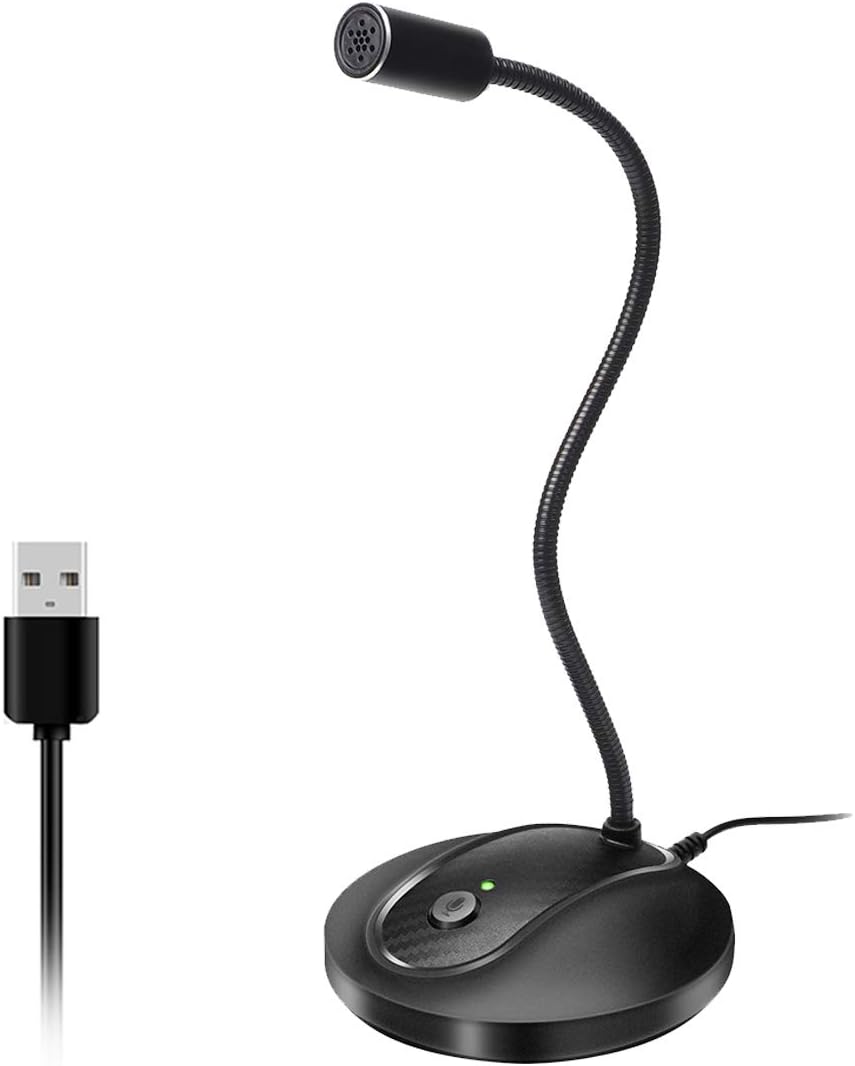
Pros
- Superior audio quality compared to laptop microphones and Bluetooth alternatives, verified by peer feedback
- Flexible gooseneck design eliminates workspace clutter and allows perfect mic positioning for any setup
- Truly plug-and-play with zero configuration, making it accessible for non-technical users
- Thoughtful mute button and LED indicator provide quick visual feedback and privacy control
- Solid metal and ABS construction feels premium and withstands daily use
Cons
- Not compatible with Xbox, Raspberry Pi, or Android devices, limiting versatility beyond PC and Mac
- Some users report occasional connection stability issues, though audio quality remains good when connected
- May require 10-15 minutes to fully understand setup despite plug-and-play simplicity
The JOUNIVO JV-601 is a compact USB microphone designed for professionals and casual users who need reliable audio capture without complexity. Whether you are taking Zoom calls, recording voice-to-text, gaming online, or conducting video conferences, this gooseneck microphone delivers the audio clarity users expect from higher-priced competitors.
The standout feature is the 360-degree adjustable gooseneck that lets you position the microphone exactly where you need it. Combined with the omnidirectional condenser mic and built-in noise-canceling technology, the JV-601 captures your voice with impressive clarity while filtering out background noise, keyboard clicks, and room hum. The one-click mute button with LED indicator adds a professional touch, letting you instantly control when the mic is active and providing visual confirmation of its status.
Build quality exceeds expectations at this price. The microphone uses premium metal piping paired with a heavy-duty ABS stand, creating a solid, professional appearance that looks good on any desk. The 1.8 to 6-foot USB cable provides flexibility in setup, and the compact 9-inch height keeps your workspace uncluttered while remaining fully visible and accessible.
The main limitation is compatibility, as the JV-601 only works with Windows and macOS computers, not mobile devices, gaming consoles, or Linux systems. Some users have reported occasional connection issues, though these appear to be rare and audio quality remains good when the connection is stable. Setup is truly plug-and-play, though first-time users may need 10-15 minutes to familiarize themselves with the controls.
The JOUNIVO JV-601 represents exceptional value for anyone seeking professional-grade audio on a budget. Real users consistently report that peers notice the dramatic improvement in call quality compared to built-in laptop mics. For video conferencing, content creation, or voice dictation on Windows or macOS, this microphone is a smart investment.
Connectivity and Compatibility: USB plug-and-play connection with 1.8 to 6-foot cable. Compatible with Windows 7, 8, 10, and 11, plus macOS. Not compatible with Xbox, Raspberry Pi, or Android devices.
Audio Performance: Omnidirectional condenser microphone with 76dB signal-to-noise ratio. Frequency range spans 20Hz to 20kHz for full-spectrum audio capture. Advanced noise-canceling technology reduces background noise and echo.
Design and Controls: 360-degree adjustable gooseneck design with metal pipe construction and heavy-duty ABS stand. One-click mute button with built-in LED indicator showing active/muted status. Compact dimensions of 3 x 3 x 9 inches.
Physical Specifications: Weight 7.06 ounces. Single-channel audio input. Enclosure material combines acrylonitrile butadiene styrene and metal for durability. Includes microphone and USB cable, no additional equipment required.

Pros
- Exceptional audio quality with 40Hz-18kHz frequency response and 46kHz sampling rate for rich, detailed sound
- Plug-and-play simplicity with zero setup hassle across multiple platforms and operating systems
- Advanced noise reduction effectively handles real-world recording environments without sacrificing vocal warmth
- Versatile physical controls allow instant on-the-fly adjustments without opening software menus
- Durable metal construction with weighted base provides excellent stability and vibration resistance
Cons
- Noise reduction mode requires holding the mute button rather than offering a dedicated toggle switch for quick access
- Single-channel design limits advanced multi-track recording capabilities for professional studio applications
- Limited frequency range at the low end (40Hz minimum) may not capture ultra-deep bass in specialized audio work
The ZealSound K66 is a desktop USB condenser microphone engineered for podcasters, content creators, streamers, and remote professionals who demand studio-quality audio without complicated setup. Its true plug-and-play design eliminates driver installation, making it instantly compatible with Windows PCs, Macs, PlayStation consoles, and mobile devices via included USB-C and Lightning adapters.
The K66 excels with its intelligent noise reduction mode, which effectively suppresses keyboard clicks, PC fan noise, air conditioner hum, and background chatter while preserving natural vocal warmth in default mode. The cardioid pickup pattern focuses on your voice, and the 40Hz-18kHz frequency response captures rich lows, smooth mids, and clear highs. Real-time zero-latency monitoring through the built-in 3.5mm headphone jack lets you hear exactly what's being recorded without delay, while dedicated control knobs for microphone gain, monitoring volume, and echo provide hands-on sound shaping without software menus.
Build quality stands out with a solid metal construction, weighted base for vibration resistance, and a 360-degree rotatable design that adapts to any desk setup. The included accessories, comprehensive 365-day warranty, and responsive customer service add significant value. Users consistently praise the plug-and-play convenience and audio clarity across two-year testing periods.
The main limitation is the single-channel design, which works perfectly for podcasting and streaming but may not suit advanced multi-track recording. The noise reduction mode requires holding the mute button rather than offering a dedicated toggle, and the 40Hz minimum frequency range may not capture ultra-deep bass in specialized applications.
For podcasters, streamers, online educators, and content creators seeking professional audio quality without technical complexity, the ZealSound K66 delivers exceptional performance. Its combination of intelligent noise reduction, real-time monitoring, multi-platform compatibility, and durable design makes it a standout choice in the affordable microphone category.
Audio Performance: Frequency response of 40Hz-18kHz with 46kHz sampling rate, 125dB audio sensitivity, 85dB signal-to-noise ratio, and 66dB audible noise level. Cardioid unidirectional polar pattern with 2.2 kiloohms impedance.
Connectivity: USB connection with 3.5mm headphone jack for monitoring. Includes 70.9-inch USB cable with USB-C and Lightning adapters for cross-platform compatibility. Compatible with Windows PC, Mac, PS4, PS5, iPhone, iPad, and USB-C devices.
Controls and Features: Dedicated knobs for microphone volume, monitoring volume, and echo control. One-touch mute button with red LED indicator. Intelligent noise reduction mode with blue LED indicator. Real-time zero-latency monitoring with adjustable headphone volume.
Design: Desktop form factor with 360-degree rotatable top-addressed design. Solid metal construction with weighted anti-vibration stand base. Dimensions: 1.58 x 1.58 x 6.1 inches. Weight: 1.1 pounds.
Included Accessories: Microphone with stand base, 70.9-inch USB cable, foam windscreen, USB-C adapter, Lightning adapter, and user manual. 365-day manufacturer warranty with free technical support.
Podcasters and Audio Producers: The K66 delivers broadcast-level audio with intelligent noise reduction, making it ideal for podcast recording, voice-over work, and audio production without expensive studio equipment.
Content Creators and Streamers: Multi-platform compatibility with included adapters makes this microphone perfect for YouTube, TikTok, Twitch, and other streaming platforms. Real-time monitoring helps catch audio issues before they affect your stream.
Remote Workers and Online Educators: Plug-and-play simplicity, noise reduction, and instant mute make the K66 excellent for Zoom meetings, Discord calls, online classes, and professional video conferences.
Gamers and ASMR Creators: The adjustable echo control and cardioid pattern capture expressive voice delivery for gaming chat, ASMR content, and creative recordings. Stable metal base prevents vibration interference during extended sessions.
Mobile Content Creators: USB-C and Lightning adapters enable seamless switching between desktop and mobile recording on iPhones, iPads, and Android devices without additional equipment or adapters.
How to Choose a USB Microphone for Speech Recognition
Prioritize Noise-Canceling Technology
Ambient noise is the primary enemy of accurate speech recognition. Keyboards, fans, and room echo confuse software algorithms. Look for microphones with dedicated noise-canceling circuitry or smart pickup patterns.
This technology actively filters out consistent background frequencies. It ensures your voice is the dominant signal sent to your computer. The result is fewer transcription errors during use.
Evaluate the Microphone Pickup Pattern
The pickup pattern determines how the microphone captures sound. For solo speech recognition, a cardioid pattern is often ideal. It focuses on sound directly in front of the mic while rejecting noise from the sides and rear.
Omnidirectional patterns capture sound from all directions. They can be useful for group calls but may introduce more ambient noise for solo dictation. Choose based on your recording environment’s noise level.
Consider Adjustability and Placement
<!–Consistent microphone placement is crucial for uniform audio levels. A flexible gooseneck or adjustable stand lets you position the capsule close to your mouth. This proximity improves the signal-to-noise ratio significantly.
The ideal position is typically 4 to 6 inches from your mouth, slightly off-axis to avoid plosives. A microphone that stays securely in place ensures your voice input level doesn’t fluctuate, which aids software accuracy. For other adjustable options, see our category page on USB Microphones.
Assess Connectivity and Compatibility
True plug-and-play operation via USB is non-negotiable for this use case. You shouldn’t need audio interfaces or complex drivers. Verify the microphone is compatible with your operating system, whether Windows or macOS.
Also, confirm it works with your specific speech recognition platform. Most USB mics are recognized as standard audio input devices. This makes them universally compatible with dictation software and AI assistants.
Final Thoughts
For reliable speech recognition, your microphone choice directly impacts accuracy. After reviewing the options, we recommend two distinct models. If your priority is a simple, highly adjustable solution for desktop dictation, the USB Microphone, 360 Degree Adjustable Gooseneck excels with its precise positioning. For creators needing advanced control, monitoring, and cleaner noise reduction for podcasts or streams that also double for dictation, the ZealSound Podcast Microphone for PC offers superior audio shaping. Both are validated to deliver the clear input that speech recognition software demands. For more audio gear insights, visit our parent category on Recording / Musical Instruments.
Frequently Asked Questions
Why is a USB microphone better for speech recognition than a headset mic?
USB microphones generally feature larger, higher-quality condenser capsules. They capture a fuller, more detailed frequency range of your voice. This provides the speech recognition engine with more accurate audio data to process, leading to better transcription results compared to typical headset microphones.
Can I use these microphones with Dragon NaturallySpeaking?
<!–Yes, both reviewed microphones are fully compatible. Dragon and similar software recognize any standard USB audio input device. During the software’s audio setup wizard, simply select the USB microphone as your preferred input. The noise-canceling features of these mics are particularly beneficial for Dragon’s accuracy.
How do I reduce background noise for better dictation?
<!–Start by using a microphone with built-in noise cancellation, like the models we reviewed. Position the microphone close to your mouth using its adjustable stand. Speak in a consistent tone and volume. For further noise reduction, consider using a USB lavalier microphone placed directly on your clothing, which minimizes room acoustics.
Do I need special software to use these microphones for Cortana or Windows Voice Typing?
<!–No special software is required. These are plug-and-play USB microphones. After connecting, go to your Windows Sound Settings and set the USB microphone as the default input device. Both Cortana and the built-in Windows Voice Typing tool will automatically use this clear audio source, improving their responsiveness and accuracy in 2026.


Write Your Review
No reviews yet. Be the first to share your experience!