

Your students are attentive, your lesson is prepared, but a muffled, echoing voice can derail the entire learning experience. For educators transitioning to virtual classrooms, audio quality isn’t just a detail, it’s the foundation of clear communication. A dedicated USB microphone bridges the gap between you and your students, ensuring your instructions are heard without distraction.
This guide is for teachers, professors, and tutors seeking reliable audio for platforms like Zoom, Google Classroom, and Microsoft Teams. We have reviewed nine popular models to highlight the key features that matter most for teaching, from noise suppression to flexible mounting. For those engaged in other forms of remote communication, you might also explore our guide on the best USB microphones for distance learning.

Pros
- Exceptional value at budget-friendly price with professional-grade audio quality
- Instant setup with no drivers needed, works immediately on Windows, Mac, and PS4
- Effective noise cancellation keeps background sounds out of recordings and calls
- Flexible gooseneck positioning allows perfect microphone placement for any user
- LED mute indicator provides clear visual feedback of microphone status
Cons
- Not compatible with Linux, Raspberry Pi, or Android devices despite some user reports
- Requires lithium ion battery despite USB power connection, adding maintenance step
- Omnidirectional pattern may pick up more ambient sound in very noisy environments
The CMTECK G009 is a compact USB desktop microphone designed for anyone needing reliable audio input without complexity. Whether you are working from home, attending online classes, streaming content, gaming, or recording podcasts, this plug-and-play microphone delivers professional results at an accessible price point.
The standout feature is the active noise cancellation powered by CMTECK's CCS2.0 SMART CHIP with omnidirectional polar pattern. Combined with the built-in pop filter, it effectively isolates your voice while blocking background noise, making it ideal for shared spaces. Real-world users consistently praise the crystal clear audio quality and accurate voice capture, with reviewers noting excellent clarity for language apps, video calls, and streaming applications.
Build quality is solid with a metal enclosure and adjustable gooseneck design that lets you position the microphone exactly where you need it. The compact footprint won't clutter your desk, and the long USB cable provides flexibility in placement. The convenient one-touch mute button with LED indicator (green for connected, red for muted) puts control at your fingertips without needing software adjustments.
The main limitation is that despite USB power, the microphone requires a lithium ion battery, which adds a maintenance consideration. Additionally, while most users report compatibility across systems, it is officially incompatible with Linux, Raspberry Pi, and Android devices, so verify your platform before purchasing.
Overall, the CMTECK G009 represents excellent value for remote workers, online students, content creators, and gamers seeking dependable microphone performance without premium pricing or complex setup requirements.
Connectivity and Compatibility: USB plug-and-play with Windows 7/8/10, Mac OS, and PS4 support. No drivers required. Not compatible with Linux, Raspberry Pi, or Android.
Audio Performance: Omnidirectional condenser microphone with 30 dB audio sensitivity and 76 dB signal-to-noise ratio. Active noise cancellation with CCS2.0 SMART CHIP and integrated pop filter.
Design and Controls: Adjustable 360-degree gooseneck with metal construction. Dimensions: 2.68 x 4.21 x 4.41 inches. One-touch mute button with LED status indicator (green connected, red muted). Single channel input.
Power and Warranty: Corded USB connection with lithium ion battery required. 2-year limited warranty included. Includes USB cable.
Remote Work and Video Calls: Crystal clear voice capture makes this ideal for Zoom meetings, Skype calls, and professional video conferences from home offices.
Online Learning: Accurate voice pickup and noise cancellation benefit language learning apps, virtual classrooms, and online tutoring sessions.
Content Creation: Podcasters, YouTubers, and streamers appreciate the affordable entry point with professional audio quality and convenient mute control.
Gaming: Compact design and clear voice transmission make it perfect for team communication during multiplayer gaming sessions.
Shared Spaces: Active noise cancellation ensures your voice comes through clearly even when others are nearby, making it ideal for busy households.

Pros
- Exceptional value at under $30 with professional-grade 24-bit audio specs
- Omnidirectional design works perfectly for group meetings and multi-person setups
- Silent mute function eliminates awkward clicking sounds during video calls
- Compact desktop form factor doesn't clutter workspace like larger conference mics
- Compatible across Windows, Mac, iPhone, and Android devices
Cons
- No built-in speaker, so it cannot function as a full conference room speakerphone solution
- AI noise cancellation may be redundant if using platforms like Zoom that have built-in noise reduction
- Requires OTG activation on some Android phones and manual default device selection on Windows
The NEEWER UM04 is a desktop USB condenser microphone designed for remote workers, online educators, gamers, podcasters, and anyone needing reliable audio input without complexity. It's a no-nonsense plug-and-play solution that eliminates driver headaches and works immediately across multiple platforms and devices.
What sets the UM04 apart is its combination of professional specifications at an accessible price point. The 48kHz/24-bit audio resolution delivers clean, detailed sound suitable for professional streaming and recording. The omnidirectional pickup pattern captures audio evenly from all directions within a 4.9-foot radius, making it genuinely useful for group calls and multi-person meetings where competing mics often force awkward positioning.
The microphone features an intuitive control scheme with a silent mute button that won't interrupt calls with mechanical noise, AI noise cancellation powered by an onboard DSP chip, and dynamic RGB lighting that provides visual feedback for volume levels and mic status. The 10-level volume adjustment with 2dB increments gives precise control, while the 3.5mm headphone jack enables real-time audio monitoring during recording or streaming sessions.
One honest limitation: this is a microphone, not a speaker. While macOS recognizes it as both input and output, there's no actual speaker component inside, so it cannot replace a full conference room speakerphone system. Additionally, if you're already using Zoom or Teams with their built-in noise cancellation, the AI noise cancellation feature may feel redundant.
The UM04 represents excellent value for solo content creators, small teams, and anyone upgrading from their laptop's built-in microphone. It delivers professional audio quality without the premium price tag, making it the smart choice for budget-conscious remote workers and streamers.
Audio Specifications: 48kHz/24-bit resolution, 80dB signal-to-noise ratio, omnidirectional polar pattern with 4.9-foot optimal pickup distance.
Connectivity: USB Type-C connection, 1-channel mono audio, compatible with Windows PC, macOS, iPhone, and Android devices.
Controls and Features: Mute button (tap once), AI noise cancellation (tap twice), RGB lighting toggle (tap and hold 3 seconds), 10-level volume adjustment with 2dB increments.
Physical: Desk-mounted form factor, 5.29 ounces, includes USB-C cable and user manual. 1-year manufacturer warranty included.
Monitoring: 3.5mm TRS headphone jack for real-time audio monitoring and playback.
Ideal For: Remote workers on video calls, online teachers and tutors, podcast and content creators, gamers streaming to Twitch or YouTube, small group conference rooms, and anyone needing better audio than their laptop microphone.
Best Use Cases: Zoom and Teams meetings, podcast recording, streaming gameplay, online teaching sessions, content creation, and group interviews where multiple speakers need to be heard clearly.
Consider Alternatives If: You need a full-featured speakerphone with built-in speakers, require XLR connectivity for professional studio work, or need cardioid (single-direction) pickup instead of omnidirectional.

Pros
- Excellent 360-degree omnidirectional coverage ideal for small group meetings without speaker system
- Truly plug-and-play with zero driver installation required on Windows 7 and above or Mac OS X
- Effective noise reduction and echo cancellation create professional-sounding audio for conferences
- Lightweight and portable design makes it perfect for remote workers, educators, and traveling professionals
- Strong 4.5-star customer rating demonstrates consistent performance and reliability
Cons
- Microphone only, no built-in speaker, so you cannot use it as a standalone conference device
- Not compatible with Linux, Android, Raspberry Pi, or Xbox, limiting use cases for some users
- 3-meter pickup range may require optimal microphone placement for larger conference rooms
The ANSTEN OSM09 is a USB-C omnidirectional conference microphone designed specifically for small group meetings, online classes, and remote team collaboration. It targets professionals, educators, and home office workers who need reliable audio capture for 4-6 participants without investing in expensive conference room systems.
What sets this microphone apart is its 360-degree pickup pattern combined with intelligent noise reduction technology. The high-density sound-absorbing cotton interior captures voices clearly while the built-in smart chip blocks background noise and eliminates echoes, delivering the kind of audio clarity you'd expect from face-to-face conversations. The 3-meter pickup range and 88dB signal-to-noise ratio ensure consistent performance in typical office and home environments.
Design-wise, the ANSTEN OSM09 is impressively compact at just 50 grams, making it genuinely portable for remote workers and traveling professionals. The included 6-foot USB Type-C cable provides flexibility in microphone placement on your desk, and the tactile mute button offers quick privacy control during sensitive calls or breaks between meetings.
The main limitation is that this is a microphone-only device with no speaker functionality, so you'll need separate speakers or headphones for audio output. Additionally, compatibility is limited to Windows 7 and above plus Mac OS X, excluding Linux, Android, and gaming consoles from the supported platforms.
For small group conferencing and online education, the ANSTEN OSM09 delivers excellent value. Its true plug-and-play setup, proven noise reduction, and portable design make it a practical solution for anyone seeking professional-quality audio without complexity or high costs.
Audio Performance
Frequency Response: 20Hz-20kHz
Signal-to-Noise Ratio: 88dB weighted
Sensitivity: -38dB +/- 3dB
Bit Depth: 16-bit
Pickup Range: 3 meters (9.8 feet)
Polar Pattern: 360-degree omnidirectional
Connectivity & Compatibility
Connector: USB Type-C
Compatible: Windows 7, 8, 8.1, 10, Vista, XP and Mac OS X 7 or higher
Not Compatible: Linux, Android, Raspberry Pi, Xbox
Cable Length: 1.8 meters (6 feet)
Physical Specifications
Model: OSM09
Weight: 50 grams
Dimensions: 3.54 x 3.54 x 0.51 inches
Material: Cotton enclosure
Color: Black
Channels: 1
Included Components
USB-C microphone unit
6-foot USB Type-C cable
User manual
1-year warranty for replacement or refund
Who Should Buy This Microphone?
The ANSTEN OSM09 is ideal for remote workers, educators, small business teams, and anyone conducting online meetings with 4-6 participants. It's perfect for Zoom calls, Skype conferences, virtual classrooms, and court reporting where clear group audio is essential without the expense of professional conference systems.
When to Choose This Over Alternatives
Choose this microphone if you prioritize portability, ease of setup, and affordability over advanced features. It's better suited for small groups than large conference rooms, and works best when participants sit relatively close together within the 3-meter pickup range.
Important Considerations
Remember this is a microphone-only device, so you'll need headphones or external speakers for audio output. Verify your operating system compatibility before purchasing, as Linux and Android are not supported. The 3-meter range works best in quiet environments, though the noise reduction helps minimize background interference.
Setup and Optimization Tips
For best results, place the microphone centrally among participants and at ear level if possible. Use the mute button to prevent accidental audio capture during private moments. Keep USB ports and the cable connection clean for reliable power delivery. If audio seems weak, move participants closer to the microphone within its 3-meter optimal range.

Pros
- Exceptional audio clarity and volume capture, outperforming built-in laptop and earphone microphones
- Genuinely versatile mounting system with magnetic design and adhesive dots adapts to laptops, monitors, and clothing
- Seamless compatibility with Zoom, Teams, Skype, and major recording platforms without configuration hassle
- Dual-mode audio processing gives users control over noise reduction versus natural sound reproduction
- Durable construction with washable nano adhesive dots designed for repeated use and long-term reliability
Cons
- AI noise reduction may not eliminate all background noise in heavily noisy environments, requiring manual mode switching
- Magnetic attachment works only on metal surfaces, limiting placement options on non-metal desks and monitors
The AIRHUG USB Microphone is a compact, feature-rich audio capture device designed for remote workers, online educators, gamers, and content creators. This plug-and-play microphone solves the common problem of poor audio quality in video calls and recordings by delivering professional-grade sound without the complexity of traditional studio equipment or expensive peripherals.
The standout feature is undoubtedly the smart magnetic mounting system combined with three reusable nano adhesive dots, offering unprecedented flexibility in placement. Real-world users report excellent performance when positioned at the base of laptop screens or mounted underneath monitors, with the 360-degree omnidirectional pickup capturing voices clearly from multiple angles within a 6-foot range. The dual-mode audio processing lets you toggle between AI Noise Reduction for filtering keyboard clicks and fan noise, or Original Mode for capturing natural, high-fidelity sound depending on your environment and needs.
Build quality is solid for the price point, with a compact desktop form factor that takes minimal desk space. The included 2-meter USB-C cable provides sufficient reach for various desk arrangements, and the one-touch mute button with color-coded LED indicator adds a professional touch for managing privacy during sensitive calls. Setup is genuinely plug-and-play on Windows and Mac systems without requiring driver downloads or software configuration.
The main limitation is that AI noise reduction, while effective for typical office environments, may not fully eliminate heavy background noise in consistently loud settings. Additionally, the magnetic mounting only works on metal surfaces, so users with non-metal desks will need to rely on the adhesive dots or clip attachment instead. Some users report the noise cancellation performs similarly to built-in software solutions from calling platforms like Zoom and Teams.
The AIRHUG 28 represents excellent value for anyone seeking noticeably better audio quality than their built-in microphone. Its versatile mounting options, dual audio modes, and reliable performance across major communication platforms make it a practical upgrade for home offices, remote work setups, and content creation without requiring significant investment or technical expertise.
Connectivity and Compatibility: USB Type-C connector with 2-meter cable. Compatible with Windows 7, 8, 10, 11 and Mac OS. Works with Zoom, Teams, Skype, and major recording applications. No drivers required.
Audio Specifications: Omnidirectional polar pattern with 360-degree pickup range. Effective audio capture distance up to 6 feet (2 meters). High sensitivity for clear voice reproduction. Single channel mono audio.
Controls and Indicators: One-touch mute button with three-color LED status indicator. Blue light indicates AI Noise Reduction mode active. Green light shows Original Mode active. Red light indicates microphone is muted.
Mounting and Accessories: Smart magnetic design with included magnetic sheet. Three washable and reusable nano adhesive dots included. Clip attachment option for clothing. Desktop form factor. Includes user guide and all necessary components in single package.
Warranty and Support: 2-year manufacturer warranty included with purchase.
Remote Workers and Home Office Professionals: If you spend hours daily on video calls via Zoom, Teams, or Skype, this microphone delivers noticeably clearer audio than your laptop's built-in mic. The mute button and noise reduction modes are particularly valuable during long workdays with frequent meetings.
Online Educators and Trainers: Teachers, instructors, and training professionals benefit from the omnidirectional pickup that captures voices clearly from various positions in a home office or classroom setting. The flexible mounting ensures you can position it optimally for your space.
Content Creators and Streamers: YouTubers, podcasters, and live streamers appreciate the dual audio modes that let them choose between noise-filtered and natural sound depending on their content type. The compact design keeps desk clutter minimal during recording sessions.
Gamers and Esports Competitors: Multiplayer gamers communicating with teammates need reliable voice capture without background noise interfering with gameplay audio. This microphone's quick mute function and clear pickup ensure your team hears you perfectly.
Budget-Conscious Buyers: Anyone seeking professional audio quality without premium pricing will find this microphone delivers exceptional value. It outperforms microphones costing two to three times more while maintaining simplicity and ease of use.

Pros
- Truly plug-and-play setup with immediate Windows and Mac recognition, no driver hassles
- Exceptional audio clarity for the price point, with users reporting professional-sounding results on video calls
- Effective cardioid noise isolation reduces background distractions during remote work and recordings
- Sturdy construction with shock absorber and silicone boot minimizes vibration and handling noise
- Versatile mounting options with standard 5/8 inch thread for tripods, boom arms, and stands
Cons
- Not a professional-grade replacement for high-end studio microphones, better suited for general use rather than critical audio production
- Cardioid pattern has a relatively wide pickup range, so nearby background noise within the focal area may not be completely eliminated
- Limited built-in audio processing features compared to more expensive alternatives
The Amazon Basics USB Condenser Microphone is a straightforward, no-nonsense solution for remote workers, content creators, gamers, and podcasters who need reliable voice capture without breaking the bank. This compact cardioid condenser mic is designed for anyone tired of tinny laptop audio or complicated setups, delivering professional-sounding results right out of the box.
The standout feature is its genuine plug-and-play functionality. Windows and Mac systems recognize it instantly without requiring driver downloads or configuration wizards. Real-world users consistently praise the audio quality, with colleagues on Zoom and Teams calls noting that voices sound clear and present, as if the speaker is in the same room. The large 14mm diaphragm condenser design captures vocal nuance and detail that budget microphones typically miss, while the cardioid pickup pattern effectively reduces background noise to keep your voice front and center.
Build quality is solid for the price. The microphone features a built-in shock absorber and silicone rubber boot to minimize vibration noise from desk movement and typing. The 360-degree adjustable stand is sturdy and allows precise positioning, while the standard 5/8 inch thread means you can upgrade to a boom arm or professional stand later. The one-tap mute button provides convenient control during calls without reaching for software controls.
The main limitation is that this is not a professional studio microphone. While audio quality punches above its weight, the cardioid pattern has a relatively wide pickup zone, so nearby background noise may still be captured. Users seeking critical audio production work should consider higher-end alternatives. Additionally, the microphone lacks built-in audio effects or post-processing features found on premium models.
For the asking price, the Amazon Basics USB Condenser Microphone is a smart buy for remote workers, streamers, podcasters, and gamers. It eliminates the frustration of poor audio quality and complicated setup while delivering results that sound genuinely professional on video calls and recordings. If you need straightforward, reliable voice capture without unnecessary complexity or expense, this mic earns a solid recommendation.
Connectivity: USB (plug-and-play, no drivers required)
Microphone Type: Large diaphragm condenser with 14mm capsule
Polar Pattern: Cardioid (unidirectional)
Audio Specifications: 20Hz to 20kHz frequency response, 75dB sensitivity, 75dB signal-to-noise ratio
Impedance: 2.2 kiloohms
Physical: 5.8 x 3.4 inches, 0.2kg weight, plastic construction
Features: 360-degree adjustable stand, one-tap mute function, built-in shock absorber, silicone rubber boot, standard 5/8 inch thread for tripod mounting
Compatibility: Windows 7, XP, 8, 10 or higher, Mac OS 10.10 or higher, compatible with Discord, Teams, Zoom, and streaming applications
Included: Microphone, detachable USB cable
Remote Work and Video Conferencing: This microphone excels for Zoom, Teams, Google Meet, and Skype calls where clear voice reproduction is essential. Users report that colleagues consistently praise audio quality during professional meetings.
Content Creation: Ideal for podcasters, YouTubers, and Twitch streamers on a budget who need reliable voice capture without investing in professional studio equipment. The cardioid pattern keeps focus on your voice while minimizing room noise.
Gaming: Discord and other gaming communication platforms benefit from this mic's clear audio and noise isolation, helping teammates hear callouts without background clutter.
Music Recording: While not a professional studio mic, it can capture acceptable quality for solo vocals, acoustic instruments, and voiceovers for casual projects and demos.
Not Ideal For: Critical professional audio production, ASMR recording where extreme sensitivity to subtle sounds is required, or environments with significant ambient noise that demand advanced noise cancellation.

Pros
- Exceptional audio quality with 40Hz-18kHz frequency response and 46kHz sampling rate for rich, detailed sound
- Plug-and-play simplicity with zero setup hassle across multiple platforms and operating systems
- Advanced noise reduction effectively handles real-world recording environments without sacrificing vocal warmth
- Versatile physical controls allow instant on-the-fly adjustments without opening software menus
- Durable metal construction with weighted base provides excellent stability and vibration resistance
Cons
- Noise reduction mode requires holding the mute button rather than offering a dedicated toggle switch for quick access
- Single-channel design limits advanced multi-track recording capabilities for professional studio applications
- Limited frequency range at the low end (40Hz minimum) may not capture ultra-deep bass in specialized audio work
The ZealSound K66 is a desktop USB condenser microphone engineered for podcasters, content creators, streamers, and remote professionals who demand studio-quality audio without complicated setup. Its true plug-and-play design eliminates driver installation, making it instantly compatible with Windows PCs, Macs, PlayStation consoles, and mobile devices via included USB-C and Lightning adapters.
The K66 excels with its intelligent noise reduction mode, which effectively suppresses keyboard clicks, PC fan noise, air conditioner hum, and background chatter while preserving natural vocal warmth in default mode. The cardioid pickup pattern focuses on your voice, and the 40Hz-18kHz frequency response captures rich lows, smooth mids, and clear highs. Real-time zero-latency monitoring through the built-in 3.5mm headphone jack lets you hear exactly what's being recorded without delay, while dedicated control knobs for microphone gain, monitoring volume, and echo provide hands-on sound shaping without software menus.
Build quality stands out with a solid metal construction, weighted base for vibration resistance, and a 360-degree rotatable design that adapts to any desk setup. The included accessories, comprehensive 365-day warranty, and responsive customer service add significant value. Users consistently praise the plug-and-play convenience and audio clarity across two-year testing periods.
The main limitation is the single-channel design, which works perfectly for podcasting and streaming but may not suit advanced multi-track recording. The noise reduction mode requires holding the mute button rather than offering a dedicated toggle, and the 40Hz minimum frequency range may not capture ultra-deep bass in specialized applications.
For podcasters, streamers, online educators, and content creators seeking professional audio quality without technical complexity, the ZealSound K66 delivers exceptional performance. Its combination of intelligent noise reduction, real-time monitoring, multi-platform compatibility, and durable design makes it a standout choice in the affordable microphone category.
Audio Performance: Frequency response of 40Hz-18kHz with 46kHz sampling rate, 125dB audio sensitivity, 85dB signal-to-noise ratio, and 66dB audible noise level. Cardioid unidirectional polar pattern with 2.2 kiloohms impedance.
Connectivity: USB connection with 3.5mm headphone jack for monitoring. Includes 70.9-inch USB cable with USB-C and Lightning adapters for cross-platform compatibility. Compatible with Windows PC, Mac, PS4, PS5, iPhone, iPad, and USB-C devices.
Controls and Features: Dedicated knobs for microphone volume, monitoring volume, and echo control. One-touch mute button with red LED indicator. Intelligent noise reduction mode with blue LED indicator. Real-time zero-latency monitoring with adjustable headphone volume.
Design: Desktop form factor with 360-degree rotatable top-addressed design. Solid metal construction with weighted anti-vibration stand base. Dimensions: 1.58 x 1.58 x 6.1 inches. Weight: 1.1 pounds.
Included Accessories: Microphone with stand base, 70.9-inch USB cable, foam windscreen, USB-C adapter, Lightning adapter, and user manual. 365-day manufacturer warranty with free technical support.
Podcasters and Audio Producers: The K66 delivers broadcast-level audio with intelligent noise reduction, making it ideal for podcast recording, voice-over work, and audio production without expensive studio equipment.
Content Creators and Streamers: Multi-platform compatibility with included adapters makes this microphone perfect for YouTube, TikTok, Twitch, and other streaming platforms. Real-time monitoring helps catch audio issues before they affect your stream.
Remote Workers and Online Educators: Plug-and-play simplicity, noise reduction, and instant mute make the K66 excellent for Zoom meetings, Discord calls, online classes, and professional video conferences.
Gamers and ASMR Creators: The adjustable echo control and cardioid pattern capture expressive voice delivery for gaming chat, ASMR content, and creative recordings. Stable metal base prevents vibration interference during extended sessions.
Mobile Content Creators: USB-C and Lightning adapters enable seamless switching between desktop and mobile recording on iPhones, iPads, and Android devices without additional equipment or adapters.

Pros
- Exceptional pickup range allows multiple people in the same room to be heard clearly on video calls
- True plug-and-play setup with zero configuration or driver software needed
- Intuitive one-button mute with visual LED status indicator for easy meeting management
- Compact, sleek design complements modern desk setups and remains unobtrusive
- Excellent value for group conferencing needs at an affordable price point
Cons
- Microphone only, does not include built-in speakers for audio output
- 5-inch diameter footprint may require desk space consideration in very cramped workstations
- Frequency range maxes out at 16 kHz, limiting use for specialized audio production applications
The TONOR TM20 is a USB-based boundary microphone designed specifically for video conferencing, online teaching, and remote collaboration. It works seamlessly with Zoom, Skype, Google Meet, WebEx, and other major communication platforms on both Windows and macOS systems. This microphone is perfect for professionals, educators, and remote teams who need reliable group audio capture without the complexity of traditional conference room setups.
What sets the TM20 apart is its genuine 360-degree omnidirectional pickup pattern combined with effective noise reduction technology. The microphone can capture voices from up to 16.4 feet away, making it ideal for conference tables or group settings where multiple people need to be heard equally. Real-world users report that it significantly outperforms standard webcam microphones, picking up conversations from across a room while minimizing background noise and echo for clearer audio delivery to remote participants.
The build quality reflects its professional design philosophy. The compact 5.79-inch boundary form factor sits flat on desks and blends into any workspace. The polycarbonate construction feels durable, and the included 2-meter USB cable provides flexibility in placement. The one-touch mute button with blue and red LED indicators gives users instant visual feedback about microphone status, which is essential during multitasking or sensitive conversations.
One limitation to note is that this is a microphone-only device with no integrated speaker functionality. Users will need separate speakers or headphones for audio output. Additionally, while the 78 dB signal-to-noise ratio performs excellently for conferencing, the frequency range of 60-16,000 Hz is optimized for voice rather than music or specialized audio work.
The TONOR TM20 delivers exceptional value for anyone seeking reliable group audio capture for video calls. Its ease of use, solid sound quality, and affordable pricing make it a standout choice for remote workers, educators, and small teams looking to upgrade from inadequate built-in microphones.
Connectivity and Compatibility
Connectivity: USB 2.0
Compatible Devices: Windows and macOS computers
Supported Platforms: Zoom, Skype, GoToMeeting, WebEx, Google Hangouts, Fuze, Discord, and other USB-compatible applications
Installation: Plug and play, no drivers required
Audio Performance
Polar Pattern: Omnidirectional 360-degree pickup
Pickup Range: 5 meters (16.4 feet)
Frequency Response: 60-16,000 Hz
Signal-to-Noise Ratio: 78 dB
Impedance: 2200 ohms
Number of Channels: 1
Physical Specifications
Form Factor: Boundary microphone
Dimensions: 5.79 x 5.79 x 1.3 inches
Weight: 400 grams (14 ounces)
Material: Polycarbonate enclosure
Color: Black
Features and Controls
Mute Function: One-button touch mute with LED indicator
LED Status: Blue light indicates working mode, red light indicates mute mode
Noise Reduction: Built-in technology to block background noise and eliminate echo
Power Source: Corded electric via USB
Included Components
1x USB Condenser Microphone (TM20)
1x USB Cable (2 meters)
1x User Manual
Who Should Buy This Microphone?
The TONOR TM20 is ideal for remote workers, online educators, small business teams, and anyone participating in frequent video conferences who needs better audio quality than their laptop or webcam provides. It is particularly valuable for group settings where multiple people in the same room need to be heard clearly by remote participants.
When to Choose the TM20
Choose this microphone if you host or participate in regular Zoom meetings, conduct online classes, run podcast discussions with multiple speakers, or manage conference calls with group participation. It is also excellent for content creators who need to capture ambient room audio or interview multiple people simultaneously.
Important Considerations
Remember that this is a microphone-only device without built-in speakers. You will need to use your computer speakers, external speakers, or headphones for audio output. The 16.4-foot pickup range is generous for most rooms, but very large conference halls may require additional microphones or a dedicated audio system. The microphone works best when placed centrally within the group to ensure even audio capture from all directions.
Setup and Placement Tips
For optimal performance, position the TM20 in the center of your conference table or meeting area. The flat boundary design allows it to sit flush on desks or tables. The included 2-meter cable gives you flexibility to place it away from your computer. Avoid placing it directly against walls, as this can affect the omnidirectional pickup pattern. Test the mute button and LED indicator during your first call to ensure you are familiar with the controls.

Pros
- Exceptional audio clarity and volume for group conference settings without participants needing to raise their voices
- Truly plug-and-play operation with zero driver requirements across Windows and Mac systems
- Solid metal build quality with thoughtful design details like the anti-slip base and shielded cable
- Versatile 11.5-foot pickup range makes it suitable for small conference rooms and multiple participants
- Excellent value for money with professional-quality audio at an accessible price point
Cons
- Not Microsoft Teams certified, so the hardware mute button won't sync with Teams mute status
- Omnidirectional design may pick up background noise in environments with significant ambient sound
- Fixed cable connection limits flexibility in positioning compared to wireless alternatives
The TONOR G11 is a USB-based omnidirectional condenser microphone engineered specifically for remote workers, small business teams, and professionals who conduct frequent video conferences. It's designed for use with Zoom, Microsoft Teams, Skype, WebEx, and similar platforms, making it a practical solution for anyone frustrated with laptop microphone quality during virtual meetings.
The standout feature is its 360-degree omnidirectional pickup pattern with an 11.5-foot capture radius. Real-world testing shows it performs exceptionally well in enclosed conference rooms, capturing crisp, loud audio from multiple participants without requiring anyone to lean toward the microphone. The audio quality is notably superior to built-in laptop mics, and users report excellent transcription quality when paired with AI meeting software.
Build quality is solid throughout. The microphone features a metal enclosure, anti-slip rubber base, and a 1.8-meter nylon shielded cable that effectively eliminates signal interference. The compact size means it won't clutter your desk, and it's portable enough to pack in a travel bag. The convenient mute button with blue LED indicator provides instant control, though note that Microsoft Teams users will need to unmute through the software rather than the hardware button.
The primary limitation is that omnidirectional design can pick up background noise in less-controlled environments. Additionally, the fixed cable connection offers less flexibility than wireless options. However, for the price point and intended use case of conference rooms and professional video calls, these are minor trade-offs.
Overall, the TONOR G11 delivers professional audio quality at an accessible price. It's an excellent upgrade for anyone whose built-in microphone underperforms during video calls, and it's particularly valuable for teams conducting multiple meetings daily. Setup takes literally one minute, and the learning curve is nonexistent.
Connectivity: USB wired connection with 1.8m nylon shielded cable
Pickup Pattern: Omnidirectional with 11.5-foot capture distance
Audio Performance: 78 dB signal-to-noise ratio for clean, professional audio
Compatibility: Windows PC, Mac, and all major video conferencing platforms including Zoom, Teams, Skype, WebEx, Google Meet, and more
Physical Design: Metal and nylon construction, compact form factor at 7.87 x 11.81 x 1.97 inches, weighs 135g with anti-slip rubber base
Controls: One-touch mute button with blue LED indicator light
Setup: Plug-and-play with no drivers required for Windows or Mac
Small to Medium Conference Rooms: The 11.5-foot omnidirectional range is perfect for capturing audio from 3-6 people seated around a table during video meetings.
Remote Workers: Upgrade from disappointing built-in laptop microphones to deliver professional-quality audio during daily video calls and presentations.
Traveling Professionals: Compact, lightweight design fits easily in bags, making it ideal for business travel or working from different locations.
Court Reporters and Transcriptionists: Clear audio capture and excellent transcription compatibility make it suitable for recording interviews, depositions, and professional meetings.
Online Training and Seminars: Reliable performance for instructors and presenters conducting virtual training sessions where audio clarity is essential.
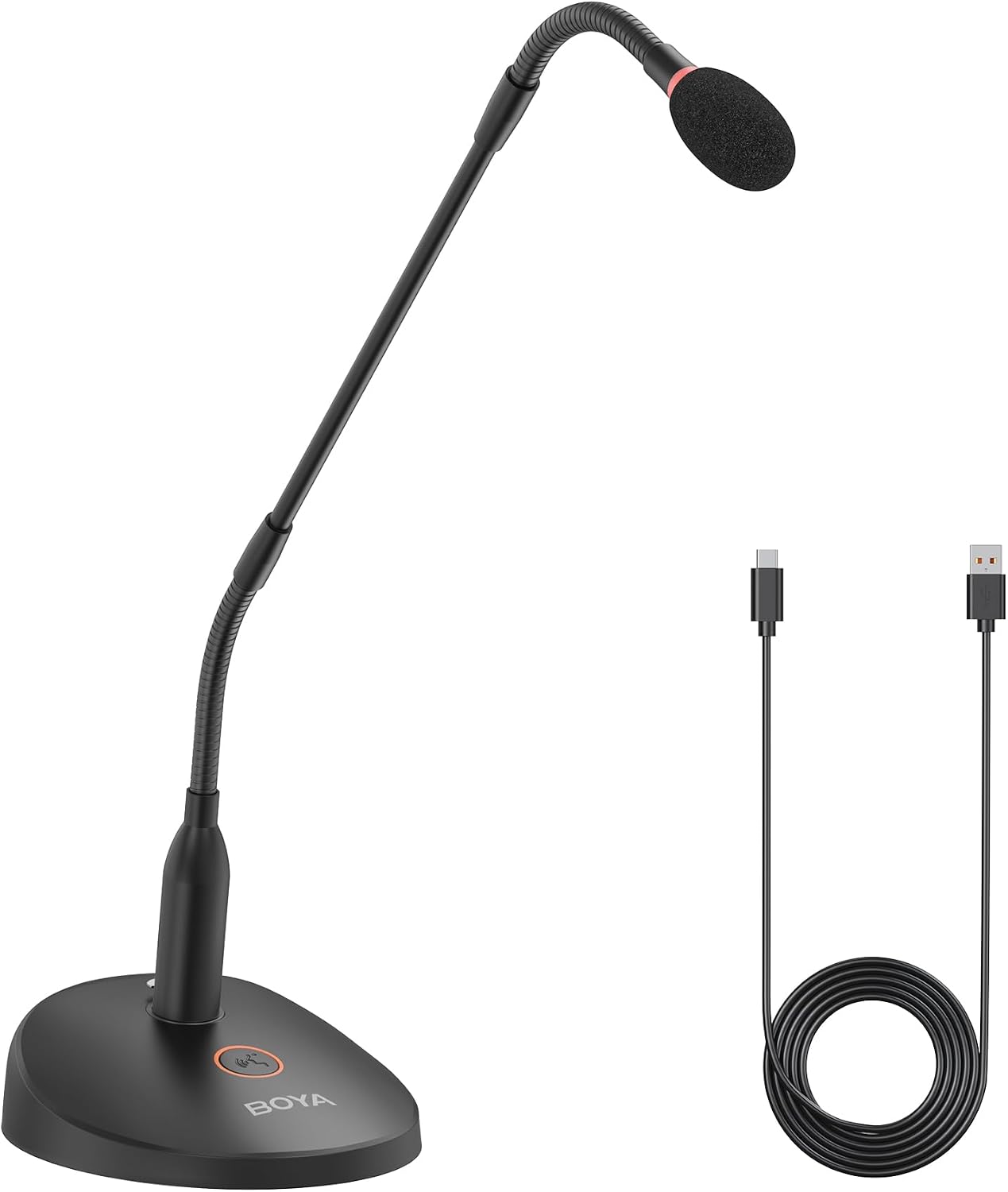
Pros
- Audio quality rivals premium Shure podium microphones at a fraction of the cost
- Extended 18-inch gooseneck provides superior positioning flexibility compared to standard desktop mics
- Instant plug-and-play setup works immediately on Windows PC and Mac without drivers
- LED mute indicator and real-time monitoring headphone jack add professional workflow features
- Includes foam windscreen and quality USB cable in the box
Cons
- Mute switch may allow slight signal leakage when off, which could be problematic in strict corporate environments
- Some users reported driver compatibility issues on certain Windows and Mac configurations despite plug-and-play claims
- Gooseneck length measurement appears inconsistent with actual product dimensions according to user comparisons
The BOYA BY-GM18CU is a USB condenser microphone designed for professionals who need broadcast-quality audio without the premium price tag. It targets online meeting participants, lecturers, content creators, and anyone requiring clear voice reproduction for streaming or recording. The cardioid polar pattern ensures focused sound capture while rejecting ambient noise from the sides and rear.
What sets this microphone apart is its exceptional performance-to-price ratio. Multiple verified users compare it favorably to Shure CentraVerse podium microphones that cost significantly more, noting superior build quality and sound clarity. The 18-inch bi-fold gooseneck offers genuine flexibility for positioning behind keyboards or at varying heights, and the one-touch mute button with LED indicator provides intuitive control. Real-time monitoring through the 3.5mm headphone jack lets you hear exactly what's being captured.
Build quality feels solid with a professional appearance, though the gooseneck length measurement appears slightly understated compared to actual dimensions. The included foam windscreen, 6.6-foot USB-C cable, and desktop base mean you have everything needed out of the box. Setup is genuinely plug-and-play on most systems, though a small number of users reported compatibility issues on specific Windows and Mac configurations.
The primary drawback is minor signal leakage when the mute switch is engaged, which most users won't notice but could be problematic in strict corporate settings where absolute silence is required. Additionally, some users experienced initial driver recognition issues despite the plug-and-play design, though this appears to be an edge case rather than a widespread problem.
The BOYA BY-GM18CU represents excellent value for remote workers, educators, and streamers seeking professional audio quality. It delivers reliable performance, thoughtful features, and build quality that punches well above its price point, making it a smart choice for anyone tired of mediocre built-in computer microphones.
Connectivity: USB Type-C (includes USB-A to USB-C cable, 6.6 feet)
Microphone Type: Condenser with cardioid polar pattern
Gooseneck Length: 18 inches, bi-fold adjustable
Audio Performance: Signal-to-noise ratio 80 dB, audible noise 80 dB
Controls: One-touch mute button with LED status indicator
Monitoring: 3.5mm headphone jack for real-time monitoring
Power: USB-powered, no batteries required
Included Accessories: Microphone base, foam windscreen, user manual
Dimensions: 3.94 x 2.36 x 14.57 inches, weight 600g
Compatibility: Windows PC and Mac computers
Remote Workers: If you spend hours in video conferences and want your voice to sound professional and clear, the BY-GM18CU eliminates the tinny quality of laptop microphones and webcam audio.
Content Creators: Podcasters, YouTube streamers, and online instructors benefit from the cardioid pattern that isolates your voice and the real-time monitoring to ensure consistent audio levels.
Educators: Lecturers and online instructors appreciate the extended gooseneck for flexible positioning and the reliable audio clarity that keeps students engaged during virtual classes.
Budget-Conscious Professionals: Anyone seeking Shure-quality audio at a fraction of the price will find exceptional value here, with verified users confirming performance parity with premium alternatives.
Voice Recognition Users: People using dictation software report this microphone's superior accuracy compared to even expensive specialized dictation devices.
Choosing the Right USB Microphone for Teaching
Pickup Pattern: Omnidirectional vs. Cardioid
Your teaching style dictates the best pickup pattern. An omnidirectional microphone, like the TONOR Conference USB Microphone, captures sound evenly from all directions. This is ideal if you move around, use a whiteboard, or teach a small group in one room.
In contrast, a cardioid pattern focuses on sound directly in front of the mic. The Amazon Basics Condenser Microphone for PC uses this to isolate your voice from background noise like a fan or keyboard. Choose cardioid for a fixed, solo teaching position at your desk.
Noise Reduction Technology
Home offices are rarely silent studios. Effective noise cancellation is non-negotiable. Look for models with dedicated chips or AI modes that filter out ambient sounds. The NEEWER UM04 USB Microphone AI Cancelling Desktop, for example, offers a specific tap-to-enable AI noise cancellation feature.
This technology actively suppresses common distractions such as typing, household chatter, or air conditioning hum. It ensures your voice remains the clear focal point for students, preventing them from straining to hear you over background interference.
Ease of Use and Setup
Teachers need technology that works instantly. A true plug-and-play microphone requires no driver installation. You simply connect it via USB and your computer recognizes it. The ZealSound Podcast Microphone for PC exemplifies this with wide device compatibility, including adapters for mobile devices.
Also, consider physical setup. A flexible gooseneck, like on the CMTECK USB Computer Microphone G009, allows precise positioning. A magnetic base, offered by the AIRHUG USB Microphone, provides versatile mounting options on monitors or desks, adapting to your unique workspace.
Essential Convenience Features
Practical features streamline your teaching flow. A dedicated, backlit mute button allows you to quickly cough or provide private feedback without fumbling in software. Real-time headphone monitoring, found on the BOYA BY-GM18CU Gooseneck Condenser Microphone, lets you hear exactly what your students hear.
This immediate feedback is crucial for catching audio issues like distortion or low volume before they affect your lesson. For creators who also produce video content, similar audio clarity principles apply, as discussed in our review of the best USB microphones for vlogging.
Final Thoughts
Investing in a dedicated USB microphone is one of the most effective upgrades for your online teaching setup. For educators seeking a simple, effective omnidirectional solution right out of the box, the TONOR USB Conference Microphone is a reliable choice. If you require more advanced control with features like gain adjustment and real-time monitoring for a professional solo setup, consider the ZealSound Podcast Microphone for PC. Both options will significantly enhance your audio presence and help keep your students engaged. You can explore more audio equipment within the broader recording and musical instruments category.
Frequently Asked Questions
Do I need a special microphone for online teaching, or is my laptop mic enough?
While laptop microphones work, they are generally low-quality and capture all surrounding noise. A dedicated USB microphone provides superior audio clarity, focuses on your voice, and actively reduces background sounds. This professional touch makes lessons easier for students to follow and reduces listener fatigue.
What is the difference between a USB microphone and an XLR microphone?
USB microphones have the audio interface built in, connecting directly to your computer via USB for ultimate simplicity. XLR microphones require a separate audio interface or mixer, offering more advanced control and potential for higher quality but at greater cost and complexity. For most online teaching scenarios, a quality USB mic is perfectly sufficient.
How do I reduce echo in my online classroom?
Echo is often caused by your microphone picking up audio from your speakers. Use headphones to prevent this audio loop. Additionally, many USB mics, like several models reviewed here, have built-in echo cancellation technology. Speaking closer to the microphone and having soft furnishings in your room can also help absorb sound reflections.
Can I use these microphones with a tablet or smartphone?
Compatibility varies. Many modern USB-C microphones can connect directly to newer tablets and phones. Others may require an adapter, such as a USB-C to USB-A or a Lightning adapter. Always check the product specifications, as models like the ZealSound include these adapters for full mobile compatibility in 2026.


Write Your Review
No reviews yet. Be the first to share your experience!