

If you are tired of muffled audio during your gaming sessions or want your podcast to sound polished, your built-in PC microphone is likely the culprit. Upgrading to a dedicated USB microphone is one of the simplest ways to dramatically improve your sound quality. Whether you are a streamer, a remote worker, or a content creator, the right mic can make your voice crisp and clear.
This guide reviews a curated selection of the top USB microphones for PC available in 2026. We have assessed models for various needs and budgets, from premium broadcast-quality condensers to compact, plug-and-play options. Our goal is to help you find the perfect microphone to elevate your audio for any application.
Top USB Microphones for PC: Quick Comparison

Pros
- Exceptional audio clarity and professional sound quality that rivals microphones costing significantly more
- Incredibly versatile with four pickup patterns, making it suitable for solo vocals, instrument recording, interviews, and group podcasts
- Intuitive onboard controls and Blue VO!CE software make professional audio effects accessible to beginners
- Solid build quality with premium metal design and included desktop stand for immediate use
- Extensive compatibility with streaming platforms, recording software, and conferencing apps across Mac and PC
Cons
- Requires Logitech G HUB software download for full functionality, adding setup complexity for some users
- USB-only connectivity limits future expandability compared to microphones with XLR outputs
- Some users report desire for shock mount compatibility when upgrading recording setups or pursuing advanced voiceover work
The Logitech Blue Yeti is a professional USB microphone engineered for content creators who demand broadcast-quality audio without studio complexity. Whether you are launching a podcast, streaming on Twitch, recording YouTube videos, conducting Zoom meetings, or producing music, this microphone delivers the clarity and power needed to sound polished and professional.
The standout feature is its custom three-capsule array combined with four switchable pickup patterns. Cardioid mode isolates your voice, omni mode captures room ambience, bidirectional mode records two sources facing opposite directions, and stereo mode creates spatial audio. This flexibility means you rarely need to purchase additional microphones as your content evolves. The Blue VO!CE software further elevates your audio with broadcast vocal effects, advanced voice modulation, and HD audio samples that professional streamers use to enhance their presence.
Build quality impresses immediately. The Blackout finish features premium metal construction that feels substantial and durable, while the adjustable desktop stand provides stable positioning. Onboard controls for headphone volume, pattern selection, instant mute, and microphone gain put you in complete command of your recording without opening software menus. Real-time no-latency monitoring lets you hear exactly what listeners will hear.
The primary consideration is that full functionality requires downloading Logitech G HUB software, which adds a setup step for those seeking truly plug-and-play simplicity. Additionally, the USB-only connection may feel limiting if you envision upgrading to XLR-enabled equipment later. However, for creators just starting out or those committed to USB-based streaming setups, these are minor trade-offs.
The Blue Yeti remains the gold standard for content creators seeking professional audio quality at accessible price points. Its combination of superior sound, versatile pickup patterns, intuitive controls, and reliable build quality makes it an exceptional investment for anyone serious about streaming, podcasting, or recording.
Podcasters and Streamers: The four pickup patterns and Blue VO!CE effects make this microphone perfect for anyone launching podcasts or streaming on Twitch, YouTube, or other platforms. Beginners and experienced creators alike benefit from the professional sound quality and ease of use.
Content Creators: Musicians, voiceover artists, and video producers gain broadcast-quality recording capabilities without investing in expensive XLR equipment. The wide frequency response captures full audio detail for music and instrument recording.
Remote Workers: The cardioid pickup pattern combined with background noise rejection makes the Yeti ideal for Zoom calls, Teams meetings, and professional conference recording. Your colleagues will hear you clearly without distracting room noise.
Gaming Streamers: Gamers streaming to Twitch or YouTube benefit from the clear vocal pickup and VO!CE effects that enhance commentary and communication with viewers. Setup takes seconds, letting you focus on gameplay.
Audio Performance: 20Hz to 20kHz frequency response, 120dB audio sensitivity, 100dB signal-to-noise ratio, 16 ohm impedance for professional-grade sound capture across the full audible spectrum.
Connectivity and Compatibility: USB connection works with both PC and Mac. Compatible with all major streaming platforms (Twitch, YouTube, OBS), recording software (Audacity, Adobe Audition), and conferencing apps (Zoom, Skype, Teams).
Physical Specifications: Weighs 3.5 pounds with dimensions of 4.92 x 4.72 x 11.61 inches. Premium metal construction with adjustable desktop stand included. Can be mounted on standard mic stands or boom arms.
Pickup Patterns: Four selectable modes including cardioid (front-facing), omnidirectional (all directions), bidirectional (front and back), and stereo (spatial audio). Switch patterns instantly with onboard button.
Warranty: 2-year manufacturer warranty included with every purchase.

Pros
- Exceptional value at budget-friendly price with professional-grade audio quality
- Instant setup with no drivers needed, works immediately on Windows, Mac, and PS4
- Effective noise cancellation keeps background sounds out of recordings and calls
- Flexible gooseneck positioning allows perfect microphone placement for any user
- LED mute indicator provides clear visual feedback of microphone status
Cons
- Not compatible with Linux, Raspberry Pi, or Android devices despite some user reports
- Requires lithium ion battery despite USB power connection, adding maintenance step
- Omnidirectional pattern may pick up more ambient sound in very noisy environments
The CMTECK G009 is a compact USB desktop microphone designed for anyone needing reliable audio input without complexity. Whether you are working from home, attending online classes, streaming content, gaming, or recording podcasts, this plug-and-play microphone delivers professional results at an accessible price point.
The standout feature is the active noise cancellation powered by CMTECK's CCS2.0 SMART CHIP with omnidirectional polar pattern. Combined with the built-in pop filter, it effectively isolates your voice while blocking background noise, making it ideal for shared spaces. Real-world users consistently praise the crystal clear audio quality and accurate voice capture, with reviewers noting excellent clarity for language apps, video calls, and streaming applications.
Build quality is solid with a metal enclosure and adjustable gooseneck design that lets you position the microphone exactly where you need it. The compact footprint won't clutter your desk, and the long USB cable provides flexibility in placement. The convenient one-touch mute button with LED indicator (green for connected, red for muted) puts control at your fingertips without needing software adjustments.
The main limitation is that despite USB power, the microphone requires a lithium ion battery, which adds a maintenance consideration. Additionally, while most users report compatibility across systems, it is officially incompatible with Linux, Raspberry Pi, and Android devices, so verify your platform before purchasing.
Overall, the CMTECK G009 represents excellent value for remote workers, online students, content creators, and gamers seeking dependable microphone performance without premium pricing or complex setup requirements.
Connectivity and Compatibility: USB plug-and-play with Windows 7/8/10, Mac OS, and PS4 support. No drivers required. Not compatible with Linux, Raspberry Pi, or Android.
Audio Performance: Omnidirectional condenser microphone with 30 dB audio sensitivity and 76 dB signal-to-noise ratio. Active noise cancellation with CCS2.0 SMART CHIP and integrated pop filter.
Design and Controls: Adjustable 360-degree gooseneck with metal construction. Dimensions: 2.68 x 4.21 x 4.41 inches. One-touch mute button with LED status indicator (green connected, red muted). Single channel input.
Power and Warranty: Corded USB connection with lithium ion battery required. 2-year limited warranty included. Includes USB cable.
Remote Work and Video Calls: Crystal clear voice capture makes this ideal for Zoom meetings, Skype calls, and professional video conferences from home offices.
Online Learning: Accurate voice pickup and noise cancellation benefit language learning apps, virtual classrooms, and online tutoring sessions.
Content Creation: Podcasters, YouTubers, and streamers appreciate the affordable entry point with professional audio quality and convenient mute control.
Gaming: Compact design and clear voice transmission make it perfect for team communication during multiplayer gaming sessions.
Shared Spaces: Active noise cancellation ensures your voice comes through clearly even when others are nearby, making it ideal for busy households.


Pros
- Exceptional value at under $10 with solid 4.4-star rating from over 1,100 users
- Instant setup, no configuration or driver downloads required for most devices
- Remarkably compact and lightweight, perfect for travel and hot-desking
- High-sensitivity condenser microphone with multi-level audio gain amplification
- Wide device compatibility covers virtually all modern computers and conferencing software
Cons
- Not designed for professional audio recording or content creation work
- Omnidirectional pattern may pick up background noise in loud environments
- Limited frequency response range compared to premium microphones
The DUNGZDUZ CGS-M3 is a budget-friendly USB microphone designed for remote workers, students, and anyone needing reliable audio for video conferencing and online communication. This pocket-sized device solves a common problem: built-in laptop microphones that produce muffled, unclear audio during important calls.
The standout feature is the high-sensitivity 6x10mm condenser microphone paired with multi-level audio gain amplification and advanced ADC processing. In real-world use, this delivers noticeably clearer voice transmission compared to standard laptop mics, with the ability to capture speech clearly from up to 10 feet away. The omnidirectional polar pattern ensures you stay in the audio sweet spot without precise positioning.
Build quality is solid for the price point, with a metal and plastic construction that feels durable despite the minimal footprint. The included metal carrying case adds protection during transport, and at just 50 grams, this mic truly fits in a pocket or laptop bag. Setup is genuinely plug-and-play across Windows, Mac, Linux, and Chromebook systems, with immediate compatibility in Zoom, Google Meet, Microsoft Teams, and Skype.
The main limitation is that this is not a studio-grade recording microphone. While adequate for conferencing and casual streaming, the 50-15000Hz frequency range and 30dB audible noise floor mean it won't satisfy professional audio engineers or podcasters seeking pristine sound quality.
Verdict: The DUNGZDUZ CGS-M3 is an excellent choice for improving video call quality on a tight budget. For remote workers, online students, and casual content creators, the combination of portability, ease of use, and audio improvement over built-in mics makes this a smart upgrade worth the investment.
Audio Specifications: Frequency Range 50-15000Hz, Signal-to-Noise Ratio 60dB, Audible Noise 30dB, Impedance 16 ohm, Omnidirectional polar pattern with 10-foot effective pickup distance.
Connectivity: USB 2.0 Type-A connector, USB-powered with no external power supply needed. Compatible with Windows, Mac, Linux, Chromebook, and Raspberry Pi.
Physical Specifications: Dimensions 0.71 x 0.31 x 1.89 inches, Weight 50 grams, Mini form factor. Includes protective metal carrying case and 12-month warranty.
Microphone Element: High-sensitivity 6x10mm condenser microphone with multi-level audio gain amplifier and advanced ADC module for enhanced audio processing.
Best For: Remote workers, online students, video conferencing professionals, content creators on a budget, and anyone seeking a portable microphone upgrade from their built-in laptop mic.
Consider This If: You regularly attend video calls and want noticeably clearer audio without complex setup. The plug-and-play nature means no technical knowledge required. The compact design is perfect if you travel frequently or work from multiple locations.
Skip This If: You need professional-grade audio for podcast recording, music production, or streaming content where sound quality is critical. This microphone is optimized for voice clarity in conferencing, not studio recording applications.
Compatibility Check: Works with all major video conferencing platforms and operating systems. Simply plug into any available USB port and select it as your microphone input in your application settings.

Pros
- Exceptional value for budget-conscious creators seeking professional-grade audio quality
- Truly plug-and-play setup eliminates frustration with driver conflicts and technical barriers
- Intelligent noise reduction dramatically improves audio clarity during recordings and live streams
- Flexible gooseneck design accommodates various desk layouts and personal positioning preferences
- LED mute button with visual feedback prevents accidental audio mishaps during important calls or streams
Cons
- USB cable connection limits microphone placement flexibility compared to wireless alternatives
- Omnidirectional pickup pattern may pick up some ambient noise in very loud environments despite noise reduction
- Lightweight base may require additional stabilization if repeatedly bumped during enthusiastic streaming sessions
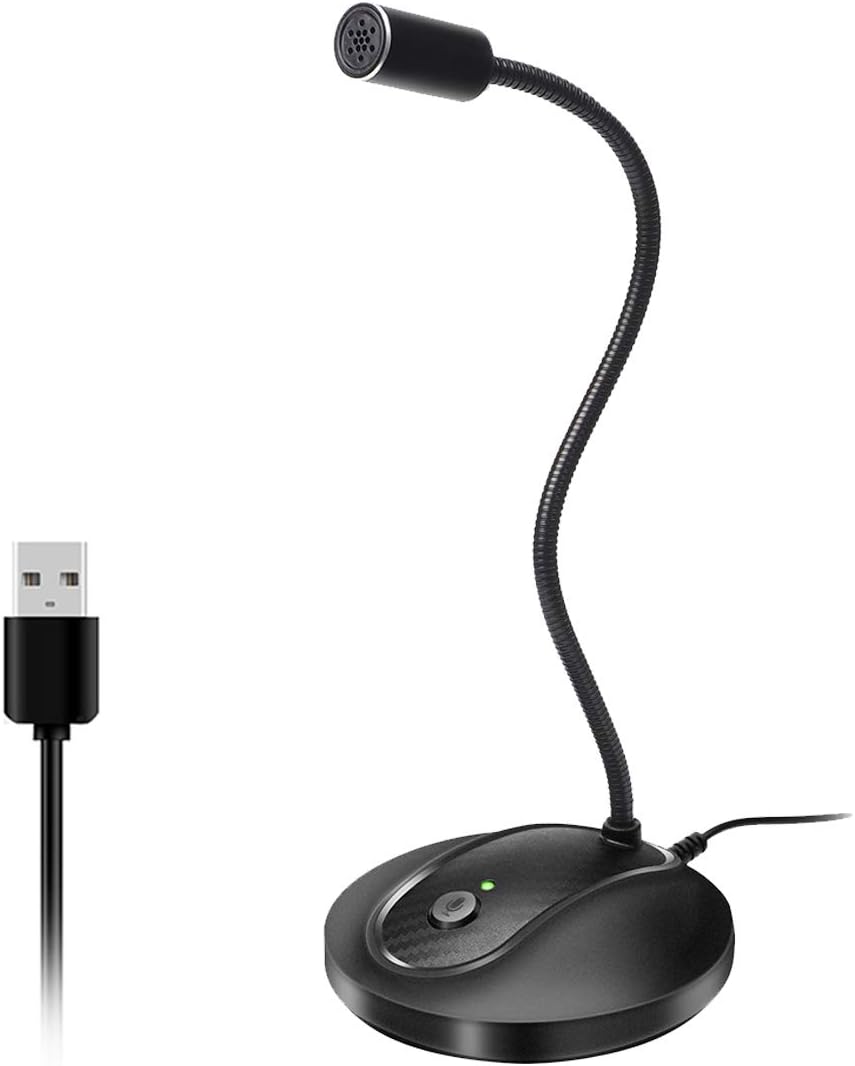
The CMOCIIY USB Gooseneck Microphone is a budget-friendly desktop microphone designed for podcasters, streamers, video conferencing participants, and online gamers who demand clear audio without complicated setup. Its plug-and-play USB connectivity means you can have professional-quality sound within seconds of unboxing, making it an excellent entry point for content creators and remote workers.
The standout feature is its intelligent noise reduction technology, which effectively filters out keyboard clicks, computer fan humming, and general background interference. Combined with the omnidirectional pickup pattern, this microphone captures your voice with impressive clarity and detail. Real-world performance shows it delivers noticeably better audio than built-in laptop microphones, and it handles everything from Zoom calls to YouTube streaming with consistent quality.
Design and build quality are solid for the price point. The flexible 5.7-inch metal gooseneck allows 360-degree positioning, so you can orient it horizontally or vertically depending on your comfort and desk setup. The weighted ABS base with non-slip silicone pads keeps the microphone stable during use, and the compact, lightweight construction makes it easy to transport between locations.
The one-tap LED mute button with customizable breathing lights adds both functionality and aesthetic appeal to your streaming or gaming setup. However, the USB cable connection does limit placement flexibility compared to wireless options, and the omnidirectional pattern may pick up some ambient noise in particularly loud environments despite the noise reduction features.
Overall, the CMOCIIY USB Gooseneck Microphone represents excellent value for creators on a budget. It eliminates the common frustration of complex driver installation, delivers noticeably better audio than stock solutions, and includes thoughtful features like LED muting. If you need reliable, clear audio for streaming, podcasting, or conferencing without spending premium prices, this microphone deserves serious consideration.
Connectivity: USB Type-A (wired)
Polar Pattern: Omnidirectional
Compatibility: Windows PC, Mac, Laptop, Tablet
Special Features: 1-touch recording, mute function with LED indicator, noise reduction, customizable breathing lights
Gooseneck: Fully adjustable 360-degree metal gooseneck, 5.7 inches flexible
Base: Weighted shock-resistant ABS with non-slip silicone pads
Weight: 0.26 kg (lightweight and portable)
Included: Microphone unit
Recommended Uses: Gaming, streaming, video conferencing, podcasting, online meetings
Perfect For: Budget-conscious podcasters and streamers looking for their first quality microphone, remote workers attending frequent video calls, casual gamers wanting better in-game chat audio, and content creators who prioritize simplicity over advanced features.
Great Choice If: You value plug-and-play convenience, need effective noise cancellation for a home office environment, want customizable LED aesthetics, appreciate flexible positioning options, and prefer avoiding driver installation headaches.
Consider Alternatives If: You require wireless connectivity, need studio-grade XLR connectivity options, work in extremely noisy environments requiring industrial-level noise filtering, or want advanced audio controls beyond basic muting.
Pros
- Superior audio quality compared to laptop microphones and Bluetooth alternatives, verified by peer feedback
- Flexible gooseneck design eliminates workspace clutter and allows perfect mic positioning for any setup
- Truly plug-and-play with zero configuration, making it accessible for non-technical users
- Thoughtful mute button and LED indicator provide quick visual feedback and privacy control
- Solid metal and ABS construction feels premium and withstands daily use
Cons
- Not compatible with Xbox, Raspberry Pi, or Android devices, limiting versatility beyond PC and Mac
- Some users report occasional connection stability issues, though audio quality remains good when connected
- May require 10-15 minutes to fully understand setup despite plug-and-play simplicity
The JOUNIVO JV-601 is a compact USB microphone designed for professionals and casual users who need reliable audio capture without complexity. Whether you are taking Zoom calls, recording voice-to-text, gaming online, or conducting video conferences, this gooseneck microphone delivers the audio clarity users expect from higher-priced competitors.
The standout feature is the 360-degree adjustable gooseneck that lets you position the microphone exactly where you need it. Combined with the omnidirectional condenser mic and built-in noise-canceling technology, the JV-601 captures your voice with impressive clarity while filtering out background noise, keyboard clicks, and room hum. The one-click mute button with LED indicator adds a professional touch, letting you instantly control when the mic is active and providing visual confirmation of its status.
Build quality exceeds expectations at this price. The microphone uses premium metal piping paired with a heavy-duty ABS stand, creating a solid, professional appearance that looks good on any desk. The 1.8 to 6-foot USB cable provides flexibility in setup, and the compact 9-inch height keeps your workspace uncluttered while remaining fully visible and accessible.
The main limitation is compatibility, as the JV-601 only works with Windows and macOS computers, not mobile devices, gaming consoles, or Linux systems. Some users have reported occasional connection issues, though these appear to be rare and audio quality remains good when the connection is stable. Setup is truly plug-and-play, though first-time users may need 10-15 minutes to familiarize themselves with the controls.
The JOUNIVO JV-601 represents exceptional value for anyone seeking professional-grade audio on a budget. Real users consistently report that peers notice the dramatic improvement in call quality compared to built-in laptop mics. For video conferencing, content creation, or voice dictation on Windows or macOS, this microphone is a smart investment.
Connectivity and Compatibility: USB plug-and-play connection with 1.8 to 6-foot cable. Compatible with Windows 7, 8, 10, and 11, plus macOS. Not compatible with Xbox, Raspberry Pi, or Android devices.
Audio Performance: Omnidirectional condenser microphone with 76dB signal-to-noise ratio. Frequency range spans 20Hz to 20kHz for full-spectrum audio capture. Advanced noise-canceling technology reduces background noise and echo.
Design and Controls: 360-degree adjustable gooseneck design with metal pipe construction and heavy-duty ABS stand. One-click mute button with built-in LED indicator showing active/muted status. Compact dimensions of 3 x 3 x 9 inches.
Physical Specifications: Weight 7.06 ounces. Single-channel audio input. Enclosure material combines acrylonitrile butadiene styrene and metal for durability. Includes microphone and USB cable, no additional equipment required.

Pros
- Exceptional audio clarity and volume capture, outperforming built-in laptop and earphone microphones
- Genuinely versatile mounting system with magnetic design and adhesive dots adapts to laptops, monitors, and clothing
- Seamless compatibility with Zoom, Teams, Skype, and major recording platforms without configuration hassle
- Dual-mode audio processing gives users control over noise reduction versus natural sound reproduction
- Durable construction with washable nano adhesive dots designed for repeated use and long-term reliability
Cons
- AI noise reduction may not eliminate all background noise in heavily noisy environments, requiring manual mode switching
- Magnetic attachment works only on metal surfaces, limiting placement options on non-metal desks and monitors
The AIRHUG USB Microphone is a compact, feature-rich audio capture device designed for remote workers, online educators, gamers, and content creators. This plug-and-play microphone solves the common problem of poor audio quality in video calls and recordings by delivering professional-grade sound without the complexity of traditional studio equipment or expensive peripherals.
The standout feature is undoubtedly the smart magnetic mounting system combined with three reusable nano adhesive dots, offering unprecedented flexibility in placement. Real-world users report excellent performance when positioned at the base of laptop screens or mounted underneath monitors, with the 360-degree omnidirectional pickup capturing voices clearly from multiple angles within a 6-foot range. The dual-mode audio processing lets you toggle between AI Noise Reduction for filtering keyboard clicks and fan noise, or Original Mode for capturing natural, high-fidelity sound depending on your environment and needs.
Build quality is solid for the price point, with a compact desktop form factor that takes minimal desk space. The included 2-meter USB-C cable provides sufficient reach for various desk arrangements, and the one-touch mute button with color-coded LED indicator adds a professional touch for managing privacy during sensitive calls. Setup is genuinely plug-and-play on Windows and Mac systems without requiring driver downloads or software configuration.
The main limitation is that AI noise reduction, while effective for typical office environments, may not fully eliminate heavy background noise in consistently loud settings. Additionally, the magnetic mounting only works on metal surfaces, so users with non-metal desks will need to rely on the adhesive dots or clip attachment instead. Some users report the noise cancellation performs similarly to built-in software solutions from calling platforms like Zoom and Teams.
The AIRHUG 28 represents excellent value for anyone seeking noticeably better audio quality than their built-in microphone. Its versatile mounting options, dual audio modes, and reliable performance across major communication platforms make it a practical upgrade for home offices, remote work setups, and content creation without requiring significant investment or technical expertise.
Connectivity and Compatibility: USB Type-C connector with 2-meter cable. Compatible with Windows 7, 8, 10, 11 and Mac OS. Works with Zoom, Teams, Skype, and major recording applications. No drivers required.
Audio Specifications: Omnidirectional polar pattern with 360-degree pickup range. Effective audio capture distance up to 6 feet (2 meters). High sensitivity for clear voice reproduction. Single channel mono audio.
Controls and Indicators: One-touch mute button with three-color LED status indicator. Blue light indicates AI Noise Reduction mode active. Green light shows Original Mode active. Red light indicates microphone is muted.
Mounting and Accessories: Smart magnetic design with included magnetic sheet. Three washable and reusable nano adhesive dots included. Clip attachment option for clothing. Desktop form factor. Includes user guide and all necessary components in single package.
Warranty and Support: 2-year manufacturer warranty included with purchase.
Remote Workers and Home Office Professionals: If you spend hours daily on video calls via Zoom, Teams, or Skype, this microphone delivers noticeably clearer audio than your laptop's built-in mic. The mute button and noise reduction modes are particularly valuable during long workdays with frequent meetings.
Online Educators and Trainers: Teachers, instructors, and training professionals benefit from the omnidirectional pickup that captures voices clearly from various positions in a home office or classroom setting. The flexible mounting ensures you can position it optimally for your space.
Content Creators and Streamers: YouTubers, podcasters, and live streamers appreciate the dual audio modes that let them choose between noise-filtered and natural sound depending on their content type. The compact design keeps desk clutter minimal during recording sessions.
Gamers and Esports Competitors: Multiplayer gamers communicating with teammates need reliable voice capture without background noise interfering with gameplay audio. This microphone's quick mute function and clear pickup ensure your team hears you perfectly.
Budget-Conscious Buyers: Anyone seeking professional audio quality without premium pricing will find this microphone delivers exceptional value. It outperforms microphones costing two to three times more while maintaining simplicity and ease of use.

Pros
- Exceptional audio quality with 40Hz-18kHz frequency response and 46kHz sampling rate for rich, detailed sound
- Plug-and-play simplicity with zero setup hassle across multiple platforms and operating systems
- Advanced noise reduction effectively handles real-world recording environments without sacrificing vocal warmth
- Versatile physical controls allow instant on-the-fly adjustments without opening software menus
- Durable metal construction with weighted base provides excellent stability and vibration resistance
Cons
- Noise reduction mode requires holding the mute button rather than offering a dedicated toggle switch for quick access
- Single-channel design limits advanced multi-track recording capabilities for professional studio applications
- Limited frequency range at the low end (40Hz minimum) may not capture ultra-deep bass in specialized audio work
The ZealSound K66 is a desktop USB condenser microphone engineered for podcasters, content creators, streamers, and remote professionals who demand studio-quality audio without complicated setup. Its true plug-and-play design eliminates driver installation, making it instantly compatible with Windows PCs, Macs, PlayStation consoles, and mobile devices via included USB-C and Lightning adapters.
The K66 excels with its intelligent noise reduction mode, which effectively suppresses keyboard clicks, PC fan noise, air conditioner hum, and background chatter while preserving natural vocal warmth in default mode. The cardioid pickup pattern focuses on your voice, and the 40Hz-18kHz frequency response captures rich lows, smooth mids, and clear highs. Real-time zero-latency monitoring through the built-in 3.5mm headphone jack lets you hear exactly what's being recorded without delay, while dedicated control knobs for microphone gain, monitoring volume, and echo provide hands-on sound shaping without software menus.
Build quality stands out with a solid metal construction, weighted base for vibration resistance, and a 360-degree rotatable design that adapts to any desk setup. The included accessories, comprehensive 365-day warranty, and responsive customer service add significant value. Users consistently praise the plug-and-play convenience and audio clarity across two-year testing periods.
The main limitation is the single-channel design, which works perfectly for podcasting and streaming but may not suit advanced multi-track recording. The noise reduction mode requires holding the mute button rather than offering a dedicated toggle, and the 40Hz minimum frequency range may not capture ultra-deep bass in specialized applications.
For podcasters, streamers, online educators, and content creators seeking professional audio quality without technical complexity, the ZealSound K66 delivers exceptional performance. Its combination of intelligent noise reduction, real-time monitoring, multi-platform compatibility, and durable design makes it a standout choice in the affordable microphone category.
Audio Performance: Frequency response of 40Hz-18kHz with 46kHz sampling rate, 125dB audio sensitivity, 85dB signal-to-noise ratio, and 66dB audible noise level. Cardioid unidirectional polar pattern with 2.2 kiloohms impedance.
Connectivity: USB connection with 3.5mm headphone jack for monitoring. Includes 70.9-inch USB cable with USB-C and Lightning adapters for cross-platform compatibility. Compatible with Windows PC, Mac, PS4, PS5, iPhone, iPad, and USB-C devices.
Controls and Features: Dedicated knobs for microphone volume, monitoring volume, and echo control. One-touch mute button with red LED indicator. Intelligent noise reduction mode with blue LED indicator. Real-time zero-latency monitoring with adjustable headphone volume.
Design: Desktop form factor with 360-degree rotatable top-addressed design. Solid metal construction with weighted anti-vibration stand base. Dimensions: 1.58 x 1.58 x 6.1 inches. Weight: 1.1 pounds.
Included Accessories: Microphone with stand base, 70.9-inch USB cable, foam windscreen, USB-C adapter, Lightning adapter, and user manual. 365-day manufacturer warranty with free technical support.
Podcasters and Audio Producers: The K66 delivers broadcast-level audio with intelligent noise reduction, making it ideal for podcast recording, voice-over work, and audio production without expensive studio equipment.
Content Creators and Streamers: Multi-platform compatibility with included adapters makes this microphone perfect for YouTube, TikTok, Twitch, and other streaming platforms. Real-time monitoring helps catch audio issues before they affect your stream.
Remote Workers and Online Educators: Plug-and-play simplicity, noise reduction, and instant mute make the K66 excellent for Zoom meetings, Discord calls, online classes, and professional video conferences.
Gamers and ASMR Creators: The adjustable echo control and cardioid pattern capture expressive voice delivery for gaming chat, ASMR content, and creative recordings. Stable metal base prevents vibration interference during extended sessions.
Mobile Content Creators: USB-C and Lightning adapters enable seamless switching between desktop and mobile recording on iPhones, iPads, and Android devices without additional equipment or adapters.

Pros
- Exceptional pickup range allows multiple people in the same room to be heard clearly on video calls
- True plug-and-play setup with zero configuration or driver software needed
- Intuitive one-button mute with visual LED status indicator for easy meeting management
- Compact, sleek design complements modern desk setups and remains unobtrusive
- Excellent value for group conferencing needs at an affordable price point
Cons
- Microphone only, does not include built-in speakers for audio output
- 5-inch diameter footprint may require desk space consideration in very cramped workstations
- Frequency range maxes out at 16 kHz, limiting use for specialized audio production applications
The TONOR TM20 is a USB-based boundary microphone designed specifically for video conferencing, online teaching, and remote collaboration. It works seamlessly with Zoom, Skype, Google Meet, WebEx, and other major communication platforms on both Windows and macOS systems. This microphone is perfect for professionals, educators, and remote teams who need reliable group audio capture without the complexity of traditional conference room setups.
What sets the TM20 apart is its genuine 360-degree omnidirectional pickup pattern combined with effective noise reduction technology. The microphone can capture voices from up to 16.4 feet away, making it ideal for conference tables or group settings where multiple people need to be heard equally. Real-world users report that it significantly outperforms standard webcam microphones, picking up conversations from across a room while minimizing background noise and echo for clearer audio delivery to remote participants.
The build quality reflects its professional design philosophy. The compact 5.79-inch boundary form factor sits flat on desks and blends into any workspace. The polycarbonate construction feels durable, and the included 2-meter USB cable provides flexibility in placement. The one-touch mute button with blue and red LED indicators gives users instant visual feedback about microphone status, which is essential during multitasking or sensitive conversations.
One limitation to note is that this is a microphone-only device with no integrated speaker functionality. Users will need separate speakers or headphones for audio output. Additionally, while the 78 dB signal-to-noise ratio performs excellently for conferencing, the frequency range of 60-16,000 Hz is optimized for voice rather than music or specialized audio work.
The TONOR TM20 delivers exceptional value for anyone seeking reliable group audio capture for video calls. Its ease of use, solid sound quality, and affordable pricing make it a standout choice for remote workers, educators, and small teams looking to upgrade from inadequate built-in microphones.
Connectivity and Compatibility
Connectivity: USB 2.0
Compatible Devices: Windows and macOS computers
Supported Platforms: Zoom, Skype, GoToMeeting, WebEx, Google Hangouts, Fuze, Discord, and other USB-compatible applications
Installation: Plug and play, no drivers required
Audio Performance
Polar Pattern: Omnidirectional 360-degree pickup
Pickup Range: 5 meters (16.4 feet)
Frequency Response: 60-16,000 Hz
Signal-to-Noise Ratio: 78 dB
Impedance: 2200 ohms
Number of Channels: 1
Physical Specifications
Form Factor: Boundary microphone
Dimensions: 5.79 x 5.79 x 1.3 inches
Weight: 400 grams (14 ounces)
Material: Polycarbonate enclosure
Color: Black
Features and Controls
Mute Function: One-button touch mute with LED indicator
LED Status: Blue light indicates working mode, red light indicates mute mode
Noise Reduction: Built-in technology to block background noise and eliminate echo
Power Source: Corded electric via USB
Included Components
1x USB Condenser Microphone (TM20)
1x USB Cable (2 meters)
1x User Manual
Who Should Buy This Microphone?
The TONOR TM20 is ideal for remote workers, online educators, small business teams, and anyone participating in frequent video conferences who needs better audio quality than their laptop or webcam provides. It is particularly valuable for group settings where multiple people in the same room need to be heard clearly by remote participants.
When to Choose the TM20
Choose this microphone if you host or participate in regular Zoom meetings, conduct online classes, run podcast discussions with multiple speakers, or manage conference calls with group participation. It is also excellent for content creators who need to capture ambient room audio or interview multiple people simultaneously.
Important Considerations
Remember that this is a microphone-only device without built-in speakers. You will need to use your computer speakers, external speakers, or headphones for audio output. The 16.4-foot pickup range is generous for most rooms, but very large conference halls may require additional microphones or a dedicated audio system. The microphone works best when placed centrally within the group to ensure even audio capture from all directions.
Setup and Placement Tips
For optimal performance, position the TM20 in the center of your conference table or meeting area. The flat boundary design allows it to sit flush on desks or tables. The included 2-meter cable gives you flexibility to place it away from your computer. Avoid placing it directly against walls, as this can affect the omnidirectional pickup pattern. Test the mute button and LED indicator during your first call to ensure you are familiar with the controls.
How to Choose the Best USB Microphone for Your PC
Consider Your Primary Use Case
Your intended activity should guide your choice. For solo streaming or podcasting, a cardioid pickup pattern is ideal as it focuses on your voice and rejects background noise. If you host multi-person meetings, an omnidirectional mic like the TONOR USB Conference Microphone captures sound from all directions. Gamers might prioritize features like RGB lighting and a dedicated mute button.
Evaluate Connectivity and Compatibility
Most USB microphones offer simple plug-and-play operation, which is perfect for beginners. Some advanced models, like the FIFINE AmpliGame AM8, provide both USB and XLR connections for future upgrades. Always confirm compatibility with your operating system and software, whether you use Windows, Mac, or popular platforms like OBS or Discord.
Assess Key Features for Control
<!–Look for onboard controls that make adjustments easy. Physical knobs for gain, headphone volume, and monitoring are invaluable for real-time tweaks. A dedicated mute button with a clear LED indicator, found on models like the ZealSound Podcast Microphone for PC, is essential for privacy. Zero-latency monitoring ensures you hear your voice in real time without distracting delay.
Prioritize Sound Quality and Noise Handling
The core purpose is clear audio. Condenser mics generally offer superior sensitivity and detail, ideal for studio-style recording. Dynamic mics can be better for noisy environments. Features like built-in pop filters, shock mounts, and advanced noise-canceling chips, as seen in the CMTECK USB Computer Microphone G009, are crucial for clean vocal capture.
Final Thoughts
Choosing the right USB microphone significantly enhances your PC audio, whether for professional streaming or daily video calls. For creators seeking legendary, broadcast-quality sound with maximum versatility, the Logitech Creators Blue Yeti USB Microphone for PC remains a top-tier investment. If you need an affordable, flexible solution for clear calls and basic recording, the highly-rated CMTECK USB Computer Microphone G009 offers exceptional value and reliable performance. Explore more options for low-noise recording on our site to find your perfect match.
Frequently Asked Questions
Do I need an audio interface for a USB microphone?
No, one of the main advantages of USB microphones is that they do not require an external audio interface. They contain their own built-in analog-to-digital converter, allowing you to plug directly into your computer’s USB port. This makes them incredibly user-friendly and cost-effective for beginners.
What is the difference between cardioid and omnidirectional pickup patterns?
A cardioid pattern captures sound primarily from the front of the microphone, perfect for isolating a single speaker’s voice and reducing background noise. An omnidirectional pattern picks up sound equally from all directions, which is suitable for conference calls or recording group discussions. Many directional USB microphones offer multiple patterns for flexibility.
Can I use a USB microphone for gaming on a console?
Yes, many USB microphones are compatible with modern gaming consoles like the PlayStation 5 and Xbox Series X/S, provided the console supports USB audio input. Always check the product specifications for confirmed console compatibility before purchasing to ensure it will work with your setup.
How do I reduce background noise with my USB microphone?
Start by using a microphone with a cardioid pickup pattern and positioning it close to your mouth. Enable any built-in noise reduction features your mic may have. Additionally, you can use software filters in programs like OBS Studio, Streamlabs, or Discord to further suppress keyboard clicks and fan noise for cleaner audio.


Write Your Review
No reviews yet. Be the first to share your experience!