

Your stream is live, your game is loaded, but something’s missing from your desk’s aesthetic. The professional audio is there, but the visual flair feels incomplete. A standard mic arm gets the job done, yet it lacks that immersive, dynamic element that ties your entire gaming or streaming persona together. That’s where specialized microphone boom arms with integrated RGB lighting come in, transforming functional gear into a centerpiece of your setup.
This guide is crafted for content creators, streamers, and dedicated gamers who refuse to compromise. You demand crystal-clear communication and professional audio positioning, but you also want your equipment to reflect your style and enhance the on-screen experience. We have assessed the leading options on the market to help you find a boom arm that delivers rock-solid stability for your microphone while bathing your space in customizable, vibrant light. Let’s illuminate your path to a superior setup.
Pros
- Exceptional audio clarity and minimal background noise capture right out of the box
- Complete bundle eliminates need for additional purchases or compatibility concerns
- Intuitive touch controls make muting and adjusting settings effortless during streaming
- Sturdy metal boom arm with adjustable joints accommodates most desk setups
- Unidirectional polar pattern focuses on your voice while rejecting side noise
Cons
- PlayStation audio quality is limited by console compatibility constraints rather than microphone capability
- No built-in headphone monitoring port, requiring separate headphone connection
- RGB lighting may not appeal to users preferring minimalist or professional aesthetics
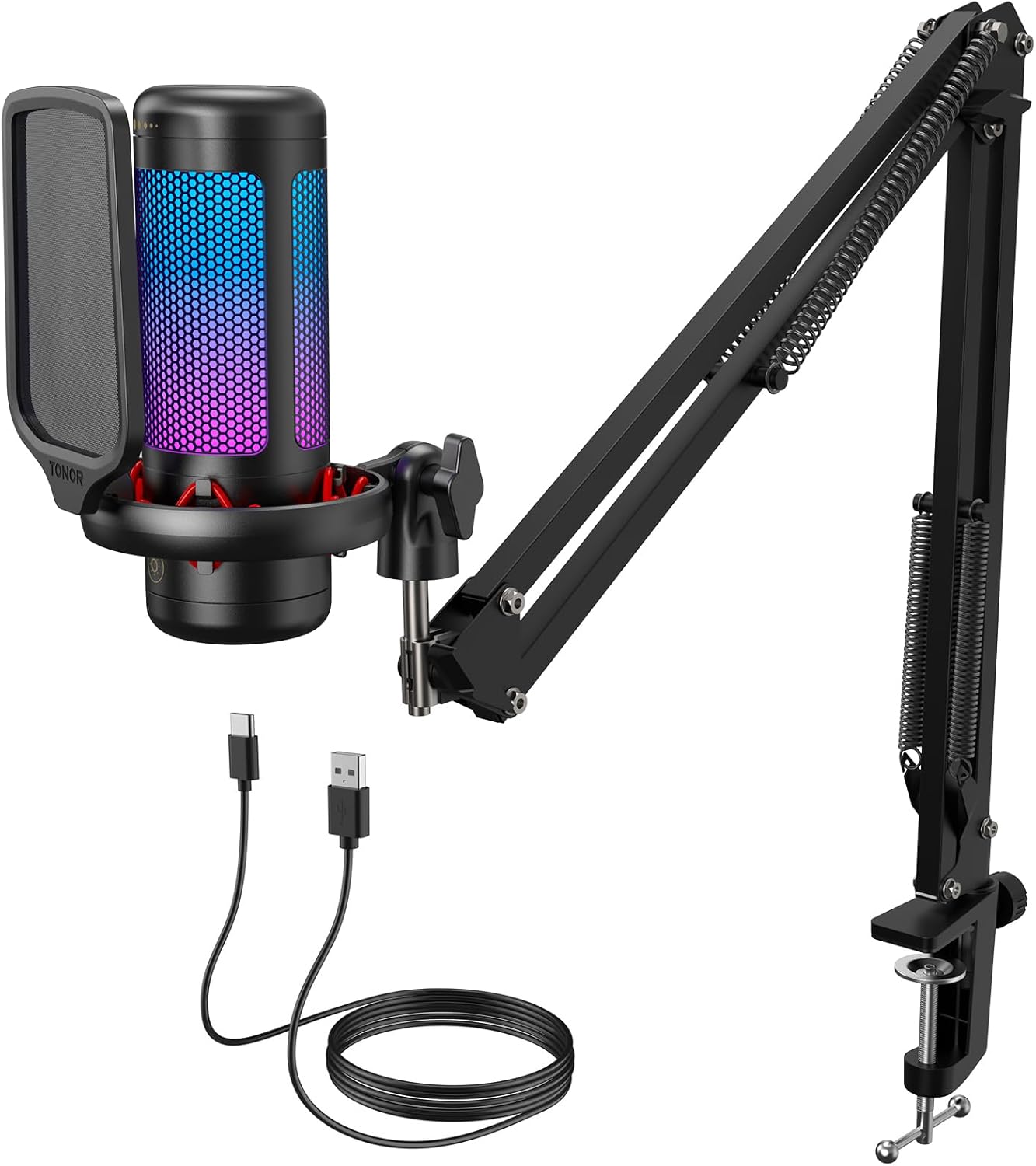
The TONOR TC310+ is a complete USB microphone solution designed for gamers, streamers, podcasters, and content creators who demand professional audio without technical complexity. This all-in-one kit arrives with everything needed for immediate setup, making it ideal for beginners and experienced creators alike who want to upgrade their audio quality without learning curve frustrations.
What sets this microphone apart is its commitment to simplicity and performance. The condenser capsule delivers crisp, clean audio with a 78 dB signal-to-noise ratio that captures voice detail while minimizing background interference. Users consistently report that friends notice immediate audio improvements during gaming sessions, and the adjustable gain control lets you dial in the perfect volume level. The one-tap mute button proves invaluable during live streams, allowing quick responses to unexpected situations without fumbling through software menus.
The included boom arm is constructed from quality metal with multiple adjustable joints, providing flexibility to position the microphone at your ideal angle. The sturdy clamp accommodates desks up to 2.36 inches thick, and the unidirectional polar pattern ensures your voice remains the focus while ambient noise stays suppressed. Build quality feels durable and professional, with the shock mount providing additional isolation from desk vibrations and handling noise.
The vibrant RGB lighting with four customizable modes adds visual appeal to your streaming setup, though brightness control prevents eye strain during extended sessions. One limitation worth noting is the lack of a headphone monitoring jack, meaning you cannot directly monitor your audio through the microphone itself. Additionally, PlayStation users report that console limitations affect audio quality more than the microphone's capabilities, a constraint beyond the device's control.
The TONOR TC310+ represents exceptional value for anyone seeking studio-quality audio at budget-friendly pricing. Its plug-and-play design, professional sound output, and complete accessory bundle make it the top choice for gamers and streamers ready to elevate their audio presence without unnecessary complexity or expense.
Audio Performance
Polar Pattern: Unidirectional
Signal-to-Noise Ratio: 78 dB
Audio Sensitivity: 10 dB
Channels: 1
Connector: USB Type-C
Physical Specifications
Dimensions: 16 x 6 x 5.4 inches
Weight: 474 grams
Material: Acrylonitrile Butadiene Styrene with Alloy Steel components
Color: Black
Boom Arm Clamp: Fits desks up to 2.36 inches thick
Connectivity and Compatibility
Connection: USB 2.0/3.0
Compatible Devices: PC, Mac, Laptop, PS4, PS5
Power Source: USB corded (no batteries required)
Setup: Plug and play, no drivers needed
Included Components
Microphone unit, Pop filter, Mic stand, Shock mount, USB cable, User manual
Ideal For
This microphone is perfect for Twitch streamers, YouTube content creators, gamers seeking better team communication, podcasters on a budget, and anyone upgrading from built-in laptop or headset microphones. If you value simplicity, professional audio quality, and don't want to spend hours configuring complex audio software, this is your solution.
Consider Alternatives If
You need professional-grade XLR connectivity, require built-in headphone monitoring, or are seeking audio equipment for mastering and music production. The TC310+ excels at voice-focused applications but isn't designed for full-spectrum music recording.
What to Look for in an RGB Microphone Boom Arm
Build Quality and Weight Capacity
The core purpose of any boom arm is to hold your microphone securely in place, without sagging or wobbling during intense moments. Look for arms constructed from heavy-duty steel or reinforced metal, as these materials provide the necessary rigidity. A high weight capacity, often around 3.3 lbs or more, ensures compatibility with a wide range of microphones, from lightweight USB models to heavier dynamic XLR mics. This foundational stability prevents unwanted noise transmission and keeps your audio clean.
Lighting Customization and Control
<!–RGB lighting should offer more than a single static color. The best arms provide multiple modes like gradient flows, breathing effects, and color cycling, all controllable via a dedicated button on the arm itself. Some advanced kits even allow the microphone’s RGB to sync with the arm for a fully coordinated light show. Consider whether you prefer a subtle glow or vibrant, game-reactive patterns to match your content’s mood.
Adjustability and Ease of Use
A good RGB boom arm must be as functional as it is flashy. Smooth, multi-joint articulation is key. You should be able to rotate the arm 360 degrees at the base and adjust the boom through a wide vertical arc for perfect microphone positioning. Tool-free installation with a robust desk clamp, like those discussed in our guide to the best microphone boom arms with desk clamps, makes setup a quick, frustration-free process. This flexibility lets you stow the mic away when not in use, maximizing desk space.
Compatibility and Included Accessories
Verify the thread size on the arm’s microphone mount. Most quality arms include both 3/8-inch and 5/8-inch thread adapters to ensure universal compatibility with virtually any microphone on the market. Also, check if the product is a standalone arm or part of a complete kit. Kits often bundle a compatible microphone, a shock mount, and a pop filter, offering tremendous value for newcomers. For those building a setup piece by piece, a dedicated arm like the FIFINE AmpliGame BM38 is a perfect choice.
Final Thoughts
Choosing the right RGB microphone boom arm elevates both your audio workflow and your visual presentation. For streamers seeking an all-in-one solution with exceptional value, the FIFINE AmpliGame A6T USB Gaming Microphone Kit provides a complete, plug-and-play package. If you already own a microphone and want to upgrade your stand with premium, customizable lighting, the dedicated FIFINE AmpliGame BM38 Metal Microphone Boom Arm offers professional-grade stability and stunning RGB effects. Both paths lead to a more immersive and professional-looking setup for your audience.
Frequently Asked Questions
Can I use an RGB microphone boom arm with any microphone? Yes, in most cases. High-quality arms come with dual thread adapters (3/8″ and 5/8″) to fit the standard mounting points on nearly all podcast, streaming, and vocal microphones. Always confirm the included adapters match your mic’s thread size.
Do RGB lights on a boom arm affect microphone performance? No, the lighting system is electrically separate from the microphone’s audio circuitry. The LEDs are low-power and designed not to introduce any electronic interference or noise into your audio signal, ensuring your sound remains clear and professional.
Are these arms difficult to set up and adjust? Modern RGB boom arms are engineered for easy setup. They typically feature tool-free installation with a hand-tightened C-clamp and intuitive tension knobs on the joints. You can adjust the microphone’s position smoothly and lock it securely in place within seconds, making fine-tuning your setup as simple as exploring options for the best silver microphone shock mounts.
What’s the difference between a USB microphone kit and a standalone boom arm? A USB kit, like the TONOR or FIFINE bundles, includes both the microphone and the RGB arm, offering a complete audio solution ideal for beginners. A standalone arm is for users who already own a microphone and want to upgrade their stand. It provides more flexibility to pair with your preferred mic, whether it’s a USB model or a more advanced XLR microphone.







Write Your Review
No reviews yet. Be the first to share your experience!