

Your YouTube setup is only as good as its weakest link, and for many creators, that’s a microphone precariously perched on a wobbly stand. A proper boom arm is the unsung hero of a professional audio setup, freeing up desk space, positioning your mic perfectly, and eliminating handling noise that can ruin a take. Whether you’re a seasoned podcaster or just starting your channel, the right arm makes recording smoother and your content sound more polished.
This guide is for content creators who want to elevate their audio without overcomplicating their workflow. We’ve assessed ten top-rated microphone boom arms, from professional studio-grade models to all-in-one kits perfect for beginners. You’ll find options for every budget and setup, helping you achieve that clean, broadcast-ready sound your audience deserves. For a broader look at tools for creators, explore our guide on the best microphone boom arms for content creators.
Comparison: Top Microphone Boom Arms for YouTube
Pros
- Exceptional build quality with alloy steel construction and reinforced springs for long-term durability
- Versatile compatibility with major microphone brands through included adapters and standard clips
- Smooth, quiet operation critical for professional recording without unwanted mechanical noise
- Compact foldable design saves desk space without compromising stability or load capacity
- Superior weight capacity compared to similarly priced alternatives on the market
Cons
- Desk clamp requires flat edges up to 2 inches thick, limiting compatibility with curved or slanted desk surfaces
- Requires manual assembly and adjustment to achieve optimal positioning for different microphone types
- Shock mount not included, requiring separate purchase for certain microphone models
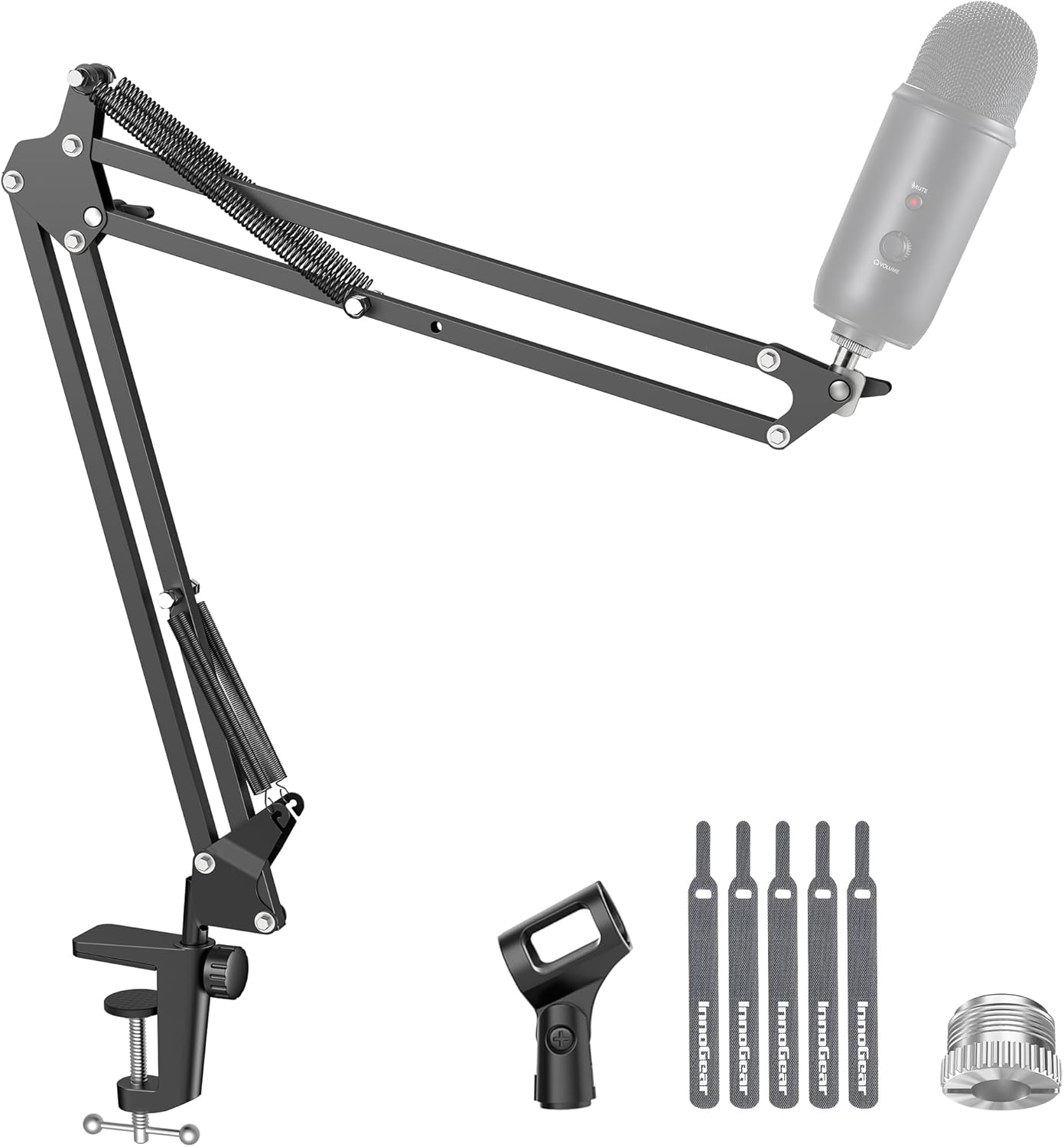
The InnoGear MU01 boom arm microphone stand is a professional-grade mounting solution designed for content creators, streamers, podcasters, and musicians who demand reliable microphone positioning. This desk-mounted arm accommodates popular USB microphones including Blue Yeti, Fifine, HyperX, and traditional XLR microphones with the included adapters.
The standout feature of this boom arm is its exceptional adjustability and build quality. With 360-degree base rotation, 135-degree back-and-forth extension, 180-degree vertical movement, and a 270-degree metal adapter, you can position your microphone precisely where needed. The 3.3lb weight capacity significantly exceeds standard competitors at 2.2lb, providing confidence for heavier microphone setups. The engineering specifically addresses a common flaw in other boom arms by eliminating the problematic knob on the arm shaft that causes spring deformation over time.
Build and design quality are exceptional for the price point. The alloy steel construction feels solid and substantial, while the super-strong springs enable silent, effortless positioning crucial for live recording sessions. The foldable design allows convenient storage when not in use, and the secure desk clamp grips edges up to 2 inches thick without wobbling. The included standard microphone clip and 5/8" to 3/8" adapter ensure compatibility with most popular microphone models.
Potential drawbacks include the desk clamp requirement for flat edges and the need for separate shock mount purchases for certain microphone models. The clamp design may not work with curved or slanted desk surfaces. Setup requires some manual adjustment to dial in your preferred microphone angle and height.
The InnoGear MU01 represents excellent value for anyone seeking a durable, feature-rich microphone boom arm. Its superior build quality, extensive adjustability, and broad microphone compatibility make it an ideal choice for serious content creators and recording enthusiasts.
Model: InnoGear MU01
Material: Alloy Steel with reinforced springs
Weight Capacity: 3.3 lbs (1.5 kg)
Dimensions: 15 x 1.5 x 4 inches
Maximum Height: 27.6 inches
Base Type: Desk clamp for edges up to 2 inches thick
Mount Thread Sizes: 3/8 inch and 5/8 inch
Adjustability: 360-degree base rotation, 135-degree extension, 180-degree vertical movement, 270-degree adapter rotation
Weight: 1.4 pounds
Compatibility: Blue Yeti, Fifine, HyperX, Shure SM58, Samson Q2U, and other standard microphones
Warranty: Manufacturer warranty included (does not cover microphones)
Who Should Buy: This boom arm is ideal for streamers, podcasters, content creators, musicians, and anyone requiring professional microphone positioning with space-saving storage. It works best with USB microphones like Blue Yeti, Fifine models, and HyperX gaming headset microphones, as well as traditional XLR microphones with adapters.
Desk Requirements: Ensure your desk has a flat edge between 0.5 and 2 inches thick for optimal clamp compatibility. Curved or slanted desk edges may not work with this clamp design.
Microphone Compatibility: Check your microphone's thread size (typically 3/8 inch or 5/8 inch). The included adapters cover most popular models, but verify compatibility before purchase if using less common microphone brands.
Setup Tips: Allow time for initial adjustment to find your preferred microphone height and angle. The boom arm's smooth operation means minimal repositioning is needed once properly configured. For heavy microphones near the 3.3lb limit, ensure the desk clamp is tightened securely.
Maintenance: Periodically check clamp tightness and spring tension. The innovative design minimizes spring wear compared to competitors, but regular inspection extends product lifespan.
How to Choose Your YouTube Boom Arm
Assess Your Desk and Microphone
Start by measuring your desk thickness where you plan to clamp the arm. Most models fit desks up to two inches thick, but some professional arms, like the RØDE PSA1+, handle even thicker surfaces. Next, check your microphone’s weight, including any shock mount. You need an arm with a load capacity that exceeds this total to prevent sagging or instability during recording sessions.
Prioritize Smooth Movement and Stability
For professional recording, silent and smooth adjustment is non-negotiable. Look for arms with internal spring damping, like those from RØDE or InnoGear, which allow you to reposition the mic mid-session without creating noise. The arm should hold its position firmly once set, with no drift or bounce. A sturdy, all-metal construction is a good indicator of lasting stability.
Consider Reach and Cable Management
Think about where your microphone needs to reach. A full horizontal and vertical extension is crucial if you move between sitting and standing or need to swing the mic completely out of frame. Integrated cable channels, as seen on the InnoGear Mic Arm, keep your XLR or USB cables neatly tucked away, preventing tangles and maintaining a clean look for your camera shots. This is a key feature for any organized mic accessories setup.
Verify Mounting Compatibility
Ensure the arm’s thread adapter matches your microphone or shock mount. Most microphones use a standard 5/8-inch or 3/8-inch thread. Many arms, such as the FIFINE BM88, include multiple adapters in the box for universal compatibility. If you use a specialized shock mount, double-check the thread size. Our review of the best microphone shock mounts with metal adapters can help you pair components correctly.
Final Thoughts
Investing in a quality boom arm is a simple upgrade with a profound impact on your YouTube production quality. For creators seeking broadcast-standard smoothness and durability, the RØDE PSA1+ Professional Studio Boom Arm remains an industry benchmark. If you’re starting out and need an entire ready-to-stream kit, the FIFINE AmpliGame A6T USB Gaming Microphone Kit offers incredible value with its included arm, mic, and accessories, making it an excellent choice for beginners. Whichever model you choose, you’re taking a major step toward more professional, engaging content for your audience.
Frequently Asked Questions
Can I use any boom arm with my USB microphone like a Blue Yeti? Yes, most boom arms are compatible with popular USB microphones. The key is to check the thread adapter. The Blue Yeti uses a standard 5/8-inch thread, which is included with most arms, such as the InnoGear or SUNMON models. Just ensure the arm’s weight capacity can support the microphone.
Will a boom arm damage my desk? A properly designed boom arm should not damage your desk. Look for a clamp that includes a protective rubber or foam pad. This pad distributes pressure and prevents scratches on your desk’s surface. Always follow the installation instructions and avoid overtightening the clamp beyond what is necessary for a secure hold.
What’s the advantage of a low-profile boom arm? A low-profile design, like the FIFINE BM88, allows the arm to extend from underneath your computer monitor. This keeps the arm and microphone out of your immediate line of sight, providing an unobstructed view of your screen and camera, which is crucial for gaming streams or teleprompter reading.
Do I need a separate shock mount if my boom arm has springs? The internal springs in a boom arm manage the arm’s movement and weight balance. A shock mount, which attaches between the mic and the arm, is designed to isolate the microphone from vibrations traveling through the desk. For the cleanest audio free from keyboard taps and desk bumps, using both a sprung arm and a dedicated shock mount is recommended. Learn more about optimizing your setup in our parent category for recording and musical instruments.







Write Your Review
No reviews yet. Be the first to share your experience!