

Your microphone deserves a proper foundation. A flimsy stand can introduce noise, limit positioning, and disrupt your creative flow during a crucial recording or stream. Metal microphone boom arms solve these problems with robust construction and precise adjustability, creating a professional-grade setup that enhances both sound quality and workspace ergonomics. This guide is crafted for podcasters, streamers, vocalists, and anyone serious about their audio, reviewing eight standout metal arms to elevate your studio.
We have assessed models from trusted brands like Elgato, FIFINE, and Neewer, focusing on build quality, stability features, and user-centric design. Whether you need a low-profile arm to clear your monitor view or a heavy-duty model for a Shure SM7B, our comparison provides the clarity you need. For more specialized options, explore our guide on the best low profile microphone arms.
Pros
- Exceptional build quality with alloy steel construction and reinforced springs for long-term durability
- Versatile compatibility with major microphone brands through included adapters and standard clips
- Smooth, quiet operation critical for professional recording without unwanted mechanical noise
- Compact foldable design saves desk space without compromising stability or load capacity
- Superior weight capacity compared to similarly priced alternatives on the market
Cons
- Desk clamp requires flat edges up to 2 inches thick, limiting compatibility with curved or slanted desk surfaces
- Requires manual assembly and adjustment to achieve optimal positioning for different microphone types
- Shock mount not included, requiring separate purchase for certain microphone models
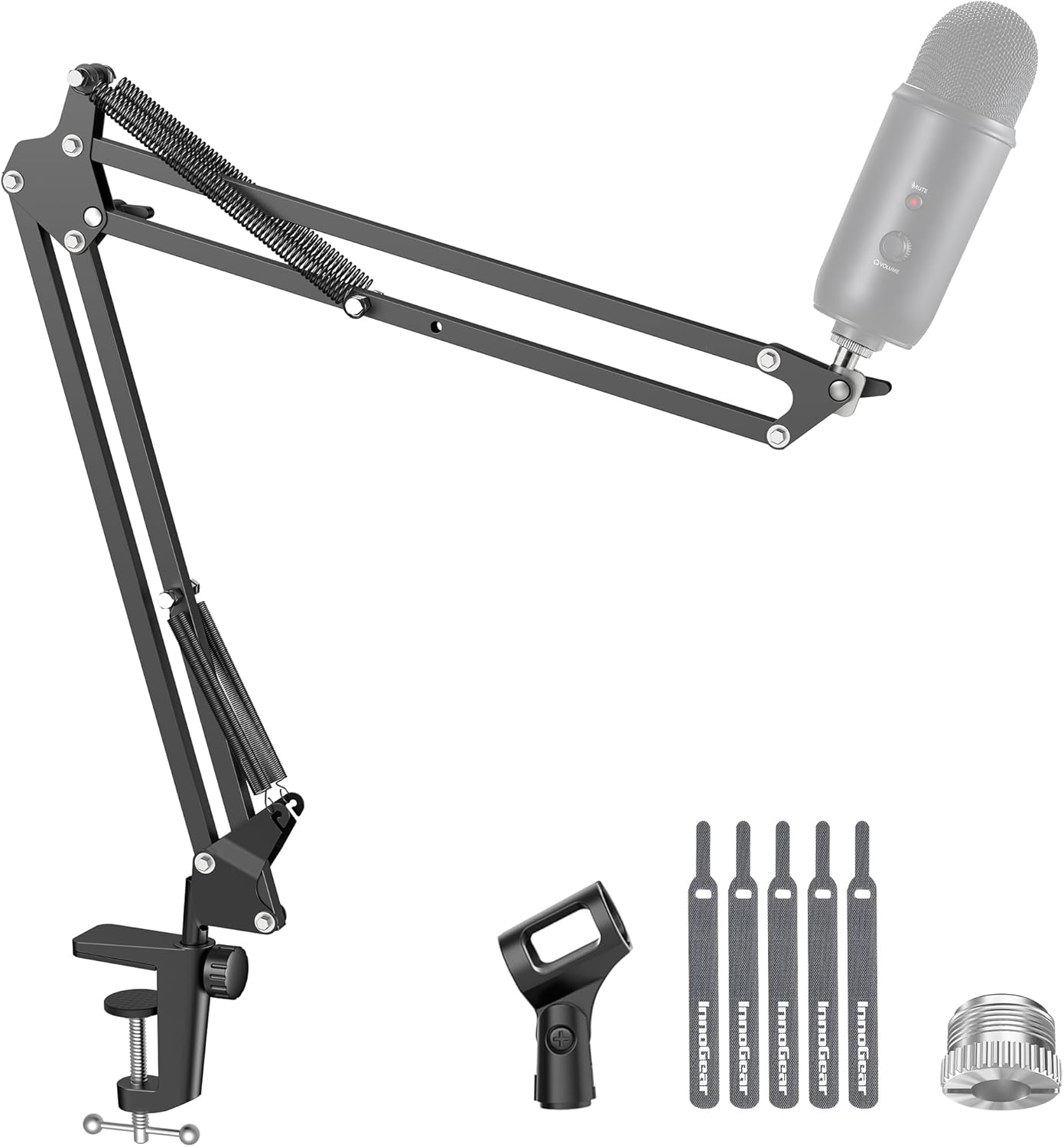
The InnoGear MU01 boom arm microphone stand is a professional-grade mounting solution designed for content creators, streamers, podcasters, and musicians who demand reliable microphone positioning. This desk-mounted arm accommodates popular USB microphones including Blue Yeti, Fifine, HyperX, and traditional XLR microphones with the included adapters.
The standout feature of this boom arm is its exceptional adjustability and build quality. With 360-degree base rotation, 135-degree back-and-forth extension, 180-degree vertical movement, and a 270-degree metal adapter, you can position your microphone precisely where needed. The 3.3lb weight capacity significantly exceeds standard competitors at 2.2lb, providing confidence for heavier microphone setups. The engineering specifically addresses a common flaw in other boom arms by eliminating the problematic knob on the arm shaft that causes spring deformation over time.
Build and design quality are exceptional for the price point. The alloy steel construction feels solid and substantial, while the super-strong springs enable silent, effortless positioning crucial for live recording sessions. The foldable design allows convenient storage when not in use, and the secure desk clamp grips edges up to 2 inches thick without wobbling. The included standard microphone clip and 5/8" to 3/8" adapter ensure compatibility with most popular microphone models.
Potential drawbacks include the desk clamp requirement for flat edges and the need for separate shock mount purchases for certain microphone models. The clamp design may not work with curved or slanted desk surfaces. Setup requires some manual adjustment to dial in your preferred microphone angle and height.
The InnoGear MU01 represents excellent value for anyone seeking a durable, feature-rich microphone boom arm. Its superior build quality, extensive adjustability, and broad microphone compatibility make it an ideal choice for serious content creators and recording enthusiasts.
Model: InnoGear MU01
Material: Alloy Steel with reinforced springs
Weight Capacity: 3.3 lbs (1.5 kg)
Dimensions: 15 x 1.5 x 4 inches
Maximum Height: 27.6 inches
Base Type: Desk clamp for edges up to 2 inches thick
Mount Thread Sizes: 3/8 inch and 5/8 inch
Adjustability: 360-degree base rotation, 135-degree extension, 180-degree vertical movement, 270-degree adapter rotation
Weight: 1.4 pounds
Compatibility: Blue Yeti, Fifine, HyperX, Shure SM58, Samson Q2U, and other standard microphones
Warranty: Manufacturer warranty included (does not cover microphones)
Who Should Buy: This boom arm is ideal for streamers, podcasters, content creators, musicians, and anyone requiring professional microphone positioning with space-saving storage. It works best with USB microphones like Blue Yeti, Fifine models, and HyperX gaming headset microphones, as well as traditional XLR microphones with adapters.
Desk Requirements: Ensure your desk has a flat edge between 0.5 and 2 inches thick for optimal clamp compatibility. Curved or slanted desk edges may not work with this clamp design.
Microphone Compatibility: Check your microphone's thread size (typically 3/8 inch or 5/8 inch). The included adapters cover most popular models, but verify compatibility before purchase if using less common microphone brands.
Setup Tips: Allow time for initial adjustment to find your preferred microphone height and angle. The boom arm's smooth operation means minimal repositioning is needed once properly configured. For heavy microphones near the 3.3lb limit, ensure the desk clamp is tightened securely.
Maintenance: Periodically check clamp tightness and spring tension. The innovative design minimizes spring wear compared to competitors, but regular inspection extends product lifespan.
How to Choose a Metal Microphone Boom Arm
Build Quality and Load Capacity
The core purpose of a metal boom arm is to provide unwavering support. Look for all-metal or heavy-duty composite construction. The load capacity, measured in pounds or kilograms, tells you what microphone weight it can securely hold.
Standard arms often support around 2kg, sufficient for many USB mics. For heavier dynamic mics like the Shure SM7B, seek arms rated for 3kg or more. A robust build prevents sagging and ensures your mic stays exactly where you position it, which is vital for consistent audio.
Stability and Locking Mechanism
Stability is non-negotiable. The locking mechanism that holds the arm’s joints in place is critical. Traditional spring-tension arms are common and allow for easy, tool-free adjustment. However, over time, springs can weaken.
For ultimate long-term stability, especially with heavy mics, consider gear-lock or advanced damping systems. These mechanical locks provide rigid support with no chance of sagging or rebound, making them ideal for permanent studio setups. This is a key feature in professional studio microphone boom arms.
Range of Motion and Adjustability
Your ideal mic position is unique to your posture and desk. A good boom arm offers extensive adjustability. Key metrics include horizontal reach (how far it extends from the base), vertical range, and rotation at the base and head.
Low-profile designs are excellent for keeping the arm below your sightline. Models with heightened risers are perfect for overhead placement or reaching over large monitors. Ensure the joints move smoothly and quietly to avoid disruptive sounds during adjustment while recording.
Cable Management and Desk Compatibility
<!–A clean setup reduces clutter and prevents cable snags. Integrated cable channels with snap-in covers or clips are a premium feature that neatly routes your microphone cable along the arm’s length. This protects the cable and maintains a professional look.
Always check the desk clamp specifications. Measure your desk thickness to confirm compatibility. Most clamps fit up to 2 inches, but some heavy-duty models accommodate thicker surfaces. A secure, non-slip clamp is the foundation of a stable arm. For setups requiring broadcast-style precision, our review of broadcast microphone arms offers further insight.
Final Thoughts
Selecting the right metal boom arm is an investment in your audio quality and daily workflow. For creators seeking a premium, integrated look with exceptional cable management, the Elgato Wave Mic Arm Low Profile Microphone Boom is a standout choice. Conversely, if your priority is supporting the heaviest studio microphones with absolute, sag-proof stability, the gear-lock system in the AA AUDIO ACCESSORY Mic Arm Desk Mount is engineered for that exact purpose. Pairing your new arm with a quality microphone shock mount will further isolate your mic from vibrations, completing a professional-grade setup ready for any project you undertake.
Frequently Asked Questions
What is the main advantage of a metal boom arm over a plastic one?
Metal arms provide superior rigidity and durability. They resist flexing and sagging under the weight of a microphone, which is crucial for maintaining consistent microphone placement and preventing unwanted movement that can cause noise. The heavier construction also dampens vibrations better than plastic.
Can I use any microphone boom arm with a heavy mic like the Shure SM7B?
No, you must check the arm’s maximum load capacity. The Shure SM7B and similar dynamic mics are relatively heavy. You need an arm specifically rated to handle their weight, typically 3kg (6.6 lbs) or more, to ensure it remains stable and does not droop over time.
How do I prevent my microphone cable from dangling and getting in the way?
Look for a boom arm with built-in cable management. This feature usually consists of channels or clips that run along the arm, allowing you to neatly thread and secure the microphone cable. It creates a cleaner workspace and protects the cable from strain and damage.
Are low-profile microphone arms worth it?
Absolutely, if you want to minimize visual obstruction. Low-profile arms are designed to sit lower on your desk and extend underneath your monitor, keeping your primary screen view clear. This is highly beneficial for streamers, video call users, and anyone who values an uncluttered sightline. Discover more in our dedicated mic accessories category.







Write Your Review
No reviews yet. Be the first to share your experience!