

You’ve invested in a great microphone, but it’s sitting awkwardly on a flimsy stand, hogging valuable desk space and picking up vibrations. For streamers, podcasters, and anyone serious about their PC audio, the right microphone boom arm isn’t just an accessory; it’s a game-changer. It clears your workspace, positions your mic perfectly, and helps isolate it from unwanted noise.
This guide reviews the leading boom arms designed for PC setups. We’ll help you find an arm that offers smooth, silent adjustment, strong stability, and the right reach to keep your microphone exactly where you need it. For protecting your audio quality further, consider pairing your new arm with one of the best swivel microphone shock mounts.

Pros
- Smooth, fluid movement with zero creaking or handling noise, perfect for live broadcasts
- Exceptional stability that holds position precisely without gradual sagging or drift
- Premium build quality and solid construction feel noticeably superior to budget alternatives
- Integrated cable management system keeps your desk setup clean and organized
- Versatile compatibility with standard mic mounts and various microphone weights
Cons
- Premium pricing is higher than budget boom arms, though users consistently report the quality justifies the cost difference
- Requires desk thickness between standard ranges, may not fit all workspace configurations
- Learning curve for optimal tension adjustment to achieve smoothest operation
The RØDE PSA1+ is a professional-grade studio boom arm engineered for content creators who record podcasts, stream live, or produce voice-over work. It's built for anyone who needs reliable microphone positioning without compromising audio quality or introducing unwanted mechanical noise into recordings.
What sets the PSA1+ apart is its innovative parallelogram spring design combined with fully damped internal springs. This means you can adjust your microphone position mid-recording without creating creaks or handling noise that ruins takes. The arm moves with precision and holds position exactly where you place it, a critical feature for long streaming sessions or multi-hour recording projects.
The build quality is immediately apparent when you unbox it. The powder-coated finish, neoprene arm cover, and solid mechanical construction feel professional-grade and durable. The integrated cable management clips keep XLR cables neatly secured along the arm rather than dangling across your desk, significantly improving workspace aesthetics and cable organization.
The main consideration is the premium price point compared to budget alternatives. However, reviewers consistently note that cheaper arms feel flimsy, sag over time, and create noise during adjustments. The PSA1+ eliminates these frustrations through superior engineering and materials, making it a worthwhile investment for serious content creators.
If you're committed to producing professional-quality podcasts, streams, or voice recordings, the RØDE PSA1+ delivers the silent, stable, and adjustable microphone positioning that broadcast-standard setups demand. It's the boom arm used across professional podcast networks and streaming studios for good reason.
Compatibility and Mounting: Fits desks up to 70mm thick with universal 3/8 inch and 5/8 inch microphone mount threads. Supports microphones weighing 0.25kg to 1.2kg including shock mounts.
Design and Construction: Parallelogram spring-damped design with neoprene arm cover. Powder-coated finish. Maximum reach height of 0.9 meters with full 360-degree rotation capability. Integrated XLR cable management system.
Included Components: PSA1+ boom arm, desk clamp, and thread adapters for both 3/8 inch and 5/8 inch mounts. Two-year manufacturer warranty included.
Dimensions and Weight: 21.25 x 8.25 x 3.25 inches. Item weight 1520g. Designed for professional studio and broadcast environments.
Who Should Buy: The PSA1+ is ideal for podcasters recording multiple episodes weekly, live streamers on platforms like Twitch or YouTube, voice-over artists, and broadcasters who need reliable equipment. It's also excellent for gaming content creators who want a clean, professional-looking setup.
Key Considerations: Verify your desk thickness falls within the 70mm clamping range. Ensure your microphone weight is between 0.25kg and 1.2kg. Confirm your microphone uses either 3/8 inch or 5/8 inch threads (most standard studio mics do). If you're upgrading from a budget arm, expect to spend more upfront but gain significantly in stability and noise elimination.
Setup Tips: Take time to properly adjust the spring tension during initial setup for smooth operation. Use the integrated cable management clips to route your XLR cable along the arm for a professional appearance. Position the clamp on a sturdy portion of your desk for maximum stability.
Investment Value: While premium-priced, users consistently report that the PSA1+ quality justifies the cost difference compared to budget alternatives that sag, create noise, and require replacement. For professional content creators, this is a long-term investment in reliable equipment.

Pros
- Exceptional build quality with all-metal construction that resists wobbling and vibration
- Low-profile design eliminates the need to reposition your mic when switching between tasks
- Impressive reach and articulation allow precise microphone placement for optimal audio capture
- Magnetic cable management system keeps your streaming setup looking professional and cable-free
- Includes multiple thread adapters ensuring compatibility with most popular microphone models
Cons
- Maximum load capacity of 4.4 lbs may limit compatibility with heavier professional microphones and shock mounts
- Desk clamp requires adequate desk thickness (up to 2.4 inches) and may not work with very thin or curved surfaces
- Premium pricing reflects the quality but positions it above budget-friendly boom arm alternatives
The Elgato Wave Mic Arm LP is a premium microphone boom arm engineered specifically for content creators, streamers, and podcasters who demand professional-grade equipment. This low-profile boom arm is designed to sit below your shoulder line, keeping your microphone positioned perfectly for audio capture while maintaining a completely unobstructed view of your camera. It's ideal for anyone who streams regularly or records video content and wants their setup to look polished and professional.
What sets the Wave Mic Arm LP apart is its combination of extensive articulation and thoughtful engineering. The boom arm offers 360-degree horizontal rotation at both the base and elbow, plus 90 degrees of upward vertical rotation, giving you virtually unlimited positioning options. The impressive 29.1-inch horizontal reach means you can mount the arm on one side of your desk and still reach across to position your microphone exactly where you need it, even with multiple monitors in the way.
The build quality is genuinely impressive. The all-metal construction with anti-torsion design means there's virtually no wobbling or flex when you move the microphone into position. The integrated magnetic cable channels are a particularly nice touch, letting you hide cables and keep your desk looking clean. Elgato includes thread adapters for standard microphone mounts, ensuring compatibility with most quality microphones on the market.
The main limitation is the 4.4-pound maximum load capacity, which may not accommodate heavier professional microphones or those used with shock mounts and pop filters. Additionally, the desk clamp works best on desks between 0.7 and 2.4 inches thick, so very thin or curved desks might present challenges. The premium price point reflects the quality but positions it above budget alternatives.
Overall, the Elgato Wave Mic Arm LP delivers exceptional value for serious content creators who want a reliable, professional-looking boom arm that won't interfere with their camera work. The low-profile design, extensive reach, and solid construction make it one of the best options in its category for streamers and video creators.
Physical Specifications: Horizontal reach of 740 mm (29.1 inches), lower arm desk clearance of 70 mm (2.8 inches), upper arm desk clearance of 160 mm (6.3 inches). The unit weighs 1692 grams and measures 3.46 x 2.36 x 5.51 inches.
Rotation and Articulation: 360-degree horizontal rotation at base and elbow, 90 degrees upward vertical rotation, 60 degrees downward vertical rotation at the elbow joint. This provides exceptional positioning flexibility for any streaming or recording setup.
Mounting and Compatibility: Expandable desk clamp accommodates desks up to 60 mm (2.4 inches) thick. Compatible with 1/4-inch, 3/8-inch, and 5/8-inch microphone thread sizes. Maximum load capacity is 2 kg (4.4 lbs) for the microphone and accessories combined.
Materials and Finish: All-metal construction with powder-coated black finish. Includes magnetic cable channels for cable management. Comes with 1/4-inch to 3/8-inch and 1/4-inch to 5/8-inch thread adapters, Allen wrench, and quick start guide. Backed by a 2-year manufacturer warranty.
Who Should Buy This: The Wave Mic Arm LP is perfect for Twitch streamers, YouTube content creators, podcasters, and anyone who records video content regularly. If you want your microphone positioned perfectly for audio without blocking your camera view, this is an excellent choice. The low-profile design makes it particularly valuable for creators who use multiple camera angles or who frequently switch between different tasks.
Compatibility Considerations: Before purchasing, verify that your microphone uses a standard 1/4-inch, 3/8-inch, or 5/8-inch thread mount. Check that your microphone and any accessories (shock mount, pop filter) weigh less than 4.4 pounds combined. Confirm your desk thickness is between 0.7 and 2.4 inches for proper clamp compatibility.
Setup and Installation: The Wave Mic Arm LP arrives with everything needed for installation. The expandable desk clamp mounts securely to your desk edge. The magnetic cable channels make it easy to route cables neatly, and the included adapters ensure compatibility with most standard microphone mounts. Setup typically takes 10-15 minutes with basic tools.
Alternatives to Consider: If you need a boom arm with higher weight capacity, consider alternatives designed for heavier professional microphones. If budget is your primary concern, entry-level boom arms are available at lower price points, though they typically lack the build quality and low-profile design of this Elgato model.
Pros
- Exceptional build quality with alloy steel construction and reinforced springs for long-term durability
- Versatile compatibility with major microphone brands through included adapters and standard clips
- Smooth, quiet operation critical for professional recording without unwanted mechanical noise
- Compact foldable design saves desk space without compromising stability or load capacity
- Superior weight capacity compared to similarly priced alternatives on the market
Cons
- Desk clamp requires flat edges up to 2 inches thick, limiting compatibility with curved or slanted desk surfaces
- Requires manual assembly and adjustment to achieve optimal positioning for different microphone types
- Shock mount not included, requiring separate purchase for certain microphone models
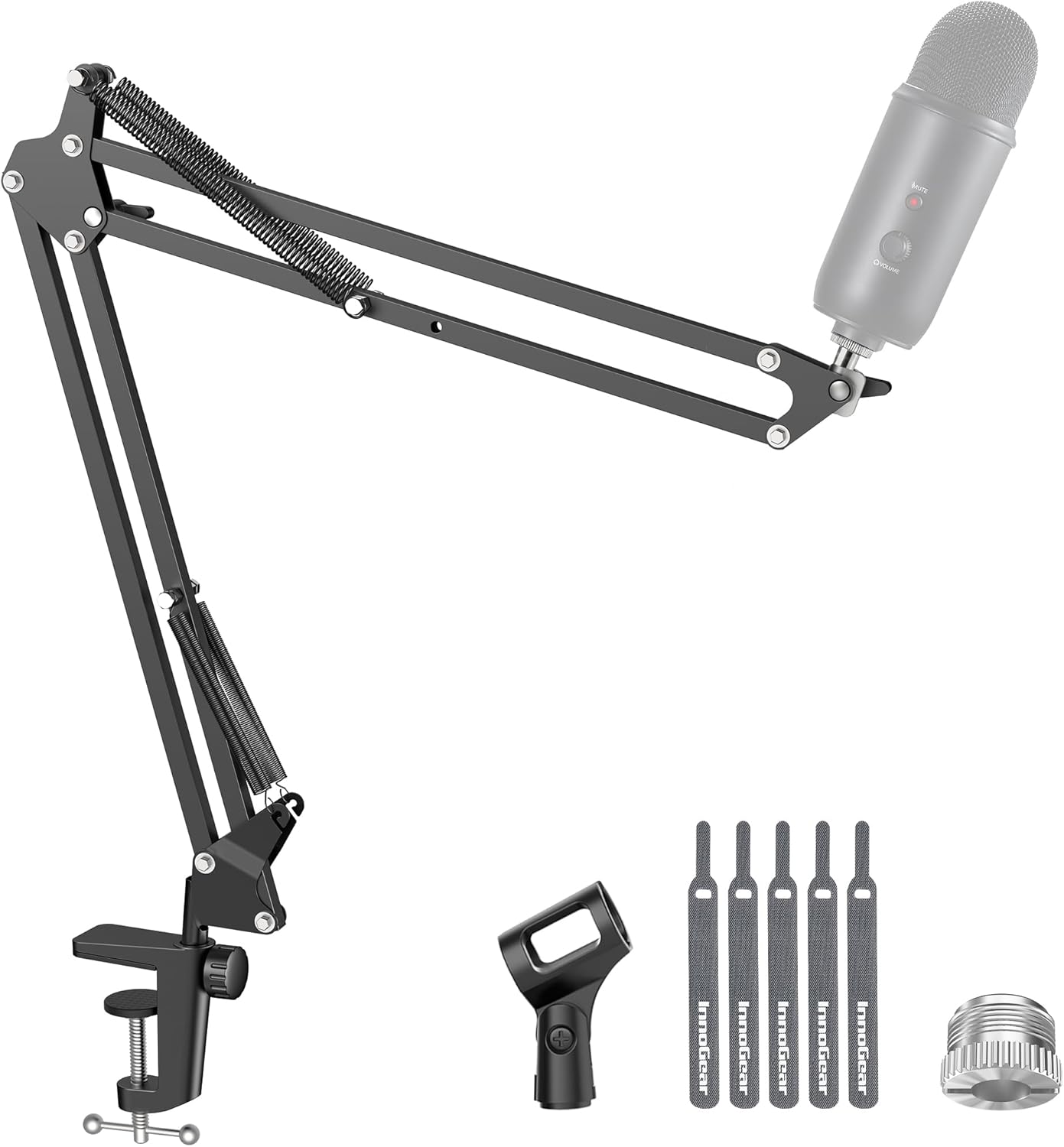
The InnoGear MU01 boom arm microphone stand is a professional-grade mounting solution designed for content creators, streamers, podcasters, and musicians who demand reliable microphone positioning. This desk-mounted arm accommodates popular USB microphones including Blue Yeti, Fifine, HyperX, and traditional XLR microphones with the included adapters.
The standout feature of this boom arm is its exceptional adjustability and build quality. With 360-degree base rotation, 135-degree back-and-forth extension, 180-degree vertical movement, and a 270-degree metal adapter, you can position your microphone precisely where needed. The 3.3lb weight capacity significantly exceeds standard competitors at 2.2lb, providing confidence for heavier microphone setups. The engineering specifically addresses a common flaw in other boom arms by eliminating the problematic knob on the arm shaft that causes spring deformation over time.
Build and design quality are exceptional for the price point. The alloy steel construction feels solid and substantial, while the super-strong springs enable silent, effortless positioning crucial for live recording sessions. The foldable design allows convenient storage when not in use, and the secure desk clamp grips edges up to 2 inches thick without wobbling. The included standard microphone clip and 5/8" to 3/8" adapter ensure compatibility with most popular microphone models.
Potential drawbacks include the desk clamp requirement for flat edges and the need for separate shock mount purchases for certain microphone models. The clamp design may not work with curved or slanted desk surfaces. Setup requires some manual adjustment to dial in your preferred microphone angle and height.
The InnoGear MU01 represents excellent value for anyone seeking a durable, feature-rich microphone boom arm. Its superior build quality, extensive adjustability, and broad microphone compatibility make it an ideal choice for serious content creators and recording enthusiasts.
Model: InnoGear MU01
Material: Alloy Steel with reinforced springs
Weight Capacity: 3.3 lbs (1.5 kg)
Dimensions: 15 x 1.5 x 4 inches
Maximum Height: 27.6 inches
Base Type: Desk clamp for edges up to 2 inches thick
Mount Thread Sizes: 3/8 inch and 5/8 inch
Adjustability: 360-degree base rotation, 135-degree extension, 180-degree vertical movement, 270-degree adapter rotation
Weight: 1.4 pounds
Compatibility: Blue Yeti, Fifine, HyperX, Shure SM58, Samson Q2U, and other standard microphones
Warranty: Manufacturer warranty included (does not cover microphones)
Who Should Buy: This boom arm is ideal for streamers, podcasters, content creators, musicians, and anyone requiring professional microphone positioning with space-saving storage. It works best with USB microphones like Blue Yeti, Fifine models, and HyperX gaming headset microphones, as well as traditional XLR microphones with adapters.
Desk Requirements: Ensure your desk has a flat edge between 0.5 and 2 inches thick for optimal clamp compatibility. Curved or slanted desk edges may not work with this clamp design.
Microphone Compatibility: Check your microphone's thread size (typically 3/8 inch or 5/8 inch). The included adapters cover most popular models, but verify compatibility before purchase if using less common microphone brands.
Setup Tips: Allow time for initial adjustment to find your preferred microphone height and angle. The boom arm's smooth operation means minimal repositioning is needed once properly configured. For heavy microphones near the 3.3lb limit, ensure the desk clamp is tightened securely.
Maintenance: Periodically check clamp tightness and spring tension. The innovative design minimizes spring wear compared to competitors, but regular inspection extends product lifespan.
Pros
- Exceptional audio clarity and minimal background noise capture right out of the box
- Complete bundle eliminates need for additional purchases or compatibility concerns
- Intuitive touch controls make muting and adjusting settings effortless during streaming
- Sturdy metal boom arm with adjustable joints accommodates most desk setups
- Unidirectional polar pattern focuses on your voice while rejecting side noise
Cons
- PlayStation audio quality is limited by console compatibility constraints rather than microphone capability
- No built-in headphone monitoring port, requiring separate headphone connection
- RGB lighting may not appeal to users preferring minimalist or professional aesthetics
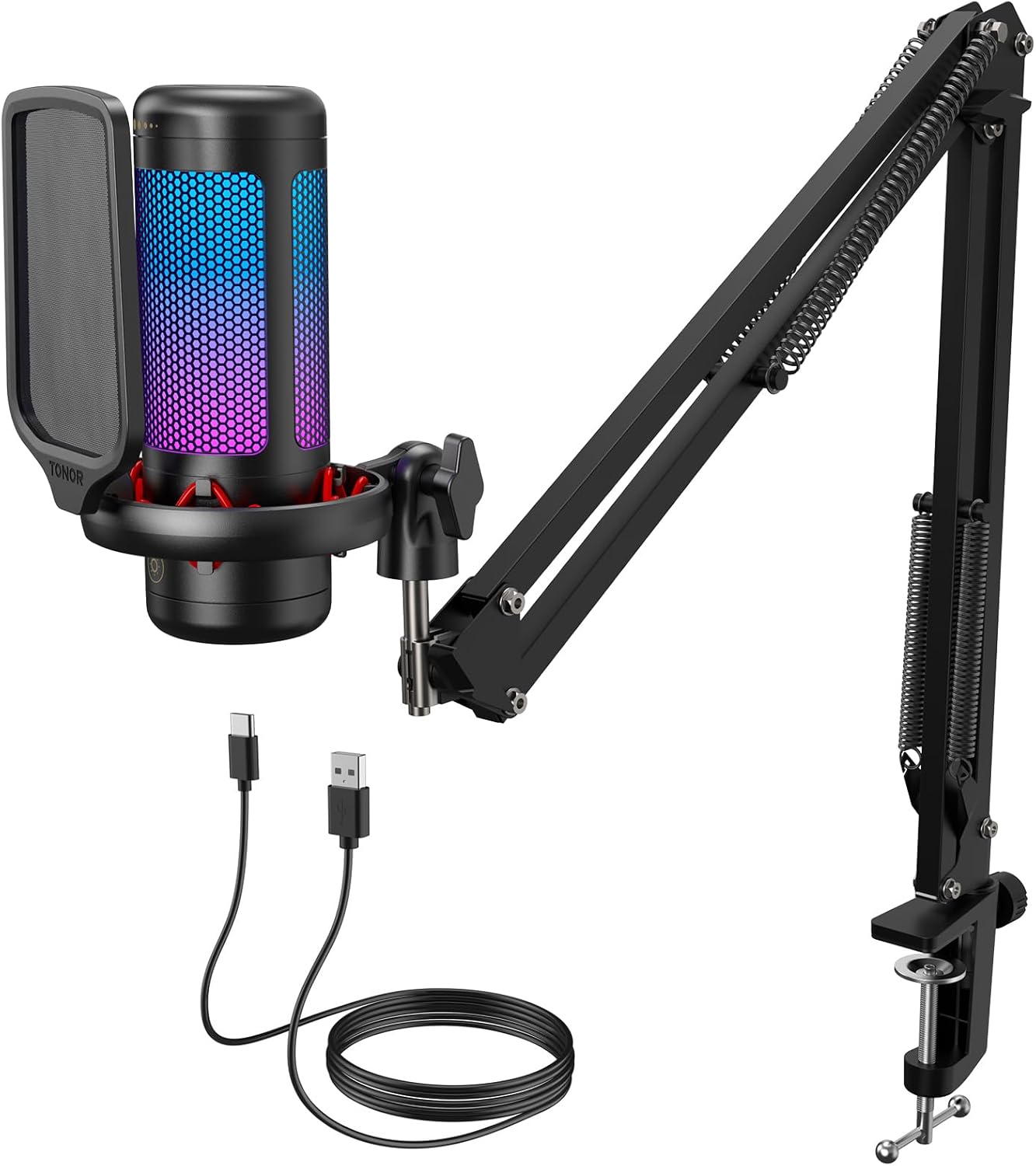
The TONOR TC310+ is a complete USB microphone solution designed for gamers, streamers, podcasters, and content creators who demand professional audio without technical complexity. This all-in-one kit arrives with everything needed for immediate setup, making it ideal for beginners and experienced creators alike who want to upgrade their audio quality without learning curve frustrations.
What sets this microphone apart is its commitment to simplicity and performance. The condenser capsule delivers crisp, clean audio with a 78 dB signal-to-noise ratio that captures voice detail while minimizing background interference. Users consistently report that friends notice immediate audio improvements during gaming sessions, and the adjustable gain control lets you dial in the perfect volume level. The one-tap mute button proves invaluable during live streams, allowing quick responses to unexpected situations without fumbling through software menus.
The included boom arm is constructed from quality metal with multiple adjustable joints, providing flexibility to position the microphone at your ideal angle. The sturdy clamp accommodates desks up to 2.36 inches thick, and the unidirectional polar pattern ensures your voice remains the focus while ambient noise stays suppressed. Build quality feels durable and professional, with the shock mount providing additional isolation from desk vibrations and handling noise.
The vibrant RGB lighting with four customizable modes adds visual appeal to your streaming setup, though brightness control prevents eye strain during extended sessions. One limitation worth noting is the lack of a headphone monitoring jack, meaning you cannot directly monitor your audio through the microphone itself. Additionally, PlayStation users report that console limitations affect audio quality more than the microphone's capabilities, a constraint beyond the device's control.
The TONOR TC310+ represents exceptional value for anyone seeking studio-quality audio at budget-friendly pricing. Its plug-and-play design, professional sound output, and complete accessory bundle make it the top choice for gamers and streamers ready to elevate their audio presence without unnecessary complexity or expense.
Audio Performance
Polar Pattern: Unidirectional
Signal-to-Noise Ratio: 78 dB
Audio Sensitivity: 10 dB
Channels: 1
Connector: USB Type-C
Physical Specifications
Dimensions: 16 x 6 x 5.4 inches
Weight: 474 grams
Material: Acrylonitrile Butadiene Styrene with Alloy Steel components
Color: Black
Boom Arm Clamp: Fits desks up to 2.36 inches thick
Connectivity and Compatibility
Connection: USB 2.0/3.0
Compatible Devices: PC, Mac, Laptop, PS4, PS5
Power Source: USB corded (no batteries required)
Setup: Plug and play, no drivers needed
Included Components
Microphone unit, Pop filter, Mic stand, Shock mount, USB cable, User manual
Ideal For
This microphone is perfect for Twitch streamers, YouTube content creators, gamers seeking better team communication, podcasters on a budget, and anyone upgrading from built-in laptop or headset microphones. If you value simplicity, professional audio quality, and don't want to spend hours configuring complex audio software, this is your solution.
Consider Alternatives If
You need professional-grade XLR connectivity, require built-in headphone monitoring, or are seeking audio equipment for mastering and music production. The TC310+ excels at voice-focused applications but isn't designed for full-spectrum music recording.

Pros
- Exceptional build quality with tight joints and consistent spring tension that maintains stability even with heavy microphones
- Built-in cable management system is superior to competitors, keeping workspace clean and cables protected during recording sessions
- Smooth, silent articulation in all directions allows precise mic positioning without noise or vibration interference
- Includes extension riser and mounting hardware, providing maximum reach and flexibility for complex studio setups
- Proven durability with users reporting consistent performance after one year of daily professional use
Cons
- Initial stiffness in movement may require a break-in period before achieving optimal smooth operation
- Premium pricing compared to basic mic stands, though justified by superior build quality and cable management features
- Shock mount not included, requiring separate purchase for certain microphone setups
The InnoGear Mic Boom Arm is a professional-grade microphone stand designed for podcasters, streamers, content creators, and audio engineers who need a reliable, space-saving solution. This boom arm elevates your microphone off the desk, freeing up workspace while positioning your mic exactly where you need it for optimal recording quality.
The standout feature is the integrated cable management system with removable rubber covers and built-in channels that keep USB, XLR, and power cables organized and hidden. Combined with 360-degree rotation and 135-degree back-and-forth plus 180-degree up-and-down articulation, you can position your microphone with precision. The arm extends up to 32.3 inches horizontally and 37.4 inches vertically, easily clearing most monitors while the included 6.3-inch extension riser provides additional height flexibility.
Build quality is exceptional throughout. The heavy-duty alloy steel construction with internal springs delivers a maximum weight capacity of 3.5 pounds, handling demanding microphones like the Shure SM7B, Blue Yeti, and AT2020 without wobble or drooping. Users report consistent performance after a full year of daily professional use, with zero deterioration in joint tightness or spring tension.
The primary drawback is initial stiffness in the articulation mechanism, though this typically resolves with regular use. Additionally, the premium price reflects the professional-grade construction and superior cable management compared to budget alternatives. The shock mount is sold separately, which some users may need to purchase depending on their microphone model.
The InnoGear Mic Boom Arm delivers professional stability, thoughtful design, and proven durability. If you're serious about content creation and want a microphone stand that will perform reliably for years while keeping your setup organized, this boom arm is a solid investment that justifies its cost through superior build quality and practical cable management features.
Model: InnoGear MU-PSA28
Material: Alloy steel with internal springs
Weight Capacity: 3.5 pounds maximum
Arm Length: 14 inches (expandable with 6.3-inch extension riser)
Maximum Reach: 32.3 inches horizontally, 37.4 inches vertically
Articulation: 135-degree back-and-forth, 180-degree up-and-down, 360-degree rotatable base
Microphone Connector: 5/8-inch universal thread
Base Type: Desk clamp for desks up to 2 inches thick
Included Components: Mic arm stand, extension riser, rubber cable covers, table mounting clamp
Warranty: 12 months
Dimensions: 15.75 x 1.57 x 13.78 inches
Weight: 1.6 kg
Compatible Microphones: This boom arm works with any microphone featuring a standard 5/8-inch connector. Verified compatibility includes Blue Yeti, Blue Snowball, Hyper X QuadCast, Fifine K669B, Fifine AM8, Shure SM7B, Shure MV7, Shure MV6, Audio-Technica AT2020, AT2020USB+, AT2035, ATR2500-USB, and ATR2100-USB.
Desk Requirements: The included clamp accommodates desks and surfaces up to 2 inches thick. Ensure your desk material is sturdy enough to support the microphone weight and arm tension. Wood and laminate desks work best, while glass desks may require additional stabilization.
Setup Considerations: The boom arm reaches up to 37.4 inches vertically, allowing positioning above dual or triple monitor setups. Verify your microphone weighs less than 3.5 pounds before mounting. If using a shock mount, confirm it has a 5/8-inch connector or purchase an adapter separately.

Pros
- Damping hinge system provides smooth, effortless vertical adjustment without loosening screws or clamps
- Sturdy aluminum construction delivers professional-grade durability that outlasts budget screw-lock alternatives
- Compact, low-profile design keeps your desk organized and camera-ready for video content creation
- Multiple thread adapter sizes ensure compatibility with most microphone models without purchasing additional adapters
- Integrated cable channels and ties create a polished, cable-free workspace for streaming and recording
Cons
- Maximum weight capacity of 3.3 pounds may limit compatibility with heavier studio microphones and shock mounts
- Requires desk thickness of 2.4 inches or less, which may not fit on thicker or irregular desk edges
- Damping tension adjustment requires a wrench and basic mechanical knowledge to fine-tune for optimal performance
The NEEWER MS007 is a professional desk-mounted microphone boom arm designed for content creators, podcasters, live streamers, and gamers who demand reliable microphone positioning without cluttering their workspace. This low-profile mount combines aluminum construction with intelligent engineering to deliver studio-quality results at an accessible price point.
The standout feature is the advanced damping system that automatically adapts to your microphone's weight and maintains position without constant readjustment. Unlike cheaper screw-lock alternatives, the MS007 allows smooth vertical tilting and horizontal rotation with a 360-degree ball head, giving you complete freedom to dial in the perfect mic placement. The damping hinge can be fine-tuned with a wrench to match your specific microphone weight, ensuring stable positioning for hours of uninterrupted recording or streaming.
Build quality is excellent throughout. The aluminum alloy construction feels solid and professional, while the low-profile design elegantly tucks under desktop monitors to keep your setup clean and camera-ready. The included extension pole and dual articulating boom arms provide flexibility for various desk configurations and microphone heights. Built-in cable management channels with included ties keep your USB, XLR, and audio cables discreetly routed and organized.
The primary limitation is the 3.3-pound weight capacity, which may not accommodate heavier studio microphones or shock mount combinations. Additionally, your desk thickness must not exceed 2.4 inches for proper mounting. Some users may find the damping tension adjustment requires experimentation to achieve perfect balance for their specific microphone.
Overall, the NEEWER MS007 delivers professional performance, thoughtful design, and lasting durability. It's an excellent choice for anyone building a content creation setup who values reliability, clean aesthetics, and smooth microphone positioning. Highly recommended for podcasters, streamers, and recording enthusiasts.
Dimensions and Weight: Maximum height 20.7 inches, articulating boom arms 14.8 inches each, extension pole 5.9 inches, total weight 3.3 pounds.
Compatibility: Microphone thread sizes include 1/4-inch, 3/8-inch, and 5/8-inch. Desk mounting requires flat surfaces up to 2.4 inches thick. Maximum microphone weight capacity is 3.3 pounds (1.5 kg).
Construction: Aluminum alloy body with damping hinge system, 360-degree swivel ball head with 90-degree tilt range, 100-degree vertical arm tilt. Includes integrated cable management channels with cable ties.
Warranty: 1-year manufacturer warranty. Model MS007, ASIN B0GCD3NLDJ.
Podcasting: The damping system and cable management make this ideal for podcast setups where consistent microphone positioning and clean audio routing are essential.
Live Streaming: Perfect for Twitch, YouTube, and other streaming platforms where a low-profile, camera-ready setup maximizes your on-screen presence.
Music Recording: The stable 3.3-pound capacity accommodates most condenser and dynamic microphones used in home recording studios.
Gaming and Content Creation: Compact design keeps your desk clutter-free while providing professional microphone positioning for Discord, streaming, and video content.
Not Recommended For: Heavy studio microphones exceeding 3.3 pounds or installations on desks thicker than 2.4 inches.

Pros
- Exceptionally sturdy all-metal build quality that feels premium and professional
- Low-profile design is ideal for streamers and gamers who want an unobstructed view
- Impressive adjustability with 360-degree horizontal and 220-degree vertical range
- Includes multiple thread adapters eliminating the need for separate purchases
- Hidden cable management keeps your workspace neat and prevents cable strain
Cons
- Maximum reach of 29 inches may be limited for very wide desks over 32 inches when clamped at the back
- The section near the C-clamp cannot be adjusted vertically, limiting positioning options in that zone
- Hand screw clamp handle placement may interfere with desk legs in tight spaces
The FIFINE BM88 is a professional-grade microphone boom arm stand built for content creators who demand reliability and clean aesthetics. Whether you're streaming gameplay, recording podcasts, or creating video content, this stand delivers the stability and adjustability you need without cluttering your workspace or blocking your monitor view.
What sets the BM88 apart is its exceptional build quality and thoughtful engineering. The all-metal construction feels premium and refuses to wobble even under heavy use or when fully extended. The low-profile design is a game-changer for streamers and gamers, as it extends beneath your monitor rather than hovering in front of it. The 360-degree horizontal and 220-degree vertical articulation gives you complete freedom to position your microphone exactly where you need it, while the integrated cable management channels keep cables organized and prevent tangling or accidental disconnection.
The included screw adapters (1/4", 3/8", and 5/8") make this arm compatible with virtually any microphone on the market, eliminating frustrating compatibility issues. The non-slip C-clamp grips your desk securely without leaving marks or scratches, and the setup process is straightforward enough that most users can have it ready in minutes.
One limitation to consider is the maximum reach of 29 inches, which may feel short on wider desks beyond 32 inches. Additionally, the section immediately near the C-clamp cannot be adjusted vertically, which could limit positioning options in specific setups. The clamp handle placement might also interfere with desk legs in tight corner installations.
The FIFINE BM88 represents excellent value for serious content creators who refuse to compromise on build quality. Its combination of durability, adjustability, and smart design makes it a standout choice in the microphone stand category.
Physical Dimensions: 13 x 11.6 x 4.1 inches, Weight 1300g (2.87 lbs)
Adjustability: Extends up to 29 inches maximum height, 360-degree horizontal rotation, 220-degree vertical adjustment
Compatibility: Thread sizes 1/4", 3/8", 5/8" with included adapters, supports microphones up to 1.5 kg (3.3 lbs)
Clamping: Non-slip C-clamp compatible with desks 0.8 to 2.4 inches thick
Materials: All-metal construction with painted finish, integrated cable management channels
Included Components: Boom arm stand, desk clamp, rotatable ball-head, Allen wrench, user manual, 1/4" to 3/8" adapter, 3/8" to 5/8" adapter
Warranty: One year manufacturer warranty
Who Should Buy This: The BM88 is ideal for streamers, podcasters, content creators, and gamers who prioritize a clean setup and reliable equipment. If you value build quality and don't want your boom arm visible in your shot, this is an excellent choice.
Desk Requirements: Ensure your desk thickness falls between 0.8 and 2.4 inches for proper clamp compatibility. If your desk is wider than 32 inches and you plan to clamp it at the back, consider your microphone placement needs carefully, as the arm may not reach as far as you'd like.
Microphone Compatibility: Check your microphone's thread size (usually 3/8" or 5/8"). This arm includes adapters for both common sizes, plus 1/4" compatibility, so most modern microphones will work without additional purchases.
Weight Capacity: The BM88 safely supports microphones and shock mounts up to 1.5 kg. If you're using particularly heavy studio microphones, verify your setup stays within this limit.
Setup Considerations: Place the clamp away from desk legs to avoid handle interference. Leave adequate space beneath your monitor for the low-profile arm to extend without hitting your screen bezel.

Pros
- Exceptional versatility with both USB and XLR connectivity options for different production environments
- Noise-canceling cardioid pattern delivers crisp, professional-quality vocals without picking up unwanted background sound
- Sturdy metal boom arm with strong springs and anti-scratch desk clamp ensures stable, secure microphone positioning
- Customizable RGB lighting adds aesthetic appeal without requiring complex software or driver installations
- Comprehensive accessory bundle saves money and eliminates the need for separate purchases
Cons
- XLR cable is not included in the package, requiring a separate purchase for XLR-based setups
- Desk clamp only accommodates desktops with thickness under 2 inches, which may not fit all desk types
- Limited to cardioid pattern without options for omnidirectional or other polar patterns for different recording scenarios
The FIFINE AmpliGame AM8T is a dual-connectivity dynamic microphone designed for gamers, streamers, podcasters, and content creators who demand professional audio quality without the complexity. This complete microphone kit arrives ready to use, featuring the microphone itself, a robust boom arm stand, desk clamp, USB-C cable, and windscreen, making it an excellent entry point for anyone upgrading from built-in computer audio.
The standout feature is undoubtedly the dual USB/XLR connectivity, which provides remarkable flexibility. For PC gaming and streaming, simply plug in the USB cable and start recording immediately without drivers or software configuration. For more advanced setups, the XLR connection works with mixers, audio interfaces, and professional sound cards, allowing you to integrate this microphone into growing production environments. The cardioid polar pattern with -50dB sensitivity effectively rejects background noise while capturing clear, focused vocals, making it particularly effective in less-than-ideal recording spaces.
Build quality impresses with the sturdy metal boom arm featuring strong elastic springs that keep the microphone stable and positioned exactly where you need it. The desk clamp includes anti-scratch padding and fits desktops up to 2 inches thick with straightforward installation. The included windscreen filters plosive sounds, while the integrated headphone jack with volume control lets you monitor audio in real-time during streaming or recording sessions. Intuitive controls including a mute button and gain knob put precise audio management at your fingertips.
The customizable RGB lighting adds visual appeal to your setup and can be controlled with a simple tap of the RGB button, requiring no software configuration or complicated settings. This feature particularly appeals to gamers who want their equipment to match their aesthetic setup. One minor limitation is that the XLR cable is not included, so XLR users need to purchase one separately. Additionally, the desk clamp has a thickness restriction of under 2 inches, which may not accommodate thicker or standing desks.
The FIFINE AmpliGame AM8T represents excellent value for streamers, podcasters, and gamers seeking a versatile microphone with professional capabilities. Its combination of dual connectivity, noise-canceling technology, complete accessory bundle, and intuitive controls makes it a compelling choice for both beginners and experienced content creators looking to upgrade their audio quality.
Connectivity: USB and XLR connectors for versatile setup options
Microphone Type: Dynamic microphone with cardioid polar pattern
Sensitivity: -50dB for focused voice capture and background noise rejection
Included Accessories: Boom arm stand, desk clamp, 8.2ft USB-C to USB cable, dynamic microphone with windscreen, user manual
Compatible Platforms: Windows PC, Mac OS, compatible with OBS, Streamlabs, and other streaming software
Special Features: Customizable RGB lighting, headphone jack with volume control, mute button, gain knob for audio control
Desk Clamp Compatibility: Fits desktops with thickness up to 2 inches
Who Should Buy This Microphone? The AM8T is ideal for PC gamers, Twitch and YouTube streamers, podcasters, voiceover artists, and musicians recording at home. It works equally well for beginners setting up their first studio and experienced creators adding a versatile microphone to their equipment collection.
USB vs. XLR Setup: Choose USB connectivity if you primarily record directly to your computer and want a plug-and-play experience. Select XLR if you plan to use a mixer, audio interface, or professional sound card for more advanced audio processing and control. Note that you'll need to purchase an XLR cable separately for XLR-based setups.
Space and Desk Considerations: The boom arm provides excellent flexibility for positioning the microphone at various angles and heights. However, verify that your desk thickness is under 2 inches for proper clamp compatibility. If you have a thicker desk, consider using an alternative mounting solution or desk arm adapter.
Background Noise Management: The cardioid polar pattern and -50dB sensitivity excel at isolating vocals and rejecting ambient noise. This makes it particularly valuable if you record in environments with background activity like fans, traffic, or roommates. The included windscreen further reduces plosive sounds and breath noise.
Software Integration: This microphone works seamlessly with OBS, Streamlabs, and other popular streaming platforms without requiring special drivers or configuration. The RGB lighting can be controlled independently without software, making setup straightforward even for non-technical users.

Pros
- Exceptional audio clarity with minimal background noise thanks to cardioid pattern and included noise suppression accessories
- Flexible connectivity options allow you to start with USB and upgrade to XLR with audio interfaces or mixers later
- Sturdy metal construction and robust boom arm feel premium and maintain stability during extended use
- Simple plug-and-play setup with no driver downloads required for immediate USB operation
- Great value for the price with professional-grade components and comprehensive accessory bundle
Cons
- XLR connection disables all onboard controls, requiring external mixer or audio interface for level management
- Desk clamp only accommodates desks under 2 inches thick, limiting placement options for some setups
- Optimal audio input requires positioning within 2 to 6 inches of the microphone, which may feel close for some users
The FIFINE K688CT is a comprehensive microphone solution designed for podcasters, streamers, gamers, and content creators who demand professional audio without the professional price tag. This all-in-one kit combines a dynamic microphone with a metal boom arm stand, shock mount, windscreen, and dual connectivity options to serve both beginners and experienced audio enthusiasts.
The standout feature is the flexible connectivity architecture. The USB connection offers immediate plug-and-play convenience for laptops and PCs, complete with onboard controls including a touch-sensitive mute button, gain knob, and headphone monitoring jack. Simultaneously, the XLR output allows you to integrate the microphone into professional studio setups using mixers or audio interfaces. This dual-path approach means your investment grows with your production ambitions. The 130dB SPL rating and cardioid polar pattern ensure your voice stays center stage while background noise fades away, delivering the clean audio that audiences expect.
Build quality exceeds expectations at this price point. The metal boom arm feels substantial and maintains secure positioning without drift, while the included shock mount and windscreen effectively eliminate vibrations and wind noise. The microphone body itself has a professional appearance that elevates any desk setup. Setup is refreshingly straightforward, requiring just a USB cable connection and basic Windows audio configuration, with no driver installations needed.
A few practical considerations deserve mention. When using XLR connectivity, all onboard controls become inactive, requiring you to manage levels through your mixer or audio interface instead. The desk clamp works best on surfaces under 2 inches thick, which may limit placement flexibility. Additionally, optimal recording quality demands positioning the microphone 2 to 6 inches from your mouth, closer than some users might prefer initially.
The FIFINE K688CT delivers exceptional value for content creators at any skill level. Its combination of solid audio performance, flexible connectivity, professional build quality, and comprehensive accessories makes it an intelligent choice for anyone serious about upgrading their audio setup without overextending their budget.
Connectivity: USB and XLR
Microphone Type: Dynamic, Unidirectional (Cardioid)
Maximum SPL: 130dB
Frequency Response: 50Hz to 16kHz
Signal-to-Noise Ratio: 80dB
Polar Pattern: Cardioid
Form Factor: Microphone with Arm Stand
Boom Arm: Metal construction with 3/8" to 5/8" adapter
Desk Clamp: Fits desks up to 2 inches thick
Included Accessories: Shock mount, windscreen, USB-C to USB-A cable, desk clamp, 3/8" to 5/8" adapter, user manual
Weight: 1.31 kg
Warranty: 1 Year
Color: Black
Compatible With: PC, Laptop, Audio Mixers, Audio Interfaces
Best For: The K688CT excels for podcasters, YouTube creators, Twitch streamers, Discord gamers, voiceover artists, and anyone recording content from a desk. Its versatility makes it equally suitable for beginners taking their first step into quality audio and experienced creators looking for reliable backup equipment.
USB vs. XLR: Start with USB for immediate convenience and onboard control simplicity. Upgrade to XLR when you invest in a mixer or audio interface for expanded creative control and professional-grade signal routing. Both connections work with the same microphone.
Positioning Tips: Place the microphone 2 to 6 inches from your mouth for optimal input levels. The cardioid pattern naturally rejects side and rear sounds, so position your monitor or noise sources to the sides or behind the mic. Use the boom arm to achieve the ideal angle without straining your neck.
Noise Reduction: The included windscreen handles plosives and wind noise effectively. The shock mount isolates the microphone from desk vibrations and keyboard noise. For maximum noise suppression, position the boom arm away from your keyboard and close any nearby windows or doors.
Setup Considerations: Ensure your desk is under 2 inches thick for the clamp to work properly. When using XLR, you'll need an external mixer or audio interface to control levels. For USB-only setups, all controls function directly on the microphone without additional hardware.

Pros
- Exceptional value at under $20 with professional-quality suspension system and universal adapter included
- Dual spring suspension effectively isolates microphone from desk vibrations and ambient noise
- Pre-installed adapter eliminates compatibility guesswork, works out of the box with most popular microphones
- Sturdy desk clamp with protective padding prevents desk damage while maintaining rock-solid stability
- Smooth, precise adjustment mechanism allows you to position your microphone exactly where you need it
Cons
- May require additional adapters or modifications for less common microphone models not listed in compatibility guide
- Desk clamp requires a minimum thickness of 1.89 inches, limiting compatibility with thinner desk surfaces
- Heavier microphones may experience slight drooping over extended periods despite spring tension design
The SUNMON QuadCast Boom Arm is a professional-grade microphone stand designed for streamers, podcasters, content creators, and gamers who demand studio-quality audio capture. This versatile boom arm works seamlessly with popular microphones including Blue Yeti, HyperX QuadCast, Fifine AM8, Shure MV7, and over 40 other models, making it an excellent choice for anyone upgrading their streaming or recording setup.
The standout feature is the dual suspension spring system, which effectively isolates your microphone from desk vibrations, keyboard typing, and other ambient noise. The reinforced locking knobs hold your microphone securely in place once positioned, preventing the drooping and sinking that plague budget alternatives. The pre-installed 3/8" to 5/8" adapter means you can mount most microphones immediately without hunting for additional parts or wrestling with compatibility issues.
Build quality is solid throughout, with an alloy steel construction that feels durable and professional. The desk clamp features protective sponge padding to safeguard your desk surface from scratches and damage. The adjustable boom arm provides excellent range of motion, allowing you to position your microphone at any angle or height within reach, perfect for finding that ideal recording distance and positioning.
The primary limitation is that the desk clamp requires a minimum thickness of 1.89 inches, which may exclude very thin or minimalist desks. Additionally, while the suspension springs are robust, extremely heavy microphones might experience slight drooping after extended use, though this is rare with standard streaming microphones.
Overall, the SUNMON QuadCast Boom Arm delivers exceptional value for budget-conscious creators. It eliminates vibration noise, works with virtually any microphone, and feels built to last. For the price, it's a smart investment that will noticeably improve your audio quality and recording setup professionalism.
This boom arm features universal compatibility with a wide range of microphone models. Confirmed compatible microphones include: Blue Yeti, Blue Snowball, HyperX QuadCast, HyperX QuadCast S, HyperX SoloCast, Fifine K688, Fifine AM8, Shure MV7, Shure SM7B, Rode Procaster, Razer Mini, and many others.
The pre-installed 3/8" to 5/8" adapter screw accommodates most standard microphone mounts and shock mounts. If your microphone uses a non-standard mount, verify the thread size before purchase. The desk clamp works with desktops and tables up to 1.89 inches thick. For thinner surfaces, you may need an alternative mounting solution.
Installation is straightforward and requires no special tools. The desk clamp attaches to your desk edge using a side screw mechanism, with the sponge padding protecting your desk surface. Loosen the boom arm adjustment knobs, position your microphone at your desired angle and height, then tighten the knobs securely to lock everything in place.
The suspension springs are pre-configured for optimal tension, so no adjustment is needed out of the box. Simply attach your microphone using the pre-installed adapter, and you're ready to start recording or streaming. The entire setup process typically takes less than five minutes.
Choosing the Right Microphone Boom Arm
Stability and Weight Capacity
Nothing ruins a recording faster than a mic that droops or wobbles. Look for arms with robust internal springs and solid metal construction. The weight capacity should comfortably exceed your microphone’s weight, especially if you use a shock mount. A stable arm ensures your mic stays put exactly where you position it.
Arms like the InnoGear Mic Arm Microphone Boom Arm Cable are built to handle heavier studio mics. For maximum security, a sturdy arm paired with a proper shock mount is ideal. You can explore options in our guide to the best adjustable microphone shock mounts.
Reach and Adjustability
Consider your desk size and where you need the microphone to reach. A good boom arm should have a horizontal reach long enough to swing from the edge of your desk to directly in front of you. Vertical adjustment is equally important for finding the perfect height and angle relative to your mouth.
Look for arms offering 360-degree rotation at the base and a wide range of motion at the joints. This flexibility allows you to stow the mic away when not in use and bring it into position effortlessly. Low-profile designs are excellent for keeping your monitor view clear.
Cable Management and Noise
Integrated cable channels are a premium feature that keeps your setup looking clean and professional. They prevent cables from dangling and getting snagged. More importantly, a well-designed arm should operate silently. Internal damping, like on the RØDE PSA1+, prevents creaks and handling noise from being picked up during a live stream or recording.
Clean audio starts at the source. Alongside a quiet arm, using a compact pop filter is crucial for reducing plosive sounds and achieving broadcast-quality vocal clarity right from your PC.
Mounting and Compatibility
Most arms use a C-clamp that attaches to the edge of your desk. Verify the clamp’s maximum thickness fits your desktop. Also, check the thread adapter. The standard is a 5/8-inch thread, but many arms include adapters for 3/8-inch and 1/4-inch mounts to ensure compatibility with most microphones and shock mounts on the market.
If you have a specialized setup, such as a glass desk, you’ll need to look for solutions designed for that surface. Our resource on the best microphone boom arms for glass desks can guide you. For a complete audio upgrade, browse our full category of microphone accessories.
Final Thoughts
Upgrading your PC audio setup with a dedicated boom arm significantly improves both sound quality and workspace ergonomics. For broadcasters and streamers seeking flawless, silent operation, the RØDE PSA1+ Professional Studio Boom Arm sets a high standard. If you prefer a clean, low-profile look that stays out of your camera view, the Elgato Wave Mic Arm Low Profile Microphone Boom is an excellent choice that combines premium build with smart cable management.
Frequently Asked Questions
Will a boom arm damage my desk?
Quality boom arms include protective rubber or foam padding on the clamp to prevent scratches and distribute pressure. As long as you don’t overtighten the clamp beyond reason and your desk is within the stated thickness limit, your desk should be perfectly safe.
Can I use a boom arm with a USB microphone?
Absolutely. Most USB microphones, like the popular Blue Yeti or HyperX QuadCast, have standard threading and are fully compatible with these arms. Some products, like the TONOR Gaming Microphone Set with Boom Arm, even come as a complete kit.
What’s the difference between a low-profile and a standard boom arm?
A low-profile arm is designed to mount lower on your desk, allowing the microphone to extend from below your monitor’s sightline. This keeps your view completely unobstructed, which is crucial for gamers and streamers. Standard arms may rise up from the desk clamp, potentially blocking a portion of your screen.
Do I need a shock mount if I have a boom arm?
While a boom arm isolates the mic from desk vibrations, a shock mount provides an additional layer of protection against handling noise and low-frequency rumble. For the cleanest possible audio, especially in professional applications, using both is highly recommended. Check out our guide on portable shock mounts for flexible options.


Write Your Review
No reviews yet. Be the first to share your experience!