

That vibrant pair of headphones you love is starting to show its age. The cushions are cracked, the foam is flat, and the comfort you once enjoyed is a distant memory. Replacing the entire headset feels wasteful, especially when a simple refresh can bring back that like-new feeling. This is where a quality set of replacement ear cushions comes in, offering a cost-effective revival.
Specifically, red headphone cushions make a bold statement. They inject personality into your audio gear, turning a functional accessory into a style piece. This guide is for anyone looking to restore their headphones’ comfort and acoustics while adding a pop of color. We have evaluated and compared the leading options available to help you make a confident choice. For more color options, explore our guide on the best Multi-Color ear tips.

Pros
- Excellent sound quality improvement with better acoustic sealing after installation
- Easy installation process takes less than a minute once old pads are removed
- Color and design closely match original Beats Studio ear pads
- High-quality materials resist deformation and maintain comfort over time
- Outstanding value at the price point compared to official replacement options
Cons
- Color accuracy may vary slightly from original pads depending on production batch
- Removing old adhesive requires careful cleaning to ensure proper new pad installation
- Limited to Beats Studio 2.0 and 3.0 models only, not compatible with other Beats headphones
These Niukeke replacement ear pads are designed specifically for Beats Studio 2.0 and 3.0 users whose original cushions have worn out, peeled, or lost their comfort. They're perfect for anyone looking to extend the life of their investment without purchasing entirely new headphones.
The standout feature is the combination of high-density memory foam and soft leather construction. Users report that installation actually improves sound quality, with some noting their music sounds louder and clearer after the swap. The acoustic sealing is noticeably better, creating a more immersive listening experience with reduced external noise interference.
Build quality is impressive for the price point. The materials resist deformation and maintain their shape over extended use, unlike cheaper foam alternatives that flatten quickly. The red color closely matches the original Beats aesthetic, though some users note minor color variation between batches.
The main consideration is installation difficulty. While the process takes only minutes, removing old adhesive residue requires patience and careful cleaning. Most users find this manageable, and once complete, the new pads stay securely in place with the included adhesive.
Overall, these replacement pads deliver genuine value and performance. They restore comfort and audio quality to aging Beats Studio headphones at a fraction of replacement headphone costs, making them an excellent choice for Beats Studio 2.0 and 3.0 owners.
These ear pads are specifically engineered for Beats Studio 2.0 and Beats Studio 3.0 headphones. Before purchasing, verify your headphone model by checking the back of the earcup or consulting your documentation.
The pads are not compatible with other Beats models including Beats Solo, Beats Pro, Beats Mixr, or Beats Studio Pro. Attempting to install them on incompatible models may result in poor fit or audio performance issues.
The package includes 2 replacement ear pads, providing both left and right cushions. Installation requires removing old pads completely and cleaning residual adhesive before applying the new pads with the included adhesive strip.
Preparation is key to successful installation. Start by gently peeling off the old ear pads and removing as much old adhesive residue as possible using a soft cloth and rubbing alcohol. Allow the earcup surface to dry completely before proceeding.
Apply the new pads slowly and carefully, starting from one edge and working around the earcup to avoid air bubbles. Press firmly for 30 seconds to ensure proper adhesion. Allow the adhesive to set for a few minutes before using your headphones.
For best results, let the headphones sit undisturbed for 2-3 hours after installation to allow the adhesive to fully cure. This ensures the pads remain securely attached during regular use and movement.

Pros
- Exceptional comfort with memory foam that molds to individual ear contours
- Noticeable enhancement to bass and audio clarity after replacement
- Simple installation with included Triangle Opener tool, no technical skills required
- Highly rated by thousands of verified buyers with 4.7-star average
- Affordable way to restore worn headphones to like-new condition
Cons
- Only compatible with specific Beats Studio models, requires careful verification before purchase to avoid ordering wrong size
- Memory foam may require a brief break-in period before achieving optimal comfort fit
- Color options limited, currently available primarily in red
The SoloWIT Memory Foam Earpads are premium replacement cushions designed specifically for Beats Studio 2 and Studio 3 over-ear headphones. These pads are ideal for anyone whose original Beats earpads have worn thin, cracked, or lost their comfort after extended use. If you've invested in quality Beats headphones, these replacement pads offer an affordable way to restore your listening experience.
The standout feature is the extra-thick, slow-rebound memory foam construction that actively conforms to your unique ear shape. Users consistently report noticeably improved comfort during extended listening sessions, plus enhanced bass response and overall audio clarity. The premium memory foam leather material feels luxurious and maintains its shape far longer than standard replacement pads, making it a worthwhile upgrade for your headphones.
Installation is remarkably straightforward thanks to the included Triangle Opener tool. The process takes just minutes, even for first-time users with no technical experience. The pads fit snugly on compatible models and remain securely attached during normal use, with no slipping or shifting reported by verified purchasers.
One important consideration is model compatibility. These pads work only with Beats Studio 2, Studio 3 Wireless, and Studio 3 Wired models. They do not fit Solo on-ear headphones or other Beats models, so careful verification of your specific headphone model before purchase is essential to avoid ordering errors.
Overall, the SoloWIT Memory Foam Earpads deliver exceptional value for Beats Studio users. At a fraction of new headphone costs, they restore comfort and audio performance while extending your existing headphones' usable lifespan. The combination of superior materials, easy installation, and strong user ratings makes this a smart choice for anyone with compatible Beats Studio headphones.
Compatibility: Beats Studio 2 Wired, Beats Studio 3 Wireless, Beats Studio 3 Wired (Models B0500, B0501, A1914)
Material: Memory Foam with Premium Leather Covering
Color: Red
Included Accessories: Triangle Opener Installation Tool
Warranty: 1-Year Manufacturer Warranty
Installation: Simple tool-assisted replacement, no technical skills required
Before You Buy: Verify your Beats headphone model by checking the model number on the device or original packaging. These pads fit only Studio 2 and Studio 3 models, not Solo on-ear headphones or other Beats variants. Look for model numbers B0500, B0501, or A1914 to confirm compatibility.
When to Replace Your Pads: Consider replacement if your original pads feel thin, uncomfortable during extended wear, show visible cracks or peeling, or no longer provide adequate sound isolation. Worn pads directly impact comfort and audio quality.
Installation Tips: The Triangle Opener makes removal of old pads simple. Take your time during installation to ensure even seating. Allow the memory foam 24 hours to fully expand and conform to your ears for optimal comfort.
Care and Maintenance: Clean your new pads occasionally with a soft, slightly damp cloth. Avoid harsh chemicals or excessive moisture. Proper care extends pad lifespan and maintains audio quality.

Pros
- Exceptional comfort upgrade with memory foam that adapts to individual ear shapes
- Significantly improves audio quality, especially bass performance, compared to degraded originals
- Installation tool included eliminates need for additional purchases or complicated setup
- Highly affordable alternative to buying replacement headphones
- Verified compatibility with Solo 2 and Solo 3 models ensures proper fit
Cons
- Only compatible with Beats Solo 2 and Solo 3 models, not Studio over-ear headphones
- Faux leather material may require occasional cleaning to maintain appearance
- Installation requires removing old pads, which some users may find tedious on first attempt
The SoloWIT earpads are replacement cushions designed specifically for Beats Solo 2 and Solo 3 wireless headphones. These are ideal for users whose original earpads have degraded, lost comfort, or experienced reduced sound quality after extended use. They offer an affordable way to restore your headphones to like-new condition without purchasing entirely new hardware.
The standout feature is the extra-thick, slow-rebound memory foam construction that molds to the unique contours of your ears. Users report noticeably improved comfort during long listening sessions and enhanced bass response that surpasses the original pads. The faux leather exterior provides a premium feel while the memory foam interior ensures each ear receives personalized support, eliminating pressure points that cause fatigue.
Build quality is solid with durable faux leather that resists peeling and degradation common in cheaper alternatives. The memory foam maintains its shape and rebound properties over time, ensuring lasting performance. Installation is straightforward thanks to the included triangle opener tool, which makes removing old pads and securing new ones simple enough for anyone without technical experience.
The main limitation is strict compatibility with only Beats Solo 2 and Solo 3 models (not Studio headphones), so verification of your headphone model is essential before purchase. Additionally, the faux leather requires occasional wiping to stay looking fresh, though this is standard for this material type.
Overall, these earpads deliver excellent value for Solo 2 and Solo 3 users seeking comfort and audio improvements. The combination of memory foam technology, included installation tool, and affordable price makes them a smart upgrade for anyone with aging original pads.
These earpads are engineered exclusively for Beats Solo 2 and Solo 3 wireless headphones. The compatible model numbers are B0534 (Solo 2) and A1796 (Solo 3). Before purchasing, check your headphone model by looking at the settings or checking your original documentation.
Important: These pads do NOT fit Beats Studio over-ear headphones or any other Beats models. Purchasing for an incompatible model will result in poor fit and wasted money. If you own Studio headphones or other Beats models, you will need different replacement pads designed for those specific models.
Installation is quick and straightforward with the included triangle opener tool. First, gently pry off your old earpads using the opener, working slowly around the edges to avoid damaging the headphone cup. The old pads should come off cleanly without leaving residue.
Once removed, align the new SoloWIT pads with the headphone cup and press firmly around all edges until they sit flush and secure. The memory foam will gradually conform to your ears during the first few hours of use. No glue or additional tools are required, making this a five-minute upgrade process.

Pros
- Expertly designed to fit Beats Studio models perfectly without gaps or awkward edges
- Thick memory foam maintains its shape over time, ensuring sustained comfort and support
- Simple installation process requires no tools, making replacement accessible to anyone
- Reinforced construction with stitched seams and heavy-duty adhesive delivers long-lasting durability
- Restores sound quality and noise isolation that deteriorates with worn original pads
Cons
- Only compatible with specific Beats Studio models, not suitable for Solo Pro or Solo series
- Faux leather material may require occasional cleaning to maintain appearance over extended use
- Industrial adhesive application is permanent, making removal difficult if needed
WC PadZ Studio 2 & 3 replacement ear pads are premium aftermarket cushions designed for Beats Studio 2, Studio 3, Studio Wireless, and Studio Wired headphone models. These pads are ideal for users whose original ear cushions have worn thin, degraded, or lost their comfort and acoustic properties after months or years of use.
The standout feature is the extra-thick memory foam construction combined with reinforced stitching along interior seams. This engineering approach prevents the common problem of ear pads flattening over time, which typically occurs with standard replacement options. The faux leather exterior is durable and resists peeling or cracking, while the included industrial-grade adhesive creates a permanent, secure bond that won't shift or separate during daily use.
Installation is straightforward and tool-free, with a detailed video guide and instruction manual provided in the package. Users simply clean the headphone cups, apply the adhesive, and press the new pads firmly into place. The process typically takes just minutes and requires no technical knowledge or special equipment.
One limitation to note is compatibility, as these pads fit only Beats Studio models and will not work with Solo Pro, Solo, or other Beats headphone lines. Additionally, the permanent adhesive bond means removal is difficult if you ever need to switch back to original pads or try different replacements.
Overall, WC PadZ Studio pads deliver excellent value for Beats Studio owners seeking to extend headphone life and restore comfort and sound quality. The combination of durable construction, thoughtful design, and straightforward installation makes this a solid choice for anyone with worn Studio model headphones.
These WC PadZ replacement ear pads are compatible with the following Beats headphone models only: Beats Studio Wired (Model B0500), Beats Studio Wireless (Model B0501), Beats Studio 2, and Beats Studio 3 Wireless.
They will NOT work with Beats Solo Pro, Beats Solo, Beats Solo 3, Beats Studio Pro, or any other Beats model. Before purchasing, verify your headphone model by checking the label on the headband or inside the ear cup. Purchasing incompatible pads will result in a poor fit and wasted money.
For best results, clean the headphone cup surface thoroughly with a dry cloth before applying new pads. Remove any residue from old pads or adhesive using gentle rubbing. Allow the surface to dry completely for at least 5 minutes.
Apply the industrial-grade adhesive evenly around the perimeter of the headphone cup, following the provided instructions. Press the new pad firmly into place and hold for 30 seconds to ensure proper adhesion. Allow the adhesive to cure for at least 2 hours before wearing the headphones.
Avoid applying excessive adhesive, as overflow can be difficult to clean and may affect the pad edges. Work in a well-ventilated area and wash your hands after application to prevent skin irritation from the adhesive.
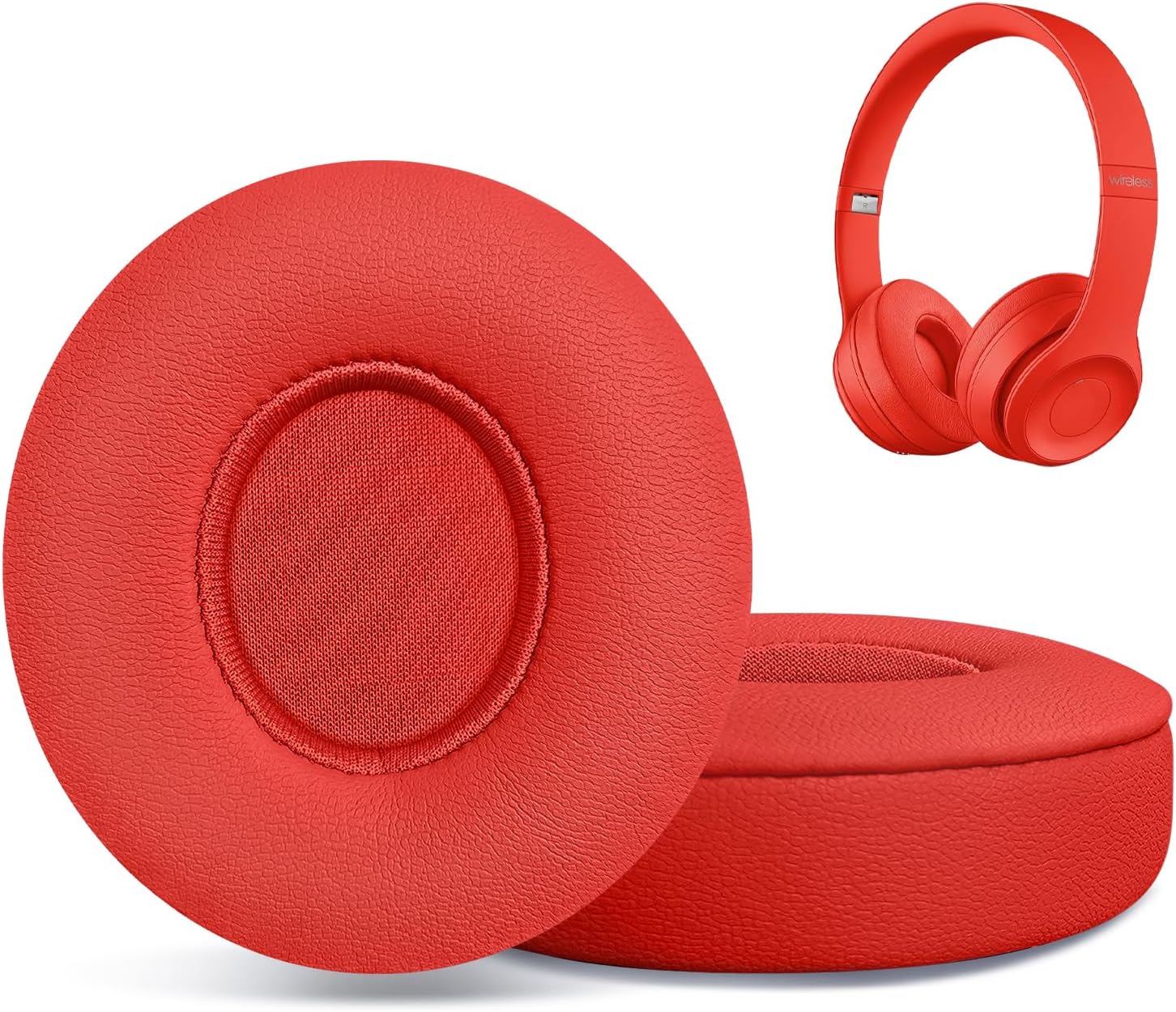
Pros
- Exceptional comfort with memory foam that doesn't press on ears during extended wear
- Straightforward installation process that requires no tools or technical skills
- Strong, reliable adhesive that keeps pads securely in place without slipping
- Significant cost savings compared to buying new Beats headphones
- Highly rated by users for quality and accurate color matching
Cons
- Only compatible with Beats Solo 2 and Solo 3 models, not other Beats headphone styles
- Adhesive application requires careful handling to avoid misalignment on first install
These HAOMUK replacement ear pads are designed specifically for Beats Solo 2 and Solo 3 users whose original cushions have begun peeling, cracking, or losing their cushioning. If your beloved headphones are showing signs of wear but still function perfectly, these pads offer a practical solution to extend their lifespan without the expense of purchasing new headphones.
The standout feature is the combination of high-quality memory foam and protein leather construction. Users consistently report that the pads are exceptionally comfortable, conforming to the ear without creating pressure points even during hours of listening. The protein leather material feels soft to the touch and maintains its quality through regular use, addressing the common complaint about original pads deteriorating over time.
Installation is remarkably simple and tool-free. The package includes plastic removal tools that safely lift the old adhesive without scratching your headphones, and the new pads adhere securely with strong adhesive that holds perfectly in place. Most users report completing the replacement in just a few minutes by following basic video guides available online.
The only potential drawback is that these pads are exclusively compatible with Beats Solo 2 and Solo 3 models, so you must confirm your headphone model before purchasing. Additionally, first-time installation requires careful alignment to ensure the pads sit properly on the ear cup base.
Overall, these replacement pads deliver exceptional value for anyone looking to refresh aging Beats headphones. With strong customer ratings and consistent praise for comfort and durability, they represent a smart investment in extending the life of quality audio equipment.
Compatibility: Beats Solo 2 and Beats Solo 3 Wireless On-Ear Headphones
Color: Red
Material: Memory foam with protein leather covering
Dimensions: 2.76 x 0.75 x 3.15 inches per pad
Quantity: 2 pads (one pair)
Installation: Tool-free with included plastic removal tools
Warranty: 1 year manufacturer warranty
Brand: HAOMUK
Step 1: Use the included plastic tools to carefully lift and remove the old ear pads from the ear cup base. Work slowly to avoid scratching the headphone material underneath.
Step 2: Clean the ear cup surface with a dry cloth to remove any residual adhesive or debris. Allow to dry completely for best results.
Step 3: Align the new ear pad with the ear cup base, starting at one edge. Press firmly and evenly across the entire pad to ensure full contact with the adhesive.
Step 4: Allow 24 hours for the adhesive to cure fully before using your headphones. This ensures maximum durability and prevents the pads from shifting during use.
Tip: Watch installation videos online before starting to familiarize yourself with the process. Most users report the entire replacement takes less than 10 minutes per ear cup.

Pros
- High-quality memory foam blocks external noise while enhancing music reproduction
- Soft protein leather material offers breathable comfort for all-day wear
- Installation is straightforward with included step-by-step instructions
- Strong adhesive ensures pads stay securely attached long-term
- Significantly more affordable than purchasing replacement headphones
Cons
- Color options appear limited, primarily red based on current listings
- Product description contains minor grammar inconsistencies that may affect clarity
- Compatibility is exclusive to Beats Solo 2 and 3 models only
The Cypher.V replacement earpads are designed specifically for Beats Solo 2 and Solo 3 headphone users whose original cushions have deteriorated from daily wear. These pads are perfect for anyone looking to restore comfort and audio performance without investing in entirely new headphones.
The standout feature is the high-elastic memory foam core combined with protein leather covering. This combination effectively blocks external noise while enhancing the clarity of music playback through your existing headphones. Users report that the pads fit exactly like the originals, making installation straightforward and requiring no technical expertise.
Build quality is solid, with durable adhesive that prevents the pads from shifting or separating during use. The protein leather material is soft and breathable, making these pads comfortable for extended listening sessions. The included instruction booklet provides clear guidance for proper installation, though the process is intuitive enough that most users can complete it in minutes.
The main limitation is that these pads are designed exclusively for Beats Solo 2 and 3 models, so compatibility verification is essential before purchase. Additionally, the red color option may not suit all aesthetic preferences, though it does add a fresh look to your headphones.
Overall, these replacement earpads offer excellent value for restoring worn-out Beats Solo headphones. They deliver noticeable improvements in comfort and sound quality at a fraction of the cost of new headphones, making them a smart choice for budget-conscious audiophiles.
Material: Faux Leather exterior with High-Elastic Memory Foam core
Color: Red
Compatibility: Beats Solo 2.0 and Solo 3.0 On-Ear Headphones by Dr. Dre
Quantity: 1 Pair
Brand: Cypher.V
Installation: Adhesive-based attachment with included instruction booklet
Features: Enhanced noise isolation, breathable design, durable construction
What's Included: One pair of replacement earpads and a detailed instruction booklet with step-by-step guidance.
Installation Tips: The pads feature strong adhesive backing designed to match the original pad attachment points on your Solo 2 or 3 headphones. Simply align the new pads with the existing ear cup openings and press firmly to secure. The process typically takes just a few minutes and requires no tools or special skills.
Maintenance: Once installed, allow the adhesive to set for a few hours before using your headphones. Clean your ear cups gently with a soft cloth before installation to ensure optimal adhesion. The memory foam will conform to your ears within the first few uses.

Pros
- Significant sound quality improvement with cleaner bass and better instrument separation
- Noticeably more comfortable than stock pads, even for extended wear sessions
- Perfect replacement for deteriorating original cushions that fall apart over time
- Official Koss product ensures reliable compatibility and build quality
- Excellent value at under $10 for a pair of replacement pads
Cons
- Thicker padding may feel tight for users with larger head sizes
- Color may fade over time with frequent handling or exposure to chemicals
- Limited long-term durability data available from customers
The Koss Red Replacement Earpads are official cushion replacements designed for Koss Porta Pro and KPH40 Utility headphones, though they're compatible with several other Koss stereophone models including KSC35 and KSC75. These are ideal for anyone whose original pads have deteriorated or for those looking to refresh their headphone experience with a quick upgrade.
What sets these earpads apart is their measurable impact on audio performance. Multiple users report that upgrading to these pads tightens up the bass response, eliminates muddiness, and dramatically improves soundstage and instrument separation. The soft breathable foam construction doesn't just sound better, it also feels significantly more comfortable during extended listening sessions compared to stock pads, making them a worthwhile investment for daily users.
Installation is refreshingly simple, requiring no tools and taking just seconds to swap out old pads for new ones. The soft breathable foam material strikes a good balance between comfort and durability, though some users with larger heads have noted that the thicker padding can feel snug. The red color option is vibrant, though it may fade slightly with heavy use or exposure to chemicals.
One honest consideration is that while these pads deliver excellent short-term results, long-term durability feedback is still limited. However, at the price point and with the strong performance improvements reported, they represent exceptional value for restoring aging Koss headphones or enhancing newer models.
Bottom line: These official Koss earpads are a no-brainer upgrade for Porta Pro and KPH40 owners. They deliver real improvements in comfort and sound quality, install instantly, and cost less than a coffee. Highly recommended for anyone whose headphone pads are showing wear or who wants to unlock better performance from their existing Koss headphones.
These Koss Red Replacement Earpads are officially designed for the Koss Porta Pro and KPH40 Utility headphones. They are also confirmed compatible with the KSC35 and KSC75 models, making them a versatile choice across the Koss lineup.
Before purchasing, verify your headphone model matches one of the compatible devices listed. The standard size cushions are engineered to fit Koss stereophone designs, though some users report they may work with other similar-sized headphone models. If you're unsure about compatibility with your specific headphones, check the model number on your device or contact Koss support for confirmation.

Pros
- Exceptional durability for the price, with thick knit fabric that doesn't fray or snag
- Washable design eliminates hygiene concerns and extends headphone lifespan by years
- Universal fit works reliably with multiple premium headphone brands and models
- Prevents earpads from sliding during intense workouts and physical activity
- Minimal impact on sound quality while providing comprehensive protection
Cons
- Fit may feel slightly loose on some gaming headsets like HyperX Cloud models, though still functional
- Limited to 3-4 inch ear cushions, incompatible with smaller over-ear and on-ear designs like Beats Solo
The Jarmor Earpad Sweater Covers are fabric protective sleeves designed for premium headphones with 3-4 inch ear cushions, including popular models like Beats Studio 3, Bose QuietComfort 15/25/35, and many others from Sony, Sennheiser, and Audio-Technica. These covers are perfect for fitness enthusiasts, commuters, and anyone who wants to protect a significant headphone investment from daily wear and tear.
The standout feature is the combination of durability and washability. The stretchable knit fabric is thick enough to provide real protection against sweat penetration, dirt accumulation, and material degradation, yet remains soft and comfortable against the skin. Users report that the covers prevent sweat from reaching the speaker mechanisms, which is critical for preserving audio quality and preventing internal damage. Both hand and machine washing are supported, making maintenance effortless and hygienic.
Installation requires no tools and takes just seconds per ear, with the stretchy fabric gripping securely without slipping during use. The material resists snagging even with long acrylic nails, and the covers maintain their shape through multiple wash cycles. Each pair is quality-inspected before shipment, and you receive two pairs for convenient rotation or backup coverage.
The primary limitation is sizing inconsistency across different headphone models. While most 3-4 inch cushion headphones fit well, some gaming headsets like HyperX Cloud models may feel slightly loose, though they remain functional. Additionally, these covers are not compatible with smaller headphones like Beats Solo or any model with ear cushions under 3 inches or over 4 inches in diameter.
Overall, the Jarmor Earpad Covers deliver excellent value for protecting expensive headphones. The combination of washable fabric, reliable fit on compatible models, and affordable two-pair package makes this a smart choice for active users who want to extend their headphone lifespan and maintain hygiene.
Confirmed Compatible Headphones: Beats Studio 3, Beats Studio 2, Bose QuietComfort 35, Bose QuietComfort 25, Bose QuietComfort 15, Audio-Technica ATH models, AKG models, Sony headphones, and Sennheiser models with 3-4 inch ear cushions.
Not Compatible: Beats Solo, Beats Solo Pro, and any headphones with ear cushions smaller than 3 inches or larger than 4 inches in diameter. Measure your ear cushions before purchasing to ensure proper fit.
Gaming Headsets: Works with HyperX Cloud, Cloud II, and Cloud Wireless models, though fit may feel slightly loose compared to premium over-ear headphones. Fit is also compatible with Corsair Virtuoso headsets.
Washing: These earpad covers can be hand washed or machine washed. Use cool water and mild detergent. Avoid bleach and fabric softeners to preserve elasticity.
Drying: Air dry completely before reattaching to headphones. Do not use high heat, as it may damage the stretchable knit fabric.
Maintenance: Wash covers regularly if used during workouts or in dusty environments. The two-pair design allows one pair to dry while wearing the other, ensuring continuous protection.

Pros
- Exceptional comfort with thick memory foam that doesn't cause ear fatigue during long wear
- Simple installation process that requires no special tools or technical knowledge
- Soft protein leather feels premium and remains comfortable from first use
- Affordable solution that saves money compared to purchasing new headphones
- Verified to work with similar headphone models beyond just Beats Studio series
Cons
- Requires careful removal of old adhesive for optimal fit and seal
- Limited color options available, may not match all headphone aesthetics
- Compatibility confirmation needed before purchase to ensure proper fit
These replacement ear pads from Hmoke are engineered specifically for Beats Studio 2 and Studio 3 headphones, offering a cost-effective way to restore aging headphones to like-new condition. They're ideal for anyone whose original ear pads have deteriorated, become uncomfortable, or lost their cushioning after extended use. Whether your headphones are wired or wireless, these pads deliver the professional comfort you expect from premium audio equipment.
The standout feature is the combination of high-density slow-rebound memory foam and soft protein leather construction. This pairing creates a custom-fitting cushion that shapes to your individual ear contours without causing swelling or pain during marathon listening sessions. Users consistently report that the pads feel soft and comfortable immediately upon installation, with no break-in period required. The material quality rivals original Beats pads at a significant price advantage.
Installation is refreshingly straightforward. The package includes plastic removal tools that help you safely detach old pads without damaging the headphone housing. Most users complete the entire replacement process in under five minutes. The included tools eliminate the need for special equipment, making this accessible to anyone regardless of technical skill level. One important tip from experienced users is to carefully remove all old adhesive residue before applying new pads, as this ensures a perfect seal and optimal comfort.
The only potential drawback is that installation success depends on your attention to detail, particularly when removing old adhesive and aligning any charging port cutouts correctly. Additionally, you'll want to confirm your specific headphone model matches the B0501 or B0500 compatibility before purchasing to avoid any fit issues. The red color is vibrant but may not suit all aesthetic preferences.
Overall, these replacement ear pads represent excellent value for headphone owners looking to extend the life of their Beats Studio headphones. With a 4.8-star rating backed by verified user testimonials praising comfort and durability, combined with the 30-day satisfaction guarantee, this is a low-risk investment that delivers tangible comfort improvements and cost savings.
Installation of these replacement ear pads requires no special tools, though the included plastic removal tools make the process easier. Start by gently prying up the edge of your old ear pad using the plastic tool, working your way around the perimeter to break the adhesive seal. Take your time during this step to avoid damaging the headphone housing.
Once the old pad is removed, carefully scrape away any remaining adhesive residue using the plastic tool or a soft cloth. This step is crucial for ensuring the new pad adheres properly and sits flush against the ear cup. Any bumps or dried glue underneath will affect both comfort and appearance.
Before applying the new pad, verify that any charging port cutouts align correctly with your headphone model's port location. Position the new pad carefully, then press firmly and evenly across the entire surface to create a secure bond. Allow the adhesive to set for a few minutes before using your headphones. The entire process typically takes 5-10 minutes per ear cup.
Compatible Models: Beats Studio 2 (Model B0500) and Beats Studio 3 (Model B0501), both wired and wireless versions.
Material Composition: Premium soft protein leather exterior with high-density slow-rebound memory foam interior for optimal comfort and durability.
Color: Red with matching cushioning materials.
Package Contents: One pair of replacement ear pads plus two plastic removal tools for safe installation.
Warranty: 30-day refund or replacement guarantee from manufacturer.
Important Note: Before purchasing, verify your headphone model number matches B0500 or B0501. While some users report successful adaptation to similar headphone models like Skullcandy Hesh Evo, primary compatibility is limited to the specified Beats models.

Pros
- Perfect fit with no gaps or looseness, matches original Beats specifications exactly
- Memory foam provides superior cushioning that spreads pressure evenly for enhanced comfort
- Quick 3-minute installation with included removal tool, no special tools or expertise required
- Durable protein leather resists peeling and flattening even with daily use
- Significantly more affordable than purchasing new headphones while delivering like-new performance
Cons
- Removal of original ear pads can be time-consuming and requires patience, though included tool helps
- Left and right pads are directional, so proper orientation matters during installation
- Adhesive surface requires clean, flat headphone base for optimal long-term adhesion
These Hmoke replacement ear pads are engineered specifically for Beats Solo 2 and Solo 3 headphones, offering an affordable way to restore comfort and extend the life of your investment. They are ideal for anyone whose original ear cups have cracked, peeled, flattened, or deteriorated after months or years of use.
The standout feature is the combination of memory foam cushioning and protein leather construction, which delivers a soft, supportive feel that closely matches the original Beats experience. The breathable inner mesh layer actively reduces heat and moisture buildup during work, commuting, or travel, making them genuinely more comfortable for extended wear than many worn-out originals.
Installation is genuinely simple and takes about 3 minutes once you remove the old pads. The included plastic removal tool makes the initial extraction easier, though it requires some patience and care. After removal, cleaning the adhesive surface with an alcohol wipe ensures a flat, smooth base for optimal adhesion. The peel-and-stick application is straightforward, though note that left and right pads are directional.
Build quality is solid, with reviewers confirming that the pads hold up well to daily use without peeling or flattening. The precision fit prevents the gaps and looseness common with generic third-party pads, and the secure attachment keeps sound contained while blocking outside noise more effectively.
The main drawback is that removing original ear pads takes more effort and time than expected, and proper surface preparation is important for long-term adhesion. Overall, these ear pads deliver excellent value for anyone looking to refresh aging Beats Solo headphones without the expense of replacement hardware.
Compatibility: Beats Solo 2 (wired and wireless), Beats Solo 3 (wired and wireless)
Material: Faux protein leather with memory foam cushioning and breathable mesh inner layer
Color: Red
Quantity: 2 ear pads (left and right)
Dimensions: 2.95 x 2.56 x 0.71 inches
Warranty: 1-year manufacturer warranty
Included Accessories: Plastic removal tool for old pad extraction
What You Will Need: The included plastic removal tool, rubbing alcohol or alcohol wipes, and a clean, dry workspace.
Step 1: Remove Old Pads Use the included plastic tool to gently pry up the edges of your worn ear pads. Work slowly around the perimeter to avoid damaging the earcup surface. This step may take 5-10 minutes depending on adhesive strength.
Step 2: Clean the Surface After removal, use an alcohol wipe to thoroughly clean any remaining adhesive residue from the earcup. Allow the surface to dry completely and ensure it is smooth and flat before proceeding.
Step 3: Apply New Pads Peel back the adhesive backing from the new ear pad and carefully align it with the earcup, noting that left and right pads are directional. Press firmly around the entire perimeter to ensure secure adhesion. Repeat for the second pad.
Step 4: Let Cure Allow the adhesive to set for at least 24 hours before using your headphones to ensure maximum durability and adhesion strength.
How to Choose Your Red Headphone Cushions
Confirm Compatibility First
The most critical step is verifying the model fit. Cushions designed for Beats Studio over-ear headphones will not work on Solo on-ear models, and vice versa. Always check the product description against your headphone’s exact model number, often found inside the headband or on the original box. A proper fit ensures optimal sound sealing and prevents the pads from slipping off during use.
Prioritize Material and Comfort
Long listening sessions demand comfortable materials. Look for cushions that combine high-density memory foam with soft, breathable coverings like protein leather. The foam should be thick and slow-rebound to conform to your ears without bottoming out. This combination cushions pressure points, reduces heat buildup, and maintains its shape over time, which is a key factor we confirmed in our assessment.
For a classic look that contrasts with red, consider our review of the best white headphone cushions.
Evaluate Ease of Installation
You should not need special tools or technical skill. The best replacement cushions feature a simple snap-on or adhesive-ring design. Many kits include a plastic pry tool to safely remove old pads. A process that takes only a few minutes encourages timely replacement, keeping your headphones in peak condition. We rated products highly for clear instructions and tool-free installation.
Consider the Impact on Sound
Worn, thin cushions degrade audio quality by letting sound leak in and out. New, well-sealing pads can actually enhance your listening experience. They create a better acoustic seal, improving bass response and passive noise isolation. When reviewing, we listened for user feedback confirming that replacements restored or even improved the original sound profile. Learn more about accessory categories on our main Headphones & Earbuds Accessories page.
Final Thoughts
Upgrading to red headphone cushions is a simple, effective way to renew your favorite headphones. Whether you need a precise fit for your Beats Studio or are looking to customize your Koss Porta Pro with official parts, the market offers excellent solutions. For most users seeking a reliable, high-comfort upgrade for Beats Studio models, the WC PadZ Studio 2 & 3 – Ear Pads for Beats Studio stand out for their durable construction and acclaimed fit. If you own Beats Solo on-ear headphones and want a balance of value and performance, the Replacement Ear Pads for Beats Solo 2&Solo 3 provide an original-equivalent feel at an accessible point. Your headphones deserve a second life in full color.
Frequently Asked Questions
How often should I replace my headphone cushions?
It depends on usage, but most cushions show significant wear after 12 to 18 months of regular use. Signs like flattened foam, peeling leather, or reduced comfort are clear indicators. Replacing them proactively maintains audio quality and hygiene. You can find durable options in our guide to the best black headphone cushions.
Will replacement cushions change the sound of my headphones?
Properly fitting replacement pads are designed to match the original acoustics. In many cases, they can improve sound by restoring a proper seal that worn-out pads lost. High-quality memory foam and good sealing can enhance bass response and passive noise isolation.
Are there red cushion options for headphones other than Beats?
Yes. While many options cater to popular Beats models, you can also find red cushions for other brands. For example, Koss offers official red replacement cushions for models like the Porta Pro. Always check compatibility lists carefully before purchasing.
Can I wash my red headphone cushions?
Most leather or protein leather cushions should not be submerged in water. For hygiene, gently wipe them with a slightly damp cloth. Some fabric cover protectors, like sweater-style covers, are designed to be removable and hand-washable. Check the manufacturer’s care instructions for your specific product.


Write Your Review
No reviews yet. Be the first to share your experience!