

You’ve got the perfect microphone, a quiet room, and a vocal take ready to capture. But when you hit record, the sound lacks the sparkle and professional sheen you hear on commercial tracks. The missing link is often the microphone preamp, the critical first stage that can make or break your audio quality. This guide is for musicians, podcasters, and content creators who are ready to elevate their recordings from amateur to exceptional by understanding and selecting the right preamplifier.
Choosing the best microphone preamps is about more than just amplifying a signal; it’s about preserving detail, adding character, and providing a clean foundation for your mix. Whether you’re recording vocals, acoustic instruments, or podcasts, the right preamp brings out the best in your source. For a deeper dive into the entire recording ecosystem, explore our comprehensive resources on recording and musical instruments.
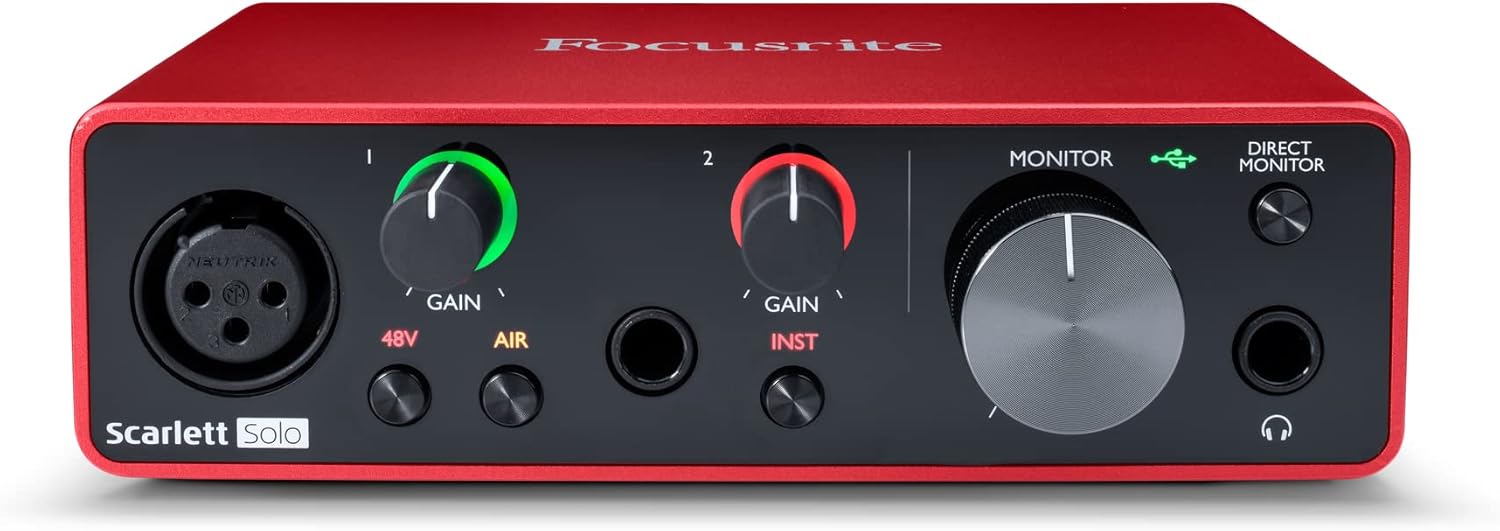
Pros
- Excellent preamp quality produces bright, clear recordings with minimal noise floor
- Air mode adds professional polish to vocal and acoustic recordings without additional equipment
- Compact design perfect for home studios, bedroom producers, and mobile recording setups
- Included software suite eliminates need for expensive DAW purchases
- Highly reliable brand with strong reputation in professional audio industry
Cons
- Single microphone input limits simultaneous multi-instrument recording capabilities
- May require audio driver updates for optimal performance on some Windows systems
- Learning curve for beginners unfamiliar with audio interface operation and gain staging
The Focusrite Scarlett Solo 3rd Gen is a professional USB audio interface designed for musicians, podcasters, and content creators who demand studio-quality recordings without the complexity of larger mixing consoles. This compact device bridges the gap between budget-friendly entry-level gear and expensive professional equipment, making it ideal for home studios, bedroom producers, and anyone serious about capturing professional-grade audio.
The standout feature is undoubtedly the high-performance microphone preamp paired with the innovative Air mode, which adds extra clarity and presence to vocals and acoustic instruments. The two high-headroom instrument inputs eliminate clipping and distortion, ensuring your guitar, bass, and other instruments shine through with clarity. Recording at up to 24-bit/192kHz resolution means your productions retain all sonic nuances, while the Gain Halo visual feedback system helps you nail perfect levels every time.
Build quality reflects Focusrite's professional heritage, with a solid metal chassis and intuitive front-panel controls that feel responsive and durable. The USB-C connectivity provides fast, reliable data transfer and modern compatibility with both Mac and Windows systems. The included software bundle (Pro Tools Intro+, Ableton Live Lite, Cubase LE) gives you everything needed to start producing immediately without additional software purchases.
The primary limitation is the single microphone input, which restricts simultaneous multi-track vocal or acoustic recording. Additionally, some Windows users report requiring driver updates for optimal performance. The learning curve for gain staging and audio interface operation may challenge complete beginners, though the included documentation is comprehensive.
The Focusrite Scarlett Solo 3rd Gen represents exceptional value for serious hobbyists and semi-professional creators. Its combination of pristine preamp quality, professional converters, intuitive design, and included software makes it the go-to choice for anyone upgrading from computer microphones or entry-level interfaces. The three-year warranty provides confidence in your investment.
Audio I/O: 1 XLR microphone input, 2 high-impedance instrument inputs, 2 balanced line outputs, headphone output
Audio Quality: 24-bit/192kHz recording and playback resolution with high-performance converters
Connectivity: USB-C to computer, compatible with all major audio recording software
Channels: 2 channels (stereo)
Features: Switchable Air mode, Gain Halo visual feedback, low-noise outputs, headphone monitoring
Software Included: Pro Tools Intro+, Ableton Live Lite, Cubase LE, Hitmaker Expansion
Warranty: 3-year manufacturer warranty worldwide
Compatible Devices: Microphones, instruments, personal computers, headphones, studio monitors
Who Should Buy: Musicians recording at home, podcasters seeking professional audio quality, guitarists and bassists needing quality instrument preamps, content creators upgrading from built-in computer audio, and producers working with limited space.
Who Should Look Elsewhere: Users needing simultaneous multi-microphone recording, those requiring extensive analog mixing features, or professionals running high-channel-count studios requiring more I/O options.
Setup Tips: Ensure your computer meets USB-C requirements and install drivers before first use. Spend time learning gain staging with the Gain Halo visual indicator to avoid clipping. Experiment with Air mode on different sources to understand its impact on your recordings.
Value Comparison: At this price point, the Scarlett Solo 3rd Gen outperforms competitors by offering superior preamp quality, professional software bundle, and proven brand reliability. The included software alone typically costs $200+ if purchased separately.
Buying Guide for Microphone Preamps
Sound Character: Clean vs. Colored
Your first major decision is between a transparent, clean preamp and one that adds harmonic coloration. Clean preamps aim for absolute fidelity, capturing your microphone’s signal with minimal alteration. This is ideal for critical recording where you want total control in post-production.
Colored preamps, often inspired by classic analog gear, add subtle warmth, saturation, or a specific tonal character. They can make digital recordings feel more organic and can be a creative tool. Consider your primary use case; podcasters and classical musicians often prefer clean gain, while rock vocalists might seek a touch of vintage character.
Gain and Headroom
Adequate gain is non-negotiable. You need enough clean amplification to bring quiet sources like dynamic microphones or soft vocals up to a strong recording level. Look for preamps offering at least 50-60 dB of gain. Headroom is equally crucial.
This refers to the margin before the signal distorts. High headroom allows you to record loud sources, like a cranked guitar amp or a powerful singer, without unwanted clipping. Features like Focusrite’s Gain Halo visually indicate optimal levels, helping you avoid distortion and capture a clean take every time.
Connectivity and Form Factor
Your setup dictates the type of preamp you need. A standalone unit is excellent for adding a premium channel to an existing mixer. An audio interface with built-in preamps, like the Focusrite Scarlett Solo, provides an all-in-one solution with computer connectivity via USB. This is perfect for most home studios.
Check for the right input types, typically XLR for microphones and possibly a combo jack for instruments. Modern interfaces use USB-C for robust power and data transfer. Also, ensure your chosen preamp works seamlessly with your other gear, such as your dynamic microphones or condenser mics.
Additional Features and Software
Modern preamps often include valuable extras. A high-pass filter can remove low-frequency rumble. A phase inversion switch is handy for multi-mic setups. ‘Air’ modes or similar circuits, as found on 3rd Gen Scarlett interfaces, add high-end clarity reminiscent of classic expensive preamps.
Many interfaces bundle professional recording software, a huge value for beginners. Bundles with Ableton Live Lite, Pro Tools Intro, and plugin suites effectively give you a complete studio in a box. This software ecosystem is a significant advantage for those starting their recording journey.
Final Thoughts
Investing in a quality microphone preamp is one of the most impactful upgrades you can make for your audio. It transforms a good recording into a great one by providing a clean, detailed foundation. For most creators seeking professional, transparent sound in a simple package, the Focusrite Scarlett Solo 3rd Gen USB-C Audio represents an exceptional starting point, while those looking to integrate premium analog character into a larger digital setup might explore dedicated standalone units. Ultimately, the best choice empowers your unique creative voice.
Frequently Asked Questions
Do I really need a separate microphone preamp?
If you are using a USB microphone, it has a built-in preamp, so an external one is not necessary. However, for any XLR microphone, a preamp is absolutely essential. It provides the proper gain and impedance matching required for the microphone to function correctly. Using a quality external preamp, whether standalone or within an interface, will always yield superior sound compared to the basic preamps found on consumer mixers or computer sound cards.
What’s the difference between a preamp and an audio interface?
<!–Think of a preamp as a single component: its job is solely to amplify the microphone’s weak signal to a usable line level. An audio interface contains one or more preamps, but it also includes an analog-to-digital converter to get that signal into your computer, and often includes outputs for monitoring. For most home studios, an interface like those reviewed for the best USB microphones is the most practical and cost-effective solution, bundling everything you need into one unit.
Can a good preamp improve my existing recordings?
<!–Absolutely. A high-quality preamp captures more detail, provides a lower noise floor, and offers greater headroom than a poor one. This results in recordings with clearer highs, more defined mids, and less background hiss. The improvement is often immediately audible, giving your tracks a more professional, polished, and competitive sound right from the source, which simplifies mixing and mastering later on.
How many preamp channels do I need?
<!–Start by assessing your maximum simultaneous recording needs. If you record solo vocals or a single instrument at a time, a one or two-channel preamp is perfect. For recording a drum kit, a full band, or multiple podcast hosts, you’ll need an interface with four, eight, or more preamps. Planning for future growth is wise, but for many creators, a simple two-channel interface provides all the connectivity needed for high-quality production in 2026.


Write Your Review
No reviews yet. Be the first to share your experience!