

Your digital audio workstation is the heart of your creative process. Yet, constantly clicking and dragging with a mouse can disrupt your creative flow and feel disconnected from the music.
This guide is for producers, beat makers, and musicians seeking a more tactile, intuitive way to interact with their software. We have assessed the leading hardware controllers designed to put hands-on command of your DAW within reach.

Pros
- Perfect size and weight balance between functionality and portability for on-the-go producers
- Seamless Ableton Live integration with pre-mapped controls eliminates setup time and learning curve
- Bright RGB pads provide clear visual feedback essential for live performance confidence
- Dual Drum and Note modes expand creative possibilities beyond clip launching
- Included Ableton Live Lite and virtual instruments provide immediate value and production-ready software
Cons
- Limited to Ableton Live workflow, making it less versatile for users of other DAWs
- No built-in sounds or standalone functionality requires connection to computer or Ableton software
- Plastic construction feels less premium compared to higher-end MIDI controllers in the price range
The Akai APC Mini MK2 is a specialized USB MIDI controller designed for Ableton Live users who want tactile control over their productions. Whether you're a bedroom producer, live performer, or music educator, this compact device bridges the gap between mouse-based workflow and hands-on creativity. At just 9.48 inches wide and 1.2 inches tall, it's engineered for maximum portability without sacrificing essential controls.
The standout feature is the 64-pad RGB matrix that maps directly to Ableton Live's clip launcher with brilliant visual feedback. Combined with 9 faders for mixing and device control, you get legitimate studio-grade mixing capabilities in a device smaller than most laptops. The Drum and Note modes are particularly impressive, offering Smart Scale View so you always know which musical key you're working in without glancing at your screen. This is genuinely useful for live performance where visual feedback matters.
Build quality is solid despite the plastic construction. The pads feel responsive and the faders operate smoothly with satisfying resistance. The compact ergonomic design sits comfortably on any desk or lap setup. USB 2.0 connectivity is reliable, and the fact that power comes through the USB cable eliminates cable clutter and battery concerns. Everything needed to get started ships in the box, including Ableton Live Lite and a virtual instrument pack with Hybrid 3, Mini Grand, and Velvet.
The main limitation is its Ableton-centric design. If you use Logic, FL Studio, or other DAWs, this controller loses much of its magic since the pre-mapped controls won't apply. Additionally, this is a controller only, not a standalone instrument, so you always need a computer and Ableton running. The plastic body also feels less durable than metal alternatives at similar price points.
Final verdict: The APC Mini MK2 is the best compact MIDI controller for Ableton Live producers who prioritize portability and workflow efficiency. If you match the software requirement, this device transforms your production experience from mouse-clicking to hands-on creativity. Highly recommended for live performers and mobile producers seeking professional control in a travel-friendly format.
Physical Dimensions: 9.48 inches wide by 8.28 inches deep by 1.2 inches tall. Weight is 810 grams, making it lightweight enough for travel while providing stable desktop operation.
Controls and Interface: 64 RGB backlit pads arranged in an 8x8 matrix, 9 assignable faders (8 channel faders plus 1 master fader), 4 directional arrow buttons, dedicated scene launch buttons, and programmable soft keys for custom workflows.
Connectivity: USB 2.0 Type B connector with plug-and-play compatibility. No external power adapter required as the device draws power directly from USB. Compatible with Mac and Windows platforms running Ableton Live 11.2.7 or later.
Included Software: Ableton Live Lite (download) with virtual instruments including Hybrid 3 polyphonic synthesizer, Mini Grand acoustic piano, and Velvet vintage electric piano. User guide, software download cards, and 1-year manufacturer warranty included.
Who Should Buy: This controller is ideal for Ableton Live users, electronic music producers, DJs performing with Ableton, music educators, and live performers who need portable hands-on control. It's perfect for anyone transitioning from keyboard-only production to tactile mixing and clip launching.
Who Should Look Elsewhere: If you use FL Studio, Logic Pro, Cubase, or other DAWs, consider controllers with more universal MIDI mapping. If you need a standalone drum machine or synthesizer, this is a controller only and requires Ableton software. For studio-only setups where portability isn't important, larger controllers with more faders and pads may offer better value.
Key Considerations: Verify your computer meets Ableton Live system requirements before purchasing. Ensure your USB setup has available ports or plan for a USB hub. Consider your primary use case: if it's 80 percent live performance, the compact size is essential. If it's 80 percent studio work, a larger controller might provide better ergonomics.
Value Assessment: At the current price point, this controller delivers excellent value for Ableton-focused workflows. The included Ableton Live Lite and virtual instruments justify the investment even before considering the hardware quality. Compared to larger MIDI controllers, you're paying for portability and Ableton integration rather than maximum control count.

Pros
- Plug-and-play USB connectivity with automatic DAW recognition and zero configuration hassle
- Built-in sequencer and standalone operation means you can produce music without a computer
- Excellent key and pad responsiveness with velocity sensitivity for expressive performances
- Native Instruments partnership provides access to professional sound libraries and exclusive bundles
- Compact yet feature-rich design balances portability with serious production capabilities
Cons
- MIDI I/O functionality requires external power source, limiting standalone hardware integration options
- Knobs arrive unassigned in most DAWs, requiring manual customization before use
- Mini keys may feel cramped for musicians with larger hands or those accustomed to full-size keyboards
The Akai MPK Mini Plus is a 37-key MIDI controller designed for producers, beat makers, and musicians who need portable, powerful music creation tools. Whether you are a beginner exploring music production or an experienced creator seeking a secondary controller, this device bridges the gap between compact convenience and serious production capability. The included MPC Beats software and Native Instruments integration make it an all-in-one solution for getting started immediately.
Performance and responsiveness are where this controller truly shines. The 37 mini keys feel responsive and velocity-sensitive, allowing for expressive melodic performances across 3 full octaves. The 8 RGB MPC pads deliver dynamic drum programming with aftertouch support, while the 64-step sequencer with separate drum and melody tracks enables standalone beat creation without a computer. The 8 customizable rotary knobs provide tactile control over DAW parameters, EQ, volume, and automation, making mixing and sound design intuitive and hands-on.
Build quality reflects Akai Professional's reputation for durable music gear. The high-grade plastic construction feels solid and lightweight, making the controller genuinely portable for studio sessions, live performances, or travel. The compact 17.9 x 7.1 inch footprint fits comfortably on any desk without overwhelming your workspace, yet the ergonomic layout prevents cramping during extended sessions. The backlit display and color-coded pads enhance usability in low-light environments.
One limitation to note: the MIDI I/O connectors require external power to function properly, which may restrict standalone hardware integration for some users. Additionally, the rotary knobs arrive unassigned in most DAWs, requiring initial setup time. Musicians with larger hands might find the mini keys slightly cramped compared to full-size alternatives, though many users report adapting quickly.
The Akai MPK Mini Plus represents exceptional value for music creators at any skill level. The combination of included software, hardware connectivity options, and intuitive controls creates a versatile production center that scales with your ambitions. Highly recommended for anyone serious about music production on a budget.
Physical Specifications: 37 mini keys with Gen 2 dynamic keybed spanning 3 octaves, 8 touch-sensitive RGB MPC pads with aftertouch, 8 assignable rotary knobs, built-in joystick and modulation wheel, 64-step sequencer with drum and melody tracks. Dimensions: 17.9 inches wide, 7.1 inches deep, 2 inches tall. Weight and materials: durable high-grade plastic construction.
Connectivity Options: USB 2.0 powered connection for DAW control and MIDI data, 5-pin MIDI In/Out for hardware synth integration, CV/Gate outputs for modular gear control. Note: MIDI I/O requires external power source for proper functionality. Compatible with Mac and Windows computers and any DAW supporting standard MIDI protocol.
Software & Included Content: MPC Beats DAW with thousands of drum samples, loops, and plugin instruments including Electric and Tubesynth. Native Kontrol Standard (NKS) integration enables Native Instruments Komplete 15 Select access with three curated bundles: Beats, Band, or Electronic. 2 months of Splice Creator plan included. 1-year manufacturer warranty.
Ideal Users: Beginner producers and beat makers seeking an affordable entry point into music production, established musicians wanting a portable secondary controller, producers working with hardware synths and modular gear, content creators and streamers needing compact DAW control, music students and hobbyists exploring production techniques.
Use Cases: Home studio music production with Logic Pro, Ableton Live, FL Studio, or any major DAW, standalone beat creation using the built-in sequencer, hardware synthesizer control via MIDI I/O, live performance and DJ applications, iPad music production with compatible apps, educational settings and music instruction.
Not Ideal For: Pianists or classical musicians requiring full 88-key weighted keyboards, users needing standalone hardware synth control without external power, musicians with significant hand size requiring full-size keys, producers requiring extensive hardware integration without computer dependency.
Pros
- Motorized faders dramatically speed up mixing workflows compared to mouse control, reducing fatigue and improving precision
- LCD scribble strips eliminate guesswork by displaying track and parameter information directly on the hardware
- Exceptional value for motorized fader technology, significantly cheaper than comparable professional control surfaces
- Wide DAW compatibility through industry-standard HUI and Mackie Control protocols ensures long-term usability
- Responsive touch-sensitive faders and intuitive layout make it accessible for both beginners and experienced engineers
Cons
- Motorized faders produce audible mechanical noise during operation, which some users find distracting in quiet environments
- Button functions may require custom mapping or paper overlay workarounds depending on specific DAW implementation
- Some users report compatibility issues with newer AMD processor USB ports, requiring external USB card adapters
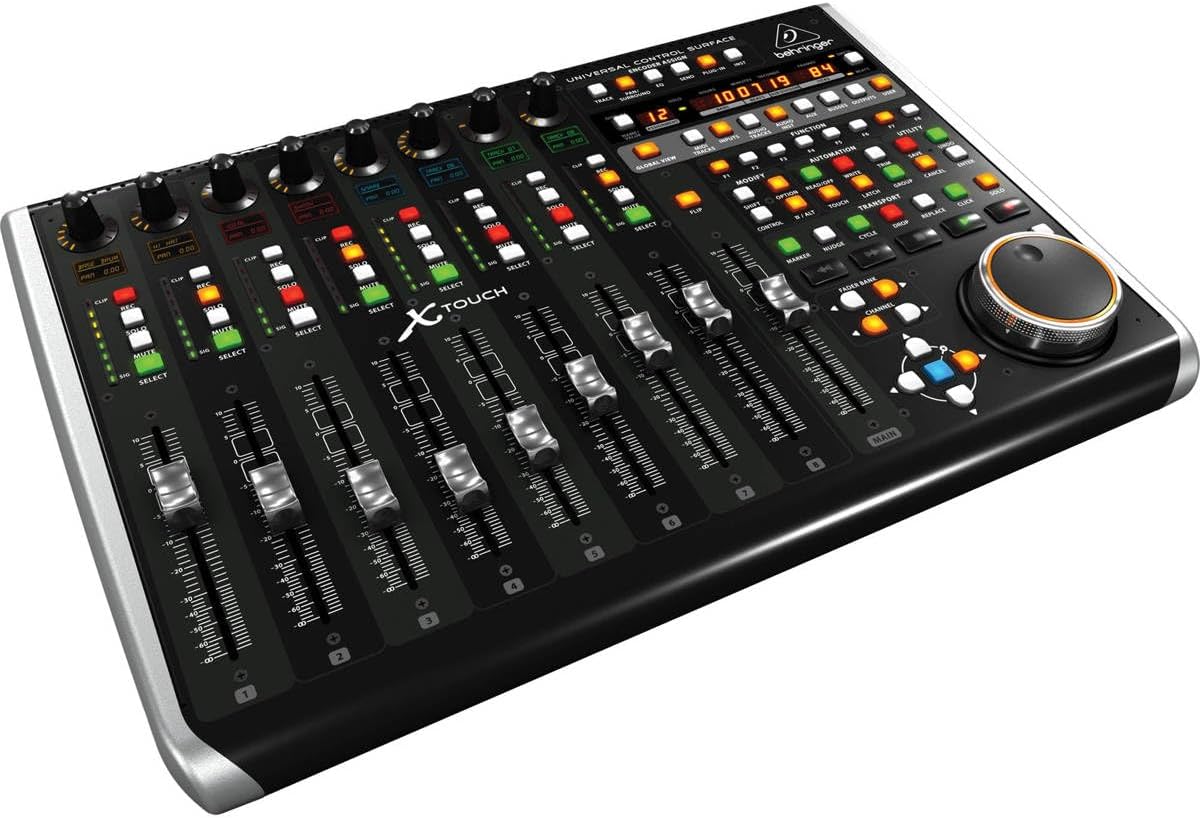
The Behringer X-TOUCH is a universal DAW control surface designed for music producers, audio engineers, and sound designers who want tactile mixing control without the expense of high-end professional consoles. It bridges the gap between budget-friendly and professional-grade equipment, offering genuine motorized faders and real-time parameter feedback at an accessible price point.
The standout features are the 9 motorized faders and 8 LCD scribble strips that transform your mixing experience. Instead of clicking and dragging in your DAW, you physically move faders and watch track names and parameters display on the dedicated screens. Users consistently report that this hardware approach makes mixing faster, more intuitive, and significantly reduces hand fatigue compared to traditional mouse-based workflows. The universal HUI and Mackie Control protocol support means it works with virtually every major DAW including Ableton Live, Pro Tools, FL Studio, Logic Pro, and Reaper.
Build quality is solid for the price range, with a compact footprint of 21.9 by 14.9 inches that fits comfortably on studio desks or fits into portable setups. The touch-sensitive faders respond quickly and allow simultaneous multi-fader adjustments, giving you real console-like control. Connectivity options include USB, Ethernet, and MIDI, providing flexibility for various studio configurations and future expansion possibilities.
The main drawbacks are the audible mechanical noise from motorized fader operation and occasional button mapping inconsistencies with certain DAWs that may require custom configuration. Additionally, some users with newer AMD processor systems report USB compatibility issues requiring external adapters. These are minor concerns for most users but worth considering if you work in noise-sensitive environments or have specific hardware configurations.
The X-TOUCH delivers genuine value for producers serious about hands-on mixing. It's the cheapest motorized fader controller on the market that actually works, making it an excellent choice for upgrading from mouse-based mixing without breaking the budget. Highly recommended for anyone using a compatible DAW.
Connectivity and Ports: USB 2.0 (3 total ports, 2 x USB 2.0), Ethernet RTP MIDI, MIDI interface. Supports both Mac and Windows platforms including iOS compatibility.
Control Surface: 9 x 100mm fully automated touch-sensitive motorized faders, 8 x dynamic LCD scribble strips for track and parameter display. Control methods include touchscreen interface and traditional button controls.
Physical Specifications: Dimensions 21.9 inches deep by 14.9 inches wide by 6.5 inches high. Weight 9.4 pounds. Color black. Portable design suitable for studio and live applications.
Compatibility: Supports HUI and Mackie Control protocols. Compatible with Ableton Live, Avid Pro Tools, FL Studio, Logic Pro, Reaper, Cakewalk Sonar, and Premiere Pro. Works with laptop and desktop computers running Windows or macOS.
Included Components: X-TOUCH control surface, Ethernet/USB/MIDI interface, dynamic microphone cardioid, 1-year extended warranty. Model number X-TOUCH, manufactured by Music Tribe US.
Who Should Buy: Music producers and audio engineers using DAWs like Ableton Live, Pro Tools, FL Studio, Logic Pro, or Reaper who want to upgrade from mouse-based mixing. Also suitable for Premiere Pro video editors requiring precise audio control. Best for anyone seeking affordable motorized fader technology without premium pricing.
Compatibility Check: Before purchasing, verify your DAW supports HUI or Mackie Control protocols. Most major DAWs do, but some niche software may have limited support. Check your specific DAW documentation or forums for implementation details. Note that button functions may require custom mapping depending on your DAW.
Setup Considerations: Requires USB 2.0 connection or Ethernet for RTP MIDI. If you have a newer AMD processor system, you may need an external USB adapter for reliable operation. Motorized faders produce mechanical noise, so consider your environment if working in noise-sensitive spaces.
Value Proposition: This is the most affordable motorized fader control surface available. Compare it to compact versions to determine if the 9-fader layout justifies the additional desk space. The LCD scribble strips are a significant workflow advantage worth the investment for serious mixing work.
Long-term Investment: The universal protocol support and established manufacturer backing ensure this device will remain compatible with future DAW updates. The motorized fader technology is reliable and cost-effective compared to higher-end alternatives.
Choosing Your Studio Controller
DAW Integration and Protocol Support
Seamless communication with your software is non-negotiable. Look for controllers with dedicated mappings for major DAWs like Ableton Live, Logic Pro, or FL Studio.
Universal protocols like Mackie Control or HUI offer broad compatibility. This ensures faders, knobs, and transport controls work intuitively without extensive configuration. For a complete studio setup, consider how your controller pairs with other gear, like the top audio interfaces with ADAT.
Control Surface Layout and Build Quality
The physical interface should match your workflow. Motorized faders provide visual feedback by moving automatically. Touch-sensitive faders and knobs offer precise, responsive control over mix parameters.
Durable pads with good velocity response are essential for finger drumming. A solid, stable build prevents unwanted movement during energetic performances. Explore more professional tools in our recording and musical instruments category.
Connectivity and Expandability
Modern connectivity goes beyond simple USB. MIDI I/O ports allow you to connect hardware synths or sound modules directly. CV/Gate outputs open the door to controlling modular gear.
Ethernet connectivity can enable network-based control for larger setups. Your controller should grow with your studio, not limit it. This is as crucial as choosing an audio interface with phantom power for your microphones.
Creative Features and Workflow Enhancement
Beyond basic control, seek features that spark creativity. Built-in sequencers, chord and scale modes, and arpeggiators can accelerate composition. Visual feedback from RGB pads or LCD scribble strips keeps you informed.
Consider bundled software, which can add significant value. These tools should remove technical barriers, letting you focus on the music. For capturing clean audio to control, a microphone with active noise cancellation can be a valuable companion.
Final Thoughts
Selecting the right controller fundamentally changes your studio experience. For producers deeply embedded in the Ableton Live ecosystem seeking vibrant clip launching, the Akai Professional APC Mini MK2 USB MIDI Pad is a compelling, compact choice. If your needs center on comprehensive mixing with motorized faders and pro-level integration, the Behringer X-TOUCH Universal Control Surface with 9 offers exceptional control. Pair your new controller with quality monitoring from our headphones and earbuds guide to complete your creative command center.
Frequently Asked Questions
Do I need a studio controller if I already have a MIDI keyboard?
A MIDI keyboard is excellent for playing melodies and chords. A dedicated studio controller, however, provides tactile faders, knobs, and pads specifically mapped to mix functions, transport controls, and clip launching. It offers a more integrated, hands-on approach to controlling your DAW itself, not just playing virtual instruments.
Are these controllers compatible with any DAW?
Most controllers target broad compatibility. Many use universal protocols like Mackie Control or HUI, which are supported by all major DAWs including Ableton Live, Logic Pro, Cubase, and Pro Tools. Some, like the APC series, offer deep, pre-mapped integration for a specific DAW (Ableton), providing a more seamless experience out of the box.
What is the main benefit of motorized faders?
Motorized faders automatically move to reflect the current parameter value in your software when you switch tracks or recall a mix. This provides crucial visual and tactile feedback, showing you exactly where each fader is set without having to touch it first. It prevents jarring jumps in volume or other parameters, making automation recall and mix navigation far more intuitive.
Can I use a studio controller without a computer?
It depends on the model. Most are designed as interfaces for computer-based DAWs. However, some advanced controllers feature standalone sequencers, MIDI I/O, and CV/Gate outputs. This allows them to sequence and control external hardware synthesizers, drum machines, and modular gear directly, enabling computer-free production sessions for certain workflows in 2026.


Write Your Review
No reviews yet. Be the first to share your experience!