

You want to start producing music, but your budget is tight. The idea of investing in a full studio setup feels overwhelming and expensive. A compact, capable MIDI controller can be your gateway, offering professional features without the professional price tag.
This guide focuses on the best MIDI keyboards under $100 for 2026. We have assessed models from trusted brands like Akai Professional and Nektar, as well as newer contenders. Our goal is to help you find a controller that fits your workflow, whether you’re sketching ideas in a bedroom studio or composing on the go. For those with an even tighter budget, we also have a guide on the best MIDI keyboards under $50.

Pros
- Exceptional value for the price with comprehensive software bundle and 1500+ sounds included
- Responsive, velocity-sensitive keys and pads deliver professional-quality performance capture
- Compact, lightweight design (0.9 kg) makes it perfect for studio work or mobile production
- Universal DAW compatibility works seamlessly with FL Studio, Ableton, Logic, and all major platforms
- Native Instruments integration provides access to premium sound libraries and preset browsing
Cons
- Learning curve for beginners, as mapping and customization requires some DAW knowledge
- Included software can be resource-intensive on lower-spec computers, potentially causing lag
- Mini keys may feel cramped for players accustomed to full-size keyboards
The Akai MPK Mini MK3 is a 25-key USB MIDI controller designed for music producers, beat makers, and musicians who need professional production tools in a compact format. Whether you're a beginner exploring music production or an experienced producer working remotely, this controller delivers studio-quality performance without consuming valuable desk space.
The standout features include 8 velocity-sensitive MPC-style drum pads with Note Repeat functionality, 8 assignable 360-degree knobs for real-time mixing and synth control, and a responsive 4-way joystick for dynamic pitch and modulation effects. The enhanced Gen 2 keybed captures every nuance of your playing with improved velocity sensitivity, while the built-in arpeggiator with adjustable resolution and modes opens creative possibilities for rhythm generation and melodic exploration. Native Instruments Komplete 15 Select integration means you can browse and control premium sound libraries directly from the controller.
Build quality is solid and professional, with responsive touch-sensitive pads and keys that feel durable despite the lightweight plastic construction. The ergonomic design and compact footprint (12.5 inches wide) make it equally at home on a studio desk or fitting into a travel bag. Setup is straightforward with single USB cable connectivity, and the included software download card provides instant access to MPC Beats, three virtual instruments, and 2GB of sound content.
Potential drawbacks include a learning curve for customizing controls within your DAW, and the included software can tax lower-spec computers. Some users report minor latency between pad hits and audio output, though this varies by system. The mini keys, while space-saving, may feel cramped compared to full-size keyboards.
The MPK Mini MK3 represents excellent value for producers at any skill level. The combination of responsive controls, professional software suite, Native Instruments integration, and portable design makes it one of the best entry points into MIDI production. Highly recommended for anyone serious about making music on a budget.
Physical Specifications
Keys: 25 mini velocity-sensitive keys
Dimensions: 12.5 inches W x 7.1 inches D x 1.9 inches H
Weight: 0.9 kg (lightweight and portable)
Material: Durable plastic construction
Controls and Features
Drum Pads: 8 backlit, velocity-sensitive MPC-style pads with Note Repeat and Full Level
Knobs: 8 assignable 360-degree knobs for parameter control
Joystick: 4-way thumbstick for pitch and modulation
Arpeggiator: Built-in with adjustable resolution, range, and modes
Display: Digital display for parameter editing
Connectivity and Compatibility
Connection: USB 2.0 Type B (single port, bus-powered)
Platform: Windows and Mac OS compatible
DAW Support: Works with any Digital Audio Workstation (FL Studio, Ableton Live, Logic Pro, GarageBand, etc.)
Integration: Native Kontrol Standard (NKS) support for Native Instruments software
Included Software and Content
MPC Beats production software
3 virtual instruments
2GB of sound content (1500+ sounds)
60 days of Splice Creator plan access
Komplete 15 Select bundle (choose from Beats, Band, or Electronic)
Who Should Buy This Controller
The MPK Mini MK3 is ideal for music producers and beat makers who value portability and affordability without sacrificing professional features. It's perfect for beginners starting their production journey, remote musicians who need a compact setup, and experienced producers looking for a secondary controller. If you use FL Studio, Ableton Live, Logic Pro, or any major DAW, this controller will integrate seamlessly into your workflow.
What You'll Need
A computer running Windows or Mac OS with available USB port
A Digital Audio Workstation (DAW) such as FL Studio, Ableton Live, Logic Pro, GarageBand, or Reaper
Headphones or studio monitors to monitor your production
Optional: a protective case for travel and storage
Getting Started Tips
Download and install the software immediately upon purchase by registering on the Akai Professional website. Spend time exploring the included MPC Beats software and virtual instruments to familiarize yourself with the workflow. Watch video tutorials on YouTube to learn mapping techniques and how to customize the knobs and pads for your specific DAW. Start with simple drum patterns using the 8 pads before advancing to keyboard melodies and complex productions.
Maximizing Your Investment
Take full advantage of the Native Instruments integration by selecting your preferred Komplete 15 Select bundle (Beats, Band, or Electronic). Use the included Splice Creator plan to access a vast sample library for expanding your sound palette. Download the Editor software to customize your MPK Mini MK3 with your own programs and controller mappings. Consider investing in a protective case if you plan to transport the controller regularly.

Pros
- Exceptional portability combined with professional features, making it ideal for mobile music production and live performance
- Reliable Bluetooth connectivity that pairs instantly with multiple devices including phones, tablets, and computers
- Responsive velocity-sensitive keys and pads deliver accurate dynamic control for expressive playing and production
- Long battery life of up to 16 hours enables extended creative sessions without frequent charging interruptions
- Outstanding value for money with comprehensive control options and software included at a budget-friendly price point
Cons
- Editor software can be difficult to locate and may have compatibility issues with older Mac OS versions, requiring YouTube tutorials for setup
- Bluetooth audio playback introduces minor latency when using wireless speakers or headphones, though wired connections eliminate this issue
- Mini-key format may feel cramped for players accustomed to full-size keyboards, limiting extended playing sessions
The M-VAVE K5 is a portable 25-key MIDI controller designed for songwriters, producers, and performers who need professional music production tools without sacrificing mobility. It combines a compact form factor with robust connectivity options, making it perfect for studio work, live performance, and creative sessions anywhere inspiration strikes. Whether you're composing on an iPad at a coffee shop or controlling synthesizers during a gig, this controller delivers serious functionality in a lightweight package.
The keyboard features 25 velocity-sensitive mini keys that respond dynamically to playing intensity, 8 RGB backlit drum pads for beat production and performance, and 8 assignable rotary encoders for real-time control of DAW parameters. The dual capacitive touch pitch bend strips add expressive capabilities, while smart chord and scale modes accelerate harmonic exploration during practice and performance. Connectivity is handled through both Bluetooth wireless and USB wired options, with a built-in 2,000 mAh battery providing approximately 16 hours of continuous wireless operation.
Build quality feels solid and travel-ready, with a modern industrial design that fits comfortably in laptop bags and backpacks. At just 12.6 inches wide and 1.8 inches tall, it's among the smallest full-featured MIDI controllers available. The unit connects immediately to compatible devices with minimal setup, and users report excellent Bluetooth pairing stability with multiple devices including CME adapters and other wireless MIDI gear.
One notable limitation is the editor software accessibility, as the configuration tool can be difficult to locate online and may encounter compatibility issues with certain Mac OS versions. Additionally, Bluetooth audio playback exhibits slight latency when using wireless speakers, though this is a technology limitation rather than a device flaw. The mini-key format may feel cramped for players with larger hands or those accustomed to full-size keyboards.
The M-VAVE K5 represents exceptional value for mobile music producers and touring musicians seeking professional MIDI control in a truly portable form factor. Its combination of wireless capability, responsive controls, broad DAW compatibility, and affordable pricing makes it an excellent choice for anyone needing a serious controller that doesn't require a dedicated studio setup. Highly recommended for producers prioritizing mobility and convenience.
Physical Dimensions: 12.6 inches wide x 7 inches deep x 1.8 inches tall, weighing 1.07 kg (2.4 lbs)
Keyboard: 25 velocity-sensitive mini keys with dynamic response control
Controls: 8 velocity-sensitive RGB backlit drum pads, 8 assignable rotary encoders, 2 capacitive touch pitch bend strips
Connectivity: Bluetooth wireless (2,000 mAh battery, approximately 16 hours runtime), USB 2.0 wired connection
Compatibility: Windows, Mac OS, iOS, and Android devices. Works with Ableton Live, FL Studio, Cubase, Logic Pro X, Bitwig, Reason, Studio One, and GarageBand
Included Accessories: USB cable, user manual, software suite
Warranty: Manufacturer warranty for 1 year from date of purchase
Model: M-VAVE K5, UPC 798044128339
Who Should Buy This: Mobile music producers, touring musicians, songwriters working with laptops or tablets, beat makers needing portable control surfaces, and anyone seeking professional MIDI functionality without desktop constraints. Ideal for Ableton Live, Logic Pro, and FL Studio users.
Best Use Cases: Composing on iPads or iPhones during travel, controlling synthesizers and drum machines wirelessly, rehearsing with backing tracks in live settings, producing beats at home with minimal setup, and adding performance controls to existing music production rigs.
Important Considerations: The mini-key format works well for most producers but may feel cramped for extended piano-style playing. Verify that editor software is available for your operating system if you plan to customize settings. Bluetooth latency is negligible for MIDI note control but noticeable for audio playback, so use wired headphones for monitoring.
Comparison Value: At under $75, this controller offers more features and better portability than many competitors in its price range. The 16-hour battery life and Bluetooth connectivity set it apart from wired-only alternatives, while the included software and professional control options rival controllers costing significantly more.

Pros
- Outstanding touch sensitivity and key responsiveness compared to other budget MIDI controllers
- Solid build quality with no flexing or creaking despite affordable price point
- Includes full DAW software license, providing immediate production-ready setup
- Extremely portable at 3 kg with compact 38.77-inch width, ideal for mobile producers
- Universal compatibility across all major DAWs and MIDI software platforms
Cons
- Build quality feels economical, though performance and key response remain excellent
- No included sustain pedal, requiring separate purchase for full piano expression
- Some users report occasional unresponsiveness during initial startup that resolves after 30 seconds
The Nektar SE61 is a full-size 61-key MIDI controller keyboard designed for music producers, composers, and aspiring musicians who want professional tools without premium pricing. It bridges the gap between entry-level and mid-range controllers, offering genuine quality where it matters most: the keyboard itself. Whether you're producing beats, composing orchestral arrangements, or learning music production, this controller provides the features and responsiveness needed to translate your musical ideas into digital reality.
The standout feature is the exceptional touch sensitivity that rivals controllers costing twice as much. Users consistently praise the responsive keys and expressive velocity control, making it suitable for everything from fast MIDI note entry to nuanced classical piano playing. The inclusion of Bitwig Studio 8-track DAW license eliminates the need for additional software purchases, and Nektar's native DAW integration means you can control parameters directly in Bitwig, Cubase, Logic, and other major platforms without complex MIDI mapping.
Build quality reflects the budget-conscious pricing, with a plastic chassis that feels lighter than professional-grade controllers. However, this translates to genuine portability rather than fragility, and users report no structural issues during regular use. The keyboard mechanism itself is robust and reliable, with smooth key action and consistent performance across all 61 keys. The compact footprint at 38.77 inches wide and lightweight 3 kg construction makes this ideal for producers who move between studios or perform live.
The main limitations are the lack of included sustain pedal support and occasional startup lag in the first 30 seconds of use. These minor drawbacks don't significantly impact functionality for most users. The SE61 excels for MIDI composition, beat-making, and learning music production without the premium price tag of professional controllers.
Verdict: The Nektar SE61 delivers exceptional value for music producers and students seeking a responsive, feature-rich MIDI controller. The responsive keys, included DAW software, and universal compatibility make it an outstanding choice at this price point. Recommended for beginners through intermediate producers who prioritize playability and software value over premium build aesthetics.
Physical Specs: 61 full-size keys, dimensions 38.77 inches W x 7.75 inches D x 2.75 inches H, weight 3 kg, black finish
Connectivity: USB 2.0 cable included, compatible with Mac, Windows PC, Linux, and iOS devices
Software Compatibility: Works with Bitwig, Cubase, Garageband, Logic Pro, Nuendo, Digital Performer, Mixcraft, Reason, Reaper, Sonar, and Studio One
Controls: Velocity-sensitive keys, MIDI controllers for comprehensive DAW integration, touch-responsive keyboard
Included: SE61 keyboard, USB cable, Bitwig Studio 8-track license card, user manual
Warranty: 2-year manufacturer warranty
Best For: Music producers, beat makers, composers, students, and anyone learning music production who needs a responsive keyboard without premium pricing
Consider This Controller If: You want full-size keys for proper technique development, need DAW integration for quick workflow, require portability, and work primarily with software-based production
Look Elsewhere If: You need weighted keys that simulate acoustic piano action, require extensive hardware controls beyond basic MIDI, or need built-in sounds and synthesis capabilities
Setup Tips: Install Nektar's DAW integration software for your specific DAW to unlock native control features. Allow 30 seconds for initialization when first powering on. Consider purchasing a separate sustain pedal for enhanced expression and classical piano playing
Value Assessment: At this price point, the SE61 offers exceptional value with included DAW software, responsive keys, and universal compatibility. The build quality is appropriate for the investment, prioritizing functionality over premium aesthetics
Pros
- Rock-solid Bluetooth connection with minimal latency once properly configured, verified by multiple users
- Responsive velocity-sensitive keys deliver nuanced musical expression and accurate tone control
- Extremely compact and lightweight design without sacrificing build quality or playability
- Seamless plug-and-play USB compatibility works across Windows, Mac, iOS, and Android platforms
- Excellent value for the price with professional features typically found in more expensive controllers
Cons
- Bluetooth setup requires proper configuration on Windows and Android devices, not automatic like iOS
- Some users report difficulty getting all functions (knobs, octave controls) working in certain DAW applications
- Does not produce sound on its own and requires music software or DAW to function
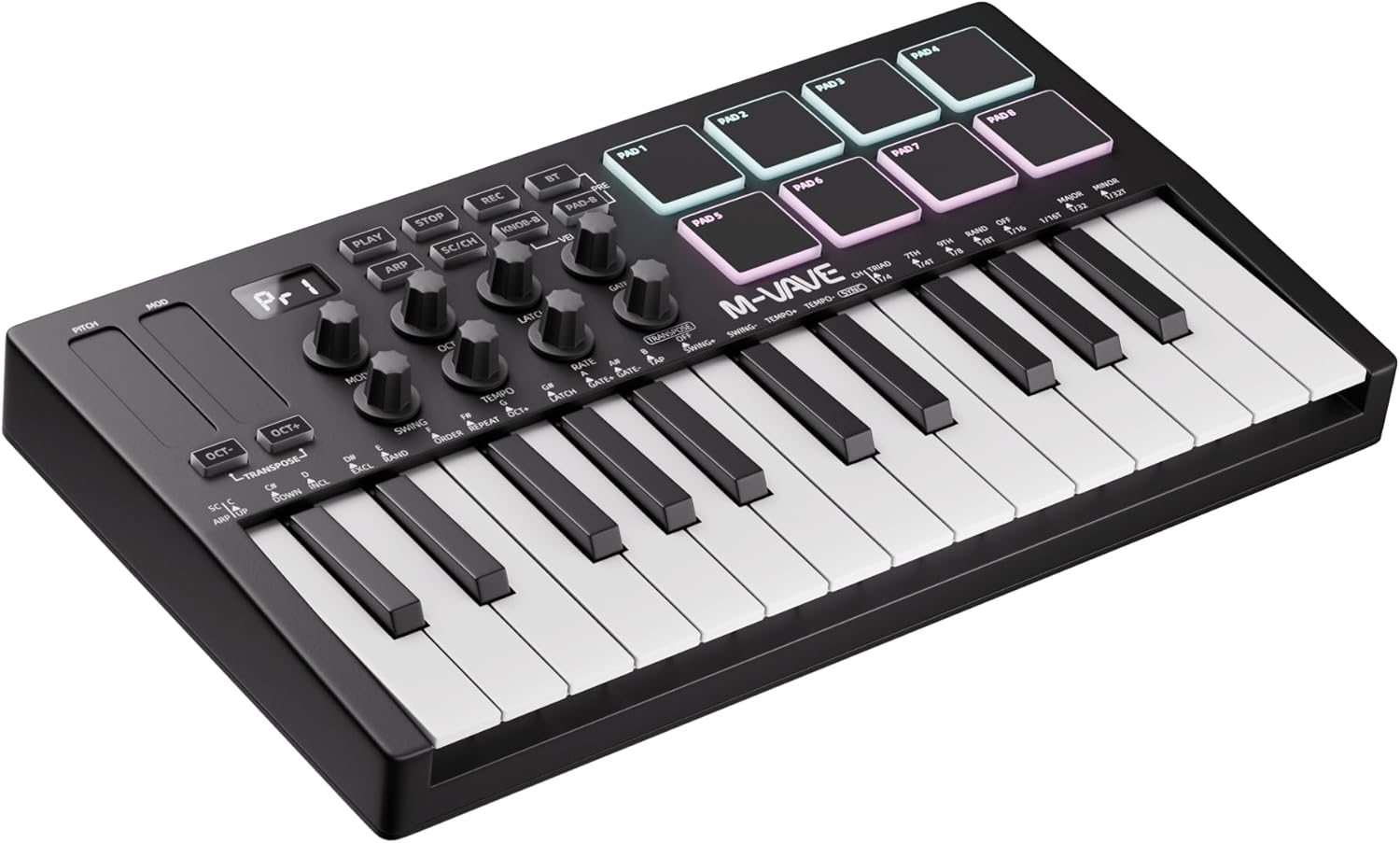
The DaierTek 25-key MIDI controller is a compact, feature-rich solution designed for music producers, beat makers, and hobbyist musicians who need professional tools without the bulk or price tag of larger controllers. Its 25 velocity-sensitive keys, 8 RGB drum pads, 8 assignable knobs, and touch-sensitive pitch and modulation controls pack serious production capability into a backpack-friendly format. This controller is ideal for bedroom producers, mobile musicians, and anyone looking to create music on laptops, tablets, or smartphones.
The standout feature is the controller's reliable wireless connectivity combined with zero-latency response. Users consistently report that once the Bluetooth connection is established, it stays rock-solid with performance comparable to wired USB connections. The velocity-sensitive keys accurately capture subtle playing dynamics, allowing for expressive musical performance whether you're laying down chords, melodies, or drum patterns. The 16-hour battery life ensures you can produce music all day without needing to recharge.
Build quality feels sturdy and professional despite the plastic and rubber construction. The ergonomic key layout is comfortable for extended playing sessions, and the compact dimensions make it genuinely portable. The inclusion of smart chord and arpeggio functions bridges the gap between beginner-friendly and professional-grade, allowing newcomers to quickly start making music while giving experienced producers advanced creative tools.
The main drawback is that Bluetooth setup varies by platform. Windows users need to install a MIDI driver, and Android connectivity must be configured within compatible apps rather than through system settings. A small percentage of users have reported difficulty getting all functions working in certain DAWs, though most users experience plug-and-play compatibility. Remember that this controller produces no sound on its own and requires music production software or a DAW to function.
Overall, the DaierTek 25-key MIDI controller delivers exceptional value and portability for the price. It's a solid choice for anyone serious about mobile music production who wants professional features without the learning curve or investment of larger systems. The combination of wireless reliability, responsive keys, and broad software compatibility makes this an easy recommendation for producers at any skill level.
Hardware Specifications: 25 velocity-sensitive keys, 8 RGB backlit drum pads with velocity and aftertouch, 8 assignable encoder knobs, 2 capacitive touch-stripes for pitch bend and modulation, mini LCD display, and advanced sensor technology for zero-latency response.
Connectivity: Dual connectivity with Bluetooth wireless (2,000 mAh battery, 16-hour runtime) and USB cable connection. Works with Windows, Mac OS, Android, and iOS devices.
DAW Compatibility: Compatible with Ableton Live, FL Studio, Cubase, GarageBand (iOS), and most digital audio workstations supporting BLE MIDI and USB MIDI protocols.
Physical Specs: Weight 1.07 kg (2.36 lbs), compact design fits standard backpacks, ergonomic key layout, includes USB cable and 1-year manufacturer warranty.
USB Connection (Recommended for beginners): Simply plug the included USB cable into your computer and the controller. Most DAWs recognize it as plug-and-play with zero driver installation needed on Mac and most Windows systems.
Bluetooth Connection (iOS): Open your compatible music app like GarageBand, enable Bluetooth MIDI within the app settings, and select the DaierTek controller. Connection is typically automatic and reliable.
Bluetooth Connection (Android): Launch your compatible music app (FL Studio recommended), access Bluetooth MIDI settings within the app, and connect to the DaierTek device. System-level Bluetooth pairing is not sufficient for MIDI control.
Bluetooth Connection (Windows): Install the MIDI driver from the manufacturer, then pair the device through your system Bluetooth settings. Once paired, your DAW should recognize it as a MIDI input device.
Pro Tip: If you experience connection issues, try the USB cable first to verify the controller works with your DAW, then troubleshoot Bluetooth connectivity separately.
Buying Guide for Affordable MIDI Keyboards
Key Count and Portability
Most budget-friendly MIDI keyboards feature 25 keys. This compact layout is ideal for producers with limited desk space or those who need a truly portable solution. It’s perfect for programming melodies, basslines, and chords without the bulk of a full-sized piano.
Consider how you’ll use the controller. If you plan to take it to sessions or produce while traveling, a slim, lightweight design is crucial. Some models offer built-in batteries for wireless use, enhancing their portability. Explore more tools for your creative space in our Recording / Musical Instruments category.
Essential Control Features
Look beyond the keys. Drum pads are invaluable for programming beats and triggering samples. Assignable knobs and faders give you hands-on control over virtual instruments and mix parameters. These tactile controls speed up your workflow immensely.
A pitch bend and modulation wheel (or touch strip) is essential for adding expression to your performances. Some controllers include arpeggiators or chord modes, which can spark new ideas and simplify the composition process for beginners and professionals alike.
Connectivity and Software Compatibility
USB connectivity is standard, allowing you to power the device and send MIDI data through a single cable. Some newer models also include Bluetooth MIDI, which offers cable-free convenience, especially with tablets and phones. Check the compatibility with your specific devices.
The bundled software is a major value add. Many controllers come with a digital audio workstation (DAW) lite version and virtual instrument plugins. This can save you significant money and provide everything you need to start creating immediately. Pair your new controller with accurate monitoring using our picks for the best studio headphones under $100.
Build Quality and Feel
Even in this price range, build quality varies. Velocity-sensitive keys respond to your playing dynamics, which is critical for realistic performances. The feel of the pads and the smoothness of the knobs also contribute to the overall user experience.
Read user reviews to gauge long-term durability. A sturdy, well-constructed controller will withstand the rigors of travel and frequent use. It’s an investment in your creative process, so reliability matters. For other essential studio gear, consider our recommendations for the best studio headphones under $200.
Final Thoughts
Finding a capable MIDI keyboard without overspending is entirely possible. For producers seeking legendary reliability and deep software integration straight out of the box, the Akai Professional MPK Mini MK3 25-Key USB MIDI remains a top-tier choice. If wireless freedom and modern features like a built-in battery and smart chord functions are priorities, the M-VAVE 25 Key USB MIDI Keyboard Controller With 8 offers compelling value. No matter your selection, these affordable controllers unlock a world of musical potential.
Frequently Asked Questions
Do I need any other equipment to use a MIDI keyboard?
You will need a computer, tablet, or smartphone to run music production software (DAW). The keyboard connects via USB or Bluetooth. You’ll also need headphones or speakers to hear the sound generated by the software, as the controller itself does not produce audio. For wireless audio solutions, browse our Wireless & Streaming Audio section.
Can I use a MIDI keyboard with my iPhone or iPad?
Yes, many modern MIDI controllers are compatible with iOS devices. You typically need a USB camera connection kit adapter for wired models or a Bluetooth MIDI connection for wireless ones. Apps like GarageBand, FL Studio Mobile, and others can receive MIDI data from the keyboard.
What is the main difference between 25-key and 61-key controllers?
The primary difference is portability versus range. A 25-key controller is compact and easy to transport, ideal for producers with limited space or those who work on melodies and chords. A 61-key controller offers a wider piano-style range, better for playing two-handed parts, but it is larger and less portable.
Are the software bundles that come with these keyboards good for beginners?
Absolutely. The included software packages, often featuring DAW lite versions and virtual instruments, are designed specifically to help beginners start creating music immediately. They provide a complete ecosystem to learn the basics of production, recording, and sound design without additional initial investment.


Write Your Review
No reviews yet. Be the first to share your experience!