

You are deep in a mix, and something sounds off. You reach for your interface’s volume knob, but it’s too coarse, or you need to quickly compare your mix on a second pair of speakers. This is where a dedicated monitor controller becomes indispensable. It is the command center for your studio’s most critical component: the sound reaching your ears. Whether you are a podcaster needing a simple mute button or a professional engineer requiring multiple headphone feeds and source switching, the right controller elevates your workflow and ensures accuracy.
This guide reviews a curated selection of monitor controllers to help you find the perfect match for your setup. We have evaluated options based on connectivity, sound integrity, and functionality, from simple passive boxes to feature-packed active hubs. For those building a complete recording environment, you might also consider pairing your controller with the right headphone amplifiers for your talent.

Pros
- Passive design eliminates active circuitry, ensuring transparent audio quality and minimal noise
- Intuitive 2x2 switching functionality handles multiple sources and monitor pairs without complexity
- Heavy-duty metal construction built to withstand years of studio use
- Affordable entry point for professional monitoring control without sacrificing build quality
- Includes valuable software bundle to jumpstart your production workflow
Cons
- No wireless connectivity, requires wired connections for all audio inputs and outputs
- Limited to two sources and two monitor pairs, may not suit complex multi-source studios
- No active amplification means you must use powered monitors or external amplifiers
The Mackie Big Knob Passive is a straightforward, passive monitor controller designed for studios that prioritize audio purity over complexity. This 2x2 controller lets you manage two audio sources and two sets of monitor speakers, making it perfect for home studios, project studios, and professional editing suites that need reliable level control without breaking the bank.
What sets this controller apart is its passive signal path, which means audio passes through without any active circuitry. This design philosophy delivers exceptional sonic clarity and eliminates the noise floor that active controllers can introduce. The iconic Big Knob volume control provides satisfying tactile feedback and precise level adjustment, while the source and monitor selection switches let you toggle between configurations instantly.
Built with a sturdy metal enclosure, the Big Knob Passive feels substantial and professional despite its affordable price point. The tabletop mount design keeps it accessible on your desk or console, and the compact footprint works equally well in tight home studios or integrated into larger facility setups. Its simplicity is actually a strength, offering zero learning curve for engineers of any experience level.
The main limitation is that this is a passive controller only, meaning you cannot amplify signals. You will need powered monitors or external amplifiers connected to the outputs. Additionally, the 2x2 configuration may feel restrictive if you work with multiple sources regularly, though for most studio setups this covers standard monitoring needs.
The Mackie Big Knob Passive delivers exceptional value for studios seeking transparent, reliable monitoring control. If you prioritize audio quality, durability, and simplicity over advanced features, this proven design remains an industry standard choice that justifies its reputation.
Audio Configuration: 2x2 monitor controller with passive signal path, stereo output mode
Connectivity: USB connectivity protocol, wired subwoofer connectivity, no wireless technology
Physical Design: Metal enclosure construction, tabletop mount, 1-inch speaker sizing reference
Power: Corded electric power source, 120 volts input, 1000 watts maximum output capability
Audio Performance: 20 kHz frequency response, pristine passive audio path for sonic integrity
Included Software: Pro Tools First recording software and The Musician Collection with 23 plugins and instruments
Warranty: 1-year all-inclusive, nontransferable limited warranty
Best For: Home studio owners, project studios, editing suites, and professional facilities seeking passive monitoring control with transparent audio quality and multi-source switching capability.
Consider This If: You value sonic purity, need simple 2x2 source and monitor switching, work with powered monitors, and want a durable, affordable control solution without complex features.
May Not Be Ideal If: You require active amplification, need more than two source inputs, want wireless connectivity, or work with complex multi-monitor setups requiring advanced routing options.
Setup Recommendation: Pair with powered studio monitors or connect to external amplifiers. Place on your console or desk for easy access to the Big Knob volume control and source selection switches. Connect your audio sources to the two inputs and route outputs to your monitors.

Pros
- 100% passive circuit design delivers clean, uncolored audio with zero noise floor
- Flexible 2-in, 4-out routing saves time and protects device connectors from wear
- Smooth damped fader and responsive mute button provide tactile, reliable control
- Compact, portable design with attractive metal chassis fits any studio aesthetic
- Exceptional build quality and durability for the price point, backed by 1-year warranty
Cons
- Unbalanced 1/4 inch connectors may not suit all professional XLR-based setups
- Passive design means no active amplification, so signal levels depend on input strength
- Best suited for informal sessions and practice rather than high-stakes live performances
The StudioMan M04 is a passive studio monitor controller designed for producers, engineers, DJs, and musicians who need flexible audio routing without compromising sound quality. It fills the gap between basic volume knobs and expensive active monitor controllers, making it ideal for home studios, podcasters, and anyone working with multiple audio sources and monitor setups.
The standout feature is its pure passive design that eliminates amplifier hum and noise while maintaining transparent, uncolored audio. The 2-input, 4-output configuration with independent switching lets you monitor multiple sources across different speaker pairs simultaneously, a workflow game-changer for mastering and mixing comparisons. The precision damped fader and dedicated mute button provide responsive control without any latency, and users consistently praise the butter-smooth fader action and solid feel of the controls.
Build quality is exceptional for the price. The metal chassis feels industrial-grade with well-fastened faders that show no wobble or play. All connections use professional 1/4 inch unbalanced jacks, and the responsive buttons provide clear tactile feedback. The compact 9.25 x 6.57 x 2.64 inch footprint makes it portable enough for jam sessions or studio-to-studio work.
The main limitation is the unbalanced connector format, which may not integrate seamlessly into XLR-based professional studios. Additionally, passive operation means signal levels depend entirely on your input sources, so weak outputs won't get amplification. Casual users and informal sessions get excellent results, but critical mastering work at high volumes may require active monitoring alternatives.
The StudioMan M04 delivers professional-grade passive monitoring at an accessible price with proven durability and support. If you need flexible multi-source routing without introducing noise or coloration, this controller offers genuine value that punches well above its cost.
Connectivity: 2 x 1/4 inch unbalanced inputs, 4 x 1/4 inch unbalanced outputs
Design: 100% passive circuit, no power supply or battery required
Controls: Precision damped volume fader with 0 to full gain range, independent one-click mute button, individual output switches
Physical: Item weight 1.72 pounds, dimensions 9.25 x 6.57 x 2.64 inches, metal chassis construction
Colors: Available in Red and Black
Warranty: 1-year hassle-free warranty with 24/7 technical support, 90% of issues resolved within 12 hours
Best For: Home studio producers, mixing engineers, mastering professionals, DJs, podcasters, and musicians who work with multiple audio sources and need flexible monitor routing without active amplification.
Consider This If: You need to compare how mixes sound across different monitor pairs, switch between multiple audio devices without constant cable swapping, or want a noise-free passive monitoring solution that requires zero setup.
Skip If: Your studio uses exclusively XLR balanced connections, you require active amplification for weak audio signals, or you need a monitor controller for high-stakes live performances where redundancy and advanced features are critical.
Setup Tip: The passive design works best when your audio sources have adequate output levels. If using weak line-level sources, ensure your interface or mixer provides sufficient gain before connecting to the M04.

Pros
- No external power required means simplified setup and zero noise floor contamination from power supplies
- Multiple input/output options accommodate both vintage and modern audio equipment configurations
- Large control knob provides tactile feedback and quick access to volume adjustments during critical monitoring tasks
- Compact footprint saves desk space while maintaining full functionality for multi-source monitoring
- Passive design delivers transparent, uncolored sound with no active circuitry artifacts
Cons
- Some users report durability issues after 6-12 months of daily studio use, raising longevity concerns despite warranty coverage
- Plastic enclosure construction may feel less robust compared to metal-bodied competitors in the same price range
- Limited to passive control functions without headphone output or advanced monitoring features found in higher-end controllers
The ESI MoCo is a fully passive monitor controller designed for music producers, audio engineers, and home studio enthusiasts who need reliable, no-fuss volume control and source switching. Unlike powered controllers that require external adapters, the MoCo operates entirely passively, making it an ideal solution for minimalist studio setups where power supply noise is a concern.
The standout feature is undoubtedly the large, smooth oversized knob that dominates the front panel. This tactile control element enables fast and precise volume adjustments during critical mixing and monitoring sessions. Beyond volume, the MoCo packs powerful functionality into its compact frame: dedicated buttons allow you to switch between two stereo inputs, monitor in mono, mute instantly, and flip left/right channels. The flexible connectivity includes two stereo inputs (1/4 inch TRS and RCA/1/8 inch TS) and two stereo outputs (XLR and 1/4 inch TRS/1/8 inch TS), making it compatible with virtually any studio configuration.
Build quality is straightforward and functional. The compact 5x6.5-inch tabletop design with plastic enclosure keeps the unit lightweight and portable, though some users prefer the feel of metal construction. The passive design ensures transparent, uncolored audio with zero noise floor contamination from active circuitry or power supplies, which is a significant advantage for critical listening environments.
The primary concern raised by users involves durability with extended daily use. Some reviewers report the unit failing after 6 to 12 months of continuous studio work, which is disappointing given the purchase price. However, ESI backs the product with a comprehensive 2-year warranty and 24/7 support, providing some peace of mind for early failures.
The ESI MoCo delivers solid value for budget-conscious studios that prioritize simplicity, passive audio integrity, and multi-source flexibility. It excels as an entry-level monitor controller or secondary studio tool. If longevity through heavy daily use is your primary concern, budget for a potential replacement or consider higher-end alternatives, but for occasional to moderate use, the MoCo offers excellent passive monitoring control at an accessible price point.
Audio Connectivity: Two stereo inputs (1/4 inch TRS and RCA/1/8 inch TS), two stereo outputs (XLR and 1/4 inch TRS/1/8 inch TS). Connectivity protocols include TRS, RCA, and XLR for maximum compatibility.
Physical Dimensions: 6.5 inches deep by 5 inches wide by 2.09 inches high. Weight is 450 grams. Compact tabletop mount design fits standard studio desks and workstations.
Audio Performance: Fully passive design with 100-watt maximum output power capability. Two-channel stereo operation with 20 Hz frequency response. Clean, uncolored sound with no active circuitry artifacts or power supply noise.
Controls and Functions: Large oversized volume knob for precise adjustment. Dedicated buttons for input/output switching, mono monitoring, mute function, and left/right channel flip. Touch-based control method with button controller type.
Warranty and Support: Limited 2-year warranty with EU spare part availability. 24/7 customer support backed by US and Germany-based teams.
Who Should Buy: The ESI MoCo is ideal for home studio owners, project studios, music producers, and audio engineers who need affordable, passive monitor control without external power requirements. It works perfectly for setups with two pairs of studio monitors or for switching between computer and TV audio sources.
Who Should Look Elsewhere: If you require headphone monitoring, advanced metering functions, or need a controller that can handle extremely heavy daily studio use with guaranteed longevity, consider powered alternatives with more robust construction and additional features.
Setup Considerations: The plug-and-play passive design means no power adapter required. Simply connect your audio sources to the inputs and route the outputs to your studio monitors or headphone amplifier. The flexible connector options (XLR, TRS, RCA) accommodate most professional audio equipment.
Value Assessment: At its price point, the MoCo offers exceptional value for passive monitoring control and multi-source switching. The main trade-off is durability under extreme daily use versus the affordable entry price. For moderate to occasional use, the value proposition is excellent.
Pros
- Buttery smooth, oversized knob provides tactile control and reduces adjustment fatigue
- Active-free passive circuitry maintains audio purity without signal degradation
- Versatile connectivity with both XLR and 3.5mm options for various studio configurations
- Solid build quality and reliability at an exceptional price point
- Mute button adds practical functionality for quick session management
Cons
- Limited connectivity compared to active monitor controllers with additional features
- Passive design means no amplification, so it requires powered monitors or amplifiers
- Compact size may feel cramped in larger studio setups with extensive gear
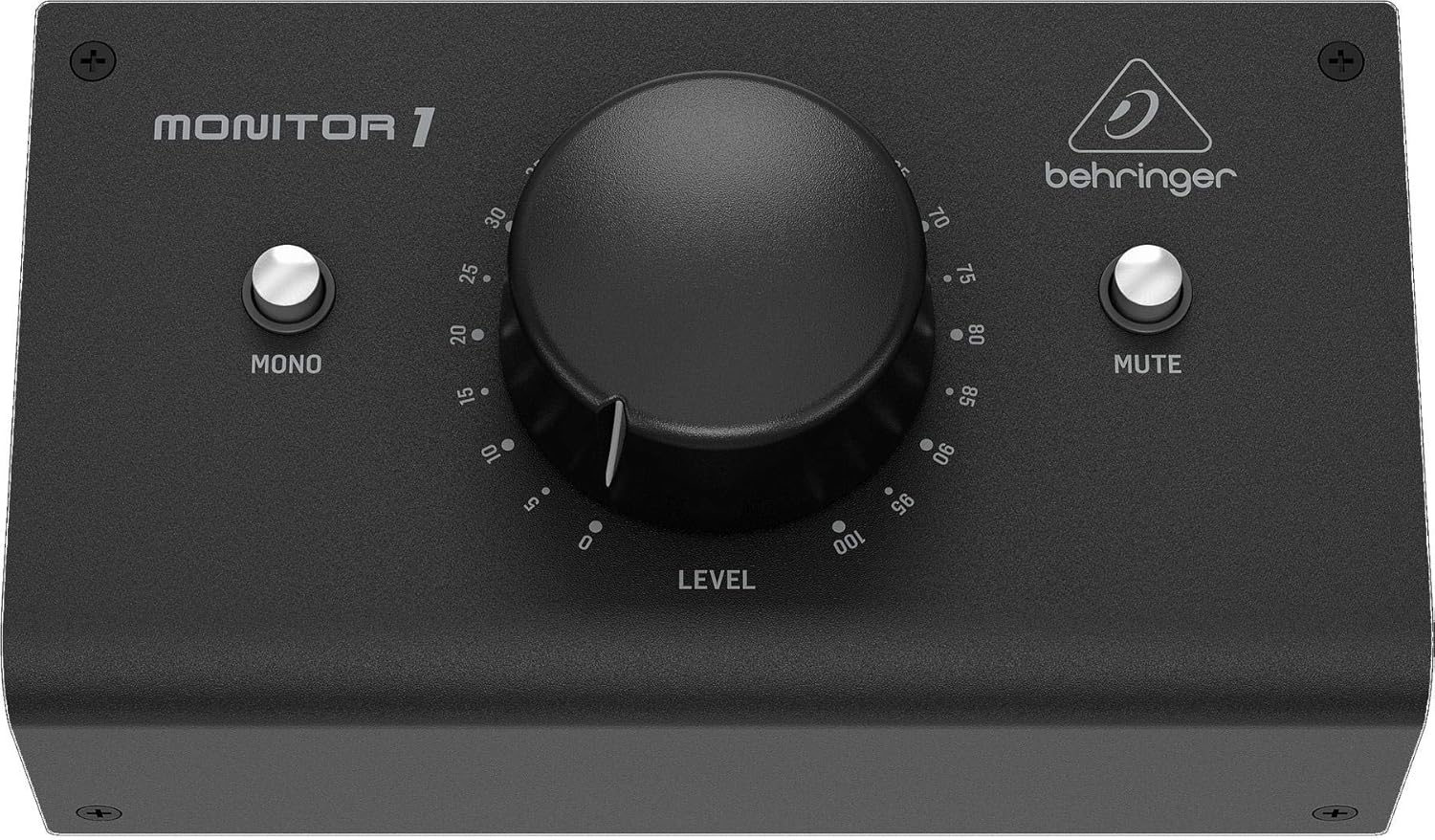
The Behringer MONITOR1 is a passive stereo volume controller designed for music producers, recording engineers, home studio enthusiasts, and performing musicians who need reliable, hands-on control over their monitor levels. Its standout feature is the large, precision-engineered volume knob that eliminates the frustration of reaching across desks or racks to adjust audio levels, making it an essential tool for any serious audio workspace.
What sets this controller apart is its active-free passive circuitry, which guarantees the purest possible signal path without any electronic components coloring or degrading your audio. The oversized knob provides exceptional tactile feedback and smooth operation, allowing for extremely precise level adjustments without the finicky behavior of smaller controls. The unit offers flexible connectivity with two high-quality XLR combo inputs, a 3.5mm stereo input, plus dual XLR outputs and a 3.5mm stereo output, making it compatible with virtually any modern DAW, interface, or audio source.
Build quality is notably solid for the price, with users praising the smooth knob action and overall construction that feels more premium than typical Behringer products. The integrated mute button adds practical value for quick session management, and the compact tabletop design fits easily into studio setups of any size. The device is lightweight yet sturdy, with dimensions that allow for convenient placement near your mixing position.
The main limitation is that this is purely a passive controller with no amplification capabilities, so it requires powered monitors or amplified outputs to function. Additionally, while the connectivity is solid, it lacks some advanced features found in more expensive active controllers. However, for the price and intended purpose of simple, reliable volume control, these are minor considerations.
The Behringer MONITOR1 delivers exceptional value for anyone seeking a no-nonsense, tactile volume solution. Whether you're a bedroom producer tired of reaching for your interface knob, a live performer managing backing track levels, or a professional engineer who appreciates the sonic purity of passive monitoring, this controller offers reliable performance without unnecessary complexity or expense.
Connectivity: 2x XLR combo inputs, 1x 3.5mm stereo input, 2x XLR outputs, 1x 3.5mm stereo output
Audio Format: Stereo, 2 channels
Control Interface: Large precision volume knob, integrated mute button
Design: Passive stereo attenuator with active-free circuitry
Mounting: Tabletop
Dimensions: 8.19 inches (D) x 4.96 inches (W) x 4.02 inches (H)
Weight: 14.08 ounces
Power: Passive, no power supply required
Compatibility: Desktop and laptop computers, all audio interfaces and monitors
Warranty: Limited warranty from Music Tribe US

Pros
- Exceptional flexibility with 4 stereo sources and 3 speaker outputs accommodates complex studio setups
- Four independent headphone outputs with smart routing saves time during multi-artist sessions
- Intuitive touchpoint interface makes adjustments fast and reduces learning curve for new users
- Comprehensive monitoring tools including dim, cut, mono, and polarity controls support critical listening
- Solid build quality and professional design inspire confidence in high-end production environments
Cons
- Premium price point may challenge home studio budgets compared to basic monitor controllers
- Requires balanced analogue connections, limiting compatibility with budget audio interfaces
- Learning curve for advanced routing features despite intuitive interface design
The Audient Nero is a professional desktop monitor controller built for studios that demand flexible source management and independent headphone mixing. It serves recording engineers, mixing professionals, and producers who work with multiple audio sources and need to accommodate multiple listeners with custom mixes. This is not an entry-level device, but rather a tool for serious production environments.
The standout feature is its four independent headphone outputs with flexible routing capabilities. This means band members, clients, and engineers can each hear a custom mix tailored to their needs. The four stereo analogue source inputs plus dedicated cue mix input provide exceptional flexibility for complex workflows. Professional monitoring controls like dim, cut, mono, and polarity switches enable critical listening and ensure mixes translate accurately across different playback systems.
Build quality reflects its professional positioning, with a compact desktop footprint that doesn't sacrifice functionality. The smart touchpoint interface feels responsive and intuitive, allowing quick adjustments without diving into menus. The external talkback input facilitates communication between control room and recording spaces, a valuable feature in multi-room setups.
The main consideration is the investment required, which reflects the professional-grade components and capabilities. Users must also have balanced analogue connections available on their audio interface, as the Nero prioritizes professional-grade connectivity over consumer convenience. The learning curve for advanced routing is manageable but not instant.
The Audient Nero delivers professional monitoring control and flexible source management that justifies its position in mid-to-high-end studios. It excels for teams requiring independent headphone mixes and multiple source management. If your workflow demands this level of control and flexibility, the Nero is a worthy investment.
Audio Inputs: 4 stereo analogue sources, 2 line level inputs, 1 dedicated cue mix input, external talkback input
Audio Outputs: 3 stereo speaker outputs, 4 headphone outputs with flexible routing
Controls: Dim, cut, mono, and polarity monitor controls with smart touchpoint customization
Connectivity: Balanced analogue connections for professional audio quality and noise rejection
Form Factor: Compact desktop controller designed for studio integration
Ideal For: Recording studios, mixing facilities, post-production suites, and serious home studios where multiple sources and independent headphone mixes are essential. Perfect for producers working with bands, clients, or complex multi-room setups.
May Not Be Ideal For: Home hobbyists with simple single-source setups, bedroom producers with USB-only interfaces, or those seeking budget-friendly monitor control solutions.

Pros
- Passive design eliminates noise floor and maintains signal purity compared to active controllers
- Versatile connectivity supports virtually any audio source and speaker configuration
- Requires zero setup, no drivers, no software, plug-and-play functionality
- Durable metal enclosure provides professional build quality and long-term reliability
- Affordable entry point for serious monitoring without compromising audio integrity
Cons
- No amplification means it cannot boost weak signals, only attenuate
- Lacks advanced features like talkback, headphone outputs, or digital control found in higher-end models
- Limited to 2x2 configuration, not suitable for surround or multi-speaker studio setups
The DYNASTY PROAUDIO PMC-2 is a passive studio monitor volume controller designed for music producers, audio engineers, and home studio owners who demand transparent, lossless level control. This compact device sits between your audio interface and active monitor speakers, providing precise attenuation without introducing noise or signal coloration.
The standout feature is its completely passive architecture, which means no power supply and no active circuitry to color your audio. By keeping your DAW masters at unity gain and controlling physical speaker level with the PMC-2's large rotary knob, you maintain maximum headroom and audio resolution. The controller includes multiple input options (XLR combo, Phone Jack, RCA, and 3.5mm Mini Jack) and matching outputs, plus dedicated DIM and Mute/Mono switches for quick reference monitoring and level checking.
Build quality is solid throughout, with a metal chassis that feels professional and durable enough for both desktop studios and portable setups. The compact 7.6-inch width fits nicely on most studio desks without consuming excessive real estate. The large knob provides satisfying tactile feedback and intuitive control, making volume adjustments smooth and precise.
The main limitation is that passive design means no signal amplification, only attenuation. If you have weak line-level sources, they'll stay weak. Additionally, this is a straightforward 2x2 controller without advanced features like talkback, headphone outputs, or digital control found in premium models, so it's best suited for basic stereo monitoring rather than complex multi-speaker setups.
The PMC-2 delivers excellent value for studios prioritizing audio purity and simplicity. If you want transparent volume control without compromising signal integrity or adding unnecessary complexity to your monitoring chain, this passive controller is a smart, affordable choice.
Connectivity: XLR Balanced, Phone Jack, RCA Audio Line, Mini Jack TRS 3.5mm inputs and outputs
Controls: Large rotary volume knob, DIM switch, Mute/Mono switch
Construction: Solid metal chassis
Dimensions: 3.6 inches deep x 7.6 inches wide x 2.2 inches high
Power Requirements: None (completely passive)
Compatibility: Windows 7 and Windows 10, works with any audio interface and active speakers
Warranty: 1 year manufacturer warranty
Who Should Buy: Music producers and audio engineers with active studio monitors who want transparent volume control, home studio owners seeking affordable monitoring solutions, and professionals who need portable monitor controllers for on-location work.
When to Choose This: Select the PMC-2 if audio purity is your priority and you want to eliminate active circuitry from your signal chain. It's ideal if you already have quality audio sources and speakers but lack a dedicated control point between them.
When to Look Elsewhere: If you need headphone outputs, talkback functionality, surround monitoring, or signal amplification, consider higher-end active controllers. If your budget allows, premium models offer more features but at significantly higher cost.
Setup Tips: Place the PMC-2 between your audio interface outputs and monitor speaker inputs. Keep your DAW master fader at 0dB (unity) and use the PMC-2 knob for physical level control. Use the DIM switch for quick reference level checks and the Mono switch to verify stereo mix compatibility.

Pros
- Exceptional build quality and reliability compared to competing monitor controllers like the Mackie Big Knob
- Four independent headphone amplifiers with impressive volume output and individual source selection capabilities
- Support for three speaker outputs gives you maximum flexibility to compare mixes across different reference monitors
- Integrated talkback system eliminates the need for separate communication equipment in recording studios
- Intuitive front-panel layout with large knobs and clearly labeled switches makes operation straightforward
Cons
- No USB audio interface functionality, so you'll need a separate interface for computer audio I/O
- Requires balanced TRS or RCA connections, which may need adapters if your gear uses different connector types
- Limited to 96 kHz sample rate, which may not suit users working exclusively in higher-resolution formats
The PreSonus Monitor Station V2 is a professional desktop monitor controller designed for recording studios, mixing engineers, and content creators who need centralized control over multiple speaker systems and audio sources. It's ideal for anyone tired of constantly plugging and unplugging cables or switching between different monitoring setups manually.
The standout feature is the ability to manage three independent speaker pairs simultaneously, each with its own level control. Combined with four separate headphone amplifiers that can monitor different sources independently, this unit gives you unprecedented flexibility in how you monitor your work. The built-in talkback microphone with variable gain is a genuine game-changer for recording studios, allowing you to communicate with artists without leaving your mixing position. The Dim and Mono switches provide essential tools for checking mix translation and identifying potential issues.
Build quality is exceptional throughout. The unit feels solid and well-engineered, with smooth potentiometers, responsive buttons, and a compact footprint that fits nicely on any studio desk. The large main level control is satisfying to use and provides the tactile feedback serious engineers expect. All connections are clearly labeled, and the rear panel layout is logical and organized.
The main limitation is the lack of USB audio interface functionality, meaning you'll still need a separate audio interface for computer connectivity. The 96 kHz maximum sample rate may also be a consideration if you work exclusively in higher-resolution formats. Additionally, the unit requires balanced TRS or RCA connections, so adapter cables may be necessary depending on your existing equipment.
Overall, the PreSonus Monitor Station V2 delivers professional-grade monitoring control at a competitive price point. It outperforms similarly priced alternatives and provides the reliability and feature set that working studios demand. Highly recommended for anyone serious about mixing and monitoring.
Audio Inputs: 4 stereo pairs (TRS and RCA) plus 1 S/PDIF digital input, 3 selectable sources
Audio Outputs: 3 stereo pairs of speaker outputs with individual level controls, main and cue outputs, 4 headphone outputs
Headphone Amplifiers: 4 independent stereo headphone amplifiers with individual volume controls and source selection
Monitoring Controls: Main level control, Main Mute, Mono switch, Dim switch with variable attenuation
Talkback: Built-in electret-condenser microphone with input gain control and dedicated button
Cue Section: Source select, input-level control, output-level control
Frequency Response: 50 Hz to 50 kHz
Maximum Sample Rate: 96 kHz
Dimensions: 16.85 inches D x 12.12 inches W x 4.9 inches H
Weight: 5 pounds
Warranty: One year manufacturer warranty
Who Should Buy This: Professional and serious home studio engineers, recording studios with multiple monitoring setups, content creators who need flexible source switching, and anyone currently frustrated with single-monitor-controller limitations.
Key Considerations: Verify that your studio monitors and audio sources use TRS, RCA, or S/PDIF connections. If you need USB audio interface functionality, you'll need to purchase a separate interface. Consider your maximum required sample rate, as this unit tops out at 96 kHz.
Setup Tips: The PreSonus Monitor Station V2 connects between your audio sources and studio monitors. Connect your DAW, turntable, portable CD player, and other audio sources to the available inputs. Route your three main speaker pairs to the speaker outputs. Use the headphone outputs for independent monitoring during recording sessions or client playback.
Comparison: Users upgrading from the Mackie Big Knob report significantly better build quality and reliability. The PreSonus unit offers more speaker outputs (3 vs 2) and more headphone amplifiers (4 vs 2), making it superior for complex studio setups.

Pros
- Exceptional value for money, outperforming audio interfaces costing three times as much
- Low noise performance with clean signal flow suitable for professional monitoring applications
- Compact, well-built metal chassis designed for durability and long studio shelf life
- Multiple input and output options provide flexibility for complex studio routing scenarios
- Integrated Midas preamps eliminate need for separate microphone preamplifier
Cons
- Minimal documentation provided in box, requiring users to reference online resources or prior audio knowledge
- Build quality reflects the budget-friendly price point compared to premium competitors
- High impedance microphones may require external preamp for optimal performance
The Behringer Studio XL is a hybrid monitor controller and audio interface designed for home and professional studio environments. It serves as an excellent replacement for users seeking a Mackie Big Knob alternative with better reliability and lower cost. The unit combines multi-channel monitoring capabilities with a 2x4 USB audio interface, making it a true all-in-one solution for producers, engineers, and content creators who need flexible studio routing without dedicated rack space.
What sets this controller apart is its thoughtful feature set and professional performance at a consumer-friendly price. The 6-channel architecture with 3 independent outputs allows you to manage multiple monitor pairs and subwoofer feeds simultaneously, a capability usually reserved for much more expensive controllers. Built-in Midas microphone preamps provide studio-quality mic input without external gear, while the 192kHz support ensures compatibility with high-resolution audio workflows. Users consistently report that the noise floor stays impressively low, with signal integrity well-suited to critical listening and professional mixing applications.
The construction quality reflects Behringer's commitment to durability at this price tier. The all-metal chassis feels solid, with aluminum knobs that inspire confidence during daily studio use. Headphone outputs deliver sufficient power to drive various headphone models reliably, and the overall build suggests this unit will withstand years of studio work. The compact footprint means it won't dominate your desk or rack space while still providing comprehensive control.
The main limitation is documentation. Behringer ships minimal printed materials, requiring users to seek online resources or rely on prior audio experience. Additionally, while the build quality is excellent for the price, it doesn't match premium competitors in every tactile detail. High impedance microphones may need external preamp support to perform optimally, though this is rarely a practical concern for most users.
The Behringer Studio XL delivers professional-grade monitoring and audio interface functionality at an exceptional price point. It's an outstanding choice for budget-conscious studios, live streaming setups, and producers who need reliable multi-monitor control without premium brand pricing. If you've been waiting for a dependable Big Knob alternative or seeking an affordable entry into professional studio monitoring, this unit genuinely delivers on its promises.
Audio Interface: 2x4 USB Audio Interface, 192kHz maximum sample rate, 6 input channels, 8 output channels
Connectivity: USB connection, Windows-compatible, supports up to 192kHz audio streaming
Built-in Preamps: 2x Midas microphone preamplifiers, 6x line-level inputs
Monitoring Outputs: 3 independent monitor outputs for multi-speaker setups, dedicated headphone output with strong amplification
Construction: All-metal chassis with aluminum control knobs, plastic buttons, compact desktop form factor
Compatibility: Windows audio software, standard DAWs (Digital Audio Workstations), professional audio applications
Model: Studio XL (Part Number: 000-E8602-00010)
Ideal For: Home studio producers, audio engineers on a budget, content creators, live streamers, musicians requiring multi-monitor setups, anyone seeking a Mackie Big Knob replacement with better reliability
Perfect Use Cases: Multi-monitor studio monitoring, podcast production with mic input, live performance audio control, music production with external mixer integration, headphone mixing for mobile or temporary setups
May Not Be Ideal For: Mac users (Windows-only), those requiring extensive printed documentation, studios needing premium build quality at any cost, users exclusively working with high impedance microphones

Pros
- Exceptional build quality and solid construction that feels premium and durable
- Intuitive single-knob interface makes switching between sources and monitors effortless
- Versatile connectivity supports multiple audio sources including USB, balanced inputs, and smartphone
- Dual headphone outputs with independent level control perfect for artist/engineer monitoring
- Excellent value for a professional-grade monitor controller at mid-range price point
Cons
- Some users report knob attenuation issues where wiggling the controls causes audio dropout or static
- Limited to 2-channel USB recording interface, not suitable for multi-track simultaneous recording
- Occasional firmware connectivity issues reported in reviews, though rare
The Mackie Big Knob Studio is a professional monitor controller and USB audio interface designed for home studios, small recording facilities, and content creators who need flexible audio source management without cluttering their workspace. It combines the legendary simplicity of Mackie's Big Knob design with modern USB connectivity and dual Onyx preamps, making it an all-in-one solution for monitoring and recording.
The standout feature is its ability to seamlessly switch between three different audio sources and control two separate monitor pairs from a single iconic volume knob. Whether you're routing USB playback from your DAW, balanced line-level inputs from external gear, or a smartphone input, the Big Knob Studio handles it with intuitive button-based source selection. The dual independent headphone outputs with separate level control are particularly valuable for recording sessions where artist and engineer need different mix levels simultaneously.
Build quality is solid and feels premium, with a compact 13.4-inch depth that fits easily on any studio desk. The physical design is thoughtfully laid out for quick access to source switching and volume adjustments. However, some users have noted that the knobs can feel slightly loose and may produce audio artifacts if wiggled during operation, which is a notable concern for professional production work requiring absolute reliability.
Recording capabilities include 192kHz/24-bit resolution via USB with dual Onyx preamps and phantom power for condenser microphones. The zero-latency overdubbing and built-in talkback function add professional workflow features typically found in higher-end interfaces. The main limitation is the 2x2 USB channel count, which restricts simultaneous multi-track recording compared to larger interfaces.
Overall, the Mackie Big Knob Studio delivers excellent value for studios prioritizing monitor control flexibility and compact form factor over multi-track recording capability. It excels at what it's designed for: managing multiple audio sources and monitoring scenarios in a professional yet space-conscious setup. Recommended for home studios, small production facilities, and anyone upgrading from a basic audio interface.
Audio Interface Specs: 2x2 USB recording interface, 192kHz/24-bit recording and playback, dual Onyx mic preamps with phantom power, zero-latency monitoring.
Connectivity: USB 2.0, balanced XLR inputs and outputs, 1/4-inch TRS inputs and outputs, 1/8-inch smartphone input, dual 1/4-inch headphone outputs.
Monitor Control: 3-source selection, 2 monitor pair outputs, independent gain trim on all inputs and outputs, separate headphone level control.
Physical: 13.4 inches deep, 8.7 inches wide, 5.6 inches tall, 5.1 pounds weight. Includes quick start guide and 1-year all-inclusive warranty.
Compatibility: Mac OS and Windows operating systems, compatible with all major DAW software including Pro Tools, Logic Pro, Ableton Live, Studio One, and more.
Ideal For: Home studio owners, small recording studios, podcasters, content creators, music producers, and audio engineers who need flexible monitor control and USB recording in a compact form factor.
Perfect If You Have: Multiple audio sources to manage, multiple monitor pairs or headphone users, limited desk space, a need for professional recording capabilities with intuitive interface design.
May Not Be Ideal If: You require more than 2 channels of simultaneous USB recording, need extensive analog I/O expansion, or prioritize absolute knob reliability over general feature set and value.

Pros
- Passive circuitry maintains transparent, uncolored audio signal for professional results
- Generous knob size allows precise volume adjustments and comfortable operation
- Multiple connectivity options support various audio devices and studio configurations
- Simple, intuitive operation with no software or drivers required
- Affordable price point for a dedicated monitor controller
Cons
- Limited customer reviews available to assess long-term reliability and durability
- No active gain staging capability, which some advanced users may prefer
- Product description contains formatting issues that suggest quality control concerns
The DAUERHAFT Passive Stereo Volume Controller is a straightforward monitor control solution designed for home studios, content creators, and audio professionals who prioritize signal integrity. This passive device sits between your audio interface and studio monitors, providing transparent volume management without electronic interference or noise floor degradation.
The standout feature is its passive signal path, which preserves the purity of your audio without adding coloration or artifacts. The generously sized control knob enables precise attenuation adjustments, and the one-touch mute function offers convenient instant silencing during recording sessions or playback. The controller supports both XLR and 3.5mm connections, making it flexible enough to work with various audio sources and monitor configurations.
Build quality appears solid with dual output options for professional studio setups. The plug-and-play design means no driver installation or software configuration is needed, making it accessible for users of all technical levels. The compact form factor fits easily into studio racks or desktop setups without taking up significant space.
One consideration is the limited number of user reviews, which makes it difficult to assess long-term reliability and real-world performance across different use cases. Additionally, some advanced users may prefer active controllers with gain staging capabilities, though the passive design is intentional for transparency-focused applications.
Overall, this monitor controller delivers on its core promise of clean, transparent volume control at an accessible price point. It is best suited for users who value audio purity and need straightforward level management without complex features or software integration.
Connectivity: 2x XLR inputs, 1x 3.5mm stereo input, 2x XLR outputs, 1x 3.5mm stereo output
Control Type: Passive stereo volume controller with precision knob and one-touch mute function
Signal Path: Passive circuitry for uncolored, transparent audio signal
Interface: Plug-and-play, no drivers or software required
Category: Equalizers and Feedback Controllers
Brand: DAUERHAFT
Who Should Buy This: This controller is ideal for home studio owners, podcast producers, music producers, and audio engineers who need transparent volume management. It works well for anyone using a DAW with external studio monitors and seeking simple, reliable level control without electronic coloration.
Setup Considerations: Place the controller between your audio interface outputs and studio monitor inputs. The multiple connectivity options allow you to connect various audio sources. The passive design means volume reduction may require slightly higher interface output levels compared to active controllers.
Best Use Cases: Mixing and mastering in home studios, podcast and video production, live streaming audio monitoring, and professional recording environments where signal purity is prioritized over feature complexity.
Choosing Your Ideal Monitor Controller
Passive vs. Active Design
The core distinction lies in whether a controller requires power. Passive units, like the StudioMan M04 Passive Monitor Controller or the ESI MoCo, offer a pure signal path with no added noise or coloration. They are plug-and-play, making them ideal for smaller setups where simplicity and sonic purity are paramount. Active controllers, such as the PreSonus Monitor Station V2, require power but offer advanced features like multiple headphone amps, talkback, and digital inputs.
Connectivity and Routing Needs
Assess how many sources and outputs you need to manage. A basic 2×2 controller handles a single interface and two monitor pairs. If you integrate multiple audio sources, like a turntable or a second interface, look for more inputs. The Mackie Big Knob Series, 3×2 Studio Monitor offers three source selections. Also, consider if you need dedicated outputs for a subwoofer or a secondary listening zone. For complex routing to multiple headphones, a dedicated headphone distribution amplifier might be a necessary companion.
Essential Studio Functions
Beyond volume, professional workflows demand specific functions. A mono sum button checks phase coherence. A dim switch temporarily lowers volume for client conversations. A dedicated mute is crucial for live streaming or quick pauses. High-end units like the Audient Nero Desktop Monitor Controller add polarity flip and custom routing. Evaluate which features directly impact your daily work in the recording and musical instruments category.
Build Quality and User Experience
The physical interface matters. A smooth, high-quality volume knob provides precise adjustment. Switches should feel solid and responsive. The unit should sit stably on your desk. A well-built controller becomes a tactile, reliable part of your studio for years. Consider the feel of the large knob on the Behringer MONITOR1 or the robust metal enclosure of the DYNASTY PROAUDIO PMC-2. A clean layout prevents mistakes during critical listening sessions.
Final Thoughts
Selecting the right monitor controller is a foundational step for any serious audio workspace. For those seeking an elegant, no-fuss passive solution that delivers pristine sound, the StudioMan M04 Passive Monitor Controller is an outstanding value-packed choice. If your project studio demands multiple headphone feeds, talkback, and extensive routing like you would find in a professional broadcast or wireless microphone system environment, the feature-rich PreSonus Monitor Station V2 Desktop Studio Control provides comprehensive control to elevate your production capabilities.
Frequently Asked Questions
Do I need a monitor controller if my audio interface has volume knobs?
While an interface knob works, a dedicated controller offers superior precision, often better ergonomics, and crucial functions like mono listening, mute, and easy A/B switching between multiple speaker sets. It centralizes control for a more professional and efficient workflow.
What is the benefit of a passive monitor controller?
A passive controller introduces no noise, distortion, or coloration to your signal because it requires no power. It acts as a high-quality attenuator, preserving the exact sound from your interface or preamp. This guarantees you hear an unaltered, pure version of your audio.
Can I use a monitor controller with powered (active) studio monitors?
Yes, monitor controllers are designed primarily for use with active monitors. You connect your audio source to the controller’s input, and the controller’s output connects to the line-level inputs on your powered speakers. This setup gives you centralized volume and source control before the signal reaches the monitors’ internal amplifiers.
How many inputs and outputs do I need for a home studio?
Most home studios function well with a 2×2 controller (two inputs, two outputs). This allows you to switch between two sources, like your main interface and a media player, and control two pairs of monitors. If you plan to add a subwoofer or need multiple cue mixes, look for models with additional outputs.


Write Your Review
No reviews yet. Be the first to share your experience!