

Struggling with teammates who can’t hear your callouts over keyboard clatter? Tired of your stream audio sounding muddy and distant? The right USB microphone transforms your gaming sessions from frustrating to flawless. This guide cuts through the noise to present the top USB microphones for gaming, evaluated for their sound quality, features, and ease of use to ensure your voice is heard with crystal clarity.
Whether you’re coordinating in competitive matches or building an audience with your live streams, clear audio is non-negotiable. We have assessed options from trusted brands to help you find a microphone that fits your desk, your budget, and your gaming style. For a broader look at recording gear, explore our parent category for recording and musical instruments.
Pros
- Exceptional audio clarity and minimal background noise capture right out of the box
- Complete bundle eliminates need for additional purchases or compatibility concerns
- Intuitive touch controls make muting and adjusting settings effortless during streaming
- Sturdy metal boom arm with adjustable joints accommodates most desk setups
- Unidirectional polar pattern focuses on your voice while rejecting side noise
Cons
- PlayStation audio quality is limited by console compatibility constraints rather than microphone capability
- No built-in headphone monitoring port, requiring separate headphone connection
- RGB lighting may not appeal to users preferring minimalist or professional aesthetics
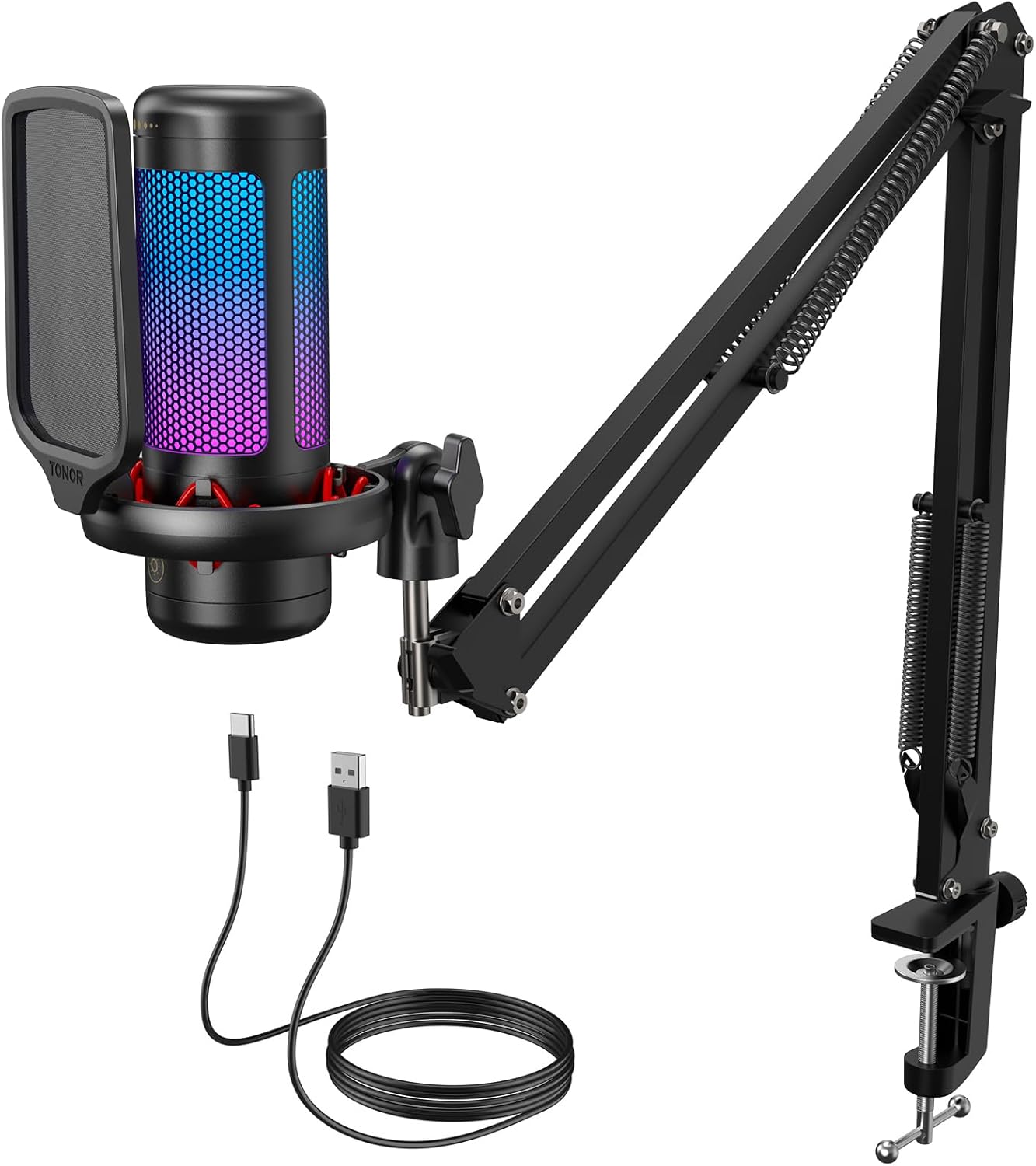
The TONOR TC310+ is a complete USB microphone solution designed for gamers, streamers, podcasters, and content creators who demand professional audio without technical complexity. This all-in-one kit arrives with everything needed for immediate setup, making it ideal for beginners and experienced creators alike who want to upgrade their audio quality without learning curve frustrations.
What sets this microphone apart is its commitment to simplicity and performance. The condenser capsule delivers crisp, clean audio with a 78 dB signal-to-noise ratio that captures voice detail while minimizing background interference. Users consistently report that friends notice immediate audio improvements during gaming sessions, and the adjustable gain control lets you dial in the perfect volume level. The one-tap mute button proves invaluable during live streams, allowing quick responses to unexpected situations without fumbling through software menus.
The included boom arm is constructed from quality metal with multiple adjustable joints, providing flexibility to position the microphone at your ideal angle. The sturdy clamp accommodates desks up to 2.36 inches thick, and the unidirectional polar pattern ensures your voice remains the focus while ambient noise stays suppressed. Build quality feels durable and professional, with the shock mount providing additional isolation from desk vibrations and handling noise.
The vibrant RGB lighting with four customizable modes adds visual appeal to your streaming setup, though brightness control prevents eye strain during extended sessions. One limitation worth noting is the lack of a headphone monitoring jack, meaning you cannot directly monitor your audio through the microphone itself. Additionally, PlayStation users report that console limitations affect audio quality more than the microphone's capabilities, a constraint beyond the device's control.
The TONOR TC310+ represents exceptional value for anyone seeking studio-quality audio at budget-friendly pricing. Its plug-and-play design, professional sound output, and complete accessory bundle make it the top choice for gamers and streamers ready to elevate their audio presence without unnecessary complexity or expense.
Audio Performance
Polar Pattern: Unidirectional
Signal-to-Noise Ratio: 78 dB
Audio Sensitivity: 10 dB
Channels: 1
Connector: USB Type-C
Physical Specifications
Dimensions: 16 x 6 x 5.4 inches
Weight: 474 grams
Material: Acrylonitrile Butadiene Styrene with Alloy Steel components
Color: Black
Boom Arm Clamp: Fits desks up to 2.36 inches thick
Connectivity and Compatibility
Connection: USB 2.0/3.0
Compatible Devices: PC, Mac, Laptop, PS4, PS5
Power Source: USB corded (no batteries required)
Setup: Plug and play, no drivers needed
Included Components
Microphone unit, Pop filter, Mic stand, Shock mount, USB cable, User manual
Ideal For
This microphone is perfect for Twitch streamers, YouTube content creators, gamers seeking better team communication, podcasters on a budget, and anyone upgrading from built-in laptop or headset microphones. If you value simplicity, professional audio quality, and don't want to spend hours configuring complex audio software, this is your solution.
Consider Alternatives If
You need professional-grade XLR connectivity, require built-in headphone monitoring, or are seeking audio equipment for mastering and music production. The TC310+ excels at voice-focused applications but isn't designed for full-spectrum music recording.
How to Choose Your Gaming Microphone
Sound Quality and Pickup Pattern
For gaming, a cardioid polar pattern is essential. It focuses on sound directly in front of the microphone, which is your voice, while minimizing noise from your keyboard, mouse, and room ambiance.
Look for a microphone that delivers a full, natural vocal tone. Condenser mics, like the best USB condenser microphones, are often praised for their sensitivity and detail, capturing the full range of your voice.
Convenience and Controls
Physical controls on the microphone itself are a game-changer. An instant mute button, often with a status light, lets you quickly silence coughs or private conversations.
A dedicated gain or volume knob allows for on-the-fly adjustments without digging into software. For real-time audio feedback, a headphone jack with zero-latency monitoring is invaluable.
Connectivity and Setup
<!–True plug-and-play operation via USB is the standard for gaming mics. Some advanced models offer dual USB/XLR connectivity, like those found in our guide to the best USB dynamic microphones, for future growth.
Consider your desk space. Does the mic include a stable stand, or will you need a separate boom arm? Kits that bundle a microphone with a boom arm offer a complete, space-saving solution right out of the box.
Design and Aesthetics
<!–RGB lighting is a popular feature that syncs with your gaming rig’s aesthetic. While not affecting sound, it enhances the visual experience of your setup.
Build quality matters for longevity. A solid, weighted base prevents the microphone from tipping over during enthusiastic gameplay, ensuring consistent audio capture.
Final Thoughts
Choosing the right microphone elevates your entire gaming and streaming presence. For streamers seeking legendary broadcast quality with versatile pattern options, the Logitech Creators Blue Yeti USB Microphone for PC remains a top-tier choice. Gamers wanting an exceptional all-in-one kit with vibrant RGB and clear audio should strongly consider the FIFINE AmpliGame A6T USB Gaming Microphone Kit. Discover more options in our dedicated USB microphones category to find your perfect match.
Frequently Asked Questions
What is the difference between a condenser and dynamic USB microphone for gaming?
Condenser microphones are generally more sensitive and capture a wider frequency range, ideal for detailed vocal clarity in a controlled environment. Dynamic mics are often more robust at rejecting background room noise. For most home gaming setups, a quality condenser mic is perfectly suitable.
Do I need a pop filter or shock mount for gaming?
A pop filter reduces harsh “p” and “b” sounds (plosives) when you speak closely to the mic. A shock mount isolates the microphone from desk vibrations caused by typing or bumping the table. While not strictly necessary, both accessories can significantly improve audio quality and are often included in microphone kits.
Can I use a USB gaming microphone on a PlayStation or Mac?
Yes, most modern USB microphones are plug-and-play compatible with PS4, PS5, and Mac computers, in addition to Windows PCs. Always verify the product description for confirmed compatibility with your specific devices before purchasing.
How important is zero-latency monitoring?
This feature is very useful for streamers and content creators. It allows you to hear your own voice in real-time through your headphones as you record or broadcast, with no distracting delay. This helps you monitor your audio levels and quality instantly, ensuring a professional result for your audience in 2026.





Write Your Review
No reviews yet. Be the first to share your experience!