

Is your desk cluttered with microphone stands that limit your movement and disrupt your workflow? For podcasters, streamers, and musicians creating from home, a proper boom arm is not just an accessory, it’s a foundational piece of studio gear. It clears your desk, positions your mic perfectly, and maintains a professional aesthetic. This guide cuts through the noise to review the best microphone boom arms specifically for home studio use, focusing on smooth operation, sturdy construction, and features that matter where you create. Whether you’re upgrading your streaming setup or building a podcast studio from scratch, the right arm makes all the difference. For those using popular models like the Shure SM7B, we also have a dedicated guide on the best arms for that microphone.
| Pick | Product | BRD Score | Where to buy |
|---|---|---|---|
| Top Pick 24% OFF |
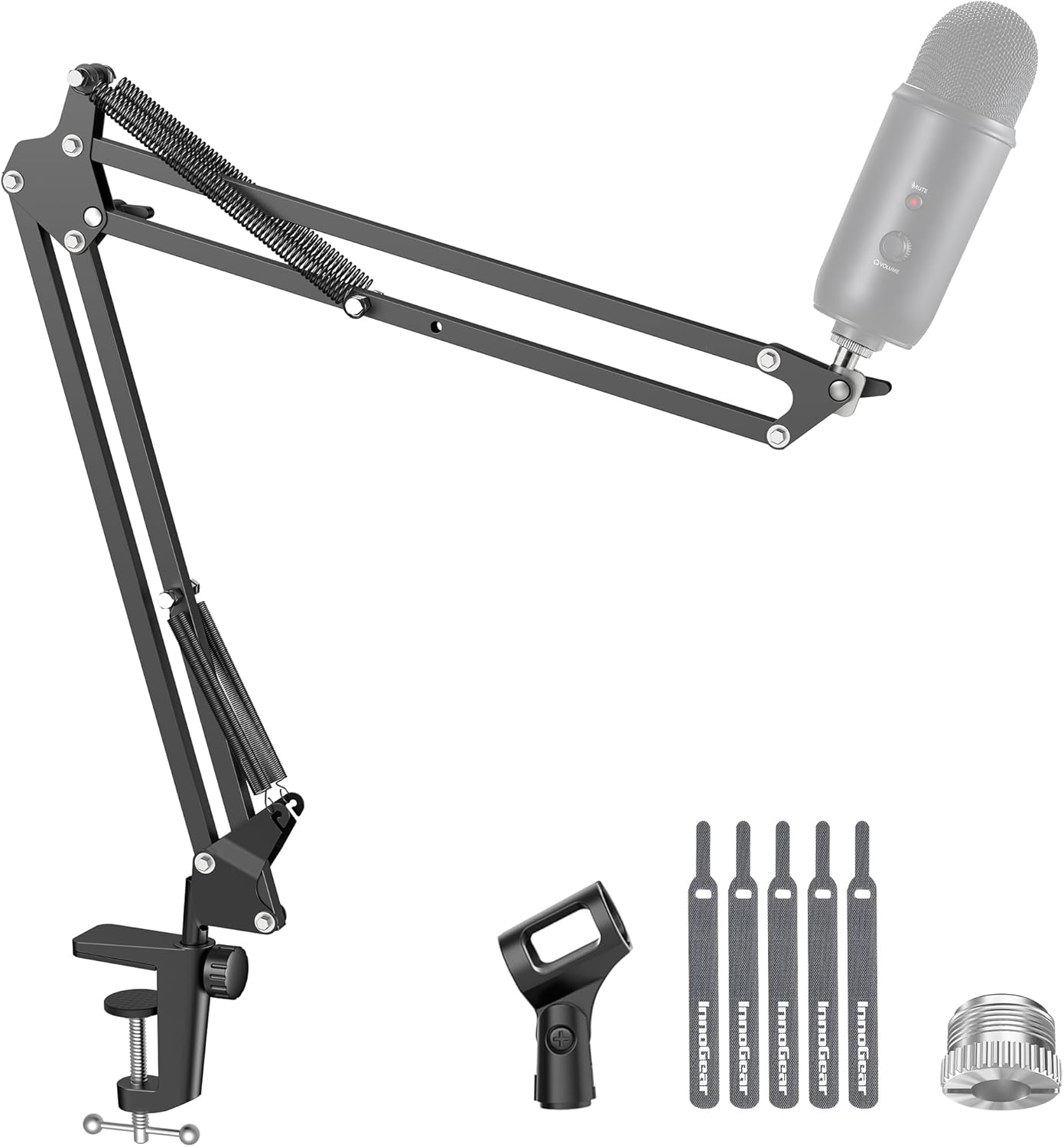 InnoGear Boom Arm Microphone Stand for Blue Yeti |
9.6/10 | View on Amazon.com |
| 20% OFF |
 FIFINE K688CT USB/XLR Dynamic Podcast Microphone |
9.4/10 | View on Amazon.com |
Prices and discounts as of Nov 23, 2026 and may have changed. Check Amazon for the current price.
Pros
- Exceptional build quality with alloy steel construction and reinforced springs for long-term durability
- Versatile compatibility with major microphone brands through included adapters and standard clips
- Smooth, quiet operation critical for professional recording without unwanted mechanical noise
- Compact foldable design saves desk space without compromising stability or load capacity
- Superior weight capacity compared to similarly priced alternatives on the market
Cons
- Desk clamp requires flat edges up to 2 inches thick, limiting compatibility with curved or slanted desk surfaces
- Requires manual assembly and adjustment to achieve optimal positioning for different microphone types
- Shock mount not included, requiring separate purchase for certain microphone models
The InnoGear MU01 boom arm microphone stand is a professional-grade mounting solution designed for content creators, streamers, podcasters, and musicians who demand reliable microphone positioning. This desk-mounted arm accommodates popular USB microphones including Blue Yeti, Fifine, HyperX, and traditional XLR microphones with the included adapters.
The standout feature of this boom arm is its exceptional adjustability and build quality. With 360-degree base rotation, 135-degree back-and-forth extension, 180-degree vertical movement, and a 270-degree metal adapter, you can position your microphone precisely where needed. The 3.3lb weight capacity significantly exceeds standard competitors at 2.2lb, providing confidence for heavier microphone setups. The engineering specifically addresses a common flaw in other boom arms by eliminating the problematic knob on the arm shaft that causes spring deformation over time.
Build and design quality are exceptional for the price point. The alloy steel construction feels solid and substantial, while the super-strong springs enable silent, effortless positioning crucial for live recording sessions. The foldable design allows convenient storage when not in use, and the secure desk clamp grips edges up to 2 inches thick without wobbling. The included standard microphone clip and 5/8" to 3/8" adapter ensure compatibility with most popular microphone models.
Potential drawbacks include the desk clamp requirement for flat edges and the need for separate shock mount purchases for certain microphone models. The clamp design may not work with curved or slanted desk surfaces. Setup requires some manual adjustment to dial in your preferred microphone angle and height.
The InnoGear MU01 represents excellent value for anyone seeking a durable, feature-rich microphone boom arm. Its superior build quality, extensive adjustability, and broad microphone compatibility make it an ideal choice for serious content creators and recording enthusiasts.
Model: InnoGear MU01
Material: Alloy Steel with reinforced springs
Weight Capacity: 3.3 lbs (1.5 kg)
Dimensions: 15 x 1.5 x 4 inches
Maximum Height: 27.6 inches
Base Type: Desk clamp for edges up to 2 inches thick
Mount Thread Sizes: 3/8 inch and 5/8 inch
Adjustability: 360-degree base rotation, 135-degree extension, 180-degree vertical movement, 270-degree adapter rotation
Weight: 1.4 pounds
Compatibility: Blue Yeti, Fifine, HyperX, Shure SM58, Samson Q2U, and other standard microphones
Warranty: Manufacturer warranty included (does not cover microphones)
Who Should Buy: This boom arm is ideal for streamers, podcasters, content creators, musicians, and anyone requiring professional microphone positioning with space-saving storage. It works best with USB microphones like Blue Yeti, Fifine models, and HyperX gaming headset microphones, as well as traditional XLR microphones with adapters.
Desk Requirements: Ensure your desk has a flat edge between 0.5 and 2 inches thick for optimal clamp compatibility. Curved or slanted desk edges may not work with this clamp design.
Microphone Compatibility: Check your microphone's thread size (typically 3/8 inch or 5/8 inch). The included adapters cover most popular models, but verify compatibility before purchase if using less common microphone brands.
Setup Tips: Allow time for initial adjustment to find your preferred microphone height and angle. The boom arm's smooth operation means minimal repositioning is needed once properly configured. For heavy microphones near the 3.3lb limit, ensure the desk clamp is tightened securely.
Maintenance: Periodically check clamp tightness and spring tension. The innovative design minimizes spring wear compared to competitors, but regular inspection extends product lifespan.
Pros
- Exceptional audio clarity with minimal background noise thanks to cardioid pattern and included noise suppression accessories
- Flexible connectivity options allow you to start with USB and upgrade to XLR with audio interfaces or mixers later
- Sturdy metal construction and robust boom arm feel premium and maintain stability during extended use
- Simple plug-and-play setup with no driver downloads required for immediate USB operation
- Great value for the price with professional-grade components and comprehensive accessory bundle
Cons
- XLR connection disables all onboard controls, requiring external mixer or audio interface for level management
- Desk clamp only accommodates desks under 2 inches thick, limiting placement options for some setups
- Optimal audio input requires positioning within 2 to 6 inches of the microphone, which may feel close for some users
The FIFINE K688CT is a comprehensive microphone solution designed for podcasters, streamers, gamers, and content creators who demand professional audio without the professional price tag. This all-in-one kit combines a dynamic microphone with a metal boom arm stand, shock mount, windscreen, and dual connectivity options to serve both beginners and experienced audio enthusiasts.
The standout feature is the flexible connectivity architecture. The USB connection offers immediate plug-and-play convenience for laptops and PCs, complete with onboard controls including a touch-sensitive mute button, gain knob, and headphone monitoring jack. Simultaneously, the XLR output allows you to integrate the microphone into professional studio setups using mixers or audio interfaces. This dual-path approach means your investment grows with your production ambitions. The 130dB SPL rating and cardioid polar pattern ensure your voice stays center stage while background noise fades away, delivering the clean audio that audiences expect.
Build quality exceeds expectations at this price point. The metal boom arm feels substantial and maintains secure positioning without drift, while the included shock mount and windscreen effectively eliminate vibrations and wind noise. The microphone body itself has a professional appearance that elevates any desk setup. Setup is refreshingly straightforward, requiring just a USB cable connection and basic Windows audio configuration, with no driver installations needed.
A few practical considerations deserve mention. When using XLR connectivity, all onboard controls become inactive, requiring you to manage levels through your mixer or audio interface instead. The desk clamp works best on surfaces under 2 inches thick, which may limit placement flexibility. Additionally, optimal recording quality demands positioning the microphone 2 to 6 inches from your mouth, closer than some users might prefer initially.
The FIFINE K688CT delivers exceptional value for content creators at any skill level. Its combination of solid audio performance, flexible connectivity, professional build quality, and comprehensive accessories makes it an intelligent choice for anyone serious about upgrading their audio setup without overextending their budget.
Connectivity: USB and XLR
Microphone Type: Dynamic, Unidirectional (Cardioid)
Maximum SPL: 130dB
Frequency Response: 50Hz to 16kHz
Signal-to-Noise Ratio: 80dB
Polar Pattern: Cardioid
Form Factor: Microphone with Arm Stand
Boom Arm: Metal construction with 3/8" to 5/8" adapter
Desk Clamp: Fits desks up to 2 inches thick
Included Accessories: Shock mount, windscreen, USB-C to USB-A cable, desk clamp, 3/8" to 5/8" adapter, user manual
Weight: 1.31 kg
Warranty: 1 Year
Color: Black
Compatible With: PC, Laptop, Audio Mixers, Audio Interfaces
Best For: The K688CT excels for podcasters, YouTube creators, Twitch streamers, Discord gamers, voiceover artists, and anyone recording content from a desk. Its versatility makes it equally suitable for beginners taking their first step into quality audio and experienced creators looking for reliable backup equipment.
USB vs. XLR: Start with USB for immediate convenience and onboard control simplicity. Upgrade to XLR when you invest in a mixer or audio interface for expanded creative control and professional-grade signal routing. Both connections work with the same microphone.
Positioning Tips: Place the microphone 2 to 6 inches from your mouth for optimal input levels. The cardioid pattern naturally rejects side and rear sounds, so position your monitor or noise sources to the sides or behind the mic. Use the boom arm to achieve the ideal angle without straining your neck.
Noise Reduction: The included windscreen handles plosives and wind noise effectively. The shock mount isolates the microphone from desk vibrations and keyboard noise. For maximum noise suppression, position the boom arm away from your keyboard and close any nearby windows or doors.
Setup Considerations: Ensure your desk is under 2 inches thick for the clamp to work properly. When using XLR, you'll need an external mixer or audio interface to control levels. For USB-only setups, all controls function directly on the microphone without additional hardware.
How to Choose Your Microphone Boom Arm
Stability and Silent Movement
The primary job of a boom arm is to hold your microphone steady and allow you to reposition it quietly. Look for arms with internal spring damping, like the RØDE PSA1+, which eliminates creaks and handling noise mid-recording. A low-profile design, such as on the Aokeo AK-58i, lowers the center of gravity for enhanced stability, preventing the mic from drifting or shaking during intense sessions. This is critical for maintaining clean audio whether you’re live streaming or recording a voiceover.
Cable Management and Reach
A tidy workspace reduces visual distraction and prevents cable snags. Many modern arms, including the InnoGear Mic Arm and the NEEWER Low Profile model, feature built-in cable channels. These channels neatly route your XLR or USB cable inside the arm, keeping it hidden and protected. Also, consider the arm’s maximum horizontal and vertical reach. You need enough extension to position the mic correctly in front of you, even over a large monitor, without straining the arm’s mechanism.
Compatibility and Build Quality
Always verify the arm’s load capacity and thread compatibility. It must support the weight of your microphone, and potentially its shock mount. Most arms offer 5/8-inch or 3/8-inch threads, with adapters often included. Build quality directly impacts longevity; arms constructed from high-grade steel or aluminum alloy, like the FIFINE kits include, will withstand daily adjustments. A robust desk clamp that fits your desk’s thickness is non-negotiable for a secure installation. For more on securing your microphone, explore our review of the best compact shock mounts.
Final Thoughts
Investing in a quality microphone boom arm transforms your home studio by delivering professional microphone placement and a clean desk environment. For broadcasters and streamers seeking the gold standard in silent, smooth operation, the RØDE PSA1+ Professional Studio Boom Arm remains a top-tier choice widely validated in professional setups. If your priority is maximizing value with a complete, ready-to-use kit, the FIFINE AmpliGame AM8T XLR/USB Gaming Microphone bundle provides a sturdy arm paired with a capable dynamic microphone, making it an excellent starting point for new creators.
Frequently Asked Questions
What is the main advantage of a low-profile boom arm?
A low-profile design, like that of the Aokeo AK-58i or NEEWER arm, positions the main arm horizontally beneath your monitor. This dramatically improves stability by lowering the center of gravity and reduces visual obstruction in your workspace, allowing you to focus better on your screen during streams or video calls.
Can I use any boom arm with a heavy microphone like the Shure SM7B?
Not all arms are suitable. You must check the product’s maximum load capacity. Heavy dynamic microphones require arms with strong internal springs and a sturdy build, such as the InnoGear Mic Arm which is rated for heavier models. Using an under-spec’d arm can lead to sagging and instability.
Do I need a separate shock mount if my boom arm has springs?
Yes, the functions are different. The arm’s springs allow for positioning and hold weight. A shock mount isolates the microphone from vibrations traveling through the desk, like keyboard taps or bumps. For optimal audio quality, especially in voice work, using both a stable boom arm and a dedicated shock mount is recommended. You can find specialized options for different uses in our guide to the best microphone boom arms for podcasting.
How do I keep my cables organized with a boom arm?
Look for arms with integrated cable management. Many models now include channels or clips that run the length of the arm. You simply thread your microphone cable through these channels, which secures the cable and prevents it from dangling or getting tangled with other equipment on your desk, contributing to a cleaner studio look.







Write Your Review
No reviews yet. Be the first to share your experience!