

You’ve just built your dream gaming PC, and everything is perfect except for one small detail: the audio jacks. Unlike modern laptops, your desktop has separate 3.5mm ports for audio out and microphone in. Your new gaming headset has a single 4-pole TRRS plug. Suddenly, you’re searching for a solution to connect them. This is the exact scenario where a Y-splitter becomes essential.
This guide is for gamers who need to bridge that gap without sacrificing sound quality or microphone clarity. We focus on headsets compatible with this setup and include a vital accessory to make it all work. Finding the right combination can elevate your communication in team-based games and ensure you never miss a crucial audio cue.

Pros
- Solves a real problem: enables gaming headsets designed for consoles to work on PCs with separate audio/mic jacks
- Excellent build quality with aluminum alloy casing, gold-plated connectors, and durable nylon braiding
- Affordable solution that saves money compared to buying new compatible headsets
- Works reliably with popular gaming brands like Turtle Beach, HyperX, and Razer
- Compact and portable design makes it easy to transport between devices
Cons
- Connection can be sensitive to slight misalignment, requiring careful insertion for consistent audio
- Short 20cm cable length may not reach comfortably from tower PCs or create cable management challenges
- Only compatible with CTIA-standard TRRS headsets; incompatible with Apple EarPods and Beats headphones
The UGREEN 3.5mm Headphone Splitter solves a compatibility problem that plagues PC gamers and remote workers: connecting modern gaming headsets with a single 3.5mm TRRS connector to older desktops and laptops that feature separate audio output and microphone input jacks. If you own a quality gaming headset from brands like Turtle Beach, HyperX, or Razer but can't use the microphone on your PC, this adapter is your answer.
Performance-wise, the splitter delivers what it promises. The gold-plated connectors and oxygen-free copper wiring ensure audio clarity without signal loss or noise interference. Users report reliable functionality across gaming, video conferencing, and VOIP applications like Skype and Teams. The design is straightforward: one female 3.5mm TRRS input splits into two male 3.5mm TRS outputs for audio and microphone, making setup intuitive even for non-technical users.
Build quality is impressive for the price point. The aluminum alloy casing provides structural rigidity, while the nylon braided jacket has passed over 10,000 bending tests, indicating excellent durability. The compact 20cm length keeps cable clutter minimal, though some users with tower PCs may find it slightly short for comfortable reach.
The main drawback is connection sensitivity: slight misalignment can cause audio dropouts or distortion, requiring careful insertion. Additionally, the product only works with CTIA-standard TRRS cables, making it incompatible with Apple products and certain premium headphone brands. Verify your headset uses the correct standard before purchasing.
Verdict: This is a highly practical, well-built adapter that delivers genuine value for PC gamers and remote workers. At under $10, it's a smart investment if you want to repurpose existing gaming headsets rather than buying new ones. Just ensure your headset uses CTIA-standard connectors and handle the connection with care.
Compatible Headsets: This adapter works with Turtle Beach XO1, PX24, Recon 50X, and XO 7 models; HyperX Cloud 2; Razer Kraken X; Sennheiser HD 598 Cs; Logitech UE 6000; Astro A10; and most other CTIA-standard gaming headsets. It also supports PS4, PS5, Xbox controllers, and Nintendo Switch headsets when connected to PCs.
Compatible Devices: Desktop PCs and laptops manufactured before 2010 with separate 3.5mm audio output and microphone input jacks. Modern laptops with single 3.5mm jacks or USB-C audio will not work with this adapter.
NOT Compatible: Apple EarPods, Beats headphones, and any OMTP-standard headsets. The adapter requires CTIA-compliant TRRS cables for proper microphone functionality. Check your headset documentation or contact the manufacturer to confirm CTIA compliance before purchasing.
Connector Type: 3.5mm Female (TRRS input) to Dual 3.5mm Male (TRS outputs). Cable Length: 20cm (7.87 inches). Color: Black with aluminum alloy and polished finish.
Build Materials: Aluminum alloy casing, 24K gold-plated connectors, oxygen-free copper wire, nylon braided jacket. Weight: 0.05 kg. Dimensions: 8.27 x 5.91 x 1.57 inches.
Durability Testing: Nylon braiding passes 10,000+ bending tests. Electrical specs: 20V input, 1.5A current rating, 3W nominal power. No external power source required. Limited warranty included.

Pros
- Exceptional comfort for extended gaming sessions with memory foam cushions
- True multiplatform compatibility works seamlessly across all major gaming platforms
- Excellent sound quality and microphone clarity at this price range
- Lightweight design with durable construction resists wear and tear
- ProSpecs glasses relief system eliminates pressure points for glasses wearers
Cons
- Volume and mute controls located on the headset itself rather than an inline remote
- Some users report durability issues after extended use, with potential for microphone wear
- Ear cushions may feel firm initially until they warm up to body temperature
The Turtle Beach Recon Spark is a budget-friendly wired gaming headset designed for players who prioritize comfort and sound quality without premium pricing. It caters to casual gamers, competitive players, and anyone needing a reliable headset for online gaming, streaming, or voice communication across multiple devices.
The standout feature is its exceptional comfort combined with genuine multiplatform compatibility. The 40mm drivers deliver crisp highs and powerful lows optimized for spatial audio technologies like Dolby Atmos and DTS Headphone X. The flip-to-mute microphone captures voice with impressive clarity, and on-ear volume controls keep adjustments within reach during intense gameplay sessions.
Build quality reflects the affordable price point with a metal-reinforced headband providing durability and synthetic leather memory foam ear cushions that mold to your head over time. The ProSpecs glasses relief system is particularly impressive, featuring dual-foam cushions that reduce pressure for glasses wearers. At just 8.48 ounces, the headset feels lightweight without feeling cheap or flimsy.
The main drawback is that volume and mute controls are positioned on the headset rather than an inline remote, which some users find inconvenient during gameplay. Additionally, a small number of users report durability concerns after several months of use, though most experience problem-free performance well beyond the 1-year limited warranty period.
The Turtle Beach Recon Spark represents outstanding value for budget-conscious gamers seeking reliable audio, comfortable fit, and genuine cross-platform compatibility. While not positioned as a premium option, it punches above its price range in sound quality and comfort, making it an excellent choice for anyone building an affordable gaming setup.
The Recon Spark features universal 3.5mm connectivity, making it compatible with virtually any gaming device. For Xbox Series X, Series S, and Xbox One, simply connect the 3.5mm cable directly to the controller. PlayStation 5 and PS4 users can connect to the controller's 3.5mm jack in the same manner.
PC gamers receive an included PC splitter cable that separates the audio and microphone signals into individual pink and green 3.5mm jacks, allowing connection to standard PC audio inputs. Mobile devices with 3.5mm headset jacks work with direct connection. The headset does not support wireless connectivity via Bluetooth, so all connections are wired through the 3.5mm standard.
Audio: 40mm Neodymium drivers, 20Hz-20kHz frequency response, closed over-ear design
Microphone: Fixed omni-directional flip-to-mute design with high sensitivity
Controls: Master volume wheel, mic mute switch
Connectivity: Wired 3.5mm jack with included PC splitter cable
Materials: Synthetic leather with memory foam cushions, metal-reinforced headband
Weight: 8.48 ounces
Warranty: 1-year limited
Compatibility: Xbox Series X/S, Xbox One, PS5, PS4, PC, mobile devices with 3.5mm jack
Pros
- Exceptional value at under $40 with premium audio quality comparable to headsets costing twice as much
- Outstanding comfort for marathon gaming sessions thanks to breathable foam ear cushions and featherweight construction
- Crystal-clear microphone quality that teammates consistently praise for voice clarity in multiplayer games
- Immersive 7.1 surround sound provides competitive advantage by delivering precise footstep and directional audio cues
- Universal wired connectivity eliminates pairing hassles and works instantly across all major gaming platforms
Cons
- Plastic construction feels less premium than higher-priced alternatives, though durability is proven over years of use
- Windows 10 64-bit required for full 7.1 surround sound functionality, limiting Mac and console users to stereo
- Not water-resistant, so not ideal for outdoor use or humid environments
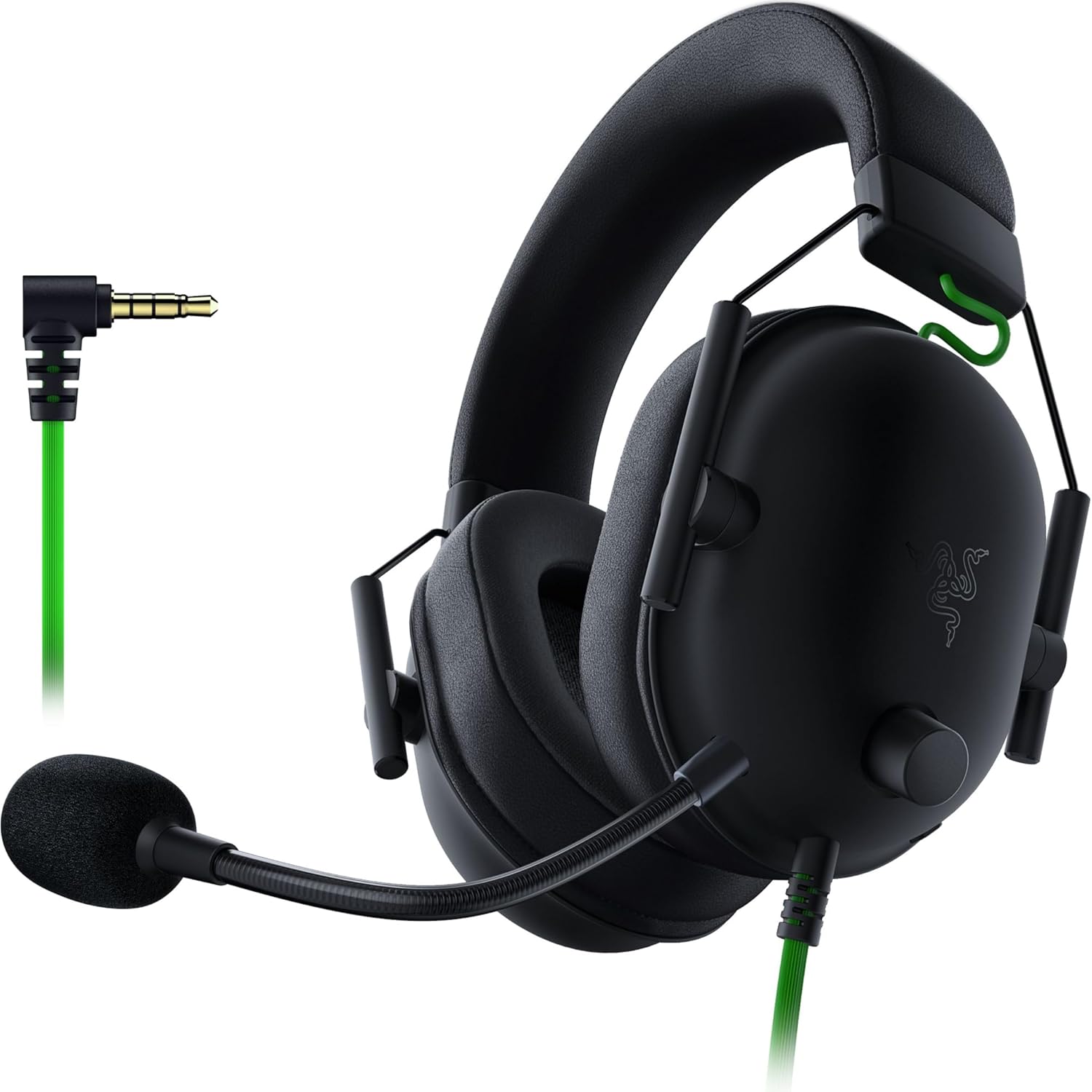
The Razer BlackShark V2 X is a budget-friendly gaming headset designed for competitive players and casual gamers who demand quality audio without breaking the bank. It's engineered for PC, PlayStation, and Switch users seeking an affordable entry point into serious gaming audio with cross-platform flexibility.
The standout feature is the 7.1 surround sound powered by Triforce Titanium 50mm drivers that divide audio into three independently tuned frequencies. This creates noticeably clearer highs, richer mids, and more powerful lows compared to standard drivers. In real-world gaming, users consistently report superior directional audio that makes hearing footsteps and in-game details significantly easier, providing a competitive edge in shooters and tactical games.
Build quality reflects the budget-conscious pricing, with primarily plastic construction that feels somewhat light but proves durable. The 240-gram weight is a major advantage for comfort, allowing hours of continuous wear without ear or head fatigue. Memory foam ear cushions provide both comfort and solid passive noise isolation, helping players stay focused during intense gaming sessions or while working remotely.
The Razer HyperClear cardioid microphone delivers impressive voice clarity that teammates consistently praise, with an improved pickup pattern that captures your voice while minimizing background noise. Setup is instant via the 3.5mm jack, with no drivers or software required for basic functionality, though Windows 10 64-bit is needed to access full 7.1 surround sound capabilities.
The main drawback is that console and Mac users get stereo audio only, and the plastic build lacks the premium feel of higher-priced competitors. However, for the price point, durability is proven with many users reporting 15,000+ hours of reliable use. The BlackShark V2 X is an excellent choice for budget-conscious gamers who prioritize sound quality, comfort, and compatibility over aesthetics.
Audio Performance: 7.1 surround sound (Windows 10 64-bit), 50mm Triforce Titanium drivers, 100 Hz to 10 kHz frequency range, 100 dB sensitivity, 32 ohm impedance, 28 kHz frequency response.
Design and Comfort: Over-ear with oval memory foam cushions, lightweight at 240 grams, closed-cup design for passive noise isolation, breathable foam ear cushions, aviation-style construction.
Microphone: Razer HyperClear cardioid microphone with improved pickup pattern for voice clarity and noise rejection.
Connectivity: Wired 3.5mm audio jack, retractable cable, compatible with PC, Mac, PlayStation 4, PlayStation 5, Nintendo Switch, and Xbox One (stereo adapter may be required).
Build and Warranty: Primarily plastic construction with titanium-coated elements, 2-year manufacturer warranty, includes audio/mic splitter extension cable and user manual.
Best For: Budget-conscious gamers wanting quality 7.1 surround sound, competitive shooters and tactical game players, multi-platform gamers with PC and PlayStation, users prioritizing comfort for long sessions, streamers and content creators on a budget.
Consider Alternatives If: You need wireless connectivity, primarily game on console and want full surround sound (only available on Windows 10 64-bit), prefer premium materials and aesthetics, require water resistance for outdoor use.
Platform Compatibility Note: Windows 10 64-bit users get full 7.1 surround sound. Mac, PlayStation, Switch, and Xbox One users receive stereo audio only. All platforms support the headset via 3.5mm jack connection.
Why Choose This Headset: The BlackShark V2 X offers exceptional value combining 7.1 surround sound, superior microphone quality, all-day comfort, and cross-platform compatibility at a price point significantly lower than competitors offering similar features. Customer reviews consistently highlight reliability over years of heavy use.

Pros
- Exceptional multi-platform connectivity eliminates the hassle of constant re-pairing between consoles
- PRO-G GRAPHENE drivers provide superior audio clarity and directional accuracy for competitive gaming
- Extended 24-hour battery life and magnetic charging dock ensure minimal downtime
- Professional-grade wireless microphone with 48 kHz bandwidth outperforms standard gaming mics
- Intuitive on-ear controls allow quick platform switching without removing the headset
Cons
- HDMI 2.1 passthrough requires compatible console setup, limiting compatibility with older systems
- Learning curve for G HUB software to fully optimize audio settings and features
The Logitech G Astro A50 X is a flagship wireless gaming headset designed for serious gamers who own multiple platforms. It's built for Xbox, PlayStation 5, Nintendo Switch, and PC users who want seamless connectivity without the frustration of constant re-pairing. This is the headset for competitive players and multi-platform enthusiasts who demand professional-grade audio.
The standout feature is PLAYSYNC technology, which lets you connect to all four platforms simultaneously and switch audio and video with on-ear controls. The PRO-G GRAPHENE 40mm drivers deliver exceptional clarity and spatial accuracy, giving you a genuine competitive edge in competitive shooters and multiplayer games. The broadcast-quality LIGHTSPEED wireless microphone captures your voice at 48 kHz full bandwidth, ensuring your teammates hear you crystal clear. Dual-device mixing means you can hear game audio and chat simultaneously, a feature that separates this from mid-tier competitors.
Build quality is solid with a professional aesthetic that works in any gaming setup. The magnetic Base Station dock is elegant and functional, keeping the headset charged and ready. The on-ear controls are intuitive and responsive, making platform switching feel natural rather than cumbersome. At 24 hours of battery life, you get genuine all-day gaming without mid-session recharging.
The main drawback is the premium price point, which limits accessibility for casual gamers. Additionally, the HDMI 2.1 passthrough feature requires compatible console hardware, and the G HUB software has a learning curve for those unfamiliar with advanced audio customization. Setup can be technical if you want to maximize all features.
The Astro A50 X is the best choice for multi-platform gamers who value audio quality and convenience enough to invest in premium gear. If you play across multiple systems and want one headset that truly works everywhere, this delivers on that promise with professional-grade performance.
Audio Technology: PRO-G GRAPHENE 40mm drivers, 35 ohm impedance
Connectivity: LIGHTSPEED wireless, Bluetooth dual-device mixing, HDMI 2.1 passthrough
Microphone: Boom microphone, 48 kHz full-bandwidth LIGHTSPEED uplink
Battery Life: 24 hours at 78 dB
Charging: Magnetic Base Station dock
Video Support: 4K 120 Hz, 24-bit audio
Compatibility: Xbox, PlayStation 5, Nintendo Switch, PC
Form Factor: Over-ear, on-ear placement
Color: Black
Software: G HUB app with 10-band parametric EQ, noise reduction, stream output mixing
Who Should Buy This: Multi-platform gamers who own Xbox, PS5, Switch, and PC and want one headset for all systems. Competitive players who prioritize audio precision and microphone quality. Content creators streaming from multiple platforms. Anyone willing to invest in premium gaming audio.
Who Should Skip This: Budget-conscious gamers looking for entry-level options. Players who only game on one platform. Casual gamers who don't need broadcast-quality audio features. Those uncomfortable with advanced audio customization software.
Key Considerations: Verify your console supports HDMI 2.1 passthrough for full feature compatibility. Plan time to explore G HUB settings to maximize audio quality for your preferences. Ensure your gaming space has room for the Base Station dock. Consider this a long-term investment that will serve multiple platforms for years.
What to Look for in a Gaming Headset with Y-Splitter Setup
Connector Compatibility and Standard
The most critical factor is the connector standard. Most modern gaming headsets use a CTIA-standard TRRS plug. Your splitter must match this. Using an incompatible standard, like OMTP, will result in a non-functional microphone.
Always verify your headset’s plug configuration. The accessory we’ve included, the UGREEN Headphone Splitter for Computer 3.5mm, is confirmed for CTIA headsets. This compatibility ensures both audio playback and mic input work correctly on legacy PC ports.
Audio Quality and Driver Performance
A splitter should not degrade your audio experience. Look for headsets with well-tuned drivers that deliver clear soundscapes. For instance, models with dedicated 40mm or 50mm drivers, like those found in many top picks, provide the immersive audio needed for competitive gaming.
High-quality splitters use gold-plated connectors and oxygen-free copper wiring to minimize signal loss. This preserves the headset’s original audio fidelity. It allows you to hear precise positional audio, which is as important as finding a headset with great on-ear controls.
Microphone Clarity and Convenience
Clear communication is non-negotiable. Your chosen headset should have a high-quality microphone that remains crisp when routed through a splitter. Features like a flip-to-mute mic or a cardioid pickup pattern help isolate your voice from background noise.
A good splitter passes the microphone signal without introducing static or distortion. This ensures your teammates hear you perfectly. It’s a key advantage over built-in laptop microphones or low-quality standalone options.
Build Quality and Platform Flexibility
Durability matters for both the headset and the splitter. A robust, nylon-braided splitter cable can withstand daily use. Similarly, a headset with a sturdy frame and comfortable ear cushions enhances long gaming sessions.
Consider multiplatform compatibility. Many headsets reviewed here work on consoles and PCs. A reliable splitter setup lets you use a single, high-quality headset across your gaming PC and other devices with a standard 3.5mm jack, offering great versatility similar to headsets with detachable cables.
Final Thoughts
Setting up a proper audio system for a PC with separate jacks is simpler than it seems. The key is pairing a compatible gaming headset with a quality Y-splitter adapter. For most gamers seeking excellent value, the Turtle Beach Recon Spark Wired Multiplatform offers a fantastic balance of sound and clear communication when used with the right splitter. For those prioritizing premium, immersive audio with superior noise isolation, the Razer BlackShark V2 X Gaming Headset is an outstanding choice that performs brilliantly in this configuration.
Frequently Asked Questions
Do I need a special splitter for my gaming headset?
Yes, you need a specific type called a “headset splitter” or “PC audio splitter.” It combines separate audio and microphone signals into one TRRS connector. A standard audio splitter that duplicates stereo sound will not carry the microphone signal. Ensure the splitter is CTIA-standard compatible with your headset.
Will using a Y-splitter reduce my headset’s audio quality?
A high-quality splitter built with good materials, like gold-plated connectors and oxygen-free copper wire, minimizes signal degradation. You should not notice a drop in audio or microphone quality. Cheap, poorly made splitters can introduce noise, so it’s worth investing in a validated accessory from a reputable brand.
Are all gaming headsets compatible with a Y-splitter setup?
No. Only headsets with a single 3.5mm TRRS plug (combining audio and mic) are compatible. Wireless headsets or those with a USB connection do not need a splitter. Most wired gaming headsets designed for consoles use this TRRS plug, making them perfect for this PC setup. You can explore more options in our full gaming headsets category.
Can I use this setup for things other than gaming?
Absolutely. This configuration is ideal for any application on a desktop PC requiring both headphone audio and microphone input. It’s perfect for video conferencing, voice chat programs, online learning, and streaming. It provides a much better audio experience than typical laptop speakers and built-in mics.



Write Your Review
No reviews yet. Be the first to share your experience!