

You’ve just nailed the perfect guitar riff, a tone you’ve been chasing for weeks. The excitement is real until you hit record and the magic disappears. Your playing sounds thin, digital, and nothing like what you hear in the room. This frustrating gap between your performance and your recording is why the right audio interface matters so much for electric guitarists.
An audio interface is your guitar’s bridge to the digital world. It converts your instrument’s rich analog signal into a format your computer can understand. The wrong one can strip away nuance and dynamics, while the right one captures every pick attack and harmonic. This guide is for every guitarist, from bedroom hobbyists to serious home studio producers, looking to record their electric guitar with professional clarity.
Pros
- Excellent preamp quality produces bright, clear recordings with minimal noise floor
- Air mode adds professional polish to vocal and acoustic recordings without additional equipment
- Compact design perfect for home studios, bedroom producers, and mobile recording setups
- Included software suite eliminates need for expensive DAW purchases
- Highly reliable brand with strong reputation in professional audio industry
Cons
- Single microphone input limits simultaneous multi-instrument recording capabilities
- May require audio driver updates for optimal performance on some Windows systems
- Learning curve for beginners unfamiliar with audio interface operation and gain staging
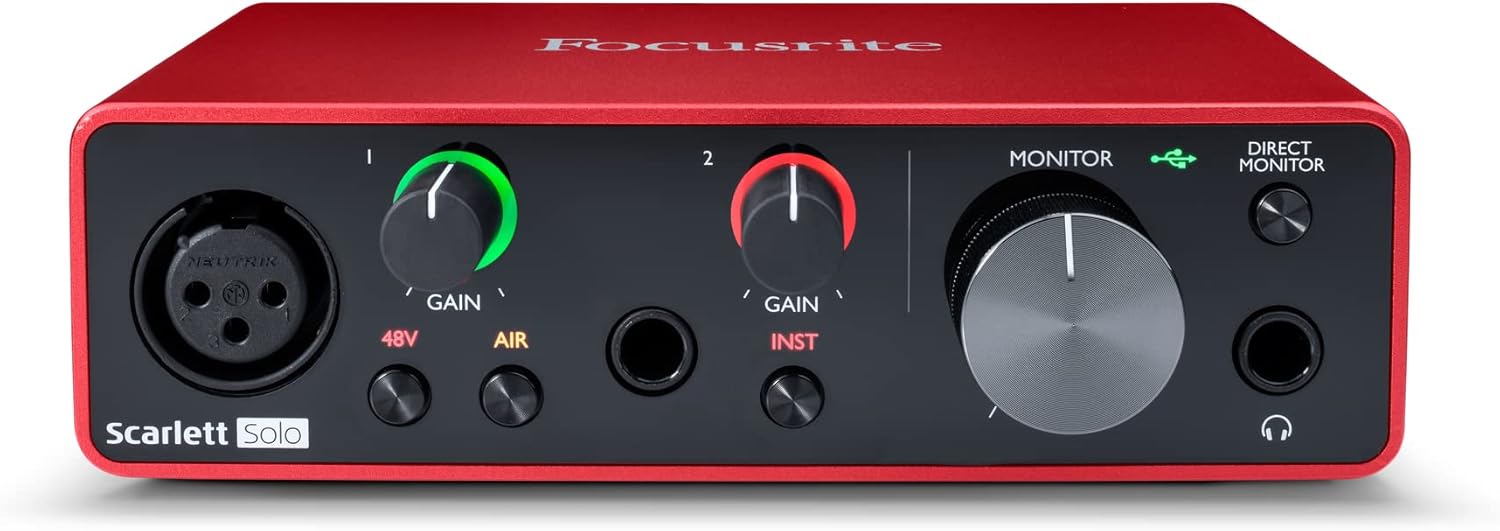
The Focusrite Scarlett Solo 3rd Gen is a professional USB audio interface designed for musicians, podcasters, and content creators who demand studio-quality recordings without the complexity of larger mixing consoles. This compact device bridges the gap between budget-friendly entry-level gear and expensive professional equipment, making it ideal for home studios, bedroom producers, and anyone serious about capturing professional-grade audio.
The standout feature is undoubtedly the high-performance microphone preamp paired with the innovative Air mode, which adds extra clarity and presence to vocals and acoustic instruments. The two high-headroom instrument inputs eliminate clipping and distortion, ensuring your guitar, bass, and other instruments shine through with clarity. Recording at up to 24-bit/192kHz resolution means your productions retain all sonic nuances, while the Gain Halo visual feedback system helps you nail perfect levels every time.
Build quality reflects Focusrite's professional heritage, with a solid metal chassis and intuitive front-panel controls that feel responsive and durable. The USB-C connectivity provides fast, reliable data transfer and modern compatibility with both Mac and Windows systems. The included software bundle (Pro Tools Intro+, Ableton Live Lite, Cubase LE) gives you everything needed to start producing immediately without additional software purchases.
The primary limitation is the single microphone input, which restricts simultaneous multi-track vocal or acoustic recording. Additionally, some Windows users report requiring driver updates for optimal performance. The learning curve for gain staging and audio interface operation may challenge complete beginners, though the included documentation is comprehensive.
The Focusrite Scarlett Solo 3rd Gen represents exceptional value for serious hobbyists and semi-professional creators. Its combination of pristine preamp quality, professional converters, intuitive design, and included software makes it the go-to choice for anyone upgrading from computer microphones or entry-level interfaces. The three-year warranty provides confidence in your investment.
Audio I/O: 1 XLR microphone input, 2 high-impedance instrument inputs, 2 balanced line outputs, headphone output
Audio Quality: 24-bit/192kHz recording and playback resolution with high-performance converters
Connectivity: USB-C to computer, compatible with all major audio recording software
Channels: 2 channels (stereo)
Features: Switchable Air mode, Gain Halo visual feedback, low-noise outputs, headphone monitoring
Software Included: Pro Tools Intro+, Ableton Live Lite, Cubase LE, Hitmaker Expansion
Warranty: 3-year manufacturer warranty worldwide
Compatible Devices: Microphones, instruments, personal computers, headphones, studio monitors
Who Should Buy: Musicians recording at home, podcasters seeking professional audio quality, guitarists and bassists needing quality instrument preamps, content creators upgrading from built-in computer audio, and producers working with limited space.
Who Should Look Elsewhere: Users needing simultaneous multi-microphone recording, those requiring extensive analog mixing features, or professionals running high-channel-count studios requiring more I/O options.
Setup Tips: Ensure your computer meets USB-C requirements and install drivers before first use. Spend time learning gain staging with the Gain Halo visual indicator to avoid clipping. Experiment with Air mode on different sources to understand its impact on your recordings.
Value Comparison: At this price point, the Scarlett Solo 3rd Gen outperforms competitors by offering superior preamp quality, professional software bundle, and proven brand reliability. The included software alone typically costs $200+ if purchased separately.

Pros
- Remarkably clean signal conversion with minimal noise despite compact size
- Universal compatibility across iOS, Android, Windows, and macOS devices
- Includes all necessary adapters (6.5mm, Lightning, USB-C) in the box
- Immediate recognition by DAWs like GarageBand and Logic Pro without driver installation
- Excellent value at under $20 for professional-grade audio interface capabilities
Cons
- Requires external DAW software for recording and playback, no built-in effects or processing
- Single-channel mono input only, does not support stereo recording
- Limited documentation on software compatibility and settings optimization may require trial and error
The COOLSELL G47 is a minimalist audio interface designed for musicians and content creators who prioritize portability without sacrificing recording quality. This pocket-sized device converts analog guitar and microphone signals into high-resolution digital audio that your phone, tablet, or computer can process. It's perfect for singer-songwriters recording demos, podcasters capturing audio on the go, and bedroom producers who need studio-quality sound in a travel-friendly package.
The standout feature is its 24bit/192kHz conversion capability paired with a 95dB signal-to-noise ratio, which ensures your recordings capture rich detail and minimal background noise. Real-world testing shows the interface delivers surprisingly clean signal conversion despite its diminutive size. Users report that guitars recorded through the G47 maintain their natural tone and dynamics, while vocal recordings come through crisp and detailed. The inclusion of both USB-C and Lightning connectors means compatibility with newer and older Apple devices, plus all Android and Windows platforms.
Build quality reflects its minimalist design philosophy. The interface is essentially a signal translator, weighing just 50 grams and measuring 2.2 inches square. It includes all necessary adapters in the box, eliminating the frustration of hunting for compatible cables. Setup is genuinely plug-and-play, with most DAWs like GarageBand and Logic Pro recognizing it immediately without requiring driver downloads or manual configuration.
The main limitation is that this device has no built-in recording capabilities or effects processing. You must use external software like GarageBand, Reaper, or professional DAWs to actually record and monitor audio. Additionally, it only supports mono input, so stereo recording isn't possible. Some users report a learning curve when configuring software settings for optimal performance, particularly regarding input levels and monitoring options.
The COOLSELL G47 is an excellent choice for musicians and creators who already use recording software and need a portable, affordable interface that delivers professional audio quality. At under $20 with a 3-year warranty, it represents outstanding value for capturing high-fidelity recordings anywhere. However, it's not suitable for those seeking an all-in-one solution with built-in effects or recording capabilities.
Audio Quality: 24bit/192kHz maximum sample rate, 95dB signal-to-noise ratio, 1-channel mono input
Connectivity: USB-C, Lightning adapter included, 3.5mm microphone input, 6.5mm guitar adapter included
Compatibility: iOS, iPadOS, Android, Windows, macOS, ChromeOS
Physical: 2.2 inches D x 2.2 inches W x 0.63 inches H, 0.05 kg (50 grams)
Warranty: 3-year manufacturer coverage
Model: COOLSELL G47
Who Should Buy This: Traveling musicians recording demos, singer-songwriters capturing ideas on phones or tablets, podcasters needing portable audio input, content creators recording guitar content, and bedroom producers wanting professional quality in a compact form factor.
Who Should Skip This: Users needing stereo recording capability, those seeking built-in effects or processing, beginners without existing recording software, or anyone requiring simultaneous input and output monitoring through the device itself.
Pro Tips: Pair this with free software like GarageBand or Audacity for immediate recording capability. Use an external USB hub with iPad if you need simultaneous guitar input and headphone monitoring. The included 6.5mm adapter is essential for standard guitar cables. Test software settings before important recording sessions to optimize input levels and reduce latency.
Pros
- Exceptional value at this price point with dual XLR inputs that competitors charge significantly more for
- Compact 7.5-inch width and lightweight design make it genuinely portable for on-the-go recording
- Zero-latency monitoring via USB/Direct switch eliminates the frustration of hearing delayed playback while recording new parts
- Included software suite jumpstarts your production immediately without additional purchases
- Transparent preamps deliver clean, professional-grade audio from entry-level to mid-range microphones
Cons
- Plastic construction feels lightweight, which some users perceive as lower build quality despite reliable performance
- 48kHz maximum sample rate is lower than some competing interfaces, limiting high-resolution audio work
- Gain staging may require careful management with certain microphones, as some users report insufficient gain at maximum levels
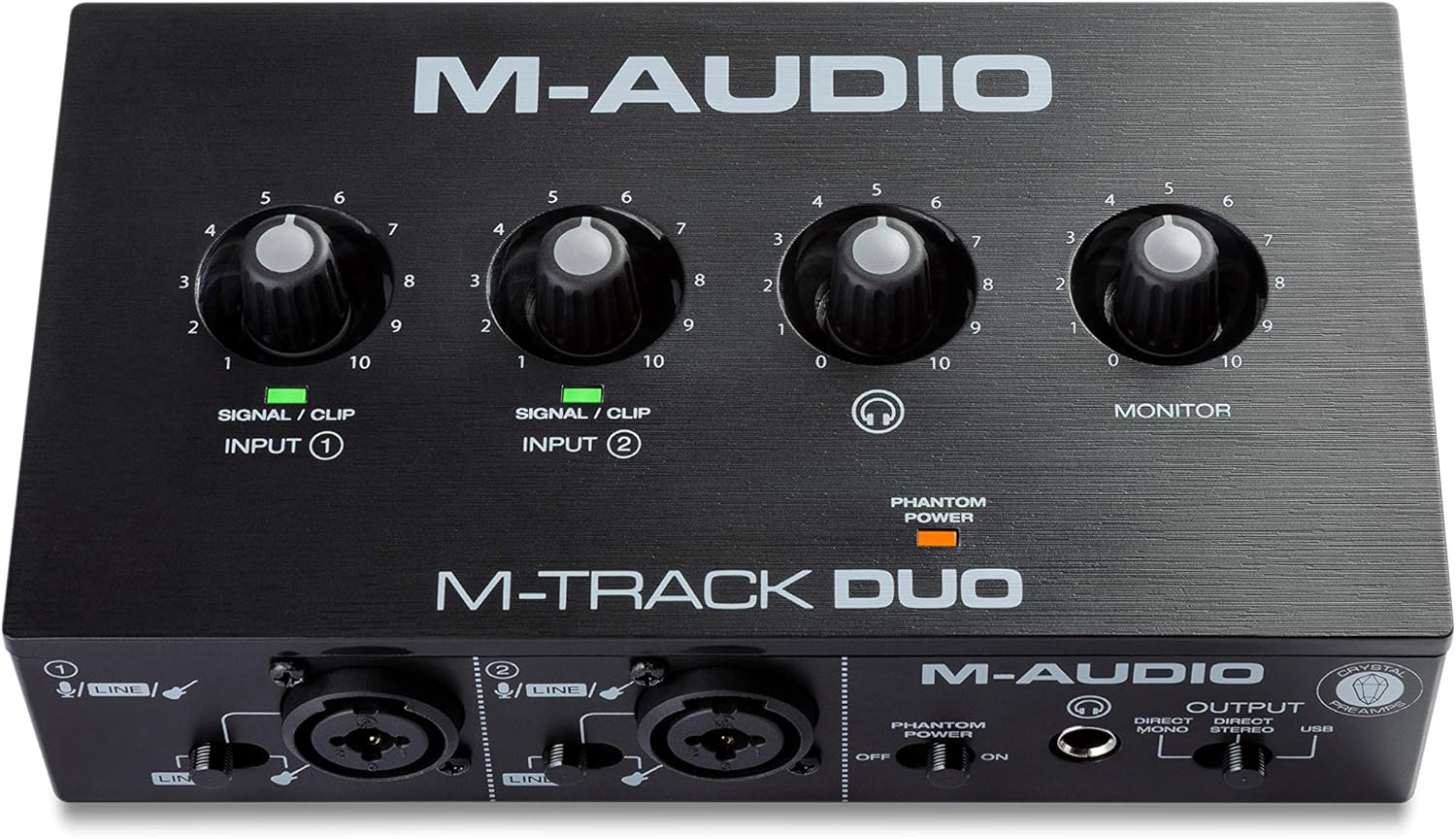
The M-Track Duo is a compact USB audio interface designed for podcasters, musicians, and content creators who need professional recording capabilities without the complexity or cost of larger studio setups. With dual XLR combo inputs, phantom power, and integrated instrument switching, this interface handles vocals, acoustic instruments, guitars, keyboards, and line-level devices with equal competence. It's the kind of gear that lets you go from idea to finished recording in minutes rather than hours.
What sets the M-Track Duo apart is its zero-latency direct monitoring feature, which eliminates the maddening delay that plagues cheaper interfaces. The USB/Direct switch lets you blend your live input signal with playback from your DAW, making it easy to record layered parts or add instruments to existing compositions. The transparent Crystal Preamps deliver clean, detailed audio that punches above its weight class, and phantom power support means you can work with professional condenser microphones without compromise.
Build quality is straightforward plastic construction that feels lightweight but proves durable in real-world use. The compact 7.5-inch width and 0.3kg weight make it genuinely portable, fitting easily into a laptop bag. All connections are professional-grade balanced XLR and quarter-inch TRS connectors, with a headphone output that supports standard stereo headphones via a quarter-inch adapter.
The main limitation is the 48kHz maximum sample rate, which is lower than some competing interfaces in higher price brackets. Additionally, some users report that gain staging requires careful management depending on your microphone, though this is rarely a dealbreaker for entry-level recording. The included MPC Beats software and ProTools First bundle provide legitimate production tools, though you'll likely graduate to more advanced DAWs as your skills develop.
The M-Track Duo delivers genuine value and reliability for anyone starting their recording journey or needing a portable backup interface. It handles its core mission of capturing clean, professional audio without fuss, making it an excellent choice for podcasters, singer-songwriters, and bedroom producers with realistic budgets.
Audio Specifications: Maximum sample rate of 48kHz with 16-bit resolution, 20kHz frequency response, and 1 megaohm impedance. Two channels of audio input and output.
Connectivity: Dual balanced XLR microphone inputs with phantom power, balanced quarter-inch line inputs, unbalanced quarter-inch instrument inputs, stereo quarter-inch main outputs, quarter-inch TRS headphone output, and USB Type B connection for computer and compatible iOS devices.
Dimensions and Weight: 7.5 inches wide by 4.34 inches deep by 2.13 inches tall, weighing just 0.3kg for maximum portability. Completely USB-powered with no external power supply required.
Compatibility: Works with Windows 7 and later via ASIO drivers, Mac OS High Sierra through Big Sur with class-compliant support, iOS with Apple Lightning to USB3 adapter, and Android devices. Compatible with all major DAWs including Logic Pro, ProTools, GarageBand, Studio One, Cubase, and Ableton Live.
Included Accessories: USB Type B to Type A cable, software download cards for MPC Beats and ProTools First, user guide, and safety documentation. Backed by a one-year manufacturer warranty.
Ideal For: This interface is perfect for podcasters launching their first show, musicians recording demos at home, content creators adding professional audio to videos, and anyone needing portable recording capability. It's also excellent for experienced engineers who need a reliable backup interface or travel-friendly setup.
Consider Alternatives If: You require sample rates above 48kHz for professional mastering work, need more than two simultaneous inputs, or demand premium metal construction and extensive onboard controls. However, for the vast majority of recording scenarios, the M-Track Duo delivers everything you need.
Budget Consideration: At this price point, the M-Track Duo offers exceptional value compared to single-channel competitors and provides genuine professional features like phantom power and zero-latency monitoring that many similarly-priced interfaces omit entirely.

Pros
- Exceptional audio quality with no background noise, even at budget price point
- Truly plug-and-play functionality works immediately on Windows, Mac, and Linux systems
- Dual combo jacks provide maximum flexibility for microphones, guitars, and line-level sources
- Lightweight and compact form factor ideal for desk space and portability
- Zero-latency monitoring enables confident tracking without hearing delay or echo
Cons
- LED illumination on gain knobs does not function as prominently displayed in product images
- Requires careful gain adjustment when connecting instruments with built-in preamps to avoid clipping
- Limited to 2 input channels, which may not suit users needing more simultaneous inputs
The PIYONE Q2 is a 2x2 USB-C audio interface designed for home recordists, podcasters, guitarists, and content creators who want professional-grade sound without complexity. It bridges the gap between budget-friendly and professional-quality recording, making it an ideal first interface for beginners or a secondary interface for established creators.
The standout feature is its genuine plug-and-play operation. Simply connect the USB-C cable to your computer, and the interface is recognized immediately on Windows, Mac, and Linux systems without any driver installation. The 24-bit/192kHz audio resolution captures professional-quality recordings with excellent clarity and minimal noise. The zero-latency direct monitoring feature eliminates tracking delays, allowing you to hear yourself in real-time without the frustrating latency that plagues cheaper interfaces. Dual XLR/TRS combo inputs with 48V phantom power provide flexibility for condenser microphones, dynamic mics, guitars, and line-level sources.
Build quality and design are impressive for the price. The compact form factor fits easily on any desk without consuming valuable space. The illuminated control knobs create a modern, professional aesthetic that looks great in any studio setup. The interface feels solid and well-constructed, with ergonomic knobs and buttons positioned for comfortable operation during long recording sessions.
One notable drawback is that the LED illumination on the gain knobs does not function as prominently as shown in product images, which may disappoint users specifically drawn to this visual feature. Additionally, users must exercise caution when adjusting gain levels with instruments that have built-in preamps, as excessive gain can cause clipping. The 2-channel limitation means this interface cannot handle multiple simultaneous inputs beyond two sources.
Verdict: The PIYONE Q2 delivers exceptional value for beginners and budget-conscious creators seeking professional audio quality without complexity. Its combination of studio-grade sound, zero-latency monitoring, and truly plug-and-play setup makes it an excellent choice for home recording, podcasting, and content creation. Recommended for anyone starting their recording journey or needing a reliable portable interface.
Audio Quality: 24-bit resolution, 192kHz maximum sample rate, high-performance converters, low-noise design
Connectivity: USB-C port (handles both data transfer and bus power), 3.5mm headphone jack
Inputs: 2 XLR/TRS combo jacks, 48V phantom power supply
Channels: 2 input channels, 2 output channels
Features: Zero-latency direct monitoring, monitor mix function, loopback capability, illuminated control knobs, class-compliant design
Compatibility: Mac, Windows PC, Linux, iOS (via USB-C adapter)
Physical: Compact portable design, 0.74 kg weight, Alloy Red finish
Warranty: 2-year limited warranty
Ideal For: Beginner recording artists, podcasters, singer-songwriters, content creators, home studio enthusiasts, and anyone seeking professional audio quality without complex setup requirements.
Perfect Use Cases: Recording vocals with condenser microphones, capturing acoustic guitar performances, podcasting and voice-over work, streaming with professional audio quality, music production on a budget, portable recording for travel or mobile content creation.
Not Ideal For: Users requiring more than 2 simultaneous inputs, professional studios with extensive I/O requirements, or those specifically seeking prominent LED illumination effects on control knobs.

Pros
- Instant setup with no installation, charging, or technical knowledge needed
- Dual-signal monitoring lets you hear your guitar plus app audio simultaneously
- Extremely portable design clips to pocket, belt, or guitar strap for mobile recording
- Included USB-C cable and Lightning adapter support multiple iOS and Android devices
- Signal indicator light provides visual feedback to prevent distortion
Cons
- Not suitable for real-time software amp simulations or effects processing
- Dry signal cannot be muted, so you'll always hear your unprocessed guitar tone
- Android device compatibility varies and requires OTG enabled in phone settings
The JOYO MOMIX CAB is a compact guitar audio interface designed for musicians who want to record high-quality dry guitar tracks directly on their smartphones. It bridges the gap between traditional recording interfaces and mobile convenience, making it perfect for singer-songwriters, bedroom producers, and guitarists who capture ideas on the go. This device is specifically engineered for those who prioritize portability and ease of use over complex real-time effects processing.
The standout feature is its zero-latency direct monitoring system, which passes your guitar's clean signal straight to your headphones while simultaneously sending it to your phone for recording. This means you'll never experience the frustrating delay that plagues many mobile recording solutions. The plug-and-play design is genuinely hassle-free: connect via USB-C or Lightning, plug in your guitar and headphones, and start recording immediately. The included signal indicator light turns green for clean input or red when levels are too hot, providing helpful visual feedback to prevent distortion.
Build quality reflects JOYO's budget-friendly philosophy without cutting corners. The pocket-sized design with back clip is genuinely clever, allowing you to attach the interface to your pocket, belt, or guitar strap for truly mobile recording sessions. The included USB-C cable and Lightning adapter ensure broad compatibility across iOS and Android devices, though Android users need to enable OTG in their phone settings. Construction feels solid despite the compact form factor.
The main limitation is that this interface is designed for clean signal recording only. The dry signal cannot be muted, and it's not intended for real-time software amp simulations or effects processing. If you need to apply effects during recording, you'll need a different solution. Additionally, Android compatibility varies by device model, so you may encounter connection issues depending on your specific phone.
The JOYO MOMIX CAB is an excellent choice for guitarists seeking affordable, portable recording without complexity. It excels at capturing dry tracks for later processing, practicing with backing tracks, and live streaming. If you need real-time effects or plan to record multiple instruments, look elsewhere. For solo guitarists and mobile recording enthusiasts, this pocket-sized interface delivers genuine value.
This interface is ideal for solo guitarists, singer-songwriters, and mobile content creators who prioritize portability and simplicity. If you frequently capture song ideas during rehearsals, practice sessions, or inspiration strikes away from your main studio, the MOMIX CAB's pocket-sized design and zero-setup requirements make it invaluable. Live streamers and social media creators will appreciate the instant connectivity and dual-signal monitoring.
It's particularly well-suited for musicians who plan to apply effects and processing during post-production rather than in real-time. Bedroom producers who record dry guitar tracks for layering and mixing will benefit from the clean signal quality. However, if you need real-time amp modeling, multi-track recording, or complex effects processing during recording, you should consider a more feature-rich audio interface. Similarly, if you record with multiple instruments simultaneously, this single-channel solution won't meet your needs.
Setup is genuinely simple. For iPhone users, connect the included Lightning adapter to your phone, then attach the MOMIX CAB to the adapter. For Android users, connect the included USB-C cable to your phone and enable USB On-The-Go (OTG) in your phone settings. Plug your guitar into the 6.35mm input jack and your headphones into the 3.5mm output jack. Open your phone's built-in recorder app or download a compatible recording application like Voice Memos, Audacity, or a dedicated music recording app.
The signal indicator light will glow green when your guitar signal is clean and optimal. If it turns red, your input is too hot, indicating you should turn down your guitar's volume to prevent distortion. You'll hear both your guitar's direct signal and any audio from your phone's apps through your headphones simultaneously. This dual-signal monitoring is the key to the zero-latency advantage. Note that the included USB-C cable is specifically tested with this interface, so use it rather than third-party alternatives to avoid connection issues.

Pros
- Professional audio quality at an affordable price point, delivering 24-bit/192kHz resolution comparable to interfaces costing twice as much
- Versatile connectivity with both XLR and instrument inputs plus headphone monitoring allows handling multiple audio sources and use cases
- Included ProStudio software and ASIO driver support unlock advanced routing and low-latency capabilities for serious streamers and producers
- Genuinely portable and compact design with intuitive controls makes it practical for home studios, mobile setups, and travel
- Strong cross-platform compatibility and DAW support ensure this interface works with virtually any modern recording or streaming software
Cons
- Limited to 2 channels, restricting simultaneous recording of multiple instruments or complex multi-track setups without additional gear
- Phantom power and preamp features depend on proper driver installation and software configuration, which may challenge complete beginners
- No built-in effects or processing, requiring external plugins or software for audio enhancement beyond basic routing and monitoring
The MAONO PS22 Lite is a compact USB audio interface designed for recording enthusiasts, podcasters, guitarists, and content creators who demand professional sound quality without the complexity or expense of larger systems. This device punches well above its weight, offering studio-grade specifications in a palm-sized form factor that fits any creative workspace.
The standout feature is undoubtedly the 24-bit/192kHz recording capability paired with a 106dB dynamic range, ensuring every nuance of your performance is captured with clarity and depth. The dual-input design handles both XLR microphones (with 56dB preamp gain and 48V phantom power) and guitar or line-level instruments, making it genuinely versatile for mixed creative work. The included ProStudio Routing Software with ASIO driver support opens possibilities for live streamers, enabling virtual channels and loopbacks for complex broadcast scenarios without latency issues.
Build quality reflects the premium positioning, with an ergonomic design featuring a dynamic light ring that indicates input status and a side-mounted headphone jack reducing cable clutter. The intuitive preset modes for recording, live broadcast, and instruments mean switching between creative tasks takes seconds, while the plug-and-play functionality works across Mac, Windows, and iPad platforms. Direct monitoring provides real-time audio feedback essential for getting performances right on the first take.
The primary limitation is the 2-channel configuration, which restricts simultaneous multi-track recording unless you're layering overdubs. Additionally, while the interface excels at capture and routing, it lacks onboard effects or processing, meaning you'll rely on software plugins for audio enhancement. Setup requires proper driver installation and software configuration, which may initially challenge absolute beginners despite the intuitive interface design.
The MAONO PS22 Lite delivers exceptional value for podcasters, guitarists, vocalists, and streamers seeking professional audio quality in a portable, user-friendly package. Its combination of high-resolution recording, versatile inputs, advanced routing software, and cross-platform compatibility makes it a smart investment for anyone serious about audio production without the premium price tag.
Audio Quality: 24-bit/192kHz recording resolution with 106dB dynamic range for professional-grade sound capture.
Inputs: 1 XLR input for microphones with 56dB preamp gain and 48V phantom power, 1 dedicated instrument input with impedance adjustment for guitars and line-level sources.
Connectivity: USB connection with included USB-A/USB-C to USB-C cable. Plug-and-play compatibility with Mac, Windows, and iPad.
Channels: 2-channel interface for stereo recording and monitoring.
Software Support: ASIO drivers, ProStudio Routing Software included. Compatible with Avid Pro Tools, Ableton Live, Logic Pro, Cubase, GarageBand, FL Studio, Studio One, plus streaming platforms like OBS, Twitch, YouTube, TikTok, and Discord.
Design: Compact palm-sized form factor with dynamic light ring indicator, ergonomic construction, and side-mounted headphone monitoring jack.
Best For: Podcasters and voice actors seeking warm, clear vocals with minimal noise. Guitarists and musicians recording demos or full productions. Content creators streaming to Twitch, YouTube, or TikTok. Home studio builders wanting professional results on a budget. Anyone transitioning from built-in computer audio to proper recording equipment.
Consider This If: You need simultaneous recording of multiple instruments, look elsewhere for 4+ channel interfaces. You want onboard effects and processing, you'll need to budget for software plugins. You're a complete beginner, allow time to learn driver installation and basic DAW setup.
Why Choose PS22 Lite Over Alternatives: The combination of 24-bit/192kHz recording, dual-input versatility, included ProStudio software, and compact design offers exceptional value. Many competitors at this price lack phantom power or advanced routing capabilities. The cross-platform compatibility and extensive DAW support ensure future-proof investment.

Pros
- Genuinely portable design fits in your pocket and includes convenient back clip for hands-free use
- Excellent audio quality at 24-bit/48kHz with low-latency processing ensures synchronized video recordings
- Works across multiple platforms and devices including iOS, Android, Windows, Mac, and Linux
- Simple one-button operation with no learning curve for beginners and musicians
- Comprehensive compatibility with popular music apps like AmpliTube, Rocksmith+, Yousician, and Tone Bridge
Cons
- Limited app compatibility means some recording software may not work, requiring use of built-in device recorders as fallback
- Mono signal input from most guitars means headphone output will be mono, not stereo
- Not compatible with MacBook Air running Monterey and certain guitar effects software according to manufacturer
The KYXAIN MOMIX CAB is a minimalist portable guitar audio interface designed for musicians and content creators who need to capture high-quality guitar audio on their smartphones or laptops. This pocket-sized device bridges your electric guitar or bass directly to your mobile device or computer, making it perfect for songwriting sessions, live streaming performances, online lessons, karaoke recording, and podcast production. At just 20.5 grams with a convenient clip design, it's genuinely portable enough to carry in your pocket or gig bag.
The standout feature is its 24-bit/48kHz audio quality combined with low-latency digital processing that ensures your recorded audio stays perfectly synced with video. Unlike full-featured audio interfaces, the MOMIX CAB embraces simplicity by handling only recording and monitoring without mixing or effects, making it ideal for beginners who want professional results without complexity. The device connects via Type-C for Android devices and laptops, includes a Lightning adapter for iPhones and iPads, and features a standard 1/4" guitar input jack plus 3.5mm headphone monitoring output.
Build quality is solid for the price point, with a compact form factor and intuitive controls. The volume adjustment buttons and color-coded indicator lights (green for normal, red for peak distortion) make it easy to manage recording levels during live sessions. Plug-and-play operation requires no batteries or software installation, making setup nearly instantaneous. The included Type-C cable, smartphone adapter, and user manual round out the package nicely.
The main limitation is app compatibility, as the MOMIX CAB works as a simple audio interface rather than a full sound card, meaning some recording applications may not recognize it. The manufacturer recommends using your device's built-in recorder if third-party apps don't support it, which is a reasonable workaround. Additionally, most guitars produce mono signals, so you'll get mono output through your headphones rather than stereo monitoring. MacBook Air users on Monterey should be aware of reported compatibility issues.
Overall, the KYXAIN MOMIX CAB delivers excellent value for budget-conscious musicians and streamers who prioritize portability and ease of use over advanced features. If you need straightforward, high-quality guitar recording for your phone or laptop without technical complications, this interface punches well above its price point. It's particularly recommended for beginners, casual musicians, content creators, and anyone seeking a travel-friendly solution for capturing guitar audio on the move.
The MOMIX CAB works with most modern smartphones and computers, but compatibility varies by device and software. For iPhones and iPads, you'll use the included Lightning to Type-C adapter. Android users connect directly via Type-C USB. Windows, Mac, and Linux computers all support the device via USB connection, though MacBook Air users running Monterey may experience issues.
Recording app compatibility includes confirmed support for AmpliTube, Rocksmith+, Yousician, Tone Bridge, Piascore, and Gibson Guitar App. However, not all recording applications recognize the MOMIX CAB, so the manufacturer recommends using your device's built-in voice recorder or audio recorder app as a reliable fallback option. Always test compatibility with your preferred app before purchasing if you have specific software requirements.
Audio Quality: 24-bit resolution, 48 kHz maximum sample rate, monaural recording capability
Connectivity: Type-C USB (Android/Laptop), Lightning (iPhone/iPad), 1/4" guitar input jack, 3.5mm headphone output
Channels: 2-channel configuration
Operating Systems: iOS, Android, Windows, macOS, Linux
Physical: Weight 20.5g, pocket-sized with back clip design
Power: Bus-powered via USB, no batteries required
Warranty: One year manufacturer warranty
Package Contents: MOMIX CAB interface, Type-C male-to-male cable, smartphone port converter, user manual

Pros
- Exceptional value for money, delivering professional audio specs at under $30
- Intuitive controls and zero-latency monitoring make it accessible for beginners and professionals alike
- Versatile connectivity supports everything from condenser mics to guitars with independent gain adjustment
- Compact and portable design ideal for home studios, mobile recording, and on-location work
- No driver installation required, works immediately across multiple operating systems and devices
Cons
- Quality control issues reported by some users, including missing buttons on certain units
- May require additional power solutions for certain Android devices lacking full OTG compliance
- Limited to 2x2 channel configuration, not suitable for multi-track recording setups
The Jolgoo 2x2 USB audio interface is a compact recording solution designed for musicians, podcasters, content creators, and home studio enthusiasts who demand professional audio quality without breaking the bank. This budget-friendly interface packs studio-grade specifications into a portable form factor, making it an accessible entry point for anyone serious about audio recording.
The standout feature is undoubtedly the zero-latency direct monitoring capability, which allows performers to hear themselves in real-time without distracting delay. Combined with 24-bit/192kHz audio conversion, users consistently report capturing crystal-clear vocals, acoustic instruments, and podcast audio with impressive clarity. The 48V phantom power support means you can connect professional condenser microphones, elevating your recording quality significantly. Independent gain controls and LED peak indicators help prevent clipping, giving you precise control over input levels.
Build quality is solid with a sturdy metal housing designed to shield against interference. The interface includes dedicated headphone monitoring, stereo line outputs for studio monitors, and both USB-C and USB-A cable options. Its compact size makes it equally at home on a desktop or packed into a mobile recording rig. Setup is genuinely plug-and-play across Windows, macOS, iOS, and Android devices, with full compatibility for major DAWs like Pro Tools, Ableton, and GarageBand.
Some users have reported quality control concerns, including missing buttons on certain units, which is disappointing at any price point. Additionally, some Android devices may require a power bank due to OTG compliance variations. The 2x2 channel configuration also limits it to stereo recording, which is fine for most solo recording scenarios but won't support multi-track setups.
The Jolgoo 2x2 delivers impressive value for budget-conscious recordists. It successfully bridges the gap between toy interfaces and expensive professional gear, making professional-quality recording accessible to everyone. Recommended for beginners exploring audio production, podcasters seeking portable solutions, and musicians wanting reliable recording without premium pricing.
Audio Specifications: 24-bit resolution, 192kHz maximum sample rate, 2x2 channel configuration, XLR/line combo inputs with independent gain control, 48V phantom power support, zero-latency direct monitoring.
Connectivity: USB connection, includes both USB-C and USB-A cables, compatible with Windows, macOS, iOS, and Android devices. Headphone monitoring output and stereo line outputs for studio monitors.
Compatibility: Works with Avid Pro Tools, Ableton Live, Steinberg Cubase, GarageBand, Audacity, and other mainstream DAWs. Driver-free operation for immediate plug-and-play setup.
Physical: Rugged metal construction for durability and interference shielding, weighs 0.81 kg, compact design suitable for desktop and mobile recording. Includes 12-month manufacturer warranty.
Best For: Home studio recording, podcasting, voiceover work, singer-songwriter demos, and anyone transitioning from smartphone recording to dedicated audio equipment. Excellent for beginners learning audio production fundamentals.
Consider This If: You need professional audio quality on a tight budget, require portable recording capabilities, or want to upgrade from built-in computer audio. The phantom power support makes it particularly valuable if you plan to invest in quality microphones.
Not Ideal For: Professional multi-track recording sessions requiring more than 2 channels, or users requiring extensive technical support. Quality control issues suggest checking your unit carefully upon arrival.
Power Considerations: USB-powered design eliminates need for external power supplies. Note that some Android devices may not provide sufficient power via OTG, in which case a powered USB hub or power bank solves the issue.
Choosing Your Guitar Audio Interface
Input Type and Impedance
Your electric guitar outputs a high-impedance, unbalanced signal. A proper interface provides a dedicated instrument input, often labeled ‘Hi-Z’. This input is designed to correctly load your guitar’s pickups, preserving their full frequency response and preventing a weak, dull sound.
Models like the Focusrite Scarlett Solo 3rd Gen USB-C Audio feature these dedicated inputs. Some versatile interfaces offer combo jacks that switch between XLR microphones and Hi-Z instruments, giving you more flexibility for future recording needs.
Sound Quality and Sample Rate
Look for an interface that records at a minimum of 24-bit/48kHz resolution. This spec ensures a wide dynamic range and captures the subtle details of your playing. Higher sample rates, like 192kHz, can capture more high-end detail, which some producers prefer.
However, the preamp quality is often more critical than the maximum sample rate. A clean, low-noise preamp ensures your signal is strong and clear before conversion. This is essential for capturing clean tones that will take digital amp simulations and effects well in your DAW software.
Connectivity and Portability
Consider where and how you plan to record. For a permanent desk setup, a traditional USB interface like the MAONO PS22 Lite USB Audio Interface for PC is ideal. It connects reliably to your computer and often includes phantom power for condenser mics.
If inspiration strikes on the go, a pocket-sized interface is a game-changer. Devices like the JOYO Guitar Audio Interface for Phone connect directly to your smartphone or tablet. They allow you to record ideas anywhere, making them perfect for songwriters and mobile creators.
Monitoring and Latency
Latency is the slight delay between playing a note and hearing it back through your computer. It can disrupt your timing and feel. A direct monitoring feature bypasses computer processing, sending your guitar signal straight to your headphones with zero delay.
This is a non-negotiable feature for comfortable recording. Most interfaces, from the M-AUDIO M-Track Duo to compact models, include this switch. It lets you hear your dry guitar in real time while your recording software processes the signal separately.
Final Thoughts
Your journey to better guitar recordings starts with the right tool. For most home studio guitarists seeking proven reliability and superb sound, the Focusrite Scarlett Solo 3rd Gen USB-C Audio remains a top-tier choice. If your creativity is mobile and you need to capture ideas directly on your phone, the ultra-portable JOYO Guitar Audio Interface for Phone offers incredible convenience without sacrificing essential direct monitoring. Explore more options on our dedicated audio interfaces page to find your perfect match.
Frequently Asked Questions
Do I need a special audio interface for electric guitar?
Yes, it is highly recommended. While you can plug into a standard line input, a dedicated instrument (Hi-Z) input is designed for your guitar’s pickups. It properly matches the impedance, resulting in a fuller, brighter, and more accurate tone. This preserves the character of your instrument from the very first stage of recording.
Can I use an audio interface with my iPhone or iPad?
Absolutely. Many modern interfaces are class-compliant, meaning they work directly with iOS devices without special drivers. You will need a compatible connection, typically a USB-C or Lightning cable. Compact interfaces are particularly popular for mobile recording, allowing you to use powerful apps like GarageBand or Logic Pro on your iPad with studio-quality input.
What is phantom power, and do I need it for guitar?
Phantom power (48V) is required to operate condenser microphones, not electric guitars. However, if you plan to record vocals or acoustic guitar simultaneously with a condenser mic, choosing an interface with phantom power is essential for future flexibility. It is a standard feature on most two-input desktop interfaces.
How do I reduce latency when recording?
First, always use your interface’s direct monitor switch for zero-latency monitoring of your raw guitar signal. For monitoring through software amp sims, ensure you are using an efficient driver protocol like ASIO on Windows and adjust your buffer size in your recording software. A lower buffer size reduces latency but requires more from your computer’s processor.


Write Your Review
No reviews yet. Be the first to share your experience!