

Staring at a tiny LED hoping it doesn’t clip while you record a crucial vocal take is a common studio anxiety. You need precise, real-time information about your audio signal, not just a guess based on a blinking light. This is where an audio interface with a dedicated display screen becomes a game-changer, transforming your workflow from hopeful to confident.
Whether you’re a podcaster needing to monitor levels, a musician recording guitars, or a streamer managing multiple inputs, a visual screen provides immediate feedback. This guide reviews the leading audio interfaces equipped with displays, helping you choose the right tool for crystal-clear, perfectly leveled recordings every time.

Pros
- Exceptional value for money with solid build quality and professional features typically found in higher-priced interfaces
- Intuitive design with independent controls for each input channel allows quick adjustments without software complexity
- Plug-and-play USB-C setup eliminates driver frustration and gets users recording within minutes of unboxing
- Versatile input options support condenser mics, dynamic mics, guitars, keyboards, and line-level devices
- Real-time direct monitoring eliminates latency issues that frustrate performers during vocal and instrument recording
Cons
- Maximum 48kHz sample rate limits professional studio applications requiring higher resolution recording like 96kHz or 192kHz
- 2-channel configuration restricts simultaneous multi-track recording for complex music production workflows
- 3-month warranty period is relatively brief compared to competitors offering extended protection plans
The AMZ-UTHHF USB audio interface represents an excellent entry point for anyone launching a home recording setup. Whether you are a podcaster, musician, content creator, or streamer, this compact device delivers the essential features needed for professional-quality audio capture without overwhelming beginners or straining budgets.
The standout feature is undoubtedly the 48V phantom power combined with dual XLR/TRS combo inputs, enabling use of professional condenser microphones alongside dynamic mics, guitars, and keyboards. Real-world performance proves solid across all input types, with the direct monitoring function providing zero-latency playback that makes recording vocals and instruments genuinely enjoyable. The adjustable echo effect adds creative flexibility for karaoke, livestreaming, and vocal performances.
Build quality feels reassuringly solid for the price point, with a compact footprint that respects desk real estate while offering independent gain controls for each input channel. The USB Type-C connectivity ensures compatibility across modern devices, and setup is genuinely plug-and-play without driver headaches that plague many budget interfaces.
The primary limitations stem from the 48kHz maximum sample rate and 2-channel configuration, which rule out professional studio work requiring higher resolution recording or complex multi-track sessions. The 3-month warranty is also shorter than ideal, though customer feedback suggests reliability is not a concern for typical use cases.
For beginners, hobbyists, and content creators seeking straightforward, dependable audio recording without complexity or excessive cost, this interface delivers remarkable value. It handles podcasts, YouTube videos, Twitch streams, guitar practice, and basic music production admirably, making it a smart choice for launching your creative audio journey.
Audio Inputs: 2x XLR/TRS combo inputs, 1x instrument input
Audio Output: Headphone output with independent monitor volume control
Connectivity: USB Type-C
Phantom Power: 48V switchable for condenser microphones
Sample Rate: Maximum 48kHz
Channels: 2-channel audio recording
Echo Effect: Adjustable echo control for enhanced sound quality
Direct Monitoring: Real-time, low-latency monitoring with independent control
Compatible Operating Systems: Windows PC, macOS, iOS
Dimensions: Compact desktop footprint
Weight: 1.5 pounds
Warranty: 3-month manufacturer warranty
Podcasters: Dual XLR inputs accommodate co-hosts or guest interviews with professional audio quality and direct monitoring for confident delivery.
Musicians and Guitarists: Dedicated instrument input plus phantom-powered condenser mic input enables recording vocals and instruments simultaneously with zero-latency monitoring.
Content Creators: Straightforward controls and USB-C compatibility work seamlessly with streaming software for YouTube, Twitch, and TikTok productions.
Singers and Vocalists: 48V phantom power supports professional condenser mics while echo effect control adds creative enhancement for vocal performances and karaoke.
Beginners and Hobbyists: Simple setup, intuitive controls, and affordable price eliminate barriers to entry for anyone starting their recording journey.
Home Studio Owners: Compact design respects limited desk space while delivering features typically reserved for professional-grade interfaces.

Pros
- Exceptional sound quality with flagship-level converters and clocking technology trusted by professional studios
- Dedicated DSP hardware eliminates CPU load during recording and effects processing, enabling smooth low-latency workflows
- Dual USB-C connectivity solves real problems for streamers, podcasters, and dual-PC gamers with seamless multi-device routing
- Four discrete preamps deliver transparent, detailed capture of vocals and instruments without coloration or noise
- Highly expandable with ADAT, S/PDIF, and multiple independent outputs for growing studio configurations
Cons
- Steep learning curve with complex user interface that requires manual reading to unlock full functionality and DSP routing capabilities
- Limited included effects library compared to competitors like Universal Audio, though 90+ total effects are available
- Some users report complications using DSP effects in feedback loops within certain DAWs, requiring workarounds
The Antelope Audio Zen Quadro is a professional audio interface designed for producers, streamers, podcasters, and traveling musicians who refuse to compromise on sound quality. It combines four discrete mic preamps, real-time DSP effects processing, and professional-grade converters in a compact, bus-powered chassis that weighs less than a kilogram. This interface bridges the gap between portable convenience and studio-grade performance.
What sets the Zen Quadro apart is its dedicated DSP and FPGA hardware running Synergy Core effects. Unlike interfaces that rely on your computer's CPU, the Quadro processes 37 included effects (with 90+ available) with near-zero latency, meaning you can track through analog-modeled compressors, EQs, preamps, and amp simulations without hearing delay. The four discrete 6-transistor mic preamps offer up to 75 dB of gain and deliver the transparent, detailed sound quality that professionals expect. The dual Hi-Z inputs accommodate guitars and basses directly, expanding its utility beyond vocal recording.
The dual USB-C connectivity is a game-changer for modern workflows. You can connect a computer plus phone/tablet simultaneously, route audio between them, or connect two computers for streaming setups. This flexibility alone makes it invaluable for content creators and streamers who need reliable, low-latency audio routing between multiple devices. The expandable 14-in/10-out architecture with ADAT and S/PDIF support means you can grow your setup without replacing the interface.
The primary drawback is the learning curve. The interface has a complex menu system that requires reading the PDF manual to fully understand DSP routing and preset management. Additionally, some users report complications when using DSP effects in feedback loops within certain DAWs, which may require alternative approaches depending on your workflow. The included effects library, while powerful, is smaller than Universal Audio's offerings, though the 90+ total effects available should cover most professional needs.
The Zen Quadro delivers flagship Antelope sound and clocking technology with 130 dB AD/DA dynamic range at a price point that undercuts comparable interfaces. If you prioritize audio quality, need real-time effects processing without CPU overhead, and work with multiple devices or computers, this interface represents exceptional value. It's best suited for creators with intermediate to advanced technical knowledge who appreciate professional-grade components and aren't intimidated by learning a feature-rich interface.
Audio Inputs: 4 XLR mic inputs with 75 dB gain, 2 Hi-Z inputs for guitar/bass, 2 RCA line inputs, S/PDIF digital input, ADAT input (up to 8 channels).
Audio Outputs: 2 XLR balanced line outputs, 2 RCA unbalanced line outputs, S/PDIF digital output, ADAT output (up to 8 channels), 2 independent headphone outputs with separate volume control.
Connectivity: Dual USB-C (USB 3.1), Hi-Z inputs, XLR mic connectors, RCA connectors, S/PDIF, TRS connections. Bus-powered or external power supply.
Audio Specifications: Up to 192 kHz sample rate, 24-bit resolution, 130 dB AD/DA dynamic range, 64-bit AFC clocking, near-zero latency DSP processing.
Physical: Dimensions 8.27 inches W x 5.35 inches D x 2.29 inches H. Weight: 0.9 kg (approximately 2 lbs). Compact desktop or travel-friendly form factor.
Software Compatibility: macOS, Windows, iOS, Android. Compatible with all major DAWs including Pro Tools, Logic Pro, Ableton Live, Studio One, and more. Standalone operation supported.
Best For: Professional producers and engineers seeking portable studio-quality recording, content creators and streamers needing multi-device connectivity, podcasters and voice actors requiring pristine mic preamps, musicians recording at home or on location, and anyone prioritizing audio quality over simplicity.
Consider Alternatives If: You need an interface with an intuitive, minimal learning curve, require a massive library of included effects, or are on a strictly limited budget and can compromise on sound quality or expandability.
Not Ideal For: Beginners seeking plug-and-play simplicity, users with single-device workflows who don't need dual USB-C, or those working exclusively with digital audio who don't require high-quality analog preamps.
Pros
- Excellent preamp quality produces bright, clear recordings with minimal noise floor
- Air mode adds professional polish to vocal and acoustic recordings without additional equipment
- Compact design perfect for home studios, bedroom producers, and mobile recording setups
- Included software suite eliminates need for expensive DAW purchases
- Highly reliable brand with strong reputation in professional audio industry
Cons
- Single microphone input limits simultaneous multi-instrument recording capabilities
- May require audio driver updates for optimal performance on some Windows systems
- Learning curve for beginners unfamiliar with audio interface operation and gain staging
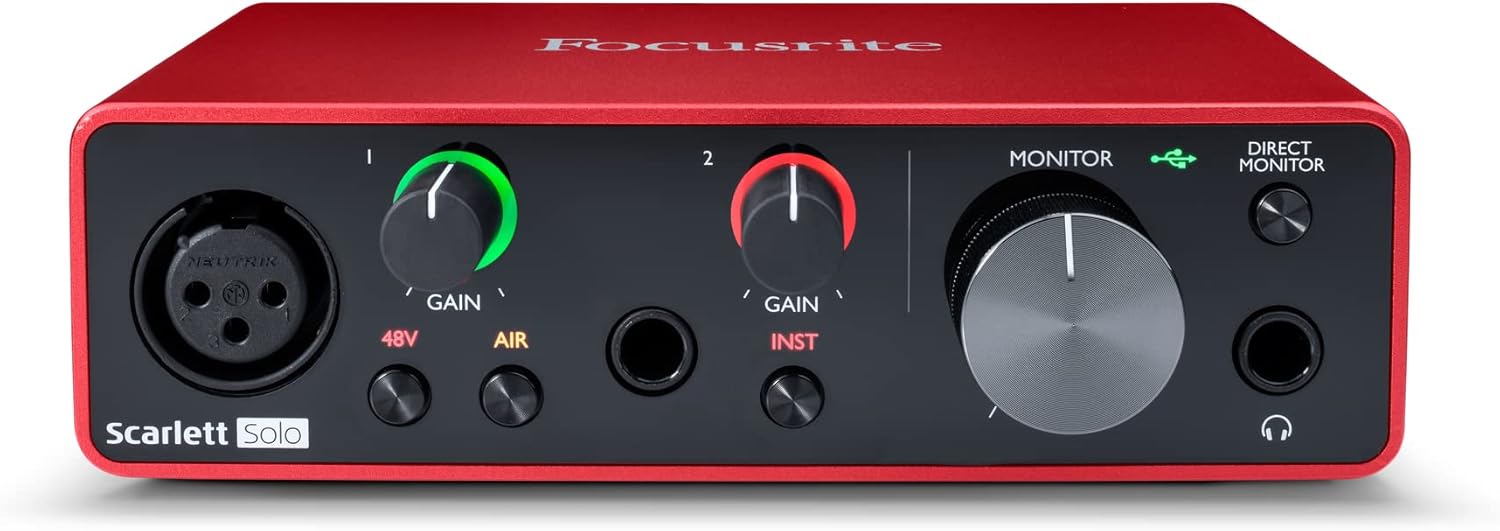
The Focusrite Scarlett Solo 3rd Gen is a professional USB audio interface designed for musicians, podcasters, and content creators who demand studio-quality recordings without the complexity of larger mixing consoles. This compact device bridges the gap between budget-friendly entry-level gear and expensive professional equipment, making it ideal for home studios, bedroom producers, and anyone serious about capturing professional-grade audio.
The standout feature is undoubtedly the high-performance microphone preamp paired with the innovative Air mode, which adds extra clarity and presence to vocals and acoustic instruments. The two high-headroom instrument inputs eliminate clipping and distortion, ensuring your guitar, bass, and other instruments shine through with clarity. Recording at up to 24-bit/192kHz resolution means your productions retain all sonic nuances, while the Gain Halo visual feedback system helps you nail perfect levels every time.
Build quality reflects Focusrite's professional heritage, with a solid metal chassis and intuitive front-panel controls that feel responsive and durable. The USB-C connectivity provides fast, reliable data transfer and modern compatibility with both Mac and Windows systems. The included software bundle (Pro Tools Intro+, Ableton Live Lite, Cubase LE) gives you everything needed to start producing immediately without additional software purchases.
The primary limitation is the single microphone input, which restricts simultaneous multi-track vocal or acoustic recording. Additionally, some Windows users report requiring driver updates for optimal performance. The learning curve for gain staging and audio interface operation may challenge complete beginners, though the included documentation is comprehensive.
The Focusrite Scarlett Solo 3rd Gen represents exceptional value for serious hobbyists and semi-professional creators. Its combination of pristine preamp quality, professional converters, intuitive design, and included software makes it the go-to choice for anyone upgrading from computer microphones or entry-level interfaces. The three-year warranty provides confidence in your investment.
Audio I/O: 1 XLR microphone input, 2 high-impedance instrument inputs, 2 balanced line outputs, headphone output
Audio Quality: 24-bit/192kHz recording and playback resolution with high-performance converters
Connectivity: USB-C to computer, compatible with all major audio recording software
Channels: 2 channels (stereo)
Features: Switchable Air mode, Gain Halo visual feedback, low-noise outputs, headphone monitoring
Software Included: Pro Tools Intro+, Ableton Live Lite, Cubase LE, Hitmaker Expansion
Warranty: 3-year manufacturer warranty worldwide
Compatible Devices: Microphones, instruments, personal computers, headphones, studio monitors
Who Should Buy: Musicians recording at home, podcasters seeking professional audio quality, guitarists and bassists needing quality instrument preamps, content creators upgrading from built-in computer audio, and producers working with limited space.
Who Should Look Elsewhere: Users needing simultaneous multi-microphone recording, those requiring extensive analog mixing features, or professionals running high-channel-count studios requiring more I/O options.
Setup Tips: Ensure your computer meets USB-C requirements and install drivers before first use. Spend time learning gain staging with the Gain Halo visual indicator to avoid clipping. Experiment with Air mode on different sources to understand its impact on your recordings.
Value Comparison: At this price point, the Scarlett Solo 3rd Gen outperforms competitors by offering superior preamp quality, professional software bundle, and proven brand reliability. The included software alone typically costs $200+ if purchased separately.

Pros
- Exceptional audio quality with ESS Sabre DAC and headphone amplifier rivaling dedicated standalone units costing hundreds more
- Industry-leading low latency at 2.5ms makes it perfect for live guitar, keyboard, and vocal recording without monitoring delay
- Built-in LCD metering display is unique in its class, providing clear visual feedback for optimal level management
- Compact, portable form factor with USB-C connectivity makes it ideal for mobile studios and remote recording setups
- Includes comprehensive software bundle and comes with a 2-year warranty backing the build quality
Cons
- Limited to 2-in/2-out configuration, which may not suit users needing more simultaneous inputs for larger recording sessions
- Single USB-C port means you cannot daisy-chain additional devices without a hub, potentially limiting workflow flexibility
- Windows users may experience initial channel configuration issues requiring manual loopback settings adjustment
The MOTU M2 is a professional-grade USB-C audio interface designed for home recording studios, content creators, musicians, and producers who refuse to compromise on audio quality while maintaining a reasonable budget. Its 2-in/2-out configuration with dual microphone preamps makes it perfect for recording vocals and instruments, podcasting, or streaming with pristine clarity and minimal latency.
What sets the M2 apart is its use of ESS Sabre32 Ultra DAC technology, typically found in audio interfaces costing thousands of dollars. This delivers a stunning 120dB dynamic range on outputs and an exceptionally clean -129dBu EIN on microphone inputs. The headphone amplifier alone rivals dedicated standalone units, making this interface equally valuable for mixing and mastering work. Real-time monitoring latency of just 2.5ms at 96kHz means you can confidently record guitars, keyboards, and vocals without the distracting lag that plagues many budget interfaces.
The build quality is immediately apparent when you interact with the device. Smooth, weighted knobs with premium feel, responsive buttons, and a sturdy physical construction inspire confidence. The full-color LCD display showing real-time level meters for all inputs and outputs is a standout feature rarely found at this price point, eliminating guesswork when setting recording levels. The compact 7.5 x 4.25 x 1.75 inch footprint with USB-C connectivity makes it genuinely portable for musicians moving between studios or recording on location.
The main limitation is the 2-in/2-out channel count, which restricts simultaneous recording to two sources. Windows users have occasionally reported initial channel configuration quirks requiring manual loopback settings adjustment, though this is easily resolved. The single USB-C port means external hubs are necessary if you need to connect other peripherals simultaneously.
The MOTU M2 represents exceptional value for anyone serious about recording quality. Whether you're tracking professional vocals, streaming with multiple guests, or building a portable studio, this interface delivers audio fidelity and performance that justifies its reputation as a best-in-class mid-tier solution.
Connectivity and Compatibility: USB-C audio interface compatible with Windows and macOS via expertly engineered MOTU drivers. Also supports iOS for mobile recording workflows.
Audio Specifications: 24-bit/192kHz maximum sample rate. 120dB dynamic range on main outputs. Microphone preamp noise floor of -129dBu EIN. 2.5ms round-trip latency at 96kHz with 32-sample buffer. ESS Sabre32 Ultra DAC on main outputs and headphone output.
I/O Configuration: 2 microphone/line inputs with dedicated preamps. 2 main analog outputs. 1 headphone output. DIN MIDI in/out jacks. Full-color LCD metering display for all inputs and outputs.
Physical Specifications: Dimensions 7.5 inches deep x 4.25 inches wide x 1.75 inches high. Weight 612 grams. USB-powered with physical power switch. Includes 6GB of free software content.
Warranty: 2-year manufacturer warranty included with purchase.
Perfect For: Home recording enthusiasts, singer-songwriters, podcast producers, streamers, content creators, guitar and keyboard players, and producers seeking professional audio quality on a realistic budget. Also ideal for audiophiles who value the ESS Sabre DAC technology and premium headphone amplification.
Consider Alternatives If: You need more than 2 simultaneous inputs for large ensemble recording, require extensive MIDI connectivity beyond basic in/out, or need bus-powered operation without a dedicated power supply.
Best Use Cases: Bedroom recording studio setup. Mobile recording and field production. Podcast and stream audio capture. Mixing and mastering with a high-quality DAC and headphone amp. Guitar and keyboard performance recording with minimal latency. Audiophile-grade home listening through the premium DAC and headphone amplifier.
Pros
- Exceptional build quality with transparent, low-noise MAX-HD preamps ideal for modern microphones
- Fender-engineered instrument inputs provide authentic, responsive guitar and bass recording capabilities
- Studio One Pro software included saves hundreds on DAW investment for new producers
- Auto Gain feature eliminates guesswork and accelerates workflow for faster recording sessions
- Flexible control options via front panel, Universal Control app, or Studio One integration
Cons
- Physical dimensions do not account for BNC connector depth, potentially exceeding stated width in compact setups
- Product registration process has experienced occasional issues requiring customer support intervention
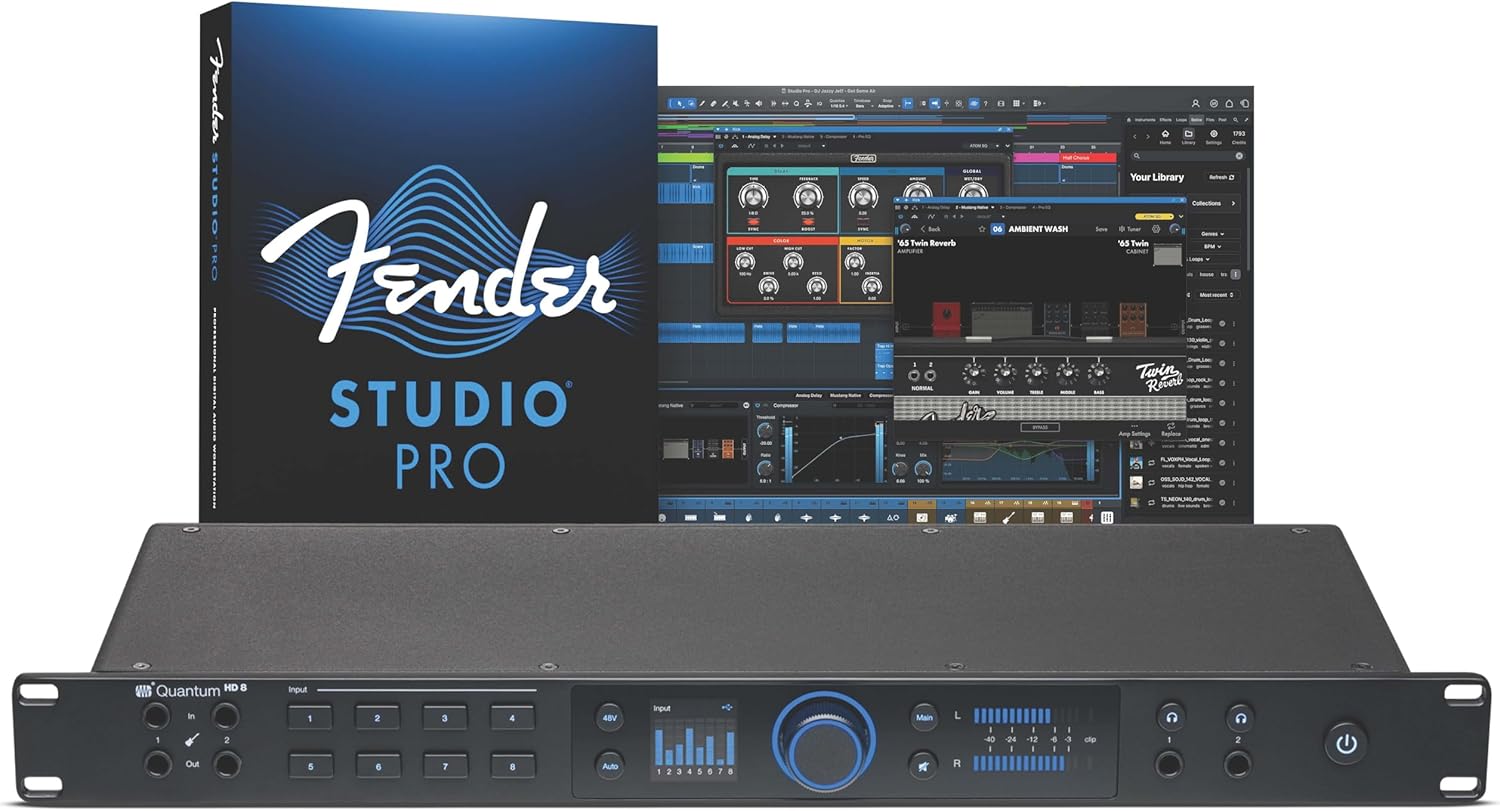
The PreSonus Quantum HD 8 represents the culmination of three decades of audio interface innovation, delivering professional-grade recording capabilities for project studios, full band setups, and serious producers. This 26x30 interface combines eight high-definition MAX-HD mic preamps with Fender-engineered instrument inputs, creating a versatile platform for capturing everything from intimate vocal recordings to complete band sessions. The included Studio One Pro perpetual license adds substantial value, eliminating the need for a separate DAW investment.
What truly sets the Quantum HD 8 apart is its thoughtful feature set designed for real-world recording scenarios. The eight MAX-HD mic preamps deliver +75dB of gain with exceptional transparency and low noise, making them ideal for today's most popular microphones. The Auto Gain button intelligently sets perfect levels automatically, while re-amp outputs enable creative sound design by letting you send DAW audio to physical amps and pedals for re-recording. At 192kHz/32-bit resolution, the converters and low-latency custom driver ensure your entire signal chain maintains pristine audio quality from input to output.
The interface excels in both form and function, featuring an illuminated push encoder for intuitive gain and volume control plus responsive LED metering for visual feedback. Universal Control app compatibility means you can manage critical preamp functions from your phone, tablet, or desktop without interrupting your creative flow. The Fender collaboration brings credibility for guitarists and bassists seeking instruments inputs specifically engineered for their needs, not generic audio inputs retrofitted for guitar use.
Minor considerations include the physical dimensions not accounting for BNC connector depth in the published specifications, which could affect extremely compact rack setups. The premium pricing reflects its professional-grade components and included software, positioning it above entry-level interfaces but competitive with other flagship models. Some users have reported occasional product registration delays, though PreSonus support reportedly responds quickly to resolve these issues.
The Quantum HD 8 delivers exceptional value for serious musicians and producers ready to invest in reliable, feature-rich recording hardware. Its combination of high-quality preamps, Fender-engineered instrument inputs, included professional software, and intuitive control options make it an outstanding choice for anyone building or upgrading a project studio. Highly recommended for full band recordings, professional home studios, and producers who demand transparent, low-latency performance.
Audio Specifications
Maximum Sample Rate: 192 kHz
Bit Depth: 32-bit
Connectivity: USB-C
Input/Output Channels: 26x30
Frequency Response: 20Hz to 20kHz
Mic Preamps: 8x MAX-HD with +75dB gain
Physical Specifications
Dimensions: 19 inches W x 8.6 inches D x 1.7 inches H
Weight: 6.3 pounds
Connectors: BNC connectors on rear panel
Control Interface: Illuminated push encoder with LED metering
Software and Compatibility
Included Software: Studio One Pro (perpetual license)
Control App: Universal Control (mobile and desktop)
Compatible Devices: Personal computers, headphones
Operating System: Windows and Mac compatible
Warranty and Support
Manufacturer Warranty: 2 years
Manufacturer: PreSonus
Model Number: Quantum HD8
UPC: 673454012211
Who Should Buy This Interface
The Quantum HD 8 is ideal for project studio owners, full band recording setups, professional home studios, guitarists and bassists seeking Fender-engineered inputs, and producers who value included professional software. It suits anyone recording multiple instruments simultaneously and needing low-latency performance for real-time monitoring.
Key Considerations Before Purchase
Verify your desk or rack depth accounts for BNC connector protrusion beyond the stated 8.6-inch depth measurement. Confirm USB-C compatibility with your computer setup. Consider whether the eight mic preamps and 26x30 channel count match your typical recording scenarios. Ensure you have adequate power supply for the interface and connected devices.
Setup and Getting Started
The interface includes Studio One Pro, eliminating the need for separate DAW purchase. Use the Universal Control app to manage preamp functions remotely. The Auto Gain feature accelerates initial setup by automatically optimizing input levels. Register your product with PreSonus promptly to activate the included software licenses and access support resources.
Maximizing Your Investment
Explore the re-amp outputs for creative sound design experiments with different amp and pedal combinations. Use the illuminated encoder for hands-on gain staging during recording sessions. Leverage the Fender-engineered instrument inputs for authentic guitar and bass tone capture. Access preamp controls via Studio One integration for seamless workflow without external app switching.

Pros
- Exceptional audio quality with no background noise, even at budget price point
- Truly plug-and-play functionality works immediately on Windows, Mac, and Linux systems
- Dual combo jacks provide maximum flexibility for microphones, guitars, and line-level sources
- Lightweight and compact form factor ideal for desk space and portability
- Zero-latency monitoring enables confident tracking without hearing delay or echo
Cons
- LED illumination on gain knobs does not function as prominently displayed in product images
- Requires careful gain adjustment when connecting instruments with built-in preamps to avoid clipping
- Limited to 2 input channels, which may not suit users needing more simultaneous inputs
The PIYONE Q2 is a 2x2 USB-C audio interface designed for home recordists, podcasters, guitarists, and content creators who want professional-grade sound without complexity. It bridges the gap between budget-friendly and professional-quality recording, making it an ideal first interface for beginners or a secondary interface for established creators.
The standout feature is its genuine plug-and-play operation. Simply connect the USB-C cable to your computer, and the interface is recognized immediately on Windows, Mac, and Linux systems without any driver installation. The 24-bit/192kHz audio resolution captures professional-quality recordings with excellent clarity and minimal noise. The zero-latency direct monitoring feature eliminates tracking delays, allowing you to hear yourself in real-time without the frustrating latency that plagues cheaper interfaces. Dual XLR/TRS combo inputs with 48V phantom power provide flexibility for condenser microphones, dynamic mics, guitars, and line-level sources.
Build quality and design are impressive for the price. The compact form factor fits easily on any desk without consuming valuable space. The illuminated control knobs create a modern, professional aesthetic that looks great in any studio setup. The interface feels solid and well-constructed, with ergonomic knobs and buttons positioned for comfortable operation during long recording sessions.
One notable drawback is that the LED illumination on the gain knobs does not function as prominently as shown in product images, which may disappoint users specifically drawn to this visual feature. Additionally, users must exercise caution when adjusting gain levels with instruments that have built-in preamps, as excessive gain can cause clipping. The 2-channel limitation means this interface cannot handle multiple simultaneous inputs beyond two sources.
Verdict: The PIYONE Q2 delivers exceptional value for beginners and budget-conscious creators seeking professional audio quality without complexity. Its combination of studio-grade sound, zero-latency monitoring, and truly plug-and-play setup makes it an excellent choice for home recording, podcasting, and content creation. Recommended for anyone starting their recording journey or needing a reliable portable interface.
Audio Quality: 24-bit resolution, 192kHz maximum sample rate, high-performance converters, low-noise design
Connectivity: USB-C port (handles both data transfer and bus power), 3.5mm headphone jack
Inputs: 2 XLR/TRS combo jacks, 48V phantom power supply
Channels: 2 input channels, 2 output channels
Features: Zero-latency direct monitoring, monitor mix function, loopback capability, illuminated control knobs, class-compliant design
Compatibility: Mac, Windows PC, Linux, iOS (via USB-C adapter)
Physical: Compact portable design, 0.74 kg weight, Alloy Red finish
Warranty: 2-year limited warranty
Ideal For: Beginner recording artists, podcasters, singer-songwriters, content creators, home studio enthusiasts, and anyone seeking professional audio quality without complex setup requirements.
Perfect Use Cases: Recording vocals with condenser microphones, capturing acoustic guitar performances, podcasting and voice-over work, streaming with professional audio quality, music production on a budget, portable recording for travel or mobile content creation.
Not Ideal For: Users requiring more than 2 simultaneous inputs, professional studios with extensive I/O requirements, or those specifically seeking prominent LED illumination effects on control knobs.

Pros
- Exceptional audio clarity and gain headroom suitable for dynamic and condenser XLR microphones
- Intuitive touch controls with visual LED feedback eliminate the learning curve for beginners
- Wave Link software provides powerful routing capabilities without requiring external mixers
- Compact desktop footprint fits seamlessly into any streaming or podcasting setup
- Solid build quality with included 150cm USB-C cable and 2-year manufacturer warranty
Cons
- AI noise cancellation feature has limitations with persistent background noise like fans and room ambience
- Requires Windows 11 or macOS 14.2 and higher, excluding older system compatibility
- Some users report the onboard effects sound overly processed if not carefully tuned
The Elgato Wave XLR MK.2 is a professional-grade USB audio interface designed for content creators who demand studio-quality sound without complex setup. It's perfect for streamers, podcasters, and remote professionals who want to elevate their XLR microphone performance with minimal effort. The device bridges the gap between entry-level and professional audio gear by delivering serious power in a compact, user-friendly package.
What sets this interface apart is its combination of raw power and accessibility. The 80dB gain is genuinely impressive, allowing you to drive even quiet condenser microphones to broadcast levels. The ultra-low-latency monitoring at 24-bit, 48kHz resolution ensures you hear exactly what your audience hears with zero perceptible delay. The onboard DSP effects processor unifies voice enhancement, compression, and EQ in a single signal chain, meaning you can achieve polished audio without juggling multiple software plugins. Touch controls with customizable LED lighting make real-time adjustments intuitive, while Wave Link integration provides advanced routing for multi-application setups.
The build quality reflects Elgato's commitment to creator tools. The interface feels solid and premium with a thoughtful industrial design that complements professional workspaces. The included 150cm USB-C cable provides flexibility for desktop placement, and the compact footprint won't clutter your desk. The 2-year warranty demonstrates manufacturer confidence in longevity and reliability.
The primary limitation is that the AI noise cancellation feature struggles with persistent environmental noise like fans and room ambience, so you may still need acoustic treatment for optimal results. Additionally, the onboard effects can sound overly processed if not carefully adjusted, requiring some audio knowledge to dial in properly. System requirements are fairly current, requiring Windows 11 or macOS 14.2 or higher.
The Elgato Wave XLR MK.2 represents excellent value for creators serious about audio quality. It delivers professional-grade features in an accessible package that doesn't require deep technical knowledge. Whether you're upgrading from basic USB microphones or replacing aging audio interfaces, this device will noticeably improve your sound and streamline your workflow.
Audio Performance: 80dB gain, 24-bit resolution at 48kHz, 192kHz maximum sample rate, 2 channels, ultra-low-latency monitoring
Connectivity: USB-C to USB-C cable included (150cm), compatible with Laptop and Personal Computer
Compatibility: Windows 11 and higher, macOS 14.2 and higher, Stream Deck integration, Wave Link software required
Physical: 11.36 ounces, compact desktop form factor with touch controls and customizable LED feedback
Warranty: 2-year manufacturer warranty included
Best For: Content creators, streamers, podcasters, and remote professionals who use professional XLR microphones and want studio-quality audio without complex setup.
Ideal If You: Already own a quality XLR microphone, need ultra-low-latency monitoring, want built-in effects processing, or use Elgato's Stream Deck ecosystem.
Consider Alternatives If: You require extensive noise cancellation, use only USB microphones, have older computer systems, or prefer analog mixing consoles.

Pros
- Exceptional value for the price with professional-grade specs and build quality comparable to premium brands
- True plug-and-play functionality makes it accessible for beginners while offering advanced features for professionals
- 48V phantom power support eliminates the need for separate power supplies when using condenser microphones
- Low-latency drivers enable real-time monitoring during recording sessions without audio delay
- Compact, portable design works seamlessly across multiple devices including computers, tablets, and smartphones
Cons
- USB-C power input has reported reliability issues in some units, though USB connectivity remains functional
- Occasional static output reported by users, typically resolved by power cycling the device
- Maximum sample rate specification shows 48 kHz in some documentation despite 192kHz capability claims, creating potential confusion
The Kmise USB Audio Interface is a compact, all-in-one recording solution designed for guitarists, vocalists, podcasters, and content creators who demand professional sound quality without the professional price tag. This device integrates microphone input, instrument input, headphone output, and speaker output into a single unit, eliminating cable clutter and simplifying your recording setup.
The standout feature is its 24-bit/192kHz recording resolution combined with built-in 48V phantom power, allowing you to connect professional condenser microphones directly without additional equipment or power supplies. The ultra-low latency drivers enable real-time monitoring during recording, which is essential for vocal tracking, guitar overdubs, and podcast production where immediate feedback matters. Users consistently praise the sturdy metal construction and responsive knobs that feel professional despite the affordable price point.
Setup is genuinely effortless: connect via USB 3.0 to any Mac, PC, or compatible mobile device and start recording immediately without installing complex drivers. The compact 6.5-inch width fits easily into any home studio or portable recording rig, making it equally suitable for bedroom producers and traveling musicians.
Some users have reported occasional static output or USB-C power input issues in rare cases, though these appear to be isolated hardware defects rather than design flaws. Power cycling typically resolves static issues. The device performs reliably for everyday recording tasks, and multiple reviewers have noted the build quality rivals well-known premium brands at a fraction of the cost.
For anyone starting a home studio, upgrading from onboard computer audio, or seeking a portable recording interface, the Kmise USB Audio Interface delivers exceptional value. It successfully bridges the gap between beginner-friendly operation and professional-grade sound quality, making it an intelligent choice for podcasters, musicians, and voice actors on a budget.
Audio Resolution: 24-bit/192kHz recording resolution
Phantom Power: 48V phantom power with single-press activation switch
Connectivity: USB 3.0 Type-A connection
Channels: 2 channels
Inputs: Microphone input, instrument/line input
Outputs: Headphone output, speaker output
Latency: Ultra-low latency professional drivers
Compatibility: Mac, PC, iOS, Android, guitar, laptop, smartphone, tablet
Dimensions: 6.5 inches W x 3.5 inches D x 1.5 inches H
Weight: 1.5 pounds
Warranty: 6-month manufacturer warranty
Model: MI8423-KUS
Podcasters: The all-in-one design with multiple inputs and low-latency monitoring makes podcast recording and editing straightforward without external equipment.
Home Studio Musicians: Guitarists and vocalists benefit from the 24-bit/192kHz resolution, phantom power support, and real-time monitoring for tracking and overdubbing.
Content Creators: Streamers and voice actors appreciate the compact size, plug-and-play setup, and professional condenser microphone compatibility for broadcast-quality audio.
Budget-Conscious Beginners: The accessible price point and simple operation make this ideal for anyone starting their first home recording setup without overwhelming complexity.
Traveling Musicians: The portable form factor and multi-device compatibility work perfectly for musicians who record on the go or between multiple locations.

Pros
- Exceptional value for money, delivering professional audio specs at under $30
- Intuitive controls and zero-latency monitoring make it accessible for beginners and professionals alike
- Versatile connectivity supports everything from condenser mics to guitars with independent gain adjustment
- Compact and portable design ideal for home studios, mobile recording, and on-location work
- No driver installation required, works immediately across multiple operating systems and devices
Cons
- Quality control issues reported by some users, including missing buttons on certain units
- May require additional power solutions for certain Android devices lacking full OTG compliance
- Limited to 2x2 channel configuration, not suitable for multi-track recording setups
The Jolgoo 2x2 USB audio interface is a compact recording solution designed for musicians, podcasters, content creators, and home studio enthusiasts who demand professional audio quality without breaking the bank. This budget-friendly interface packs studio-grade specifications into a portable form factor, making it an accessible entry point for anyone serious about audio recording.
The standout feature is undoubtedly the zero-latency direct monitoring capability, which allows performers to hear themselves in real-time without distracting delay. Combined with 24-bit/192kHz audio conversion, users consistently report capturing crystal-clear vocals, acoustic instruments, and podcast audio with impressive clarity. The 48V phantom power support means you can connect professional condenser microphones, elevating your recording quality significantly. Independent gain controls and LED peak indicators help prevent clipping, giving you precise control over input levels.
Build quality is solid with a sturdy metal housing designed to shield against interference. The interface includes dedicated headphone monitoring, stereo line outputs for studio monitors, and both USB-C and USB-A cable options. Its compact size makes it equally at home on a desktop or packed into a mobile recording rig. Setup is genuinely plug-and-play across Windows, macOS, iOS, and Android devices, with full compatibility for major DAWs like Pro Tools, Ableton, and GarageBand.
Some users have reported quality control concerns, including missing buttons on certain units, which is disappointing at any price point. Additionally, some Android devices may require a power bank due to OTG compliance variations. The 2x2 channel configuration also limits it to stereo recording, which is fine for most solo recording scenarios but won't support multi-track setups.
The Jolgoo 2x2 delivers impressive value for budget-conscious recordists. It successfully bridges the gap between toy interfaces and expensive professional gear, making professional-quality recording accessible to everyone. Recommended for beginners exploring audio production, podcasters seeking portable solutions, and musicians wanting reliable recording without premium pricing.
Audio Specifications: 24-bit resolution, 192kHz maximum sample rate, 2x2 channel configuration, XLR/line combo inputs with independent gain control, 48V phantom power support, zero-latency direct monitoring.
Connectivity: USB connection, includes both USB-C and USB-A cables, compatible with Windows, macOS, iOS, and Android devices. Headphone monitoring output and stereo line outputs for studio monitors.
Compatibility: Works with Avid Pro Tools, Ableton Live, Steinberg Cubase, GarageBand, Audacity, and other mainstream DAWs. Driver-free operation for immediate plug-and-play setup.
Physical: Rugged metal construction for durability and interference shielding, weighs 0.81 kg, compact design suitable for desktop and mobile recording. Includes 12-month manufacturer warranty.
Best For: Home studio recording, podcasting, voiceover work, singer-songwriter demos, and anyone transitioning from smartphone recording to dedicated audio equipment. Excellent for beginners learning audio production fundamentals.
Consider This If: You need professional audio quality on a tight budget, require portable recording capabilities, or want to upgrade from built-in computer audio. The phantom power support makes it particularly valuable if you plan to invest in quality microphones.
Not Ideal For: Professional multi-track recording sessions requiring more than 2 channels, or users requiring extensive technical support. Quality control issues suggest checking your unit carefully upon arrival.
Power Considerations: USB-powered design eliminates need for external power supplies. Note that some Android devices may not provide sufficient power via OTG, in which case a powered USB hub or power bank solves the issue.
Choosing Your Audio Interface with a Display
Screen Type and Information Display
Consider what you need to see. Some interfaces feature simple LED meter bridges that show input and output levels. Others offer full OLED screens displaying detailed information like sample rate, clock source, input type, and even channel names.
A more detailed display, like those found on the best audio interfaces with gain control, allows for deeper system monitoring. It helps you avoid clipping and confirms your settings at a glance, which is essential for professional results.
Input Configuration and Expandability
Match the input count to your needs. A simple two-channel interface is perfect for solo vocalists or guitarists. For full band recordings or advanced setups, look for interfaces with more preamps and digital expansion via ADAT.
This allows you to connect more microphones and outboard gear. An interface with comprehensive I/O, similar to the options listed for the best audio interfaces with main outputs, provides the flexibility to grow your studio.
Audio Quality and Converter Performance
The screen is helpful, but the sound is paramount. Prioritize interfaces with high-quality analog-to-digital converters. Look for specifications like 24-bit/192kHz resolution and a high dynamic range (measured in dB).
Superior converters capture the full detail of your performance with minimal noise. This ensures your recordings have the professional clarity needed for music production, podcasting, or streaming.
Software Integration and Driver Stability
A reliable driver is non-negotiable for low-latency monitoring and stable recording sessions. Many modern interfaces are class-compliant for Mac and iOS, offering plug-and-play simplicity. For Windows, a dedicated, well-supported driver is key.
Also, check for included software bundles. These often provide powerful digital audio workstations and plugin suites that add tremendous value to your purchase. For routing flexibility, explore interfaces with features highlighted in our guide to the best audio interfaces with balanced outputs.
Final Thoughts
Investing in an audio interface with a visual display brings clarity and confidence to your recordings, allowing you to focus on performance rather than guesswork. For creators seeking legendary reliability and pristine sound in a compact form, the Focusrite Scarlett Solo 3rd Gen USB-C Audio remains a top-tier choice. Meanwhile, those needing advanced metering, expansive connectivity, and onboard DSP for real-time effects should seriously consider the powerful Antelope Audio Zen Quadro Audio Interface. Your perfect match depends on balancing visual feedback with the core audio quality your projects demand.
Frequently Asked Questions
Why is a display screen useful on an audio interface?
A display provides immediate, accurate visual feedback on your input and output levels. This helps you set gain precisely to avoid distortion and confirms your sample rate, clock status, and signal path. It eliminates guesswork, leading to better recordings and a more efficient workflow.
Can I use an audio interface with a display for live streaming?
Absolutely. Interfaces with clear metering are excellent for streaming. They allow you to monitor your microphone level in real-time, ensuring your voice is consistent and clear for your audience. Features like loopback mixing, often found on these devices, are also crucial for combining your mic with computer audio.
Do I need special drivers for interfaces with screens?
It depends on the model. Many are class-compliant for Mac and iOS, requiring no drivers. For Windows and advanced features on any platform, you will typically install a dedicated driver from the manufacturer’s website. This driver ensures low latency and unlocks the full functionality of the interface and its display.
What should I look for besides the screen when choosing an interface?
Prioritize sound quality first. Assess the preamp clarity, converter resolution, and available inputs for your needs. Also, consider software compatibility, build quality, and connectivity options like USB-C. For more details on critical output features, our review of the best audio interfaces with TRS outputs offers valuable insights.


Write Your Review
No reviews yet. Be the first to share your experience!