

If you rely on in-ear monitors for critical listening, mixing, or live performance, you know that every component in your signal chain matters. The audio interface you choose sits at the heart of this chain, directly impacting the clarity, detail, and noise floor you hear through your IEMs. A subpar interface can introduce hiss, distortion, or inadequate power, ruining the precision monitoring you need.
This guide is for musicians, podcasters, and engineers seeking an interface that delivers pristine audio specifically to in-ear monitors. We have assessed several leading models for their headphone amplifier quality, output options, and overall signal integrity. For a broader look at interfaces suited for IEMs, you can explore our dedicated resource on the best audio interfaces for IEMs.

Pros
- Exceptional 16-hour battery life provides all-day performance on a single charge
- Locking connector design prevents cable disconnections during intense live performances
- Mono/stereo switchability offers flexibility for different audio sources and mixing console setups
- Compact, lightweight form factor with secure belt clip makes it ideal for active performers
- Delivers professional sound quality comparable to industry-standard wireless systems at a significantly lower price
Cons
- Some users report noticeable background hiss at lower volume levels, which may affect critical listening applications
- Wired connection via XLR/TRS input limits mobility compared to wireless monitoring systems
- Limited to single headphone output, restricting use cases where multiple outputs are needed
The LEKATO P30 is a portable in-ear monitor amplifier built specifically for musicians who demand reliable, professional-grade monitoring without the complexity and cost of wireless systems. It serves vocalists, drummers, keyboardists, guitarists, and bassists who need their own dedicated mix during live performances or studio sessions. The device bridges the gap between entry-level monitoring solutions and expensive wireless systems, making it an excellent choice for touring musicians, session players, and sound engineers managing multiple performers.
The standout feature is undoubtedly the 16-hour rechargeable battery, which eliminates the frustration of managing disposable batteries during long tours or festival appearances. The switchable mono/stereo modes ensure compatibility with virtually any audio source, whether you're pulling a stereo mix from a headphone output or a mono aux send from a mixing console. Real-world users praise the clarity and volume capabilities, with reviewers noting excellent performance when paired with quality earbuds like Sennheiser IE 100 PRO models. The locking XLR/TRS combo input is a thoughtful engineering detail that prevents accidental disconnections during high-energy performances.
Design and build quality are solid for the price point. At just 180 grams with compact dimensions, the P30 fits comfortably on a performer's belt without adding bulk or weight. The reinforced belt clip has undergone durability testing to withstand the movement and intensity of active stage performance. The stable 3.5mm TRS headphone output accommodates any standard earbuds or in-ear monitors, and the LED battery indicator provides clear feedback about power status during critical moments.
The primary drawback worth noting is the occasional background hiss reported by some users at lower volume levels, which may be problematic for applications requiring whisper-quiet monitoring. Additionally, the wired connection via XLR/TRS input means performers have less freedom of movement compared to wireless systems, though this also eliminates the latency and interference issues common with wireless monitoring.
The LEKATO P30 represents excellent value for musicians seeking professional monitoring capabilities without the expense and complexity of wireless systems. It's particularly recommended as a backup unit for existing wireless systems, a primary solution for budget-conscious touring musicians, and an ideal entry point for performers new to dedicated monitoring. The combination of extended battery life, flexible input options, and reliable sound quality makes it a smart investment for serious performers.
Battery and Power: Built-in 1000mAh lithium battery with up to 16 hours continuous use per charge. USB-C charging for convenient, fast recharging. LED battery status indicator (red below 20%, green above 20%).
Audio Specifications: High-fidelity audio output with low noise floor. Switchable stereo and mono audio modes. 2-channel output configuration. Compatible with 3.5mm TRS headphone output jack.
Connectivity: Locking combo input jack supporting XLR, 1/4 inch (6.35mm), and 3.5mm TRS connectors. Prevents accidental cable disconnection during performance.
Physical Specifications: Dimensions: 5.12 inches D x 1.57 inches W x 5.12 inches H. Weight: approximately 180 grams (0.4 lbs). Durable reinforced belt clip design. Color: Black.
Warranty and Support: 1-year manufacturer warranty. Includes USB-C cable and user manual. Compatible with vocalists, drummers, keyboardists, guitarists, and bassists.
Who Should Buy This Product: The LEKATO P30 is ideal for performing musicians who need reliable, affordable in-ear monitoring. It's perfect for touring bands, session musicians, solo performers, and sound engineers managing multiple performers. It also serves as an excellent backup unit for professionals using wireless systems and a great entry-level option for musicians new to dedicated monitoring.
Key Considerations: Choose the P30 if you prioritize battery life, cable reliability, and compatibility with multiple audio sources. The 16-hour battery and locking connectors make it particularly suitable for long performances and energetic stage work. If you require wireless freedom of movement or operate in environments with severe background noise, you may want to consider wireless alternatives despite their higher cost.
Setup Tips: The mono/stereo switch is easily accessible near the volume control, allowing quick adjustments during soundcheck. Use the LED battery indicator to plan recharge schedules during tour dates. The locking XLR connector works best with quality cables that properly seat the connector to prevent intermittent connections.
Value Proposition: At its price point, the P30 offers exceptional value compared to wireless IEM systems that often cost 5 to 10 times more. For performers on a budget or those seeking a reliable backup system, this amplifier delivers professional-grade monitoring performance without premium pricing.
Pros
- Excellent preamp quality produces bright, clear recordings with minimal noise floor
- Air mode adds professional polish to vocal and acoustic recordings without additional equipment
- Compact design perfect for home studios, bedroom producers, and mobile recording setups
- Included software suite eliminates need for expensive DAW purchases
- Highly reliable brand with strong reputation in professional audio industry
Cons
- Single microphone input limits simultaneous multi-instrument recording capabilities
- May require audio driver updates for optimal performance on some Windows systems
- Learning curve for beginners unfamiliar with audio interface operation and gain staging
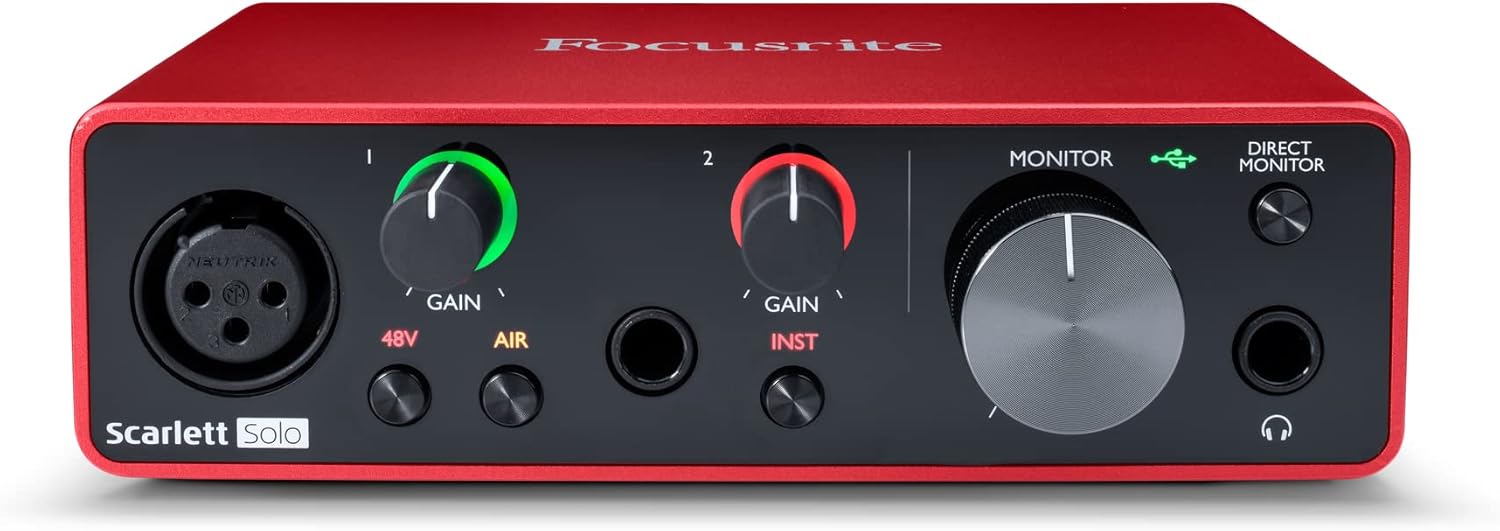
The Focusrite Scarlett Solo 3rd Gen is a professional USB audio interface designed for musicians, podcasters, and content creators who demand studio-quality recordings without the complexity of larger mixing consoles. This compact device bridges the gap between budget-friendly entry-level gear and expensive professional equipment, making it ideal for home studios, bedroom producers, and anyone serious about capturing professional-grade audio.
The standout feature is undoubtedly the high-performance microphone preamp paired with the innovative Air mode, which adds extra clarity and presence to vocals and acoustic instruments. The two high-headroom instrument inputs eliminate clipping and distortion, ensuring your guitar, bass, and other instruments shine through with clarity. Recording at up to 24-bit/192kHz resolution means your productions retain all sonic nuances, while the Gain Halo visual feedback system helps you nail perfect levels every time.
Build quality reflects Focusrite's professional heritage, with a solid metal chassis and intuitive front-panel controls that feel responsive and durable. The USB-C connectivity provides fast, reliable data transfer and modern compatibility with both Mac and Windows systems. The included software bundle (Pro Tools Intro+, Ableton Live Lite, Cubase LE) gives you everything needed to start producing immediately without additional software purchases.
The primary limitation is the single microphone input, which restricts simultaneous multi-track vocal or acoustic recording. Additionally, some Windows users report requiring driver updates for optimal performance. The learning curve for gain staging and audio interface operation may challenge complete beginners, though the included documentation is comprehensive.
The Focusrite Scarlett Solo 3rd Gen represents exceptional value for serious hobbyists and semi-professional creators. Its combination of pristine preamp quality, professional converters, intuitive design, and included software makes it the go-to choice for anyone upgrading from computer microphones or entry-level interfaces. The three-year warranty provides confidence in your investment.
Audio I/O: 1 XLR microphone input, 2 high-impedance instrument inputs, 2 balanced line outputs, headphone output
Audio Quality: 24-bit/192kHz recording and playback resolution with high-performance converters
Connectivity: USB-C to computer, compatible with all major audio recording software
Channels: 2 channels (stereo)
Features: Switchable Air mode, Gain Halo visual feedback, low-noise outputs, headphone monitoring
Software Included: Pro Tools Intro+, Ableton Live Lite, Cubase LE, Hitmaker Expansion
Warranty: 3-year manufacturer warranty worldwide
Compatible Devices: Microphones, instruments, personal computers, headphones, studio monitors
Who Should Buy: Musicians recording at home, podcasters seeking professional audio quality, guitarists and bassists needing quality instrument preamps, content creators upgrading from built-in computer audio, and producers working with limited space.
Who Should Look Elsewhere: Users needing simultaneous multi-microphone recording, those requiring extensive analog mixing features, or professionals running high-channel-count studios requiring more I/O options.
Setup Tips: Ensure your computer meets USB-C requirements and install drivers before first use. Spend time learning gain staging with the Gain Halo visual indicator to avoid clipping. Experiment with Air mode on different sources to understand its impact on your recordings.
Value Comparison: At this price point, the Scarlett Solo 3rd Gen outperforms competitors by offering superior preamp quality, professional software bundle, and proven brand reliability. The included software alone typically costs $200+ if purchased separately.

Pros
- Exceptional audio quality and clarity that rivals interfaces at significantly higher price points
- Class A preamp design captures natural tone and richness in vocal and acoustic recordings
- Solid metal construction feels premium and withstands portable use without degradation
- Dual headphone outputs with independent control provide professional monitoring options
- Straightforward setup with included USB-C cable and broad OS compatibility
Cons
- Headphone output may require external amplification for high-impedance or demanding headphones
- Printed logos on the interface can fade over time with regular use
- Limited to 2 channels of simultaneous recording, which may constrain multi-track live capture
The Audient iD4 MKII is a professional-grade audio interface designed for home recording enthusiasts, podcast producers, and content creators who demand studio-quality sound without the bulk or complexity of larger mixing consoles. Its compact footprint and robust feature set make it an excellent choice for bedroom studios, mobile recording setups, and anyone upgrading from budget-tier interfaces.
The standout feature is undoubtedly the Class A microphone preamp, borrowed from Audient's high-end ASP8024 HE console. Users consistently report remarkable clarity and natural tone reproduction in vocal recordings, with the preamp capturing subtle nuances while maintaining clean gain across a wide range of microphone types. The JFET instrument input adds analog warmth and character to guitar and bass recordings, while the dual headphone outputs with independent monitor mixing and panning enable flexible monitoring during sessions.
Build quality is genuinely impressive for the price. The all-metal chassis feels substantial and professional, with tactile knobs that inspire confidence during use. The new USB-C connector eliminates the need for multiple cables and provides improved power delivery compared to the original iD4. At 740 grams with compact dimensions of 133x120x40.7mm, it's genuinely portable while maintaining a desktop-friendly footprint.
A few considerations exist. The headphone output, while clean, may struggle with high-impedance studio headphones and could benefit from an external amplifier in demanding scenarios. Additionally, the printed logos can fade with regular handling, though this is purely cosmetic. The interface maxes out at 2 simultaneous recording channels, which is appropriate for its positioning but worth noting for multi-track live recording scenarios.
Verdict: The iD4 MKII delivers exceptional value and professional sound quality that justifies its investment. Whether you're recording vocals, instruments, or podcasts, the Class A preamp and thoughtful feature set provide tools typically found in much more expensive interfaces. It's a genuine step up from consumer-grade alternatives and an excellent choice for serious home recordists.
Connectivity and Compatibility: USB-C connection with support for Mac, PC, and iOS devices. Includes 1-meter USB-C cable. Frequency response up to 96 kHz with maximum sample rate of 96 kHz.
Audio Channels and I/O: 2 channels of simultaneous recording. Includes 3.5mm and 6.3mm headphone connectors with dual independent headphone outputs featuring monitor mix and panning control. JFET instrument input and XLR microphone input with Class A preamp.
Physical Specifications: Dimensions 133mm x 120mm x 40.7mm (5.2 x 4.72 x 1.57 inches). Weight 740 grams. All-metal chassis construction. Available in black.
Included Software: Steinberg Cubase LE, Cubasis LE 2, Retrologue 2 Synth, TwoNotes Wall of Sound, and Loopmasters Sample Pack. 3-year manufacturer warranty.
Who Should Buy: The iD4 MKII is ideal for home recording producers, podcast creators, musicians recording vocals or instruments, and anyone upgrading from entry-level interfaces like the Scarlett 2i2. It's particularly suited for those prioritizing microphone preamp quality and seeking professional sound in a compact package.
Who Should Consider Alternatives: If you require more than 2 simultaneous recording channels or need extensive MIDI connectivity, larger interfaces may be more appropriate. Similarly, if budget is the primary concern, entry-level options exist at lower price points, though they lack the sonic quality of the iD4 MKII.
Setup Considerations: The interface works immediately upon connection with most operating systems. For optimal headphone monitoring, consider pairing with quality studio headphones or an external headphone amplifier if using high-impedance models. The dual headphone outputs with independent panning make it excellent for collaborative recording or client monitoring scenarios.
Value Assessment: Compared to similarly-priced interfaces, the iD4 MKII stands out for its Class A preamp quality and build construction. Users consistently report it punches above its weight class, delivering sound quality typically associated with interfaces at significantly higher price points.

Pros
- Outstanding audio quality with quiet, transparent preamps that capture full warmth and clarity from microphones
- Premium all-metal build quality feels professional and portable enough for travel between studios
- Dual headphone outputs with independent monitoring provide flexibility for collaborative recording sessions
- USB-C connector offers faster, more stable connection than older USB standards with simplified cable management
- Excellent value for professional-grade preamps at mid-range pricing compared to competitor offerings
Cons
- No physical power switch requires unplugging to fully disconnect, which some users find inconvenient
- Steeper learning curve than some competitors due to unique control layout and menu system
- May experience connectivity loss when computer enters sleep mode on some systems
The Audient iD14 MKII is a professional-grade USB audio interface designed for home studio recording, music production, and content creation. It targets serious musicians, podcast producers, and audio engineers who demand studio-quality sound without the price tag of larger mixing consoles. This interface bridges the gap between budget-friendly options and enterprise-level gear.
The standout feature is the dual Class-A microphone preamps, borrowed directly from Audient's professional ASP8024 HE mixing console. Users consistently report that these preamps deliver exceptional clarity, warmth, and detail, with remarkably low noise floors that capture every nuance of vocals and instruments. The new USB-C connector provides faster data transfer and improved power delivery compared to the original iD14, while the dual headphone outputs enable independent monitoring for collaborative sessions. Real-world testing shows the interface drives high-impedance headphones effortlessly with clean, detailed reproduction.
Build quality is exceptional throughout. The all-metal chassis feels substantial and professional, with a compact footprint that fits easily on crowded studio desks while remaining portable enough for mobile recording setups. The included 1m USB-C cable and software bundle (Cubase LE, Retrologue 2, and sample packs) provide immediate production capability out of the box.
Potential drawbacks include the lack of a dedicated power switch and occasional sleep-mode connectivity issues on certain computer configurations. The control layout also requires a brief learning period compared to more straightforward interfaces, though users report this complexity becomes intuitive with minimal practice.
The Audient iD14 MKII delivers professional preamp quality and build standards that justify its mid-range price point. It represents an excellent upgrade path for producers outgrowing entry-level interfaces while remaining accessible to those building their first serious home studio setup.
Connectivity and Compatibility
USB-C connector with high-speed data transfer. Compatible with Mac, PC, and iOS devices. Includes 1m USB-C cable. Supported software: Steinberg Cubase LE, Cubasis LE 2, Retrologue 2 Synth, TwoNotes Wall of Sound, Waldorf Edition 2 LE, and Loopmasters Sample Pack.
Audio Performance
Maximum sample rate: 96 kHz. 4 channels total. Two Class-A microphone preamps derived from Audient's ASP8024 HE console. Dual headphone outputs for independent monitoring. Exceptional headroom and low-noise amplification for transparent audio capture.
Physical Specifications
Dimensions: 173 x 120 x 62 mm (6.81 x 4.72 x 2.44 inches). Weight: 1250g (2.75 lbs). All-metal chassis construction. Available in black finish. Compact desktop form factor with portability for mobile studio applications.
Warranty and Support
3-year manufacturer warranty. Backed by Audient's professional audio reputation. Model number: iD14MKII. UPC: 656942526773.
Ideal For
Home studio professionals seeking transparent, high-quality preamps. Music producers upgrading from budget interfaces. Podcast and voiceover creators requiring clean vocal capture. Recording engineers building portable studio setups. Musicians pairing with quality microphones and headphones for critical monitoring and recording.
May Not Be Ideal For
Users requiring extensive MIDI connectivity or analog I/O options. Those needing simple plug-and-play functionality without learning control layouts. Budget-conscious beginners with minimal production requirements. Users requiring onboard effects processing or DSP capabilities.
Best Paired With
Quality condenser microphones like Rode NT1 or similar. Closed-back monitoring headphones like Sennheiser HD650 or Audio-Technica AT2020. Professional studio monitors for mix referencing. Acoustic treatment for optimal recording environment.
What to Look for in an Audio Interface for IEMs
Headphone Amplifier Power and Quality
The built-in headphone amp is arguably the most important feature for IEM users. You need sufficient clean power to drive your monitors to a comfortable listening level without introducing noise or distortion. Look for interfaces that specifically mention a low-noise floor and high-quality amplification for headphones.
This ensures your in-ears reveal the true detail of your audio, not an amplified version of background hiss. Some interfaces are particularly adept at this, as discussed in our review of the best audio interfaces with headphone amplifiers.
Output Options and Connectivity
Consider how you will connect your in-ear monitors. Most interfaces offer a standard 1/4″ or 3.5mm headphone output. For live use, you might need a dedicated monitor send or a device with a locking XLR input, like a dedicated IEM amplifier. Your choice depends on whether you’re in a home studio or on stage.
Dedicated monitor mix controls are a valuable feature, allowing you to blend a direct input signal with your computer playback. This is essential for recording vocals or instruments with minimal latency. For more complex setups, a dual channel audio interface provides greater flexibility.
Portability and Form Factor
<!–Your workflow dictates the ideal size. For mobile recording or live performance, a compact, bus-powered interface is key. It should be sturdy enough for travel and simple to connect. For a permanent studio desk, a larger unit with more physical controls might be preferable.
Some interfaces prioritize a minimalist desktop footprint, while others, like dedicated belt-pack amplifiers, are designed for movement on stage. Consider where and how you will use your gear most often.
Final Thoughts
Selecting the optimal audio interface for your in-ear monitors hinges on matching its strengths to your primary use case. For most home studio creators seeking pro-grade sound and simplicity, the Focusrite Scarlett Solo 3rd Gen USB-C Audio remains a stellar, reliable choice. If your needs extend to the stage where wireless IEM systems are used, a dedicated device like the LEKATO P30 in-Ear Monitor Amplifier offers targeted functionality and excellent portability. Ultimately, the right interface will deliver the clean, powerful, and detailed audio your in-ear monitors are capable of reproducing.
Frequently Asked Questions
Do I need a special audio interface for in-ear monitors?
Not necessarily, but you do need an interface with a high-quality, low-noise headphone output. Many standard audio interfaces work perfectly. The key is to verify the headphone amp’s specifications and read reviews from other IEM users to confirm performance.
Can any audio interface power low-impedance in-ear monitors?
Most can, but the quality of power matters more than sheer quantity. A good interface provides clean amplification without introducing hiss, which is especially audible with sensitive IEMs. For a deeper dive into power requirements, our guide on interfaces for high impedance headphones covers related amplifier principles.
What’s the advantage of a dedicated IEM amplifier over a standard interface?
A dedicated IEM amp, often used live, connects to a mixer’s aux send and provides personal volume control, a robust body-pack design, and sometimes mix blending. A standard audio interface is designed for computer connectivity, recording, and playback, making it ideal for the studio.
How do I reduce noise when using IEMs with my audio interface?
Start with an interface known for a low-noise floor. Use balanced connections where possible, keep gain stages appropriate, and ensure your computer’s USB ports are clean. Interfaces with built-in amplifiers often have optimized circuits for this purpose, as highlighted in our review of the best audio interfaces with Built-in amplifiers.


Write Your Review
No reviews yet. Be the first to share your experience!