

You have your first USB microphone, a passion for content creation, and a desk that’s about to become your studio. The final piece of the puzzle is a microphone boom arm. It lifts your mic off the desk, reduces handling noise, and reclaims precious workspace. For beginners, the world of scissor arms can be confusing. You need something reliable, easy to use, and kind to your budget, without sacrificing the professional feel.
This guide is for streamers, podcasters, and gamers taking their first step into better audio. We have reviewed the top entry-level microphone boom arms, focusing on value, stability, and features that matter most when you are starting out. From low-profile designs that hide under your monitor to versatile all-in-one kits, these picks will elevate your setup without complexity. For creators working in compact spaces, you might also explore our dedicated list of the best microphone boom arms for small rooms.
Pros
- Exceptional build quality with alloy steel construction and reinforced springs for long-term durability
- Versatile compatibility with major microphone brands through included adapters and standard clips
- Smooth, quiet operation critical for professional recording without unwanted mechanical noise
- Compact foldable design saves desk space without compromising stability or load capacity
- Superior weight capacity compared to similarly priced alternatives on the market
Cons
- Desk clamp requires flat edges up to 2 inches thick, limiting compatibility with curved or slanted desk surfaces
- Requires manual assembly and adjustment to achieve optimal positioning for different microphone types
- Shock mount not included, requiring separate purchase for certain microphone models
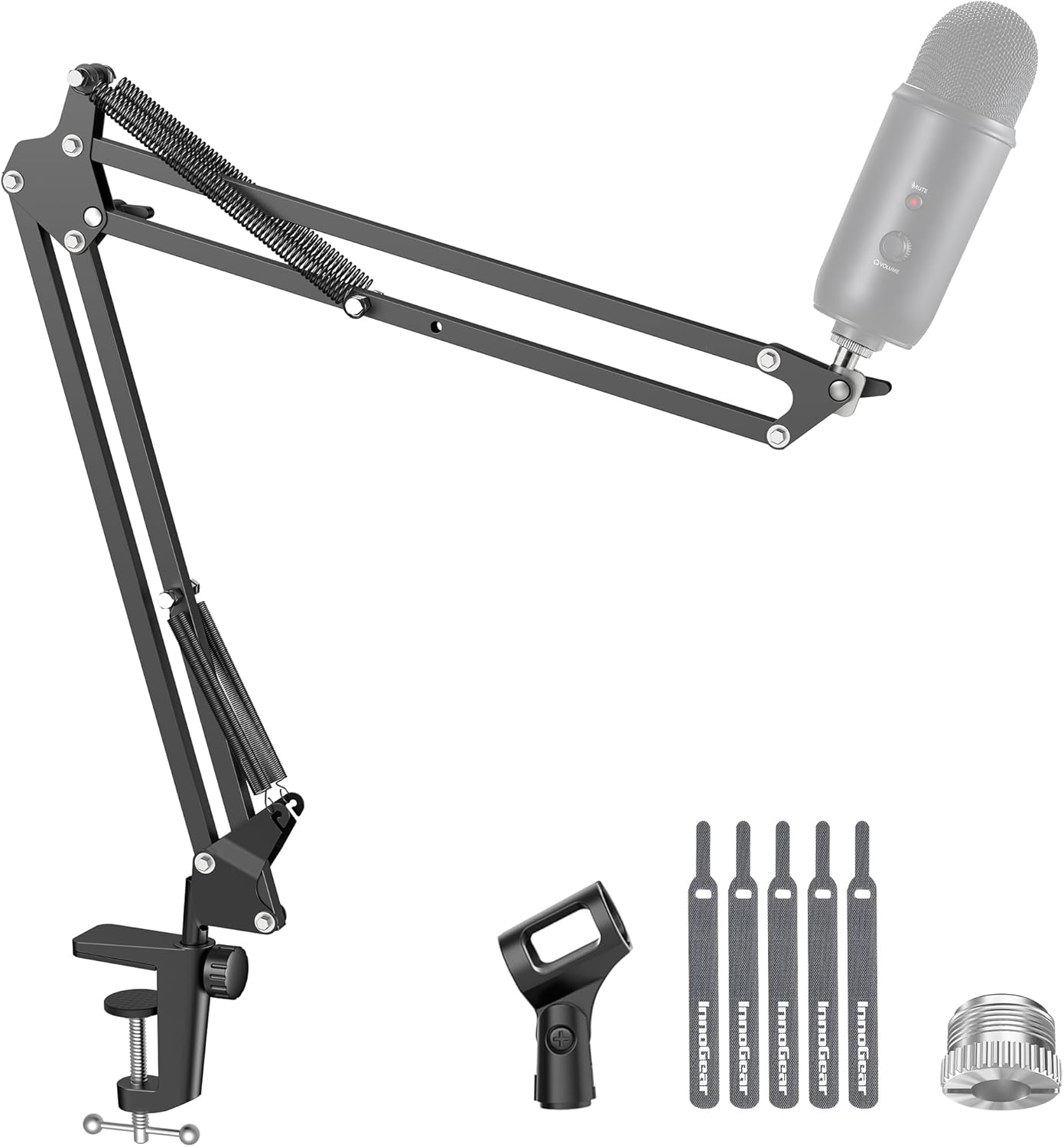
The InnoGear MU01 boom arm microphone stand is a professional-grade mounting solution designed for content creators, streamers, podcasters, and musicians who demand reliable microphone positioning. This desk-mounted arm accommodates popular USB microphones including Blue Yeti, Fifine, HyperX, and traditional XLR microphones with the included adapters.
The standout feature of this boom arm is its exceptional adjustability and build quality. With 360-degree base rotation, 135-degree back-and-forth extension, 180-degree vertical movement, and a 270-degree metal adapter, you can position your microphone precisely where needed. The 3.3lb weight capacity significantly exceeds standard competitors at 2.2lb, providing confidence for heavier microphone setups. The engineering specifically addresses a common flaw in other boom arms by eliminating the problematic knob on the arm shaft that causes spring deformation over time.
Build and design quality are exceptional for the price point. The alloy steel construction feels solid and substantial, while the super-strong springs enable silent, effortless positioning crucial for live recording sessions. The foldable design allows convenient storage when not in use, and the secure desk clamp grips edges up to 2 inches thick without wobbling. The included standard microphone clip and 5/8" to 3/8" adapter ensure compatibility with most popular microphone models.
Potential drawbacks include the desk clamp requirement for flat edges and the need for separate shock mount purchases for certain microphone models. The clamp design may not work with curved or slanted desk surfaces. Setup requires some manual adjustment to dial in your preferred microphone angle and height.
The InnoGear MU01 represents excellent value for anyone seeking a durable, feature-rich microphone boom arm. Its superior build quality, extensive adjustability, and broad microphone compatibility make it an ideal choice for serious content creators and recording enthusiasts.
Model: InnoGear MU01
Material: Alloy Steel with reinforced springs
Weight Capacity: 3.3 lbs (1.5 kg)
Dimensions: 15 x 1.5 x 4 inches
Maximum Height: 27.6 inches
Base Type: Desk clamp for edges up to 2 inches thick
Mount Thread Sizes: 3/8 inch and 5/8 inch
Adjustability: 360-degree base rotation, 135-degree extension, 180-degree vertical movement, 270-degree adapter rotation
Weight: 1.4 pounds
Compatibility: Blue Yeti, Fifine, HyperX, Shure SM58, Samson Q2U, and other standard microphones
Warranty: Manufacturer warranty included (does not cover microphones)
Who Should Buy: This boom arm is ideal for streamers, podcasters, content creators, musicians, and anyone requiring professional microphone positioning with space-saving storage. It works best with USB microphones like Blue Yeti, Fifine models, and HyperX gaming headset microphones, as well as traditional XLR microphones with adapters.
Desk Requirements: Ensure your desk has a flat edge between 0.5 and 2 inches thick for optimal clamp compatibility. Curved or slanted desk edges may not work with this clamp design.
Microphone Compatibility: Check your microphone's thread size (typically 3/8 inch or 5/8 inch). The included adapters cover most popular models, but verify compatibility before purchase if using less common microphone brands.
Setup Tips: Allow time for initial adjustment to find your preferred microphone height and angle. The boom arm's smooth operation means minimal repositioning is needed once properly configured. For heavy microphones near the 3.3lb limit, ensure the desk clamp is tightened securely.
Maintenance: Periodically check clamp tightness and spring tension. The innovative design minimizes spring wear compared to competitors, but regular inspection extends product lifespan.
How to Choose Your First Microphone Boom Arm
Stability and Build Quality
A wobbly arm defeats its purpose. Look for arms constructed from heavy-duty steel or alloy. The spring tension must be strong enough to hold your microphone securely in place without sagging or drifting. A solid desk clamp with protective padding is non-negotiable for both grip and surface protection.
Some models, like the AA AUDIO ACCESSORY Mic Arm Desk Mount, use a gear-lock system instead of springs for absolute stability with heavy mics. For most beginners, a well-reviewed spring-loaded arm from a trusted brand provides excellent performance. Stability is especially crucial for bedroom studio setups where every piece of equipment needs to work reliably.
Low-Profile vs. Traditional Design
Your workspace dictates the ideal form factor. A low-profile boom arm, such as the FIFINE BM88, is designed to extend from under your monitor. It keeps your sightlines clear, which is a major benefit for gamers and streamers. This design minimizes visual clutter on your desk.
A traditional boom arm offers maximum range of motion and often greater vertical height. It is the classic choice for podcasters who need to move the mic around frequently. Consider your monitor placement and how much you value an unobstructed view when choosing between these two styles.
Compatibility and Included Accessories
Your arm must fit your microphone. Most arms support the standard 5/8″-27 thread, but many popular USB mics like the Blue Yeti use a 3/8″ thread. Ensure the arm includes the necessary metal adapters. The InnoGear all-in-one kit is popular because it bundles a shock mount and pop filter, saving you separate purchases.
If your microphone already has its own shock mount, a simple arm like the MAONO model may be all you need. Think about your current gear and future upgrades. A versatile arm that works with dynamic mics like the Shure SM7B offers more room to grow. For optimal vocal clarity, pairing your arm with one of the best windscreen pop filters is a smart next step.
Cable Management and Adjustability
A clean setup is a professional setup. Built-in cable channels, like those on the InnoGear Mic Arm with Cable Management, neatly route your microphone cable along the arm. This prevents snags and keeps your desk looking organized. It is a small feature that makes a big difference in daily use.
Adjustability is about ease and silence. You should be able to reposition your microphone smoothly and quietly. Check the range of motion, including horizontal rotation and vertical tilt. Tool-less knobs make fine-tuning your mic’s position intuitive and quick during a recording session.
Final Thoughts
Choosing the right entry-level microphone boom arm is about investing in the foundation of your audio setup. For the absolute best value that includes essential accessories, we recommend the InnoGear Microphone Stand Mic Boom Arm for Blue. If your priority is a clean, unobstructed desk for streaming or gaming, the FIFINE BM88 Low Profile Microphone Boom Arm Stand is an outstanding choice. Both options deliver professional performance without complexity, letting you focus on creating great content. Explore more options and detailed guides in our main mic accessories category.
Frequently Asked Questions
Do I need a shock mount with a boom arm?
While not strictly mandatory, a shock mount is highly recommended. It isolates your microphone from vibrations and desk bumps, which the boom arm itself cannot prevent. This results in cleaner recordings, free from low-frequency thuds and handling noise. Many entry-level kits include a basic shock mount.
Will a boom arm fit on my glass desk?
You must exercise extreme caution. Most desk clamps are not designed for glass and can cause cracking or damage. The pressure needed for stability can shatter tempered glass. For a glass desk, you should look for a dedicated weighted base or a floor stand instead of a clamp-on boom arm.
How do I stop my microphone arm from sagging?
Sagging is typically caused by a spring that cannot support the microphone’s weight. First, ensure your mic is within the arm’s rated capacity. You can often adjust the spring tension via a knob or bolt on the arm’s joints. Tightening this increases resistance. If it still sags, the arm may be under-spec for your microphone.
What is the advantage of a low-profile microphone arm?
The primary advantage is an unobstructed field of view. By extending from under your monitor, the arm and microphone stay out of your line of sight. This is ideal for streamers and gamers who need full visibility of their screen. It also tends to create a cleaner, more minimalist desk aesthetic. For a broader look at recording gear, visit our recording and musical instruments hub.







Write Your Review
No reviews yet. Be the first to share your experience!