

You’re ready to capture your next great vocal take or guitar riff, but your recordings sound flat and lack the professional sheen you hear on commercial tracks. The missing ingredient might be the subtle harmonic enhancement and high-end presence that studio consoles provide. For musicians, podcasters, and streamers, an audio interface with Air Mode offers a direct path to that polished, pro-level sound without needing expensive outboard gear.
This guide focuses specifically on audio interfaces featuring Focusrite’s celebrated Air Mode, a circuit emulation that imparts the character of their classic ISA mic preamps. We have evaluated three popular options to help you find the right balance of features, performance, and value for your creative workflow. Whether you’re setting up a first home studio or upgrading your current rig, understanding this feature is key. For creators needing more connectivity, explore our guide on the best audio interfaces with dual headphone outputs.

Pros
- Exceptional audio clarity and detail from industry-leading Focusrite mic preamps
- Easy setup and intuitive software installation suitable for beginners and professionals alike
- Included premium XLR cables and comprehensive software reduce additional purchasing needs
- Dynamic Gain Halos provide visual feedback for precise input and output level monitoring
- Loopback functionality enables seamless virtual audio routing between applications
Cons
- Limited to 2 inputs and 2 outputs, which may constrain users requiring higher channel counts
- Headphone output volume can feel weak at maximum levels for some users
- No built-in equalizer, requiring external software or hardware for tone shaping
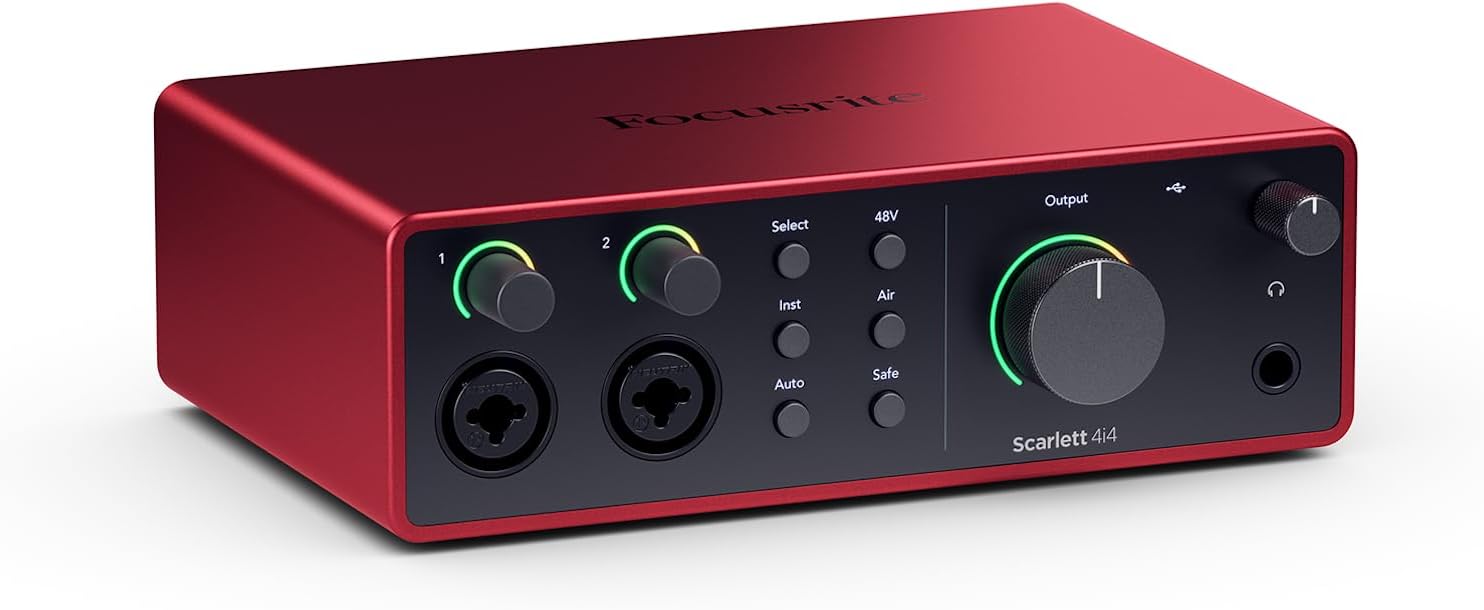
The Focusrite Scarlett 2i2 4th Gen is a compact yet powerful USB audio interface designed for home studio producers, musicians, podcasters, and content creators seeking professional-grade recording quality. This 2-in, 2-out interface strikes an impressive balance between portability and performance, making it ideal for bedroom studios, small project spaces, and mobile recording setups.
The standout feature is the 4th-generation Focusrite mic preamps, boasting a substantial 69dB gain range that delivers exceptional clarity and detail across vocals, acoustic instruments, and spoken word. The 120dB dynamic range rivals interfaces costing significantly more, utilizing the same studio-grade converters found in Focusrite's flagship RedNet systems. Air Mode adds a welcome character to recordings, infusing them with the presence and harmonic richness typically associated with premium studio consoles. Auto Gain and Clip Safe features eliminate the guesswork from level setting, while the Dynamic Gain Halos provide intuitive visual feedback directly on the hardware.
Build quality is solid with a professional feel, and the included XLR cables add immediate value. The custom-designed headphone amp provides clear monitoring, though some users note the volume ceiling feels limited at maximum levels. Setup is straightforward across Windows and macOS, with comprehensive software including Ableton Live Lite and Pro Tools Artist included in the box, eliminating additional software costs for new producers.
The main limitation is the 2x2 channel configuration, which may feel restrictive for users planning to record multiple instruments simultaneously or expand their setup significantly. Additionally, the lack of built-in EQ means tone shaping relies on software plugins. These constraints are minor given the price point and target audience of home producers and solo artists.
Verdict: The Scarlett 2i2 4th Gen delivers studio-quality audio capture at an accessible price point. Its combination of professional preamps, intuitive controls, and included software makes it an excellent gateway into serious music production. Highly recommended for beginners and experienced producers alike seeking a reliable, compact recording interface.
Home Music Producers: The 2i2 provides professional recording capabilities for songwriting, arrangement, and mixing projects without requiring expensive studio gear.
Podcasters and Voiceover Artists: The exceptional mic preamps and Auto Gain feature ensure broadcast-quality vocal recordings with minimal technical setup.
Guitarists and Keyboardists: Hi-Z instrument inputs provide authentic, responsive recording of electric guitars, synths, and keyboards with genuine amp-like feel.
Content Creators: Loopback functionality enables seamless audio routing for streaming, YouTube production, and multi-track content creation.
Beginners and Upgrades: Easy setup, included software, and intuitive controls make this ideal for first-time interface buyers and those upgrading from basic USB solutions.
Audio Specifications: 2 inputs, 2 outputs; 120dB dynamic range; 4th-generation mic preamps with 69dB gain range; 24-bit, 192kHz resolution; Hi-Z instrument and line inputs.
Connectivity: USB 2.0 bus-powered; compatible with Windows and macOS operating systems; includes 2 premium 6-foot XLR cables.
Physical: Dimensions 8.43 x 6.54 x 2.48 inches; compact desktop footprint; Dynamic Gain Halos with illuminated input and output monitoring.
Software Included: Ableton Live Lite, Avid Pro Tools Artist, Focusrite's Red Plug-In Suite, Splice integration, and additional production tools.
Features: Air Mode for console character; Auto Gain and Clip Safe technology; professional headphone amp with independent level control; Loopback for virtual audio routing.
Pros
- Excellent preamp quality produces bright, clear recordings with minimal noise floor
- Air mode adds professional polish to vocal and acoustic recordings without additional equipment
- Compact design perfect for home studios, bedroom producers, and mobile recording setups
- Included software suite eliminates need for expensive DAW purchases
- Highly reliable brand with strong reputation in professional audio industry
Cons
- Single microphone input limits simultaneous multi-instrument recording capabilities
- May require audio driver updates for optimal performance on some Windows systems
- Learning curve for beginners unfamiliar with audio interface operation and gain staging
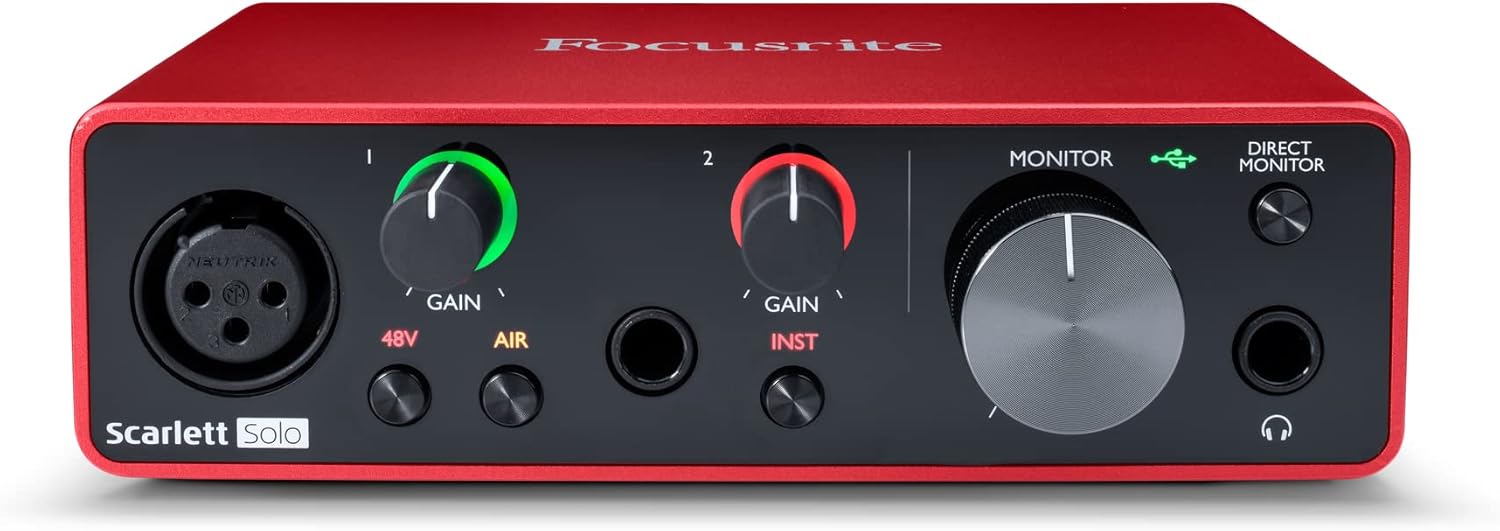
The Focusrite Scarlett Solo 3rd Gen is a professional USB audio interface designed for musicians, podcasters, and content creators who demand studio-quality recordings without the complexity of larger mixing consoles. This compact device bridges the gap between budget-friendly entry-level gear and expensive professional equipment, making it ideal for home studios, bedroom producers, and anyone serious about capturing professional-grade audio.
The standout feature is undoubtedly the high-performance microphone preamp paired with the innovative Air mode, which adds extra clarity and presence to vocals and acoustic instruments. The two high-headroom instrument inputs eliminate clipping and distortion, ensuring your guitar, bass, and other instruments shine through with clarity. Recording at up to 24-bit/192kHz resolution means your productions retain all sonic nuances, while the Gain Halo visual feedback system helps you nail perfect levels every time.
Build quality reflects Focusrite's professional heritage, with a solid metal chassis and intuitive front-panel controls that feel responsive and durable. The USB-C connectivity provides fast, reliable data transfer and modern compatibility with both Mac and Windows systems. The included software bundle (Pro Tools Intro+, Ableton Live Lite, Cubase LE) gives you everything needed to start producing immediately without additional software purchases.
The primary limitation is the single microphone input, which restricts simultaneous multi-track vocal or acoustic recording. Additionally, some Windows users report requiring driver updates for optimal performance. The learning curve for gain staging and audio interface operation may challenge complete beginners, though the included documentation is comprehensive.
The Focusrite Scarlett Solo 3rd Gen represents exceptional value for serious hobbyists and semi-professional creators. Its combination of pristine preamp quality, professional converters, intuitive design, and included software makes it the go-to choice for anyone upgrading from computer microphones or entry-level interfaces. The three-year warranty provides confidence in your investment.
Audio I/O: 1 XLR microphone input, 2 high-impedance instrument inputs, 2 balanced line outputs, headphone output
Audio Quality: 24-bit/192kHz recording and playback resolution with high-performance converters
Connectivity: USB-C to computer, compatible with all major audio recording software
Channels: 2 channels (stereo)
Features: Switchable Air mode, Gain Halo visual feedback, low-noise outputs, headphone monitoring
Software Included: Pro Tools Intro+, Ableton Live Lite, Cubase LE, Hitmaker Expansion
Warranty: 3-year manufacturer warranty worldwide
Compatible Devices: Microphones, instruments, personal computers, headphones, studio monitors
Who Should Buy: Musicians recording at home, podcasters seeking professional audio quality, guitarists and bassists needing quality instrument preamps, content creators upgrading from built-in computer audio, and producers working with limited space.
Who Should Look Elsewhere: Users needing simultaneous multi-microphone recording, those requiring extensive analog mixing features, or professionals running high-channel-count studios requiring more I/O options.
Setup Tips: Ensure your computer meets USB-C requirements and install drivers before first use. Spend time learning gain staging with the Gain Halo visual indicator to avoid clipping. Experiment with Air mode on different sources to understand its impact on your recordings.
Value Comparison: At this price point, the Scarlett Solo 3rd Gen outperforms competitors by offering superior preamp quality, professional software bundle, and proven brand reliability. The included software alone typically costs $200+ if purchased separately.

Pros
- Exceptional audio quality at this price point with professional-grade converters and ultra-low noise floor
- Intuitive interface with visual gain indicators prevents clipping and makes learning curve nearly non-existent
- Included software suite and plugins provide immediate value without additional purchases
- Standalone mode capability adds versatility for live performance and monitoring scenarios
- Included Polsen HPC-A30 headphones offer solid monitoring quality with flexible single-ear monitoring option
Cons
- Pop filter included in bundle has awkward attachment angle and poor fit compatibility
- No built-in equalizer, requiring external software or hardware for tone shaping
- Limited to 2-in/2-out channel configuration, which may feel restrictive for multi-track recording scenarios
The Focusrite Scarlett Solo 4th Generation USB-C audio interface is a purpose-built solution for home recording enthusiasts, singer-songwriters, podcasters, and content creators who demand professional audio quality without complexity. This compact interface brings studio-grade sound to any workspace, whether you're recording in a bedroom, living room, or mobile setup.
The standout feature is its dual-input design that lets you simultaneously record a microphone and guitar, making it ideal for singer-songwriters capturing full performances in one take. The 120dB dynamic range and 24-bit/192kHz converters match converters found in world-class professional studios, while the selectable Air circuit adds musical presence and harmonic richness that lifts vocals and guitars forward in your mix. Real-world performance is rock-solid, with users consistently praising the audio quality and ease of setup.
Build quality is solid for the price point, with a compact footprint that doesn't sacrifice functionality. The included Polsen HPC-A30 closed-back studio monitor headphones provide accurate monitoring with the convenient ability to flip one earpiece sideways for split monitoring. The visual gain indicator with color-coding (green-yellow-red) prevents clipping mistakes and helps beginners nail proper levels immediately.
The main drawback is the included pop filter, which users report has awkward attachment angles and poor fit compatibility with standard mic stands. Additionally, the lack of a built-in equalizer means you'll rely on software for tone shaping. The 2-in/2-out channel configuration, while perfect for songwriting, may feel limiting if you need multi-track simultaneous recording.
Verdict: The Scarlett Solo 4th Gen is an excellent entry point to professional home recording, offering genuine studio-quality converters, intuitive controls, and a comprehensive software bundle that justifies the investment. Best suited for beginners and experienced musicians alike who prioritize audio fidelity and ease of use over complex features.
Audio Interface Specs: USB-C connectivity, 2-in/2-out channels, 24-bit/192kHz AD/DA converters, 120dB dynamic range, ultra-low-noise microphone preamp, Hi-Z instrument input, selectable Air circuit, Loopback feature, standalone mode capable.
Bundle Contents: Focusrite Scarlett Solo 4th Gen interface, USB-C to USB-A cable, XLR to XLR cable, Polsen HPC-A30 closed-back studio monitor headphones, pop filter, and 3-year manufacturer warranty. Software included: Pro Tools Artist, Ableton Live Lite, Auto-Tune Access for Vocals, Softube Marshall Silver Jubilee 2555 guitar amp, Native Instruments MASSIVE synth.
Compatibility: Works with Windows and Mac operating systems, compatible with PCs, laptops, tablets, and standalone use. Supports multiple DAWs and recording software.
Perfect For: Singer-songwriters recording demos, home recording beginners seeking professional quality without steep learning curve, podcasters and YouTubers needing reliable audio capture, streamers requiring Loopback mixing capability, and anyone upgrading from built-in computer audio.
May Not Be Ideal For: Users requiring more than 2 simultaneous inputs, professionals needing extensive channel count for complex multi-track sessions, or those seeking integrated mixing and effects processing.
How to Choose Your Audio Interface with Air Mode
Input Configuration and Your Needs
Your required number of inputs directly dictates which model suits you. A solo vocalist or guitarist will thrive with a single-input interface like the Scarlett Solo. It simplifies the process beautifully.
If you plan to record a stereo source, use two microphones simultaneously, or want a dedicated input for a guitar and a microphone, a two-input interface like the 2i2 is essential. This flexibility supports duets, detailed acoustic guitar miking, or future expansion.
Generation and Feature Sets
Focusrite’s Scarlett line has evolved through several generations, each bringing refinements. Later generations, like the 4th Gen, offer a wider dynamic range and more advanced features such as Auto Gain and Clip Safe. These tools are invaluable for beginners.
They automatically set optimal input levels and prevent distortion. An earlier generation, like the 3rd Gen, still delivers the core Air Mode benefit and professional sound at a compelling value. It represents a proven and reliable entry point.
Bundled Value vs. Core Unit
Consider whether you need just the interface or a complete starter kit. A bare interface is perfect if you already own cables, headphones, and software. It allows you to invest solely in the core audio quality.
Bundles that include cables, headphones, and even a pop filter offer tremendous convenience for new creators. They provide everything required to start recording immediately after unboxing. This can simplify the initial setup process significantly.
Software and Connectivity
All Focusrite interfaces come bundled with excellent digital audio workstation (DAW) software and plugin suites. This software is crucial for editing and mixing your recordings. Ensure the included tools align with your creative goals.
Also, verify the connection type matches your computer. Most modern interfaces use USB-C, which offers robust, fast data transfer. For other connectivity needs, such as integrating digital gear, our review of the best audio interfaces with optical input may be useful. For real-time monitoring without latency, also consider interfaces highlighted in our guide on the best audio interfaces with direct monitoring.
Final Thoughts
For creators seeking that elusive studio console warmth and presence directly in their recordings, an interface with Air Mode is a transformative tool. Our assessment confirms the Focusrite Scarlett 2i2 4th Gen 2×2 USB Audio stands out for its versatile dual inputs and advanced features, making it an excellent centerpiece for a growing home studio. Meanwhile, the Focusrite Scarlett Solo 3rd Gen USB-C Audio remains a supremely reliable and affordable entry point, delivering the essential Air Mode magic for solo artists and podcasters ready to elevate their sound quality immediately.
Frequently Asked Questions
What exactly does Air Mode do to my audio?
Air Mode is a circuit emulation modeled after Focusrite’s classic ISA microphone preamplifiers. When engaged, it adds a subtle high-frequency lift and harmonic saturation to your input signal. This results in vocals and acoustic instruments sounding brighter, more present, and professionally polished, as if recorded through high-end studio hardware.
Is an audio interface with Air Mode suitable for podcasting?
Absolutely. While often associated with music production, Air Mode can greatly benefit podcasters and streamers. It adds clarity and a pleasing, radio-ready quality to spoken voice, helping your vocals cut through with authority and warmth. It’s a simple one-button way to enhance your podcast’s production value significantly.
Can I use Air Mode on playback or only while recording?
Air Mode is applied to the input signal as it passes through the interface’s preamps on its way to your computer. Therefore, its effect is printed directly onto your recording. You cannot retrospectively add Air Mode to an already-recorded track through the hardware, but you can use similar plugin emulations during mixing if your interface includes such software.
Do I need special drivers for these interfaces?
For full functionality and lowest latency, installing the official Focusrite Control drivers from their website is highly recommended, especially on Windows. macOS often supports class-compliant operation for basic functionality, but the dedicated drivers unlock advanced features, stable performance, and proper integration. All necessary software is provided with the interface.



Write Your Review
No reviews yet. Be the first to share your experience!