

Your studio monitors sound pristine, and your microphone captures every nuance. Yet, your recordings lack that professional sheen heard on commercial tracks. The missing link often lies not in your talent, but in your gear’s processing power. Audio interfaces with dedicated Digital Signal Processing, or DSP, bridge this gap by handling effects like compression, EQ, and reverb in real-time, without taxing your computer’s CPU.
This guide is crafted for musicians, podcasters, and streamers seeking that critical upgrade. We will explore leading interfaces that offer onboard DSP, empowering you to record with zero-latency monitoring through studio-grade effects. Whether you are building a home studio or refining a streaming setup, the right DSP interface is a game-changer. For creators also considering their vocal chain, exploring the best USB microphones under 200 can be a logical next step.

Pros
- Unison preamps deliver authentic analog tone without expensive hardware gear
- Massive plugin library covers mixing, mastering, and creative production needs
- Sonarworks-powered room correction ensures accurate mixes in any acoustic environment
- Auto-Gain saves time during recording sessions by automating input level setup
- Excellent 4.6 out of 5 rating reflects genuine user satisfaction and reliability
Cons
- Requires Thunderbolt 3 compatibility, limiting compatibility with older computers or some Windows systems
- Learning curve for maximizing the extensive plugin library and Unison preamp features
- Premium price point reflects professional-grade quality but may exceed hobbyist budgets
The Universal Audio Apollo Twin X DUO Gen 2 represents a significant investment in professional audio production, designed for recording engineers, music producers, and serious home studio operators who refuse to compromise on sound quality. This Thunderbolt 3 audio interface bridges the gap between affordable home recording and expensive analog hardware, delivering studio-grade results without the space or budget constraints of traditional gear.
The standout feature is undoubtedly the Unison preamp technology, which allows you to record through authentic emulations of legendary hardware from Neve, API, Avalon, Manley, and Fender in real-time. Combined with access to over 200 UAD plugins including award-winning tools like Capitol Chambers and EL8 Distressor, this interface becomes a complete production ecosystem. The Auto-Gain feature is a practical addition that automatically balances levels across multiple inputs, ensuring you capture clean takes without tedious manual adjustments.
Build quality and connectivity are handled professionally with Thunderbolt 3 providing the bandwidth necessary for low-latency performance during recording and mixing. The 32 channels of I/O accommodate complex workflows, while the Apollo Monitor Correction system powered by Sonarworks ensures your mixes translate accurately across playback systems. Bass management with subwoofer support rounds out the monitoring capabilities for serious mastering work.
The main consideration is the learning curve involved with the extensive plugin ecosystem and Unison preamp options. Additionally, Thunderbolt 3 compatibility may be a limitation for users with older computers or certain Windows setups. The premium pricing reflects professional-grade quality but represents a significant commitment.
The Apollo Twin X DUO Gen 2 earns its strong user rating by delivering on the promise of professional analog warmth and mixing precision in a compact interface. For producers and engineers serious about their craft, this is a transformative tool that justifies its investment through superior sound quality and workflow efficiency.
Connectivity: Thunderbolt 3
Channels: 32 channels of I/O
Brand: Universal Audio
Compatible Systems: Windows and macOS
Software Support: All major DAWs supporting UAD plugins
Key Features: Unison preamps, 200+ UAD plugins, Sonarworks room correction, Auto-Gain, bass management
Ideal For: Professional recording engineers, music producers, mixing and mastering specialists, and serious home studio owners who prioritize analog warmth and comprehensive plugin access.
Consider Alternatives If: You need USB 2.0 compatibility, operate on a tight budget, or work primarily with native plugins without hardware emulation needs.
Pros
- Exceptional value at this price point with dual XLR inputs that competitors charge significantly more for
- Compact 7.5-inch width and lightweight design make it genuinely portable for on-the-go recording
- Zero-latency monitoring via USB/Direct switch eliminates the frustration of hearing delayed playback while recording new parts
- Included software suite jumpstarts your production immediately without additional purchases
- Transparent preamps deliver clean, professional-grade audio from entry-level to mid-range microphones
Cons
- Plastic construction feels lightweight, which some users perceive as lower build quality despite reliable performance
- 48kHz maximum sample rate is lower than some competing interfaces, limiting high-resolution audio work
- Gain staging may require careful management with certain microphones, as some users report insufficient gain at maximum levels
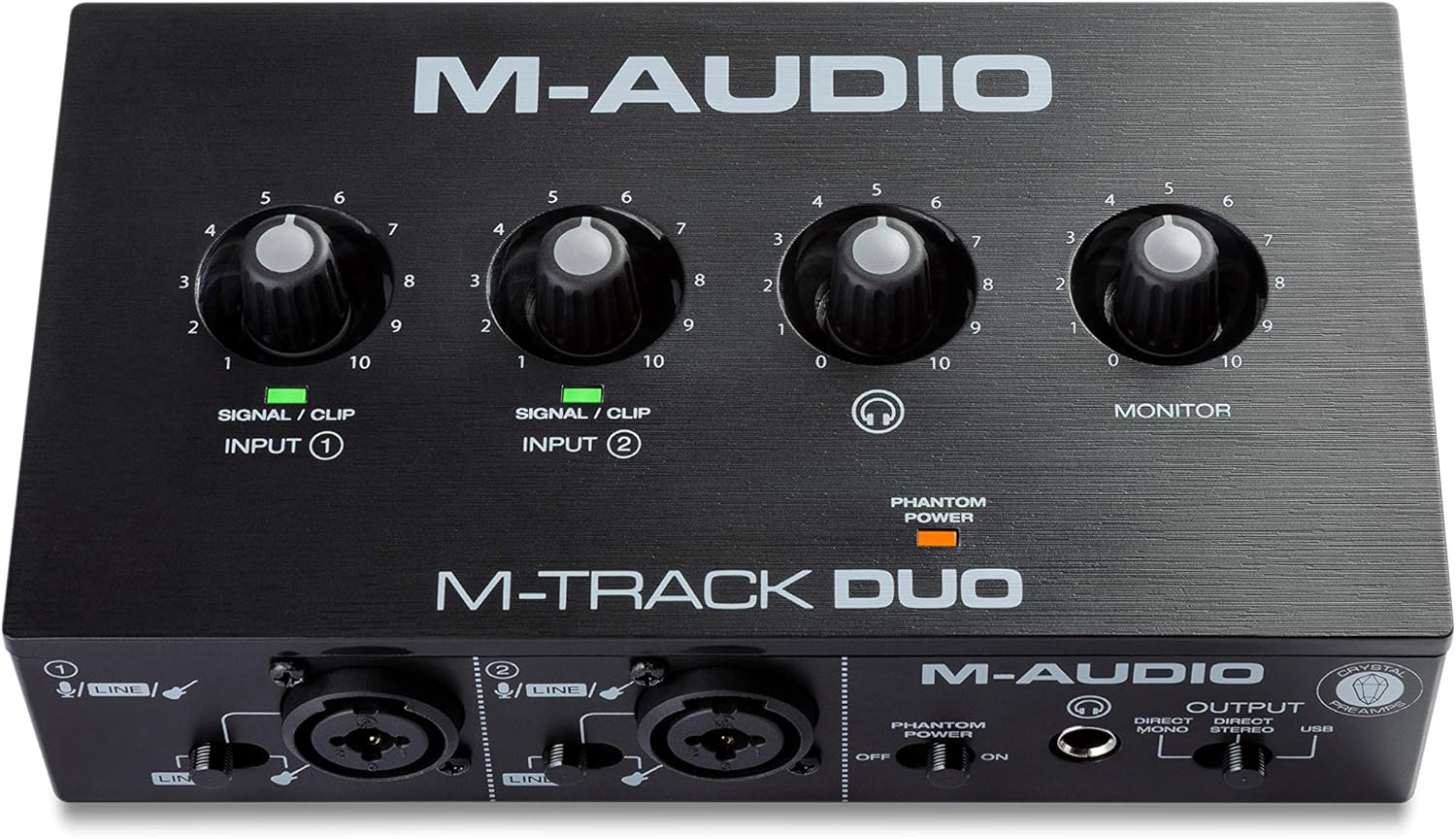
The M-Track Duo is a compact USB audio interface designed for podcasters, musicians, and content creators who need professional recording capabilities without the complexity or cost of larger studio setups. With dual XLR combo inputs, phantom power, and integrated instrument switching, this interface handles vocals, acoustic instruments, guitars, keyboards, and line-level devices with equal competence. It's the kind of gear that lets you go from idea to finished recording in minutes rather than hours.
What sets the M-Track Duo apart is its zero-latency direct monitoring feature, which eliminates the maddening delay that plagues cheaper interfaces. The USB/Direct switch lets you blend your live input signal with playback from your DAW, making it easy to record layered parts or add instruments to existing compositions. The transparent Crystal Preamps deliver clean, detailed audio that punches above its weight class, and phantom power support means you can work with professional condenser microphones without compromise.
Build quality is straightforward plastic construction that feels lightweight but proves durable in real-world use. The compact 7.5-inch width and 0.3kg weight make it genuinely portable, fitting easily into a laptop bag. All connections are professional-grade balanced XLR and quarter-inch TRS connectors, with a headphone output that supports standard stereo headphones via a quarter-inch adapter.
The main limitation is the 48kHz maximum sample rate, which is lower than some competing interfaces in higher price brackets. Additionally, some users report that gain staging requires careful management depending on your microphone, though this is rarely a dealbreaker for entry-level recording. The included MPC Beats software and ProTools First bundle provide legitimate production tools, though you'll likely graduate to more advanced DAWs as your skills develop.
The M-Track Duo delivers genuine value and reliability for anyone starting their recording journey or needing a portable backup interface. It handles its core mission of capturing clean, professional audio without fuss, making it an excellent choice for podcasters, singer-songwriters, and bedroom producers with realistic budgets.
Audio Specifications: Maximum sample rate of 48kHz with 16-bit resolution, 20kHz frequency response, and 1 megaohm impedance. Two channels of audio input and output.
Connectivity: Dual balanced XLR microphone inputs with phantom power, balanced quarter-inch line inputs, unbalanced quarter-inch instrument inputs, stereo quarter-inch main outputs, quarter-inch TRS headphone output, and USB Type B connection for computer and compatible iOS devices.
Dimensions and Weight: 7.5 inches wide by 4.34 inches deep by 2.13 inches tall, weighing just 0.3kg for maximum portability. Completely USB-powered with no external power supply required.
Compatibility: Works with Windows 7 and later via ASIO drivers, Mac OS High Sierra through Big Sur with class-compliant support, iOS with Apple Lightning to USB3 adapter, and Android devices. Compatible with all major DAWs including Logic Pro, ProTools, GarageBand, Studio One, Cubase, and Ableton Live.
Included Accessories: USB Type B to Type A cable, software download cards for MPC Beats and ProTools First, user guide, and safety documentation. Backed by a one-year manufacturer warranty.
Ideal For: This interface is perfect for podcasters launching their first show, musicians recording demos at home, content creators adding professional audio to videos, and anyone needing portable recording capability. It's also excellent for experienced engineers who need a reliable backup interface or travel-friendly setup.
Consider Alternatives If: You require sample rates above 48kHz for professional mastering work, need more than two simultaneous inputs, or demand premium metal construction and extensive onboard controls. However, for the vast majority of recording scenarios, the M-Track Duo delivers everything you need.
Budget Consideration: At this price point, the M-Track Duo offers exceptional value compared to single-channel competitors and provides genuine professional features like phantom power and zero-latency monitoring that many similarly-priced interfaces omit entirely.

Pros
- Exceptional audio clarity and gain headroom suitable for dynamic and condenser XLR microphones
- Intuitive touch controls with visual LED feedback eliminate the learning curve for beginners
- Wave Link software provides powerful routing capabilities without requiring external mixers
- Compact desktop footprint fits seamlessly into any streaming or podcasting setup
- Solid build quality with included 150cm USB-C cable and 2-year manufacturer warranty
Cons
- AI noise cancellation feature has limitations with persistent background noise like fans and room ambience
- Requires Windows 11 or macOS 14.2 and higher, excluding older system compatibility
- Some users report the onboard effects sound overly processed if not carefully tuned
The Elgato Wave XLR MK.2 is a professional-grade USB audio interface designed for content creators who demand studio-quality sound without complex setup. It's perfect for streamers, podcasters, and remote professionals who want to elevate their XLR microphone performance with minimal effort. The device bridges the gap between entry-level and professional audio gear by delivering serious power in a compact, user-friendly package.
What sets this interface apart is its combination of raw power and accessibility. The 80dB gain is genuinely impressive, allowing you to drive even quiet condenser microphones to broadcast levels. The ultra-low-latency monitoring at 24-bit, 48kHz resolution ensures you hear exactly what your audience hears with zero perceptible delay. The onboard DSP effects processor unifies voice enhancement, compression, and EQ in a single signal chain, meaning you can achieve polished audio without juggling multiple software plugins. Touch controls with customizable LED lighting make real-time adjustments intuitive, while Wave Link integration provides advanced routing for multi-application setups.
The build quality reflects Elgato's commitment to creator tools. The interface feels solid and premium with a thoughtful industrial design that complements professional workspaces. The included 150cm USB-C cable provides flexibility for desktop placement, and the compact footprint won't clutter your desk. The 2-year warranty demonstrates manufacturer confidence in longevity and reliability.
The primary limitation is that the AI noise cancellation feature struggles with persistent environmental noise like fans and room ambience, so you may still need acoustic treatment for optimal results. Additionally, the onboard effects can sound overly processed if not carefully adjusted, requiring some audio knowledge to dial in properly. System requirements are fairly current, requiring Windows 11 or macOS 14.2 or higher.
The Elgato Wave XLR MK.2 represents excellent value for creators serious about audio quality. It delivers professional-grade features in an accessible package that doesn't require deep technical knowledge. Whether you're upgrading from basic USB microphones or replacing aging audio interfaces, this device will noticeably improve your sound and streamline your workflow.
Audio Performance: 80dB gain, 24-bit resolution at 48kHz, 192kHz maximum sample rate, 2 channels, ultra-low-latency monitoring
Connectivity: USB-C to USB-C cable included (150cm), compatible with Laptop and Personal Computer
Compatibility: Windows 11 and higher, macOS 14.2 and higher, Stream Deck integration, Wave Link software required
Physical: 11.36 ounces, compact desktop form factor with touch controls and customizable LED feedback
Warranty: 2-year manufacturer warranty included
Best For: Content creators, streamers, podcasters, and remote professionals who use professional XLR microphones and want studio-quality audio without complex setup.
Ideal If You: Already own a quality XLR microphone, need ultra-low-latency monitoring, want built-in effects processing, or use Elgato's Stream Deck ecosystem.
Consider Alternatives If: You require extensive noise cancellation, use only USB microphones, have older computer systems, or prefer analog mixing consoles.
Buying Guide for Audio Interfaces with DSP
Understanding DSP Power and Plugin Ecosystems
The core value of a DSP interface is its processing muscle and the software it unlocks. High-end models provide access to vast libraries of authentic analog emulations for preamps, compressors, and reverbs. These allow you to print effects directly to your recording, committing to a sound. Evaluate the quality and scope of the included plugin suite, as this defines your creative palette from day one.
Latency Performance and Monitoring Features
<!–Ultra-low latency monitoring is non-negotiable for recording vocals or instruments. DSP offloads this processing from your computer, enabling near-instantaneous feedback through your headphones. Look for features like direct monitoring switches or sophisticated zero-latency mixer apps. This ensures you can perform comfortably without distracting audio delays disrupting your flow.
Input/Output Configuration and Connectivity
<!–Match the interface’s physical connections to your workflow. Consider how many microphones or instruments you need to record simultaneously. Combo jacks that accept XLR and quarter-inch cables offer maximum flexibility. Also, verify the connection type, such as USB-C or Thunderbolt, for compatibility with your computer. A well-configured setup is the backbone of any productive recording space.
Software Integration and Workflow Enhancement
<!–Beyond raw power, consider how the interface integrates into your daily workflow. Some include companion software for routing audio between applications, a boon for streamers. Others bundle full digital audio workstations or instrument libraries. The goal is a seamless experience where the hardware and software work in concert to reduce technical friction and boost creativity, much like a quality MIDI keyboard controller does for composition.
Final Thoughts
Selecting an audio interface with DSP is a significant step toward professional-grade audio. For those seeking the pinnacle of studio processing with unparalleled plugin authenticity, the Universal Audio Apollo Twin X DUO Gen 2 with UAD stands in a class of its own. Conversely, creators focused on streamlined streaming and podcasting with intuitive touch controls will find the Elgato Wave XLR MK.2 USB Audio Interface and DSP exceptionally capable. Your perfect match depends on balancing power, workflow, and creative needs.
Frequently Asked Questions
<!–Why do I need an audio interface with DSP?
<!–An audio interface with DSP provides dedicated processing chips to run effects like compression, EQ, and reverb. This allows for real-time, zero-latency monitoring through these effects while recording, which is impossible using software plugins alone on your computer’s CPU. It also preserves your computer’s resources for other tasks.
Can I use DSP effects during live streaming?
<!–Absolutely. Many modern DSP interfaces are designed with streamers in mind. They allow you to apply voice enhancement, noise suppression, and compression directly to your microphone signal before it enters your streaming software. This results in a cleaner, more professional broadcast sound without relying on potentially unstable software filters.
Is a DSP interface compatible with my existing studio headphones?
<!–Yes, in nearly all cases. DSP interfaces feature dedicated headphone amplifiers with standard quarter-inch or 3.5mm outputs. They are designed to drive a wide range of impedances, from consumer-grade to professional studio headphones. For the best critical listening experience, pair your interface with models from our related headphones category.
How do I choose between USB and Thunderbolt connectivity?
<!–Your choice depends on your computer and performance needs. USB interfaces, especially USB-C, offer excellent performance and broad compatibility with most modern computers. Thunderbolt interfaces, like some high-end models, provide the lowest possible latency and highest bandwidth, which is beneficial for large recording sessions with many tracks and plugins. Check your computer’s available ports before deciding.


Write Your Review
No reviews yet. Be the first to share your experience!