

You have a great amplifier and a pair of speakers you love, but your music library is trapped on your phone or computer. Connecting via a basic Bluetooth adapter often means sacrificing the detail and clarity you know your system can deliver. The solution is a dedicated audio streamer, specifically one with a USB output, which serves as a high-fidelity bridge between your digital music sources and your cherished stereo components.
This guide is for anyone looking to modernize their listening experience without compromising on sound quality. We have reviewed eight leading audio streamers with USB connectivity, from versatile all-in-one units to specialized transports. Whether you are building a new system or giving an old one new life, the right streamer can transform how you enjoy music. For more on high-resolution audio capabilities, explore our guide on the best audio streamers with high-res audio.

Pros
- Exceptional value for a dedicated network transport with audiophile-grade specifications and modern connectivity
- Purpose-built design focuses purely on streaming without unnecessary DAC or amplification, reducing cost and complexity
- Excellent multi-protocol support allows seamless handoff between different streaming services and devices
- Compact form factor and minimal power consumption make it ideal for small spaces without compromising audio quality
- Professional-grade digital output ensures bit-perfect audio delivery to your preferred converter or receiver
Cons
- No built-in DAC means you must own a separate digital-to-analog converter or compatible receiver to produce sound
- Roon Ready certification is still pending, though expected by year-end, limiting integration with Roon users currently
- Simultaneous optical and USB output is not supported, requiring users to choose one primary connection method
The Fosi Audio S3 Lite is a specialized network streaming transport designed for a specific but growing audience: audiophiles and music enthusiasts who already own quality DACs, amplifiers, or vintage receivers. Unlike all-in-one streaming solutions, this device strips away unnecessary components to focus purely on delivering clean, high-resolution digital audio to your existing equipment. It's perfect for those looking to modernize their stereo setup without replacing gear they've invested in or grown attached to.
Performance-wise, the S3 Lite impresses with its state-of-the-art Amlogic A113X processor and comprehensive protocol support. Users can stream via Bluetooth 5.3, WiFi 6, or hardwired LAN connections, with LAN delivering up to 32-bit/768kHz resolution and WiFi handling 32-bit/384kHz. The device supports virtually every major streaming platform including AirPlay 2, Google Cast, Spotify Connect, TIDAL Connect, and Qobuz Connect, making it genuinely platform-agnostic. Real-world testing shows dependable playback through extended listening sessions with minimal setup hassle once configured through the intuitive Fosi Audio app.
The build quality reflects its price point without cutting corners where it matters. The compact, matte black chassis keeps desk clutter minimal while maintaining a clean aesthetic that blends into any listening room. Despite its lightweight construction, the engineering inside prioritizes audio integrity with professional-grade specs including 0.000003% THD+N and bit-perfect digital transfer. The included remote simplifies navigation, though the absence of a front display emphasizes the device's role as a background component rather than a focal point.
The main limitation is that this is not a standalone solution. You absolutely need an external DAC or a receiver with digital inputs to hear anything, which disqualifies it for casual listeners seeking plug-and-play convenience. Additionally, Roon Ready certification is still pending, and simultaneous optical plus USB output isn't supported, requiring users to commit to one connection method. These constraints are intentional design choices rather than oversights, keeping costs down for users who don't need those features.
The Fosi Audio S3 Lite represents intelligent product design that refuses to over-engineer or over-feature. For the target audience of existing audio enthusiasts seeking an affordable, capable streaming bridge to their current equipment, this delivers exceptional value and proven reliability. It's a refreshing alternative to expensive dedicated streamers and bloated all-in-one receivers that force you to replace components you're happy with.
Processor and Chipset: Amlogic A113X processor for high-resolution streaming and minimal latency
Connectivity Options: WiFi 6 (2.4GHz/5GHz), Bluetooth 5.3 (SBC/AAC codecs), Gigabit LAN port, USB-A output, Optical output, Coaxial output, 12V trigger port
Audio Resolution: LAN supports up to 32-bit/768kHz, WiFi supports up to 32-bit/384kHz, USB outputs 32-bit/768kHz via LAN and 32-bit/384kHz via WiFi
Wireless Range: WiFi extends approximately 300 feet, Bluetooth reaches approximately 30 feet
Audio Quality: THD+N measured at 0.000003%, bit-perfect digital transfer, no internal DAC
Power: 12V DC power supply for minimal noise interference
Physical: Ultra-compact lightweight design, matte black finish, weighs 0.5 kg
Control: Fosi Audio app (iOS/Android) with 12-language support, 10-band EQ, multiple volume modes, Bluetooth remote control included
Streaming Platforms Supported: Google Cast, AirPlay 2, DLNA, Spotify Connect, TIDAL Connect, Qobuz Connect
Warranty: 24-month manufacturer warranty
Included Components: S3 Lite unit, 12V DC power supply, Bluetooth remote control (requires 2 AAA batteries, not included), optical cable, user manual
Who Should Buy This: The S3 Lite is ideal for audiophiles with existing DACs or digital receivers, vintage audio enthusiasts wanting to add wireless convenience to classic amplifiers, home office workers seeking quality streaming without bulky equipment, and recording engineers needing a clean network transport without built-in conversion. It's also excellent for multi-room audio setups where you want consistent high-resolution streaming across different zones.
Who Should Skip This: Casual listeners wanting a complete, standalone solution should look elsewhere, as this requires external conversion hardware. Those heavily invested in Roon ecosystem may want to wait for Roon Ready certification. Users needing simultaneous optical and USB output will need to choose a different device.
Setup Considerations: You must already own a DAC, digital receiver, or integrated amplifier with digital inputs to use this device. Ensure your external DAC or receiver can accept USB, optical, or coaxial digital input. The Fosi Audio app is essential for accessing advanced features like EQ adjustments and volume control modes, so smartphone compatibility is important.
Integration Tips: The 12V trigger port allows synchronized power-up of multiple components with a single button press. Google Home app grouping enables multi-room audio synchronization across different zones. WiFi 6 connectivity provides reliable streaming even in congested networks, while LAN offers maximum stability for audiophile listening sessions.
Value Comparison: At this price point, the S3 Lite offers exceptional specifications and multi-protocol support compared to competing network transports. It positions itself between budget streaming solutions and premium dedicated transports, making it an intelligent choice for quality-conscious buyers who refuse unnecessary compromises.

Pros
- Exceptional audio performance with audiophile-spec DAC at a mid-range price point
- Unmatched connectivity options covering virtually every digital and analog source and output format
- Intuitive WiiM Home App praised by reviewers for seamless setup and reliable day-to-day control
- Built-in bass management with adjustable crossover and subwoofer output fills a gap many receivers leave open
- Supports a wide range of streaming services and voice assistants including Alexa and Google Assistant
Cons
- No AirPlay support, which may be a dealbreaker for users deeply invested in the Apple ecosystem
- AAA batteries for the included voice remote are not included in the box, requiring an extra purchase out of the gate
The WiiM Ultra is a compact, feature-packed music streamer and preamplifier designed for listeners who want high-resolution audio without building a rack full of separate components. At its core sits an ESS ES9038 Q2M DAC, the same chip found in dedicated DACs costing significantly more, making it a compelling option for both entry-level audiophiles and seasoned enthusiasts looking to simplify their setup.
Streaming performance is where the Ultra genuinely shines. It supports hi-res playback up to 24-bit/192kHz from major platforms including Spotify, TIDAL, Qobuz, and Amazon Music HD, with gapless playback and Roon Ready certification for those already in the Roon ecosystem. Wi-Fi 6 and Bluetooth 5.3 ensure a stable, low-latency wireless connection, while the WiiM Home App receives consistent praise in user reviews for its clean interface and reliable multiroom synchronization with Echo and Google Home devices.
Build quality is a clear step above what the price might suggest. The aluminum chassis feels solid and premium, and the 3.5-inch touchscreen is bright and responsive for quick on-device control. Connectivity is genuinely comprehensive, covering HDMI ARC, USB, Optical, Coaxial, RCA, a Phono input with ground adapter, a dedicated headphone output, and a Subwoofer Out with adjustable crossover, a combination rarely found at this price tier.
There are a couple of considerations worth noting before purchasing. The WiiM Ultra does not support AirPlay in any form, so Apple ecosystem users relying on AirPlay 2 will need to look elsewhere or use an alternative streaming method. Additionally, while the included accessory bundle is generous, the voice remote ships without batteries, which is a minor but slightly frustrating omission.
Overall, the WiiM Ultra represents outstanding value for its category. It delivers audiophile-adjacent performance, exceptional versatility, and a polished user experience at a price that undercuts most comparable separates. For anyone with an existing amplifier or receiver looking to add a capable, modern streaming front-end, this is one of the most well-rounded choices currently available.
DAC: ESS ES9038 Q2M | THD+N: -116dB | SNR: 121dB | Max Resolution: 24-bit/192kHz
Wireless: Wi-Fi 6, Bluetooth 5.3 | Wired: Ethernet | Display: 3.5-inch touchscreen
Outputs: RCA, Headphone, Coaxial, Optical, USB, HDMI ARC, Subwoofer Out | Inputs: RCA, Phono, Optical, USB
Streaming Services: Spotify Connect, Amazon Music, TIDAL Connect, Qobuz Connect, Deezer, iHeartRadio, TuneIn, SoundCloud, Pandora, and more | Voice Control: Amazon Alexa, Google Assistant
Dimensions: 8.3 x 7.87 x 2.83 inches | Weight: 3.1 lbs | Power: 100-240V AC | Warranty: 1 Year | In the Box: WiiM Ultra, WiiM Voice Remote, HDMI cable, RCA cable, Optical cable, AC power cable, Phono ground adapter, Quick start guide
The WiiM Ultra is best suited for listeners who already own a quality amplifier or receiver and want to add a modern, high-resolution streaming front-end without replacing their existing gear. If your current amp lacks network streaming, a phono stage, or bass management for a subwoofer, this device addresses all three in a single compact unit.
If you are comparing the WiiM Ultra to standalone network streamers in the same price range, its built-in DAC and preamp functionality offer clear added value. For those who plan to use an external DAC, the Ultra still serves as an excellent Roon endpoint or digital transport via its Coaxial or Optical outputs, as demonstrated by several reviewers who pair it with dedicated DACs like the Denafrips Ares 2.
Buyers who rely heavily on AirPlay 2 for whole-home audio, particularly in Apple-centric households, should note that the WiiM Ultra does not support AirPlay in any capacity. In that scenario, a WiiM Pro or a competing device with AirPlay 2 support may be a better fit. For everyone else, especially those using Android, Alexa, or Google ecosystems, the Ultra is a compelling and well-priced choice.

Pros
- XLR input with 48V phantom power provides room to grow into professional microphone setups without expensive upgrades
- Individual channel faders give precise control over each audio source, preventing background noise and feedback issues
- Intuitive mute and monitor buttons on the front panel make real-time adjustments effortless during live broadcasts
- Exceptional value for money, offering features typically found in mixers costing two to three times more
- Includes customizable sound effects and voice modulation tools that enhance entertainment value for viewers
Cons
- XLR cable not included in the package, requiring separate purchase for full functionality
- Sound effect quality is basic compared to dedicated soundboard software alternatives
- Microphone preamp gain output is modest compared to higher-end professional audio interfaces
The FIFINE SC3 is a compact audio mixer purpose-built for gamers, streamers, and content creators who need professional-grade sound control without the learning curve or expense of traditional DJ equipment. This mixer bridges the gap between USB microphones and full studio setups, making it perfect for anyone transitioning from basic streaming audio to something more sophisticated.
The standout feature is the XLR microphone input paired with 48V phantom power, which lets you use high-quality condenser microphones immediately. Combined with four independent channel controls for microphone, line input, headphones, and line output, you gain granular control over your entire audio environment. The front-mounted mute and monitor buttons make real-time adjustments intuitive during live streams, while the monitoring feature provides confidence monitoring without latency issues that distract broadcasters.
Build quality feels solid for the price point, with sturdy faders and responsive buttons that withstand frequent use. The compact footprint (6.45 inches wide) fits neatly on any streaming desk without consuming valuable real estate. The customizable RGB lighting is vibrant but not fatiguing to the eyes, and the flowing color modes add visual interest to your setup without appearing gimmicky.
The main drawbacks are the modest microphone preamp gain compared to professional interfaces and the fact that XLR cables are sold separately. Additionally, the built-in sound effects quality is basic, though this is easily remedied with free soundboard software. These limitations are minor given the price and feature set.
The SC3 delivers excellent value for streamers, podcasters, and content creators seeking straightforward audio mixing with room to grow into more sophisticated setups. It's particularly recommended for anyone making the jump from USB microphones to XLR gear without wanting to invest in expensive professional equipment immediately.
Audio Inputs: XLR microphone input with 48V phantom power, 3.5mm line input, 3.5mm headset input
Audio Outputs: 3.5mm headphones jack, 3.5mm line output, 3.5mm headset output
Channels: 4 independent channels with individual volume control
Connectivity: USB-C to computer, 3.5mm jacks for audio devices
Additional Features: 4 programmable sound effect buttons (15 seconds each), 6 voice-changing modes, 12 auto-tune settings, RGB lighting with customizable patterns, mute and monitor buttons
Physical Dimensions: 6.45 inches wide x 4.44 inches deep x 1.6 inches tall
Weight: 0.5 kg (approximately 1.1 pounds)
Power Supply: USB-C from computer
Compatibility: Windows and Mac OS, works with OBS, Twitch, YouTube, TikTok
Warranty: 1 year manufacturer warranty
Included Accessories: USB cable, 3.5mm to 3.5mm audio cable, user manual
Who Should Buy This Mixer: The SC3 is ideal for beginner to intermediate streamers, podcasters, and content creators who want professional audio control without expensive equipment. It's perfect for anyone upgrading from a basic USB microphone to an XLR setup, or for streamers managing multiple audio sources like game audio, music, and microphone input simultaneously.
Who Might Want to Look Elsewhere: Professional audio engineers or high-end podcast studios requiring maximum microphone preamp gain should consider more expensive interfaces. If you exclusively use USB microphones, a simpler mixer may suffice. Those needing more than four channels should explore larger mixing consoles.
What You Need to Buy Separately: An XLR microphone cable is essential if you plan to use an XLR condenser microphone. A quality shielded XLR cable is recommended to ensure audio quality. Budget approximately 10 to 20 dollars for a reliable cable. You'll also need an XLR condenser microphone if you don't already own one.
Setup Tips: Connect the USB-C cable to your computer first for power and data. Use the included 3.5mm cable to connect audio devices like phones or tablets to the line input. Connect your XLR microphone to the XLR input. Plug your headphones into the headphones output. Start with all faders at mid-level and adjust from there. Test your audio levels in your streaming software before going live.
Best Use Cases: Twitch and YouTube streaming, podcast recording, TikTok content creation, Discord gaming sessions, online interviews, and music production for beginners.

Pros
- True hi-res audio playback up to 192kHz/24-bit with no resampling preserves the original recording quality
- Broad streaming service support including Spotify, TIDAL, Amazon Music, Qobuz, and AirPlay 2 in one affordable device
- Dual voice assistant compatibility with both Alexa and Siri is rare at this price point
- Highly rated by a large number of verified buyers, reflecting consistent real-world reliability
- Small, unobtrusive form factor makes it easy to add to any existing audio setup without clutter
Cons
- AirPlay receiver only, meaning it cannot transmit audio to other AirPlay-enabled speakers or devices downstream
- No Google Cast support, which may disappoint Android-first households or those already invested in a Chromecast ecosystem
- Qobuz Connect is not supported natively and must be accessed through the WiiM Home app instead
The WiiM Mini is a palm-sized wireless audio streamer designed to breathe new life into any existing stereo system, amplifier, or powered speakers. At its core, it bridges the gap between legacy audio hardware and modern streaming platforms, making it an excellent choice for audiophiles, home theater enthusiasts, and anyone who wants smart speaker functionality without scrapping their current setup.
The standout feature is its commitment to uncompromised audio quality. Unlike many competing streamers that resample audio to a fixed rate, the WiiM Mini passes audio through unaltered at up to 192kHz and 24-bit resolution via both its analog and digital optical outputs. This means content from Amazon Music Ultra HD, Qobuz, and personal hi-res libraries arrives at your speakers exactly as the artist intended.
Connectivity is genuinely impressive for the price. The device supports AirPlay 2, Spotify Connect, TIDAL Connect, Amazon Music Cast, Alexa, Siri, DLNA, and NAS streaming, covering virtually every major platform and ecosystem. Multiroom grouping with other WiiM devices, Echo speakers, and HomePods works reliably through the WiiM Home app, making whole-home audio straightforward to set up and manage.
On the physical side, the WiiM Mini is compact at just 2.7 inches square and under an inch tall, finished in a clean matte black. It connects via USB-C for power, a 3.5mm analog output, and a TOSLINK digital optical port, covering most amplifier and DAC input configurations. The build feels solid for the size, though it is clearly designed to sit out of sight rather than on display.
The main limitations to keep in mind are the lack of Google Cast support and the AirPlay receive-only restriction, which means it cannot push audio to other AirPlay devices in a chain. For Apple and Amazon ecosystem users these are non-issues, but Android households relying on Chromecast should consider a different WiiM model. Overall, the WiiM Mini delivers exceptional value as a versatile, high-fidelity streaming upgrade for virtually any audio system.
Connectivity: Wi-Fi (2.4GHz/5GHz), Bluetooth. Supported protocols include AirPlay 2, Spotify Connect, TIDAL Connect, Amazon Music Cast (Alexa Cast), DLNA, and NAS home media server streaming.
Audio Outputs: 3.5mm analog stereo output and TOSLINK digital optical (SPDIF) output. Maximum audio resolution is 192kHz at 24-bit via both outputs, with no resampling applied to the signal chain.
Voice Assistants: Amazon Alexa and Apple Siri are both supported. The device integrates with Alexa routines and Apple Home for smart home automation and voice-controlled playback.
Compatible Devices: Works with amplifiers, DACs, powered speakers, HomePod, Apple TV, Echo devices, tablets, and smartphones. Control is handled through the WiiM Home app (iOS and Android) or supported voice assistants.
Physical: Dimensions are 2.7 inches deep by 2.7 inches wide by 0.9 inches tall. Color is matte black. Power is supplied via USB Type-C. Surround configuration is 2-channel stereo.
Who should buy the WiiM Mini? This streamer is ideal for anyone who already owns a quality amplifier, receiver, or powered speakers and wants to add modern wireless streaming without replacing their hardware. It is particularly well-suited to Apple and Amazon ecosystem users who want AirPlay 2 and Alexa in a single compact device.
Apple vs. Android households: The WiiM Mini is optimized for Apple and Amazon users. AirPlay 2, Siri, and Amazon Music Cast are all supported natively. However, Google Cast is not available on this model. If your household relies heavily on Chromecast or Google Home, consider the WiiM Pro or WiiM Pro Plus, which add Google Cast and additional outputs.
Hi-res audio considerations: To take full advantage of the 192kHz/24-bit capability, you will need a subscription to Amazon Music Ultra HD, Qobuz, or access to a personal hi-res library. TIDAL Masters tops out at 96kHz/24-bit, and standard Spotify streams at compressed quality regardless of the hardware. The digital optical output is recommended for the cleanest signal path to an external DAC.
Multiroom setup tips: The WiiM Mini groups natively with other WiiM devices for synchronized playback, and also joins AirPlay 2 groups with HomePods and Apple TV. For Amazon-based multiroom audio, it integrates into Alexa speaker groups alongside Echo devices. For the most flexible whole-home setup, pairing multiple WiiM units through the WiiM Home app offers the tightest synchronization.

Pros
- Exceptional streaming protocol support covers virtually every major platform and voice assistant
- Hi-res 24-bit/192kHz output delivers audiophile-grade sound quality at a budget-friendly price point
- Easy setup with the WiiM app on iOS and Android, including Android devices without Google Play Services
- Versatile connectivity with optical, coaxial, RCA, USB-C, and Ethernet ports for broad compatibility
- Strong multiroom audio capabilities rivaling systems costing several times more
Cons
- AirPlay receiver only, it cannot transmit streams to other AirPlay-enabled speakers or devices
- The built-in DAC is adequate but audiophiles seeking the best analog output may prefer the upgraded WiiM Pro Plus with its premium AKM DAC chip
- Some users report minor software bugs, particularly with YouTube Music via Chromecast, though the app receives regular updates
The WiiM Pro is a network music streamer designed to breathe new life into existing stereo systems without requiring a full equipment overhaul. It sits in a compact, unobtrusive black box and connects to amplifiers, receivers, or DACs via optical, coaxial, or RCA outputs. It is aimed squarely at audiophiles and everyday music lovers who want modern, app-driven streaming tied to gear they already own and love.
Where the WiiM Pro truly shines is in its breadth of streaming support. AirPlay 2, Google Cast, Spotify Connect, TIDAL Connect, Amazon Music, Qobuz, Roon Ready, and DLNA are all on board, making it one of the most protocol-rich streamers at this price point. Hi-res playback up to 24-bit/192kHz is available through the digital outputs, and gapless playback ensures a seamless listening experience across compatible services.
Build quality is solid for the price, with a clean matte finish and a sensibly laid-out rear panel. The included accessory bundle is generous, featuring an optical cable, RCA cable, USB power adapter, and USB-C cable right in the box. Setup via the WiiM app is consistently praised by users as fast and intuitive, with the Android version notably not requiring Google Play Services.
There are a few limitations worth noting. The WiiM Pro is an AirPlay receiver only and cannot send streams to other AirPlay speakers. The onboard DAC performs well for most listeners, but those feeding the analog output directly into high-end amplifiers may notice a ceiling compared to the Pro Plus variant. Occasional minor app bugs, particularly around YouTube Music via Chromecast, have been flagged by some users, though firmware updates address these over time.
Overall, the WiiM Pro delivers remarkable value as a streaming upgrade for legacy stereo systems. It earns its top-two ranking in audio component receivers through a combination of wide compatibility, hi-res audio support, and a genuinely user-friendly experience. For anyone looking to modernize a beloved amplifier or receiver without spending a fortune, this is a hard device to beat.
Audio Output: Digital Optical (TOSLINK), Coaxial SPDIF, Analog RCA stereo. Supports up to 24-bit/192kHz hi-res audio on digital outputs and 24-bit/96kHz via TIDAL MQA core decoding.
Connectivity: Wi-Fi, Ethernet (wired LAN), Bluetooth. Connector types include USB Type-C, RCA, TOSLINK, Coaxial, and Ethernet for comprehensive integration options.
Streaming Protocols: AirPlay 2, Google Cast, Spotify Connect, TIDAL Connect, Amazon Music, Qobuz Connect, Roon Ready, DLNA, NAS, and Home Media Server support.
Voice Assistant Compatibility: Amazon Alexa, Google Assistant, and Siri. Compatible with Echo devices, Google Home, HomePod, and Apple TV.
Physical: Dimensions 5.5 x 5.5 x 1.6 inches, weight 11.6 ounces. Color: Black. In the box: optical cable, RCA cable, USB power adapter, USB-C cable, and user guide. Warranty: 12 months.
If you own a stereo amplifier, AV receiver, or powered speakers without built-in streaming, the WiiM Pro is one of the most cost-effective ways to add that capability. It works best when connected via the digital optical or coaxial output to an external DAC or a receiver with a built-in DAC, preserving the highest possible audio quality.
Consider the WiiM Pro if your priority is broad streaming service support and multiroom audio flexibility. It covers virtually every major platform and voice ecosystem, so you are unlikely to encounter a service it cannot handle. If you primarily stream Spotify, Apple Music, TIDAL, or Amazon Music, all of these are natively supported with their respective high-quality connect protocols.
If you plan to use the analog RCA output as your primary connection and you own a high-end amplifier, it may be worth stepping up to the WiiM Pro Plus, which features a premium AKM DAC chip for improved analog performance. For digital output users or those pairing with a dedicated external DAC, the standard WiiM Pro offers the same streaming engine at a lower price and represents outstanding value.
For home theater or TV audio integration, note that Google Cast allows streaming of TV audio from Cast-enabled apps, and AirPlay 2 supports audio from Apple TV. This makes the WiiM Pro a versatile addition to both dedicated listening rooms and living room setups alike.
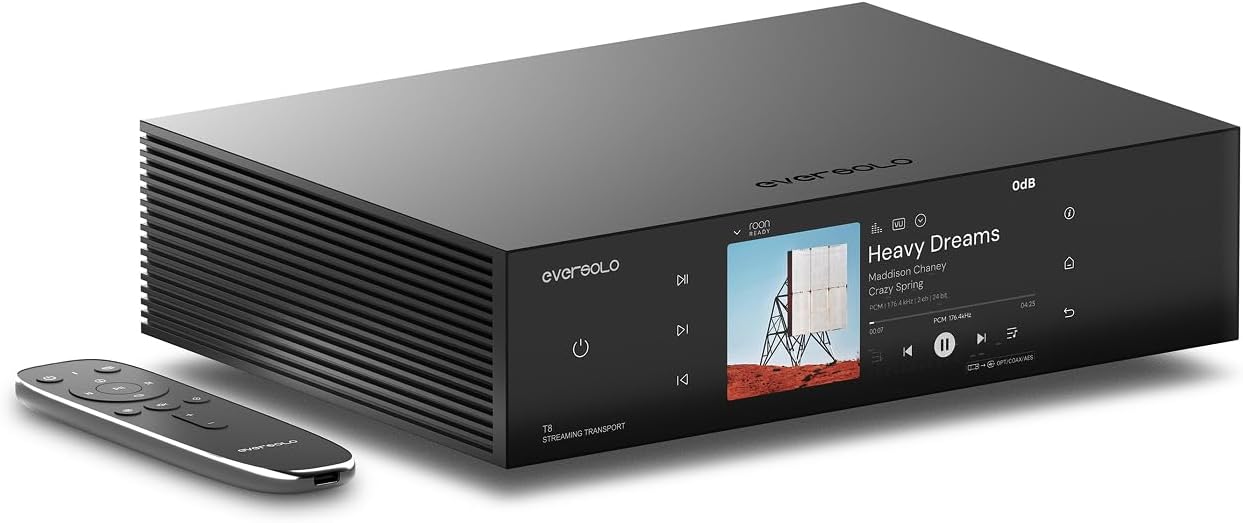
Pros
- Superior sound quality with exceptional clarity, detailed midrange, and punchy bass that rivals dedicated DAC-transport combinations
- Exceptionally well-designed software with extensive features including FIR filters, robust EQ controls, and frequent firmware updates
- Multiple control methods via touchscreen, remote control, and mobile app across iOS, Android, and macOS platforms
- Flexible storage options with dual NVMe bays allowing local music library storage for optimal wireless-free playback
- Premium build quality with CNC-machined aluminum chassis and anodized finishing that feels substantial and professional
Cons
- SFP fiber network modules must be purchased separately, adding extra cost for those seeking optical isolation benefits
- Requires a separate DAC to convert digital output to analog audio, increasing total system cost and complexity
The Eversolo T8 is a professional-grade streaming transport designed for audiophiles and music enthusiasts who demand transparent, high-resolution digital audio. It functions as a dedicated source component that streams music from services like TIDAL and Qobuz, or stores local high-resolution files, then sends pristine digital audio to your DAC via multiple output options. This is the ideal choice for listeners who have invested in quality DAC and amplification but want superior streaming capabilities and jitter reduction.
The standout feature is the dual femtosecond clock architecture with AS318-B series crystal oscillators operating at 49.1520 MHz. This dramatically reduces clock jitter at the source, resulting in noticeably cleaner audio with enhanced detail retrieval, superior vocal tone, and a more three-dimensional soundstage. The fully isolated outputs on all ports eliminate ground loop noise and interference, while support for up to DSD512 and PCM 768kHz ensures compatibility with the most demanding high-resolution audio formats available today.
Build quality is exceptional, featuring a CNC-machined aluminum chassis with anodized finishing that delivers premium aesthetics and mechanical stability. The 6-inch vibrant touchscreen is bright, responsive, and displays real-time VU meters and cover art with excellent attention to detail. Control is intuitive through the touchscreen, included remote, or mobile app on iOS, Android, or macOS devices, making operation smooth from day one.
The proprietary evotune acoustic calibration system is a game-changer for room optimization, automatically compensating for acoustic imperfections while the 10-band parametric EQ lets you fine-tune specific frequencies to your preferences. Integration with Roon, Qobuz Connect, and TIDAL Connect provides seamless access to millions of tracks in lossless quality, while dual NVMe storage bays allow you to build a personal music library for ultimate playback control.
The main considerations are the premium price point and the requirement for a separate DAC to complete your system. However, users consistently report that the T8 justifies its cost through superior sound quality, software sophistication, and build excellence that surpasses competing streaming transports. This is a genuine end-game component for serious music lovers.
Connectivity: Wi-Fi 6, Bluetooth, Ethernet, SFP Fiber Network, Gigabit LAN
Audio Outputs: IIS (8 pinout configurations), Coaxial, AES/EBU (balanced XLR), USB Audio, Optical, USB 3.0 OTG x2
Maximum Resolution: IIS and USB Audio support DSD512 Native and PCM 768kHz 32Bit; Coaxial, AES/EBU, and Optical support PCM 192kHz 24Bit and DoP64
Streaming Services: TIDAL, Qobuz, IDAGIO, Amazon Music, TuneIn Radio, Presto Music, KKBOX, Radio Paradise, Deezer
Display: 6-inch vibrant touchscreen with multiple VU meter visualizers
Clocking: Dual femtosecond clocks with AS318-B series professional audiophile-grade crystal oscillators
Storage: Dual NVMe bays for high-capacity local music library storage
Control Options: Touchscreen, remote control, mobile app (iOS, iPadOS, Android, macOS M-series)
Build: CNC-machined aluminum chassis with anodized finishing
Weight: 4.5 kg
Warranty: 1 year manufacturer
Who Should Buy This: The T8 is ideal for serious audiophiles and music enthusiasts who already own a quality DAC and want a superior streaming transport. It's perfect for those who value high-resolution audio, extensive software features, and premium build quality. If you stream from TIDAL or Qobuz regularly, or maintain a large personal music library, this transport will elevate your listening experience significantly.
Who Should Consider Alternatives: Casual listeners or those on a tight budget should explore more affordable streaming options. If you need a complete all-in-one streaming solution with built-in DAC, integrated amplification, or speakers, you may want to look at different product categories.
Important Considerations: The T8 is a transport only and requires a separate DAC to convert digital audio to analog. Factor this into your total system cost. SFP fiber network modules must be purchased separately if you want optical isolation benefits. Ensure your chosen DAC supports at least one of the T8's output formats (IIS is most common for high-end DACs).
Setup Recommendations: For optimal performance, use the AES/EBU XLR output with a quality digital cable to your DAC, or the IIS connection if your DAC supports it. Take advantage of the dual NVMe storage bays to store your favorite high-resolution files locally, reducing reliance on wireless streaming. Use the evotune acoustic calibration system to automatically optimize sound for your listening room.

Pros
- Exceptional audio clarity with 75dB SNR and sub-0.2% distortion ensures your voice cuts through game audio and background noise
- Intuitive game/chat balance control eliminates the need to tab out or adjust software settings mid-game
- Versatile connectivity with optical AUX, 3.5mm AUX-In, and USB-C covers virtually every gaming platform and audio source
- Voice morphing and customizable presets add entertainment value and streamline content creation workflows
- Compact footprint and responsive controls make it ideal for streaming setups with limited desk space
Cons
- XLR cable not included in the box, requiring separate purchase and potentially affecting final audio quality based on cable specifications
- Only compatible with XLR or 6.35mm microphones, not USB microphones, limiting flexibility for users with existing USB mic setups
- Virtual 7.1 surround is software-based rather than true hardware surround, which may appeal less to audiophiles seeking authentic spatial audio
The FIFINE SC8 is a feature-rich gaming mixer built specifically for streamers, esports competitors, and content creators who need professional audio control without the complexity of full-sized mixing consoles. It bridges the gap between budget gaming headsets and expensive studio equipment, offering studio-grade voice capture capabilities in a compact tabletop form factor. This mixer is perfect for anyone serious about competitive gaming, live streaming, or creating polished Discord content.
The standout feature is undoubtedly the dedicated game/chat balance dial, which solves a real problem for competitive gamers who struggle to hear both enemy audio cues and teammate callouts. Combined with 7.1 virtual surround and three EQ presets, you get genuine audio advantages in tactical shooters like Valorant and Call of Duty. The 48V phantom power XLR input delivers studio-quality voice capture with impressive 75dB SNR and sub-0.2% distortion, ensuring your communication stays crisp even during intense firefights. The eight voice morphing effects and four customizable buttons add personality to streams and enable quick preset switching without menu diving.
Build quality feels solid for the price point, with a compact 9.5-inch depth that fits most gaming desks without consuming excessive space. The three smart knobs with push-mute functionality provide intuitive control, and the RGB lighting synchronized to audio peaks adds professional visual flair to your streaming setup. Multi-platform USB-C connectivity works seamlessly across PC, PS5, Nintendo Switch, and mobile devices, making this mixer genuinely versatile for different gaming ecosystems.
The main drawback is that XLR cables are not included, and audio quality depends heavily on cable shielding and specifications. Additionally, the mixer only accepts XLR or 6.35mm microphones, not USB microphones, which could be limiting if you already own a USB mic. The 7.1 surround is software-based virtual processing rather than true hardware surround, which some audiophiles might find less authentic.
The FIFINE SC8 delivers exceptional value for competitive gamers and streamers seeking professional audio control at an accessible price. Its intuitive game/chat balance dial, multi-platform connectivity, and studio-grade voice clarity make it a smart investment for anyone serious about gaming audio performance.
Audio Specifications: 5 channels, 48V phantom power XLR input, 75dB SNR, sub-0.2% distortion, 93dB SNR headphone output, supports dynamic and condenser microphones with up to -50dB gain adjustment.
Connectivity: USB-C (PC, PS5, Nintendo Switch, mobile), Optical AUX (PS4, TV), 3.5mm AUX-In, 3.5mm headphone output (32Ω impedance supported).
Features: 7.1 virtual surround sound, 3 EQ presets (Game, Music, Movie), 8 voice changers, 4 customizable buttons, RGB lighting, dedicated game/chat balance dial, 3 smart knobs with push-mute controls.
Physical: Dimensions 9.53 inches (D) x 6.14 inches (W) x 2.68 inches (H), corded electric power.
Who Should Buy: Competitive gamers playing tactical shooters (Valorant, CS2, Apex Legends), esports enthusiasts requiring reliable team communication, live streamers on Twitch or YouTube, and Discord power users who want professional-grade voice quality.
Who Might Want to Look Elsewhere: Users with existing USB microphones seeking plug-and-play compatibility, budget-conscious buyers unwilling to invest in a quality XLR cable, or casual gamers who don't need advanced audio features.
Setup Considerations: Budget approximately 20-40 dollars for a quality shielded XLR cable to maximize audio quality. Ensure your XLR microphone supports the mixer's dynamic/condenser toggle. Allow time to explore the EQ presets and voice effects to find your preferred audio profile. Test the game/chat balance dial extensively to dial in your ideal audio mix for your specific games.

Pros
- Exceptional audio clarity and gain headroom suitable for dynamic and condenser XLR microphones
- Intuitive touch controls with visual LED feedback eliminate the learning curve for beginners
- Wave Link software provides powerful routing capabilities without requiring external mixers
- Compact desktop footprint fits seamlessly into any streaming or podcasting setup
- Solid build quality with included 150cm USB-C cable and 2-year manufacturer warranty
Cons
- AI noise cancellation feature has limitations with persistent background noise like fans and room ambience
- Requires Windows 11 or macOS 14.2 and higher, excluding older system compatibility
- Some users report the onboard effects sound overly processed if not carefully tuned
The Elgato Wave XLR MK.2 is a professional-grade USB audio interface designed for content creators who demand studio-quality sound without complex setup. It's perfect for streamers, podcasters, and remote professionals who want to elevate their XLR microphone performance with minimal effort. The device bridges the gap between entry-level and professional audio gear by delivering serious power in a compact, user-friendly package.
What sets this interface apart is its combination of raw power and accessibility. The 80dB gain is genuinely impressive, allowing you to drive even quiet condenser microphones to broadcast levels. The ultra-low-latency monitoring at 24-bit, 48kHz resolution ensures you hear exactly what your audience hears with zero perceptible delay. The onboard DSP effects processor unifies voice enhancement, compression, and EQ in a single signal chain, meaning you can achieve polished audio without juggling multiple software plugins. Touch controls with customizable LED lighting make real-time adjustments intuitive, while Wave Link integration provides advanced routing for multi-application setups.
The build quality reflects Elgato's commitment to creator tools. The interface feels solid and premium with a thoughtful industrial design that complements professional workspaces. The included 150cm USB-C cable provides flexibility for desktop placement, and the compact footprint won't clutter your desk. The 2-year warranty demonstrates manufacturer confidence in longevity and reliability.
The primary limitation is that the AI noise cancellation feature struggles with persistent environmental noise like fans and room ambience, so you may still need acoustic treatment for optimal results. Additionally, the onboard effects can sound overly processed if not carefully adjusted, requiring some audio knowledge to dial in properly. System requirements are fairly current, requiring Windows 11 or macOS 14.2 or higher.
The Elgato Wave XLR MK.2 represents excellent value for creators serious about audio quality. It delivers professional-grade features in an accessible package that doesn't require deep technical knowledge. Whether you're upgrading from basic USB microphones or replacing aging audio interfaces, this device will noticeably improve your sound and streamline your workflow.
Audio Performance: 80dB gain, 24-bit resolution at 48kHz, 192kHz maximum sample rate, 2 channels, ultra-low-latency monitoring
Connectivity: USB-C to USB-C cable included (150cm), compatible with Laptop and Personal Computer
Compatibility: Windows 11 and higher, macOS 14.2 and higher, Stream Deck integration, Wave Link software required
Physical: 11.36 ounces, compact desktop form factor with touch controls and customizable LED feedback
Warranty: 2-year manufacturer warranty included
Best For: Content creators, streamers, podcasters, and remote professionals who use professional XLR microphones and want studio-quality audio without complex setup.
Ideal If You: Already own a quality XLR microphone, need ultra-low-latency monitoring, want built-in effects processing, or use Elgato's Stream Deck ecosystem.
Consider Alternatives If: You require extensive noise cancellation, use only USB microphones, have older computer systems, or prefer analog mixing consoles.
Buying Guide for USB Audio Streamers
USB Output Type and Function
Not all USB ports on a streamer serve the same purpose. The primary function you need is a USB Audio output. This port sends a pristine digital signal from the streamer to an external digital-to-analog converter (DAC) or a DAC-equipped amplifier.
Some streamers, like the WiiM Ultra Hi-Res Music Streamer with Touchscreen, also include a USB input. This allows you to connect a hard drive or thumb drive to play your local music files directly. Confirm whether the USB port is for output, input, or both based on your needs.
Streaming Services and Connectivity Protocols
Your choice of music service should dictate your streamer choice. Look for native integration through protocols like Spotify Connect, TIDAL Connect, or Qobuz Connect. These allow you to control playback directly from the service’s app, often enabling higher quality streams than standard casting.
For multi-platform households, ensure the streamer supports your ecosystem. AirPlay 2 is essential for Apple users, while Google Cast caters to Android and Chrome environments. A device like the WiiM Pro Music Streamer to Upgrade Stereo supports both, offering maximum flexibility. Robust Wi-Fi performance is also critical for stable, high-bandwidth streaming.
DAC Integration vs. Pure Transport
This is a crucial distinction. A streamer with a built-in DAC, such as the WiiM Ultra, can connect directly to an amplifier’s analog inputs. It’s an all-in-one solution that simplifies your system. A pure transport, like the Fosi Audio S3 Lite Stream Receiver Bluetooth WIFI6, has no internal DAC.
It outputs only a digital signal via USB, optical, or coaxial cables. This design is for audiophiles who already own a high-quality external DAC they wish to use. It prioritizes a clean, jitter-free digital signal path, leaving the analog conversion to your preferred dedicated component.
System Integration and Expandability
Consider how the streamer will fit into your existing setup. Check for other necessary outputs, like optical or coaxial digital, and analog RCA outputs if the unit has a DAC. Features like a subwoofer output, a headphone jack, or HDMI ARC can greatly expand functionality for home theater use.
For whole-home audio, verify multiroom capabilities. Many streamers can synchronize with other smart speakers or group with identical units. Also, assess physical integration. A compact design is ideal for a desktop, while a unit with a display might be better for a living room rack. Discover more options in our broader home audio category.
Final Thoughts
Upgrading to a dedicated USB audio streamer is one of the most impactful changes you can make to your music listening. For most users seeking a brilliant all-in-one solution, the WiiM Ultra Hi-Res Music Streamer with Touchscreen offers an exceptional blend of performance, features, and intuitive control. If your priority is a pristine digital feed for a separate high-end DAC, the Eversolo T8 Music Streamer Transport with Remote represents the pinnacle of transport design, engineered for the utmost signal integrity. Whichever path you choose, you are steps away from unlocking your music’s full potential.
Frequently Asked Questions
What is the advantage of a USB output on an audio streamer?
A USB audio output allows you to connect the streamer directly to an external DAC using a standard USB cable. This connection can often support higher-resolution audio formats than traditional optical or coaxial connections, providing a direct and potentially cleaner digital pathway for the highest fidelity sound reproduction from your digital sources.
Can I use a USB audio streamer without a separate amplifier?
Only if the streamer has a built-in DAC and a volume-controlled analog output, such as a headphone jack or preamp output. Most streamers with DACs have line-level RCA outputs that require connection to an amplifier or powered speakers. Pure transport streamers with only digital outputs always need an external DAC and amp. For more on connecting your devices, our wireless and streaming audio hub has additional resources.
Do I need special software to use an audio streamer?
Typically, you will use the manufacturer’s companion app for initial setup and some controls. However, the best streamers are designed for convenience. Once set up, you can often control playback directly from your favorite music app (like Spotify or Tidal) using Connect features, or via voice assistants and universal protocols like AirPlay 2, minimizing reliance on a proprietary app for daily use.
Is there a sound quality difference between Wi-Fi and Bluetooth streaming?
Yes, there is a significant difference. Wi-Fi streaming supports full, lossless high-resolution audio formats without compression, providing the best possible sound quality. Bluetooth, especially common codecs like SBC, uses data compression which can reduce audio detail. For critical listening, Wi-Fi is the preferred method. Many streamers include Bluetooth as a convenient option for quick connections from phones or tablets where ultimate quality is less critical.


Write Your Review
No reviews yet. Be the first to share your experience!