

Your microphone deserves a proper home. A cluttered desk with a bulky stand can hinder your workflow and disrupt your professional aesthetic, whether you’re live streaming, recording a podcast, or producing voiceovers. The right black microphone boom arm solves this by providing precise positioning, freeing up valuable desk real estate, and maintaining a sleek, cohesive look for your setup.
This guide is crafted for content creators, streamers, and audio professionals seeking a reliable and visually discreet solution. We have evaluated nine leading black boom arms, focusing on critical factors like stability, adjustability, and cable management to help you make an informed decision. For a complete professional setup, consider pairing your new arm with a quality shock mount for dynamic microphones.
Pros
- Exceptional build quality with alloy steel construction and reinforced springs for long-term durability
- Versatile compatibility with major microphone brands through included adapters and standard clips
- Smooth, quiet operation critical for professional recording without unwanted mechanical noise
- Compact foldable design saves desk space without compromising stability or load capacity
- Superior weight capacity compared to similarly priced alternatives on the market
Cons
- Desk clamp requires flat edges up to 2 inches thick, limiting compatibility with curved or slanted desk surfaces
- Requires manual assembly and adjustment to achieve optimal positioning for different microphone types
- Shock mount not included, requiring separate purchase for certain microphone models
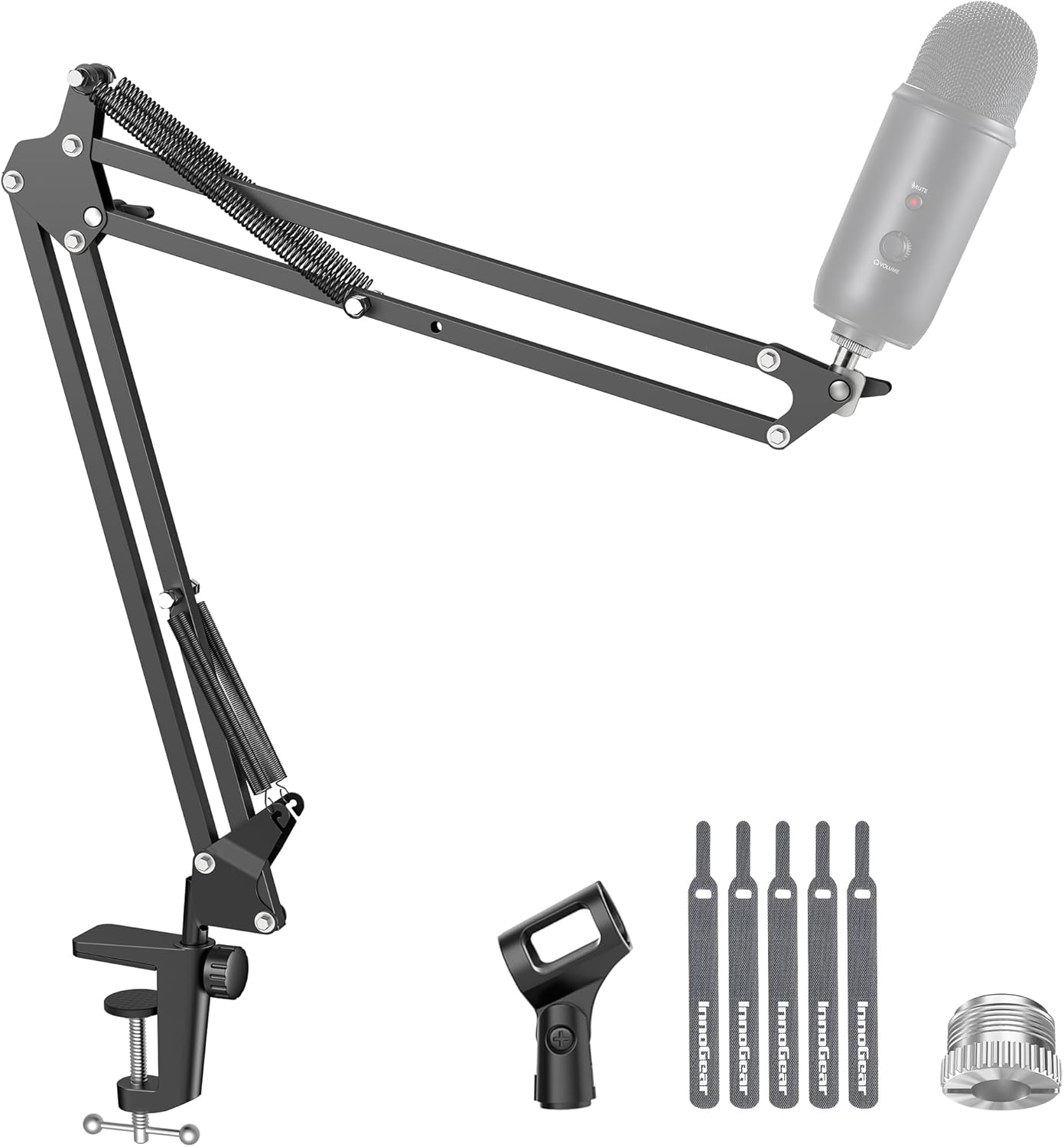
The InnoGear MU01 boom arm microphone stand is a professional-grade mounting solution designed for content creators, streamers, podcasters, and musicians who demand reliable microphone positioning. This desk-mounted arm accommodates popular USB microphones including Blue Yeti, Fifine, HyperX, and traditional XLR microphones with the included adapters.
The standout feature of this boom arm is its exceptional adjustability and build quality. With 360-degree base rotation, 135-degree back-and-forth extension, 180-degree vertical movement, and a 270-degree metal adapter, you can position your microphone precisely where needed. The 3.3lb weight capacity significantly exceeds standard competitors at 2.2lb, providing confidence for heavier microphone setups. The engineering specifically addresses a common flaw in other boom arms by eliminating the problematic knob on the arm shaft that causes spring deformation over time.
Build and design quality are exceptional for the price point. The alloy steel construction feels solid and substantial, while the super-strong springs enable silent, effortless positioning crucial for live recording sessions. The foldable design allows convenient storage when not in use, and the secure desk clamp grips edges up to 2 inches thick without wobbling. The included standard microphone clip and 5/8" to 3/8" adapter ensure compatibility with most popular microphone models.
Potential drawbacks include the desk clamp requirement for flat edges and the need for separate shock mount purchases for certain microphone models. The clamp design may not work with curved or slanted desk surfaces. Setup requires some manual adjustment to dial in your preferred microphone angle and height.
The InnoGear MU01 represents excellent value for anyone seeking a durable, feature-rich microphone boom arm. Its superior build quality, extensive adjustability, and broad microphone compatibility make it an ideal choice for serious content creators and recording enthusiasts.
Model: InnoGear MU01
Material: Alloy Steel with reinforced springs
Weight Capacity: 3.3 lbs (1.5 kg)
Dimensions: 15 x 1.5 x 4 inches
Maximum Height: 27.6 inches
Base Type: Desk clamp for edges up to 2 inches thick
Mount Thread Sizes: 3/8 inch and 5/8 inch
Adjustability: 360-degree base rotation, 135-degree extension, 180-degree vertical movement, 270-degree adapter rotation
Weight: 1.4 pounds
Compatibility: Blue Yeti, Fifine, HyperX, Shure SM58, Samson Q2U, and other standard microphones
Warranty: Manufacturer warranty included (does not cover microphones)
Who Should Buy: This boom arm is ideal for streamers, podcasters, content creators, musicians, and anyone requiring professional microphone positioning with space-saving storage. It works best with USB microphones like Blue Yeti, Fifine models, and HyperX gaming headset microphones, as well as traditional XLR microphones with adapters.
Desk Requirements: Ensure your desk has a flat edge between 0.5 and 2 inches thick for optimal clamp compatibility. Curved or slanted desk edges may not work with this clamp design.
Microphone Compatibility: Check your microphone's thread size (typically 3/8 inch or 5/8 inch). The included adapters cover most popular models, but verify compatibility before purchase if using less common microphone brands.
Setup Tips: Allow time for initial adjustment to find your preferred microphone height and angle. The boom arm's smooth operation means minimal repositioning is needed once properly configured. For heavy microphones near the 3.3lb limit, ensure the desk clamp is tightened securely.
Maintenance: Periodically check clamp tightness and spring tension. The innovative design minimizes spring wear compared to competitors, but regular inspection extends product lifespan.
How to Choose Your Black Boom Arm
Stability and Load Capacity
A boom arm must hold your microphone securely without sagging or wobbling. Assess the maximum weight capacity, which varies significantly. Lightweight USB mics have different needs than heavy broadcast models like the Shure SM7B. Look for reinforced construction, such as the gear-lock mechanism on the AA AUDIO ACCESSORY Mic Arm Desk Mount, which prevents sinking over time.
Desk Compatibility and Mounting
Check your desk’s thickness and edge style. Most arms use a C-clamp, but their maximum grip varies from under two inches to over 2.75 inches. Ensure the clamp has protective padding to prevent scratches. For desks that cannot be clamped, a floor-standing tripod option like the InnoGear Mic Stand Tripod Boom Arm Floor offers a versatile alternative.
Adjustability and Range of Motion
Full 360-degree rotation and ample vertical tilt are essential for perfect microphone placement. Consider the total horizontal reach and how low the arm can go. Low-profile designs, such as the InnoGear Low Profile Mic Arm, sit discreetly below your monitor for an unobstructed view, a key feature for streamers. Smooth, silent adjustment is also vital for on-air use.
Cable Management and Aesthetics
Integrated cable channels or magnetic runners keep your XLR or USB cables neatly tucked away. This not only creates a clean, professional look but also prevents cables from snagging or pulling on your microphone. A tidy setup complements other gear, like your audio interface or USB microphone.
Final Thoughts
Ultimately, the best black microphone boom arm aligns with your specific microphone weight, desk space, and workflow needs. For broadcast-quality smoothness and silent operation, the RØDE PSA1+ Professional Studio Boom Arm remains an industry benchmark. If you prioritize a space-saving, low-profile design that stays out of your sightline, the InnoGear Low Profile Mic Arm Boom Arm Microphone offers excellent value and a sleek aesthetic, ensuring your focus stays on your content.
Frequently Asked Questions
<!–Will a boom arm damage my desk?
A quality boom arm should not damage your desk. Most models include a C-clamp with rubber or foam padding on the contact points. This padding distributes pressure and prevents scratches or dents on your desktop surface when the clamp is properly tightened.
Can a boom arm hold a heavy microphone like the Shure SM7B?
Yes, but you must select an arm rated for the weight. The Shure SM7B and similar dynamic microphones require a robust arm with a high load capacity. Look for arms specifically marketed for heavy mics, such as the AA AUDIO ACCESSORY model with its 6.6 lb capacity, or the RØDE PSA1+, which is validated for professional broadcast use.
What is the advantage of a low-profile boom arm?
A low-profile boom arm is designed to position the microphone without obstructing your view of the monitor or camera. It extends from a lower point on the desk, often tucking neatly under your screen. This is ideal for streamers, gamers, and anyone who needs to maintain a clear sightline while using a high-quality microphone close to their face.
Do I need a pop filter if I use a boom arm?
A boom arm and a pop filter serve different purposes. The arm positions the microphone, while a pop filter reduces plosive sounds (like ‘p’ and ‘b’). Using both is recommended for professional vocal recording. You can easily attach a pop filter to the microphone itself. For guidance on selecting one, see our resource on the best pop filters for voiceovers in 2026.







Write Your Review
No reviews yet. Be the first to share your experience!