

Staring at a mouse and keyboard can drain creativity fast. Whether you’re mixing a complex track in your digital audio workstation or navigating a virtual cockpit, tactile control transforms the experience. This guide cuts through the noise to highlight the best control surfaces for music producers, audio engineers, and flight simulation enthusiasts.
We have evaluated options from leading brands like KORG, Behringer, and Thrustmaster. You will find detailed insights on products that offer hands-on faders, rotary encoders, and dedicated buttons for seamless command. Let’s find the perfect hardware to make your workflow more intuitive and responsive.

Pros
- Motorized faders provide tactile feedback and accurately reflect DAW automation in real time
- Comprehensive button layout and jog wheel streamline workflow and reduce reliance on keyboard shortcuts
- LCD scribble strips with customizable colors and descriptions simplify track management across complex sessions
- Robust build quality and extensive connectivity options ensure long-term reliability and studio compatibility
- Professional-grade features at a mid-range price point compared to competing control surfaces
Cons
- Limited to 8 channels of fader control, which may require banking for larger mixing sessions
- Requires learning curve for optimal integration with specific DAW setup and workflow preferences
- Single review available limits long-term reliability feedback from diverse user base
The Behringer X-Touch is a professional universal control surface designed to bring hands-on mixing capabilities to your digital audio workstation. This device is purpose-built for music producers, audio engineers, mixing professionals, and serious home studio enthusiasts who want to move beyond mouse and keyboard control and experience tactile, real-time command over their DAW.
The standout feature is undoubtedly the 9 motorized 100mm touch-sensitive faders that sync with your DAW in real time, reflecting every automation move you write. Combined with 8 rotary encoders, 92 illuminated buttons, and a responsive jog wheel, the X-Touch delivers comprehensive control over mixing parameters, transport functions, and plugin controls. The LCD scribble strips at the top of each channel provide instant visual identification of tracks and parameters, dramatically speeding up mix recalls and workflow efficiency.
Build quality is solid throughout. The device weighs 12.9 pounds and feels substantial on a desk or rack. Connectivity is comprehensive with USB Type B, Ethernet, dual USB Type A ports, MIDI I/O, and footswitch inputs, making integration with virtually any studio setup straightforward. The illuminated buttons and LED collars provide clear visual feedback of your settings and current DAW state.
The main limitation is that the X-Touch controls 8 channels of faders, so larger mixing sessions require banking between channel groups. Additionally, setup and workflow integration take time to optimize for your specific DAW, though the HUI and Mackie protocol support covers most major platforms including Pro Tools, Logic, Ableton, and Cubase.
The Behringer X-Touch represents excellent value for professionals and serious enthusiasts seeking to elevate their mixing experience with tactile control and visual feedback. The included Turnstile Audio headphones and one-year warranty add practical value to an already compelling package.
Physical Specifications
Weight: 12.9 pounds
Faders: 9 motorized, touch-sensitive 100mm faders with full automation
Rotary Controls: 8 with LED collars
Buttons: 92 illuminated dedicated buttons
Meters: 8-segment LED per channel
Display: 8 LCD scribble strips with customizable color and description
Connectivity
USB: 1 USB Type B port, 2 USB Type A ports
Ethernet: 1 port
MIDI: Input and output
Additional: Footswitch inputs
Control Protocols: HUI and Mackie control
Warranty and Included Items
Warranty: 1 year limited warranty via Adorama
Bundle Includes: Behringer X-Touch control surface and Turnstile Audio studio monitor headphones
Manufacturer: Behringer
Model: 0808-AAD86-US1 B
Who Should Buy This
The Behringer X-Touch is ideal for music producers, mixing engineers, and audio professionals who spend significant time in a DAW and want to transition from mouse-based control to tactile mixing. It works exceptionally well for those mixing multiple-track sessions where visual feedback and quick parameter access significantly impact workflow efficiency.
DAW Compatibility
The X-Touch supports HUI and Mackie control protocols, which means it works with Pro Tools, Logic Pro, Ableton Live, Cubase, Reaper, Studio One, and other major DAWs. Before purchasing, verify that your specific DAW is listed in the compatibility documentation to ensure seamless integration.
Studio Setup Considerations
Ensure you have available USB or Ethernet connectivity on your computer. The device requires approximately 24 inches of horizontal desk space. Consider your current monitor and keyboard setup to avoid workspace clutter. The motorized faders and illuminated buttons do require power, which is supplied via USB connection.
Learning Curve
Allow time to configure button assignments and learn the layout specific to your DAW. Most users report full proficiency within 2-3 weeks of regular use. Behringer provides documentation and video tutorials to accelerate the learning process.
Pros
- Motorized faders dramatically speed up mixing workflows compared to mouse control, reducing fatigue and improving precision
- LCD scribble strips eliminate guesswork by displaying track and parameter information directly on the hardware
- Exceptional value for motorized fader technology, significantly cheaper than comparable professional control surfaces
- Wide DAW compatibility through industry-standard HUI and Mackie Control protocols ensures long-term usability
- Responsive touch-sensitive faders and intuitive layout make it accessible for both beginners and experienced engineers
Cons
- Motorized faders produce audible mechanical noise during operation, which some users find distracting in quiet environments
- Button functions may require custom mapping or paper overlay workarounds depending on specific DAW implementation
- Some users report compatibility issues with newer AMD processor USB ports, requiring external USB card adapters
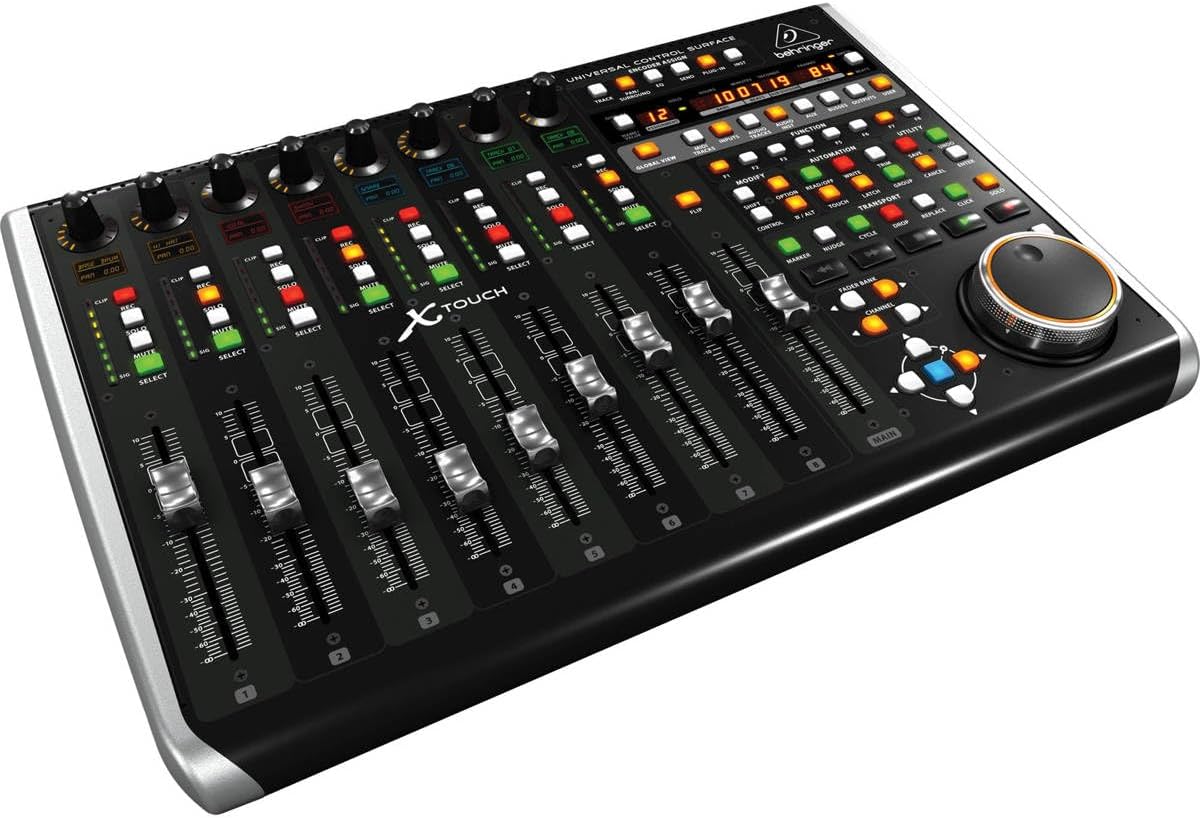
The Behringer X-TOUCH is a universal DAW control surface designed for music producers, audio engineers, and sound designers who want tactile mixing control without the expense of high-end professional consoles. It bridges the gap between budget-friendly and professional-grade equipment, offering genuine motorized faders and real-time parameter feedback at an accessible price point.
The standout features are the 9 motorized faders and 8 LCD scribble strips that transform your mixing experience. Instead of clicking and dragging in your DAW, you physically move faders and watch track names and parameters display on the dedicated screens. Users consistently report that this hardware approach makes mixing faster, more intuitive, and significantly reduces hand fatigue compared to traditional mouse-based workflows. The universal HUI and Mackie Control protocol support means it works with virtually every major DAW including Ableton Live, Pro Tools, FL Studio, Logic Pro, and Reaper.
Build quality is solid for the price range, with a compact footprint of 21.9 by 14.9 inches that fits comfortably on studio desks or fits into portable setups. The touch-sensitive faders respond quickly and allow simultaneous multi-fader adjustments, giving you real console-like control. Connectivity options include USB, Ethernet, and MIDI, providing flexibility for various studio configurations and future expansion possibilities.
The main drawbacks are the audible mechanical noise from motorized fader operation and occasional button mapping inconsistencies with certain DAWs that may require custom configuration. Additionally, some users with newer AMD processor systems report USB compatibility issues requiring external adapters. These are minor concerns for most users but worth considering if you work in noise-sensitive environments or have specific hardware configurations.
The X-TOUCH delivers genuine value for producers serious about hands-on mixing. It's the cheapest motorized fader controller on the market that actually works, making it an excellent choice for upgrading from mouse-based mixing without breaking the budget. Highly recommended for anyone using a compatible DAW.
Connectivity and Ports: USB 2.0 (3 total ports, 2 x USB 2.0), Ethernet RTP MIDI, MIDI interface. Supports both Mac and Windows platforms including iOS compatibility.
Control Surface: 9 x 100mm fully automated touch-sensitive motorized faders, 8 x dynamic LCD scribble strips for track and parameter display. Control methods include touchscreen interface and traditional button controls.
Physical Specifications: Dimensions 21.9 inches deep by 14.9 inches wide by 6.5 inches high. Weight 9.4 pounds. Color black. Portable design suitable for studio and live applications.
Compatibility: Supports HUI and Mackie Control protocols. Compatible with Ableton Live, Avid Pro Tools, FL Studio, Logic Pro, Reaper, Cakewalk Sonar, and Premiere Pro. Works with laptop and desktop computers running Windows or macOS.
Included Components: X-TOUCH control surface, Ethernet/USB/MIDI interface, dynamic microphone cardioid, 1-year extended warranty. Model number X-TOUCH, manufactured by Music Tribe US.
Who Should Buy: Music producers and audio engineers using DAWs like Ableton Live, Pro Tools, FL Studio, Logic Pro, or Reaper who want to upgrade from mouse-based mixing. Also suitable for Premiere Pro video editors requiring precise audio control. Best for anyone seeking affordable motorized fader technology without premium pricing.
Compatibility Check: Before purchasing, verify your DAW supports HUI or Mackie Control protocols. Most major DAWs do, but some niche software may have limited support. Check your specific DAW documentation or forums for implementation details. Note that button functions may require custom mapping depending on your DAW.
Setup Considerations: Requires USB 2.0 connection or Ethernet for RTP MIDI. If you have a newer AMD processor system, you may need an external USB adapter for reliable operation. Motorized faders produce mechanical noise, so consider your environment if working in noise-sensitive spaces.
Value Proposition: This is the most affordable motorized fader control surface available. Compare it to compact versions to determine if the 9-fader layout justifies the additional desk space. The LCD scribble strips are a significant workflow advantage worth the investment for serious mixing work.
Long-term Investment: The universal protocol support and established manufacturer backing ensure this device will remain compatible with future DAW updates. The motorized fader technology is reliable and cost-effective compared to higher-end alternatives.
Pros
- Genuinely portable with slim profile and lightweight design, perfect for mobile producers
- 8 motorized faders provide real-time feedback and tactile mixing control
- Class-compliant operation works seamlessly across Mac, PC, and iOS platforms
- Durable construction with solid feel despite compact size
- Excellent price-to-functionality ratio compared to larger controllers
Cons
- Limited to 8 faders and 24 buttons, so advanced users may find it restrictive for complex sessions
- Knob and fader caps may loosen with heavy use over time
- Fewer knobs and encoders compared to some competitors, though software editor helps mitigate this
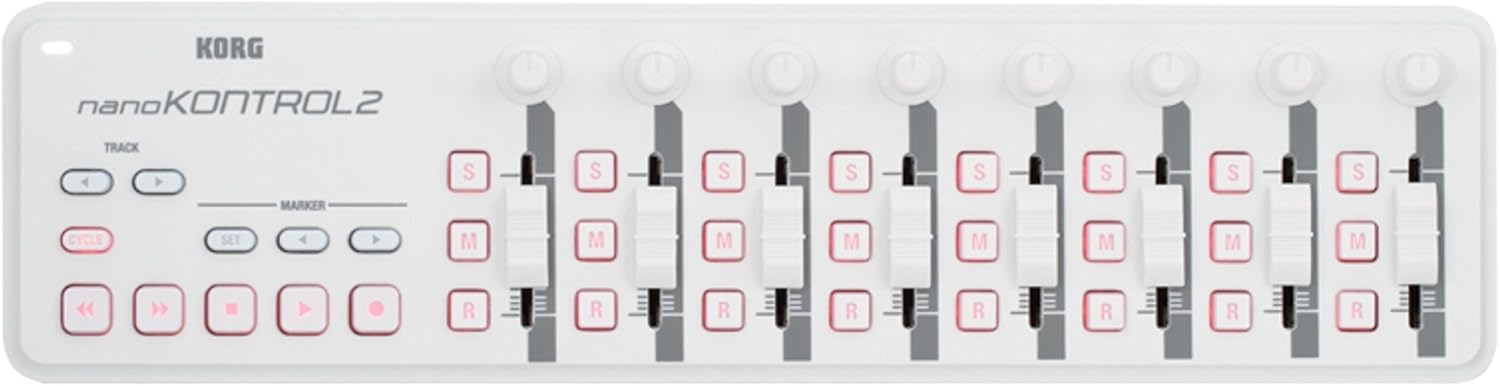
The Korg nanoKONTROL2 is a slim-line USB MIDI controller designed for music producers, audio engineers, and musicians who need professional mixing controls without the bulk of a full-sized console. This device is ideal for home studio setups, mobile production rigs, and anyone looking to add hands-on control to their digital audio workstation.
The standout feature is the combination of 8 motorized faders and 24 assignable buttons that deliver real tactile control over your DAW's mixing parameters, transport controls, and track selection. Users consistently praise how the motorized faders provide visual feedback, making mixing feel more like working on a physical console than clicking with a mouse. The included Korg software editor allows you to customize button behavior, set ranges, and enable latch modes for maximum flexibility across different DAWs and software synths.
Build quality is solid for the price point, with a stainless steel construction and durable plastic components that feel premium despite the compact form factor. The slim white design is visually appealing and matches well with modern studio aesthetics. The device is genuinely portable at 15.52 ounces, making it practical for producers who work between multiple locations or collaborate with others.
The main limitation is the relatively small control surface compared to larger MIDI controllers, though this is intentional for portability. Some users may find 8 faders restrictive for complex mixing sessions, and component durability concerns about knob caps loosening over extended use have been noted by long-term owners. However, the class-compliant USB connectivity means you can get up and running immediately with any DAW without driver installation.
The Korg nanoKONTROL2 delivers exceptional value for producers seeking professional mixing control in a portable, affordable package. It bridges the gap between keyboard controllers and full mixing surfaces, making it a smart choice for both beginners upgrading from mouse-only workflows and experienced producers needing a secondary control surface for travel or collaboration.
Physical Specifications: Weight: 15.52 ounces, Color: White, Material: Stainless Steel construction with durable plastic components, Form Factor: Ultra-compact slim-line design
Control Surface: 8 motorized faders, 24 assignable buttons, 8 mixer channels, ergonomic keyboard-style layout with touch control method
Connectivity: USB 2.0 interface, 1 USB port, class-compliant operation, includes USB cable. Compatible with Mac, PC, and iOS devices with USB connectivity
Software Compatibility: Works with all major DAW programs including Ableton Live, Logic Pro, Cubase, Pro Tools, and digital synth software. Includes Korg software editor for custom mapping and control configuration
Warranty and Support: 1-year manufacturer warranty, Model Year: 2018, Manufacturer: Korg USA Inc.
Who Should Buy This: The nanoKONTROL2 is perfect for bedroom producers, traveling musicians, studio engineers needing a secondary control surface, and anyone transitioning from mouse-based mixing to tactile DAW control. It's also an excellent choice for those wanting to learn professional mixing workflows on a budget.
Who Should Look Elsewhere: If you need extensive control over many parameters simultaneously or prefer large faders and knobs, consider a full-sized mixing console or larger MIDI controller. Professional studios with multiple workstations may also want something with more real estate.
Pro Tips: Check if your purchase includes software bundle coupons, which can provide significant savings on Korg Collection software. Use the included Korg editor to customize buttons for your specific workflow. The class-compliant operation means you can often use it without installing any drivers, making setup incredibly fast.
Value Consideration: At under $70, this controller offers exceptional value when you factor in the motorized faders, software editor, and portability. The potential software bundle savings make it an even better investment for producers interested in Korg's virtual instruments.

Pros
- Rock-solid build quality with tactile, realistic switch clicks that feel authentic
- Native plug-and-play compatibility with Microsoft Flight Simulator Steam requires zero configuration
- LED feedback on landing gear status creates immersive, true-to-life simulation experience
- Modular mounting system offers exceptional flexibility for custom cockpit setups
- Expandable platform works alongside other flight panels for complete virtual cockpit control
Cons
- Driver installation required for some simulation software, not universally plug-and-play across all platforms
- Landing gear lights do not illuminate when used with third-party games via macro programming
- Requires software compatibility research to ensure integration with your specific flight simulator version
The Logitech G Pro Flight Switch Panel is a dedicated cockpit control unit designed for flight simulation enthusiasts who want authentic, tactile control over critical aircraft systems. This is the ideal accessory for serious sim pilots using Microsoft Flight Simulator, X-Plane, or Prepar3D who want to move beyond keyboard controls and into realistic, hardware-based flight operations.
The standout feature is the realistic landing gear control with LED indicators that display actual gear status from your simulation software. The 14 customizable switches handle engine power, lights, and other essential cockpit functions with satisfying mechanical feedback. Users report that native integration with Microsoft Flight Simulator Steam works seamlessly, requiring nothing more than plugging in the unit. The switch mechanism produces authentic clicks that enhance immersion and make every control feel purposeful.
Build quality is excellent throughout, with solid construction that feels professional-grade and durable. The modular design with included mounting brackets allows you to position the panel on your yoke, desk, or custom cockpit frame. You can stack multiple Saitek panels vertically or arrange them side-by-side, creating a fully customizable control layout limited only by your imagination and available space.
The main drawback is that not all flight simulation software recognizes the panel automatically. Some users need to install drivers from the Logitech website or configure software settings, which can be frustrating during initial setup. Additionally, when used with third-party games through macro programming, the landing gear LED feedback does not function, though the switches themselves work perfectly.
This is a well-engineered product that delivers authentic cockpit control for dedicated flight simulation enthusiasts. If you use Microsoft Flight Simulator or are willing to invest time in software configuration, the Pro Flight Switch Panel significantly enhances immersion and provides years of reliable use in your virtual cockpit.
Controller Type: Switch Panel with 14 buttons
Connectivity: USB
Compatibility: Windows 7, 8, 8.1, 10 and newer
Supported Software: Microsoft Flight Simulator X, Prepar3D 2.2+, X-Plane 10, and compatible third-party simulation software
Physical Dimensions: 11.1 inches D x 2.48 inches W x 3.31 inches H
Weight: 14.78 ounces
Color: White
Warranty: 90 days
Included Components: Pro Flight Switch Panel, mounting bracket, quick start guide, and screws
Is This Right for You? This panel is ideal if you own Microsoft Flight Simulator, X-Plane, or Prepar3D and want authentic hardware controls. It's perfect for building a modular cockpit setup without breaking the bank.
Compatibility Considerations: Verify your flight simulation software version before purchasing. Microsoft Flight Simulator Steam users report seamless compatibility. Older versions of Flight Simulator X may require driver installation from the Logitech website.
Setup Tips: Have your flight simulator software installed and updated before connecting the panel. Check Logitech's support page for the latest drivers if your software doesn't recognize the panel immediately. Consider purchasing additional Saitek panels to expand your cockpit setup over time.
Alternative Uses: The panel works with space sims and action games like Elite Dangerous and Star Citizen through macro programming software such as DCSFlightpanels, though LED feedback will not function in these applications.

Pros
- Safe, non-toxic formula approved by EPA with no harmful chemicals that could damage surfaces or harm family members
- Dual-action technology eliminates existing mold while creating a long-lasting barrier against future growth
- Aerosol design provides superior coverage for hard-to-reach areas that traditional liquids and sprays cannot access effectively
- Versatile application works on multiple surface types including drywall, wood, tile, and fabric without pre-treatment
- Odorless and bleach-free makes it ideal for use in occupied homes without causing respiratory irritation or lingering odors
Cons
- Aerosol format may require proper ventilation during application despite being odorless and low-VOC
- Best suited for mid-sized jobs rather than large-scale commercial mold remediation projects
- Results depend on proper application technique and may require multiple treatments for severe mold infestations
Concrobium Mold Control Aerosol is a professional-grade mold elimination and prevention solution designed for homeowners dealing with mold and mildew issues on indoor and outdoor surfaces. This product is ideal for anyone seeking a safe, chemical-free alternative to bleach-based cleaners, particularly families with children, pets, or members with chemical sensitivities.
The standout feature of this product is its dual-action formula that crushes mold spores as it dries, then leaves behind an invisible antimicrobial shield to prevent future growth. The aerosol dispersal system creates a fogging effect that reaches corners, crevices, and hard-to-access areas that traditional sprays cannot cover effectively. EPA registration confirms its safety and efficacy for household use without the harsh chemicals found in conventional mold treatments.
The design is practical and user-friendly, with a compact 14.1 oz aerosol can that fits easily in storage and is convenient for spot treatments and preventative applications. The odorless, bleach-free, and VOC-free formulation makes it safe to use in occupied spaces without causing respiratory irritation or leaving chemical odors. It works on nearly all household surfaces including drywall, wood, tile, fabric, and more without causing damage or discoloration.
The main limitation is that this aerosol is best suited for mid-sized mold problems rather than extensive infestations requiring professional remediation. Results depend on proper application and may require multiple treatments for severe cases. Additionally, despite low VOC content, adequate ventilation during application is still recommended for best results.
Overall, Concrobium Mold Control Aerosol delivers an effective, safe, and convenient solution for homeowners seeking to eliminate and prevent mold growth without harsh chemicals. Its EPA registration, versatile application, and preventative benefits make it a solid choice for routine mold control and maintenance in moisture-prone areas.
Product Dimensions: 2.5 x 2.5 x 9.7 inches
Weight: 1 pound
Manufacturer: Rust-Oleum
Model Number: 27400CAL
ASIN: B084CNRHHF
Format: Aerosol spray, 14.1 oz
Key Certifications: EPA Registered
Formula Type: Bleach-free, VOC-free, odorless
Compatible Surfaces: Nearly all household surfaces including drywall, wood, tile, fabric, and more
Who Should Buy This? Concrobium Mold Control Aerosol is perfect for homeowners dealing with mold and mildew on indoor and outdoor surfaces, especially those seeking a safe, chemical-free solution. It is ideal for preventative maintenance in bathrooms, basements, attics, and other moisture-prone areas.
Best Use Cases: Mid-sized mold problems, hard-to-reach areas, preventative treatments, and routine maintenance. The aerosol format excels at reaching corners and crevices that traditional cleaners cannot access.
Application Tips: Ensure proper ventilation during use despite the low-VOC formulation. Shake the can well before application and test on an inconspicuous area first. Multiple applications may be needed for severe infestations.
Storage: Keep in a cool, dry place away from direct sunlight and heat sources. The compact 14.1 oz size makes it easy to store in cabinets or utility closets for quick access when needed.

Pros
- Outstanding precision and responsiveness with patented H.E.A.R.T haptic technology
- Complete package includes all essential components, no additional purchases required
- Ambidextrous design with removable components accommodates any hand preference
- Extensive customization options through T.A.R.G.E.T software for different games
- Proven durability and reliability across flight sims, space games, and racing applications
Cons
- Requires desk mounts for throttle and joystick to prevent movement during intense gameplay
- Pedals may slide on carpet surfaces without proper floor mat placement
- Better suited for beginners to intermediate players; advanced users may eventually seek high-end alternatives
The Thrustmaster T16000M FCS Flight Pack represents a comprehensive entry point into serious flight simulation and space gaming. This complete control system is designed for PC gamers seeking realistic, responsive controls that go far beyond keyboard and mouse input. Whether you're exploring Elite Dangerous, flying Microsoft Flight Simulator 2024, or piloting in FSX, this pack provides the tools needed for immersive gameplay.
What sets this system apart is its precision engineering and thoughtful design. The patented H.E.A.R.T technology ensures consistent accuracy that doesn't degrade over extended use, a critical factor for competitive and long-session gaming. The 16 programmable action buttons, combined with an 8-way POV hat switch and four independent axes including twist rudder control, provide extensive mapping possibilities. Real-world testing shows users achieving over 1200 hours of reliable performance, with smooth, responsive controls that feel premium despite the accessible price point.
The fully ambidextrous design demonstrates Thrustmaster's commitment to inclusivity. Three removable components allow quick reconfiguration for left or right-handed users. The package includes everything needed to start flying: the main joystick, throttle unit with integrated pedal connection port, and rudder pedals. The T.A.R.G.E.T software enables custom profile creation for different games, maximizing control flexibility.
Setup requires consideration of your play environment. The throttle and joystick benefit from desk mounts to prevent movement during intense gameplay sessions, and pedals may slide on carpet without a floor mat. These are minor setup considerations rather than product flaws. The included instruction manual provides clear guidance for assembly and calibration.
For flight sim enthusiasts and space gamers seeking reliable, feature-rich controls at mid-range pricing, the T16000M FCS Flight Pack delivers exceptional value and performance. It's an investment that grows with your skills and commitment to the hobby.
Connectivity and Compatibility: USB connection, compatible with Windows 10, 8, 7, and Vista in both 32-bit and 64-bit versions. Requires PC hardware platform.
Control Components: 16 action buttons with braille-style physical identification, 1 eight-way Point of View hat switch, 4 independent axes including twist rudder control. Fully removable and reconfigurable for ambidextrous use.
Physical Specifications: Package dimensions 16.73 x 24.02 x 17.52 inches, total weight 3 pounds. Includes joystick, throttle unit, and rudder pedals. Color: Black. Corded electric power source via USB.
Warranty and Support: One-year manufacturer warranty from Thrustmaster VG. T.A.R.G.E.T software included for custom profile creation and game-specific mapping.
Is This Right for You? The T16000M FCS excels for flight sim newcomers and intermediate players. If you're upgrading from keyboard controls or basic joysticks, this system provides a significant performance leap. It's ideal for Microsoft Flight Simulator, Elite Dangerous, Star Citizen, and classic titles like FSX.
Setup Considerations: Plan for desk space to properly mount the throttle and joystick units. A non-slip mat for pedals is recommended if you have carpet flooring. Budget 30-60 minutes for initial assembly and calibration, though the process is straightforward with included documentation.
Software and Customization: The T.A.R.G.E.T software is essential for maximizing this system's potential. Create separate profiles for different games to optimize button mapping and control sensitivity. Thrustmaster's online community provides pre-configured profiles for popular titles.
Long-Term Value: This system reliably handles 1000+ gaming hours. As your skills advance, you may eventually explore higher-end options, but the T16000M FCS provides years of satisfying gameplay for most enthusiasts.

Pros
- Highly intuitive layout with 16 encoders and 8 buttons provides extensive hands-on control
- Excellent DAW compatibility covers all major production platforms and workflows
- Custom mapping via Novation Components allows complete personalization for any setup
- Compact 9.1-inch form factor fits easily into any studio without sacrificing functionality
- Generous software bundle adds significant value to the overall package
Cons
- Limited number of physical controls compared to larger MIDI controllers, which may feel restrictive for complex mixing tasks
- No reviews available yet, so real-world user feedback and long-term reliability data are not yet established
- Steep learning curve required to fully utilize custom mode mapping and Novation Components software
The Novation Launch Control 3 is a compact USB MIDI control surface designed for producers, musicians, and sound designers who need hands-on control over their DAW, hardware synths, and plugin parameters. This controller bridges the gap between software and hardware workflows, making it ideal for anyone building a hybrid studio setup or looking to add tactile control to their existing production environment.
The standout feature is undoubtedly the 16 endless rotary encoders paired with 8 assignable buttons and a crisp OLED display. These components work together seamlessly to provide immediate visual feedback and intuitive parameter control. The deep integration with major DAWs like Ableton Live, Logic Pro, FL Studio, Cubase, and Bitwig means you can get up and running quickly with pre-mapped controls, while the custom mode feature allows you to create personalized setups for specific workflows or projects.
Build quality feels solid despite the compact plastic chassis. The encoder feel is responsive and smooth, while the buttons offer satisfying tactile feedback. The USB-C connection is modern and reliable, and the full MIDI I/O connectivity (In, Out, Out2/Thru) provides flexibility for connecting external hardware without requiring a computer. At just 0.54 kg and 9.1 inches on each side, this controller takes up minimal desk space.
The main drawback is the limited physical control surface compared to larger MIDI controllers, which may feel restrictive if you need to adjust many parameters simultaneously. Additionally, with no user reviews available yet, long-term reliability and real-world performance data from the community are not yet established. The custom mapping learning curve could also be steep for beginners unfamiliar with MIDI protocol.
Overall, the Launch Control 3 offers excellent value for producers seeking a compact, feature-rich MIDI controller with strong DAW integration and flexible customization options. The included software bundle sweetens the deal significantly, making this a smart investment for both beginners and experienced producers upgrading their setup.
Connectivity: USB Type-C, 5-pin MIDI I/O (In, Out, Out2/Thru)
Physical Controls: 16 endless rotary encoders, 8 assignable buttons, OLED display
Dimensions: 9.1 inches D x 9.1 inches W x 9.1 inches H
Weight: 0.54 kg (1.19 lbs)
Compatible Platforms: Windows, Linux, PC, Synthesizer, Groovebox
Supported Software: Ableton Live, Logic Pro, FL Studio, Pro Tools, Cubase, Bitwig
Custom Modes: Up to 7 custom mappings storable via Novation Components
Included: Launch Control 3 unit, USB-C cable
Warranty: 3-year manufacturer warranty
Best For: This controller is perfect for producers using Ableton Live, Logic Pro, FL Studio, or Cubase who want tactile control over their DAW and hardware. It excels in hybrid setups where you combine software, hardware synths, and external effects units.
Consider This If: You need a compact MIDI controller that doesn't require much desk space, you want strong out-of-the-box DAW integration, or you're building your first professional studio on a budget.
Skip This If: You require extensive physical controls for complex mixing tasks, you work exclusively with hardware and don't use a DAW, or you need a controller with built-in audio interface capabilities.
Setup Tips: Start with the pre-mapped DAW profiles before diving into custom mode creation. This will help you understand how the controller works before building your own mappings. The included software bundle provides excellent value, so take time to explore Ableton Live Lite and Cubase LE to maximize your investment.
Pros
- Comprehensive out-of-the-box setup eliminates the need to purchase separate components for a complete flight experience
- Intuitive flight management display with real-time status alerts and customizable ambient lighting enhances immersion and learning
- Robust build quality with hall effect sensor technology provides long-term durability and consistent performance
- Universal compatibility across Xbox Series X|S, Xbox One, and Windows PC platforms with broad game support
- Excellent customer support from Turtle Beach with responsive firmware updates and helpful troubleshooting
Cons
- Some users report initial stiffness or jerky spring response that may require break-in time or adjustment
- Xbox One and Xbox Cloud Gaming versions of Microsoft Flight Simulator 2020 are not supported, limiting compatibility
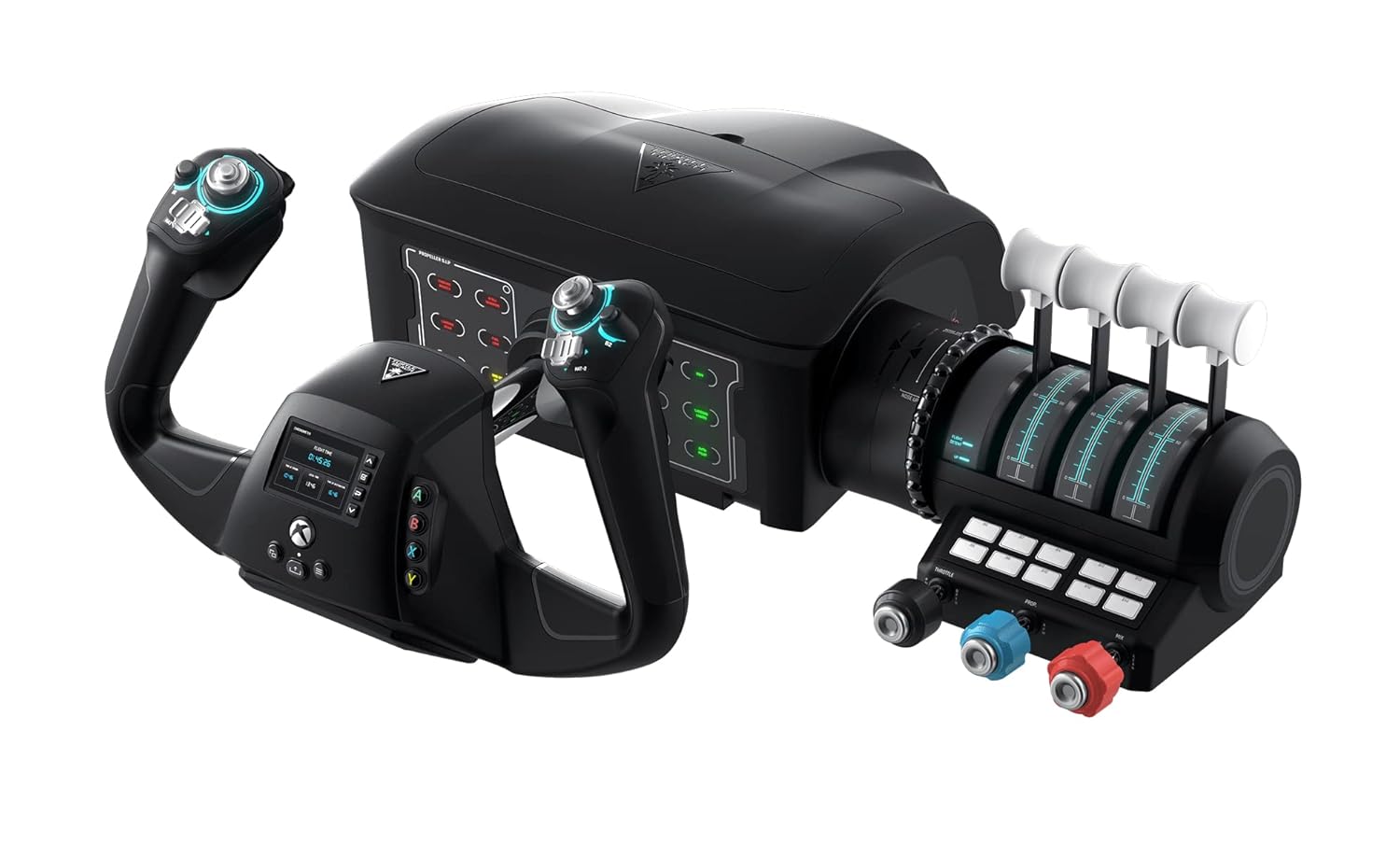
The Turtle Beach VelocityOne Flight is a professional-grade flight control system designed for serious flight simulation enthusiasts on Xbox Series X|S, Xbox One, and Windows PC. Developed by aeronautical engineers and pilots, this all-in-one system is perfect for players who want authentic, immersive flight experiences without purchasing multiple peripherals separately.
The standout feature is the realistic 180-degree yoke with integrated rudder controls and toe brakes, paired with a modular throttle quadrant and dedicated trim wheel. The full-color flight management display is genuinely useful, not just a gimmick, helping you configure controls, learn button assignments, and monitor real-time cockpit alerts. With 12 analog axes, 26 programmable buttons, and customizable lever handles for different aircraft types, you have extensive control and customization options.
Build quality is solid and designed for long-term use, featuring a non-contact hall effect sensor in the yoke shaft that resists wear and degradation. The secure clamping system integrates reliably into various home setups. Setup is straightforward via USB connection, and the system works out-of-the-box with most supported titles including Microsoft Flight Simulator 2024, X-Plane, Elite Dangerous, and War Thunder.
Some users report initial stiffness or jerky spring response, though this typically improves with use. The $399.99 price is substantial, making it better suited for dedicated flight sim enthusiasts than casual players. Additionally, Xbox One and Xbox Cloud Gaming versions of Microsoft Flight Simulator 2020 are not supported, which may limit compatibility for some users.
Overall, the VelocityOne Flight delivers exceptional value for serious flight simulation players seeking an authentic, comprehensive control system. The combination of realistic controls, extensive customization, and reliable build quality makes it one of the best flight simulator controllers available, backed by responsive customer support and regular firmware updates.
Compatibility: Xbox Series X, Xbox Series S, Xbox One, Windows 10 and 11 PC
Controls: 180-degree yoke with integrated rudder, modular throttle quadrant with trim wheel, 26 programmable buttons, 12 analog axes, 2 POV switches, 2 four-way HAT switches
Connectivity: USB wired connection
Display: Full-color flight management display with customizable ambient lighting and status indicator panel
Audio: 3.5mm headset jack for immersive audio coordination
Dimensions: 19.01 x 7.2 x 19.5 inches
Weight: 10 pounds
Power: Corded electric
Model: TBS-0715-02
Who Should Buy: This system is ideal for dedicated flight simulation enthusiasts, student pilots, and gamers who want an authentic, comprehensive flight control experience on Xbox or PC. It's perfect if you play Microsoft Flight Simulator 2024, X-Plane, Elite Dangerous, or other supported flight titles regularly.
Who Should Skip: Casual flight sim players or those on a tight budget should consider entry-level alternatives. If you only play occasionally or want to test flight sims before investing heavily, start with a basic yoke controller first.
Setup Tips: Download the Turtle Beach controller app to your Xbox for firmware updates and optimal performance. Take time to calibrate and configure controls for your preferred aircraft type using the flight management display. Allow break-in time if springs feel stiff initially. Ensure your desk or mount can handle the 10-pound weight securely.
Supported Games: Works best with Microsoft Flight Simulator 2020 and 2024, X-Plane, Elite Dangerous, War Thunder, and other flight simulation titles. Note that manual control mapping may be required for some games outside of Microsoft Flight Simulator.

Pros
- Superior build quality with Hall sensors on landing gear, hook, parking brake, and wing folding handles for lasting durability
- Exceptional versatility with 3-position landing gear switch and generalized brake/wing designs compatible with numerous aircraft models
- Authentic full-analog mechanisms deliver tactile feedback and realistic control feel unavailable on budget simulators
- Comprehensive bundle includes mounting brackets, data cable, adhesive dots, and toolkit for immediate setup
- Professional-grade craftsmanship designed specifically for full-cabin cockpit builders and serious flight simulation enthusiasts
Cons
- No existing user reviews available to validate real-world performance and long-term reliability claims
- PC-only compatibility limits use for console-based flight simulators or cross-platform gaming setups
- Premium price point may be prohibitive for casual flight sim hobbyists or budget-conscious buyers
The WINCTRL PTO 2 is a professional-grade flight simulator control panel engineered for serious aviation enthusiasts, VR pilots, and full-cabin cockpit builders. This 41-button takeoff and landing panel replicates authentic military and commercial aircraft controls, offering a level of immersion far beyond standard gaming controllers. It is designed for PC-based flight simulation platforms and suits pilots who demand realistic, precise control mechanisms.
The standout feature is the full-analog design combined with Hall effect sensors across all major control surfaces including the landing gear, landing hook, parking brake, and wing folding handle. This technology eliminates drift and ensures consistent, precision operation even after extended use. The 3-position hidden switch landing gear system provides exceptional compatibility across diverse aircraft models, while the military-style fluctuation switches accelerate pilot recognition and reduce operational errors during complex maneuvers.
Build quality is exceptional, with a durable PC and ABS plastic shell housing all mechanisms. The anthropomorphic structure feels natural in the hands, and the hidden indicator lights add visual authenticity without cluttering the control panel. Included mounting brackets, adhesive dots, data cable, and toolkit enable quick integration into existing cockpit setups. The generalized design philosophy ensures this panel adapts to various flight sim software and aircraft configurations.
The primary limitation is the lack of existing user reviews, making it difficult to independently verify long-term durability claims. Additionally, PC-only connectivity may disappoint console flight sim fans. The premium price reflects professional-grade components and engineering, which may exceed casual hobbyist budgets.
The WINCTRL PTO 2 represents a serious investment in authentic flight simulation. For dedicated pilots building full cockpits or seeking military-level realism, this panel delivers professional craftsmanship and versatile control options. Casual gamers should consider more affordable alternatives, but serious enthusiasts will find this control panel indispensable for their virtual aviation experience.
Product Model: PTO 2 Panel of Take Off
Brand: WINCTRL
Compatibility: PC via USB
Button Quantity: 41 programmable buttons
Material: PC and ABS plastic shell
Key Components: Full-analog landing gear, landing hook, parking brake, wing folding handle with Hall effect sensors
Landing Gear Switch: 3-position hidden switch design
Connectivity: USB data cable included
Package Contents: PTO 2 panel, left mounting bracket, right mounting bracket, USB data cable, nanometre double-sided adhesive dots, accessories pack, toolkit
Package Dimensions: 290mm length x 170mm width x 195mm height
Package Weight: 1.93kg
Controller Type: Flight Simulator Controller
Additional Features: Ergonomic design, multiuse compatibility, hidden indicator lights
Who Should Buy This Product? The WINCTRL PTO 2 is ideal for dedicated flight simulation enthusiasts building full cockpit setups, professional flight training facilities, serious VR pilots, and hobbyists seeking military-grade realism. This panel suits anyone who values authentic control feedback and precision over casual gaming convenience.
Who Should Look Elsewhere? Casual flight sim players, budget-conscious gamers, and console-only users should consider more affordable alternatives. This premium panel targets professionals and dedicated enthusiasts willing to invest in authentic equipment.
Setup Considerations: The included mounting brackets, adhesive dots, and toolkit enable straightforward installation. Ensure your flight sim software supports USB flight controllers and verify aircraft model compatibility with the PTO 2 before purchase. The 41-button configuration requires learning the control layout, but the ergonomic design minimizes the learning curve.
Value Assessment: Premium pricing reflects Hall effect sensor technology, full-analog mechanisms, and broad aircraft compatibility. Compare against competing flight control panels to ensure alignment with your budget and performance expectations. For serious cockpit builders, the versatility and build quality justify the investment.
How to Choose the Right Control Surface
Primary Use Case and Software Compatibility
Your choice hinges on your main activity. For music production, ensure the surface supports your DAW via protocols like HUI or Mackie Control. The Behringer X-TOUCH Universal Control Surface excels here with broad software integration.
Flight sim enthusiasts need hardware mapped to simulator software. Products like the Turtle Beach VelocityOne Flight Universal Control are built specifically for this. Always verify compatibility with your primary software before purchasing. For more on integrating hardware with your audio setup, explore our guide on the best audio interfaces under 500.
Control Density and Layout
Consider how many parameters you need to manipulate simultaneously. A full-featured unit like the Behringer X-Touch Universal Control Surface Bundle offers nine motorized faders and numerous buttons for comprehensive mixing. For a compact solution, the Korg Nanokontrol2 provides essential transport and level controls in a slim profile.
The layout should feel logical under pressure. Dedicated jog wheels, rotary encoders with LED feedback, and clearly labeled buttons improve efficiency. A cluttered or non-intuitive layout can hinder your workflow rather than help it.
Build Quality and Connectivity
Durability is key for gear used daily. Look for solid construction, reliable faders, and robust knobs. The Thrustmaster T16000M FCS Flight Pack, for instance, is known for its precise Hall effect sensors that maintain accuracy over time.
Check the available ports. USB-C offers modern convenience, while 5-pin MIDI ports, like those on the Novation Launch Control 3, are crucial for connecting hardware synthesizers without a computer. Ethernet connectivity can be vital for linking multiple units in a larger studio. Pairing your control surface with a quality microphone, as discussed in our best studio microphones under 50 guide, completes a professional setup.
Customization and Expandability
The best control surfaces grow with your needs. Software like Novation Components allows you to create and save custom mappings for the Launch Control 3. This is invaluable for controlling specific plugins or external gear.
For flight sim, modularity is a major advantage. The Logitech G Pro Flight Switch Panel can be mounted alongside other modules. The WINCTRL PTO 2 Panel of Take Off also offers highly customizable configurations for different aircraft models. This flexibility ensures your investment remains useful as your setup evolves.
Final Thoughts
Selecting the right control surface fundamentally enhances how you interact with your digital tools. For music producers seeking deep DAW integration and motorized faders, the Behringer X-TOUCH Universal Control Surface with 9 is a powerhouse worth considering. Flight simulation enthusiasts looking for an all-in-one, immersive yoke and throttle experience should evaluate the Turtle Beach VelocityOne Flight Universal Control. Ultimately, the best choice aligns with your specific workflow, providing tangible, responsive control that software alone cannot match.
Frequently Asked Questions
What is the main benefit of using a control surface over a mouse?
A control surface provides tactile, hands-on control over multiple parameters at once. This allows for more natural, expressive adjustments during mixing or performance. It can significantly speed up workflow and reduce eye strain from constantly focusing on a screen.
Do I need a special audio interface to use a DAW control surface?
Most modern DAW control surfaces connect via USB or Ethernet directly to your computer. They control the software, not the audio signal. Your audio interface handles the actual sound input and output separately. For advice on choosing that critical component, see our reviews of the best audio interfaces under 300 and the best audio interfaces under 200.
Can I use a flight simulator control panel with any game?
Compatibility varies. Most panels, like the Logitech G Pro Flight Switch Panel, work with major simulation platforms such as Microsoft Flight Simulator and X-Plane. Always check the manufacturer’s listed compatible software before buying to ensure it works with your preferred sim.
Are compact control surfaces like the Korg Nanokontrol2 still effective?
Absolutely. Compact surfaces are ideal for producers with limited desk space or those who need portable solutions. They offer core transport controls, level faders, and pan knobs, which cover the majority of mixing tasks. They are a fantastic, cost-effective entry point into hands-on control.


Write Your Review
No reviews yet. Be the first to share your experience!