

You have the perfect microphone, a professional audio interface, and a quiet space, but your recordings still feel limited. The culprit is often a lack of flexibility in microphone placement. A standard desk stand tethers your mic to one spot, forcing you to hunch or strain, which can compromise your posture and your audio quality. For podcasters, streamers, and musicians, a long reach microphone boom arm is the essential upgrade that unlocks true studio-level versatility.
This guide is designed for anyone looking to elevate their audio setup, from the home studio enthusiast to the professional content creator. We have evaluated and reviewed a curated selection of the leading long reach boom arms on the market. Our goal is to help you understand the key features that matter, from weight capacity and reach to stability and cable management, so you can choose the arm that seamlessly integrates into your creative workflow. For a complete studio setup, consider pairing your new boom arm with a compatible shock mount for heavy microphones.
| Pick | Product | BRD Score | Where to buy |
|---|---|---|---|
| Top Pick 24% OFF |
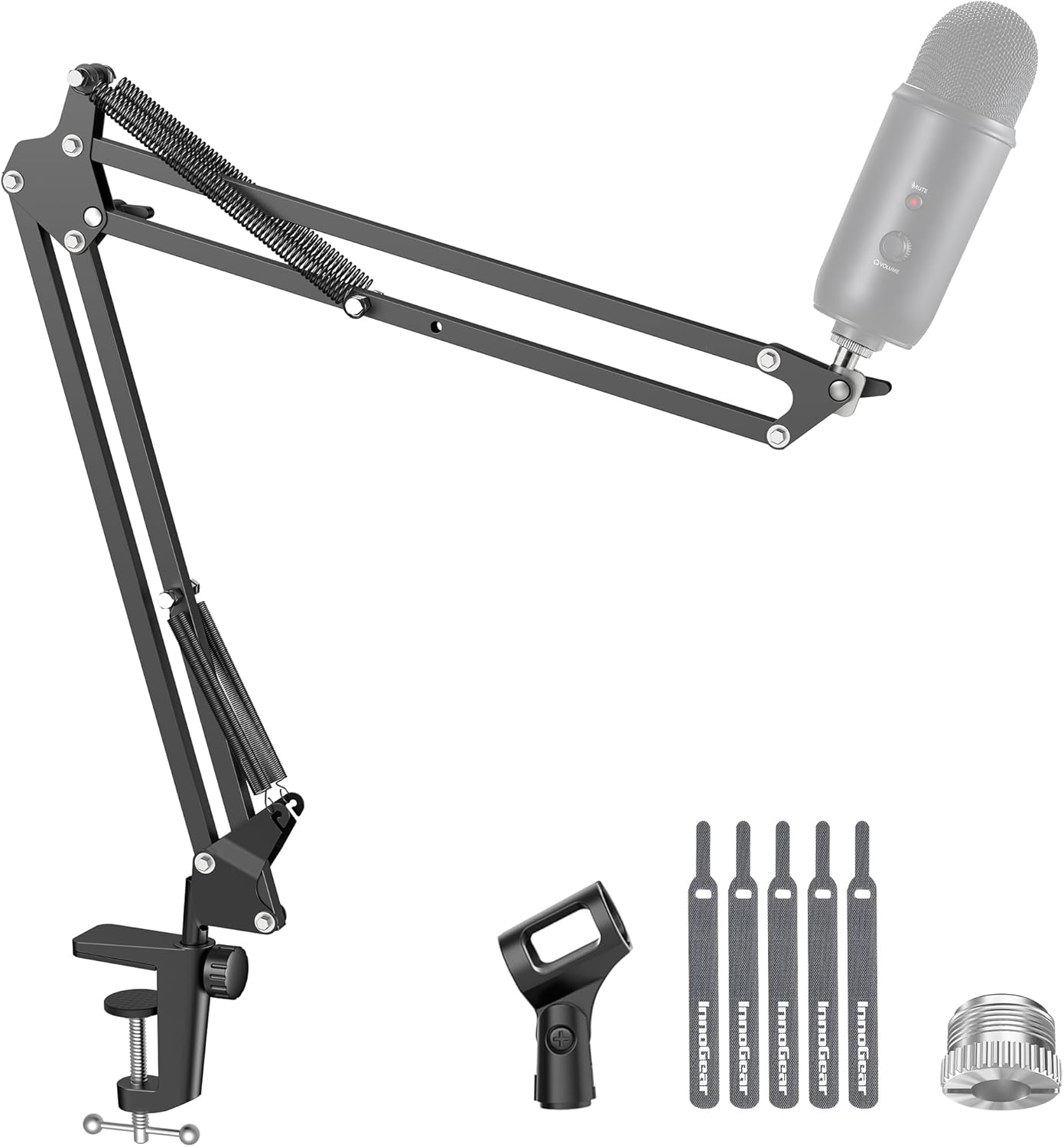 InnoGear Boom Arm Microphone Stand for Blue Yeti |
9.6/10 | View on Amazon.com |
| 22% OFF |
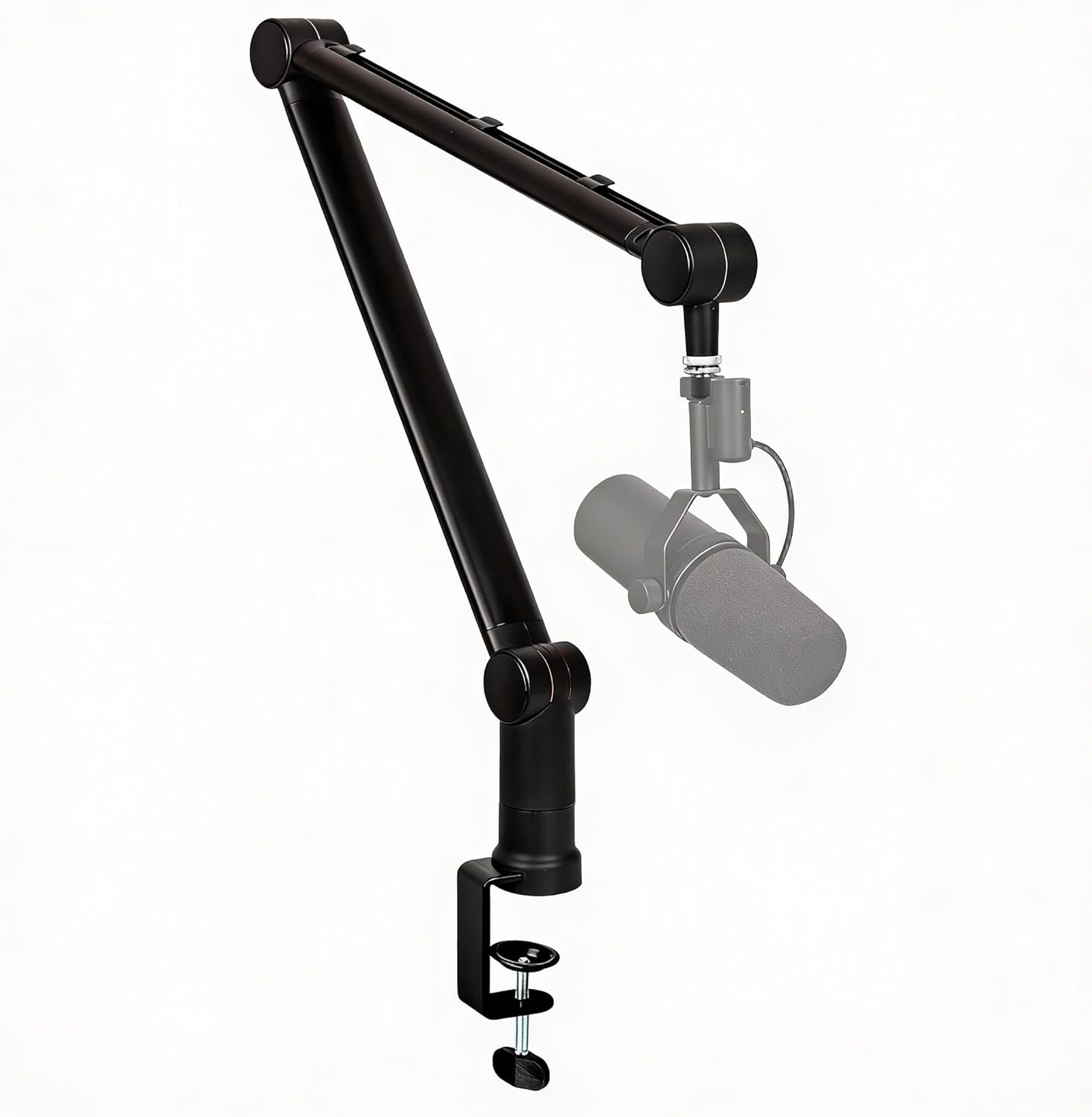 IXTECH 360° Rotatable Microphone Boom Arm |
9.8/10 | View on Amazon.com |
Prices and discounts as of Nov 22, 2026 and may have changed. Check Amazon for the current price.
Pros
- Exceptional build quality with alloy steel construction and reinforced springs for long-term durability
- Versatile compatibility with major microphone brands through included adapters and standard clips
- Smooth, quiet operation critical for professional recording without unwanted mechanical noise
- Compact foldable design saves desk space without compromising stability or load capacity
- Superior weight capacity compared to similarly priced alternatives on the market
Cons
- Desk clamp requires flat edges up to 2 inches thick, limiting compatibility with curved or slanted desk surfaces
- Requires manual assembly and adjustment to achieve optimal positioning for different microphone types
- Shock mount not included, requiring separate purchase for certain microphone models
The InnoGear MU01 boom arm microphone stand is a professional-grade mounting solution designed for content creators, streamers, podcasters, and musicians who demand reliable microphone positioning. This desk-mounted arm accommodates popular USB microphones including Blue Yeti, Fifine, HyperX, and traditional XLR microphones with the included adapters.
The standout feature of this boom arm is its exceptional adjustability and build quality. With 360-degree base rotation, 135-degree back-and-forth extension, 180-degree vertical movement, and a 270-degree metal adapter, you can position your microphone precisely where needed. The 3.3lb weight capacity significantly exceeds standard competitors at 2.2lb, providing confidence for heavier microphone setups. The engineering specifically addresses a common flaw in other boom arms by eliminating the problematic knob on the arm shaft that causes spring deformation over time.
Build and design quality are exceptional for the price point. The alloy steel construction feels solid and substantial, while the super-strong springs enable silent, effortless positioning crucial for live recording sessions. The foldable design allows convenient storage when not in use, and the secure desk clamp grips edges up to 2 inches thick without wobbling. The included standard microphone clip and 5/8" to 3/8" adapter ensure compatibility with most popular microphone models.
Potential drawbacks include the desk clamp requirement for flat edges and the need for separate shock mount purchases for certain microphone models. The clamp design may not work with curved or slanted desk surfaces. Setup requires some manual adjustment to dial in your preferred microphone angle and height.
The InnoGear MU01 represents excellent value for anyone seeking a durable, feature-rich microphone boom arm. Its superior build quality, extensive adjustability, and broad microphone compatibility make it an ideal choice for serious content creators and recording enthusiasts.
Model: InnoGear MU01
Material: Alloy Steel with reinforced springs
Weight Capacity: 3.3 lbs (1.5 kg)
Dimensions: 15 x 1.5 x 4 inches
Maximum Height: 27.6 inches
Base Type: Desk clamp for edges up to 2 inches thick
Mount Thread Sizes: 3/8 inch and 5/8 inch
Adjustability: 360-degree base rotation, 135-degree extension, 180-degree vertical movement, 270-degree adapter rotation
Weight: 1.4 pounds
Compatibility: Blue Yeti, Fifine, HyperX, Shure SM58, Samson Q2U, and other standard microphones
Warranty: Manufacturer warranty included (does not cover microphones)
Who Should Buy: This boom arm is ideal for streamers, podcasters, content creators, musicians, and anyone requiring professional microphone positioning with space-saving storage. It works best with USB microphones like Blue Yeti, Fifine models, and HyperX gaming headset microphones, as well as traditional XLR microphones with adapters.
Desk Requirements: Ensure your desk has a flat edge between 0.5 and 2 inches thick for optimal clamp compatibility. Curved or slanted desk edges may not work with this clamp design.
Microphone Compatibility: Check your microphone's thread size (typically 3/8 inch or 5/8 inch). The included adapters cover most popular models, but verify compatibility before purchase if using less common microphone brands.
Setup Tips: Allow time for initial adjustment to find your preferred microphone height and angle. The boom arm's smooth operation means minimal repositioning is needed once properly configured. For heavy microphones near the 3.3lb limit, ensure the desk clamp is tightened securely.
Maintenance: Periodically check clamp tightness and spring tension. The innovative design minimizes spring wear compared to competitors, but regular inspection extends product lifespan.
Pros
- Exceptional flexibility with 360-degree rotation and adjustable angles for any recording setup or preference
- Rock-solid stability from dual suspension springs prevents unwanted vibrations and shaking during recordings
- Thoughtful cable management system keeps your desk organized and maintains a professional appearance
- Sturdy stainless steel construction with reliable C-clamp ensures years of dependable performance
- Compact foldable design makes transport and storage convenient for mobile or multi-room setups
Cons
- Weight limit not clearly specified, which may concern users with heavier microphone setups
- Some users may find the scissor arm requires occasional readjustment as springs settle over extended use
- Compatibility limited to standard threading sizes, excluding specialty or non-standard microphone mounts
The IXTECH Boom Arm is a professional-grade microphone stand designed for content creators, podcasters, streamers, and audio engineers who demand reliable performance in home or professional studios. This scissor-style boom arm combines functionality with a compact footprint, making it an excellent choice for anyone looking to upgrade their recording setup without sacrificing desk space.
The standout feature is the 360-degree rotatable design paired with dual suspension springs that work together to eliminate vibration and provide exceptional stability. Users can position their microphone at virtually any angle or height, enabling better mic-to-mouth distance control and improved posture during long recording sessions. The stainless steel construction feels premium and durable, while the integrated cable holder keeps your workspace organized and professional-looking.
Build quality is solid throughout, with a sturdy C-clamp that securely attaches to most desk edges and a foldable scissor arm mechanism that operates smoothly. The universal threading compatibility accommodates both 5/8" and 3/8" microphone mounts, ensuring broad compatibility with industry-standard microphones. At 1.9 pounds, the arm is lightweight enough to handle most standard studio microphones without excessive strain.
One consideration is that weight capacity specifications aren't explicitly detailed, which may be important if you're using particularly heavy microphones or shock mounts. Additionally, like most scissor arms, the suspension springs may require occasional readjustment as they settle with regular use, though this is typical for the category.
Overall, the IXTECH Boom Arm delivers professional-grade performance at an accessible price point. It's an excellent investment for anyone serious about improving their audio setup, offering the flexibility, stability, and build quality needed for consistent, professional-sounding recordings.
Brand: IXTECH
Color: HERO
Material: Stainless Steel
Weight: 1.9 pounds
Dimensions: 2.72 x 2.83 x 43.11 inches (L x W x H)
Rotation: 360-degree rotatable
Microphone Compatibility: Universal 5/8" and 3/8" threading
Design: Foldable scissor arm with C-clamp attachment
Suspension: Dual suspension springs
Cable Management: Integrated clip-on cable holder
Podcasters and Audio Content Creators: The IXTECH Boom Arm is perfect for anyone producing podcasts, audiobooks, or voice-over work who needs reliable, adjustable microphone positioning without taking up excessive desk space.
Twitch and YouTube Streamers: Streamers benefit from the flexible positioning, stable suspension system, and cable management features that keep streaming setups clean and professional-looking during long broadcast sessions.
Home Studio Professionals: Audio engineers, musicians, and producers appreciate the premium stainless steel construction, stability, and universal compatibility for recording vocals, instruments, and other audio sources.
Radio and Broadcast Professionals: The boom arm's industrial-grade design and reliable performance make it suitable for radio stations, broadcast facilities, and professional recording studios.
Budget-Conscious Upgraders: Anyone looking to move beyond basic desk microphone stands will appreciate the professional features and durability at a mid-range price point.
How to Choose Your Long Reach Boom Arm
Weight Capacity and Stability
The most critical specification is how much weight the arm can hold without sagging or wobbling. Lightweight USB mics have different needs than heavy dynamic models like the Shure SM7B. Look for arms with robust construction, such as heavy-duty steel or aluminum alloy, and a confirmed load rating. A stable arm ensures your microphone stays precisely where you position it, even during energetic streams or recordings.
Reach and Articulation
“Long reach” means different things depending on your desk size and posture. Measure the distance from where the clamp attaches to where you need the microphone. Consider both vertical height and horizontal extension. True flexibility comes from multiple points of articulation: 360-degree rotation at the base, adjustable joint angles, and a swiveling ball head. This allows you to position the mic perfectly for seated speech, standing vocals, or instrument recording.
Mounting and Compatibility
Ensure the arm’s mounting clamp fits your desk thickness, often up to 2 inches. Most arms use a standard 5/8″-27 thread, but the best include adapters for 3/8″ and 1/4″ threads for maximum compatibility with various microphones and accessories. If you use a large diaphragm condenser, verify the arm works with your specific shock mount. A versatile mounting system future-proofs your investment.
Cable Management and Build Quality
Built-in cable channels are a game-changer for a clean, professional look. They route your XLR or USB cable neatly along the arm, preventing tangles and reducing the risk of noise from cable movement. Assess the overall build quality, including the smoothness of the springs or damping mechanisms. A well-made arm moves silently and effortlessly, holding its position securely without constant re-tightening. Explore more essential gear in our recording and musical instruments category.
Final Thoughts
Investing in a quality long reach microphone boom arm is a definitive step toward professional audio production. It grants you the freedom to achieve the ideal microphone placement for clarity and comfort, fundamentally improving your recording experience. For users seeking a proven, professional-grade arm with exceptional reach and silent operation, the Samson MBA48 Microphone Boom Arm, 48″ remains a top-tier choice. Conversely, if your priority is securing a heavyweight microphone like the Shure SM7B with absolute, sag-free stability, the innovative gear-lock system in the AA AUDIO ACCESSORY Design for Shure SM7B SM7dB MV7 offers unparalleled reliability for serious studio work.
Frequently Asked Questions
What is the main advantage of a low-profile boom arm design?
A low-profile design positions the main pivot point lower on the desk. This creates a lower center of gravity, which significantly improves overall stability and reduces arm shake. It also allows the arm to tuck neatly under a monitor, minimizing visual obstruction in your workspace, which is ideal for streamers and video conferencing.
Can I use a microphone boom arm with a USB microphone?
Absolutely. Most boom arms are fully compatible with popular USB microphones like the Blue Yeti, HyperX QuadCast, and FIFINE models. You simply attach the microphone using the included thread adapter or clip. The arm provides much better positioning flexibility than the stock stand that comes with most USB microphones. Just ensure the arm’s weight capacity exceeds your microphone’s weight.
How do I prevent my boom arm from sagging over time?
Sagging is often caused by spring fatigue in traditional arms, especially under heavy loads. To combat this, look for arms with adjustable tension knobs or wrenches that allow you to recalibrate the spring resistance. For the most permanent solution, consider a gear-lock style arm, which uses a mechanical locking system instead of springs, eliminating sag entirely and providing consistent holding power.
Are all microphone boom arms difficult to install?
No, most modern boom arms are designed for simple, tool-free installation. The primary step is securing the C-clamp or bolt-through mount to the edge of your desk. The arm sections then typically screw together by hand. The entire process usually takes just a few minutes. Always confirm the clamp fits your desk thickness and that you use any included protective pads to prevent scratches.







Write Your Review
No reviews yet. Be the first to share your experience!