

Frustrated by a microphone cluttering your desk during intense Discord sessions? You’re not alone. That shaky, obstructive stand can hinder your view and pick up distracting desk noises, making communication with your team less than clear. This guide is for gamers and streamers who want to elevate their Discord audio with a dedicated boom arm. We will cover top models that prioritize stability, flexible positioning, and clean cable management to keep your focus on the game.
To streamline your search, we’ve reviewed several leading options on the market. Check out the quick comparison list below to see our top picks at a glance.
| Pick | Product | BRD Score | Where to buy |
|---|---|---|---|
| Top Pick 25% OFF |
 FIFINE T669 USB Condenser Microphone Kit with Boom |
9.8/10 | View on Amazon.com |
| 24% OFF |
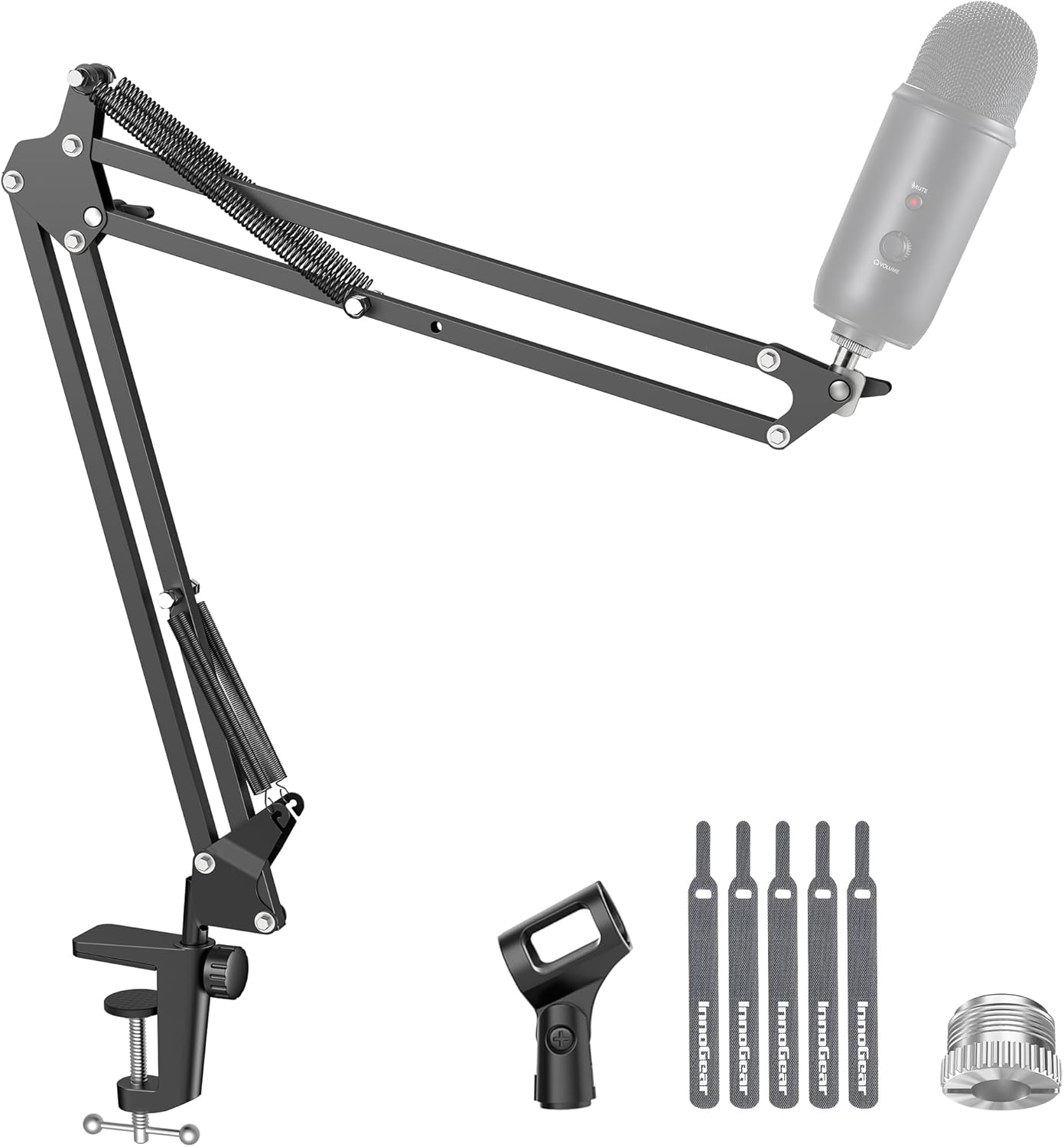 InnoGear Boom Arm Microphone Stand for Blue Yeti |
9.6/10 | View on Amazon.com |
Prices and discounts as of Nov 23, 2026 and may have changed. Check Amazon for the current price.
Pros
- Exceptional audio quality at an affordable price point, outperforming built-in laptop microphones
- Comprehensive accessory package eliminates need for separate purchases of stand, pop filter, and cables
- Sturdy and stable boom arm with extensive adjustment range for comfortable recording positions
- Simple setup and immediate usability without software installation or configuration
- Highly durable metal construction designed for consistent daily use in home studios
Cons
- Some users report occasional USB connectivity issues requiring cable reconnection
- Pop filter attachment can be loose and may not stay securely positioned on the arm
- No dedicated mute button, requiring volume knob adjustment to silence the microphone
The FIFINE T669 is a complete USB condenser microphone system designed for content creators, podcasters, streamers, and anyone seeking professional-quality audio without a large investment. This all-in-one kit targets home studio users, YouTube creators, and remote workers who need reliable, studio-grade recording capabilities with minimal setup complexity.
The standout feature is the exceptional audio clarity delivered by its cardioid condenser capsule, which captures vocals and instruments with impressive presence while effectively rejecting ambient noise from the sides and rear. With a frequency response spanning 20Hz to 20KHz and a 78dB signal-to-noise ratio, the T669 produces clean, detailed recordings suitable for professional podcasts and streaming. Real-world testing by users consistently shows it outperforming built-in MacBook microphones and other budget alternatives, making it an ideal entry point into quality audio recording.
Build quality is solid throughout, featuring an all-steel construction boom arm with professional-grade shock mount and dual-layer pop filter. The adjustable boom arm offers 180-degree vertical rotation and 135-degree horizontal extension, allowing flexible positioning for different recording scenarios. The included accessories (shock mount, pop filter, windscreen, C-clamp, and 8.2-foot USB cable) represent genuine value, eliminating the need for separate purchases that would quickly exceed the microphone's price.
Some drawbacks warrant mention: occasional USB connectivity issues have been reported by a small percentage of users, typically resolved by reconnecting the cable. The pop filter attachment can be loose and may shift during use. Additionally, there is no dedicated mute button, requiring users to adjust the volume knob to silence the microphone during breaks.
The FIFINE T669 delivers exceptional value for podcasters, streamers, voice-over artists, and content creators on a budget. Its combination of audio quality, complete accessory package, and straightforward setup makes it a smart choice for anyone upgrading from built-in microphones or cheap headset options.
Audio Specifications: Frequency Response: 20Hz-20KHz, Signal-to-Noise Ratio: 78dB, Polar Pattern: Unidirectional (Cardioid), Number of Channels: 1, Maximum SPL: Handles high sound pressure levels with ease.
Connectivity and Compatibility: USB Type-A and USB Type-C connectors, Direct plug-and-play connection to PC, Mac, PS4, and PS5. Not compatible with Xbox. No drivers or additional hardware required.
Physical Specifications: Item Dimensions: 16.5 x 9.61 x 2.99 inches, Item Weight: 1 kg, Enclosure Material: Metal, Color: Black, Model Number: T669.
Included Accessories: Condenser microphone, Scissor boom arm stand with C-clamp and desktop mount, Shock mount, Double pop filter, Windscreen, 8.2-foot USB-B to USB-A/C cable, Metal ring, User manual, 1-year warranty.
Recommended Uses: Recording, Podcasting, Voice-over work, Gaming, Streaming, Home studio applications, Video conferencing (Zoom, Skype, Discord).
Who Should Buy This Microphone? The FIFINE T669 is ideal for beginners and intermediate content creators seeking professional audio quality without premium pricing. It suits podcasters, YouTube creators, streamers, voice-over artists, and remote workers who need reliable recording capabilities. If you're upgrading from a built-in laptop microphone or cheap headset, this kit provides a dramatic audio quality improvement.
When to Choose the T669: Choose this microphone if you need a complete, ready-to-use system with minimal setup. The included boom arm, pop filter, and shock mount eliminate separate purchases. Its cardioid pattern effectively reduces background noise, making it suitable for untreated home studios. The USB connectivity ensures compatibility with most computers and streaming platforms.
Potential Limitations: If you require advanced features like multiple polar patterns, XLR output, or professional-grade phantom power, consider higher-end options. The occasional connectivity issues reported by some users may concern those requiring absolute reliability during live streams. Those needing a dedicated mute button may find the volume-knob-only control inconvenient.
Setup Expectations: Expect 5-10 minutes of total setup time. Simply attach the boom arm to your desk using the C-clamp, position the microphone, and connect the USB cable to your computer. No software installation is required. The included user manual provides clear guidance for all assembly steps.
Pros
- Exceptional build quality with alloy steel construction and reinforced springs for long-term durability
- Versatile compatibility with major microphone brands through included adapters and standard clips
- Smooth, quiet operation critical for professional recording without unwanted mechanical noise
- Compact foldable design saves desk space without compromising stability or load capacity
- Superior weight capacity compared to similarly priced alternatives on the market
Cons
- Desk clamp requires flat edges up to 2 inches thick, limiting compatibility with curved or slanted desk surfaces
- Requires manual assembly and adjustment to achieve optimal positioning for different microphone types
- Shock mount not included, requiring separate purchase for certain microphone models
The InnoGear MU01 boom arm microphone stand is a professional-grade mounting solution designed for content creators, streamers, podcasters, and musicians who demand reliable microphone positioning. This desk-mounted arm accommodates popular USB microphones including Blue Yeti, Fifine, HyperX, and traditional XLR microphones with the included adapters.
The standout feature of this boom arm is its exceptional adjustability and build quality. With 360-degree base rotation, 135-degree back-and-forth extension, 180-degree vertical movement, and a 270-degree metal adapter, you can position your microphone precisely where needed. The 3.3lb weight capacity significantly exceeds standard competitors at 2.2lb, providing confidence for heavier microphone setups. The engineering specifically addresses a common flaw in other boom arms by eliminating the problematic knob on the arm shaft that causes spring deformation over time.
Build and design quality are exceptional for the price point. The alloy steel construction feels solid and substantial, while the super-strong springs enable silent, effortless positioning crucial for live recording sessions. The foldable design allows convenient storage when not in use, and the secure desk clamp grips edges up to 2 inches thick without wobbling. The included standard microphone clip and 5/8" to 3/8" adapter ensure compatibility with most popular microphone models.
Potential drawbacks include the desk clamp requirement for flat edges and the need for separate shock mount purchases for certain microphone models. The clamp design may not work with curved or slanted desk surfaces. Setup requires some manual adjustment to dial in your preferred microphone angle and height.
The InnoGear MU01 represents excellent value for anyone seeking a durable, feature-rich microphone boom arm. Its superior build quality, extensive adjustability, and broad microphone compatibility make it an ideal choice for serious content creators and recording enthusiasts.
Model: InnoGear MU01
Material: Alloy Steel with reinforced springs
Weight Capacity: 3.3 lbs (1.5 kg)
Dimensions: 15 x 1.5 x 4 inches
Maximum Height: 27.6 inches
Base Type: Desk clamp for edges up to 2 inches thick
Mount Thread Sizes: 3/8 inch and 5/8 inch
Adjustability: 360-degree base rotation, 135-degree extension, 180-degree vertical movement, 270-degree adapter rotation
Weight: 1.4 pounds
Compatibility: Blue Yeti, Fifine, HyperX, Shure SM58, Samson Q2U, and other standard microphones
Warranty: Manufacturer warranty included (does not cover microphones)
Who Should Buy: This boom arm is ideal for streamers, podcasters, content creators, musicians, and anyone requiring professional microphone positioning with space-saving storage. It works best with USB microphones like Blue Yeti, Fifine models, and HyperX gaming headset microphones, as well as traditional XLR microphones with adapters.
Desk Requirements: Ensure your desk has a flat edge between 0.5 and 2 inches thick for optimal clamp compatibility. Curved or slanted desk edges may not work with this clamp design.
Microphone Compatibility: Check your microphone's thread size (typically 3/8 inch or 5/8 inch). The included adapters cover most popular models, but verify compatibility before purchase if using less common microphone brands.
Setup Tips: Allow time for initial adjustment to find your preferred microphone height and angle. The boom arm's smooth operation means minimal repositioning is needed once properly configured. For heavy microphones near the 3.3lb limit, ensure the desk clamp is tightened securely.
Maintenance: Periodically check clamp tightness and spring tension. The innovative design minimizes spring wear compared to competitors, but regular inspection extends product lifespan.
Buying Guide
Stability and Build Quality
A flimsy arm that wobbles or sags defeats its purpose. Look for all-metal construction and strong internal springs. Products like the FIFINE BM88 and InnoGear models are designed to hold heavier microphones without drifting. A secure C-clamp that fits desks of varying thicknesses is also essential to prevent slippage.
Adjustability and Reach
Your ideal position changes. A good boom arm offers extensive rotation and extension. Consider arms with up to 360-degree horizontal swivel and at least 180 degrees of vertical adjustment. The Elgato Wave Mic Arm LP exemplifies this with its long horizontal reach, letting you position the mic perfectly without blocking your monitor. For more insights on flexible setups for content creation, see our guide on the best microphone boom arms.
Cable Management
Exposed cables look messy and can snag. Integrated cable channels, like those found on the InnoGear Mic Arm and Elgato Wave Mic Arm, are a game-changer. They neatly route your microphone cable along the arm’s length, resulting in a clean, professional look for your stream and reducing the risk of accidental tugs.
Mount Compatibility
Ensure the arm works with your microphone. Most use standard thread sizes like 5/8″ or 3/8″. Some arms, including the FIFINE BM88 and the SUNMON QuadCast Boom Arm, come with multiple adapters in the box. This versatility saves you from buying extra parts. For those using specialized mounts, our review of the best microphone shock mounts with metal adapters offers further guidance.
Final Thoughts
Choosing the right boom arm significantly improves your Discord experience by clearing desk space and ensuring consistent, clear audio pickup. For gamers seeking a premium, low-profile solution, the Elgato Wave Mic Arm Low Profile Microphone Boom is an excellent investment. If you need a versatile, all-in-one kit that includes a quality microphone, the FIFINE AmpliGame A6T USB Gaming Microphone Kit provides tremendous value and is ready to use right out of the box.
Frequently Asked Questions
Do I need a shock mount with my boom arm for Discord? While not always mandatory, a shock mount is highly recommended. It isolates the microphone from vibrations transmitted through the desk, like keyboard taps or bumps, which is crucial for clean audio in gaming environments.
Can a boom arm work with any USB microphone? Yes, most USB microphones have a standard thread on their included stand or mount. You simply detach that mount and screw the microphone (often via its shock mount) directly onto the boom arm’s adapter. Always check the thread size compatibility listed in the product details.
How do I keep my boom arm from blocking my screen? Opt for a “low-profile” design, like the FIFINE BM88 or Elgato Wave Mic Arm LP. These arms are engineered to extend from below your monitor’s sightline. Proper adjustment and taking advantage of the full range of motion will keep your view unobstructed. For more setup tips, explore our resource on best microphone boom arms for beginners in 2026.
Will a heavier microphone cause a boom arm to sag? It can, if the arm isn’t built for it. Always check the manufacturer’s stated maximum load capacity. Arms like those from InnoGear are rated for several pounds, making them suitable for heavier studio-grade microphones without losing their position.







Write Your Review
No reviews yet. Be the first to share your experience!