

You are about to start a live stream, but your desk is a chaotic nest of cables. Your microphone sits on a wobbly stand that picks up every keyboard tap. For podcasters, gamers, and content creators on a budget, a high-quality microphone boom arm feels like an expensive luxury. Yet, it is the single accessory that can transform your audio setup from cluttered to professional.
This guide cuts through the noise to present a curated selection of the most reliable microphone boom arms available without a hefty price tag. We assessed these arms for build quality, stability, and ease of use. Whether you need a space-saving low-profile design or a versatile kit packed with accessories, you will find an option that elevates your recording space. For a broader look at mounting solutions, check out our guide to the best desk microphone arms in 2026.
Pros
- Exceptional audio clarity and minimal background noise capture right out of the box
- Complete bundle eliminates need for additional purchases or compatibility concerns
- Intuitive touch controls make muting and adjusting settings effortless during streaming
- Sturdy metal boom arm with adjustable joints accommodates most desk setups
- Unidirectional polar pattern focuses on your voice while rejecting side noise
Cons
- PlayStation audio quality is limited by console compatibility constraints rather than microphone capability
- No built-in headphone monitoring port, requiring separate headphone connection
- RGB lighting may not appeal to users preferring minimalist or professional aesthetics
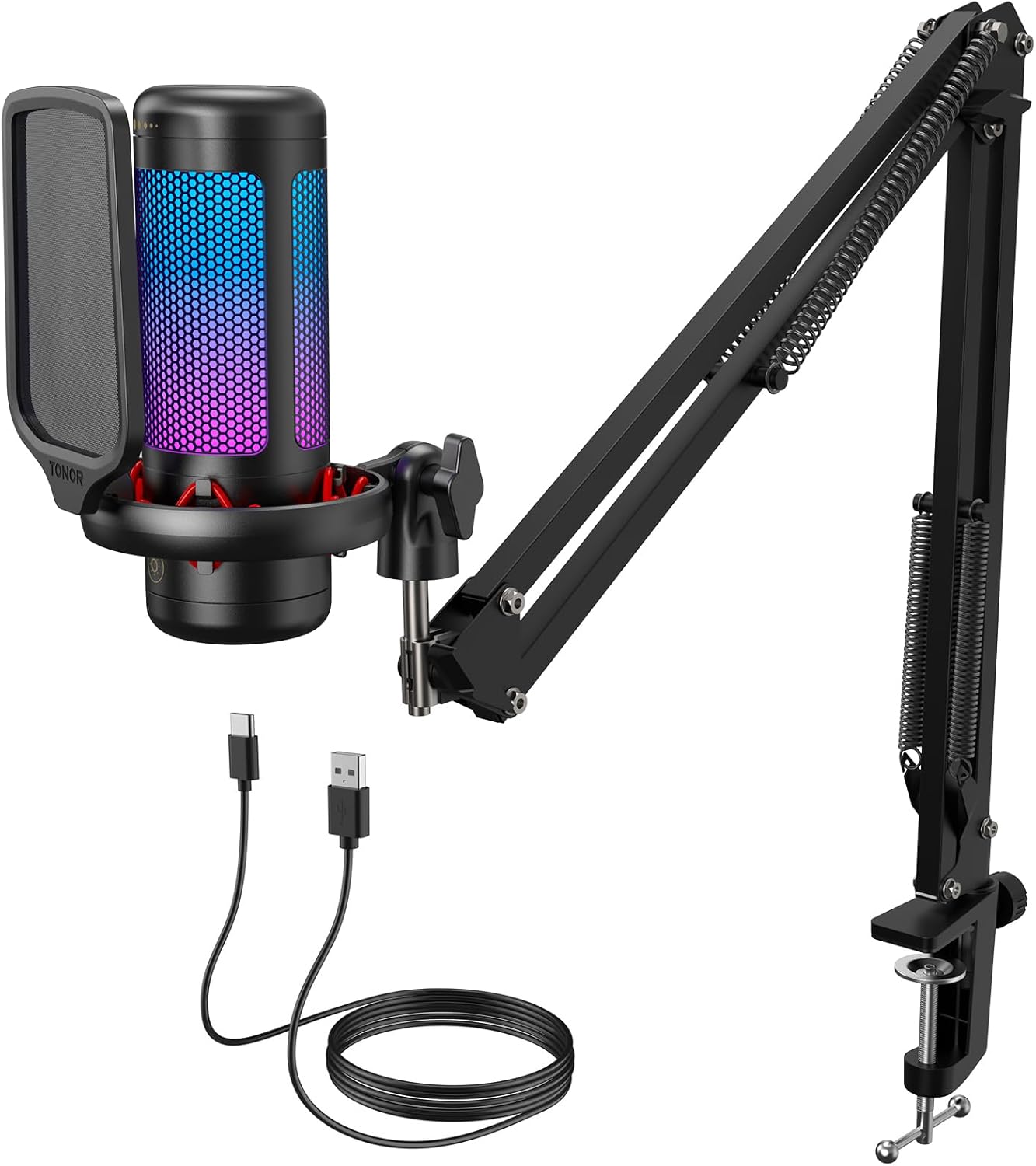
The TONOR TC310+ is a complete USB microphone solution designed for gamers, streamers, podcasters, and content creators who demand professional audio without technical complexity. This all-in-one kit arrives with everything needed for immediate setup, making it ideal for beginners and experienced creators alike who want to upgrade their audio quality without learning curve frustrations.
What sets this microphone apart is its commitment to simplicity and performance. The condenser capsule delivers crisp, clean audio with a 78 dB signal-to-noise ratio that captures voice detail while minimizing background interference. Users consistently report that friends notice immediate audio improvements during gaming sessions, and the adjustable gain control lets you dial in the perfect volume level. The one-tap mute button proves invaluable during live streams, allowing quick responses to unexpected situations without fumbling through software menus.
The included boom arm is constructed from quality metal with multiple adjustable joints, providing flexibility to position the microphone at your ideal angle. The sturdy clamp accommodates desks up to 2.36 inches thick, and the unidirectional polar pattern ensures your voice remains the focus while ambient noise stays suppressed. Build quality feels durable and professional, with the shock mount providing additional isolation from desk vibrations and handling noise.
The vibrant RGB lighting with four customizable modes adds visual appeal to your streaming setup, though brightness control prevents eye strain during extended sessions. One limitation worth noting is the lack of a headphone monitoring jack, meaning you cannot directly monitor your audio through the microphone itself. Additionally, PlayStation users report that console limitations affect audio quality more than the microphone's capabilities, a constraint beyond the device's control.
The TONOR TC310+ represents exceptional value for anyone seeking studio-quality audio at budget-friendly pricing. Its plug-and-play design, professional sound output, and complete accessory bundle make it the top choice for gamers and streamers ready to elevate their audio presence without unnecessary complexity or expense.
Audio Performance
Polar Pattern: Unidirectional
Signal-to-Noise Ratio: 78 dB
Audio Sensitivity: 10 dB
Channels: 1
Connector: USB Type-C
Physical Specifications
Dimensions: 16 x 6 x 5.4 inches
Weight: 474 grams
Material: Acrylonitrile Butadiene Styrene with Alloy Steel components
Color: Black
Boom Arm Clamp: Fits desks up to 2.36 inches thick
Connectivity and Compatibility
Connection: USB 2.0/3.0
Compatible Devices: PC, Mac, Laptop, PS4, PS5
Power Source: USB corded (no batteries required)
Setup: Plug and play, no drivers needed
Included Components
Microphone unit, Pop filter, Mic stand, Shock mount, USB cable, User manual
Ideal For
This microphone is perfect for Twitch streamers, YouTube content creators, gamers seeking better team communication, podcasters on a budget, and anyone upgrading from built-in laptop or headset microphones. If you value simplicity, professional audio quality, and don't want to spend hours configuring complex audio software, this is your solution.
Consider Alternatives If
You need professional-grade XLR connectivity, require built-in headphone monitoring, or are seeking audio equipment for mastering and music production. The TC310+ excels at voice-focused applications but isn't designed for full-spectrum music recording.
What to Look for in a Budget Boom Arm
Stability and Build Quality
The primary job of a boom arm is to hold your microphone securely without drooping or shaking. Look for terms like “heavy-duty,” “all-metal,” or “aluminum alloy” in the description. A robust desk clamp with protective pads is essential to prevent damage and ensure a firm grip. An arm that wobbles will transmit vibrations and ruin your audio quality. Our review of the best microphone boom arms in 2026 highlights models known for their solid construction.
Compatibility and Mounting Options
Before you buy, confirm the thread size of your microphone. Most arms come with 5/8″ to 3/8″ adapters to fit popular models like the Blue Yeti or HyperX QuadCast. Check the product specifications to see if your specific microphone is listed. Also, consider the clamp’s thickness range to ensure it fits your desk edge. A universal fit saves you from needing extra adapters.
Range of Motion and Flexibility
You need to position your mic perfectly for your voice. A good arm offers multiple points of adjustment, including 360-degree rotation at the base and the head. Smooth, stepless joints allow for precise, silent positioning. Consider if you need a low-profile arm that tucks behind your monitor or a standard design with greater vertical reach.
Included Accessories and Cable Management
Some bundles offer incredible value by including a pop filter and shock mount, like the InnoGear set. A built-in shock mount is crucial for isolating your mic from desk bumps, a topic we cover in our best microphone shock mounts guide. Built-in cable channels or included ties keep your setup looking clean and professional, preventing tangled wires from pulling on your equipment. For Blue Yeti users, pairing your arm with one of the best pop filters for Blue Yeti in 2026 can further enhance your audio.
Final Thoughts
Investing in a proper microphone boom arm is one of the smartest upgrades you can make for clearer audio and a cleaner workspace. For creators seeking a comprehensive starter kit, the InnoGear Microphone Stand Mic Boom Arm for Blue delivers exceptional value with its included shock mount and pop filter. If your priority is a sleek, space-saving design that stays out of your way, the Low Profile Mic Arm for Lightweight Mics offers smooth, precise adjustments. You can explore more options in our dedicated mic accessories category.
Frequently Asked Questions
Are cheap microphone boom arms worth it?
Absolutely. Many budget-friendly arms now use quality materials like aluminum alloy and feature robust clamps. They provide stable support for standard USB and dynamic microphones, offering a significant upgrade over a basic desk stand without the high cost.
Will a boom arm fit my specific microphone?
Most arms are designed with universal compatibility in mind. They typically include thread adapters (like 5/8″ to 3/8″) to fit a wide range of microphones. Always double-check the product’s compatibility list against your microphone model before purchasing.
Do I need a shock mount with my boom arm?
While not always mandatory, a shock mount is highly recommended. It isolates the microphone from vibrations transmitted through the desk, such as keyboard taps or bumps. This results in cleaner, more professional audio. Some arms, like the InnoGear, include one.
How do I prevent my boom arm from sagging over time?
<!–Proper tension adjustment is key. Most arms have adjustable knobs or screws at the joints. Tighten them just enough to hold the microphone’s weight without being difficult to move. Avoid over-tightening, as this can wear out the mechanism. Choosing an arm rated for a weight capacity higher than your microphone also helps ensure long-term stability.







Write Your Review
No reviews yet. Be the first to share your experience!