

That critical video call is about to start. You need your voice to be heard clearly, free from the background chaos of a home office or a busy cafe. The wrong headphones can leave you repeating yourself or struggling to focus. On-ear headphones offer a perfect balance of audio clarity, situational awareness, and comfort for extended virtual meetings.
This guide is for remote professionals, students, and anyone who relies on Zoom for clear communication. We have assessed and reviewed seven leading on-ear headsets, focusing on microphone quality, comfort for long calls, and seamless software integration. Whether you prioritize advanced noise cancellation or simple plug-and-play convenience, you will find a suitable option here. For more insights on optimizing your setup, explore our guide to the best On-Ear headphones for video calls.
| Pick | Product | BRD Score | Where to buy |
|---|---|---|---|
| Top Pick 20% OFF |
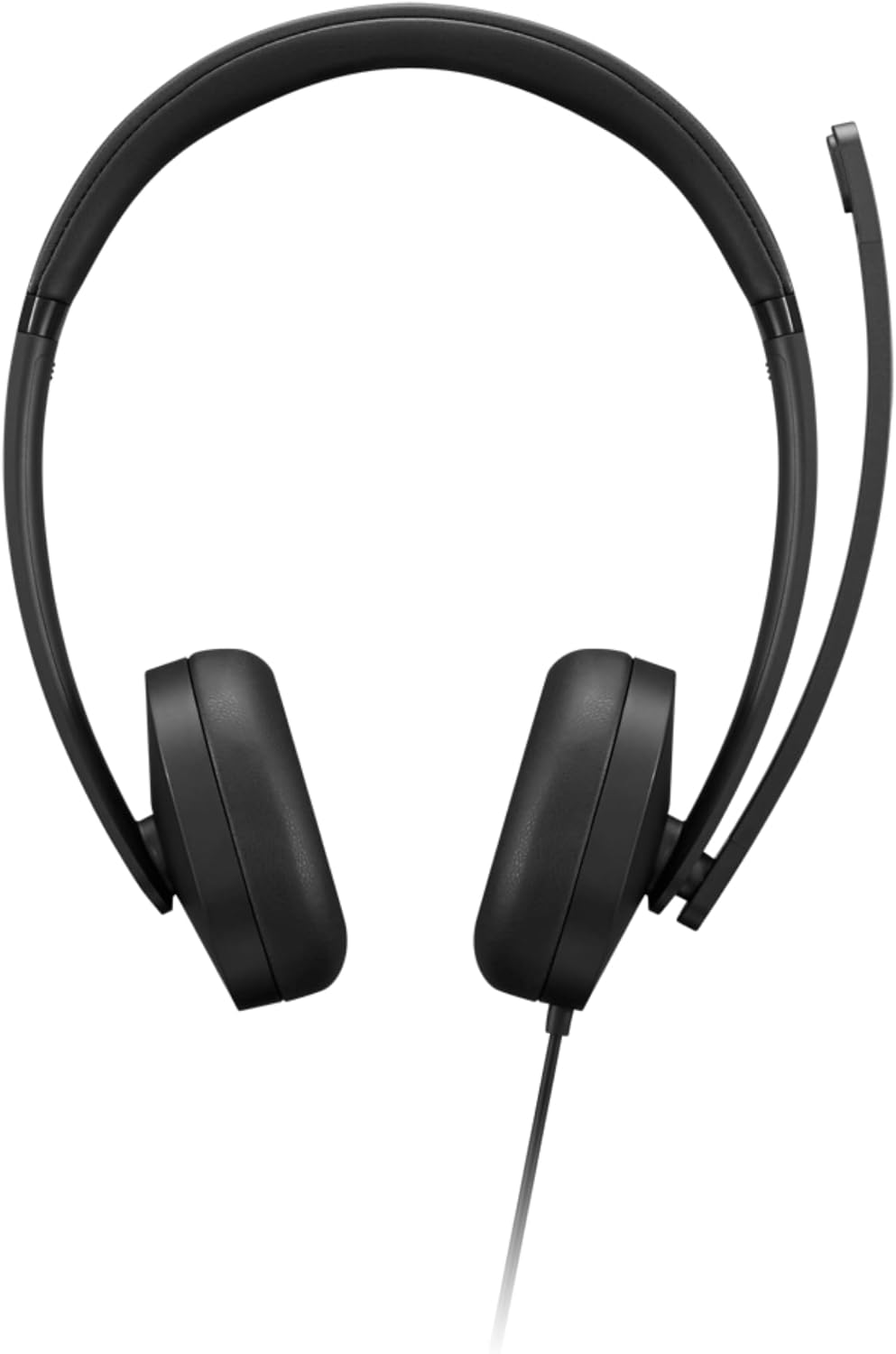 Lenovo USB-A Wired Stereo Headset Gen 2 |
9.5/10 | View on Amazon.com |
| 17% OFF |
 Sony WH-CH520 Wireless On-Ear Bluetooth Headphones |
9.9/10 | View on Amazon.com |
Prices and discounts as of Nov 23, 2026 and may have changed. Check Amazon for the current price.
Pros
- Exceptional comfort for all-day wear thanks to lightweight construction and ergonomic design
- Superior noise cancellation performance exceeds expectations for the price range
- Instant plug-and-play setup requires no drivers or complicated configuration
- Responsive in-line controls and mute button provide convenient call management
- Replaceable earcups offer durability and long-term value
Cons
- Wired connection limits mobility compared to wireless alternatives
- Requires LADM software installation to access full AI noise-canceling features
- Microphone boom arm may need securing with cable ties for extended use
The Lenovo USB-A Wired Stereo Headset Gen 2 is a professional-grade communication device designed for remote workers, office staff, and anyone requiring reliable call quality during daily video conferences. Its universal USB-A compatibility and plug-and-play setup make it an excellent choice for hybrid work environments where multiple platforms like Teams, Zoom, Google Meet, and Slack are standard.
What truly sets this headset apart is its exceptional balance of comfort and performance. At just 140 grams, it feels barely there even during marathon meeting sessions, eliminating the ear fatigue common with heavier models. The AI noise-canceling technology powered by Lenovo's Accessories and Device Manager software actively filters out background distractions, ensuring your voice comes through crystal-clear to colleagues. The dual-sided boom microphone provides flexibility to position the mic on either side, adapting to your preference without sacrificing audio quality.
Build quality and design reflect thoughtful engineering for professional use. The replaceable earcups are a standout feature that extends the headset's lifespan and reduces replacement costs over time. In-line controls are intuitive and responsive, giving you quick access to volume adjustment, mute toggle, and call functions without breaking focus during important meetings. The control box simplifies operation, eliminating the need to fumble with complicated settings.
The primary limitation is the wired connection, which restricts movement compared to wireless alternatives. Additionally, accessing the full AI noise-canceling capabilities requires downloading and installing the Lenovo app, adding a minor setup step. Some users report the microphone boom arm may benefit from securing with a cable tie during extended use to keep it stable.
For professionals seeking an affordable, comfortable, and reliable headset for daily work calls, the Lenovo USB-A Wired Stereo Headset Gen 2 delivers outstanding value. Its combination of lightweight design, effective noise cancellation, and broad platform compatibility makes it a smart investment for remote and hybrid work environments.
Connectivity: USB-A Wired, Plug and Play
Weight: 140 grams (4.9 ounces)
Dimensions: 7.28 x 74.8 x 2.36 inches
Microphone: Double-sided boom microphone with mute control
Audio Features: AI noise cancellation via Lenovo Accessories and Device Manager (LADM) software
Controls: In-line volume control, mute button, responsive call function buttons
Compatibility: Teams, Zoom, Google Meet, Google Voice, Slack, GoTo Meeting, WeChat, Cisco Webex
Earcups: Replaceable design for durability and longevity
Model Number: 4XD1P83425
Manufacturer: Lenovo
Remote Workers: If you spend hours on video calls from home, this headset's lightweight design and AI noise cancellation make it perfect for maintaining focus and comfort throughout your workday.
Office Professionals: The professional audio quality and universal compatibility with major platforms ensure seamless integration into any corporate communication setup.
Budget-Conscious Buyers: Quality doesn't require premium pricing. This headset delivers professional-grade performance at an exceptional price point, making it ideal for individuals or companies outfitting multiple workstations.
Platform-Agnostic Users: Whether your team uses Teams, Zoom, Google Meet, Slack, or Webex, this headset works instantly without compatibility concerns.
Comfort-First Users: The featherlight construction eliminates ear fatigue, making this ideal for anyone who has experienced discomfort with heavier headsets during extended wear.
Pros
- Exceptional 50-hour battery life far outlasts most competitors in this price range
- Multipoint connection allows easy switching between two Bluetooth devices simultaneously
- Clear, balanced sound quality enhanced by the Sony Headphones Connect app EQ customization
- Very lightweight and comfortable for extended all-day wear
- Excellent value with trusted Sony build quality at an accessible price point
Cons
- Ear pads are on the smaller side, which may cause discomfort for users with larger ears during long sessions
- No active noise cancellation at the level of premium models, so some ambient sound will still come through
- Not water resistant, making it less suitable for intense workouts or outdoor use in wet conditions
The Sony WH-CH520 is an on-ear wireless headphone designed for everyday listeners who want reliable performance without spending a fortune. Whether you are a student, a remote worker, or someone who simply loves music on the go, these headphones deliver a well-rounded experience that punches well above its price class.
The headline feature is undoubtedly the 50-hour battery life, which real-world users confirm is genuinely impressive, with many reporting weeks of use between charges. The 3-minute quick charge feature is a lifesaver for those moments when you forget to plug in overnight, giving you enough juice to get through a meeting or commute almost instantly.
Sound quality is clear, balanced, and well-suited for music, podcasts, and voice calls. The DSEE upscaling technology noticeably improves compressed audio from streaming services, and the Sony Headphones Connect app allows you to fine-tune the EQ to your personal taste. The built-in microphone performs admirably on calls and virtual meetings, capturing vocals cleanly with minimal background noise pickup.
The design is lightweight and minimalist, with swivel earcups and a padded adjustable headband that most users find comfortable for hours at a time. That said, the ear pads are relatively compact, and a small number of users with larger ears have noted some soreness after extended sessions. The headphones are also not water resistant, so they are best kept away from heavy rain or sweat-heavy workouts.
Overall, the Sony WH-CH520 is a standout budget headphone that delivers on its core promises: long battery life, good sound, and everyday comfort. For anyone seeking a dependable daily driver that works seamlessly across multiple devices, this is one of the smartest buys in its category.
Model: Sony WH-CH520 | Color: Cappuccino | Connectivity: Bluetooth 5.2 (Wireless)
Battery Life: Up to 50 hours | Quick Charge: 3 minutes for 1.5 hours playback | Charging: USB Type-C
Driver Type: Dynamic | Frequency Response: 20 Hz to 20,000 Hz | Impedance: 24 Ohm | Sensitivity: 100 dB
Bluetooth Range: Up to 10 meters | Multipoint Connection: Yes (2 devices) | Microphone: Built-in
Ear Placement: On-Ear | Weight: Ultra-lightweight | Warranty: 1 Year Manufacturer Warranty | Compatible Devices: Smartphones, Tablets, PCs
If you are comparing budget wireless headphones, the Sony WH-CH520 stands out primarily for its battery life and brand reliability. For commuters and students, the multipoint connection and lightweight build make it a practical everyday companion that handles both entertainment and work calls with ease.
Those upgrading from wired headphones or basic earbuds will immediately appreciate the freedom of Bluetooth 5.2 and the convenience of hands-free calling. The Sony Headphones Connect app adds a layer of customization that most headphones in this price range simply do not offer, making it a smarter long-term investment.
If active noise cancellation is a top priority, you may want to consider stepping up to a higher-tier model such as the Sony WH-1000XM5. However, if your main needs are long battery life, clear audio, and comfortable all-day wear on a budget, the WH-CH520 is difficult to beat and is available in six colors to suit any preference.
How to Choose Your On-Ear Headset for Zoom
Microphone Clarity Is Paramount
Your microphone is your voice to the meeting. Look for features like AI noise cancellation, which uses dual microphones and software to filter out keyboard clicks and ambient sound. A unidirectional or boom microphone that rotates to position near your mouth ensures your voice is picked up accurately.
Headsets like the Yealink UH35 Wired Headset, USB-A employ dedicated acoustic shield technology for this purpose. For wireless models, confirm the microphone’s noise suppression rating. A clear microphone prevents you from being the person everyone asks to repeat themselves.
Prioritize All-Day Comfort
Comfort is non-negotiable for back-to-back meetings. Lightweight construction, adjustable headbands, and breathable memory foam ear cushions prevent fatigue. On-ear designs should create a gentle seal without excessive clamping force.
Products designed for call centers, like the TECKNET Wireless Headset, often excel here. Consider headsets with rotatable earcups that allow for a single-ear listen, giving you one ear free to hear your surroundings. For other professional options, see our roundup of the best On-Ear headphones for work.
Confirm Compatibility and Connectivity
Ensure your headset works seamlessly with your devices. USB-A or USB-C wired headsets offer universal plug-and-play functionality with computers. Wireless Bluetooth models provide mobility but require a stable connection.
For optimal performance with collaboration software, look for headsets that are certified for Zoom, Microsoft Teams, or Google Meet. This certification validates that features like mute synchronization and audio processing work perfectly. The best On-Ear headphones for the office often highlight these certified features.
Final Thoughts
Choosing the right on-ear headset transforms your virtual meeting experience from a chore into a seamless, professional interaction. For users seeking premium, certified audio quality with advanced AI noise suppression, the Yealink UH35 Wired Headset, USB-A is a standout choice. If your priority is wireless freedom without sacrificing call clarity or battery life, the versatile TECKNET Wireless Headset delivers excellent value and comfort for long sessions. You can explore more audio solutions in our main on-ear headphones category.
Frequently Asked Questions
Are on-ear or over-ear headphones better for Zoom calls?
On-ear headphones are often preferred for calls as they provide a good balance of audio isolation and situational awareness. They are typically lighter and less bulky than over-ear models, making them more comfortable for all-day wear during meetings. Over-ear models offer more sound isolation, which can be beneficial in very noisy environments.
What is the most important feature in a headset for video conferencing?
The microphone quality is arguably the most critical feature. A good noise-cancelling microphone ensures your colleagues hear you clearly, not your background noise. Comfort is a very close second, as uncomfortable headphones will distract you throughout long calls. For features that overlap with entertainment, check out our gaming headsets category, as many models also excel in microphone performance.
Can I use regular Bluetooth headphones for Zoom meetings?
<!–Yes, many standard Bluetooth headphones will work for Zoom calls. However, headsets specifically designed for conferencing often have superior noise-cancelling microphones, longer battery life optimized for talk time, and physical mute buttons for quick privacy. Always verify the microphone quality through reviews before relying on casual listening headphones for important professional calls.
How do I reduce background noise on my Zoom calls?
Start with a headset that has a dedicated noise-cancelling microphone, as hardware filtering is most effective. You can also enable Zoom’s built-in background noise suppression feature in your audio settings. For the best results, combine a quality headset with a quiet environment, but a good microphone can make a significant difference even in less-than-ideal conditions.


Write Your Review
No reviews yet. Be the first to share your experience!