

Your PC’s audio is a critical part of the experience, whether you are immersed in a game’s soundtrack, deciphering dialogue in a movie, or needing crystal-clear communication in a video call. The thin sound from built-in monitors or laptop speakers often falls short. A dedicated soundbar designed for desktop use delivers the rich, full-range audio that your content deserves, all while saving precious desk space.
This guide is crafted for anyone looking to elevate their PC audio setup. We have reviewed and compared eight top-rated soundbars, from compact USB-powered bars to powerful 2.1 systems with separate subwoofers. You will find options suited for gamers seeking RGB immersion, professionals needing clear dialogue, and music lovers craving high-fidelity sound.
Top Soundbars for PC: Side-by-Side Comparison

Pros
- Excellent value for money with solid sound quality suitable for Zoom calls, music, and movies
- Simple plug-and-play installation works immediately with Windows, Mac, and Chrome devices
- Compact design with secure monitor clamp mounting keeps workspace organized and audio properly positioned
- Dual connectivity lets you effortlessly switch between computer USB and smartphone Bluetooth
- Clear vocal reproduction and good audio range make it ideal for professional video conferencing
Cons
- Bright LED indicators cannot be disabled and may be distracting in dark work environments
- 5W mono output is not suitable for serious audiophiles or high-performance gaming setups
- Monitor clamp may not fit very thick monitors, though alternative placement options exist
The Cyber Acoustics CA-2890BT is a compact USB and Bluetooth speaker bar designed for desktop and laptop users who need reliable audio without taking up valuable desk space. This monitor-mounted speaker is perfect for professionals working from home, students attending online classes, and casual users who want better audio than their monitor provides.
The standout feature is its dual connectivity approach. USB connection provides stable, lag-free audio for computer use with no battery needed, while Bluetooth 5.0 allows wireless connection to smartphones within a 10-meter range. The multi-function button makes switching between sources effortless, and the built-in speakerphone with LED mic mute indicator ensures professional-quality audio for video calls and virtual meetings. Sound quality is described by reviewers as good and clear, with strong vocal reproduction that works well for Zoom calls and general listening.
Build quality is solid for the price range. The plastic enclosure is lightweight at just 11.2 ounces, making it portable enough to move between locations. The monitor clamp mounting system is secure and keeps the speaker positioned at ear level for optimal audio, though some users with very thick monitors may need to find alternative placement options like shelves or desk stands.
The main drawback is that the bright LED indicators cannot be turned off without disconnecting power, which some users find distracting in low-light environments. Additionally, the 5W mono output is good for office work and casual listening but falls short for serious gamers or audiophiles seeking premium sound quality.
Overall, this speaker delivers excellent value for budget-conscious buyers needing reliable dual-connectivity audio for work and entertainment. It excels at its intended purpose as an affordable office and computer speaker, earning strong customer satisfaction ratings and genuine recommendations from users.
Audio and Connectivity: 5W mono output, USB and Bluetooth 5.0 connectivity, 10-meter Bluetooth range, single 1.5-inch speaker driver.
Design and Mounting: Dimensions 8.3 inches wide by 2.7 inches high by 1.25 inches deep, weighs 11.2 ounces, plastic enclosure, secure monitor clamp mount, black color.
Controls and Features: Touch button controls, multi-function button for source switching, play/pause, volume up/down, mic mute with LED indicator, single built-in microphone.
Compatibility: Windows 7, 8.1, 10 and later, Mac OS X 10.0 and later, Chrome 6.0 and later, Bluetooth devices, includes USB-A to USB-C adapter.
Power and Warranty: Corded electric power via USB, 1 lithium-ion battery included for Bluetooth operation, 8-hour battery life, 1-year limited warranty.
Who Should Buy This Speaker: This speaker is ideal for home office workers, remote employees attending frequent video calls, students in online classes, and anyone with a monitor lacking built-in speakers. It works great for casual music listening, movie playback, and gaming on systems where audio quality matters less than convenience and affordability.
Who Should Skip This Speaker: Audiophiles and serious gamers seeking high-fidelity sound should look for higher-wattage systems with stereo output. If you need powerful bass or immersive surround sound, this 5W mono speaker will disappoint.
Installation Tips: This speaker requires zero installation. Simply plug the USB cable into your computer for power and audio, or pair via Bluetooth. The included USB-C adapter ensures compatibility with modern laptops. The monitor clamp is tool-free and adjustable.
Optimal Use Cases: Professional video conferencing, Zoom meetings, Teams calls, office background music, YouTube videos, streaming content, and general computer audio. The clear vocal reproduction makes it particularly effective for voice-heavy applications.

Pros
- Exceptional sound quality for the price, delivering clarity and bass response that rivals speakers costing significantly more
- Perfectly sized for desktop use without overwhelming the space, yet produces impressive volume and presence
- Latest Bluetooth 5.3 with LDAC codec ensures high-fidelity wireless audio transmission from compatible devices
- Included aluminum speaker stands optimize sound delivery and reduce the need for additional purchases
- Versatile connectivity and app control make it easy to integrate into any audio setup or workflow
Cons
- Touch controls have a steep learning curve with non-intuitive wake-up gestures that require a swipe pattern rather than simple button press
- Limited bass response due to 3-inch woofer size, so users seeking room-shaking low-end may need a dedicated subwoofer
- Sleep mode activation can be frustrating if you prefer simple power button operation without automatic shutdown
The Edifier M60 is a premium desktop speaker system designed for anyone seeking professional audio quality in a space-conscious package. Whether you're a music enthusiast, gamer, content creator, or professional working from home, these compact speakers deliver exceptional sound without dominating your desk. The two-speaker configuration provides true stereo separation and imaging that brings your favorite content to life.
What truly sets the M60 apart is its impressive technical specification combined with real-world performance. The 66W RMS power output, split intelligently between mid-range drivers and tweeters, produces remarkably clear vocals, crisp details, and punchy bass for a speaker of this size. The Hi-Res Audio certification with Bluetooth 5.3 LDAC codec support means you can stream high-fidelity audio wirelessly from Android devices without any perceptible quality loss. Users consistently praise the sound quality, with many comparing it favorably to speakers costing two to three times the price.
Build quality is solid throughout, with MDF enclosures housing quality internal components and the included aluminum speaker stands featuring a 15-degree angle that directs audio precisely at ear level. The compact dimensions, roughly equivalent to a smartphone in height and width, make these speakers adaptable to any desk configuration. The touch-sensitive control panel with automatic backlight is a nice design touch, though the wake-up gesture requires some getting used to compared to traditional power buttons.
The main limitation is the 3-inch woofer size, which naturally restricts the deepest bass response. While the speakers produce satisfying low-end at moderate listening levels, those seeking room-shaking bass will need to add a dedicated subwoofer. Additionally, the learning curve for the touch controls can be frustrating initially, though the EDIFIER ConneX mobile app provides an alternative control method once you get comfortable with the system.
The Edifier M60 represents excellent value for desktop audio enthusiasts who prioritize sound quality, connectivity options, and space efficiency. With Hi-Res audio support, multiple input options, and performance that punches well above its weight, these speakers are a smart choice for any desktop setup where audio matters.
Audio Performance: 66W RMS total output (18W+18W mid-low, 15W+15W treble), 40 kHz frequency response, Hi-Res Audio certified, Class-D amplification with built-in DSP
Drivers: 1-inch silk dome tweeters, 3-inch long-throw aluminum diaphragm mid-low drivers, two-way active crossover with dynamic range control
Connectivity: Bluetooth 5.3 with LDAC codec (up to 990 kbps, 24-bit/96kHz), USB-C input, 3.5mm AUX input, 10-meter Bluetooth range
Design: Compact bookshelf speakers, 100mm W x 168mm H x 147mm D per speaker (3.93" x 6.61" x 5.78"), MDF enclosure, black finish, includes angled aluminum speaker stands
Controls: Capacitive touch panel with automatic backlight, EDIFIER ConneX mobile app for extended functions, compatible with smartphones, tablets, laptops, and desktops
Package Contents: 2 speakers, aluminum speaker stands, power cable, product brochure, 2-year manufacturer warranty
Who Should Buy: The M60 is ideal for desktop users who prioritize sound quality and space efficiency. Perfect for music lovers, gamers, content creators, video editors, and professionals who spend significant time at their desk and want audio that enhances their experience without consuming valuable workspace.
Who Should Consider Alternatives: If you need massive bass response or plan to fill a large room with sound, the M60's compact 3-inch woofers may feel limiting. For those who exclusively use older audio sources without Bluetooth or modern connectivity, the M60's advanced features may be overkill. If you prefer simple, traditional button controls without learning new touch gestures, the learning curve may frustrate you initially.
Setup Considerations: The included aluminum speaker stands are essential for optimal sound delivery, so plan for adequate desk space to position them at ear level and separated by at least a few feet. Ensure your Bluetooth device supports LDAC codec to take full advantage of Hi-Res audio capabilities. Download the EDIFIER ConneX app during setup to unlock additional functionality and make control easier than mastering the touch panel gestures.
Value Assessment: At their price point, the M60 speakers offer exceptional value compared to alternatives from brands like PreSonus, Audioengine, or Klipsch. The combination of Hi-Res audio support, modern Bluetooth 5.3 connectivity, and build quality makes them a smart long-term investment for any desktop audio setup.

Pros
- Exceptional sound quality for the price, with clear highs, balanced mids, and punchy bass
- Powerful subwoofer adds immersive depth for gaming and movie watching
- Versatile connectivity options with both Bluetooth 5.4 and wired AUX input
- Hassle-free plug-and-play setup with intuitive side-knob controls
- Compact tabletop design fits easily on most desk setups without taking up much space
Cons
- Subwoofer vibration can be noticeable through desks and furniture at higher volumes
- No built-in battery, requires power adapter connection for operation
- Not waterproof, limiting use to indoor desktop environments only
The Nylavee SK100Pro is a 2.1 computer soundbar system designed for desktop users, gamers, and content creators seeking quality audio without premium pricing. This system combines a main soundbar with a dedicated subwoofer to deliver surround sound that elevates everything from gaming sessions to movie marathons and music listening.
Performance-wise, the SK100Pro impresses with its dual soft-dome silk tweeters and full-range drivers that produce crystal-clear highs and balanced mid-range frequencies. The 5.25-inch subwoofer packs 60W peak power (30W RMS) to deliver deep, impactful bass while maintaining vocal clarity. Real-world users consistently praise the audio quality at this price point, noting that the system handles volume well without distortion and creates an immersive listening experience across multiple media types.
The design is compact and sleek, measuring 17.4 inches wide and fitting neatly on most desk setups. The system features intuitive controls via a side knob for power, mode switching, volume adjustment, and reset functions. Connectivity is flexible with Bluetooth 5.4 for wireless pairing up to 33 feet away, plus a 3.5mm auxiliary input for wired connections to any device. Setup requires zero technical knowledge, with everything working plug-and-play without drivers or software installation.
One consideration is that the subwoofer can vibrate through desks and furniture at mid to high volumes, which some users may appreciate for immersion while others might find distracting. Additionally, the system requires a power adapter connection and is not waterproof, limiting it to indoor desktop use. The 18-month warranty provides reasonable protection for this investment.
Overall, the Nylavee SK100Pro represents excellent value for desktop audio enthusiasts. It delivers professional-quality sound, versatile connectivity, and reliable performance at a price point that undercuts most comparable systems. Whether you're upgrading from basic laptop speakers or replacing an aging sound system, this soundbar with subwoofer offers noticeable audio improvement and lasting satisfaction.
Audio System: 2.1 Hi-Fi Stereo with Subwoofer, 60W Peak Power (30W RMS)
Drivers: Dual soft-dome silk tweeters, full-range drivers, 5.25-inch woofer
Connectivity: Bluetooth 5.4 (33-foot range), 3.5mm AUX input, wired subwoofer
Frequency Response: 20 KHz
Signal-to-Noise Ratio: 70 dB
Controls: Touch-based side knob for power, mode, volume, reset
Power: Corded electric adapter (no battery)
Dimensions: 17.4W x 11.81H x 5.79D inches
Weight: 3 kg
Material: ABS plastic enclosure
Warranty: 18-month limited warranty
Compatible Devices: Desktops, laptops, MacBooks, iMacs, gaming consoles (Xbox, PS5), smartphones, tablets
Who Should Buy This? The Nylavee SK100Pro is ideal for desktop users, gamers, content creators, and anyone dissatisfied with built-in laptop or monitor speakers. It's perfect for those seeking quality audio at mid-range pricing without complex setup requirements.
Best Use Cases: Gaming with immersive surround sound, movie and video watching, music listening, video conferencing with superior audio clarity, and content creation work requiring accurate sound monitoring.
Setup Considerations: Place the soundbar on your desk at ear level or monitor height for optimal sound. Position the subwoofer under or beside your desk where bass vibration won't disturb others. Use Bluetooth for wireless convenience or the AUX cable for direct wired connection to any device.
Volume Management: Start at lower volumes to experience the system's full range. Be aware that the subwoofer vibrates noticeably at higher volumes, which enhances immersion but may not suit all environments. Adjust to your comfort level and room acoustics.
Device Compatibility: Works with any device featuring Bluetooth 5.4 or a 3.5mm headphone jack. Includes multiple cables for flexibility: 3.5mm audio cable, RCA cable, and power adapter for comprehensive connectivity options.
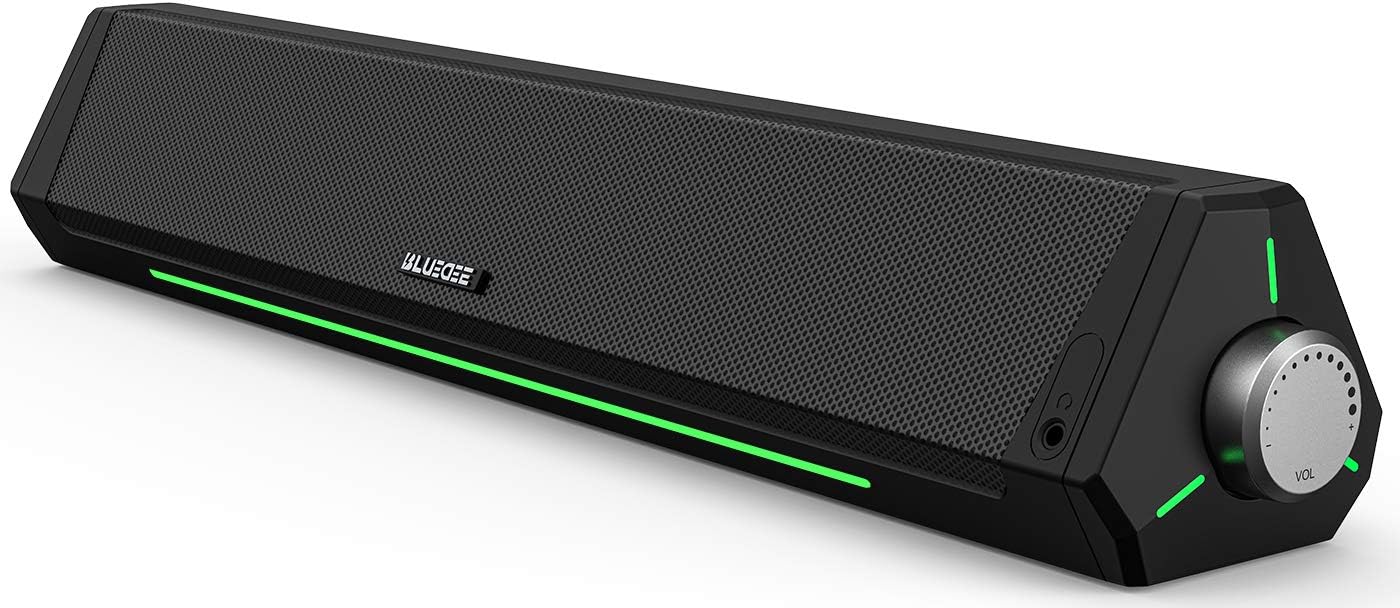
Pros
- Superior sound quality compared to built-in laptop and monitor speakers, with noticeable bass enhancement
- Perfect fit under standard monitors with minimal desk footprint, ideal for space-conscious setups
- Seamless Bluetooth connectivity with 10-meter range and instant pairing reliability
- Attractive ambient lighting adds professional aesthetic to gaming and work environments
- Simple USB power delivery eliminates cable clutter with tidy nylon-braided Y-cable design
Cons
- No dedicated power button or sleep mode, speaker remains in standby with flashing lights when powered
- USB power dependency means speaker won't function without active USB port connection
- Not water-resistant, so placement near beverages or humid environments not recommended
The Bluedee SK010 is a compact desktop soundbar engineered for professionals, gamers, remote workers, and anyone frustrated with inadequate built-in speaker performance. This 16.4-inch soundbar delivers a noticeable audio upgrade without monopolizing desk space, making it an ideal solution for modern workstations where real estate is premium.
The standout feature is its dual-driver, dual-diaphragm audio architecture that produces well-balanced sound across the frequency spectrum. Users consistently report impressive bass response and clear midrange clarity, particularly beneficial for video conferencing, gaming sessions, and multimedia consumption. The anti-magnetic technology effectively eliminates static interference, resulting in a noticeably crisper listening experience compared to standard computer speakers.
Design and build quality impress with the slim, futuristic profile that slides neatly beneath most monitors. The eco-friendly ABS plastic construction feels durable despite its lightweight 2-pound frame, and the ambient LED light strips add visual sophistication to your setup. The nylon-braided Y-cable consolidates power and audio into a single connection, maintaining workspace organization.
One notable limitation is the absence of a dedicated power button. When your PC remains powered, the speaker enters standby mode with flashing lights, which some users find distracting. Additionally, USB power dependency means you cannot use the speaker without an active USB port, limiting portability compared to battery-powered alternatives.
Overall, the Bluedee SK010 represents excellent value for desktop audio enhancement. Its combination of superior sound quality, compact design, dual connectivity, and eco-conscious construction makes it a compelling choice for anyone seeking professional-grade audio without premium pricing or space requirements.
Audio Performance: Stereo output with dual drivers and dual diaphragms, 10-meter Bluetooth 5.0 range, anti-magnetic technology for interference elimination.
Connectivity: Bluetooth 5.0 wireless and 3.5mm audio jack, USB-powered (compatible with laptops, PCs, power banks, and adapters), 1 built-in microphone for conferencing.
Physical Dimensions: 16.45 inches width x 2.67 inches depth x 2.67 inches height, weighs 2 pounds, tabletop mount design.
Materials and Sustainability: 85% eco-friendly ABS plastic, 5% metal components, eco-friendly cardboard packaging, nylon-braided Y-cable.
Warranty and Support: 18-month manufacturer warranty, lifetime after-sales technical support, includes setup video guide with QR codes.
Remote Workers and Video Conferencing: The built-in microphone and superior audio clarity significantly improve virtual meeting quality, making this ideal for professionals conducting frequent video calls.
Gaming Enthusiasts: Gamers appreciate the enhanced bass response and clear sound staging for immersive gameplay across PC, consoles, and streaming platforms.
Content Creators and Multimedia Users: Video editors, streamers, and content consumers benefit from the dual-driver audio quality and ambient lighting for extended work sessions.
Space-Conscious Users: Anyone with limited desk space who refuses to compromise on audio quality will appreciate the compact 16.4-inch footprint that fits beneath standard monitors.
Budget-Conscious Audiophiles: Those seeking professional-grade sound without premium pricing will find the Bluedee SK010 delivers impressive audio performance at an accessible price point.

Pros
- Exceptional audio clarity and dialogue intelligibility, ideal for movies, games, and video calls
- Surprisingly powerful bass response from a compact soundbar that belies its diminutive size
- Versatile RGB lighting can be customized or disabled entirely to match your aesthetic preferences
- Excellent value for the price with reliable Creative Labs brand backing and solid construction
- Minimal desk footprint with flexible mounting options under monitors or on shelves
Cons
- Not ideal for serious audiophiles or those seeking movie theater-quality surround sound experience
- Gaming performance is secondary to headphones for competitive multiplayer titles requiring spatial audio precision
- RGB lighting, while customizable, may distract some users despite toggle-off functionality
The Creative Sound Blaster GS3 is a compact desktop soundbar engineered for gamers, content creators, and office workers who refuse to sacrifice audio quality for desk space. This 24W powerhouse delivers clear, immersive sound in a refined black design that slides seamlessly under any monitor setup.
What truly sets the GS3 apart is its Superwide technology, which creates an expansive soundstage with pronounced bass that defies its compact 16-inch width. Reviewers consistently praise its dialogue clarity for movies and shows, making it ideal for watching films on ultrawide monitors without straining to hear conversations. The racetrack drivers and built-in port tube work together to produce balanced audio across gaming, music, and multimedia content.
Build quality is solid throughout, with intuitive controls and a refined aesthetic that complements modern gaming setups. Connectivity is genuinely flexible, offering USB-C, Bluetooth 5.4, standard AUX input, and a headphone-out port for direct headphone connection. Setup is remarkably simple, typically requiring just one cable from your computer for a clean desk environment.
The RGB lighting system features six presets including Chasers, Aurora, Peak Meter, Glowing, Wave, and Cycle modes. You can sync lighting with music or disable it entirely for a minimal aesthetic. However, this is not a replacement for dedicated gaming headphones if you play competitive multiplayer titles requiring precise spatial audio.
At its price point, the Sound Blaster GS3 offers exceptional value for desktop audio. It excels as a monitor soundbar for immersive single-player gaming, movie watching, and office work while maintaining the compact footprint modern setups demand. Highly recommended for anyone seeking powerful, clear desktop audio without the bulk.
Audio Performance
Peak Power: 24W
Driver Type: Full-range racetrack drivers with built-in port tube
Technology: Superwide soundstage enhancement
Connectivity
Wireless: Bluetooth 5.4
Wired: USB-C, 3.5mm AUX input
Output: 3.5mm headphone jack
Design
Dimensions: 3.64 x 16.14 x 2.9 inches
Weight: 2.33 pounds
Color: Black
RGB Lighting: 6 presets (Chasers, Aurora, Peak Meter, Glowing, Wave, Cycle)
Additional Info
Model: MF8465
Manufacturer: Creative Labs
Best Sellers Rank: #44 in Computer Speakers

Pros
- Exceptional value for money with audio quality comparable to premium brands like Bose
- Truly plug-and-play setup with single USB-C connection eliminates cable management headaches
- Crisp, clear audio with strong bass response enhances gaming and movie experiences
- Dual connectivity options via USB and Bluetooth provide maximum flexibility
- Sleek RGB lighting and compact design complement modern gaming setups perfectly
Cons
- No bass subwoofer included, so bass response relies entirely on built-in drivers and radiators
- Audio output can split between multiple devices, requiring manual toggling in some scenarios
- Limited to 10-meter Bluetooth range, so not ideal for larger rooms or distance streaming
The Razer Leviathan V2 X is a compact PC gaming soundbar engineered for desktop users and gamers who demand immersive audio without sacrificing workspace. It's purpose-built for streamlined setups where a single USB-C cable serves dual duty, powering the device and delivering crystal-clear audio to your monitor or gaming rig. This soundbar is perfect for anyone upgrading from tinny monitor speakers or downsizing from bulky multi-speaker systems.
Performance-wise, the Leviathan V2 X punches above its weight class. Its dual full-range drivers and passive radiators produce rich stereo sound with impressive clarity and bass response that rivals much pricier competitors. Gaming audio feels immersive with crisp details and dynamic range, while movies and music benefit from the 90dB output capability. Bluetooth 5.0 connectivity ensures lag-free audio when paired with mobile devices, and the seamless switching between PC and phone via the Razer Audio App adds genuine convenience to daily use.
Build quality reflects Razer's gaming heritage with a sleek black finish and a compact form factor that tucks neatly beneath most monitors. The 14-zone Chroma RGB lighting system syncs with your gaming peripherals through Razer Synapse, creating cohesive visual effects that enhance immersion without overwhelming your setup. The minimalist design prioritizes function over flash, keeping your desk clean and professional-looking.
The main limitation is the absence of a dedicated subwoofer, which means bass enthusiasts may find the low-frequency response somewhat constrained compared to larger 2.1 systems. Additionally, audio output occasionally splits between connected devices, requiring manual toggling through the app in certain scenarios. The 10-meter Bluetooth range is standard but worth noting if you plan to use it from across a larger room.
Verdict: The Razer Leviathan V2 X delivers exceptional audio quality and convenience for PC gamers and desktop users on a budget. Its single-cable setup, impressive sound stage, and RGB customization make it a worthy upgrade from monitor speakers. Recommended for anyone seeking a compact, clutter-free soundbar that doesn't compromise on performance.
Audio Output: Stereo, 90dB maximum volume
Drivers: 2x full-range drivers, 2x passive radiators
Connectivity: USB Type-C (wired), Bluetooth 5.0 (wireless)
Bluetooth Range: 10 meters
Frequency Response: 20 KHz
Audio Channels: 2.0 stereo
RGB Lighting: 14 customizable zones with Razer Chroma ecosystem support
Control: Razer Audio App and Razer Synapse software
Dimensions: Compact bar mount design fits beneath standard monitors
Power: USB Type-C single cable
Warranty: 1 year manufacturer limited warranty
Included: USB Type-C cable and product documentation
Who Should Buy: PC gamers with limited desk space, content creators needing monitor-mounted audio, and users upgrading from basic monitor speakers. Also ideal for anyone seeking a second soundbar for a secondary gaming or work setup.
Who Should Skip: Audiophiles requiring deep bass response should consider pairing this with a separate subwoofer or opt for larger 2.1 systems. Users with rooms larger than 10 meters who rely solely on Bluetooth connectivity may want to verify compatibility with their setup first.
Setup Considerations: Requires a USB-C port on your PC or motherboard. Older systems may need a USB-C adapter (sold separately). Optimal placement is directly beneath your monitor for balanced stereo imaging. Allow the device a full charge cycle before expecting maximum responsiveness from the power button.
Customization Tips: Download Razer Synapse to unlock full RGB lighting potential and sync with compatible gaming peripherals. Use the Razer Audio App to toggle between USB and Bluetooth inputs and customize audio profiles for different content types like gaming versus music streaming.

Pros
- Exceptional value for the price with premium aesthetic and functional RGB lighting
- Quick setup with USB power and 3.5mm connectivity, no drivers or complicated installation required
- Stylish modern design that enhances desk aesthetics while delivering adequate sound quality
- Touch controls and individual volume buttons provide intuitive, accurate adjustment
- Wide device compatibility covers PC, TV, laptop, and smartphone audio needs
Cons
- Maximum output power of 3 watts means volume levels are moderate, not ideal for large rooms or high-volume listening
- Some users report power stability issues after power outages requiring unplugging and replugging to restore function
- Build quality feels slightly fragile compared to higher-priced alternatives, with durability concerns noted in long-term use
The Redragon GS520 Anvil is a compact 2.0 stereo speaker system designed for budget-conscious users who want desktop audio with style. Perfect for gamers, content creators, office workers, and anyone seeking affordable speakers that don't sacrifice on aesthetics, this USB-powered solution delivers practical performance without requiring a wall outlet.
The standout feature is the touch-controlled RGB lighting system offering 6 customizable modes that sync beautifully with gaming setups or workspace environments. Audio performance covers gaming, YouTube, video calls, and general multimedia well, with crisp sound reproduction and minimal distortion at moderate volumes. The 2.0 channel stereo configuration provides clear separation between left and right channels, though the 3-watt maximum output limits volume capacity in larger spaces.
Design and build quality reflect the budget positioning with minimalist urban styling and brushed aluminum accents that create an upscale appearance. The compact 7-inch height and lightweight 1.8-pound construction fit naturally on crowded desks. Materials include durable ABS plastic and aluminum, though some users note the overall construction feels less robust than premium alternatives at higher price points.
Drawbacks include moderate volume limitations, occasional power stability issues after electrical interruptions, and potential durability concerns with extended use. Some users report needing to unplug and replug speakers to restore function after power outages, which can be frustrating for always-on setups.
Verdict: The Redragon GS520 Anvil delivers excellent value for budget-conscious buyers seeking stylish, functional desktop speakers. While not suited for audiophiles or high-volume applications, it excels as an affordable solution for gaming, office work, and multimedia entertainment where aesthetics matter as much as sound quality.
Audio Performance: 2.0 stereo channel configuration, 3-watt maximum output power, 20 kHz frequency response, bass driver type for enhanced low-end clarity.
Connectivity: USB powered (5V DC), 3.5mm audio jack input, compatible with PC, laptop, TV, and smartphones. 80cm cable length between speakers provides flexible placement options.
Design: Compact tabletop mounting, 3.5 inches deep by 4 inches wide by 7 inches tall, weighs 1.8 pounds. ABS plastic and aluminum construction with brushed material finish and minimalist modern aesthetic.
Controls: Touch-controlled RGB lighting with 6 customizable modes plus off option, individual volume up and down push buttons, power button with hold activation.
Package: Includes 2 stereo speakers, 1-year limited warranty, model GS520 Anvil by Redragon, ranked number 16 in computer speakers category.
Best For: The GS520 Anvil suits gamers on tight budgets, office workers needing desk speakers, content creators wanting RGB-enhanced setups, and anyone prioritizing aesthetics alongside basic audio quality. Ideal for small to medium-sized spaces where moderate volume suffices.
Consider Alternatives If: You need high-volume output for large rooms, require professional-grade audio quality, demand exceptional durability and long-term reliability, or prefer traditional speaker designs without RGB lighting.
Setup Tips: Position speakers equidistant from your seating for balanced stereo imaging. Keep speakers away from water sources as they are not waterproof. Test RGB lighting modes to find your preferred aesthetic. Use the 3.5mm input for devices without USB ports, and leverage USB power to eliminate extra cables.
Warranty: Covered by 1-year limited warranty from Redragon. Review warranty terms carefully for coverage details and claim procedures before purchase.

Pros
- Extremely easy setup with most users reporting connection in under 5 minutes, including ARC TV remote compatibility
- 2-in-1 detachable form factor offers rare placement flexibility not found in most soundbars at this price
- Comprehensive connectivity with all required cables included in the box for ARC, Optical, and AUX hookups
- Auto Volume Boost feature effectively solves the common problem of fluctuating TV audio levels
- Strong value proposition with 80W output and multiple EQ modes at a sub-$50 price point
Cons
- Remote control does not include AAA batteries, which is an inconvenient omission that requires an extra purchase before first use
- ARC connection may require volume levels above 80% on some TV brands such as TCL Roku to achieve satisfactory loudness
- No wall-mount template is included in the box, making precise screw placement for wall installation more difficult
The Assistrust KY-8000 is a compact 80W soundbar designed for budget-conscious buyers who want a meaningful audio upgrade for their TV, PC, gaming setup, or projector. Priced well under $100, it targets everyday home theater users, renters, and students who need solid sound without a complex or expensive installation.
The standout feature here is the 2-in-1 detachable design, which allows the single 17-inch bar to split into two independent vertical tower speakers. This gives users a level of placement flexibility that is genuinely rare at this price tier. Combined with four high-performance dynamic drivers and 80W of output power, the soundbar produces noticeably fuller and more detailed audio than typical built-in TV speakers, with the Auto Volume Boost feature doing a commendable job of keeping dialogue audible without sudden loud spikes.
Build quality is respectable for the price, using a mix of recycled ABS plastic and metal components. The low-profile black finish looks clean and modern beneath most TVs, and at just under 3kg it is light enough to wall mount or reposition easily. The included remote provides straightforward control, and Bluetooth 5.0 ensures a stable wireless pairing experience across phones, tablets, and laptops.
There are a few genuine drawbacks worth noting. The remote ships without batteries, which is an unnecessary inconvenience. Some users on specific TV brands have reported that the ARC connection requires higher-than-expected volume levels to sound balanced. Additionally, no wall-mount template is provided, which complicates screw placement for those who want a clean wall installation.
Overall, the Assistrust KY-8000 is a compelling pick for anyone seeking an affordable, flexible, and easy-to-use soundbar upgrade. It punches above its weight in features and sound quality, and the comprehensive warranty and support package add meaningful peace of mind. Minor packaging omissions aside, this is one of the better budget soundbars available today.
Model: Assistrust KY-8000 | Speaker Output: 80W | Audio Channels: 2.0 Stereo | Drivers: 4 Dynamic Drivers | Frequency Response: up to 20 kHz
Connectivity: Bluetooth 5.0, HDMI ARC, Optical (Toslink), 3.5mm AUX | Power Source: AC Adapter (100V input) | Control: Included Remote Control
Dimensions: 17 inches (L) x 3.5 inches (W) x 2.5 inches (H) | Weight: 2.97 kg | Color: Black | Enclosure: 60% Recycled ABS, 25% Metal, 15% Other
Mounting Options: Tabletop, Horizontal, Vertical, Wall Mount | Compatible Devices: Smart TV, PC, Laptop, Smartphone, Tablet, Projector, Home Theater | EQ Modes: Movie, Music, News
In the Box: 1x Detachable Soundbar, 1x Power Adapter, ARC Cable, Optical Cable, 3.5mm AUX Cable, 1x Remote (batteries not included), 2x Bases | Warranty: 18-Month Limited plus 60-Day Replacement Policy
If you are shopping for a soundbar under $50, the most important factors to consider are connectivity options, ease of setup, and whether the form factor fits your space. The Assistrust KY-8000 excels in all three areas, making it a strong default choice for most casual buyers in this price range.
For TV users, the HDMI ARC connection is the most convenient option as it allows your existing TV remote to control the soundbar volume. Before purchasing, confirm that your TV has an ARC-labeled HDMI port. If not, the included Optical or AUX cables provide reliable wired alternatives. Bluetooth 5.0 is ideal for wireless use with phones or tablets, or for moving the speaker to a different room temporarily.
The 2-in-1 detachable feature is a genuine differentiator. If you have a wide TV setup or a gaming room where you want stereo separation, splitting the bar into two vertical towers can meaningfully improve the sense of audio width and immersion. This makes the KY-8000 a smarter buy than a similarly priced traditional single-bar unit.
Consider this soundbar if you need: an affordable first soundbar upgrade, a secondary room audio solution, a soundbar for a dorm or small apartment, or a gaming audio boost for a PC or console setup. It is less ideal for dedicated audiophiles or home theater enthusiasts who prioritize deep bass, as there is no subwoofer included or subwoofer output port.
Remember to pick up a pack of AAA batteries before your soundbar arrives, as they are not included with the remote. Also note that wall mounting will require you to measure and mark screw positions manually since no mounting template is provided in the box.
How to Choose the Right PC Soundbar
Audio Performance and Power
Consider how you will use your soundbar. For general multimedia and clear voice chat, a standard stereo bar like the Bluedee Computer Speakers for Desktop PC may suffice. For gaming and movies where impactful bass is key, a 2.1 system with a dedicated subwoofer, such as the Nylavee Computer Speakers with Subwoofer, provides a more immersive experience. High-wattage output, like the 66W RMS from the Edifier M60 Multimedia Speaker, ensures the audio remains crisp even at higher volumes.
Connectivity and Compatibility
Your PC’s available ports dictate your choices. Most soundbars offer a simple 3.5mm AUX input, which is universally compatible. USB connectivity, found on models like the Cyber Acoustics CA-2890BT, provides digital audio and often powers the speaker from a single cable. For wireless freedom and modern convenience, look for Bluetooth 5.0 or higher, a feature explored in our guide on the best soundbars with bluetooth 5.0. If your monitor has audio outputs, a wired connection via AUX input remains a reliable, low-latency option.
Form Factor and Desk Space
Soundbars excel at delivering big sound in a slim profile. Measure the space beneath your monitor before you buy. Ultra-compact models like the Creative Sound Blaster GS3 are designed to fit snugly under most screens without blocking the display. If you have more room, a wider bar or a system with external speakers, like the Edifier M60, can offer a wider soundstage. Consider cable management as well; tidy solutions with combined audio/power cables help maintain a clean workspace.
Extra Features and Customization
Additional features can enhance your setup. RGB lighting, offered by the Razer Leviathan V2 X and Redragon GS520, adds aesthetic flair for gaming rigs. Dedicated companion apps, like those from Razer or Edifier, allow for fine-tuning equalizer settings and lighting effects. Some bars, including the Assistrust Sound Bar for Smart TV, include multiple audio modes optimized for movies, music, or dialogue. For those using the soundbar with a TV as well, features like HDMI ARC, detailed in our HDMI ARC guide, add valuable versatility.
Final Thoughts
Upgrading your PC with a dedicated soundbar is one of the most impactful changes you can make to your setup. For users seeking maximum audio fidelity and a premium build, the Edifier M60 Multimedia Speaker stands out with its Hi-Res certification and powerful output. Gamers and those wanting a seamless, feature-rich experience will appreciate the software integration and RGB ecosystem of the Razer Leviathan V2 X. Regardless of your choice, any of these reviewed models will provide a significant leap over standard PC audio. For more options and comparisons, browse our full selection of soundbars.
Frequently Asked Questions
Do I need a soundbar with a subwoofer for my PC?
It depends on your audio preferences. A 2.1 system with a subwoofer, like the Nylavee model reviewed, delivers significantly deeper bass for action games, movies, and bass-heavy music. For general use, clear dialogue, and saving space, a standard soundbar provides excellent quality without the extra component.
Can I use a TV soundbar for my computer?
Yes, many TV soundbars work perfectly with PCs, especially if they have a 3.5mm AUX or Bluetooth input. However, TV soundbars are often wider and may not fit neatly under a monitor. PC-specific soundbars are typically more compact and designed for near-field listening on a desktop.
Is Bluetooth good enough for PC gaming?
Modern Bluetooth 5.0 and higher offers low latency, making it suitable for casual gaming and media. For competitive gaming where every millisecond counts, a wired USB or 3.5mm connection is recommended to eliminate any potential audio delay between the action on screen and the sound you hear.
How do I connect a soundbar to my PC if it only has USB ports?
Many modern soundbars, including the Cyber Acoustics CA-2890BT, connect and draw power via a single USB cable. This is a plug-and-play solution that works with any PC or laptop with a USB-A or USB-C port, often requiring no additional drivers for basic functionality.


Write Your Review
No reviews yet. Be the first to share your experience!