

You’ve chosen the perfect spot on the wall, mounted your TV with a sleek bracket, and stepped back to admire your handiwork. Then your eyes drift downward to the tangled web of power cords, HDMI cables, and Ethernet wires snaking to the floor. That promised minimalist look is instantly ruined by visual clutter. Finding the best TV mounts with cable management is the crucial final step to achieving a truly polished home theater.
This guide is for anyone tired of messy cables detracting from their viewing experience. We have evaluated leading in-wall cable management kits that work seamlessly with your wall mount. These solutions safely route wires behind the drywall, offering a clean, professional finish without requiring an electrician. Whether you are setting up a new mount or retrofitting an existing one, the right kit can transform your space. For more on mounting hardware itself, explore our guide on the best TV mounts for drywall.

Pros
- All-inclusive kit eliminates need to purchase additional tools or components separately
- Fast installation process makes this accessible for renters and homeowners alike
- Includes quality hole saw drill attachment with arbor and hex wrench for perfect fit
- Rated 4.8 out of 5 stars with thousands of verified customer reviews
- Affordable price point makes professional cable management accessible to everyone
Cons
- Only suitable for walls with 12mm-18mm thickness, may not work with thicker masonry or concrete
- Requires basic drilling skills and proper wall assessment before installation
- Limited to hiding cables within wall cavities, not suitable for all wall types or configurations
The Riozoo In-Wall TV Cable Management Kit is a practical solution for anyone frustrated with messy cables visible behind wall-mounted TVs. This kit targets homeowners and renters seeking a clean entertainment setup without professional installation costs or the hassle of hiring an electrician.
The kit delivers impressive functionality with its included hole saw drill attachment, two pass-through grommets, arbor, and hex wrench. Installation takes under 20 minutes and requires only a standard drill, making it accessible to DIY beginners. The grommets fit perfectly in walls between 12mm and 18mm thick, including drywall, plaster, and wood plank surfaces common in most homes.
Build quality appears solid with thicker drilling accessories designed for proper grommet fit and durability. The plastic construction keeps the kit lightweight and affordable while maintaining functionality. The white finish blends seamlessly into most home decor and entertainment setups.
The main limitation is wall compatibility, as thicker masonry, concrete, or specialty wall types may not accommodate the standard hole saw included. Additionally, users must assess their wall structure before installation to ensure proper fit and safety.
Overall, this cable management kit offers excellent value for the price, delivering professional results without professional costs. The high customer rating and extensive positive feedback confirm its effectiveness for standard home entertainment installations.
Before starting, measure your wall thickness to confirm it falls within the 12mm-18mm range. Locate your TV wall studs and plan cable routes from your TV to components or wall outlets below.
Mark hole locations on the wall where you want cables to pass through. Use the included hole saw with your drill to create clean, precise holes. Insert the plastic grommets into the holes and thread your cables through them for a finished look.
The entire process typically takes 15-20 minutes for most installations. If you encounter resistance or difficulty drilling, stop and reassess your wall type. Contact customer support if you have concerns about your specific wall configuration.
Package Contents: 2 TV Cord Hider grommets, 2-3/8 inch (60mm) hole saw, hole saw arbor, hex wrench, installation hardware
Compatibility: Perforated walls including drywall, plaster, and wood planks with thickness of 12mm to 18mm
Color: White
Material: Plastic construction
Installation Type: Wall mount with DIY installation
Warranty: 2-year manufacturer warranty with 24/7 customer support
Best For: Flat panel TVs, gaming systems, entertainment consoles, and home theater setups

Pros
- All-in-one solution eliminates messy cable clutter behind wall-mounted TVs
- Includes professional installation tools and template for accurate, hassle-free setup
- Dual outlet accommodates various plug shapes and sizes without obstruction
- Highly rated by customers with strong 4.7 out of 5 star rating reflecting real-world satisfaction
- Safe brush plate design prevents cable damage while routing multiple low-voltage connections
Cons
- Requires cutting into drywall, making it unsuitable for renters or temporary installations
- Limited to powering only two devices, which may not suffice for complex entertainment setups
- 6ft extension cord may require additional cable management in some wall configurations
The ECHOGEAR In-Wall TV Cable Management Kit is a comprehensive solution designed for anyone frustrated with visible cables behind wall-mounted televisions. This system is perfect for homeowners and renters with permanent living situations who want a professional, clean aesthetic without hiring an electrician or dealing with complex wiring.
The standout feature is its all-in-one design that combines power delivery with cable routing in a single compact module. The dual outlet accommodates two devices, while the brush plate pass-through safely hides up to three low-voltage cables like HDMI and ethernet. Real-world performance is straightforward: install the module between wall studs, run your cables through, and enjoy a clutter-free entertainment space. The included wall template and drywall saw ensure precise installation, making this accessible for DIY enthusiasts without professional tools.
Build quality appears solid based on customer feedback, with the 6.25 by 8 by 3.95 inch module fitting discreetly behind drywall while the spacious dual outlet handles awkwardly shaped plugs that often cause frustration. The low-profile 6ft extension cord included in the package demonstrates thoughtful engineering for realistic installation scenarios.
The main limitation is that this solution requires permanent wall modification, making it unsuitable for renters or those in temporary housing. Additionally, the dual outlet may feel restrictive for complex entertainment setups requiring more than two powered devices, though the cable pass-through handles multiple low-voltage connections effectively.
Overall, this is a well-executed cable management system that delivers on its promise of a clean installation. For homeowners with wall-mounted TVs seeking a professional appearance without hiring electricians, the ECHOGEAR kit represents solid value with strong customer satisfaction backing its design and functionality.
Installation is straightforward and requires no electrical wiring knowledge. Start by using the included wall template to mark stud locations and cut the appropriate opening with the provided drywall saw. The template ensures your hole is perfectly sized for the 6.25 by 8 by 3.95 inch module.
Feed your power cord through first, then route your low-voltage cables through the brush plate pass-through. The unique cable catching design prevents wires from getting pinched. Finally, secure the module between studs and snap the faceplate into place. The entire process typically takes 30 minutes to an hour for most users.
Model: ECHOGEAR EGAV-CMIWP2, White finish. Module dimensions: 6.25 inches length by 8 inches height by 3.95 inches depth. Includes dual AC outlets on top, brush plate pass-through for low-voltage cables, 6ft extension cord with low-profile plug, wall template, and drywall saw blade. Indoor use only. Accommodates up to 2 powered devices and 3 low-voltage cable connections simultaneously.
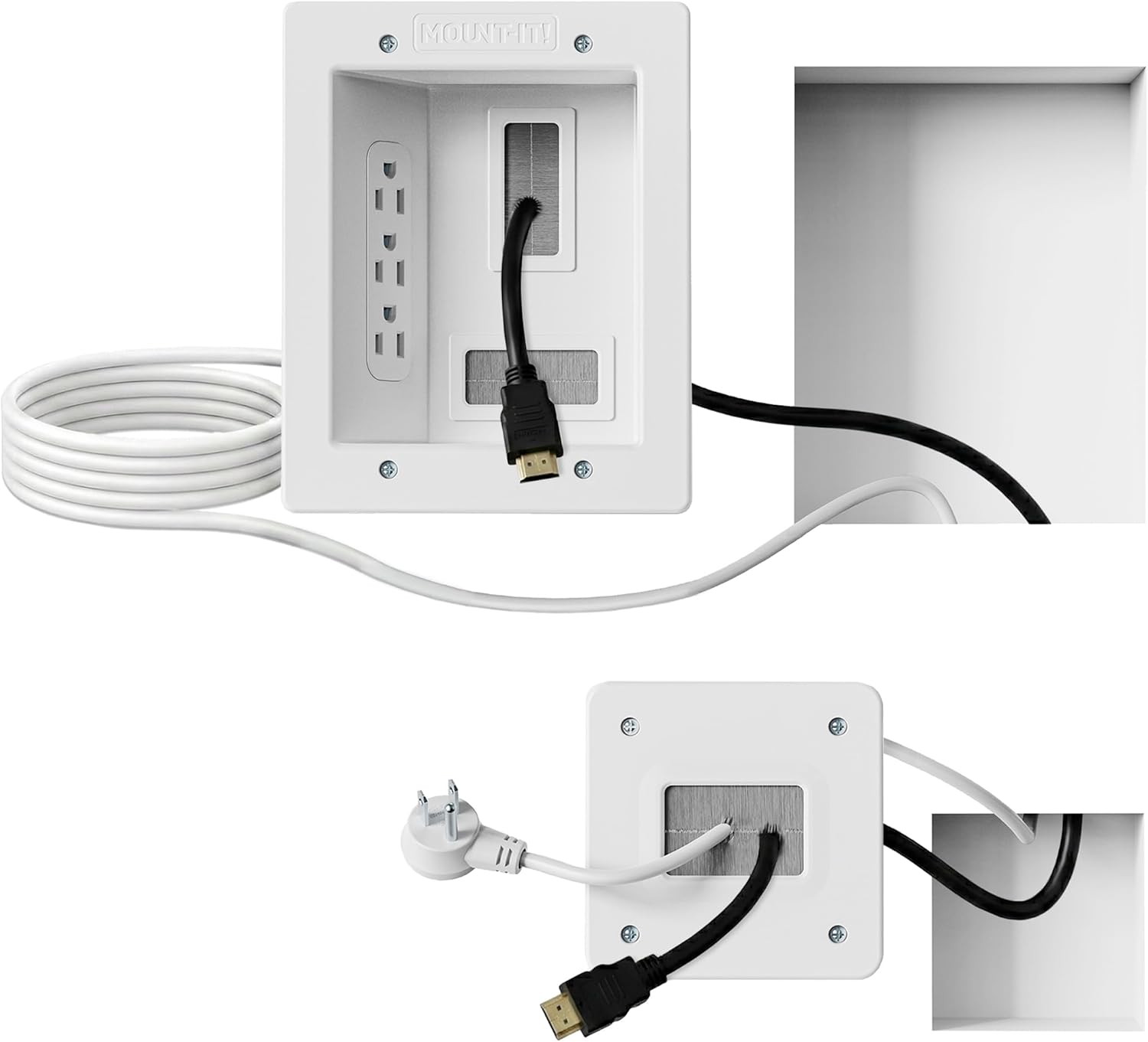
Pros
- Renter-friendly plug-in design eliminates the need for permanent electrical modifications
- Comprehensive kit includes all tools and hardware needed for one-person installation in under 30 minutes
- ETL certification guarantees safety compliance for both power and low-voltage cable management
- Spacious recessed opening accommodates multiple cable types without pinching or damage
- Lifetime warranty demonstrates manufacturer confidence in product durability and performance
Cons
- Requires minimum 2.4 inches of cavity depth, which may not work in all wall types or locations
- Large wall plate cutout (6.3 x 7.9 inches) needs to be positioned between wall studs for proper installation
- No reviews currently available, so real-world user feedback and long-term durability data are limited
The Mount-It in-wall cable concealer kit is a DIY-friendly solution designed for anyone tired of tangled cables cluttering their entertainment area. This kit is ideal for homeowners and renters who want a professional-looking home theater setup without the expense and hassle of hiring an electrician. The plug-in design makes it accessible to anyone with basic tools and patience.
The standout feature is the spacious recessed opening that accommodates multiple HDMI, Ethernet, and A/V cables simultaneously, keeping everything neatly concealed behind the wall. The included 9-foot extension cord with triple outlets provides flexible power delivery to reach distant wall outlets. Installation is straightforward with the provided drywall saw, cutting template, and detailed instructions, taking roughly 30 minutes for most users. The ETL certification ensures both power and low-voltage cables are managed safely.
Build quality appears solid with durable plastic and rubber materials designed for long-term use. The kit includes two wall plates (a large 6.3 x 7.9 inch plate and smaller 4.5 inch plate) with pre-installed screws for faster assembly. The lifetime warranty reflects manufacturer confidence in the product's durability and performance over time.
One consideration is that installation requires a minimum cavity depth of 2.4 inches and the cutout must be positioned between wall studs. This may limit placement options in some homes or apartment layouts. Additionally, without user reviews available yet, real-world feedback on long-term performance remains limited.
Overall, this cable concealer kit delivers excellent value for anyone seeking a cleaner entertainment setup without professional installation costs. The complete package, ease of installation, and safety certifications make it a practical choice for modernizing your home theater or bedroom TV area.
Brand: Mount-It
Model Number: MI-7284
Color: White/Gray
Material: Plastic, Rubber
Weight: 2.4 pounds
Installation Type: Wall-mounted
Usage: Indoor
Large Wall Plate Dimensions: 6.3 inches x 7.9 inches
Small Wall Plate Dimensions: 4.5 inches
Minimum Cavity Depth Required: 2.4 inches
Extension Cord Length: 9 feet
Outlet Configuration: Triple outlet
Certification: ETL In-Wall Certified
Warranty: Lifetime
What's Included: 2 wall plates with pre-installed screws, 9-foot power extension cord, drywall saw, cutting template, and step-by-step instructions
Pre-Installation Checklist: Measure your wall cavity depth to ensure it meets the minimum 2.4-inch requirement. Locate the desired installation spot between wall studs. Standard drywall walls are typically 3.5 inches deep, providing adequate space. Identify your nearest outlet for the 9-foot extension cord to reach comfortably.
Installation Steps: Use the provided cutting template to mark your drywall cutout location between studs. Carefully cut the drywall opening using the included drywall saw following the template guide. Feed your cables through the opening and position them in the recessed cavity. Install the wall plate using the pre-installed screws and secure it to the wall studs or use appropriate anchors. Connect your power cord to your existing outlet and plug in your TV and devices. Route your HDMI, Ethernet, and A/V cables through the concealer for a clean, organized appearance.
Safety Tips: Always turn off power at the breaker before working near electrical outlets. Use caution when cutting drywall to avoid damaging hidden wires or pipes. Do not exceed the weight capacity of the wall plates. Ensure cables are not pinched or bent excessively as they pass through the concealer. The ETL certification covers this kit when installed according to instructions.

Pros
- All-in-one kit eliminates need to purchase separate components or hire professional installation
- Included hole saw drill attachment ensures proper fit and takes guesswork out of sizing
- Sleek design creates floating TV appearance by completely hiding cable clutter
- Sufficient cable capacity handles multiple HDMI, ethernet, and audio connections
- Paintable design allows customization to match any interior aesthetic
Cons
- Requires at least 2.5 inches of space behind drywall, limiting compatibility with some wall types or installations
- Pre-wired design may not accommodate custom cable routing needs for complex AV setups
- No water resistance limits use to indoor installations only
The COOVIE in-wall cable management kit is a comprehensive DIY solution designed for homeowners and renters who want to hide unsightly TV cables and cords behind their walls. This product is perfect for anyone mounting a television and looking to achieve that clean, professional look without visible cable clutter running down the wall.
The standout feature is the included hole saw drill attachment, which removes the guesswork from installation and ensures a perfectly sized opening every time. The kit handles multiple large braided HDMI cables along with ethernet and audio connections, making it versatile enough for most home theater setups. Installation takes less than 30 minutes and requires no special electrical knowledge or professional help, thanks to the pre-wired design and comprehensive component package.
Build quality appears solid with locking bracket wings that grip the back of your drywall securely to keep cables in place and prevent shifting over time. The white finish is paintable, allowing you to match your wall color or decor for a truly seamless, integrated appearance. The grommet design keeps cables organized and protected as they pass through the wall.
The main limitation is the requirement for at least 2.5 inches of space behind your drywall, which may not be available in all wall locations or construction types. Additionally, the pre-wired design may not suit those with highly customized or complex AV setups requiring specific cable routing.
Overall, the COOVIE in-wall cable management kit delivers excellent value for anyone wanting a professional-looking hidden cable solution without professional installation costs. It's an ideal choice for standard TV mounting projects where clean aesthetics matter.
Installation is straightforward and designed for DIY completion in under 30 minutes. Start by locating your desired cable pass-through point on the wall, ensuring you have at least 2.5 inches of clear space behind the drywall. Use the included hole saw drill attachment to create a perfectly sized opening for the grommet.
After drilling, insert the grommet into the hole and secure it with the locking bracket wings. The wings grip the back of the wall firmly to hold everything in place. Route your HDMI, ethernet, and audio cables through the grommet, and the kit accommodates up to four large braided cables comfortably. Once installed, you can paint the white finish to match your wall color for a completely integrated look.
Buying Guide for Cable Management Kits
Type of Wall and Installation Method
Your wall type dictates the best approach. Most kits are designed for standard drywall installed between studs. They require you to cut an opening, which is fine for most homeowners. Always measure your wall cavity depth before purchasing. Some products are specifically for plaster or thinner walls. If you are unsure about cutting into your wall, consider surface-mounted raceways, though they are less discreet. Proper installation ensures safety and a clean look.
Power Outlet Capacity and Cable Pass-Throughs
Consider how many devices you need to power directly from the recessed box. Kits offer single, dual, or even triple outlets. You also need ample pass-through space for low-voltage cables like HDMI, Ethernet, and audio wires. A good kit separates power and signal cables to prevent interference. Think about your current setup and potential future additions, such as a new gaming console or streaming device. This foresight prevents you from outgrowing the system too quickly.
Planning for a large screen? The number of cables often increases with TV size. Our resource on best TV mounts for 85-Inch TVs covers the sturdy hardware needed for such setups.
Included Tools and Ease of Installation
A complete DIY kit includes everything for the job. Look for a drywall saw or hole saw attachment, a precise cutting template, and clear instructions. Some kits even include a low-profile extension cord to connect the in-wall module to your existing outlet. The best products are designed for a straightforward installation in under an hour. This allows you to achieve a professional look without hiring a contractor, making it a rewarding project.
Safety Certifications and Build Quality
Never compromise on safety when running cables inside a wall. Look for kits that are ETL In-Wall Certified or have similar safety validations. This certification confirms the product meets strict electrical and fire safety standards for in-wall use. High-quality materials and a secure mounting system are also essential for long-term reliability. A well-built kit protects your home and your expensive electronics, giving you peace of mind for years.
For all your mounting and cabling needs, our Home Theater Mounts & Cables category is a valuable resource.
Final Thoughts
Choosing the right cable management system elevates your TV installation from functional to fantastic. For a comprehensive, high-capacity solution that includes almost every tool you need, the ECHOGEAR TV Cord Hider for Wall Mounted TV stands out. If you prefer a more budget-friendly option that covers the essentials for basic setups, the TV Wire Hider Kit for Wall Mount TV offers excellent value and simplicity. Whichever you select, you will enjoy a cleaner, safer, and more organized entertainment space.
Frequently Asked Questions
Is it safe to run power cords behind a wall?
Yes, but only if you use a kit specifically designed and certified for in-wall use. These kits include a proper electrical box and an approved power cord extension. Never simply stuff a standard power strip or loose cables into a wall cavity, as this can create a fire hazard. Always look for ETL or UL certification to ensure safety.
Can I install a cable management kit myself?
Absolutely. Most modern kits are designed for DIY installation and come with detailed instructions, templates, and the necessary tools. The process typically involves cutting a single hole in the drywall between studs, mounting the module, and connecting the cords. If you are comfortable with basic tools, you can complete the project in under an hour. For more complex setups, our parent category on Home Audio Sound Bars offers related guidance.
Do I need a special kit for a large TV?
Larger TVs do not necessarily require a special cable kit, but they often use more devices. Therefore, you should choose a kit with sufficient outlet capacity and ample pass-through space for multiple thick HDMI cables. Ensure the wall plate is wide enough to be discreet behind your TV’s profile. It is wise to pair a robust cable management system with a mount rated for your TV’s size, as discussed in our feature on best TV mounts for 65-Inch TVs.
Can I paint the wall plate to match my decor?
Most cable management wall plates come in a standard white finish that blends with most walls. Many are also paintable, allowing you to apply a coat of wall paint for a completely seamless look. Always check the product specifications to confirm the plate material is paint-friendly. This small step can make the installation virtually invisible.


Write Your Review
No reviews yet. Be the first to share your experience!