

Your PlayStation 5 is a powerhouse for immersive gaming, but the built-in controller microphone can leave your squad struggling to hear your callouts. Whether you’re coordinating the final push in a competitive match or streaming your epic adventures, crystal-clear audio is non-negotiable. A dedicated USB microphone bridges that gap, turning muffled speech into broadcast-quality sound that makes you heard.
This guide is designed specifically for PS5 players seeking that audio edge. We have evaluated eight popular USB microphones, assessing their compatibility, sound quality, and gamer-centric features. From all-in-one kits with boom arms to simple plug-and-play dynamic mics, you’ll find options to match your desk space, budget, and streaming ambitions.
Top USB Microphones for PS5: At a Glance
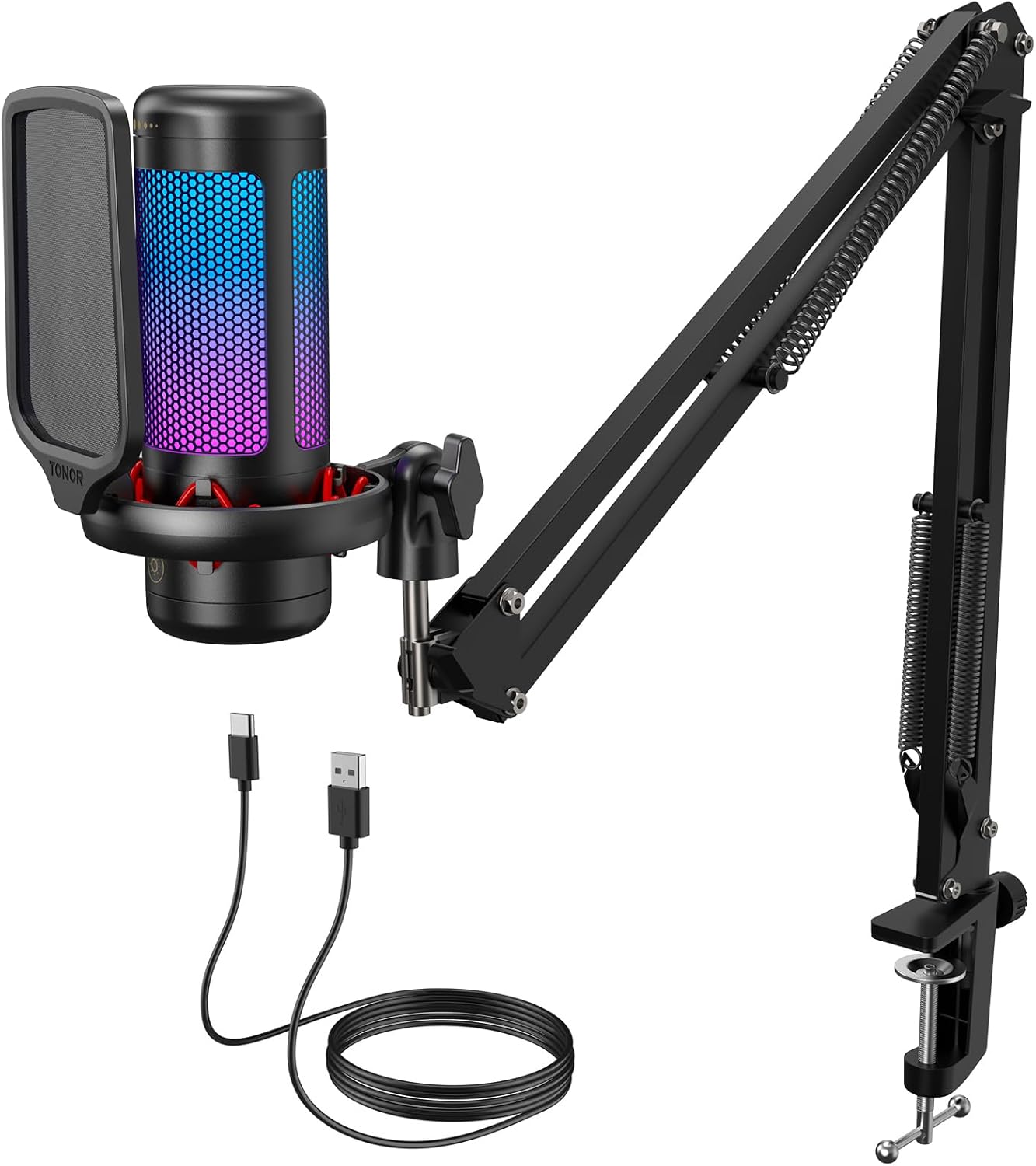
Pros
- Exceptional audio clarity and minimal background noise capture right out of the box
- Complete bundle eliminates need for additional purchases or compatibility concerns
- Intuitive touch controls make muting and adjusting settings effortless during streaming
- Sturdy metal boom arm with adjustable joints accommodates most desk setups
- Unidirectional polar pattern focuses on your voice while rejecting side noise
Cons
- PlayStation audio quality is limited by console compatibility constraints rather than microphone capability
- No built-in headphone monitoring port, requiring separate headphone connection
- RGB lighting may not appeal to users preferring minimalist or professional aesthetics
The TONOR TC310+ is a complete USB microphone solution designed for gamers, streamers, podcasters, and content creators who demand professional audio without technical complexity. This all-in-one kit arrives with everything needed for immediate setup, making it ideal for beginners and experienced creators alike who want to upgrade their audio quality without learning curve frustrations.
What sets this microphone apart is its commitment to simplicity and performance. The condenser capsule delivers crisp, clean audio with a 78 dB signal-to-noise ratio that captures voice detail while minimizing background interference. Users consistently report that friends notice immediate audio improvements during gaming sessions, and the adjustable gain control lets you dial in the perfect volume level. The one-tap mute button proves invaluable during live streams, allowing quick responses to unexpected situations without fumbling through software menus.
The included boom arm is constructed from quality metal with multiple adjustable joints, providing flexibility to position the microphone at your ideal angle. The sturdy clamp accommodates desks up to 2.36 inches thick, and the unidirectional polar pattern ensures your voice remains the focus while ambient noise stays suppressed. Build quality feels durable and professional, with the shock mount providing additional isolation from desk vibrations and handling noise.
The vibrant RGB lighting with four customizable modes adds visual appeal to your streaming setup, though brightness control prevents eye strain during extended sessions. One limitation worth noting is the lack of a headphone monitoring jack, meaning you cannot directly monitor your audio through the microphone itself. Additionally, PlayStation users report that console limitations affect audio quality more than the microphone's capabilities, a constraint beyond the device's control.
The TONOR TC310+ represents exceptional value for anyone seeking studio-quality audio at budget-friendly pricing. Its plug-and-play design, professional sound output, and complete accessory bundle make it the top choice for gamers and streamers ready to elevate their audio presence without unnecessary complexity or expense.
Audio Performance
Polar Pattern: Unidirectional
Signal-to-Noise Ratio: 78 dB
Audio Sensitivity: 10 dB
Channels: 1
Connector: USB Type-C
Physical Specifications
Dimensions: 16 x 6 x 5.4 inches
Weight: 474 grams
Material: Acrylonitrile Butadiene Styrene with Alloy Steel components
Color: Black
Boom Arm Clamp: Fits desks up to 2.36 inches thick
Connectivity and Compatibility
Connection: USB 2.0/3.0
Compatible Devices: PC, Mac, Laptop, PS4, PS5
Power Source: USB corded (no batteries required)
Setup: Plug and play, no drivers needed
Included Components
Microphone unit, Pop filter, Mic stand, Shock mount, USB cable, User manual
Ideal For
This microphone is perfect for Twitch streamers, YouTube content creators, gamers seeking better team communication, podcasters on a budget, and anyone upgrading from built-in laptop or headset microphones. If you value simplicity, professional audio quality, and don't want to spend hours configuring complex audio software, this is your solution.
Consider Alternatives If
You need professional-grade XLR connectivity, require built-in headphone monitoring, or are seeking audio equipment for mastering and music production. The TC310+ excels at voice-focused applications but isn't designed for full-spectrum music recording.
How to Choose a USB Microphone for Your PS5
Prioritize Plug-and-Play Simplicity
Your PS5 offers limited audio software control compared to a PC. Look for a microphone that works instantly via a direct USB connection. Models like the FIFINE AmpliGame A6T USB Gaming Microphone Kit are designed for this, requiring no drivers or complex setup. Just connect the cable to an available USB-A port on your console, and you’re ready to chat.
This seamless compatibility ensures you spend more time gaming and less time troubleshooting audio settings. It’s the foundation of a frustration-free upgrade.
Evaluate Your Need for a Boom Arm
A boom arm is a game-changer for desk organization and audio precision. It allows you to position the microphone close to your mouth without cluttering your playing surface. Kits that include an arm, like the MAONO DGM20S Gaming Microphone for PC with Clear, offer great value and flexibility.
If your desk space is limited or you prefer a minimalist look, a sturdy desk stand or tripod base might suffice. Consider your physical setup before choosing. For more on optimizing your mic placement, explore our guide on essential mic accessories.
Look for Gamer-Specific Controls
During an intense session, you need instant audio control. A physical tap-to-mute button on the microphone itself is invaluable for private conversations or sudden distractions. A gain control knob lets you adjust your voice volume without diving into PS5 menus.
Features like RGB lighting might seem cosmetic, but they provide clear mute status indicators and enhance your setup’s atmosphere. The FIFINE AmpliGame A6V USB Gaming Microphone exemplifies this with its intuitive, game-ready design.
Understand Polar Patterns and Noise Handling
For most gaming environments, a cardioid polar pattern is ideal. It focuses on sound directly in front of the microphone (your voice) while reducing noise from the sides and rear, like your game audio or room fan. This is crucial for clear communication.
Some mics offer additional noise reduction features via a physical button or, for more advanced users, companion software on a separate computer. If you’re a budding content creator, this flexibility can be a significant advantage for producing cleaner recordings.
Final Thoughts
Upgrading your PS5 audio with a dedicated USB microphone is one of the most impactful changes you can make for both multiplayer gaming and content creation. For players who want a complete, ready-to-use package right out of the box, the FIFINE AmpliGame A6T USB Gaming Microphone Kit is an excellent all-in-one solution. If your priority is exceptional voice clarity and future-proofing with both USB and XLR connectivity, the versatile FIFINE AmpliGame AM8 USB/XLR Dynamic Microphone offers professional-grade performance. Whichever model you choose, you’ll gain a critical audio advantage and a much-improved experience for everyone on your team.
Frequently Asked Questions
Do USB microphones work with PS5?
Yes, most modern USB microphones are compatible with the PS5. You simply plug the microphone’s USB cable directly into an available USB-A port on the front or back of your console. The system typically recognizes it immediately, and you can select it as your input device in the Sound settings. Always confirm compatibility in the product description before purchasing.
What’s better for PS5: a condenser or dynamic USB microphone?
For the typical home gaming environment, a condenser microphone often provides clearer, more detailed vocal reproduction, which is great for streaming. However, if your room has significant background noise (like loud air conditioning), a dynamic microphone, such as the FIFINE AM8, can be more effective at rejecting ambient sound. Both types work well with the PS5; the choice depends on your specific acoustic setting and needs.
Can I use a USB microphone and a gaming headset at the same time on PS5?
Yes, you can. Connect your USB microphone as the input device for your voice. Then, connect your wired gaming headset to the controller’s 3.5mm jack or use a wireless headset via its USB dongle for game audio and chat output. You will need to configure the audio input and output devices separately in the PS5’s audio settings to route sound correctly.
Where should I place my USB microphone for PS5 gaming?
Position the microphone close to your mouth, ideally 2-6 inches away, and slightly off to the side to avoid breath pops. Use a boom arm or a stable stand to achieve this without the mic blocking your screen. Ensure it’s pointed directly at you to leverage the cardioid pickup pattern. For a deeper dive into setup, our USB Microphones category page offers further resources and product comparisons.





Write Your Review
No reviews yet. Be the first to share your experience!