

Have you ever started a recording or a stream, only to realize your voice is either a faint whisper or painfully distorted? Manually adjusting microphone gain can be a frustrating dance, especially when you’re trying to focus on your content. This is where USB microphones with auto gain technology become a game-changer. They intelligently set your audio levels in real-time, protecting you from clipping and ensuring consistent volume, so you can concentrate on what you say, not how it sounds.
This guide is designed for content creators, gamers, podcasters, and remote professionals who demand professional audio without the technical complexity. We have evaluated a selection of popular USB microphones that feature some form of automatic gain control or intelligent leveling. Our goal is to help you find a microphone that delivers clear, reliable sound right out of the box. For a broader look at other essential recording gear, explore our main category page for USB Microphones.
Top USB Microphones with Auto Gain Compared
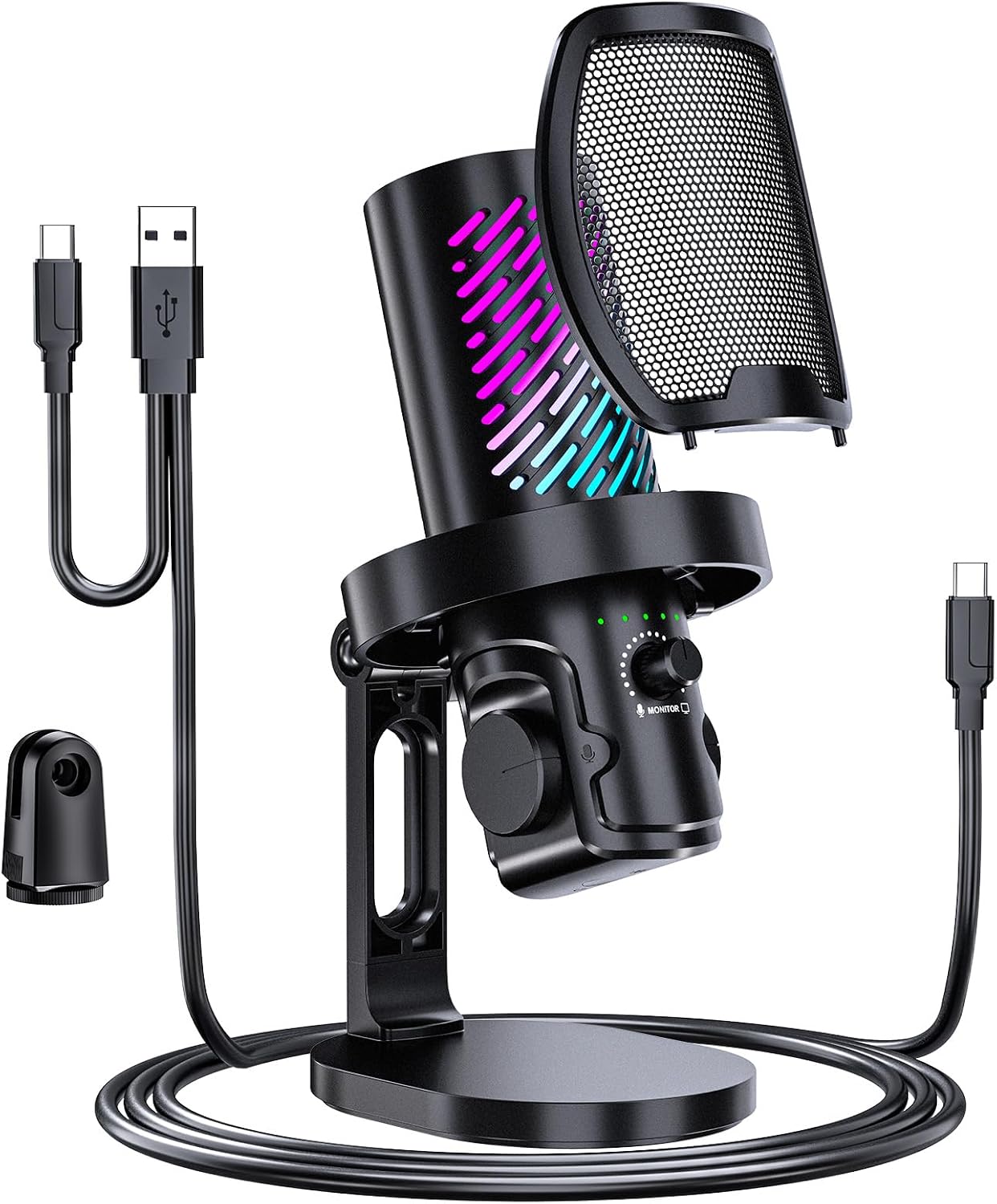
Pros
- Exceptional audio clarity with cardioid condenser technology ideal for streaming, podcasting, and gaming
- Intuitive touch controls and real-time monitoring eliminate the learning curve for new creators
- Comprehensive accessory kit and weighted stand provide a professional setup right out of the box
- AI noise reduction adapts to your environment, reducing the need for post-processing
- Reliable USB-C connectivity works seamlessly across multiple platforms without driver installation
Cons
- No customer reviews available yet, so real-world user feedback is limited at launch
- RGB lighting customization requires learning the touch controls, which may take some trial and error
- Plastic construction may feel less premium compared to all-metal microphones at similar price points
The tenlamp USB Gaming Microphone is a purpose-built desktop microphone designed for content creators, streamers, podcasters, and online gamers who demand professional audio quality without the complexity of traditional studio setups. The hyper-cardioid polar pattern and AI noise reduction technology make it particularly effective in untreated rooms where background noise can be problematic.
The standout feature is the zero-latency headphone monitoring, which lets you hear your own voice and incoming audio simultaneously without delay. Combined with dedicated gain, volume, and balance controls, this gives you precise real-time control over your sound. The touch mute button with LED indicator is a thoughtful addition that prevents accidental broadcasting during awkward moments, while the customizable RGB lighting adds visual appeal to your streaming setup or gaming desk.
Build quality is solid for the price point, with a weighted desktop stand that keeps the microphone stable during use. The complete accessory kit, including a shock mount, magnetic pop filter, and multiple cables, means you can achieve a professional setup immediately without purchasing additional gear. Plug-and-play USB-C connectivity works across Windows, macOS, and Android devices without requiring driver installation.
The main limitation is the absence of user reviews at launch, so real-world performance feedback is unavailable. Additionally, the plastic construction feels less premium than all-metal alternatives, though it remains durable for typical use cases. The RGB lighting customization requires learning the touch interface, which adds a minor learning curve.
Overall, the tenlamp USB Gaming Microphone represents excellent value for streamers, podcasters, and gamers seeking studio-quality audio with modern conveniences like noise cancellation and real-time monitoring. The comprehensive accessory kit and intuitive controls make it accessible to beginners while offering enough customization for experienced creators.
Audio Specifications: Hyper-cardioid polar pattern, 85 dB audio sensitivity, 85 dB signal-to-noise ratio, 20 kHz frequency response, cardioid condenser microphone design.
Connectivity: USB Type-C primary connection, 3.5mm auxiliary jack for headphone monitoring, compatible with Windows, macOS, and Android OTG devices.
Controls and Features: Touch mute button with red LED indicator, dedicated mic gain control, headphone volume control, mic-to-PC balance adjustment, customizable RGB lighting with multiple modes, real-time zero-latency monitoring.
Physical Specifications: Dimensions 3.9 x 8.3 x 4.75 inches, weight 1.4 pounds, plastic enclosure with round weighted base, 1/4 inch thread for tripod mounting.
Included Accessories: Weighted desktop stand, shock mount, magnetic pop filter, USB-C cable, 3.5mm adapter cable, one-year manufacturer warranty.
Ideal For: Twitch and YouTube streamers, podcast creators, Discord gamers, content creators recording voiceovers or ASMR content, and anyone conducting frequent online meetings who wants professional audio quality.
Best Use Cases: Gaming streams with real-time voice communication, podcast recording in home studios, professional video content creation, streaming on multiple platforms simultaneously, and environments with moderate background noise that benefit from AI noise reduction.
Not Recommended For: Professional recording studios requiring XLR connectivity, users who need extensive audio processing options, or those seeking a purely minimalist design without RGB lighting features.

Pros
- Exceptional audio clarity and focus with super cardioid polar pattern, even when positioned 3-6 inches from mouth
- Intelligent Clipguard 2.0 and Auto Gain eliminate distortion and level-setting hassles for beginners and pros alike
- Onboard DSP effects and Wave Link software provide professional audio control without expensive external gear
- Tap-to-mute button and multifunction dial offer intuitive, hands-on control during live streaming or recording
- Durable metal and plastic construction with proven long-term reliability based on extended user experiences
Cons
- USB-C only connectivity may require adapters for older devices or setups without native USB-C support
- Built-in effects, while powerful, may have a learning curve for users unfamiliar with audio software
- Premium pricing reflects professional-grade quality but may exceed budgets for casual or entry-level users
The Elgato Wave:3 MK.2 is a professional USB condenser microphone engineered for streamers, content creators, podcasters, and online gamers who demand broadcast-quality audio without the complexity of traditional studio setups. This compact desktop microphone combines a high-performance condenser capsule with intelligent processing to deliver clear, focused vocals that listeners consistently praise for sounding intimate and professional.
The standout feature is Clipguard 2.0, a multi-stage anti-distortion system that makes audio clipping virtually impossible, paired with Auto Gain calibration that optimizes levels automatically in seconds. Combined with onboard DSP effects including voice enhancement, compression, and EQ, the Wave:3 MK.2 lets you shape your sound directly on the microphone without relying on external software or plugins. The Wave Link app unifies all effects and VST plugins into one intuitive signal chain, giving you professional-grade control from your desktop.
Build quality is solid, with a metal and plastic enclosure that feels premium and durable. The multifunction dial and tap-to-mute button sit within arm's reach for quick adjustments during live sessions, while the integrated headphone jack enables direct monitoring of your audio without latency. The included desk stand, USB-C cable, and dual mic adapters mean you can set up and start recording within minutes. Users report exceptional performance even when positioned at slight angles or several feet away, thanks to the super cardioid polar pattern.
The primary limitation is USB-C only connectivity, which may require adapters for older setups. Additionally, while the onboard effects are powerful, first-time users may need time to explore the Wave Link software to unlock the microphone's full potential. The price point reflects professional-grade quality and may exceed budgets for casual users seeking basic functionality.
Verdict: The Elgato Wave:3 MK.2 is an excellent investment for anyone serious about streaming, content creation, or professional audio work. Its combination of studio-quality sound, intelligent anti-distortion protection, and built-in effects delivers professional results without the complexity or cost of traditional studio equipment. Highly recommended for creators at any level.
Connectivity: USB Type-C with 150 cm cable included
Audio Performance: Super cardioid condenser capsule, 110 dB signal-to-noise ratio, studio-quality vocal capture
Processing: Clipguard 2.0 anti-distortion, Auto Gain calibration, onboard voice enhancer, compressor, and EQ effects
Controls: Multifunction dial, tap-to-mute button, integrated headphone jack for direct monitoring, real-time LED feedback
Compatibility: PC and Mac via USB, native Wave Link software integration
Physical: Metal and plastic construction, 7.52 ounces, 3.9 x 3.9 x 8.4 inches, includes desk stand and dual mic adapters
Warranty: 2-year manufacturer coverage
Who Should Buy: The Wave:3 MK.2 is ideal for streamers, podcasters, content creators, online gamers, and anyone recording video content or hosting virtual meetings who wants professional audio quality without expensive studio equipment. It's also perfect for musicians and singers recording demos or practicing remotely.
Setup Considerations: Ensure your PC or Mac has a USB-C port or USB-C adapter available. Position the microphone 3-6 inches from your mouth for optimal clarity and use the included desk stand for stable placement on your desktop. Download the Wave Link software to access full DSP effect capabilities and audio routing options.
Positioning Tips: The super cardioid polar pattern works well even at slight angles and distances, so you don't need to keep your mouth directly on the microphone. This flexibility makes it comfortable for extended use during streams or calls. The built-in sibilance reduction means you typically won't need a pop filter.
Comparison Note: If you need XLR connectivity for professional studio environments or plan to use dynamic microphones, consider alternative options. For USB-only setups prioritizing ease of use and professional sound, the Wave:3 MK.2 is hard to beat at this price point.

Pros
- Exceptional audio clarity and vocal warmth at this price point, verified by thousands of user reviews
- Intuitive controls with touch-mute button and large volume knob require no software configuration
- Sturdy, adjustable boom arm holds position reliably and stores away easily when not in use
- Complete accessory package eliminates need for separate purchases of stand, cable, or pop filter
- Reversible USB-C connector makes it impossible to plug in the wrong way in low-light gaming environments
Cons
- C-clamp desk mount may not fit desks thicker than 2 inches or provide adequate stability on some surfaces
- RGB lighting cannot be disabled, which may be distracting for some users or consume unnecessary power
- Frequency response maxes out at 18 kHz, limiting some high-end audio detail compared to premium models
The FIFINE AmpliGame A6T is a complete USB microphone kit engineered for gamers, streamers, and podcasters who want professional-quality audio without spending hundreds of dollars. This plug-and-play condenser microphone arrives fully assembled with a boom arm, shock mount, pop filter, and all necessary cables, making it ideal for beginners setting up their first recording or streaming setup.
The standout feature is its audio performance. The cardioid condenser capsule delivers warm, energetic vocals with excellent clarity and minimal background noise. Users consistently praise how crisp and professional their voice sounds, even during intense gaming sessions where communication with teammates is critical. The 70 dB signal-to-noise ratio and 60Hz-18KHz frequency range provide solid performance for gaming, streaming, and podcasting applications. The touch-mute button on top offers one-handed control without accidentally hitting keys, while the large volume knob at the bottom allows quick adjustments without breaking focus on your game or stream.
Design and build quality exceed expectations for the price. The black ABS plastic and metal construction feels sturdy rather than cheap, and the adjustable boom arm with nearly 180-degree rotation positioning lets you place the microphone exactly where you need it. The shock mount effectively isolates vibrations from desk movement, and the included pop filter reduces plosive sounds without obstructing your view. The reversible USB-C connector is a thoughtful touch that prevents frustration when connecting in dim lighting. The two-tone RGB gradient lighting adds visual appeal to gaming setups and streams, though it cannot be turned off.
The main drawback is the C-clamp mounting system, which works well on desks up to 2 inches thick but may struggle with thicker surfaces or provide insufficient stability on some furniture. Additionally, the permanent RGB lighting consumes power and may distract some users who prefer minimalist setups. The frequency response ceiling of 18 kHz is acceptable for gaming and streaming but slightly lower than premium alternatives.
The FIFINE AmpliGame A6T delivers exceptional value for budget-conscious content creators and gamers. Its combination of excellent audio quality, intuitive controls, complete accessory package, and affordable pricing makes it a top choice for anyone entering the streaming or podcasting space without breaking the bank.
Connectivity and Compatibility: USB connection with reversible USB-C interface. Compatible with Windows, Mac OS, PS4, and PS5. 8.2-foot USB-C to USB-A/C cable included.
Audio Performance: Condenser microphone with cardioid polar pattern. Frequency response 60Hz-18KHz. Signal-to-noise ratio 70 dB. Mono channel audio.
Physical Specifications: Dimensions 16.54 x 6.42 x 4.29 inches. Weight 900 grams. Black ABS plastic and metal construction. Boom arm with 180-degree rotation capability.
Included Components: USB condenser microphone with shock mount, boom arm stand with adapter, pop filter, C-clamp for desk mounting, 8.2-foot USB-C to USB-A/C cable, and user manual.
Features: Two-tone RGB gradient lighting, touch-mute button with visual feedback, large volume control knob, shock mount for vibration isolation, detachable pop filter, adjustable boom arm.
Ideal For: This microphone is perfect for beginner streamers, podcasters, and gamers who need professional audio quality without complex setup or high costs. It works equally well for online gaming with friends, Discord voice chat, Twitch streaming, YouTube content creation, and podcasting from home.
Best For: Budget-conscious content creators, students recording online classes, gamers who prioritize clear team communication, and anyone upgrading from headset microphones. The RGB lighting particularly appeals to gamers who want their setup to match their gaming aesthetic.
May Not Be Ideal For: Professional audio engineers or musicians requiring extended frequency response beyond 18 kHz, users with desks thicker than 2 inches who cannot use the included C-clamp, or minimalist users who prefer non-RGB equipment without permanent lighting.

Pros
- Exceptional audio clarity and professional sound quality that rivals microphones costing significantly more
- Incredibly versatile with four pickup patterns, making it suitable for solo vocals, instrument recording, interviews, and group podcasts
- Intuitive onboard controls and Blue VO!CE software make professional audio effects accessible to beginners
- Solid build quality with premium metal design and included desktop stand for immediate use
- Extensive compatibility with streaming platforms, recording software, and conferencing apps across Mac and PC
Cons
- Requires Logitech G HUB software download for full functionality, adding setup complexity for some users
- USB-only connectivity limits future expandability compared to microphones with XLR outputs
- Some users report desire for shock mount compatibility when upgrading recording setups or pursuing advanced voiceover work
The Logitech Blue Yeti is a professional USB microphone engineered for content creators who demand broadcast-quality audio without studio complexity. Whether you are launching a podcast, streaming on Twitch, recording YouTube videos, conducting Zoom meetings, or producing music, this microphone delivers the clarity and power needed to sound polished and professional.
The standout feature is its custom three-capsule array combined with four switchable pickup patterns. Cardioid mode isolates your voice, omni mode captures room ambience, bidirectional mode records two sources facing opposite directions, and stereo mode creates spatial audio. This flexibility means you rarely need to purchase additional microphones as your content evolves. The Blue VO!CE software further elevates your audio with broadcast vocal effects, advanced voice modulation, and HD audio samples that professional streamers use to enhance their presence.
Build quality impresses immediately. The Blackout finish features premium metal construction that feels substantial and durable, while the adjustable desktop stand provides stable positioning. Onboard controls for headphone volume, pattern selection, instant mute, and microphone gain put you in complete command of your recording without opening software menus. Real-time no-latency monitoring lets you hear exactly what listeners will hear.
The primary consideration is that full functionality requires downloading Logitech G HUB software, which adds a setup step for those seeking truly plug-and-play simplicity. Additionally, the USB-only connection may feel limiting if you envision upgrading to XLR-enabled equipment later. However, for creators just starting out or those committed to USB-based streaming setups, these are minor trade-offs.
The Blue Yeti remains the gold standard for content creators seeking professional audio quality at accessible price points. Its combination of superior sound, versatile pickup patterns, intuitive controls, and reliable build quality makes it an exceptional investment for anyone serious about streaming, podcasting, or recording.
Podcasters and Streamers: The four pickup patterns and Blue VO!CE effects make this microphone perfect for anyone launching podcasts or streaming on Twitch, YouTube, or other platforms. Beginners and experienced creators alike benefit from the professional sound quality and ease of use.
Content Creators: Musicians, voiceover artists, and video producers gain broadcast-quality recording capabilities without investing in expensive XLR equipment. The wide frequency response captures full audio detail for music and instrument recording.
Remote Workers: The cardioid pickup pattern combined with background noise rejection makes the Yeti ideal for Zoom calls, Teams meetings, and professional conference recording. Your colleagues will hear you clearly without distracting room noise.
Gaming Streamers: Gamers streaming to Twitch or YouTube benefit from the clear vocal pickup and VO!CE effects that enhance commentary and communication with viewers. Setup takes seconds, letting you focus on gameplay.
Audio Performance: 20Hz to 20kHz frequency response, 120dB audio sensitivity, 100dB signal-to-noise ratio, 16 ohm impedance for professional-grade sound capture across the full audible spectrum.
Connectivity and Compatibility: USB connection works with both PC and Mac. Compatible with all major streaming platforms (Twitch, YouTube, OBS), recording software (Audacity, Adobe Audition), and conferencing apps (Zoom, Skype, Teams).
Physical Specifications: Weighs 3.5 pounds with dimensions of 4.92 x 4.72 x 11.61 inches. Premium metal construction with adjustable desktop stand included. Can be mounted on standard mic stands or boom arms.
Pickup Patterns: Four selectable modes including cardioid (front-facing), omnidirectional (all directions), bidirectional (front and back), and stereo (spatial audio). Switch patterns instantly with onboard button.
Warranty: 2-year manufacturer warranty included with every purchase.


Pros
- Exceptional audio clarity with minimal background noise thanks to cardioid pattern and included noise suppression accessories
- Flexible connectivity options allow you to start with USB and upgrade to XLR with audio interfaces or mixers later
- Sturdy metal construction and robust boom arm feel premium and maintain stability during extended use
- Simple plug-and-play setup with no driver downloads required for immediate USB operation
- Great value for the price with professional-grade components and comprehensive accessory bundle
Cons
- XLR connection disables all onboard controls, requiring external mixer or audio interface for level management
- Desk clamp only accommodates desks under 2 inches thick, limiting placement options for some setups
- Optimal audio input requires positioning within 2 to 6 inches of the microphone, which may feel close for some users
The FIFINE K688CT is a comprehensive microphone solution designed for podcasters, streamers, gamers, and content creators who demand professional audio without the professional price tag. This all-in-one kit combines a dynamic microphone with a metal boom arm stand, shock mount, windscreen, and dual connectivity options to serve both beginners and experienced audio enthusiasts.
The standout feature is the flexible connectivity architecture. The USB connection offers immediate plug-and-play convenience for laptops and PCs, complete with onboard controls including a touch-sensitive mute button, gain knob, and headphone monitoring jack. Simultaneously, the XLR output allows you to integrate the microphone into professional studio setups using mixers or audio interfaces. This dual-path approach means your investment grows with your production ambitions. The 130dB SPL rating and cardioid polar pattern ensure your voice stays center stage while background noise fades away, delivering the clean audio that audiences expect.
Build quality exceeds expectations at this price point. The metal boom arm feels substantial and maintains secure positioning without drift, while the included shock mount and windscreen effectively eliminate vibrations and wind noise. The microphone body itself has a professional appearance that elevates any desk setup. Setup is refreshingly straightforward, requiring just a USB cable connection and basic Windows audio configuration, with no driver installations needed.
A few practical considerations deserve mention. When using XLR connectivity, all onboard controls become inactive, requiring you to manage levels through your mixer or audio interface instead. The desk clamp works best on surfaces under 2 inches thick, which may limit placement flexibility. Additionally, optimal recording quality demands positioning the microphone 2 to 6 inches from your mouth, closer than some users might prefer initially.
The FIFINE K688CT delivers exceptional value for content creators at any skill level. Its combination of solid audio performance, flexible connectivity, professional build quality, and comprehensive accessories makes it an intelligent choice for anyone serious about upgrading their audio setup without overextending their budget.
Connectivity: USB and XLR
Microphone Type: Dynamic, Unidirectional (Cardioid)
Maximum SPL: 130dB
Frequency Response: 50Hz to 16kHz
Signal-to-Noise Ratio: 80dB
Polar Pattern: Cardioid
Form Factor: Microphone with Arm Stand
Boom Arm: Metal construction with 3/8" to 5/8" adapter
Desk Clamp: Fits desks up to 2 inches thick
Included Accessories: Shock mount, windscreen, USB-C to USB-A cable, desk clamp, 3/8" to 5/8" adapter, user manual
Weight: 1.31 kg
Warranty: 1 Year
Color: Black
Compatible With: PC, Laptop, Audio Mixers, Audio Interfaces
Best For: The K688CT excels for podcasters, YouTube creators, Twitch streamers, Discord gamers, voiceover artists, and anyone recording content from a desk. Its versatility makes it equally suitable for beginners taking their first step into quality audio and experienced creators looking for reliable backup equipment.
USB vs. XLR: Start with USB for immediate convenience and onboard control simplicity. Upgrade to XLR when you invest in a mixer or audio interface for expanded creative control and professional-grade signal routing. Both connections work with the same microphone.
Positioning Tips: Place the microphone 2 to 6 inches from your mouth for optimal input levels. The cardioid pattern naturally rejects side and rear sounds, so position your monitor or noise sources to the sides or behind the mic. Use the boom arm to achieve the ideal angle without straining your neck.
Noise Reduction: The included windscreen handles plosives and wind noise effectively. The shock mount isolates the microphone from desk vibrations and keyboard noise. For maximum noise suppression, position the boom arm away from your keyboard and close any nearby windows or doors.
Setup Considerations: Ensure your desk is under 2 inches thick for the clamp to work properly. When using XLR, you'll need an external mixer or audio interface to control levels. For USB-only setups, all controls function directly on the microphone without additional hardware.

Pros
- Superior sound quality with minimal background noise pickup compared to larger competitors
- No software dependency makes it instantly compatible with any USB-C device
- Compact, lightweight design fits easily on desks without requiring excessive space
- Built-in headphone monitoring with direct connection eliminates software latency issues
- Durable all-metal construction and German engineering ensure long-term reliability
Cons
- Single cardioid pattern lacks the directional flexibility of multi-pattern microphones
- Requires USB-C connector, which may need an adapter for older devices with USB-A ports
- Premium price point positions it above entry-level USB microphones
The Sennheiser Profile is a professional-grade USB-C microphone designed for content creators who demand quality audio without technical complexity. Whether you're a podcaster, streamer, gamer, or voiceover artist, this microphone delivers broadcast-quality sound right out of the box with zero software installation required.
What sets the Profile apart is its German-engineered cardioid condenser capsule combined with intuitive hardware controls. The gain, mix, and volume dials let you dial in your perfect sound on the fly, while the built-in mute button and headphone jack with direct monitoring eliminate common streaming headaches. Users consistently report that the Profile outperforms larger competitors like the Blue Yeti, particularly in rejecting keyboard noise and background audio while maintaining natural, warm vocal presence.
The compact metal construction feels premium and durable, with a solid build that justifies the investment. At just 350 grams with a footprint smaller than competing options, the Profile fits naturally on any desk or boom arm without creating visual clutter. The included table stand provides stable positioning, and the adjustable tilt function keeps your mic exactly where you want it during recording sessions.
The only real limitation is the single cardioid pattern, which some users miss from multi-pattern alternatives. Additionally, the USB-C connector may require an adapter if your primary device uses older USB-A ports. These minor trade-offs are easily outweighed by the simplicity and audio quality you gain.
The Sennheiser Profile represents the best choice for creators seeking professional audio quality without sacrificing ease of use or space. Its combination of zero-software operation, superior sound engineering, and intuitive controls makes it the top recommendation for anyone upgrading from consumer-grade microphones.
Audio Performance: Cardioid condenser capsule, 125 dB audio sensitivity, 60 dB signal-to-noise ratio, 60 dB audible noise specification. Delivers warm, natural sound optimized for vocal clarity and presence.
Connectivity: USB-C connector with 1.2 meter cable included. Compatible with PC, Mac, tablets, and mobile devices. Powered entirely through USB connection, no external power supply needed. Built-in headphone jack for direct monitoring without latency.
Physical Design: All-metal construction, 4.37 x 4.37 x 7.95 inches, 350 grams. Includes table stand with adjustable tilt function. Compatible with standard boom arms for flexible mounting options.
Controls: Hardware-based gain, mix, and volume dials. Mute button for instant control. Mono single-channel audio output. No software or drivers required for operation.
Warranty: 2-year manufacturer warranty covering defects and technical support.
Ideal For: Podcasters seeking professional audio without complex setup, live streamers who need real-time control over their sound, gamers looking to improve stream quality, voiceover artists requiring portable professional-grade equipment, and content creators switching from consumer microphones to professional gear.
Perfect Upgrade From: Blue Yeti users, entry-level USB microphones, built-in laptop microphones, and gaming headset microphones. The Profile delivers noticeably superior sound quality and ease of use compared to these alternatives.
Not Ideal For: Users requiring multi-pattern recording capabilities, those exclusively using older USB-A devices without adapters, or budget-conscious buyers prioritizing lowest cost over quality. If you need extensive customization through software, other microphones may offer more flexibility.
What to Look for in an Auto Gain USB Microphone
Intelligent Gain Control Systems
The core feature is how the microphone manages your input level. Look for terms like Clipguard, automatic gain control, or intelligent anti-distortion. A robust system will actively prevent audio clipping when you get loud while boosting quieter speech, maintaining a balanced output. This is crucial for dynamic streamers or podcast hosts whose delivery volume can vary. Some models, like the Elgato Wave:3 MK.2, integrate this seamlessly with onboard DSP for a polished sound without software.
Connectivity and Monitoring Features
Consider how you will connect the microphone and monitor your audio. USB-C offers a modern, reversible connection for simplicity. A direct headphone jack with zero-latency monitoring allows you to hear your voice exactly as it is being recorded, which is essential for catching issues immediately. Some microphones offer a blend control between your microphone audio and your computer’s system sound, a handy feature for gamers. Many of these plug-and-play options are also considered excellent driverless USB microphones.
Polar Pattern and Physical Controls
For most solo creators, a cardioid polar pattern is ideal. It focuses on sound from the front while minimizing noise from the sides and rear, which is perfect for a typical desk setup. Physical controls elevate the user experience. A tactile gain knob, a dedicated mute button (often with a visual LED indicator), and a headphone volume wheel put essential adjustments at your fingertips. This hardware-based control is often more reliable and faster than searching through software menus during a live session.
Software Integration and Sound Processing
While auto gain handles levels, additional software can shape your tone. Some microphones come with companion apps that offer advanced features like noise suppression, EQ, compression, and voice effects. This allows you to further refine your sound profile. If you prefer a clean, unprocessed signal that captures your natural voice, look for a microphone praised for its natural sound reproduction. The level of integrated DSP, or Digital Signal Processing, varies widely, so choose based on how much post-processing you want the mic to handle itself.
Final Thoughts
Choosing a USB microphone with auto gain is a significant step toward professional and hassle-free audio. For streamers and creators who want top-tier integrated software and intelligent controls, the Elgato Wave:3 MK.2 USB Condenser Microphone stands out as a premium choice. If you are seeking exceptional value with versatile connectivity in a complete kit, the FIFINE AmpliTank K688CT Podcast Microphone Kit offers both USB and XLR options for growing your setup. Whichever model you select, you will gain the confidence of consistent audio levels for all your projects.
Frequently Asked Questions
What is auto gain control on a USB microphone?
Auto gain control, sometimes called automatic level control, is a feature where the microphone’s internal circuitry automatically adjusts the sensitivity of its input. It raises the volume when you speak softly and lowers it when you speak loudly or make sudden loud noises. This helps maintain a consistent output volume and prevents distortion from clipping, making it much easier to achieve good sound without manual tweaking.
Is auto gain better than manual gain?
For most everyday creators, auto gain is more convenient and forgiving. It protects against common mistakes like clipping and ensures your audience can always hear you clearly, even if you move closer or farther from the mic. Manual gain offers ultimate control for experienced audio engineers in a controlled studio environment. However, for live streaming, gaming, podcasting, and video calls where conditions can change, auto gain provides a significant reliability advantage.
Can I use a USB microphone with auto gain for professional recording?
Absolutely. Many modern USB microphones with auto gain and high-quality condenser capsules produce broadcast-quality audio suitable for professional podcasts, voiceovers, and streaming. The auto gain feature ensures a clean, consistent signal as your source. For the highest fidelity, some creators prefer models with additional integrated DSP for further polishing. The key is to pair the microphone with proper recording technique and a treated acoustic environment.
Do I need special software to use auto gain?
In most cases, no. The auto gain function is typically a hardware feature built into the microphone itself. You simply plug it in via USB, and it begins working automatically. Some models may offer companion software that provides additional controls or customization for the auto gain parameters, but it is not required for the basic function to operate. This makes them fantastic plug and play USB microphones.


Write Your Review
No reviews yet. Be the first to share your experience!