

Is your home theater setup held back by a tangle of wires snaking across the floor? Do you crave deep, cinematic bass but dread the thought of running another cable? The solution lies in modern Wi-Fi subwoofers, which deliver room-shaking low frequencies without the physical tether to your main system.
This guide is for anyone ready to elevate their audio experience, from movie buffs seeking that theater rumble to music lovers wanting fuller sound. We have reviewed leading models that connect via your home network for stable, high-quality audio streaming and flexible placement. For those considering different connectivity options, explore our guide to the best bluetooth subwoofers as well.
Pros
- Powerful 750W output with a dedicated 10-inch wireless subwoofer delivers genuinely room-filling, cinematic bass
- Dolby Atmos combined with MultiBeam 3.0 produces an impressively wide and immersive surround soundstage
- PureVoice 2.0 dialogue enhancement is a standout feature for those who struggle to hear speech over loud sound effects
- Extensive connectivity options including HDMI eARC with 4K Dolby Vision passthrough ensure compatibility with virtually any modern TV or source device
- Room calibration and the JBL ONE app make setup and personalization straightforward even for non-audiophiles
Cons
- At this price point, buyers may expect a detachable rear speaker configuration rather than a purely beam-based surround solution
- No built-in voice assistant microphone means you must rely on a separately owned smart speaker device for hands-free voice control
- The soundbar's 37-inch width may not suit smaller TV setups or compact living room arrangements
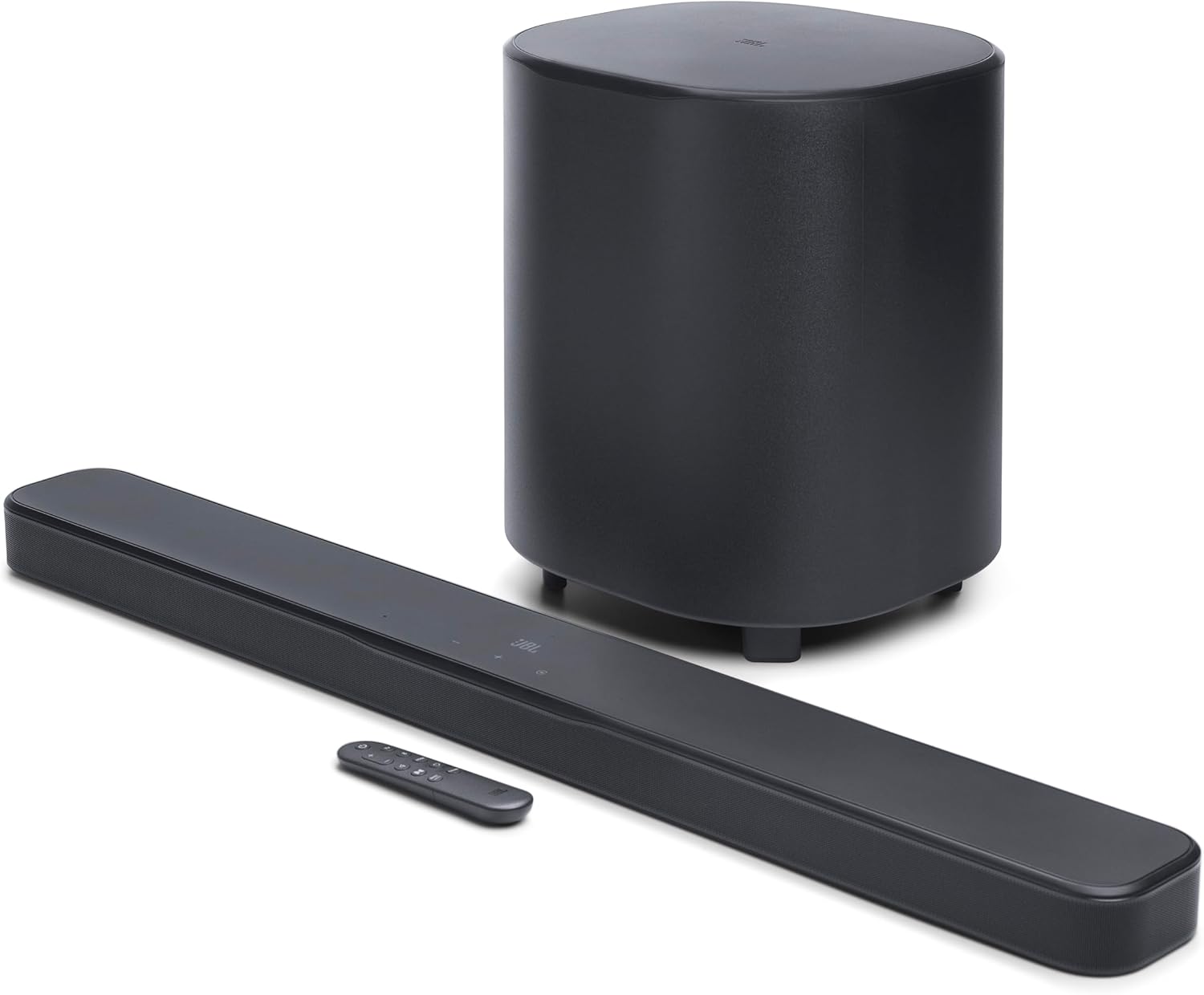
The JBL Bar 500MK2 is a 5.1-channel soundbar system designed for homeowners and entertainment enthusiasts who want a significant audio upgrade over their flat-panel TV's built-in speakers. Priced in the premium mid-range tier, it targets buyers who appreciate cinematic sound quality but prefer a cleaner, cable-light setup over a full discrete surround system. It ships as a complete package including the soundbar unit, a wireless 10-inch subwoofer, wall-mount hardware, an HDMI cable, and a remote control.
The headline features here are genuinely compelling. Dolby Atmos decoding combined with JBL's proprietary MultiBeam 3.0 technology allows the soundbar to project audio beams that bounce off walls and ceilings, creating a convincing three-dimensional soundstage without requiring rear satellite speakers. PureVoice 2.0 is another standout addition, dynamically adjusting dialogue levels relative to ambient scene audio and overall volume so that speech remains consistently clear and intelligible throughout any content.
Build quality follows JBL's established design language: a slim, low-profile bar measuring just 2 inches tall and 37 inches wide that should sit neatly beneath most mid-to-large televisions. The wireless subwoofer is a substantial unit housing a 10-inch driver, and its wireless connection to the soundbar simplifies placement flexibility. The system's 750W total power rating translates to genuinely impactful bass performance, particularly during action sequences and bass-heavy music.
There are a few considerations worth noting. The surround effect relies entirely on beam-steering rather than physical rear speakers, which means the immersive effect can vary depending on room shape and wall materials. Additionally, voice assistant support requires pairing with an external smart speaker rather than using a built-in microphone, which adds a step for those expecting fully integrated voice control. The 37-inch form factor may also feel oversized for smaller display setups.
Overall, the JBL Bar 500MK2 is a strong performer that punches well for its category, offering a rich feature set including room calibration, broad streaming service support, and HDMI eARC with 4K passthrough. For anyone seeking a substantial home theater audio upgrade with minimal installation complexity, this soundbar system is a well-rounded and highly capable choice.
Audio Channels: 5.1 surround sound configuration with dedicated subwoofer channel for low-frequency effects.
Power Output: 750W maximum total system power. Subwoofer features a 10-inch wireless driver with a frequency response starting at 20Hz for deep bass reproduction.
Connectivity: HDMI eARC with 4K Dolby Vision passthrough, optical input, USB port, Bluetooth, Wi-Fi, AirPlay, Google Cast, Spotify Connect, and Tidal Connect. Roon Ready certified for audiophile streaming setups.
Dimensions and Weight: Soundbar measures 4.1 inches deep, 37 inches wide, and 2 inches tall. Total system weight is 24.3 pounds. Supports wall mounting via included L-shaped brackets and template.
Compatibility: Works with televisions, gaming consoles, smartphones, and streaming devices from all major brands. Compatible with Google Assistant and Siri via linked external smart speakers. Managed via the JBL ONE app on iOS and Android. Warranty: 1-year limited manufacturer warranty. Model number: JBLBAR500M2BLKAM.
If you are upgrading from a TV's built-in speakers for the first time, the JBL Bar 500MK2 offers an accessible entry point into premium home theater audio. The included room calibration feature removes the guesswork from setup, and the JBL ONE app provides a user-friendly interface for fine-tuning sound to your personal preference without requiring any technical expertise.
Buyers who already own a smart speaker from Google or Apple will benefit from seamless voice assistant integration, allowing hands-free playback control without reaching for the remote. Those invested in streaming ecosystems will appreciate the broad platform support, covering Spotify, Tidal, Apple AirPlay, and Google Cast in a single device.
If your priority is the absolute most immersive surround experience possible, consider whether a system with physical rear satellite speakers might better suit your needs, particularly in larger or acoustically challenging rooms. The Bar 500MK2's beam-based surround is excellent for most living room environments but may not fully replicate the effect of discrete rear channels in every space.
For gaming enthusiasts, the HDMI input supporting 4K Dolby Vision passthrough means you can route a gaming console through the soundbar without sacrificing video quality, and the powerful subwoofer adds a visceral dimension to action and adventure titles. Overall, the JBL Bar 500MK2 represents strong value for those seeking a feature-rich, easy-to-use soundbar system that genuinely elevates everyday home entertainment.
How to Choose Your Wi-Fi Subwoofer
System Compatibility and Ecosystem
Your first consideration should be how the subwoofer integrates with your existing audio gear. Some models, like the Sonos Sub Mini, are designed specifically to pair with other speakers from the same brand for a seamless wireless ecosystem. Others, such as the WiiM Sub Pro Smart Wireless Subwoofer, offer broader compatibility with various receivers and soundbars via RCA inputs or generic wireless pairing.
Verify whether the subwoofer requires a specific soundbar or hub to function, or if it can operate as a standalone, flexible component. This decision will define your upgrade path and overall system flexibility. For a deeper look at powered options, our review of the best active subwoofers provides additional context.
Room Calibration and Bass Management
Advanced room calibration is a game-changer for bass performance. Technologies like Sonos Trueplay or the WiiM Sub Pro’s AI RoomFit automatically analyze your room’s acoustics and adjust the subwoofer’s output to compensate for placement and reflections. This ensures tight, accurate bass that isn’t boomy or muddy, regardless of where you place the unit.
Look for companion apps that offer manual control, such as parametric equalizers, phase adjustment, and crossover settings. This level of precision allows you to fine-tune the bass to your personal preference and perfectly blend it with your main speakers for a cohesive soundstage.
Driver Size, Power, and Enclosure Design
The physical design directly impacts the bass character. Larger drivers, like the 10-inch unit in the JBL Bar 800, typically move more air for deeper extension and greater output, ideal for large rooms. Compact sealed designs, such as the Sonos Sub Mini, often provide faster, punchier bass suitable for music and smaller spaces.
Consider the amplifier power and enclosure type. A ported design can enhance low-frequency output, while a sealed cabinet with force-canceling woofers, found in Sonos models, minimizes vibration and distortion. Your choice should align with your room size and whether you prioritize sheer power or precise, articulate bass. You can find more options for larger budgets on our best subwoofers under $1000 page.
Connectivity and Multi-Room Features
True Wi-Fi connectivity offers significant advantages over just a wireless connection to a soundbar. It provides a more stable, higher-bandwidth link for audio and enables multi-room music synchronization. You can group the subwoofer with other Wi-Fi speakers throughout your home, creating a unified audio experience.
Check for support for major streaming protocols like AirPlay 2, Chromecast built-in, or Spotify Connect. These features offer convenient control from your phone and access to high-quality streaming services. Also, assess the app’s functionality for setup, grouping, and firmware updates, which keep your system current. For a complete overview of audio components, visit our main home audio speakers category.
Final Thoughts
Upgrading to a Wi-Fi subwoofer simplifies your setup and unlocks powerful, customizable bass. For those deeply invested in a specific ecosystem, the seamless integration of the Sonos Sub 4 – Wireless Subwoofer – Black is hard to beat. If you value broad compatibility and advanced app-based tuning, the versatile WiiM Sub Pro Smart Wireless Subwoofer offers exceptional control. Whichever you choose, you are stepping into a cleaner, more immersive listening experience.
Frequently Asked Questions
What is the difference between a Wi-Fi subwoofer and a wireless subwoofer?
All Wi-Fi subwoofers are wireless, but not all wireless subwoofers use Wi-Fi. Many wireless subwoofers use a proprietary wireless link to connect only to their matched soundbar. A true Wi-Fi subwoofer connects to your home network, enabling features like multi-room audio, streaming service integration, and often more reliable performance over greater distances without direct line-of-sight requirements.
Do Wi-Fi subwoofers cause audio lag or latency?
Modern Wi-Fi subwoofers from reputable brands are engineered to minimize latency. They use advanced synchronization protocols to ensure the bass is perfectly timed with the audio from your main speakers or soundbar. This is crucial for a cohesive home theater experience where audio and video must be in sync. You should not perceive any lag during movies, TV, or music playback.
Can I use a Wi-Fi subwoofer with any TV or stereo system?
Compatibility varies. Some Wi-Fi subwoofers are designed as part of a closed ecosystem and only work with specific brand’s soundbars or speakers. Others, often labeled as “smart” or “pro” models, include standard RCA or LFE inputs, allowing them to connect to virtually any AV receiver or soundbar with a subwoofer output. Always check the connectivity options before purchasing to ensure it works with your existing gear.
Where should I place my Wi-Fi subwoofer for the best sound?
The general rule is to place your subwoofer where it sounds best in your room, as bass frequencies are non-directional. Common starting points are near a front corner or along the front wall. The great advantage of a Wi-Fi model is placement flexibility, as you only need a power outlet. Use the built-in room calibration feature, found in many models in 2026, to automatically optimize the bass response for your specific placement.



Write Your Review
No reviews yet. Be the first to share your experience!