

Is your audio setup tangled in a web of cables that limits your movement and creativity? You want the freedom to stream music from your phone to your home stereo or produce a professional podcast without being tethered to your desk. Finding the right wireless audio interface can solve these problems, but the options vary widely in capability and purpose.
This guide is for anyone looking to cut the cord, from the casual listener wanting to modernize a home stereo to the aspiring podcaster seeking studio-quality flexibility. We have assessed the current market to bring you focused insights on two standout devices that serve different needs within the wireless audio sphere. For more ways to enhance your wireless setup, explore our guide on the best wireless audio hubs.
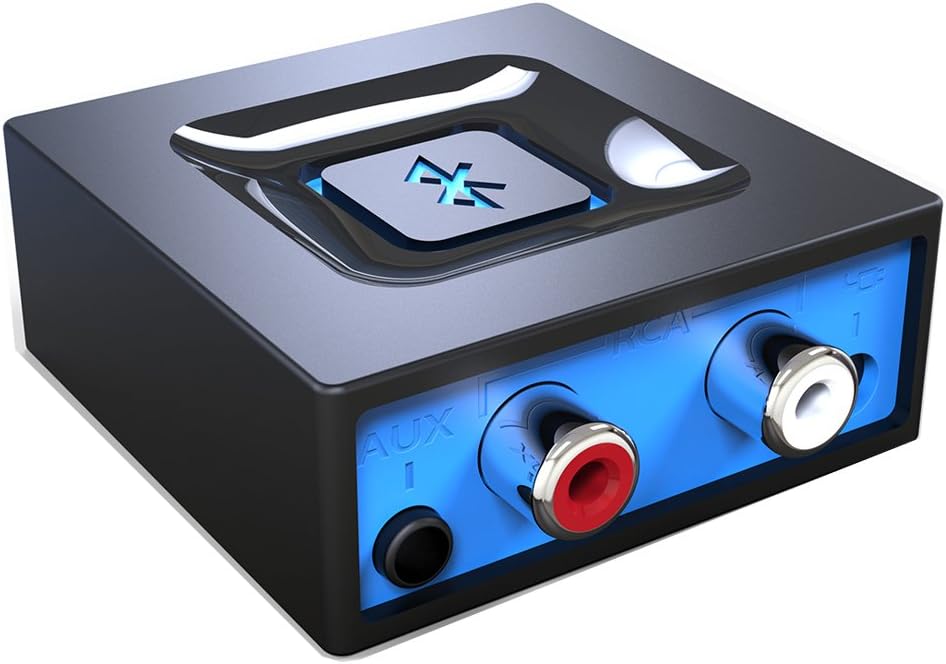
Pros
- Extremely easy one-button setup with no app or complex configuration required
- Compatible with a wide range of legacy audio equipment thanks to both RCA and 3.5mm outputs
- Reliable automatic reconnection saves time and eliminates repeated pairing steps
- Affordable price point makes it one of the best value Bluetooth adapters available
- Includes all necessary cables and power adapters right out of the box
Cons
- No built-in battery, so it requires a constant power source via USB or AC adapter
- Can occasionally connect to an unintended previously paired device when multiple phones are nearby
- Does not function as a Bluetooth transmitter, limiting use to receiver-only applications
The Esinkin Bluetooth Audio Adapter is a compact wireless receiver designed to breathe new life into older stereo systems, powered speakers, and home audio setups that lack Bluetooth capability. It is ideal for anyone who wants to stream music from a smartphone or tablet without replacing their existing equipment. Whether you have a vintage hi-fi system, a Bose CD player, or a basic set of computer speakers, this adapter bridges the gap between legacy hardware and modern wireless convenience.
Setup is refreshingly straightforward. A single large Bluetooth button on the unit handles pairing, connection, and power, making the process accessible for users of all technical levels. The automatic reconnect feature is a genuine standout, as the adapter remembers the last paired device and reconnects instantly when powered on, eliminating the need to re-pair every session. The wireless range of 30 to 40 feet indoors is sufficient for most living rooms and home office environments.
The unit ships with everything needed to get started, including an AC/DC power adapter, a USB power cable, and an RCA-to-AUX cord. This flexibility in both power and audio connection options is a practical advantage. The build is lightweight and unobtrusive, with a subtle blue indicator light that confirms Bluetooth status without being distracting in a home setting.
There are a few limitations worth noting. The adapter requires a constant power source since it has no internal battery, which means it is best suited for fixed installations rather than portable use. It is also strictly a receiver and cannot transmit audio to wireless headphones or speakers. Occasional connection hiccups have been reported when multiple previously paired devices are in range simultaneously, though this is unlikely to affect most single-household users.
Overall, the Esinkin Bluetooth Audio Adapter delivers excellent value and reliable performance for its intended purpose. Its top-tier ranking in its category, combined with an outstanding volume of positive customer feedback, confirms it as one of the most trusted options for adding Bluetooth to an existing audio system. If you want a simple, affordable, and effective solution to modernize your speakers, this adapter is a smart choice.
ASIN: B016NUTG5K
Model Number: W29-US
Brand: Esinkin
Category: Bluetooth Network Adapters
Audio Outputs: 3.5mm stereo jack and RCA (Left and Right)
Wireless Range: Up to 30 to 40 feet (10 to 12 meters) indoors without obstacles
Power Source: USB cable or included AC/DC power adapter (no built-in battery)
Device Compatibility: Smartphones, tablets, computers, and laptops with Bluetooth enabled
Speaker Compatibility: Powered PC speakers, home stereo systems, A/V receivers, and any speaker system with 3.5mm or RCA input
Item Weight: 3.52 ounces
In the Box: Bluetooth receiver unit, AC/DC power adapter, USB power cable, RCA-to-AUX cord, instruction manual
Date First Available: October 15, 2015
Best Sellers Rank: Number 2 in Bluetooth Network Adapters
Before purchasing this adapter, confirm that your speaker system or stereo has either a 3.5mm auxiliary input or RCA input ports. These are the two connection types supported by this device, and without at least one of them, the adapter cannot be used. Most powered speakers, bookshelf stereos, home theater receivers, and vintage hi-fi units will have one or both of these inputs.
Keep in mind that this product is a Bluetooth receiver only. It allows a Bluetooth-enabled phone or tablet to send audio to your speakers wirelessly. It cannot be used to send audio from a wired source to wireless headphones or Bluetooth speakers. If you need a transmitter for that purpose, you will need a different type of adapter.
Because there is no internal battery, you will need to place the adapter near a USB port or power outlet. For living room setups, the included AC/DC adapter is the most convenient option. For desk setups near a computer, the USB cable works well and keeps the installation tidy. Plan your cable routing before committing to a permanent placement.
If you plan to use the adapter in a household with multiple Bluetooth devices, be aware that it may occasionally reconnect to a previously paired device rather than your preferred one. To avoid this, unpair unused devices from the adapter or ensure other devices have Bluetooth turned off when not in use. For single-device households, this is not a concern and the automatic reconnect feature works flawlessly.

Pros
- Exceptional value for money with professional-grade features typically found in higher-priced interfaces
- Intuitive one-touch controls and comprehensive manual make setup quick even for beginners
- Compact, portable form factor is perfect for mobile podcasters and content creators on the go
- Rich ecosystem of sound effects and voice processing tools enable creative content differentiation
- Solid build quality and widespread software compatibility ensure long-term usability
Cons
- Sound effect pads limited to 20 seconds of storage with no expandable storage or SD card support
- Noise gate feature could be more sophisticated for advanced audio engineers
- No internal storage capacity for recording directly to the device without a computer connection
The MAONO E2 Gen2 is an all-in-one podcast and streaming interface designed for content creators who want professional audio quality without the complexity or price tag of traditional studio setups. This compact mixer is perfect for solo podcasters, co-hosted shows, live streamers, and musicians looking to upgrade their home recording capabilities.
The standout feature is the dual XLR combo inputs paired with 60dB low-noise preamps that deliver crystal-clear audio suitable for dynamic microphones and professional-grade recordings. The 8 customizable sound effect pads add genuine value for content creators, allowing you to upload intro music, sound bites, or effects to enhance audience engagement. The loopback function simplifies live streaming workflows, and the included voice effects like pitch-changing and reverb presets provide creative flexibility without needing additional software.
Build quality feels solid and purposeful, with an intuitive layout that minimizes the learning curve. The 8-hour battery makes this interface genuinely portable, and the multiple connectivity options (Bluetooth, USB-C, 3.5mm, XLR) ensure compatibility with virtually any device or workflow. Setup is straightforward, and the included manual is comprehensive with online support available.
The main limitation is the 20-second storage limit on sound effect pads and lack of expandable storage options. The noise gate, while functional, may not satisfy advanced audio engineers seeking granular control. Additionally, this is an audio interface only and does not support phone charging or power delivery functions.
Overall, the MAONO E2 Gen2 represents excellent value for podcasters and streamers at any skill level. It successfully balances affordability with professional features, making it an ideal entry point for those starting their podcasting journey or a solid secondary interface for established creators who need portability and flexibility.
Connectivity: Dual XLR combo inputs, Bluetooth, USB-C, 3.5mm audio jack, dual stream outputs
Audio Performance: 60dB gain preamps, 48 kHz maximum sample rate, 20 kHz frequency response, built-in noise reduction
Sound Effects: 8 customizable pads (up to 20 seconds each), 6 preset reverbs, pitch-changing effects, SingAlong mode
Battery: Built-in 1500mA battery providing up to 8 hours of operation
Compatibility: Windows, macOS, iOS, Android. Works with OBS, Discord, Zoom, Audacity, YouTube, Facebook, TikTok, Twitch
Physical: 9.64 inches D x 6.18 inches W x 2.16 inches H, weighs 0.89 kg. Includes USB-A/USB-C cable, 3.5mm cable, and user manual
Warranty: 1 year manufacturer warranty
Best For: Podcasters (solo or co-hosted), live streamers, content creators, musicians, and anyone needing portable, professional audio recording and mixing capabilities.
Consider This If: You need dual microphone inputs for co-hosted shows, want to add custom sound effects to your content, require portability with battery backup, or work across multiple platforms and devices simultaneously.
Skip This If: You need unlimited internal storage for sound pads, require advanced noise gate control, or need a device that supports phone charging or power delivery functions.
Setup Tips: Download the MAONO website resources and tutorial videos before your first session. Pre-record and test your sound effects before going live. Use the loopback function for seamless computer-based streaming workflows. The intuitive layout means most users can be production-ready within 30 minutes.
Value Comparison: This interface delivers features comparable to interfaces priced 50-100 dollars higher, making it an exceptional value for budget-conscious creators without sacrificing professional audio quality or functionality.
Buying Guide
Primary Use Case: Streaming vs. Production
Your first decision is defining the core task. A simple Bluetooth receiver, like the Esinkin Bluetooth Audio Adapter for Music, is designed solely for wireless audio playback. It takes a signal from your phone or tablet and sends it to powered speakers or a stereo system.
For content creation, you need an interface that can handle inputs. A device like the MAONO E2 Gen2 Podcast Equipment Bundle Audio includes microphone preamps, mixing controls, and effects. It manages audio going into your computer for recording or live streaming, not just playing it back.
Connectivity and Compatibility
Check the input and output options against your existing gear. For basic streaming, ensure the adapter has the correct output jack, like 3.5mm or RCA, to match your speaker system. Most modern Bluetooth adapters are broadly compatible with smartphones and tablets.
Professional interfaces require more scrutiny. Look for XLR inputs for microphones, USB-C for computer connection, and auxiliary inputs for external audio sources. Verify driverless plug-and-play operation for your operating system to avoid software headaches. Our review of wireless audio extenders covers solutions for challenging connectivity scenarios.
Audio Quality and Latency
<!–For music listening, audio quality is often defined by the supported Bluetooth codec. Common codecs like SBC provide decent quality, while aptX or AAC can offer improved sound, depending on your source device. Note that any wireless transmission can introduce slight latency, which is negligible for music but critical for monitoring during recording.
Recording interfaces prioritize clean preamps with high gain for clear microphone capture and minimal noise. Features like direct monitoring, where you hear your microphone input with zero delay, are essential for podcasters and vocalists to perform naturally. This separates a dedicated audio interface from a simple adapter.
Portability and Power
<!–Consider where and how you will use the device. A compact Bluetooth receiver is ideal for a semi-permanent home audio setup, often powered by a USB port or wall adapter. For creators on the move, an interface with a built-in rechargeable battery, like the MAONO bundle, offers true cord-free operation for hours of recording or streaming anywhere.
Evaluate the entire ecosystem. A streamlined device for your living room keeps things simple. A full production bundle may include cables and software, offering an all-in-one start for content creation. For a broader look at audio gear for your space, visit our home audio category.
Final Thoughts
Choosing the right wireless audio interface ultimately depends on your goal. For a straightforward and affordable way to add Bluetooth to your existing home stereo or speakers, the Esinkin Bluetooth Audio Adapter for Music is a reliable and user-friendly solution. If your ambition is to produce high-quality podcasts, streams, or recordings with professional features and total wireless freedom, the MAONO E2 Gen2 Podcast Equipment Bundle Audio provides a comprehensive and portable studio in one box. Both represent excellent paths to cutting the cord in 2026.
Frequently Asked Questions
Can I use a wireless audio interface to record with a microphone?
Yes, but only if the interface is designed for it. A basic Bluetooth receiver cannot accept microphone input. You need a dedicated audio interface with XLR or combo jack inputs and built-in preamps, like the MAONO E2 Gen2, to properly connect and power a microphone for recording into your computer or smartphone.
Will I experience lag or delay when using a Bluetooth audio adapter?
For listening to music or podcasts, the slight latency inherent in Bluetooth transmission is usually unnoticeable. However, this delay makes Bluetooth unsuitable for monitoring live audio during recording or for watching video, as the sound may not sync with the picture. For such tasks, a wired connection or an interface with direct monitoring is necessary.
What is the difference between a Bluetooth audio receiver and a transmitter?
A receiver accepts a wireless Bluetooth signal from your phone or computer and outputs it to your speakers, making a non-Bluetooth system wireless. A transmitter does the opposite: it takes audio from a non-Bluetooth source, like a TV, and sends it wirelessly to your Bluetooth headphones or speakers. The products reviewed here are receivers. For more on expanding your wireless audio network, check our wireless and streaming audio hub.
How do I know if a wireless audio interface will work with my computer or phone?
Most modern Bluetooth audio adapters work with any device that has Bluetooth capability. For more advanced USB-C audio interfaces, compatibility is generally broad with Windows, macOS, iOS, and Android, especially if they advertise plug-and-play or driverless operation. Always check the product specifications to confirm support for your specific operating system version.


Write Your Review
No reviews yet. Be the first to share your experience!