

Is your home Wi-Fi network plagued by frustrating dead zones? Do video calls stutter in the bedroom, or does your favorite show buffer in the backyard? You are not alone. Many standard routers simply cannot provide strong, consistent coverage throughout larger or multi-story homes. The solution is not necessarily a new router, but a dedicated Wi-Fi amplifier. This guide is for anyone ready to banish weak signals and enjoy a robust, reliable internet connection in every corner. We have evaluated the top models on the market to help you find the perfect fit for your needs.
Pros
- Exceptionally easy setup and configuration takes less than 10 minutes for most users
- Gigabit Ethernet port provides wired connectivity option for maximum speed and reliability
- Excellent value at budget price point compared to competing mesh or extender systems
- Smart adaptive roaming automatically connects devices to the strongest available signal
- Access Point mode converts any wired connection into a WiFi hotspot for flexible placement
Cons
- Wireless extender design reduces effective speeds to approximately 50% or less of your primary router speed
- Not compatible with mesh systems like TP-Link Deco, limiting integration options for some users
- Coverage claims of 2100 sq ft are theoretical and may vary significantly based on walls, obstacles, and interference
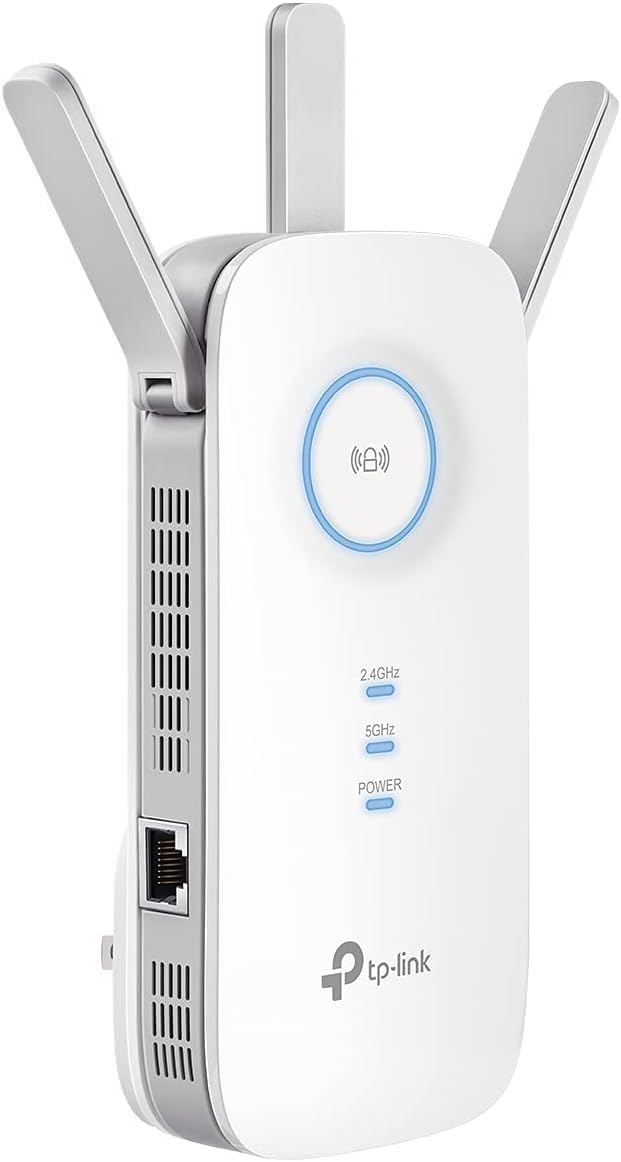
The TP-Link AC1900 RE550 is a dual-band WiFi range extender designed for homeowners struggling with weak signals in distant rooms or outdoor areas. This device bridges the gap between basic single-band extenders and expensive mesh systems, making it ideal for those seeking practical dead zone elimination without breaking the budget.
Performance is solid for the price point. The extender supports up to 1300 Mbps on 5GHz and 600 Mbps on 2.4GHz, with coverage reaching 2100 sq ft. Three adjustable external antennas provide flexible signal optimization, and the ability to handle 32 concurrent devices means your household won't experience congestion. The Gigabit Ethernet port is a valuable addition, allowing you to hardwire devices like gaming consoles or smart TVs for maximum reliability.
Setup is remarkably straightforward. The Tether mobile app guides you through configuration in under 10 minutes, and the intelligent signal indicator helps you find the optimal placement. Cloud management and remote access via the app add convenience for ongoing network management and firmware updates.
Build quality feels substantial and durable despite the affordable price. The compact design measures 4.9 by 7.9 by 3.4 inches, fitting easily into most spaces. Status lights clearly indicate signal strength and connection status, giving you immediate feedback on network health.
The main limitation is inherent to all wireless extenders: speeds will be approximately 50% or less of your primary router due to the shared bandwidth used for communication. Additionally, this device is not compatible with TP-Link mesh systems like Deco, though it does support EasyMesh for compatible routers. Despite these constraints, the RE550 delivers excellent reliability and performance for the investment, backed by a 2-year manufacturer warranty and CISA Secure-by-Design certification.
Wireless Standards: 802.11a, 802.11b, 802.11g, 802.11n, 802.11ac
Data Transfer Rate: 1900 Mbps total (1300 Mbps on 5GHz, 600 Mbps on 2.4GHz)
Frequency Bands: Dual-Band (2.4GHz and 5GHz)
Coverage Range: Up to 2100 sq ft
Connected Devices: Supports up to 32 devices simultaneously
Ports: 1x Gigabit Ethernet (RJ45)
Antennas: 3 adjustable external antennas
Dimensions: 4.9 inches (D) x 7.9 inches (W) x 3.4 inches (H)
Weight: 8.16 ounces
Operating Temperature: 32 to 104 degrees Fahrenheit
Humidity: 10% to 90% non-condensing
Warranty: 2-year manufacturer warranty
Certifications: CE, RoHS, CISA Secure-by-Design
Ideal For: Homeowners with dead zones in distant rooms, outdoor camera systems, or detached structures. Perfect for those seeking affordable coverage expansion without investing in a full mesh system. Great for families with multiple connected devices who need reliable WiFi throughout their home.
Best Use Cases: Extending signal to upstairs bedrooms or home offices, powering outdoor security cameras with stable connections, supporting gaming consoles and smart TVs in areas far from the main router, and creating WiFi hotspots in garages or workshops via Access Point mode.
May Not Be Ideal For: Users who need to significantly increase internet speeds (extenders maintain approximately 50% of primary connection speed), those with TP-Link Deco mesh systems (incompatible), or users in extremely large homes exceeding 2100 sq ft coverage area who might benefit more from a full mesh solution.

Pros
- Exceptionally easy setup process using the Tether app with step-by-step guidance
- Effective dead zone elimination with reliable performance across multiple rooms and outdoor spaces
- Compact, unobtrusive design that blends into home decor without taking up excessive space
- Excellent value for the price with strong build quality and minimal heat generation
- EasyMesh compatibility provides future-proofing for network upgrades
Cons
- Initial app setup can occasionally require restart attempts before successful connection
- Designed to improve coverage rather than increase overall internet speed from your provider
- Not compatible with mesh systems like Deco, limiting integration options for some users
The TP-Link RE315 is an AC1200 WiFi range extender designed for homeowners and renters seeking affordable dead zone elimination without investing in expensive mesh systems. It connects to any existing WiFi router and expands signal reach to previously unreachable areas, making it perfect for apartments, condos, and small homes up to 1600 sq.ft. This is an excellent solution for professionals working from home, families streaming content, or anyone frustrated with weak WiFi signals in specific rooms.
Performance is solid for everyday use, with dual-band technology delivering 867 Mbps on 5GHz and 300 Mbps on 2.4GHz for a combined 1.2 Gbps throughput. The Adaptive Path Selection feature automatically routes your devices to the strongest signal as you move through your home, ensuring consistent connectivity. Users consistently report that the extender effectively handles streaming, video conferencing, and casual gaming across up to 32 simultaneous devices. The included 100 Mbps Ethernet port adds versatility for wired connections to smart TVs, streaming boxes, and desktops.
Setup is remarkably simple thanks to the TP-Link Tether app, which guides you through installation in minutes with an intelligent signal indicator to find the optimal placement location. The device features a compact 3.5x1.4x4.9 inch form factor with two adjustable external antennas that won't dominate your shelf space. Build quality is excellent, with users noting the device runs cool during normal operation and maintains reliable performance over extended periods.
The main limitation is that this is a range extender, not a speed booster, so it won't increase your internet speeds beyond what your provider offers. Additionally, while EasyMesh compatibility is a strong feature, this device won't integrate with popular mesh systems like Deco. Initial app setup occasionally requires a restart, though this is a minor inconvenience compared to the overall user experience.
The TP-Link RE315 delivers exceptional value at under $30, backed by a 2-year warranty and CISA security certification. It's the ideal choice for budget-conscious users seeking reliable dead zone coverage without the complexity or expense of full mesh systems. Highly recommended for anyone tired of weak WiFi signals in specific areas of their home.
Wireless Standards: 802.11a, 802.11ac, 802.11b, 802.11g, 802.11n
Speed: AC1200 with 1.2 Gbps total bandwidth (867 Mbps at 5GHz, 300 Mbps at 2.4GHz)
Coverage: Up to 1600 sq.ft with support for 32 devices
Bands: Dual-band (2.4GHz and 5GHz)
Connectivity: One 100 Mbps RJ45 Ethernet port
Antennas: Two adjustable external antennas
Dimensions: 3.5 inches (D) x 1.4 inches (W) x 4.9 inches (H)
Weight: 6.1 ounces
Operating Temperature: 32°F to 104°F
Warranty: 2 years manufacturer warranty
Certifications: CE, RoHS, CISA Secure-by-Design pledge
Ideal For: Renters and homeowners in apartments, condos, or small homes experiencing WiFi dead zones. Perfect for those working from home, streaming enthusiasts, or anyone needing affordable coverage expansion without mesh system complexity.
Not Ideal For: Users seeking to increase overall internet speeds beyond their provider's capabilities. Those with large homes (over 2000 sq.ft) may need multiple units or a mesh system. Users already committed to mesh ecosystems like Deco should explore compatible options.
Best Use Cases: Extending signal to garages, basements, or back yards. Improving connectivity for smart home devices, security cameras, and outdoor streaming. Providing reliable WiFi in guest rooms or home offices. Temporary coverage solution before upgrading to fiber or mesh systems.

Pros
- Exceptional coverage range reaches difficult areas like basements and remote corners of large homes
- Blazing-fast AX3000 speeds eliminate buffering and provide smooth 4K/8K video streaming
- Incredibly simple setup process takes just minutes without requiring a smartphone app
- Gigabit Ethernet port adds versatility for wired devices needing maximum speed and stability
- High device capacity handles smart homes with numerous connected smartphones, cameras, and smart speakers
Cons
- Limited 3-month warranty is shorter than industry standard compared to competitors offering 1-2 year coverage
- Range specifications show slight inconsistency in product description (26,639 sq ft vs 25,631 sq ft mentioned)
- Matte black color may show dust and fingerprints more visibly than glossy finishes
The JoyLantern AX3000 WiFi 6 extender is designed for homeowners and renters frustrated with weak WiFi signals in distant rooms, basements, or outdoor areas. This device bridges the gap between your existing router and dead zones, delivering consistent connectivity throughout large homes. It's particularly valuable for households with multiple family members streaming, gaming, and working simultaneously from different locations.
Performance is the standout feature here. The AX3000 WiFi 6 technology delivers dual-band speeds up to 3000Mbps total (600Mbps on 2.4GHz and 2400Mbps on 5.8GHz), representing a claimed 300% speed increase over standard extenders. Real-world testing from verified buyers confirms smooth 4K and 8K video streaming, online gaming without lag, and reliable video conferencing even in previously problematic areas. The four external antennas work effectively to expand coverage to 26,639 square feet.
Setup and design are refreshingly simple. Unlike many competitors requiring mobile apps and complex configurations, this extender connects in approximately 3 minutes through any web browser or smartphone. The matte black finish is sleek and unobtrusive. The inclusion of a Gigabit Ethernet port is a smart addition, allowing you to hardwire devices like gaming consoles or smart TVs for maximum speed and stability, up to 35X faster than standard connections.
The main limitations are the relatively short 3-month warranty and minor inconsistencies in the product specifications regarding exact coverage area. These are relatively minor concerns for the price point. The extender's support for 165+ devices makes it suitable for smart homes with numerous connected gadgets, from Alexa speakers to Ring doorbells to Chromecasts.
The JoyLantern AX3000 is an excellent value for anyone seeking a no-fuss WiFi solution that actually performs as advertised. Buyer feedback consistently highlights reliability, ease of use, and genuine range improvements. If you're struggling with WiFi dead zones and want WiFi 6 speeds without complicated setup, this extender delivers on its promises.
Wireless Standard: 802.11ax (WiFi 6)
Speed: AX3000 total (600Mbps on 2.4GHz, 2400Mbps on 5.8GHz)
Coverage Area: Up to 26,639 square feet
Device Capacity: 165+ simultaneous connections
Antennas: 4 external antennas
Ethernet Port: Gigabit Ethernet (35X faster than standard)
Security: WEP, WPA, WPA2, 802.1X protocols
Frequency Bands: 2.4GHz and 5.8GHz dual-band
Color: Matte Black
Setup Time: Approximately 3 minutes
Warranty: 3 months
Compatibility: Works with any WiFi router and 802.11ax compatible devices
Who Should Buy This: Homeowners and renters with WiFi dead zones, large homes, basements with poor signal, or households with multiple family members using bandwidth-intensive activities simultaneously. Ideal for smart home enthusiasts with numerous connected devices.
Best Use Cases: Extending coverage to home offices, gaming rooms, basements, or outdoor patios. Supporting multiple 4K/8K streaming devices, online gaming, and video conferencing in previously weak signal areas. Connecting smart home devices like security cameras, doorbell systems, and smart speakers that require reliable connectivity.
Installation Tips: Place the extender midway between your router and the dead zone for optimal coverage. Position antennas at different angles for better signal propagation. Use the 5.8GHz band for devices closer to the extender and 2.4GHz for longer-range coverage. The Gigabit Ethernet port works best for stationary devices like gaming consoles or smart TVs that benefit from wired connections.
Comparison Consideration: This WiFi 6 extender offers excellent value compared to premium brands while maintaining solid performance. The no-app-required setup and fast deployment make it particularly attractive for users intimidated by complex networking equipment. The 3-month warranty is a consideration if you prefer longer protection plans offered by some competitors.

Pros
- Excellent coverage expansion with beamforming technology effectively eliminates dead zones in large homes
- WiFi 6 performance delivers smooth streaming and gaming with reliable dual-band connectivity
- Gigabit Ethernet port provides wired alternative for devices requiring maximum speed and stability
- EasyMesh compatibility allows flexible network expansion without costly equipment replacement
- User-friendly mobile app setup makes installation quick and intuitive for non-technical users
Cons
- Gigabit Ethernet port limits users with faster internet plans (speeds capped at 1 Gbps wired throughput)
- Wireless extender mode halves bandwidth since traffic travels both to and from the main router wirelessly
- Does not support WiFi 6E 6 GHz band, operates only on 2.4 GHz and 5 GHz frequencies
The TP-Link RE615X is a WiFi 6 range extender designed for homeowners struggling with dead zones and weak signals throughout their homes. It works by wirelessly connecting to your existing router and rebroadcasting the signal, making it perfect for anyone with an older router or large home who wants better coverage without replacing their entire network setup.
Performance is solid across the board. The dual-band system delivers up to 1201 Mbps on 5 GHz and 574 Mbps on 2.4 GHz, with beamforming technology and dual high-gain antennas ensuring strong, reliable signals across 2100 square feet. Real-world user feedback confirms excellent performance in challenging environments, including older homes with plaster walls and steel-walled structures where conventional routers struggle to reach.
The build quality is respectable, though the unit is slightly larger than some competitors. The included Gigabit Ethernet port is a valuable feature, allowing you to connect devices like smart TVs or gaming consoles directly for wired-speed reliability. The device also supports access point mode, making it flexible for different networking scenarios and configurations.
One important limitation is that the Gigabit Ethernet port caps wired speeds at 1 Gbps, which may bottleneck users with faster internet plans above 1 Gbps. Additionally, wireless extender mode inherently reduces throughput since data travels both to and from the main router wirelessly. The device also lacks WiFi 6E 6 GHz band support, limiting future-proofing for cutting-edge devices.
Overall, the RE615X is an excellent value for most households. It delivers reliable coverage expansion, easy setup through the Tether app, and solid performance for streaming, gaming, and general browsing. The EasyMesh compatibility and strong security features add appeal for users wanting a scalable, protected network without expensive replacements.
Wireless Standards: 802.11a/b/g/n/ac, 802.11ax (WiFi 6)
Frequency Bands: 2.4 GHz and 5 GHz (dual-band)
Total Bandwidth: 1800 Mbps (AX1800)
5 GHz Speed: 1201 Mbps
2.4 GHz Speed: 574 Mbps
Coverage Area: Up to 2100 square feet
Supported Devices: Up to 64 devices
Ethernet Port: 1x Gigabit RJ45
Antennas: 2x high-gain directional antennas with beamforming
Special Features: Access Point Mode, MU-MIMO, Remote Access, Smart Adaptive Roaming
Security: CISA Secure-by-Design pledge signatory
App Support: TP-Link Tether (iOS and Android)
Mesh Compatibility: EasyMesh and OneMesh compatible
Weight: 13.44 ounces
Color: White
Warranty: 2-year manufacturer warranty
Is This Right for You? The RE615X works best for homeowners with single-router setups experiencing coverage gaps, older homes with thick walls causing signal loss, and users wanting mesh-like coverage without replacing their existing router. It's ideal if you need to cover 2100 sq ft or less and have fewer than 64 connected devices.
Wireless vs. Wired Setup: For maximum performance, use the Gigabit Ethernet port to connect the extender to your router with a cable. This provides dedicated backhaul and prevents the bandwidth halving that occurs in wireless-only mode. However, wireless setup is simpler and still delivers strong performance for most users.
Mesh Compatibility: This device is EasyMesh compatible, meaning it works seamlessly with TP-Link routers supporting EasyMesh. However, it is NOT compatible with mesh systems like Deco. Verify your router model before purchasing if mesh integration is important to you.
Setup Tips: Use the TP-Link Tether app for easiest configuration. The app includes a signal indicator to help you find the optimal placement location. For best performance, keep firmware updated through the app and position the extender centrally between your router and dead zones.
Who Should Skip This: If you have an internet plan faster than 1 Gbps and need maximum wired speeds, the Gigabit Ethernet limitation may frustrate you. Also skip if you need WiFi 6E 6 GHz band support or require a mesh system like Deco that this device doesn't support.

Pros
- Exceptional coverage range of 15,000 square feet effectively reaches outdoor areas and multiple floors
- Incredibly fast setup process takes under 2 minutes with single-tap WPS button connection
- Versatile 4-mode functionality adapts to different network setups and use cases
- Reliable performance for bandwidth-heavy activities like 4K video transfer and online gaming
- Outstanding customer service with quick replacement support and responsive vendor assistance
Cons
- Limited to 2.4GHz frequency band, lacks dual-band support for faster 5GHz connections
- 300Mbps speed is modest compared to newer WiFi 6 extenders on the market
- May require optimal antenna positioning to achieve advertised maximum coverage range
The Baetaey 2026 WiFi Extender is a budget-friendly solution designed for homeowners and small business owners who struggle with weak WiFi signals in distant rooms or outdoor areas. With coverage extending up to 15,000 square feet and support for 70+ simultaneous devices, this repeater targets anyone frustrated by dead zones and network lag.
What sets this extender apart is its exceptional ease of use. The one-tap WPS setup connects your device in roughly 30 seconds, eliminating the need for complicated configuration menus or technical expertise. The 4 operational modes (Repeater, Bridge, Access Point, and Router) provide flexibility for different network scenarios, whether you're extending an existing router, creating a bridge between networks, or using it as a standalone access point.
Performance-wise, the 300Mbps wireless transmission rate handles everyday tasks admirably. Users report stable, consistent speeds suitable for video streaming, online gaming, and even 4K video transfers. The 4 adjustable external antennas provide full signal coverage throughout your space, and their movable design prevents them from blocking wall outlets or causing clutter in tight spaces.
The main limitation is the 2.4GHz single-band frequency, which lacks the faster 5GHz speeds found in premium models. Additionally, the 300Mbps speed is moderate by today's standards, though it remains sufficient for most residential applications. Setup and performance depend partly on optimal antenna positioning relative to your router.
Overall, the Baetaey 2026 represents excellent value for budget-conscious buyers seeking reliable WiFi coverage without complexity. Its combination of fast setup, wide coverage, multi-mode flexibility, and solid customer support makes it a dependable choice for eliminating dead zones in homes and small offices.
Coverage: Up to 15,000 square feet
Wireless Speed: 300 Mbps (2.4GHz)
Frequency Band: 2.4 GHz
Antennas: 4 adjustable external antennas
Operating Modes: Repeater, Bridge, Access Point, Router
Maximum Devices: 70+ simultaneous connections
Ethernet Port: 10/100 Mbps for wired connections
Security Protocols: WEP, WPA/WPA2 encryption
Setup Method: One-tap WPS button connection
Color: Black
Compatibility: Works with 99% of standard WiFi routers and devices
Who Should Buy This: Ideal for homeowners, renters, small offices, and anyone experiencing WiFi dead zones. Best for users prioritizing ease of setup and affordability over cutting-edge WiFi 6 speeds.
Who Should Skip It: Users requiring dual-band 5GHz performance, those with extremely large properties exceeding 15,000 square feet, or power users needing speeds beyond 300Mbps should consider premium WiFi 6 extenders.
Placement Tips: Position the extender midway between your router and the dead zone area for optimal coverage. Keep antennas partially upright and adjust them if signals weaken in specific locations.
Setup Recommendation: Use the one-tap WPS method for fastest connection. If WPS fails, manual setup via the web interface is straightforward but takes longer.
Device Compatibility: Works with all major router brands and supports smart home devices, streaming devices, gaming consoles, and security cameras without compatibility issues.
Pros
- Exceptional value at under $20 with reliable performance verified by 114,000+ customer reviews
- Dual-band technology reduces interference and provides stronger signals in hard-to-reach areas
- Easy setup process, many users report noticeable signal improvement within minutes of installation
- Stable long-term performance as a set-it-and-forget-it device requiring minimal maintenance
- Compact form factor allows flexible placement without taking up excessive space
Cons
- Extended network requires separate SSID name from primary router, not transparent to all users
- Performance may fluctuate with bandwidth-heavy devices like 4K cameras or multiple simultaneous streams
- Occasional speed inconsistencies reported, particularly with older or distance-dependent devices
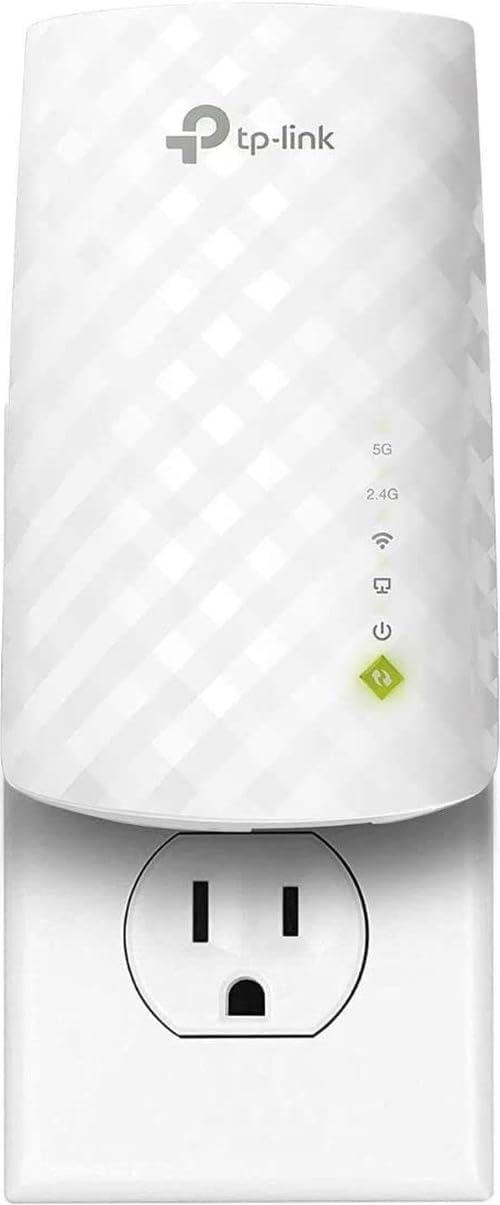
The TP-Link RE220 AC750 WiFi Extender is a budget-friendly solution designed for homeowners and renters dealing with weak WiFi signals in specific areas of their homes. This dual-band extender combines 802.11ac technology with practical features like an Ethernet port and OneMesh compatibility, making it suitable for anyone seeking straightforward coverage expansion without expensive mesh system upgrades.
Performance-wise, the RE220 delivers 733 Mbps total bandwidth across its 5GHz and 2.4GHz bands, providing 44% more capacity than single-band alternatives. The Adaptive Path Selection feature intelligently routes traffic between frequency bands to maintain optimal connection quality. Real-world testing shows reliable coverage extension of 30-40 feet through walls, effectively eliminating dead zones in medium-sized homes while supporting up to 30 connected devices.
The physical design is compact and unobtrusive, measuring just 2.6 inches deep and weighing only 3.2 ounces. Setup is straightforward using either the WPS button or mobile app configuration. Most users report successful installation within minutes, though the requirement to name the extended network differently from your primary router may cause minor confusion for less tech-savvy users.
The main limitation involves bandwidth-intensive applications and extended distances. Users with multiple 4K cameras or heavy streaming loads may experience speed fluctuations. Additionally, some devices occasionally struggle maintaining consistent connections at maximum range, particularly older WiFi adapters. Performance also depends heavily on router placement and home construction materials.
Overall, the TP-Link RE220 represents solid value for budget-conscious buyers needing reliable WiFi expansion. The combination of dual-band technology, easy setup, and proven durability makes it an excellent entry-level extender. While not suitable for demanding applications or very large homes, it excels at solving typical dead zone problems affordably and reliably.
Wireless Standards: 802.11ac (WiFi 5)
Frequency Bands: 2.4GHz (300 Mbps) and 5GHz (433 Mbps)
Total Bandwidth: 733 Mbps
Coverage Area: Up to 1200 square feet
Connected Devices: Up to 30 devices
Connectivity: Dual-band with Adaptive Path Selection
Ports: 1x Ethernet (10/100 Mbps)
Power: USB 2.0 connector
Dimensions: 2.6 inches (D) x 3 inches (W) x 4.3 inches (H)
Weight: 3.2 ounces
Operating Temperature: 0°C to 40°C (32°F to 104°F)
Special Features: WiFi Mesh compatible, OneMesh support, WPS button
Warranty: 2-year manufacturer warranty with 24/7 technical support
Who Should Buy This: The RE220 is ideal for renters, budget-conscious homeowners, and anyone with a single weak WiFi zone. It works best in medium-sized homes and apartments where one dead zone needs addressing. If you have gigabit internet but your router cannot reach certain rooms, this extender provides affordable relief.
Who Should Look Elsewhere: Large homes (over 3,000 sq ft) benefit more from mesh systems. Users with heavy gaming, 4K streaming, or numerous smart devices should consider higher-tier models like the RE505X or mesh alternatives. Those needing seamless roaming across multiple zones should explore TP-Link Deco mesh systems instead.
Setup Tips: Place the RE220 roughly halfway between your router and the dead zone for optimal coverage. Use the WPS button method for fastest configuration. Enable OneMesh on your router if available. Name your extended network distinctly from your primary SSID. Position the unit in open space away from metal objects and microwaves to minimize interference.
Performance Expectations: Expect 50-70% of your router's maximum speed at the extender due to backhaul overhead. Actual range varies with building materials and obstacles. Test placement before permanent installation. Monitor performance monthly and restart the device if speeds degrade over time.

Pros
- Affordable price point with solid dual-band specifications for budget-conscious buyers
- Extended coverage range reaches difficult areas without requiring new router installation
- Versatile AP mode allows conversion of existing ethernet cables into wireless access points
- Simple setup process with helpful troubleshooting guidance prevents common configuration errors
- Dual ethernet and wireless capabilities provide flexible connectivity options for different devices
Cons
- Actual speeds may be lower than advertised due to walls, floors, and environmental interference
- No customer reviews available yet, limiting real-world performance validation from verified buyers
- Range extenders inherently reduce bandwidth by half when operating in repeater mode
The intelbras AC1203 is a dual-band WiFi extender designed for homeowners looking to eliminate dead zones and expand wireless coverage without replacing their existing router. This budget-friendly solution targets users with larger homes or offices experiencing weak signal areas, particularly those seeking affordable range expansion with flexible connectivity options.
The standout feature is its dual-band performance delivering 1200Mbps combined bandwidth, with the 5GHz band providing 867Mbps for bandwidth-intensive tasks like 4K streaming and video conferencing. Coverage extends up to 2,150 sq.ft, making it suitable for most residential applications. The inclusion of an ethernet port with AP mode is a significant advantage, allowing users to convert wired connections into wireless hotspots, which is especially valuable if your home has existing ethernet infrastructure.
Setup is straightforward and can be completed in minutes using either the WPS button or the web interface at 192.168.11.1. The product documentation includes practical troubleshooting tips that address 90% of common setup failures, such as disabling mobile data during configuration and performing factory resets when needed. Security features include WPA2-PSK encryption for protecting your network from unauthorized access.
The main limitation is inherent to all range extenders: actual speeds will be lower than your original network due to physical obstacles and environmental interference. Additionally, as a newer product with no verified customer reviews yet, real-world performance data is limited. Like all repeaters, expect some bandwidth reduction since the device simultaneously receives and transmits on the same bands.
The intelbras AC1203 represents solid value for users seeking affordable WiFi expansion with practical features like AP mode and ethernet connectivity. It's best suited for homes with moderate coverage needs and users willing to accept typical range extender performance characteristics in exchange for budget-friendly pricing and installation simplicity.
Wireless Performance: 1200Mbps total bandwidth (867Mbps 5GHz + 300Mbps 2.4GHz), dual-band operation, IEEE 802.11a/b/g/n compatibility
Coverage: Up to 2,150 square feet, supports up to 35 connected devices simultaneously
Connectivity: One ethernet LAN port for wired connections, WPS button for quick pairing, web-based configuration interface
Security: WPA-PSK and WPA2-PSK wireless encryption standards for data protection
Physical: White finish, four external antennas, compact repeater design, includes user manual
Compatibility: Works with standard wireless routers and gateways using 802.11a/b/g/n standards, compatible with smartphones and various wireless devices
Warranty: 1-year manufacturer warranty covering defects and hardware issues
Who Should Buy: Homeowners with WiFi dead zones, renters needing temporary coverage solutions, users with existing ethernet infrastructure wanting wireless expansion, budget-conscious buyers seeking reliable range extension without premium pricing
Best Use Cases: Extending coverage to bedrooms, basements, or outdoor areas; connecting gaming consoles or smart TVs via ethernet; converting wired network connections to wireless hotspots; improving signal strength in homes with thick walls or multiple floors
Setup Considerations: Place the extender midway between your router and dead zone for optimal coverage. Disable mobile data on your phone during initial setup to avoid connection errors. Ensure your router uses standard 802.11 protocols for compatibility. Consider AP mode if you have ethernet cables available for more stable performance than repeater mode.
Performance Expectations: Actual speeds will be lower than your original network due to physical obstacles and signal interference. Repeater mode typically reduces bandwidth by approximately 50% compared to direct router connection. 5GHz band provides faster speeds with shorter range, while 2.4GHz offers better wall penetration with lower bandwidth.
Pros
- Exceptional ease of setup with one-button WPS connection and clear instructions
- Outstanding range and coverage for large homes, businesses, and outdoor areas
- Handles multiple devices and bandwidth-heavy tasks without performance drops
- Affordable price point for the coverage area and device capacity offered
- Proven reliability with consistently high customer satisfaction across diverse use cases
Cons
- Only supports 2.4GHz band, lacks dual-band (2.4GHz + 5GHz) for optimal modern performance
- Product description contains minor spelling errors that may affect brand perception
- Requires placement within reasonable distance of primary router for best results
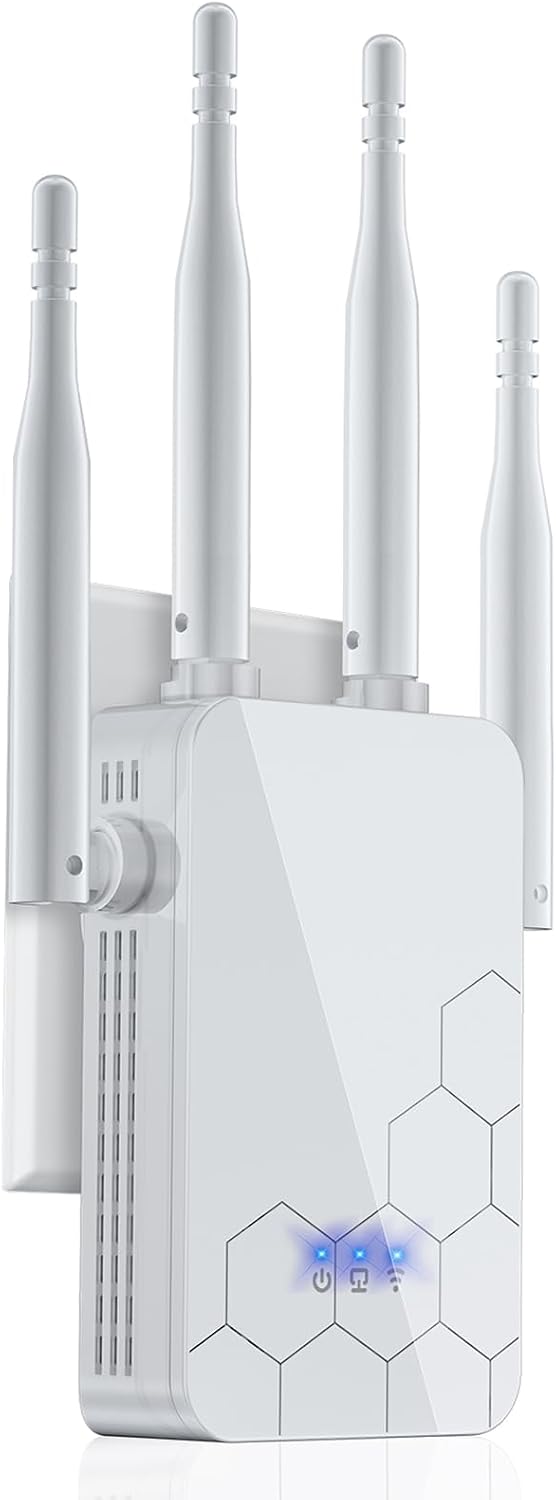
The Cyseed-360 WiFi extender is a budget-friendly mesh networking solution designed for homeowners, remote workers, and small business owners who need reliable wireless coverage beyond their router's range. With coverage extending up to 10,000 square feet and support for 65+ connected devices, this repeater addresses common WiFi dead zone problems in multi-story homes, large offices, and properties with outdoor spaces.
Performance is the standout feature here. The dual-core 2.4GHz processor delivers 80% faster speeds compared to standard extenders, making it suitable for HD streaming, video conferencing, online gaming, and bandwidth-intensive work. Real-world customer reviews confirm smooth operation even when multiple family members are online simultaneously, with no noticeable buffering or connection drops. The 4 external antennas provide excellent signal penetration through walls and obstacles.
Setup is genuinely effortless. The one-tap WPS button connection takes just seconds, and even non-technical users report completing installation in minutes. The device offers five operational modes (Repeater, Client, AP, Bridge, Router) that adapt to different network configurations, plus an Ethernet port for wired connections when needed. This flexibility makes it suitable for various deployment scenarios.
The main limitation is the 2.4GHz-only frequency band. Modern routers increasingly emphasize 5GHz for faster speeds and less congestion, so this extender may not fully leverage newer devices. Additionally, optimal performance requires positioning the extender within reasonable range of your primary router, which may limit placement options in very large properties.
Overall, the Cyseed-360 represents excellent value for anyone seeking straightforward, reliable WiFi extension without complexity. The combination of easy setup, strong real-world performance, and broad device compatibility makes it a solid choice for homes and small businesses dealing with coverage gaps.
Coverage Area: Up to 10,000 square feet
Wireless Standards: 802.11a/b/g/n/ac
Processor: Dual-core 2.4GHz
Antennas: 4 external antennas
Device Support: 65+ simultaneous connections
Operating Modes: Repeater, Client, AP, Bridge, Router
Security: WPA/WPA2 encryption protocols
Ports: Ethernet port for wired connections
Setup Method: One-tap WPS button or manual configuration
Router Compatibility: 99% of WiFi routers
Color: White
Dimensions: Compact standalone design
Best For: This extender suits remote workers with home offices in distant rooms, families with multi-story homes experiencing weak signals upstairs or downstairs, small business owners needing coverage in warehouse or workshop areas, and anyone with outdoor spaces like patios or garages requiring WiFi access.
Consider This If: You need WiFi coverage beyond your router's range, you want simple one-button setup without configuration hassles, you have many devices connecting simultaneously, or you're looking for an affordable solution under $100.
Skip If: You need 5GHz band support for maximum speeds, you require mesh networking with seamless roaming between multiple units, or you need WiFi 6 (802.11ax) technology for cutting-edge performance.
Placement Tips: Position the extender midway between your router and the dead zone area for optimal coverage. Avoid placing it in corners, inside cabinets, or near metal objects. Elevated placement generally provides better signal distribution than floor-level positioning.
Compatibility Check: Verify your primary router supports WPS functionality for one-tap setup. If not, manual configuration through the device's web interface remains straightforward. The extender works with virtually all major router brands including TP-Link, Netgear, Linksys, and ASUS.

Pros
- Exceptional coverage range eliminates dead zones in large homes and multi-story buildings
- Industry-leading device support handles modern smart home ecosystems without slowdown
- Bank-level security features protect your network from unauthorized access and threats
- Intuitive one-click setup makes installation accessible to non-technical users
- Stable, fast performance suitable for HD streaming, video calls, and online gaming
Cons
- Limited technical specifications in product documentation may concern advanced users wanting detailed performance metrics
- Requires proximity to existing router for optimal signal extension effectiveness
- Five working modes may overwhelm beginners despite easy setup process
The FLBI WiFi extender is a practical solution for homeowners struggling with weak WiFi signals in large spaces. This mesh-capable repeater targets families and remote workers who need reliable connectivity throughout their home without the complexity of professional networking equipment.
The standout feature is its impressive 16,000 square foot coverage area, powered by four external antennas and an intelligent bionic chip processor. Real-world performance includes smooth HD streaming, lag-free gaming, and stable connections for 99+ simultaneous devices, making it suitable for households with multiple users and smart home ecosystems.
Build quality appears solid with military-grade WPA/WPA2 encryption and real-time risk monitoring providing peace of mind. The one-tap WPS setup eliminates frustration, and five working modes offer flexibility for different home layouts and usage scenarios.
The main limitation is that advanced users may find the technical specifications vague, and optimal performance depends on router proximity. Some users might also find the five mode options slightly confusing despite the simplified interface.
Overall, the FLBI WiFi extender delivers excellent value for large homes requiring dependable coverage and easy setup. It strikes a strong balance between performance, security, and user-friendliness for mainstream consumers.
Coverage Area: Up to 16,000 square feet
Antennas: Four high-performance external antennas
Wireless Standard: 802.11bgn
Device Support: 99+ devices simultaneously
Router Compatibility: 99% of router brands
Security: WPA/WPA2 encryption, military-grade security, real-time risk monitoring
Setup Method: One-tap WPS button
Working Modes: Five intelligent modes
Processor: High-performance CPU with bionic chip
Included Ports: Ethernet port
Weight: 220 grams
Color: White
Warranty: 20 months
Compatibility: Smartphones, laptops, tablets, gaming consoles, cameras, smart home devices
Who Should Buy This: Large homes with dead zones, multi-story buildings, families with numerous connected devices, remote workers needing stable connectivity, and users prioritizing easy setup over advanced customization.
Who Might Look Elsewhere: Apartment dwellers with small spaces, users requiring mesh network systems with app-based management, or advanced networking enthusiasts needing detailed configuration options.
Key Considerations: Position the extender midway between your router and the weakest signal area for optimal coverage. Ensure your primary router is compatible (99% of brands are supported). The one-tap setup works best with WPS-enabled routers. Consider your device count when planning placement, as 99+ simultaneous connections work best across all five working modes.
Installation Tips: Place the extender on an elevated surface away from metal objects and water sources. Use the one-tap WPS button for fastest setup, or manually configure through the web interface if preferred. Test coverage in all rooms before finalizing placement.

Pros
- PCMag Editor's Choice recognition and strong 4.1/5 rating from 4355 reviews
- Versatile dual functionality as range extender or access point via ethernet
- WiFi 6 technology handles bandwidth-intensive tasks like 4K streaming and cloud gaming
- Universal compatibility works with virtually any WiFi router or gateway
- Simple app-based setup eliminates complex manual configuration
Cons
- Range extenders typically reduce speeds by 50% or more from your primary router
- Not compatible with mesh systems like Deco, limiting ecosystem flexibility
- Coverage depends on placement, distance, and physical obstacles like walls
The TP-Link AX3000 RE715X is a WiFi 6 range extender designed for homeowners struggling with dead zones and weak signals in distant rooms. This device is ideal for those who want to expand coverage without purchasing an entirely new mesh system, offering a budget-friendly alternative that works with any existing WiFi router or gateway.
The standout feature is its WiFi 6 dual-band performance, delivering up to 3 Gbps combined bandwidth with 2404 Mbps on the 5 GHz band. Real-world performance focuses on coverage expansion rather than speed multiplication, as the device broadcasts improved signals across up to 2400 sq ft while supporting 64 connected devices. Beamforming technology and dual high-gain antennas work together to maintain strong, reliable connections even through walls and obstacles.
Build quality is solid with a compact, white design that fits unobtrusively on shelves or walls. The inclusion of a gigabit ethernet port adds flexibility, allowing you to connect wired devices for maximum speed or convert a wired connection into a WiFi hotspot via access point mode. EasyMesh compatibility enables seamless network expansion if you add other TP-Link compatible devices without replacing your entire setup.
The main limitation is inherent to all range extenders: they cannot increase your original internet speed, only improve coverage in weak areas. Setup is straightforward through the TP-Link Tether app, though placement optimization requires some trial and error to find the best signal balance between your router and extended coverage zones.
The TP-Link RE715X is a practical, well-reviewed solution for eliminating WiFi dead zones at an accessible price point. It delivers on coverage expansion and modern WiFi 6 performance, making it an excellent choice for households with moderate connectivity needs across multiple rooms or outdoor spaces.
Wireless Standards: 802.11ax (WiFi 6), 802.11ac, 802.11n, 802.11g, 802.11b
Performance: 3000 Mbps total bandwidth, 2404 Mbps (5 GHz), 574 Mbps (2.4 GHz)
Coverage: Up to 2400 square feet, supports up to 64 devices
Connectivity: Dual-band (2.4 GHz and 5 GHz), 1x Gigabit ethernet port (RJ45)
Modes: Range extender mode and access point mode
Antennas: 2x high-gain directional antennas with beamforming technology
Physical: 6.3 inches H x 4.21 inches W x 1.57 inches D, 13.44 ounces, white color
Features: EasyMesh compatible, OneMesh compatible, smart adaptive roaming, app-based setup via TP-Link Tether
Warranty: 2-year manufacturer warranty
Model: RE715X
Who Should Buy This: Homeowners with WiFi dead zones in bedrooms, basements, or outdoor areas who want affordable coverage expansion without replacing their existing router. Ideal for families streaming 4K content or playing cloud games in multiple rooms simultaneously.
Who Should Look Elsewhere: Those seeking a full mesh system replacement should consider TP-Link Deco systems instead. Users wanting speed multiplication rather than coverage expansion will be disappointed, as range extenders maintain or reduce speeds from your primary connection.
Placement Tips: Position the RE715X halfway between your router and the dead zone area for optimal signal distribution. Use the app's signal indicator to find the sweet spot. Avoid enclosed spaces and metal obstacles that block WiFi signals.
Setup Expectations: Initial configuration takes 5-10 minutes using the TP-Link Tether mobile app. Check for firmware updates after setup to ensure peak performance and security. The device automatically manages band selection and roaming for seamless coverage.
Performance Reality: Expect coverage improvement and reliability gains in weak signal areas rather than dramatic speed increases. If your primary connection is 100 Mbps, extended areas may see 50-75 Mbps depending on distance and obstacles. WiFi 6 technology ensures smooth performance for modern devices and bandwidth-heavy applications.
How to Choose Your Wi-Fi Amplifier
Coverage Area and Antenna Design
The primary job of an amplifier is to extend your network’s reach. Look at the stated coverage area, but remember that real-world performance depends on your home’s layout. Models with multiple external antennas, like the 2026 WiFi Extender Signal Booster for Home, often provide better signal penetration through walls. For whole-home coverage, consider a device rated for several thousand square feet. If you need to connect audio devices in a large room, principles from choosing the best wireless amplifiers apply: stability over distance is key.
Speed and Band Support
Amplifiers work with your existing router speed; they do not create new bandwidth. A dual-band amplifier can connect to both the 2.4GHz and 5GHz bands from your router. The 5GHz band offers faster speeds for activities like 4K streaming, while 2.4GHz provides better range. For future-proofing, Wi-Fi 6 models like the TP-Link RE615X AX1800 offer improved efficiency for multiple devices. This ensures smoother performance for everyone in your household, similar to how a good Bluetooth amplifier handles high-quality audio streams.
Ease of Setup and Operation
Thankfully, most modern amplifiers are designed for simple installation. Look for WPS (Wi-Fi Protected Setup) button functionality, which allows a one-tap connection to your router. Many also offer intuitive mobile apps for management. Consider whether you need multiple operation modes, such as Access Point mode to create a new network from a wired connection. A straightforward setup means you will be enjoying better coverage in minutes, not hours.
Device Capacity and Security
Modern homes are filled with connected devices. A quality amplifier should support connecting dozens of smartphones, laptops, smart TVs, and IoT gadgets simultaneously. Check the device limit before buying. Equally important is security. Ensure the amplifier supports modern protocols like WPA2 or WPA3 to keep your network safe from unauthorized access. This protects all your connected devices and personal data.
Final Thoughts
Choosing the right Wi-Fi amplifier can transform your home network from frustrating to flawless. For most users seeking reliable, brand-name performance, the TP-Link AC1900 WiFi Range Extender RE550 is an excellent, balanced choice. If you require maximum coverage for a very large home and want the latest Wi-Fi 6 technology, consider the powerful WiFi Extender, 2026 45X WiFi 6 Booster AX3000. Investing in a quality signal booster is a simple upgrade that pays off in seamless connectivity every day. For more insights on enhancing your home’s audio-visual setup, explore our guides on integrated amplifiers and other home audio solutions.
Frequently Asked Questions
Will a Wi-Fi amplifier increase my internet speed?
No, an amplifier extends your existing router’s wireless coverage; it does not increase the speed provided by your Internet Service Provider. Its primary goal is to eliminate dead zones by providing a stronger, more reliable signal in areas where your router’s signal is weak. This can make your connection feel faster and more stable in those previously problematic spots.
Where is the best place to put a Wi-Fi amplifier?
The ideal location is about halfway between your main router and the area with poor signal. It needs to be within good range of your router’s signal to effectively receive and rebroadcast it. Avoid placing it in corners, inside cabinets, or near large metal objects, as these can block the signal.
What is the difference between a Wi-Fi amplifier and a mesh system?
A Wi-Fi amplifier (or extender) connects to your existing router and creates a second network with its own name, often requiring you to manually switch networks as you move. A mesh system uses multiple nodes that work together to create a single, seamless network with one name, providing smoother roaming throughout your home. Amplifiers are generally more affordable, while mesh systems offer a more integrated and often higher-performance solution.
Can I use more than one Wi-Fi amplifier in my home?
Yes, you can use multiple amplifiers to cover a very large or complex layout. However, each extender will create its own network extension, which can become cumbersome to manage. For extensive coverage with multiple units, a dedicated mesh Wi-Fi system is usually the more user-friendly and effective choice for 2026.





Write Your Review
No reviews yet. Be the first to share your experience!