

Is your home Wi-Fi network plagued by frustrating dead zones? Do video calls stutter in the bedroom, or does your favorite show buffer in the backyard? You are not alone. Many standard routers simply cannot provide strong, consistent coverage throughout larger or multi-story homes. The solution is not necessarily a new router, but a dedicated Wi-Fi amplifier. This guide is for anyone ready to banish weak signals and enjoy a robust, reliable internet connection in every corner. We have evaluated the top models on the market to help you find the perfect fit for your needs.
| Pick | Product | BRD Score | Where to buy |
|---|---|---|---|
| Top Pick 30% OFF |
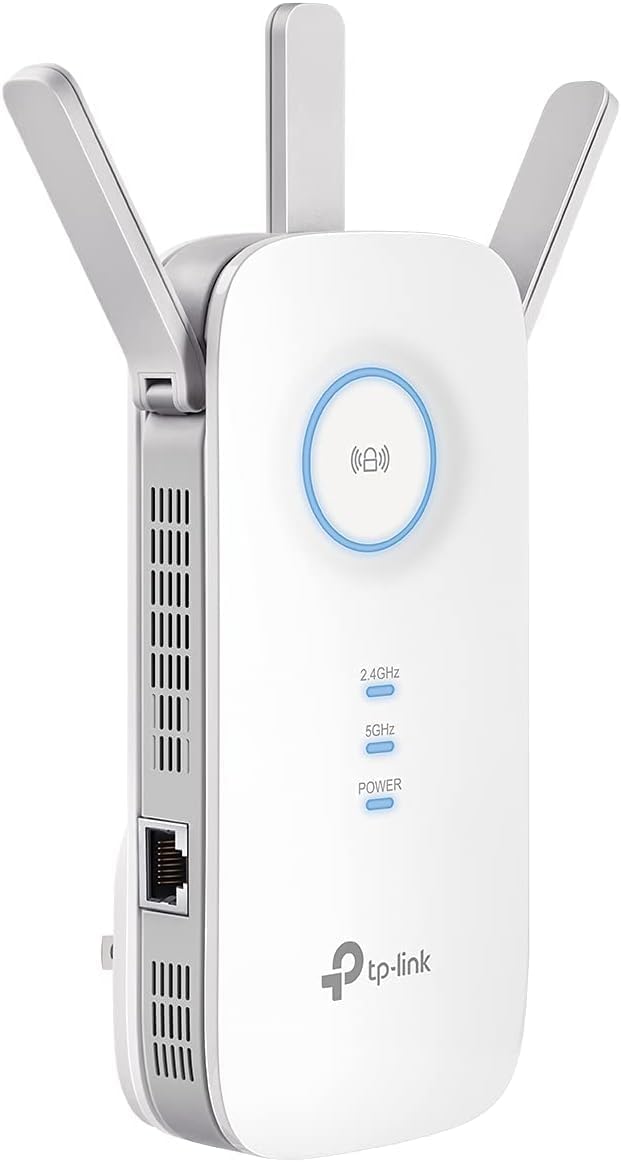 TP-Link AC1900 WiFi Range Extender RE550 |
9.5/10 | View on Amazon.com |
| 33% OFF |
 TP-Link AC1200 WiFi Extender RE315 |
9.9/10 | View on Amazon.com |
| 31% OFF |
 TP-Link RE615X AX1800 WiFi 6 Range Extender |
9.5/10 | View on Amazon.com |
 Baetaey 2026 WiFi Extender 15000 sq ft Coverage |
9.5/10 | View on Amazon.com |
Prices and discounts as of Nov 23, 2026 and may have changed. Check Amazon for the current price.
Pros
- Exceptionally easy setup and configuration takes less than 10 minutes for most users
- Gigabit Ethernet port provides wired connectivity option for maximum speed and reliability
- Excellent value at budget price point compared to competing mesh or extender systems
- Smart adaptive roaming automatically connects devices to the strongest available signal
- Access Point mode converts any wired connection into a WiFi hotspot for flexible placement
Cons
- Wireless extender design reduces effective speeds to approximately 50% or less of your primary router speed
- Not compatible with mesh systems like TP-Link Deco, limiting integration options for some users
- Coverage claims of 2100 sq ft are theoretical and may vary significantly based on walls, obstacles, and interference
The TP-Link AC1900 RE550 is a dual-band WiFi range extender designed for homeowners struggling with weak signals in distant rooms or outdoor areas. This device bridges the gap between basic single-band extenders and expensive mesh systems, making it ideal for those seeking practical dead zone elimination without breaking the budget.
Performance is solid for the price point. The extender supports up to 1300 Mbps on 5GHz and 600 Mbps on 2.4GHz, with coverage reaching 2100 sq ft. Three adjustable external antennas provide flexible signal optimization, and the ability to handle 32 concurrent devices means your household won't experience congestion. The Gigabit Ethernet port is a valuable addition, allowing you to hardwire devices like gaming consoles or smart TVs for maximum reliability.
Setup is remarkably straightforward. The Tether mobile app guides you through configuration in under 10 minutes, and the intelligent signal indicator helps you find the optimal placement. Cloud management and remote access via the app add convenience for ongoing network management and firmware updates.
Build quality feels substantial and durable despite the affordable price. The compact design measures 4.9 by 7.9 by 3.4 inches, fitting easily into most spaces. Status lights clearly indicate signal strength and connection status, giving you immediate feedback on network health.
The main limitation is inherent to all wireless extenders: speeds will be approximately 50% or less of your primary router due to the shared bandwidth used for communication. Additionally, this device is not compatible with TP-Link mesh systems like Deco, though it does support EasyMesh for compatible routers. Despite these constraints, the RE550 delivers excellent reliability and performance for the investment, backed by a 2-year manufacturer warranty and CISA Secure-by-Design certification.
Wireless Standards: 802.11a, 802.11b, 802.11g, 802.11n, 802.11ac
Data Transfer Rate: 1900 Mbps total (1300 Mbps on 5GHz, 600 Mbps on 2.4GHz)
Frequency Bands: Dual-Band (2.4GHz and 5GHz)
Coverage Range: Up to 2100 sq ft
Connected Devices: Supports up to 32 devices simultaneously
Ports: 1x Gigabit Ethernet (RJ45)
Antennas: 3 adjustable external antennas
Dimensions: 4.9 inches (D) x 7.9 inches (W) x 3.4 inches (H)
Weight: 8.16 ounces
Operating Temperature: 32 to 104 degrees Fahrenheit
Humidity: 10% to 90% non-condensing
Warranty: 2-year manufacturer warranty
Certifications: CE, RoHS, CISA Secure-by-Design
Ideal For: Homeowners with dead zones in distant rooms, outdoor camera systems, or detached structures. Perfect for those seeking affordable coverage expansion without investing in a full mesh system. Great for families with multiple connected devices who need reliable WiFi throughout their home.
Best Use Cases: Extending signal to upstairs bedrooms or home offices, powering outdoor security cameras with stable connections, supporting gaming consoles and smart TVs in areas far from the main router, and creating WiFi hotspots in garages or workshops via Access Point mode.
May Not Be Ideal For: Users who need to significantly increase internet speeds (extenders maintain approximately 50% of primary connection speed), those with TP-Link Deco mesh systems (incompatible), or users in extremely large homes exceeding 2100 sq ft coverage area who might benefit more from a full mesh solution.
Pros
- Exceptionally easy setup process using the Tether app with step-by-step guidance
- Effective dead zone elimination with reliable performance across multiple rooms and outdoor spaces
- Compact, unobtrusive design that blends into home decor without taking up excessive space
- Excellent value for the price with strong build quality and minimal heat generation
- EasyMesh compatibility provides future-proofing for network upgrades
Cons
- Initial app setup can occasionally require restart attempts before successful connection
- Designed to improve coverage rather than increase overall internet speed from your provider
- Not compatible with mesh systems like Deco, limiting integration options for some users
The TP-Link RE315 is an AC1200 WiFi range extender designed for homeowners and renters seeking affordable dead zone elimination without investing in expensive mesh systems. It connects to any existing WiFi router and expands signal reach to previously unreachable areas, making it perfect for apartments, condos, and small homes up to 1600 sq.ft. This is an excellent solution for professionals working from home, families streaming content, or anyone frustrated with weak WiFi signals in specific rooms.
Performance is solid for everyday use, with dual-band technology delivering 867 Mbps on 5GHz and 300 Mbps on 2.4GHz for a combined 1.2 Gbps throughput. The Adaptive Path Selection feature automatically routes your devices to the strongest signal as you move through your home, ensuring consistent connectivity. Users consistently report that the extender effectively handles streaming, video conferencing, and casual gaming across up to 32 simultaneous devices. The included 100 Mbps Ethernet port adds versatility for wired connections to smart TVs, streaming boxes, and desktops.
Setup is remarkably simple thanks to the TP-Link Tether app, which guides you through installation in minutes with an intelligent signal indicator to find the optimal placement location. The device features a compact 3.5x1.4x4.9 inch form factor with two adjustable external antennas that won't dominate your shelf space. Build quality is excellent, with users noting the device runs cool during normal operation and maintains reliable performance over extended periods.
The main limitation is that this is a range extender, not a speed booster, so it won't increase your internet speeds beyond what your provider offers. Additionally, while EasyMesh compatibility is a strong feature, this device won't integrate with popular mesh systems like Deco. Initial app setup occasionally requires a restart, though this is a minor inconvenience compared to the overall user experience.
The TP-Link RE315 delivers exceptional value at under $30, backed by a 2-year warranty and CISA security certification. It's the ideal choice for budget-conscious users seeking reliable dead zone coverage without the complexity or expense of full mesh systems. Highly recommended for anyone tired of weak WiFi signals in specific areas of their home.
Wireless Standards: 802.11a, 802.11ac, 802.11b, 802.11g, 802.11n
Speed: AC1200 with 1.2 Gbps total bandwidth (867 Mbps at 5GHz, 300 Mbps at 2.4GHz)
Coverage: Up to 1600 sq.ft with support for 32 devices
Bands: Dual-band (2.4GHz and 5GHz)
Connectivity: One 100 Mbps RJ45 Ethernet port
Antennas: Two adjustable external antennas
Dimensions: 3.5 inches (D) x 1.4 inches (W) x 4.9 inches (H)
Weight: 6.1 ounces
Operating Temperature: 32°F to 104°F
Warranty: 2 years manufacturer warranty
Certifications: CE, RoHS, CISA Secure-by-Design pledge
Ideal For: Renters and homeowners in apartments, condos, or small homes experiencing WiFi dead zones. Perfect for those working from home, streaming enthusiasts, or anyone needing affordable coverage expansion without mesh system complexity.
Not Ideal For: Users seeking to increase overall internet speeds beyond their provider's capabilities. Those with large homes (over 2000 sq.ft) may need multiple units or a mesh system. Users already committed to mesh ecosystems like Deco should explore compatible options.
Best Use Cases: Extending signal to garages, basements, or back yards. Improving connectivity for smart home devices, security cameras, and outdoor streaming. Providing reliable WiFi in guest rooms or home offices. Temporary coverage solution before upgrading to fiber or mesh systems.
Pros
- Excellent coverage expansion with beamforming technology effectively eliminates dead zones in large homes
- WiFi 6 performance delivers smooth streaming and gaming with reliable dual-band connectivity
- Gigabit Ethernet port provides wired alternative for devices requiring maximum speed and stability
- EasyMesh compatibility allows flexible network expansion without costly equipment replacement
- User-friendly mobile app setup makes installation quick and intuitive for non-technical users
Cons
- Gigabit Ethernet port limits users with faster internet plans (speeds capped at 1 Gbps wired throughput)
- Wireless extender mode halves bandwidth since traffic travels both to and from the main router wirelessly
- Does not support WiFi 6E 6 GHz band, operates only on 2.4 GHz and 5 GHz frequencies
The TP-Link RE615X is a WiFi 6 range extender designed for homeowners struggling with dead zones and weak signals throughout their homes. It works by wirelessly connecting to your existing router and rebroadcasting the signal, making it perfect for anyone with an older router or large home who wants better coverage without replacing their entire network setup.
Performance is solid across the board. The dual-band system delivers up to 1201 Mbps on 5 GHz and 574 Mbps on 2.4 GHz, with beamforming technology and dual high-gain antennas ensuring strong, reliable signals across 2100 square feet. Real-world user feedback confirms excellent performance in challenging environments, including older homes with plaster walls and steel-walled structures where conventional routers struggle to reach.
The build quality is respectable, though the unit is slightly larger than some competitors. The included Gigabit Ethernet port is a valuable feature, allowing you to connect devices like smart TVs or gaming consoles directly for wired-speed reliability. The device also supports access point mode, making it flexible for different networking scenarios and configurations.
One important limitation is that the Gigabit Ethernet port caps wired speeds at 1 Gbps, which may bottleneck users with faster internet plans above 1 Gbps. Additionally, wireless extender mode inherently reduces throughput since data travels both to and from the main router wirelessly. The device also lacks WiFi 6E 6 GHz band support, limiting future-proofing for cutting-edge devices.
Overall, the RE615X is an excellent value for most households. It delivers reliable coverage expansion, easy setup through the Tether app, and solid performance for streaming, gaming, and general browsing. The EasyMesh compatibility and strong security features add appeal for users wanting a scalable, protected network without expensive replacements.
Wireless Standards: 802.11a/b/g/n/ac, 802.11ax (WiFi 6)
Frequency Bands: 2.4 GHz and 5 GHz (dual-band)
Total Bandwidth: 1800 Mbps (AX1800)
5 GHz Speed: 1201 Mbps
2.4 GHz Speed: 574 Mbps
Coverage Area: Up to 2100 square feet
Supported Devices: Up to 64 devices
Ethernet Port: 1x Gigabit RJ45
Antennas: 2x high-gain directional antennas with beamforming
Special Features: Access Point Mode, MU-MIMO, Remote Access, Smart Adaptive Roaming
Security: CISA Secure-by-Design pledge signatory
App Support: TP-Link Tether (iOS and Android)
Mesh Compatibility: EasyMesh and OneMesh compatible
Weight: 13.44 ounces
Color: White
Warranty: 2-year manufacturer warranty
Is This Right for You? The RE615X works best for homeowners with single-router setups experiencing coverage gaps, older homes with thick walls causing signal loss, and users wanting mesh-like coverage without replacing their existing router. It's ideal if you need to cover 2100 sq ft or less and have fewer than 64 connected devices.
Wireless vs. Wired Setup: For maximum performance, use the Gigabit Ethernet port to connect the extender to your router with a cable. This provides dedicated backhaul and prevents the bandwidth halving that occurs in wireless-only mode. However, wireless setup is simpler and still delivers strong performance for most users.
Mesh Compatibility: This device is EasyMesh compatible, meaning it works seamlessly with TP-Link routers supporting EasyMesh. However, it is NOT compatible with mesh systems like Deco. Verify your router model before purchasing if mesh integration is important to you.
Setup Tips: Use the TP-Link Tether app for easiest configuration. The app includes a signal indicator to help you find the optimal placement location. For best performance, keep firmware updated through the app and position the extender centrally between your router and dead zones.
Who Should Skip This: If you have an internet plan faster than 1 Gbps and need maximum wired speeds, the Gigabit Ethernet limitation may frustrate you. Also skip if you need WiFi 6E 6 GHz band support or require a mesh system like Deco that this device doesn't support.
Pros
- Exceptional coverage range of 15,000 square feet effectively reaches outdoor areas and multiple floors
- Incredibly fast setup process takes under 2 minutes with single-tap WPS button connection
- Versatile 4-mode functionality adapts to different network setups and use cases
- Reliable performance for bandwidth-heavy activities like 4K video transfer and online gaming
- Outstanding customer service with quick replacement support and responsive vendor assistance
Cons
- Limited to 2.4GHz frequency band, lacks dual-band support for faster 5GHz connections
- 300Mbps speed is modest compared to newer WiFi 6 extenders on the market
- May require optimal antenna positioning to achieve advertised maximum coverage range
The Baetaey 2026 WiFi Extender is a budget-friendly solution designed for homeowners and small business owners who struggle with weak WiFi signals in distant rooms or outdoor areas. With coverage extending up to 15,000 square feet and support for 70+ simultaneous devices, this repeater targets anyone frustrated by dead zones and network lag.
What sets this extender apart is its exceptional ease of use. The one-tap WPS setup connects your device in roughly 30 seconds, eliminating the need for complicated configuration menus or technical expertise. The 4 operational modes (Repeater, Bridge, Access Point, and Router) provide flexibility for different network scenarios, whether you're extending an existing router, creating a bridge between networks, or using it as a standalone access point.
Performance-wise, the 300Mbps wireless transmission rate handles everyday tasks admirably. Users report stable, consistent speeds suitable for video streaming, online gaming, and even 4K video transfers. The 4 adjustable external antennas provide full signal coverage throughout your space, and their movable design prevents them from blocking wall outlets or causing clutter in tight spaces.
The main limitation is the 2.4GHz single-band frequency, which lacks the faster 5GHz speeds found in premium models. Additionally, the 300Mbps speed is moderate by today's standards, though it remains sufficient for most residential applications. Setup and performance depend partly on optimal antenna positioning relative to your router.
Overall, the Baetaey 2026 represents excellent value for budget-conscious buyers seeking reliable WiFi coverage without complexity. Its combination of fast setup, wide coverage, multi-mode flexibility, and solid customer support makes it a dependable choice for eliminating dead zones in homes and small offices.
Coverage: Up to 15,000 square feet
Wireless Speed: 300 Mbps (2.4GHz)
Frequency Band: 2.4 GHz
Antennas: 4 adjustable external antennas
Operating Modes: Repeater, Bridge, Access Point, Router
Maximum Devices: 70+ simultaneous connections
Ethernet Port: 10/100 Mbps for wired connections
Security Protocols: WEP, WPA/WPA2 encryption
Setup Method: One-tap WPS button connection
Color: Black
Compatibility: Works with 99% of standard WiFi routers and devices
Who Should Buy This: Ideal for homeowners, renters, small offices, and anyone experiencing WiFi dead zones. Best for users prioritizing ease of setup and affordability over cutting-edge WiFi 6 speeds.
Who Should Skip It: Users requiring dual-band 5GHz performance, those with extremely large properties exceeding 15,000 square feet, or power users needing speeds beyond 300Mbps should consider premium WiFi 6 extenders.
Placement Tips: Position the extender midway between your router and the dead zone area for optimal coverage. Keep antennas partially upright and adjust them if signals weaken in specific locations.
Setup Recommendation: Use the one-tap WPS method for fastest connection. If WPS fails, manual setup via the web interface is straightforward but takes longer.
Device Compatibility: Works with all major router brands and supports smart home devices, streaming devices, gaming consoles, and security cameras without compatibility issues.
How to Choose Your Wi-Fi Amplifier
Coverage Area and Antenna Design
The primary job of an amplifier is to extend your network’s reach. Look at the stated coverage area, but remember that real-world performance depends on your home’s layout. Models with multiple external antennas, like the 2026 WiFi Extender Signal Booster for Home, often provide better signal penetration through walls. For whole-home coverage, consider a device rated for several thousand square feet. If you need to connect audio devices in a large room, principles from choosing the best wireless amplifiers apply: stability over distance is key.
Speed and Band Support
Amplifiers work with your existing router speed; they do not create new bandwidth. A dual-band amplifier can connect to both the 2.4GHz and 5GHz bands from your router. The 5GHz band offers faster speeds for activities like 4K streaming, while 2.4GHz provides better range. For future-proofing, Wi-Fi 6 models like the TP-Link RE615X AX1800 offer improved efficiency for multiple devices. This ensures smoother performance for everyone in your household, similar to how a good Bluetooth amplifier handles high-quality audio streams.
Ease of Setup and Operation
Thankfully, most modern amplifiers are designed for simple installation. Look for WPS (Wi-Fi Protected Setup) button functionality, which allows a one-tap connection to your router. Many also offer intuitive mobile apps for management. Consider whether you need multiple operation modes, such as Access Point mode to create a new network from a wired connection. A straightforward setup means you will be enjoying better coverage in minutes, not hours.
Device Capacity and Security
Modern homes are filled with connected devices. A quality amplifier should support connecting dozens of smartphones, laptops, smart TVs, and IoT gadgets simultaneously. Check the device limit before buying. Equally important is security. Ensure the amplifier supports modern protocols like WPA2 or WPA3 to keep your network safe from unauthorized access. This protects all your connected devices and personal data.
Final Thoughts
Choosing the right Wi-Fi amplifier can transform your home network from frustrating to flawless. For most users seeking reliable, brand-name performance, the TP-Link AC1900 WiFi Range Extender RE550 is an excellent, balanced choice. If you require maximum coverage for a very large home and want the latest Wi-Fi 6 technology, consider the powerful WiFi Extender, 2026 45X WiFi 6 Booster AX3000. Investing in a quality signal booster is a simple upgrade that pays off in seamless connectivity every day. For more insights on enhancing your home’s audio-visual setup, explore our guides on integrated amplifiers and other home audio solutions.
Frequently Asked Questions
Will a Wi-Fi amplifier increase my internet speed?
No, an amplifier extends your existing router’s wireless coverage; it does not increase the speed provided by your Internet Service Provider. Its primary goal is to eliminate dead zones by providing a stronger, more reliable signal in areas where your router’s signal is weak. This can make your connection feel faster and more stable in those previously problematic spots.
Where is the best place to put a Wi-Fi amplifier?
The ideal location is about halfway between your main router and the area with poor signal. It needs to be within good range of your router’s signal to effectively receive and rebroadcast it. Avoid placing it in corners, inside cabinets, or near large metal objects, as these can block the signal.
What is the difference between a Wi-Fi amplifier and a mesh system?
A Wi-Fi amplifier (or extender) connects to your existing router and creates a second network with its own name, often requiring you to manually switch networks as you move. A mesh system uses multiple nodes that work together to create a single, seamless network with one name, providing smoother roaming throughout your home. Amplifiers are generally more affordable, while mesh systems offer a more integrated and often higher-performance solution.
Can I use more than one Wi-Fi amplifier in my home?
Yes, you can use multiple amplifiers to cover a very large or complex layout. However, each extender will create its own network extension, which can become cumbersome to manage. For extensive coverage with multiple units, a dedicated mesh Wi-Fi system is usually the more user-friendly and effective choice for 2026.





Write Your Review
No reviews yet. Be the first to share your experience!