

Your creative ideas deserve a clear path from your mind to the recording. If you are frustrated with legacy connections, incompatible cables, or audio that just does not sound professional, the right USB-C audio interface is your solution. This guide is for musicians, podcasters, and streamers who want to upgrade their setup with a modern, high-fidelity connection. We have reviewed ten leading models to simplify your search for the perfect hub for your microphones, instruments, and monitors. For a broader look at connection types, explore our guide to the best USB audio interfaces.
Pros
- Exceptional audio quality with studio-grade converters and 192kHz sample rate capability
- Intelligent recording features like Auto Gain and Clip Safe eliminate guesswork and failed takes
- Air mode adds musical presence and harmonic richness to vocals and guitars
- Included software suite provides professional recording, production, and mastering tools immediately
- Reliable performance with zero driver issues reported in customer reviews
Cons
- Requires high-impedance headphones for optimal headphone output performance, limiting some accessory choices
- Some gaming and specialized software can cause driver crashes requiring system restart
- Learning curve involved in configuring MIDI and audio routing within DAW software
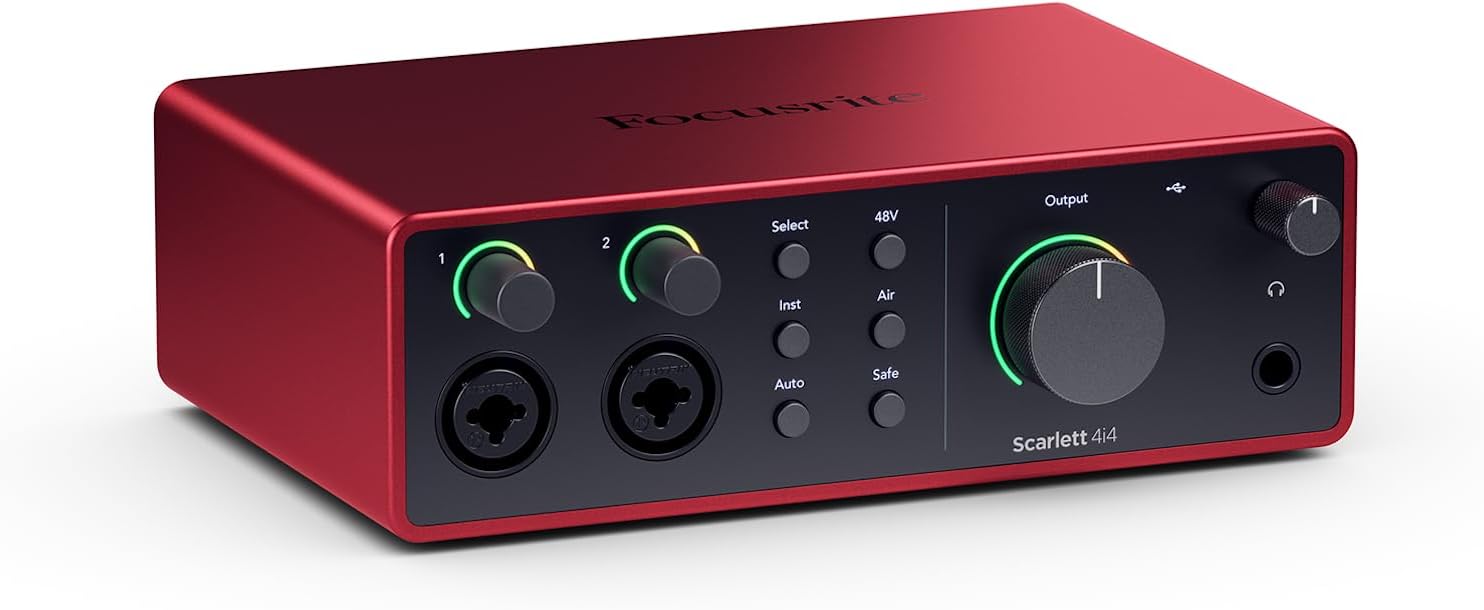
The Focusrite Scarlett 4i4 4th Gen is a professional audio interface designed for musicians, producers, podcasters, and content creators who need reliable, studio-quality sound capture. This USB-C interface combines professional-grade audio converters with intelligent recording features that make it accessible to beginners while satisfying experienced engineers.
The standout feature is the dual ultra-low-noise Scarlett 4th Gen mic preamps paired with studio-grade converters boasting a massive 120dB dynamic range, matching equipment found in the world's biggest recording studios. The innovative Air mode adds musical presence and harmonic richness to vocals and guitars, while Auto Gain and Clip Safe features automatically set perfect recording levels and prevent clipping, meaning you capture keeper takes without obsessing over gain staging.
Build quality is solid and compact, measuring just 7.09 inches wide and weighing 2.2 pounds, making it portable for mobile recording setups. The interface offers versatile I/O with 2 Hi-Z instrument inputs for guitars and synths, 4 line inputs, 4 line outputs, and MIDI I/O to accommodate any recording scenario. USB-C connectivity delivers low-latency performance critical for streaming and real-time monitoring.
The included software bundle is exceptional value, featuring Pro Tools Intro+, Ableton Live Lite, Cubase LE, and the Hitmaker Expansion with professional plugins from XLN Audio, Softube, and Native Instruments. Some users report occasional driver crashes with certain gaming software, though this appears rare and resolved with system restart.
The Scarlett 4i4 4th Gen delivers professional audio quality and intelligent features at a mid-range price point, backed by a 3-year warranty and round-the-clock support. Whether you're recording music, podcasts, or content, this interface provides the tools and sound quality to produce broadcast-ready results.
Audio Performance: 120dB dynamic range, 24-bit/192kHz maximum sample rate, 20kHz frequency response. Dual ultra-low-noise Scarlett 4th Gen mic preamps with Air mode.
I/O Configuration: 2 Scarlett 4th Gen mic preamps, 2 Hi-Z instrument inputs, 4 line inputs, 4 line outputs, MIDI In/Out, headphone output with high-impedance support.
Connectivity: USB-C with included USB-C to USB-A adaptor and 5V 3A power supply. Compatible with Mac OS, Windows OS, and iOS.
Physical Specs: 7.09 inches wide x 5.08 inches deep x 2.32 inches tall, 2.2 pounds. Includes USB-C cable and power supply.
Software Included: Pro Tools Intro+, Ableton Live Lite, Cubase LE, Hitmaker Expansion with premium plugins and virtual instruments.
Best For: Musicians recording guitars, vocals, and keyboards; music producers and beat makers; podcasters and content creators; streamers needing low-latency monitoring; anyone upgrading from budget interfaces who wants professional sound quality.
Consider If You: Need versatile I/O for multiple instruments and MIDI devices simultaneously; want included professional software to start producing immediately; require reliable, crash-free performance for critical recording sessions; value portability and compact design; prefer established brands with excellent customer support.
May Not Be Ideal If: You need more than 2 mic inputs simultaneously; you work exclusively with gaming software that has driver compatibility issues; you require XLR outputs instead of line-level outputs; budget is below $250.

Pros
- Exceptional audio quality and clarity that rivals interfaces at significantly higher price points
- Class A preamp design captures natural tone and richness in vocal and acoustic recordings
- Solid metal construction feels premium and withstands portable use without degradation
- Dual headphone outputs with independent control provide professional monitoring options
- Straightforward setup with included USB-C cable and broad OS compatibility
Cons
- Headphone output may require external amplification for high-impedance or demanding headphones
- Printed logos on the interface can fade over time with regular use
- Limited to 2 channels of simultaneous recording, which may constrain multi-track live capture
The Audient iD4 MKII is a professional-grade audio interface designed for home recording enthusiasts, podcast producers, and content creators who demand studio-quality sound without the bulk or complexity of larger mixing consoles. Its compact footprint and robust feature set make it an excellent choice for bedroom studios, mobile recording setups, and anyone upgrading from budget-tier interfaces.
The standout feature is undoubtedly the Class A microphone preamp, borrowed from Audient's high-end ASP8024 HE console. Users consistently report remarkable clarity and natural tone reproduction in vocal recordings, with the preamp capturing subtle nuances while maintaining clean gain across a wide range of microphone types. The JFET instrument input adds analog warmth and character to guitar and bass recordings, while the dual headphone outputs with independent monitor mixing and panning enable flexible monitoring during sessions.
Build quality is genuinely impressive for the price. The all-metal chassis feels substantial and professional, with tactile knobs that inspire confidence during use. The new USB-C connector eliminates the need for multiple cables and provides improved power delivery compared to the original iD4. At 740 grams with compact dimensions of 133x120x40.7mm, it's genuinely portable while maintaining a desktop-friendly footprint.
A few considerations exist. The headphone output, while clean, may struggle with high-impedance studio headphones and could benefit from an external amplifier in demanding scenarios. Additionally, the printed logos can fade with regular handling, though this is purely cosmetic. The interface maxes out at 2 simultaneous recording channels, which is appropriate for its positioning but worth noting for multi-track live recording scenarios.
Verdict: The iD4 MKII delivers exceptional value and professional sound quality that justifies its investment. Whether you're recording vocals, instruments, or podcasts, the Class A preamp and thoughtful feature set provide tools typically found in much more expensive interfaces. It's a genuine step up from consumer-grade alternatives and an excellent choice for serious home recordists.
Connectivity and Compatibility: USB-C connection with support for Mac, PC, and iOS devices. Includes 1-meter USB-C cable. Frequency response up to 96 kHz with maximum sample rate of 96 kHz.
Audio Channels and I/O: 2 channels of simultaneous recording. Includes 3.5mm and 6.3mm headphone connectors with dual independent headphone outputs featuring monitor mix and panning control. JFET instrument input and XLR microphone input with Class A preamp.
Physical Specifications: Dimensions 133mm x 120mm x 40.7mm (5.2 x 4.72 x 1.57 inches). Weight 740 grams. All-metal chassis construction. Available in black.
Included Software: Steinberg Cubase LE, Cubasis LE 2, Retrologue 2 Synth, TwoNotes Wall of Sound, and Loopmasters Sample Pack. 3-year manufacturer warranty.
Who Should Buy: The iD4 MKII is ideal for home recording producers, podcast creators, musicians recording vocals or instruments, and anyone upgrading from entry-level interfaces like the Scarlett 2i2. It's particularly suited for those prioritizing microphone preamp quality and seeking professional sound in a compact package.
Who Should Consider Alternatives: If you require more than 2 simultaneous recording channels or need extensive MIDI connectivity, larger interfaces may be more appropriate. Similarly, if budget is the primary concern, entry-level options exist at lower price points, though they lack the sonic quality of the iD4 MKII.
Setup Considerations: The interface works immediately upon connection with most operating systems. For optimal headphone monitoring, consider pairing with quality studio headphones or an external headphone amplifier if using high-impedance models. The dual headphone outputs with independent panning make it excellent for collaborative recording or client monitoring scenarios.
Value Assessment: Compared to similarly-priced interfaces, the iD4 MKII stands out for its Class A preamp quality and build construction. Users consistently report it punches above its weight class, delivering sound quality typically associated with interfaces at significantly higher price points.

Pros
- Exceptional audio quality with ESS Sabre DAC and headphone amplifier rivaling dedicated standalone units costing hundreds more
- Industry-leading low latency at 2.5ms makes it perfect for live guitar, keyboard, and vocal recording without monitoring delay
- Built-in LCD metering display is unique in its class, providing clear visual feedback for optimal level management
- Compact, portable form factor with USB-C connectivity makes it ideal for mobile studios and remote recording setups
- Includes comprehensive software bundle and comes with a 2-year warranty backing the build quality
Cons
- Limited to 2-in/2-out configuration, which may not suit users needing more simultaneous inputs for larger recording sessions
- Single USB-C port means you cannot daisy-chain additional devices without a hub, potentially limiting workflow flexibility
- Windows users may experience initial channel configuration issues requiring manual loopback settings adjustment
The MOTU M2 is a professional-grade USB-C audio interface designed for home recording studios, content creators, musicians, and producers who refuse to compromise on audio quality while maintaining a reasonable budget. Its 2-in/2-out configuration with dual microphone preamps makes it perfect for recording vocals and instruments, podcasting, or streaming with pristine clarity and minimal latency.
What sets the M2 apart is its use of ESS Sabre32 Ultra DAC technology, typically found in audio interfaces costing thousands of dollars. This delivers a stunning 120dB dynamic range on outputs and an exceptionally clean -129dBu EIN on microphone inputs. The headphone amplifier alone rivals dedicated standalone units, making this interface equally valuable for mixing and mastering work. Real-time monitoring latency of just 2.5ms at 96kHz means you can confidently record guitars, keyboards, and vocals without the distracting lag that plagues many budget interfaces.
The build quality is immediately apparent when you interact with the device. Smooth, weighted knobs with premium feel, responsive buttons, and a sturdy physical construction inspire confidence. The full-color LCD display showing real-time level meters for all inputs and outputs is a standout feature rarely found at this price point, eliminating guesswork when setting recording levels. The compact 7.5 x 4.25 x 1.75 inch footprint with USB-C connectivity makes it genuinely portable for musicians moving between studios or recording on location.
The main limitation is the 2-in/2-out channel count, which restricts simultaneous recording to two sources. Windows users have occasionally reported initial channel configuration quirks requiring manual loopback settings adjustment, though this is easily resolved. The single USB-C port means external hubs are necessary if you need to connect other peripherals simultaneously.
The MOTU M2 represents exceptional value for anyone serious about recording quality. Whether you're tracking professional vocals, streaming with multiple guests, or building a portable studio, this interface delivers audio fidelity and performance that justifies its reputation as a best-in-class mid-tier solution.
Connectivity and Compatibility: USB-C audio interface compatible with Windows and macOS via expertly engineered MOTU drivers. Also supports iOS for mobile recording workflows.
Audio Specifications: 24-bit/192kHz maximum sample rate. 120dB dynamic range on main outputs. Microphone preamp noise floor of -129dBu EIN. 2.5ms round-trip latency at 96kHz with 32-sample buffer. ESS Sabre32 Ultra DAC on main outputs and headphone output.
I/O Configuration: 2 microphone/line inputs with dedicated preamps. 2 main analog outputs. 1 headphone output. DIN MIDI in/out jacks. Full-color LCD metering display for all inputs and outputs.
Physical Specifications: Dimensions 7.5 inches deep x 4.25 inches wide x 1.75 inches high. Weight 612 grams. USB-powered with physical power switch. Includes 6GB of free software content.
Warranty: 2-year manufacturer warranty included with purchase.
Perfect For: Home recording enthusiasts, singer-songwriters, podcast producers, streamers, content creators, guitar and keyboard players, and producers seeking professional audio quality on a realistic budget. Also ideal for audiophiles who value the ESS Sabre DAC technology and premium headphone amplification.
Consider Alternatives If: You need more than 2 simultaneous inputs for large ensemble recording, require extensive MIDI connectivity beyond basic in/out, or need bus-powered operation without a dedicated power supply.
Best Use Cases: Bedroom recording studio setup. Mobile recording and field production. Podcast and stream audio capture. Mixing and mastering with a high-quality DAC and headphone amp. Guitar and keyboard performance recording with minimal latency. Audiophile-grade home listening through the premium DAC and headphone amplifier.

Pros
- Exceptional audio quality and low noise floor at a fraction of the cost of higher-end interfaces
- Blazingly fast USB drivers deliver class-leading low latency for responsive live monitoring
- Unique color LCD display provides real-time visual feedback for precise gain staging and level control
- Powerful headphone amplifier drives high-impedance headphones without dedicated amp needed
- Includes comprehensive software bundle and XLR cable, providing excellent value out of the box
Cons
- Limited to 2x2 channel configuration, which may not suit users needing more simultaneous inputs or outputs
- USB-C connectivity requires quality cables and compatible computers, potential compatibility consideration for older systems
- Setup and driver configuration require attention to detail, particularly regarding sample rates and buffer settings for optimal performance
The MOTU M2 is a professional-grade 2x2 USB-C audio interface designed for musicians, producers, podcasters, and content creators who demand pristine audio quality without the premium price tag. Its compact size and straightforward feature set make it ideal for home studios, mobile recording setups, and anyone seeking reliable audio capture and monitoring capabilities.
At the heart of the M2 lies ESS Sabre32 Ultra DAC technology, the same converter found in high-end interfaces costing thousands of dollars. This translates to a measured 120 dB dynamic range on outputs, exceptional headphone amplification that rivals dedicated amps, and ultra-clean mic preamps with -129 dBu equivalent input noise. Real-world performance is equally impressive, with users consistently praising the clarity and fidelity of recordings, whether capturing vocals, acoustic instruments, or podcast dialogue.
The standout feature is the full-color LCD display with detailed level meters for all inputs and outputs, a rarity in this price category. Combined with MOTU's expertly engineered USB drivers, the M2 achieves class-leading 2.5ms round trip latency at 96 kHz, enabling responsive live monitoring through your computer without the delay that plagues many budget interfaces. This makes it genuinely usable for real-time guitar, keyboard, or vocal monitoring while recording.
Build quality is solid and straightforward, with a compact aluminum chassis that feels durable and professional. The interface includes a generous software bundle featuring Ableton Live Lite, MOTU Performer Lite, 100+ instruments, and 6GB of loops and samples, plus a quality XLR-XLR cable. Some users report that optimal performance requires attention to USB cable quality and proper sample rate configuration, particularly on Windows systems, though this is a minor consideration for users willing to invest time in setup.
The MOTU M2 represents exceptional value for anyone seeking professional audio quality in a portable, user-friendly package. Its combination of premium converter technology, low latency, visual feedback, and included software makes it a compelling choice for both beginners upgrading from basic interfaces and professionals seeking a reliable secondary unit. Highly recommended for serious hobbyists and professionals on a budget.
Audio Specifications
Dynamic Range: 120 dB (outputs), -129 dBu EIN (mic inputs)
Sample Rate: Up to 192 kHz
Latency: 2.5ms round trip at 96 kHz with 32 sample buffer
Converter Technology: ESS Sabre32 Ultra DAC
Physical Specifications
Channels: 2x2 (2 inputs, 2 outputs)
Connectivity: USB-C
Weight: 1.46 kg
Model Number: 3120
UPC: 745150759186
Included Software
MOTU Performer Lite
Ableton Live Lite
100+ instruments
6GB of loops and sample packs
XLR-XLR cable
Compatibility
Operating System: Windows and Mac
Audio Input: USB
Best for: Personal computers with USB-C ports
Ideal For
Home studio musicians and producers seeking professional audio quality on a budget
Podcasters and content creators needing reliable mic input with low latency monitoring
Gamers wanting superior audio quality and responsive mic monitoring for streaming
Mobile recording enthusiasts requiring a portable, USB-powered interface
Musicians upgrading from basic interfaces or needing a secondary unit for live use
Not Ideal For
Users requiring more than 2 simultaneous audio inputs or outputs
Those needing legacy USB-A connectivity without adapters
Anyone seeking a fully integrated solution with built-in preamps, effects, or mixing capabilities beyond basic monitoring

Pros
- Excellent value with included production software and 6GB+ of content
- Hardware monitoring with LCD display eliminates latency issues during recording sessions
- USB-C connection provides reliable, fast performance and works across Mac, PC, and iOS platforms
- Compact and portable design makes it ideal for bedroom studios, home offices, and mobile recording
- Two quality microphone preamps handle both vocals and instruments without additional gear
Cons
- Limited to 4 simultaneous inputs, which may feel restrictive for larger band recordings or complex setups
- USB-C only means you'll need adapters if using older USB-A devices or hubs
- Learning curve on some features like loopback routing for users new to audio interfaces
The MOTU M4 is a 4-in/4-out USB-C audio interface built for modern producers, podcasters, musicians, and content creators who need professional-grade sound quality without the bulk or price tag of larger mixing consoles. It's the perfect middle ground between entry-level USB interfaces and expensive studio-grade equipment, delivering serious features in a compact footprint.
What makes the M4 truly stand out is its combination of hardware monitoring with an LCD screen, which eliminates the frustrating latency that plagues many budget interfaces. The two dedicated microphone preamps deliver clean, professional recordings for vocals and instruments, while the loopback feature opens up possibilities for streaming, podcasting, and music production without needing external hardware. The included 6GB+ of free software and content transforms this from a simple interface into a complete production toolkit.
Build quality is solid and straightforward. The aluminum chassis feels durable despite its lightweight, portable design, making it suitable for both stationary studios and traveling musicians. The USB-C connection is modern and reliable, though it does require adapters for older devices. Navigation through the LCD screen is intuitive, and setup across Mac, Windows, and iOS platforms is refreshingly painless.
The main limitation is the 4-input cap, which restricts simultaneous recording to four sources. For solo artists and small projects this is fine, but larger band recordings or complex setups may feel constrained. Additionally, some users new to audio interfaces may find the loopback routing requires a learning curve to master.
The MOTU M4 earns its 4.6-star rating by delivering genuine professional features at an accessible price point. It's an excellent choice for anyone serious about recording who wants reliability, portability, and included software to get started immediately.
Connectivity: USB-C, compatible with Mac, Windows, and iOS devices
I/O Configuration: 4 inputs and 4 outputs with 2 dedicated microphone preamps
Total Channels: 8 channels
Features: Hardware monitoring with LCD screen, loopback functionality, zero-latency input monitoring
Included Software: 6GB+ of free content including Performer Lite and Live Lite production software
Design: Compact, portable aluminum chassis suitable for studio or mobile use
Who Should Buy: The MOTU M4 is ideal for home studio musicians, podcasters, content creators, and producers who need reliable multi-channel recording in a portable package. It's perfect for upgrading from basic USB audio solutions while staying budget-conscious.
Who Might Want to Look Elsewhere: If you need more than 4 simultaneous inputs for large ensemble recording, or if you prefer a purely software-based solution without hardware monitoring, consider larger interfaces or alternative options.
Setup Considerations: Ensure your computer has an available USB-C port or budget for a USB-C hub adapter. The included software requires internet connection for initial download and activation. Allow 30 minutes for complete setup and driver installation.
Value Assessment: At its price point, the M4 offers exceptional value when factoring in the included 6GB+ of production software. The hardware monitoring alone justifies the investment for serious recording work, as it eliminates the latency issues that frustrate users on cheaper interfaces.

Pros
- Exceptional plug-and-play simplicity with zero latency audio processing and no driver installation needed
- Powerful onboard DSP with Auto Level Mode ensures consistent professional sound across any environment
- Incredibly compact and lightweight design makes it ideal for mobile recording, streaming, and travel
- Works with any XLR microphone including high-end condensers and provides essential 48V phantom power
- Versatile cross-platform compatibility including iPhone, iPad, Mac, Windows, and Android devices
Cons
- MOTIV app support for mobile devices may be limited or incomplete depending on your specific device and firmware version
- Single-channel design limits flexibility if you need to record multiple microphones simultaneously
- Some users report variable quality control from third-party sellers, so purchasing directly from Shure is recommended
The Shure MVX2U Gen 2 is a single-channel XLR-to-USB-C audio interface designed for content creators, podcasters, streamers, and anyone who wants to elevate their recording quality without investing in expensive gear. This compact device bridges the gap between professional XLR microphones and modern computers and mobile devices, making it ideal for creators working across multiple platforms.
What sets the MVX2U Gen 2 apart is its intelligent onboard digital audio processing. The Auto Level Mode automatically adjusts gain in real time, ensuring consistent output regardless of your environment or mic technique. The Real-Time Denoiser and Digital Popper Stopper work at zero latency, meaning you get clean, professional sound with zero delay. Users can select from Dark, Natural, or Bright tone profiles and access advanced controls like compression and EQ through the MOTIV app on desktop or mobile, giving you studio-quality processing in a device smaller than your hand.
Build quality reflects Shure's professional heritage. The interface feels solid and premium despite its compact form factor at just 100 grams. Setup is genuinely effortless: plug in your XLR mic, connect the included USB-C cable, and start recording. The device delivers up to 60dB of clean gain and 48V phantom power, supporting both dynamic and condenser microphones. MFi certification ensures reliable performance on iPhones and iPads, while broad compatibility extends to Mac, Windows, and Android devices.
The primary limitation is that mobile app support may be inconsistent across all devices as of the latest updates. Additionally, the single-channel design means you cannot record multiple microphones simultaneously. Some buyers have noted quality control inconsistencies when purchasing through third-party sellers, making direct purchase from Shure preferable.
The MVX2U Gen 2 delivers exceptional value for creators seeking professional audio without complexity or bulk. Its combination of intelligent processing, universal XLR compatibility, and cross-platform versatility makes it an outstanding choice for podcasters, content creators, and anyone upgrading from built-in device microphones to XLR-based recording.
Connectivity and Compatibility: USB-C connection, compatible with Mac, Windows, iOS, and Android. MFi certified for iPhone and iPad.
Audio Performance: Single XLR input channel, supports up to 192 kHz sample rate, provides up to 60dB clean gain, and includes 48V phantom power for condenser microphones.
Processing Features: Onboard Shure Digital Audio Processing with Auto Level Mode, Real-Time Denoiser, Digital Popper Stopper, three tone profiles (Dark, Natural, Bright), compression, EQ, and limiter controls accessible via MOTIV app.
Physical Specifications: Weight 100g, includes 1m USB-C cable, single-channel design. Warranty: 2-year limited coverage.
Ideal For: Podcasters and streamers using XLR microphones on computers or mobile devices, content creators recording video with professional audio, musicians recording acoustic instruments, journalists and reporters needing portable professional audio, and anyone upgrading from USB microphones to XLR-based recording.
Best Use Cases: Desktop podcasting and streaming, mobile recording on iPhone or iPad, video conferencing with professional microphones, traveling content creation, and hybrid setups combining desktop and mobile recording.
May Not Be Ideal For: Users requiring simultaneous multi-channel recording, those needing extensive analog monitoring controls, or anyone exclusively recording on mobile devices without desktop setup access.

Pros
- Exceptional audio quality with no background noise, even at budget price point
- Truly plug-and-play functionality works immediately on Windows, Mac, and Linux systems
- Dual combo jacks provide maximum flexibility for microphones, guitars, and line-level sources
- Lightweight and compact form factor ideal for desk space and portability
- Zero-latency monitoring enables confident tracking without hearing delay or echo
Cons
- LED illumination on gain knobs does not function as prominently displayed in product images
- Requires careful gain adjustment when connecting instruments with built-in preamps to avoid clipping
- Limited to 2 input channels, which may not suit users needing more simultaneous inputs
The PIYONE Q2 is a 2x2 USB-C audio interface designed for home recordists, podcasters, guitarists, and content creators who want professional-grade sound without complexity. It bridges the gap between budget-friendly and professional-quality recording, making it an ideal first interface for beginners or a secondary interface for established creators.
The standout feature is its genuine plug-and-play operation. Simply connect the USB-C cable to your computer, and the interface is recognized immediately on Windows, Mac, and Linux systems without any driver installation. The 24-bit/192kHz audio resolution captures professional-quality recordings with excellent clarity and minimal noise. The zero-latency direct monitoring feature eliminates tracking delays, allowing you to hear yourself in real-time without the frustrating latency that plagues cheaper interfaces. Dual XLR/TRS combo inputs with 48V phantom power provide flexibility for condenser microphones, dynamic mics, guitars, and line-level sources.
Build quality and design are impressive for the price. The compact form factor fits easily on any desk without consuming valuable space. The illuminated control knobs create a modern, professional aesthetic that looks great in any studio setup. The interface feels solid and well-constructed, with ergonomic knobs and buttons positioned for comfortable operation during long recording sessions.
One notable drawback is that the LED illumination on the gain knobs does not function as prominently as shown in product images, which may disappoint users specifically drawn to this visual feature. Additionally, users must exercise caution when adjusting gain levels with instruments that have built-in preamps, as excessive gain can cause clipping. The 2-channel limitation means this interface cannot handle multiple simultaneous inputs beyond two sources.
Verdict: The PIYONE Q2 delivers exceptional value for beginners and budget-conscious creators seeking professional audio quality without complexity. Its combination of studio-grade sound, zero-latency monitoring, and truly plug-and-play setup makes it an excellent choice for home recording, podcasting, and content creation. Recommended for anyone starting their recording journey or needing a reliable portable interface.
Audio Quality: 24-bit resolution, 192kHz maximum sample rate, high-performance converters, low-noise design
Connectivity: USB-C port (handles both data transfer and bus power), 3.5mm headphone jack
Inputs: 2 XLR/TRS combo jacks, 48V phantom power supply
Channels: 2 input channels, 2 output channels
Features: Zero-latency direct monitoring, monitor mix function, loopback capability, illuminated control knobs, class-compliant design
Compatibility: Mac, Windows PC, Linux, iOS (via USB-C adapter)
Physical: Compact portable design, 0.74 kg weight, Alloy Red finish
Warranty: 2-year limited warranty
Ideal For: Beginner recording artists, podcasters, singer-songwriters, content creators, home studio enthusiasts, and anyone seeking professional audio quality without complex setup requirements.
Perfect Use Cases: Recording vocals with condenser microphones, capturing acoustic guitar performances, podcasting and voice-over work, streaming with professional audio quality, music production on a budget, portable recording for travel or mobile content creation.
Not Ideal For: Users requiring more than 2 simultaneous inputs, professional studios with extensive I/O requirements, or those specifically seeking prominent LED illumination effects on control knobs.

Pros
- Professional 24-bit/192kHz audio resolution rivals interfaces costing significantly more
- Plug-and-play setup with USB-C connectivity requires no complex configuration or drivers
- Included software bundle provides immediate production tools worth hundreds of dollars separately
- Compact footprint makes it perfect for portable recording and travel-friendly setups
- Versatile connectivity supports both XLR microphone inputs and 1/4 inch instrument inputs
Cons
- Limited to 2 inputs and 2 outputs, which may feel restrictive for multi-track recording sessions
- No physical monitoring level knobs on the interface itself, requiring software adjustments
- Requires external powered USB hub for some Android devices and older computers
The M-Track Duo HD is a USB-C audio interface designed for aspiring producers, podcasters, and bedroom musicians who need professional recording quality without unnecessary complexity. This compact unit strips away extraneous features and focuses on delivering the essentials: clean audio capture, reliable connectivity, and straightforward operation that works across Mac, PC, iOS, and Android platforms.
Where this interface truly shines is in its audio specifications. The 24-bit/192kHz resolution captures every nuance of your performance, while the Crystal preamps deliver a solid 55dB of gain with minimal noise. Zero-latency monitoring means you hear yourself instantly without the distracting delays that plague budget interfaces, making it suitable for both overdubbing vocals and recording live instruments. The switchable 48V phantom power supports condenser microphones, expanding your microphone options significantly.
Build quality is solid and practical. The rugged aluminum enclosure feels durable enough for studio and portable use, and the compact 7.5 by 4.4 inch footprint fits comfortably into any recording setup or gig bag. The included USB-C cable provides direct connectivity to modern computers and devices, though you can also use an externally powered USB hub for flexibility. The two combo inputs accommodate microphones, guitars, bass, and line-level sources, covering most common recording scenarios.
The main limitation is the 2-in/2-out configuration, which restricts simultaneous recording to two tracks. Additionally, monitoring level control happens entirely through software rather than dedicated hardware knobs. Some Android users may need an external powered USB hub for stable operation, adding a small additional expense.
The M-Track Duo HD represents exceptional value for the price, especially when factoring in the included Ableton Live Lite, MPC Beats, and Splice subscription. It's an excellent entry point into music production and podcast recording that delivers professional results without overwhelming beginners with unnecessary features.
Connectivity: USB Type-C, Headphone Output 1/4 inch TRS, Instrument Input Unbalanced 1/4 inch TS, Line Input Balanced 1/4 inch TRS, Main Outputs L and R Impedance Balanced 1/4 inch TRS, Mic Input Balanced XLR
Audio Performance: 24-bit/192kHz maximum sample rate, 20Hz frequency response, 1 megaohm impedance, Crystal preamps with 55dB gain, switchable 48V phantom power
Channels: 2 inputs and 2 outputs
Physical: 7.5 inch W x 4.4 inch D x 2.1 inch H, 0.47 kg weight, compact rugged enclosure
Compatibility: Windows, macOS, iOS, and Android operating systems
Included Software: Ableton Live Lite, Akai Professional MPC Beats, 2-month Splice subscription
Warranty: 1 year manufacturer warranty
Best For: The M-Track Duo HD is ideal for bedroom producers starting their music production journey, podcasters looking to upgrade from built-in microphones, session musicians recording demos, and content creators needing reliable audio capture for live streams or videos.
Consider If: You need more than 2 simultaneous inputs, require extensive hardware controls without software interaction, or plan to record complex multi-track arrangements with many overdubs. For these scenarios, a larger interface like the M-Track Quad might better suit your needs.
Setup Tips: Use the included USB-C cable for direct connection to modern computers. If using older devices or experiencing stability issues, connect through an externally powered USB hub. Enable phantom power only when using condenser microphones to avoid unnecessary power drain and potential noise.
Software Integration: The included Ableton Live Lite integrates seamlessly with the M-Track Duo HD for immediate production capability. The 2-month Splice subscription provides access to professional samples and loops used by top producers, helping accelerate your learning and creative process.

Pros
- Professional audio quality at an affordable price point, delivering 24-bit/192kHz resolution comparable to interfaces costing twice as much
- Versatile connectivity with both XLR and instrument inputs plus headphone monitoring allows handling multiple audio sources and use cases
- Included ProStudio software and ASIO driver support unlock advanced routing and low-latency capabilities for serious streamers and producers
- Genuinely portable and compact design with intuitive controls makes it practical for home studios, mobile setups, and travel
- Strong cross-platform compatibility and DAW support ensure this interface works with virtually any modern recording or streaming software
Cons
- Limited to 2 channels, restricting simultaneous recording of multiple instruments or complex multi-track setups without additional gear
- Phantom power and preamp features depend on proper driver installation and software configuration, which may challenge complete beginners
- No built-in effects or processing, requiring external plugins or software for audio enhancement beyond basic routing and monitoring
The MAONO PS22 Lite is a compact USB audio interface designed for recording enthusiasts, podcasters, guitarists, and content creators who demand professional sound quality without the complexity or expense of larger systems. This device punches well above its weight, offering studio-grade specifications in a palm-sized form factor that fits any creative workspace.
The standout feature is undoubtedly the 24-bit/192kHz recording capability paired with a 106dB dynamic range, ensuring every nuance of your performance is captured with clarity and depth. The dual-input design handles both XLR microphones (with 56dB preamp gain and 48V phantom power) and guitar or line-level instruments, making it genuinely versatile for mixed creative work. The included ProStudio Routing Software with ASIO driver support opens possibilities for live streamers, enabling virtual channels and loopbacks for complex broadcast scenarios without latency issues.
Build quality reflects the premium positioning, with an ergonomic design featuring a dynamic light ring that indicates input status and a side-mounted headphone jack reducing cable clutter. The intuitive preset modes for recording, live broadcast, and instruments mean switching between creative tasks takes seconds, while the plug-and-play functionality works across Mac, Windows, and iPad platforms. Direct monitoring provides real-time audio feedback essential for getting performances right on the first take.
The primary limitation is the 2-channel configuration, which restricts simultaneous multi-track recording unless you're layering overdubs. Additionally, while the interface excels at capture and routing, it lacks onboard effects or processing, meaning you'll rely on software plugins for audio enhancement. Setup requires proper driver installation and software configuration, which may initially challenge absolute beginners despite the intuitive interface design.
The MAONO PS22 Lite delivers exceptional value for podcasters, guitarists, vocalists, and streamers seeking professional audio quality in a portable, user-friendly package. Its combination of high-resolution recording, versatile inputs, advanced routing software, and cross-platform compatibility makes it a smart investment for anyone serious about audio production without the premium price tag.
Audio Quality: 24-bit/192kHz recording resolution with 106dB dynamic range for professional-grade sound capture.
Inputs: 1 XLR input for microphones with 56dB preamp gain and 48V phantom power, 1 dedicated instrument input with impedance adjustment for guitars and line-level sources.
Connectivity: USB connection with included USB-A/USB-C to USB-C cable. Plug-and-play compatibility with Mac, Windows, and iPad.
Channels: 2-channel interface for stereo recording and monitoring.
Software Support: ASIO drivers, ProStudio Routing Software included. Compatible with Avid Pro Tools, Ableton Live, Logic Pro, Cubase, GarageBand, FL Studio, Studio One, plus streaming platforms like OBS, Twitch, YouTube, TikTok, and Discord.
Design: Compact palm-sized form factor with dynamic light ring indicator, ergonomic construction, and side-mounted headphone monitoring jack.
Best For: Podcasters and voice actors seeking warm, clear vocals with minimal noise. Guitarists and musicians recording demos or full productions. Content creators streaming to Twitch, YouTube, or TikTok. Home studio builders wanting professional results on a budget. Anyone transitioning from built-in computer audio to proper recording equipment.
Consider This If: You need simultaneous recording of multiple instruments, look elsewhere for 4+ channel interfaces. You want onboard effects and processing, you'll need to budget for software plugins. You're a complete beginner, allow time to learn driver installation and basic DAW setup.
Why Choose PS22 Lite Over Alternatives: The combination of 24-bit/192kHz recording, dual-input versatility, included ProStudio software, and compact design offers exceptional value. Many competitors at this price lack phantom power or advanced routing capabilities. The cross-platform compatibility and extensive DAW support ensure future-proof investment.

Pros
- Immediate setup with no complicated driver downloads or software installation needed
- Excellent value for beginners and podcasters seeking professional sound quality at an affordable price point
- Robust build quality with durable metal construction suitable for portable recording setups
- Effective phantom power delivery works reliably with condenser microphones
- Sensitive preamps detect subtle audio details, encouraging better recording space treatment
Cons
- Compatibility issues reported with Pro Tools and potentially other professional DAWs may restrict workflow options
- Limited to 2-in/2-out configuration, which may feel restrictive for multi-track recording projects
- Some users report microphone input compatibility challenges with certain condenser mic models
The CIXUN 2x2 USB-C audio interface is a plug-and-play recording solution designed for beginners, content creators, podcasters, and home studio enthusiasts. It bridges the gap between consumer-grade and professional equipment by offering studio-grade specifications at an accessible price point without requiring technical expertise to set up.
The standout feature is its studio-grade 24-bit/192kHz audio resolution combined with genuine 48V phantom power support, enabling users to work with professional condenser microphones immediately out of the box. The interface features dual XLR/TS inputs with up to 80dB of gain, providing flexibility for vocals, guitars, and various microphone types. Real-world performance proves solid for podcast recording, voice-over work, and music production, with users praising how the sensitive preamps reveal background noise details that encourage better acoustic treatment.
Build quality impresses with a durable metal chassis that feels professional and portable. The included adapter kit covers USB-A, USB-B, and 3.5mm connections, ensuring compatibility across different devices and setups. Direct monitoring enables low-latency audio feedback during recording, and the straightforward control layout makes operation intuitive even for complete beginners.
Notable drawbacks include reported compatibility issues with professional DAWs like Pro Tools, which may disappoint users with existing workflows in those systems. The 2-in/2-out channel limitation suits simple recording scenarios but may feel restrictive for multi-track projects. Some users report occasional microphone input compatibility challenges, though phantom power generally functions reliably.
The CIXUN 2x2 represents excellent value for anyone starting their recording journey or upgrading from built-in computer audio. It delivers genuine quality improvements over onboard sound cards and offers the professional features needed for quality podcast production and music recording without the complexity or price tag of larger interfaces.
Audio Resolution: 24-bit/192kHz sampling rate
Connectivity: USB-C (USB 2.0 compatible)
Channels: 2 in, 2 out
Inputs: Dual XLR/TS combo connectors, 1/4-inch instrument input with Hi-Z selector
Outputs: Dual stereo outputs with direct monitoring
Phantom Power: 48V with indicator light
Input Gain: Up to 80dB
Compatibility: Windows and macOS (native drivers)
Power: Bus-powered via USB
Construction: Metal chassis
Warranty: 2-year premium warranty
Included Accessories: USB-C to USB-A adapter, USB-A to USB-C adapter, USB-A to USB-B adapter, 6.35mm to 3.5mm audio adapter, user manual
Best For: This interface suits podcasters, voice-over artists, bedroom producers, and streamers who need reliable recording quality without technical complexity. It works well for solo artists recording vocals or acoustic instruments and content creators building their first home studio.
Consider Alternatives If: You use Pro Tools as your primary DAW, need more than 2 input channels, or plan multi-track recording sessions. Professional audio engineers requiring extensive third-party plugin support may find limitations here.
Getting Started: Connect via USB-C to your computer, plug in your microphone using the XLR input with phantom power enabled, and select the CIXUN as your audio device in your recording software. No driver installation needed for Windows and macOS. Test with your headphones using the built-in monitoring feature before recording.
Pro Tips: Use the Hi-Z selector for guitar recording to preserve tone and clarity. Enable phantom power only when using condenser microphones to avoid potential damage to dynamic mics. The sensitive preamps mean your recording space acoustics matter more than with consumer equipment, so address echo and background noise first for best results.
How to Choose Your USB-C Audio Interface
Input and Output Configuration
Your required number of inputs dictates your choice. Solo vocalists or guitarists often only need a simple 2-in/2-out interface. If you plan to record a stereo synth while singing, or use outboard gear, look for four or more inputs. Also, confirm the interface has the correct jacks for your gear, like combo XLR/TRS inputs for microphones and Hi-Z inputs for guitars.
Sound Quality and Conversion
The quality of the analog-to-digital converters and microphone preamps defines your recorded sound. Key specifications to assess are the dynamic range (measured in dB) and the maximum sample rate (like 192kHz). A higher dynamic range captures more detail between the quietest and loudest sounds, resulting in cleaner, more professional recordings.
Software and Driver Support
Most interfaces include valuable software bundles with digital audio workstations and plugin effects. Driver stability is also critical, especially on Windows. Class-compliant interfaces work instantly with Mac and iOS, while others may require a dedicated driver for optimal low-latency performance on PC. Our review of the best audio interfaces under $1000 often highlights premium software packages.
Portability and Power
USB-C interfaces are prized for portability. Many are bus-powered, drawing all necessary power from your computer via a single cable. This is ideal for mobile recording with a laptop. If you need to power multiple condenser microphones with phantom power, ensure the bus-powered interface can supply enough stable current for your specific setup.
Final Thoughts
Selecting the right USB-C audio interface hinges on matching its capabilities to your creative workflow. For the musician seeking a versatile studio hub with exceptional sound and useful tools like Auto Gain, the Focusrite Scarlett 4i4 4th Gen USB-C Audio is a standout choice. Alternatively, podcasters and streamers who prioritize pristine, simple connectivity for a single XLR microphone will find immense value in the streamlined processing of the Shure MVX2U Gen 2 XLR-to-USB-C Audio Interface. For more options and detailed comparisons, visit our main audio interfaces category page.
Frequently Asked Questions
What is the main advantage of a USB-C audio interface over USB-A?
USB-C offers a reversible connector for easier use and often supports higher data transfer speeds and more reliable bus power delivery. This allows for higher audio channel counts and sample rates with a single, sturdy cable, future-proofing your setup as computers phase out older USB-A ports.
Can I use a USB-C audio interface with my phone or tablet?
Many modern USB-C interfaces are class-compliant and will work directly with compatible Android devices, iPads, and iPhones (often with a camera adapter). This makes them excellent for mobile recording or streaming. Always check the manufacturer’s specifications for confirmed mobile compatibility.
Do I need an interface if I already have a USB microphone?
A USB microphone is an all-in-one solution, but an interface provides far greater flexibility. It allows you to connect multiple microphones, professional XLR mics, and instruments like guitars simultaneously. For growing your setup, an interface is the better long-term investment. Learn about other microphone options in our USB microphones guide.
How important is zero-latency monitoring?
It is crucial for recording vocals or instruments in real time. Latency is a slight delay between the sound you make and when you hear it back in your headphones, which can be disorienting. A direct monitoring feature on an interface routes the input signal directly to the headphone output, bypassing computer processing to eliminate this delay.



Write Your Review
No reviews yet. Be the first to share your experience!