

If you are serious about recording music, podcasts, or voiceovers, the audio interface is the heart of your setup. It is the critical component that converts your microphone and instrument signals into digital audio your computer can understand. Choosing the right one can mean the difference between amateur-sounding recordings and professional, broadcast-ready quality. This guide is designed for musicians, producers, and content creators who demand studio-grade performance without compromise, focusing on three exceptional interfaces that represent the pinnacle of technology in their class.
Navigating the vast landscape of audio gear can be daunting, especially within the broader category of recording and musical instruments. Whether you are upgrading from a basic model or building your first serious studio, the options here offer professional features like pristine preamps, onboard DSP effects, and expansive connectivity. Let us dive into a direct comparison of our top selections.

Pros
- Exceptional sound quality with flagship-level converters and clocking technology trusted by professional studios
- Dedicated DSP hardware eliminates CPU load during recording and effects processing, enabling smooth low-latency workflows
- Dual USB-C connectivity solves real problems for streamers, podcasters, and dual-PC gamers with seamless multi-device routing
- Four discrete preamps deliver transparent, detailed capture of vocals and instruments without coloration or noise
- Highly expandable with ADAT, S/PDIF, and multiple independent outputs for growing studio configurations
Cons
- Steep learning curve with complex user interface that requires manual reading to unlock full functionality and DSP routing capabilities
- Limited included effects library compared to competitors like Universal Audio, though 90+ total effects are available
- Some users report complications using DSP effects in feedback loops within certain DAWs, requiring workarounds
The Antelope Audio Zen Quadro is a professional audio interface designed for producers, streamers, podcasters, and traveling musicians who refuse to compromise on sound quality. It combines four discrete mic preamps, real-time DSP effects processing, and professional-grade converters in a compact, bus-powered chassis that weighs less than a kilogram. This interface bridges the gap between portable convenience and studio-grade performance.
What sets the Zen Quadro apart is its dedicated DSP and FPGA hardware running Synergy Core effects. Unlike interfaces that rely on your computer's CPU, the Quadro processes 37 included effects (with 90+ available) with near-zero latency, meaning you can track through analog-modeled compressors, EQs, preamps, and amp simulations without hearing delay. The four discrete 6-transistor mic preamps offer up to 75 dB of gain and deliver the transparent, detailed sound quality that professionals expect. The dual Hi-Z inputs accommodate guitars and basses directly, expanding its utility beyond vocal recording.
The dual USB-C connectivity is a game-changer for modern workflows. You can connect a computer plus phone/tablet simultaneously, route audio between them, or connect two computers for streaming setups. This flexibility alone makes it invaluable for content creators and streamers who need reliable, low-latency audio routing between multiple devices. The expandable 14-in/10-out architecture with ADAT and S/PDIF support means you can grow your setup without replacing the interface.
The primary drawback is the learning curve. The interface has a complex menu system that requires reading the PDF manual to fully understand DSP routing and preset management. Additionally, some users report complications when using DSP effects in feedback loops within certain DAWs, which may require alternative approaches depending on your workflow. The included effects library, while powerful, is smaller than Universal Audio's offerings, though the 90+ total effects available should cover most professional needs.
The Zen Quadro delivers flagship Antelope sound and clocking technology with 130 dB AD/DA dynamic range at a price point that undercuts comparable interfaces. If you prioritize audio quality, need real-time effects processing without CPU overhead, and work with multiple devices or computers, this interface represents exceptional value. It's best suited for creators with intermediate to advanced technical knowledge who appreciate professional-grade components and aren't intimidated by learning a feature-rich interface.
Audio Inputs: 4 XLR mic inputs with 75 dB gain, 2 Hi-Z inputs for guitar/bass, 2 RCA line inputs, S/PDIF digital input, ADAT input (up to 8 channels).
Audio Outputs: 2 XLR balanced line outputs, 2 RCA unbalanced line outputs, S/PDIF digital output, ADAT output (up to 8 channels), 2 independent headphone outputs with separate volume control.
Connectivity: Dual USB-C (USB 3.1), Hi-Z inputs, XLR mic connectors, RCA connectors, S/PDIF, TRS connections. Bus-powered or external power supply.
Audio Specifications: Up to 192 kHz sample rate, 24-bit resolution, 130 dB AD/DA dynamic range, 64-bit AFC clocking, near-zero latency DSP processing.
Physical: Dimensions 8.27 inches W x 5.35 inches D x 2.29 inches H. Weight: 0.9 kg (approximately 2 lbs). Compact desktop or travel-friendly form factor.
Software Compatibility: macOS, Windows, iOS, Android. Compatible with all major DAWs including Pro Tools, Logic Pro, Ableton Live, Studio One, and more. Standalone operation supported.
Best For: Professional producers and engineers seeking portable studio-quality recording, content creators and streamers needing multi-device connectivity, podcasters and voice actors requiring pristine mic preamps, musicians recording at home or on location, and anyone prioritizing audio quality over simplicity.
Consider Alternatives If: You need an interface with an intuitive, minimal learning curve, require a massive library of included effects, or are on a strictly limited budget and can compromise on sound quality or expandability.
Not Ideal For: Beginners seeking plug-and-play simplicity, users with single-device workflows who don't need dual USB-C, or those working exclusively with digital audio who don't require high-quality analog preamps.
Pros
- Exceptional build quality with transparent, low-noise MAX-HD preamps ideal for modern microphones
- Fender-engineered instrument inputs provide authentic, responsive guitar and bass recording capabilities
- Studio One Pro software included saves hundreds on DAW investment for new producers
- Auto Gain feature eliminates guesswork and accelerates workflow for faster recording sessions
- Flexible control options via front panel, Universal Control app, or Studio One integration
Cons
- Physical dimensions do not account for BNC connector depth, potentially exceeding stated width in compact setups
- Product registration process has experienced occasional issues requiring customer support intervention
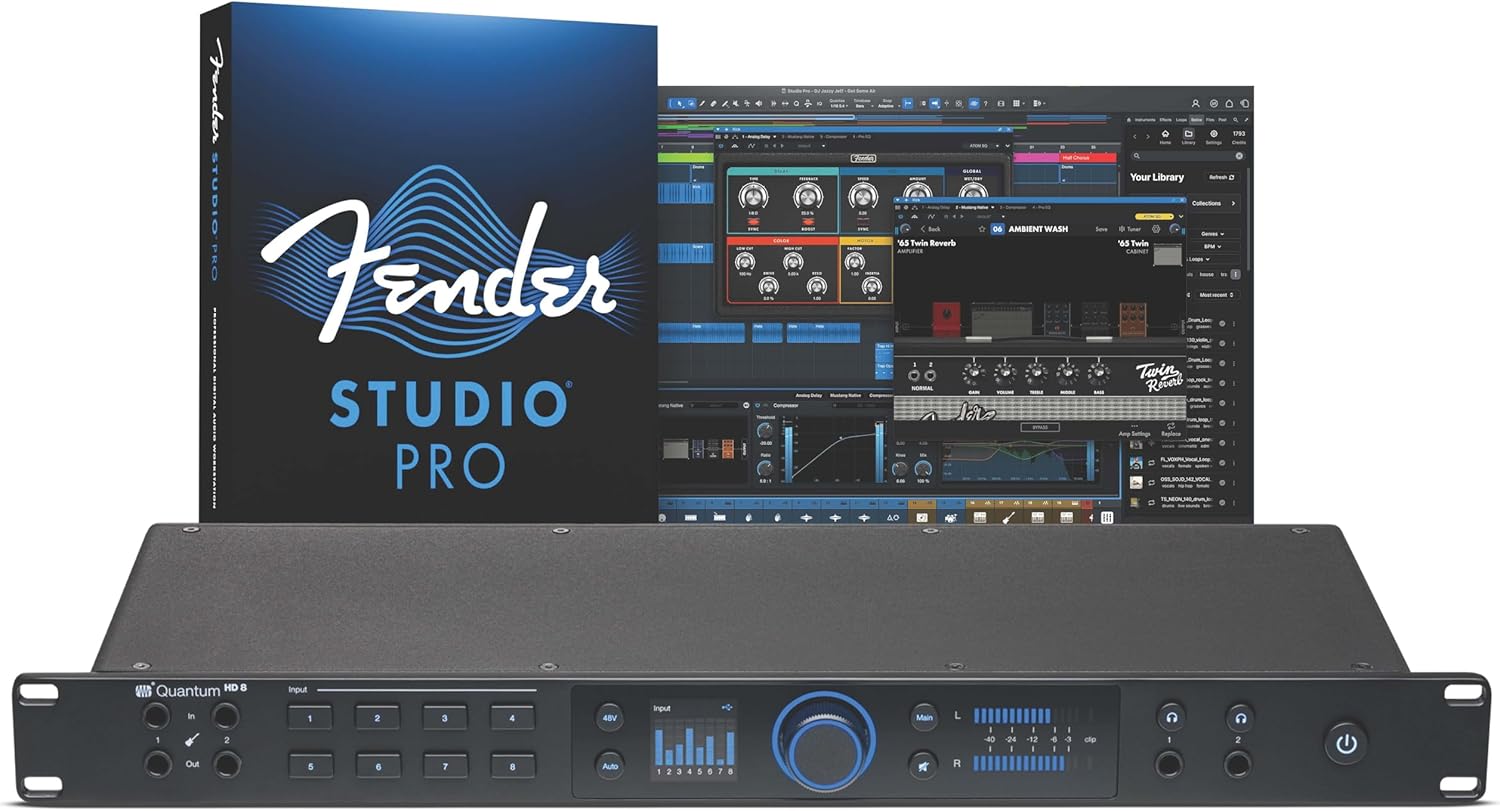
The PreSonus Quantum HD 8 represents the culmination of three decades of audio interface innovation, delivering professional-grade recording capabilities for project studios, full band setups, and serious producers. This 26x30 interface combines eight high-definition MAX-HD mic preamps with Fender-engineered instrument inputs, creating a versatile platform for capturing everything from intimate vocal recordings to complete band sessions. The included Studio One Pro perpetual license adds substantial value, eliminating the need for a separate DAW investment.
What truly sets the Quantum HD 8 apart is its thoughtful feature set designed for real-world recording scenarios. The eight MAX-HD mic preamps deliver +75dB of gain with exceptional transparency and low noise, making them ideal for today's most popular microphones. The Auto Gain button intelligently sets perfect levels automatically, while re-amp outputs enable creative sound design by letting you send DAW audio to physical amps and pedals for re-recording. At 192kHz/32-bit resolution, the converters and low-latency custom driver ensure your entire signal chain maintains pristine audio quality from input to output.
The interface excels in both form and function, featuring an illuminated push encoder for intuitive gain and volume control plus responsive LED metering for visual feedback. Universal Control app compatibility means you can manage critical preamp functions from your phone, tablet, or desktop without interrupting your creative flow. The Fender collaboration brings credibility for guitarists and bassists seeking instruments inputs specifically engineered for their needs, not generic audio inputs retrofitted for guitar use.
Minor considerations include the physical dimensions not accounting for BNC connector depth in the published specifications, which could affect extremely compact rack setups. The premium pricing reflects its professional-grade components and included software, positioning it above entry-level interfaces but competitive with other flagship models. Some users have reported occasional product registration delays, though PreSonus support reportedly responds quickly to resolve these issues.
The Quantum HD 8 delivers exceptional value for serious musicians and producers ready to invest in reliable, feature-rich recording hardware. Its combination of high-quality preamps, Fender-engineered instrument inputs, included professional software, and intuitive control options make it an outstanding choice for anyone building or upgrading a project studio. Highly recommended for full band recordings, professional home studios, and producers who demand transparent, low-latency performance.
Audio Specifications
Maximum Sample Rate: 192 kHz
Bit Depth: 32-bit
Connectivity: USB-C
Input/Output Channels: 26x30
Frequency Response: 20Hz to 20kHz
Mic Preamps: 8x MAX-HD with +75dB gain
Physical Specifications
Dimensions: 19 inches W x 8.6 inches D x 1.7 inches H
Weight: 6.3 pounds
Connectors: BNC connectors on rear panel
Control Interface: Illuminated push encoder with LED metering
Software and Compatibility
Included Software: Studio One Pro (perpetual license)
Control App: Universal Control (mobile and desktop)
Compatible Devices: Personal computers, headphones
Operating System: Windows and Mac compatible
Warranty and Support
Manufacturer Warranty: 2 years
Manufacturer: PreSonus
Model Number: Quantum HD8
UPC: 673454012211
Who Should Buy This Interface
The Quantum HD 8 is ideal for project studio owners, full band recording setups, professional home studios, guitarists and bassists seeking Fender-engineered inputs, and producers who value included professional software. It suits anyone recording multiple instruments simultaneously and needing low-latency performance for real-time monitoring.
Key Considerations Before Purchase
Verify your desk or rack depth accounts for BNC connector protrusion beyond the stated 8.6-inch depth measurement. Confirm USB-C compatibility with your computer setup. Consider whether the eight mic preamps and 26x30 channel count match your typical recording scenarios. Ensure you have adequate power supply for the interface and connected devices.
Setup and Getting Started
The interface includes Studio One Pro, eliminating the need for separate DAW purchase. Use the Universal Control app to manage preamp functions remotely. The Auto Gain feature accelerates initial setup by automatically optimizing input levels. Register your product with PreSonus promptly to activate the included software licenses and access support resources.
Maximizing Your Investment
Explore the re-amp outputs for creative sound design experiments with different amp and pedal combinations. Use the illuminated encoder for hands-on gain staging during recording sessions. Leverage the Fender-engineered instrument inputs for authentic guitar and bass tone capture. Access preamp controls via Studio One integration for seamless workflow without external app switching.

Pros
- Unison preamps deliver authentic analog tone without expensive hardware gear
- Massive plugin library covers mixing, mastering, and creative production needs
- Sonarworks-powered room correction ensures accurate mixes in any acoustic environment
- Auto-Gain saves time during recording sessions by automating input level setup
- Excellent 4.6 out of 5 rating reflects genuine user satisfaction and reliability
Cons
- Requires Thunderbolt 3 compatibility, limiting compatibility with older computers or some Windows systems
- Learning curve for maximizing the extensive plugin library and Unison preamp features
- Premium price point reflects professional-grade quality but may exceed hobbyist budgets
The Universal Audio Apollo Twin X DUO Gen 2 represents a significant investment in professional audio production, designed for recording engineers, music producers, and serious home studio operators who refuse to compromise on sound quality. This Thunderbolt 3 audio interface bridges the gap between affordable home recording and expensive analog hardware, delivering studio-grade results without the space or budget constraints of traditional gear.
The standout feature is undoubtedly the Unison preamp technology, which allows you to record through authentic emulations of legendary hardware from Neve, API, Avalon, Manley, and Fender in real-time. Combined with access to over 200 UAD plugins including award-winning tools like Capitol Chambers and EL8 Distressor, this interface becomes a complete production ecosystem. The Auto-Gain feature is a practical addition that automatically balances levels across multiple inputs, ensuring you capture clean takes without tedious manual adjustments.
Build quality and connectivity are handled professionally with Thunderbolt 3 providing the bandwidth necessary for low-latency performance during recording and mixing. The 32 channels of I/O accommodate complex workflows, while the Apollo Monitor Correction system powered by Sonarworks ensures your mixes translate accurately across playback systems. Bass management with subwoofer support rounds out the monitoring capabilities for serious mastering work.
The main consideration is the learning curve involved with the extensive plugin ecosystem and Unison preamp options. Additionally, Thunderbolt 3 compatibility may be a limitation for users with older computers or certain Windows setups. The premium pricing reflects professional-grade quality but represents a significant commitment.
The Apollo Twin X DUO Gen 2 earns its strong user rating by delivering on the promise of professional analog warmth and mixing precision in a compact interface. For producers and engineers serious about their craft, this is a transformative tool that justifies its investment through superior sound quality and workflow efficiency.
Connectivity: Thunderbolt 3
Channels: 32 channels of I/O
Brand: Universal Audio
Compatible Systems: Windows and macOS
Software Support: All major DAWs supporting UAD plugins
Key Features: Unison preamps, 200+ UAD plugins, Sonarworks room correction, Auto-Gain, bass management
Ideal For: Professional recording engineers, music producers, mixing and mastering specialists, and serious home studio owners who prioritize analog warmth and comprehensive plugin access.
Consider Alternatives If: You need USB 2.0 compatibility, operate on a tight budget, or work primarily with native plugins without hardware emulation needs.
What to Look for in a Professional Audio Interface
Preamplifier Quality and Input Count
The microphone preamp is your first point of contact with your sound source. A high-quality preamp provides clean gain, low noise, and preserves the detail of your performance. Consider how many microphones or instruments you need to record simultaneously. For solo vocalists, two preamps may suffice, while full band recordings require eight or more. The interfaces reviewed feature advanced preamp designs, from Antelope’s discrete transistor circuits to Universal Audio’s Unison technology that emulates classic hardware.
Digital Signal Processing (DSP) and Effects
Onboard DSP is a game-changer for recording with near-zero latency. It allows you to monitor your voice or instrument through professional-grade compressors, EQs, and amp simulations in real time, without taxing your computer’s CPU. This is essential for capturing a confident, inspired performance. Both the Antelope Zen Quadro and Universal Audio Apollo Twin X excel here, offering extensive libraries of analog-modeled plugins that run on their dedicated hardware.
Connectivity and Future Expansion
Your interface should serve as a hub for your entire studio. Look for ample connectivity, including line outputs for studio monitors, dedicated headphone outputs with independent level control, and digital ports like ADAT or S/PDIF. These digital ports let you expand your input count by connecting external preamp units later. The PreSonus Quantum HD 8, for example, offers a generous 26×30 channel count, making it a powerful centerpiece for a growing studio setup. For simpler setups, explore our guide on dedicated USB microphones.
Driver Stability and Software Bundle
Reliable, low-latency drivers are non-negotiable for a smooth recording workflow. They ensure stable communication between your interface and your digital audio workstation (DAW). The included software bundle also adds tremendous value. A perpetual license to a professional DAW like Studio One Pro, included with the PreSonus, or a suite of premium plugins can save you hundreds of dollars and accelerate your production process. Complement your setup with the right accessories, like a wireless USB-C lavalier microphone for mobile recording.
Final Thoughts
After a detailed assessment, your ideal choice hinges on your specific creative workflow. For the musician or podcaster who values pristine sound and real-time effects on the go, the Antelope Audio Zen Quadro Audio Interface is remarkably versatile. For those seeking the undisputed king of analog emulation and plugin integration for mixing and tracking, the Universal Audio Apollo Twin X DUO Gen 2 with UAD remains an industry benchmark. Whichever path you choose, you are investing in a tool that will capture your sound with professional fidelity for years to come.
Frequently Asked Questions
What is the main advantage of an audio interface over a computer’s built-in sound card?
Professional audio interfaces provide vastly superior analog-to-digital conversion, resulting in clearer, more detailed recordings with less noise and distortion. They also feature high-quality microphone preamplifiers with phantom power for condenser mics, very low-latency performance for real-time monitoring, and multiple dedicated inputs and outputs for connecting studio monitors, headphones, and instruments. For a wireless alternative tailored for on-camera use, consider a clip-on wireless microphone.
Do I need an interface with DSP if my computer is powerful?
While a powerful computer can run many plugin effects, DSP offers near-zero latency monitoring that is impossible to achieve with software alone. This means you can hear yourself singing with reverb or play guitar through a perfect amp simulation without any perceptible delay, which is crucial for a natural-feeling performance. It also frees your computer’s CPU to handle more tracks and virtual instruments during mixing.
How important is the sample rate and bit depth of an interface?
Modern interfaces, including all models in this guide, support high sample rates (like 192 kHz) and bit depths (24-bit or 32-bit). This provides a wide dynamic range and high-resolution audio capture. For most applications, recording at 24-bit/48 kHz is considered the professional standard, offering an excellent balance of quality and file size. The higher specifications ensure your recordings are future-proof and capture every subtle nuance.
Can I use these interfaces for live streaming?
Absolutely. These interfaces are perfect for high-quality streaming. They connect via USB or Thunderbolt to your computer, and you can select them as the audio input device in streaming software like OBS or Streamlabs. Features like loopback routing (available on the Zen Quadro) allow you to blend your microphone, computer audio, and backing tracks seamlessly for your audience. Their robust build and reliable drivers ensure a stable broadcast.


Write Your Review
No reviews yet. Be the first to share your experience!