

You are ready to stream your gameplay, record a podcast with co-hosts, or produce a music tutorial. The challenge is capturing your voice, your instrument, and the audio from your computer simultaneously without complex software routing. This is where an audio interface with loopback becomes essential.
Our guide reviews the top audio interfaces featuring built-in loopback functionality. We have assessed models perfect for content creators who need to merge microphone and desktop audio into a single, clean stream for platforms like OBS, Zoom, or your digital audio workstation.
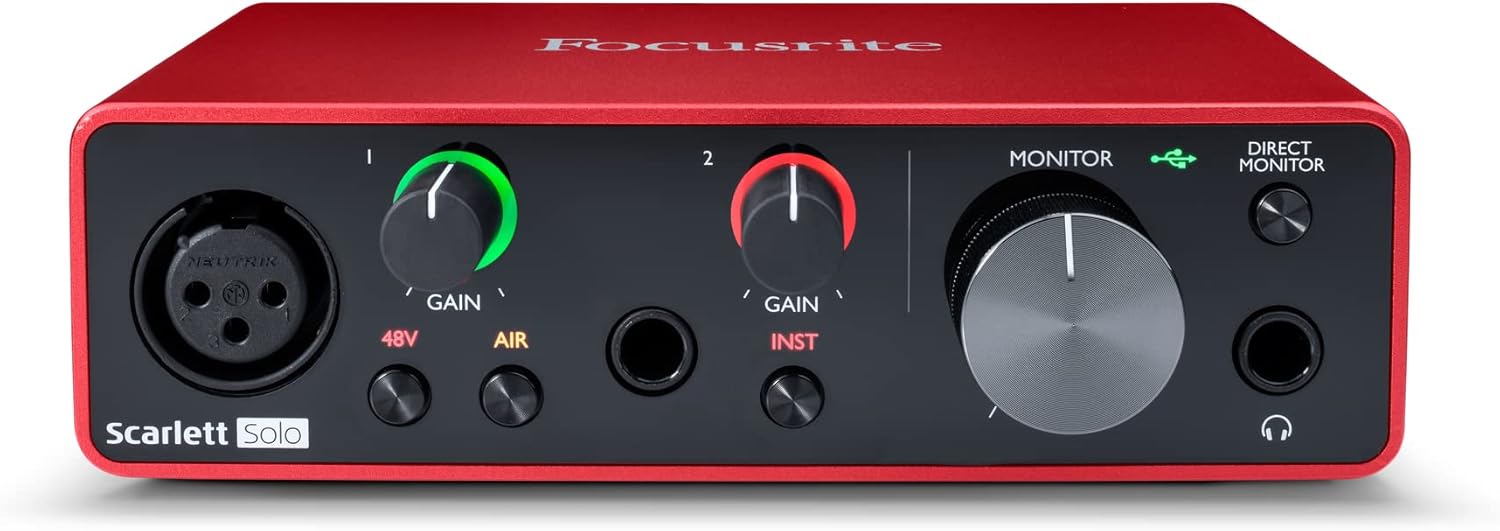
Pros
- Excellent preamp quality produces bright, clear recordings with minimal noise floor
- Air mode adds professional polish to vocal and acoustic recordings without additional equipment
- Compact design perfect for home studios, bedroom producers, and mobile recording setups
- Included software suite eliminates need for expensive DAW purchases
- Highly reliable brand with strong reputation in professional audio industry
Cons
- Single microphone input limits simultaneous multi-instrument recording capabilities
- May require audio driver updates for optimal performance on some Windows systems
- Learning curve for beginners unfamiliar with audio interface operation and gain staging
The Focusrite Scarlett Solo 3rd Gen is a professional USB audio interface designed for musicians, podcasters, and content creators who demand studio-quality recordings without the complexity of larger mixing consoles. This compact device bridges the gap between budget-friendly entry-level gear and expensive professional equipment, making it ideal for home studios, bedroom producers, and anyone serious about capturing professional-grade audio.
The standout feature is undoubtedly the high-performance microphone preamp paired with the innovative Air mode, which adds extra clarity and presence to vocals and acoustic instruments. The two high-headroom instrument inputs eliminate clipping and distortion, ensuring your guitar, bass, and other instruments shine through with clarity. Recording at up to 24-bit/192kHz resolution means your productions retain all sonic nuances, while the Gain Halo visual feedback system helps you nail perfect levels every time.
Build quality reflects Focusrite's professional heritage, with a solid metal chassis and intuitive front-panel controls that feel responsive and durable. The USB-C connectivity provides fast, reliable data transfer and modern compatibility with both Mac and Windows systems. The included software bundle (Pro Tools Intro+, Ableton Live Lite, Cubase LE) gives you everything needed to start producing immediately without additional software purchases.
The primary limitation is the single microphone input, which restricts simultaneous multi-track vocal or acoustic recording. Additionally, some Windows users report requiring driver updates for optimal performance. The learning curve for gain staging and audio interface operation may challenge complete beginners, though the included documentation is comprehensive.
The Focusrite Scarlett Solo 3rd Gen represents exceptional value for serious hobbyists and semi-professional creators. Its combination of pristine preamp quality, professional converters, intuitive design, and included software makes it the go-to choice for anyone upgrading from computer microphones or entry-level interfaces. The three-year warranty provides confidence in your investment.
Audio I/O: 1 XLR microphone input, 2 high-impedance instrument inputs, 2 balanced line outputs, headphone output
Audio Quality: 24-bit/192kHz recording and playback resolution with high-performance converters
Connectivity: USB-C to computer, compatible with all major audio recording software
Channels: 2 channels (stereo)
Features: Switchable Air mode, Gain Halo visual feedback, low-noise outputs, headphone monitoring
Software Included: Pro Tools Intro+, Ableton Live Lite, Cubase LE, Hitmaker Expansion
Warranty: 3-year manufacturer warranty worldwide
Compatible Devices: Microphones, instruments, personal computers, headphones, studio monitors
Who Should Buy: Musicians recording at home, podcasters seeking professional audio quality, guitarists and bassists needing quality instrument preamps, content creators upgrading from built-in computer audio, and producers working with limited space.
Who Should Look Elsewhere: Users needing simultaneous multi-microphone recording, those requiring extensive analog mixing features, or professionals running high-channel-count studios requiring more I/O options.
Setup Tips: Ensure your computer meets USB-C requirements and install drivers before first use. Spend time learning gain staging with the Gain Halo visual indicator to avoid clipping. Experiment with Air mode on different sources to understand its impact on your recordings.
Value Comparison: At this price point, the Scarlett Solo 3rd Gen outperforms competitors by offering superior preamp quality, professional software bundle, and proven brand reliability. The included software alone typically costs $200+ if purchased separately.

Pros
- Exceptional audio quality with ESS Sabre DAC and headphone amplifier rivaling dedicated standalone units costing hundreds more
- Industry-leading low latency at 2.5ms makes it perfect for live guitar, keyboard, and vocal recording without monitoring delay
- Built-in LCD metering display is unique in its class, providing clear visual feedback for optimal level management
- Compact, portable form factor with USB-C connectivity makes it ideal for mobile studios and remote recording setups
- Includes comprehensive software bundle and comes with a 2-year warranty backing the build quality
Cons
- Limited to 2-in/2-out configuration, which may not suit users needing more simultaneous inputs for larger recording sessions
- Single USB-C port means you cannot daisy-chain additional devices without a hub, potentially limiting workflow flexibility
- Windows users may experience initial channel configuration issues requiring manual loopback settings adjustment
The MOTU M2 is a professional-grade USB-C audio interface designed for home recording studios, content creators, musicians, and producers who refuse to compromise on audio quality while maintaining a reasonable budget. Its 2-in/2-out configuration with dual microphone preamps makes it perfect for recording vocals and instruments, podcasting, or streaming with pristine clarity and minimal latency.
What sets the M2 apart is its use of ESS Sabre32 Ultra DAC technology, typically found in audio interfaces costing thousands of dollars. This delivers a stunning 120dB dynamic range on outputs and an exceptionally clean -129dBu EIN on microphone inputs. The headphone amplifier alone rivals dedicated standalone units, making this interface equally valuable for mixing and mastering work. Real-time monitoring latency of just 2.5ms at 96kHz means you can confidently record guitars, keyboards, and vocals without the distracting lag that plagues many budget interfaces.
The build quality is immediately apparent when you interact with the device. Smooth, weighted knobs with premium feel, responsive buttons, and a sturdy physical construction inspire confidence. The full-color LCD display showing real-time level meters for all inputs and outputs is a standout feature rarely found at this price point, eliminating guesswork when setting recording levels. The compact 7.5 x 4.25 x 1.75 inch footprint with USB-C connectivity makes it genuinely portable for musicians moving between studios or recording on location.
The main limitation is the 2-in/2-out channel count, which restricts simultaneous recording to two sources. Windows users have occasionally reported initial channel configuration quirks requiring manual loopback settings adjustment, though this is easily resolved. The single USB-C port means external hubs are necessary if you need to connect other peripherals simultaneously.
The MOTU M2 represents exceptional value for anyone serious about recording quality. Whether you're tracking professional vocals, streaming with multiple guests, or building a portable studio, this interface delivers audio fidelity and performance that justifies its reputation as a best-in-class mid-tier solution.
Connectivity and Compatibility: USB-C audio interface compatible with Windows and macOS via expertly engineered MOTU drivers. Also supports iOS for mobile recording workflows.
Audio Specifications: 24-bit/192kHz maximum sample rate. 120dB dynamic range on main outputs. Microphone preamp noise floor of -129dBu EIN. 2.5ms round-trip latency at 96kHz with 32-sample buffer. ESS Sabre32 Ultra DAC on main outputs and headphone output.
I/O Configuration: 2 microphone/line inputs with dedicated preamps. 2 main analog outputs. 1 headphone output. DIN MIDI in/out jacks. Full-color LCD metering display for all inputs and outputs.
Physical Specifications: Dimensions 7.5 inches deep x 4.25 inches wide x 1.75 inches high. Weight 612 grams. USB-powered with physical power switch. Includes 6GB of free software content.
Warranty: 2-year manufacturer warranty included with purchase.
Perfect For: Home recording enthusiasts, singer-songwriters, podcast producers, streamers, content creators, guitar and keyboard players, and producers seeking professional audio quality on a realistic budget. Also ideal for audiophiles who value the ESS Sabre DAC technology and premium headphone amplification.
Consider Alternatives If: You need more than 2 simultaneous inputs for large ensemble recording, require extensive MIDI connectivity beyond basic in/out, or need bus-powered operation without a dedicated power supply.
Best Use Cases: Bedroom recording studio setup. Mobile recording and field production. Podcast and stream audio capture. Mixing and mastering with a high-quality DAC and headphone amp. Guitar and keyboard performance recording with minimal latency. Audiophile-grade home listening through the premium DAC and headphone amplifier.

Pros
- Excellent value with included production software and 6GB+ of content
- Hardware monitoring with LCD display eliminates latency issues during recording sessions
- USB-C connection provides reliable, fast performance and works across Mac, PC, and iOS platforms
- Compact and portable design makes it ideal for bedroom studios, home offices, and mobile recording
- Two quality microphone preamps handle both vocals and instruments without additional gear
Cons
- Limited to 4 simultaneous inputs, which may feel restrictive for larger band recordings or complex setups
- USB-C only means you'll need adapters if using older USB-A devices or hubs
- Learning curve on some features like loopback routing for users new to audio interfaces
The MOTU M4 is a 4-in/4-out USB-C audio interface built for modern producers, podcasters, musicians, and content creators who need professional-grade sound quality without the bulk or price tag of larger mixing consoles. It's the perfect middle ground between entry-level USB interfaces and expensive studio-grade equipment, delivering serious features in a compact footprint.
What makes the M4 truly stand out is its combination of hardware monitoring with an LCD screen, which eliminates the frustrating latency that plagues many budget interfaces. The two dedicated microphone preamps deliver clean, professional recordings for vocals and instruments, while the loopback feature opens up possibilities for streaming, podcasting, and music production without needing external hardware. The included 6GB+ of free software and content transforms this from a simple interface into a complete production toolkit.
Build quality is solid and straightforward. The aluminum chassis feels durable despite its lightweight, portable design, making it suitable for both stationary studios and traveling musicians. The USB-C connection is modern and reliable, though it does require adapters for older devices. Navigation through the LCD screen is intuitive, and setup across Mac, Windows, and iOS platforms is refreshingly painless.
The main limitation is the 4-input cap, which restricts simultaneous recording to four sources. For solo artists and small projects this is fine, but larger band recordings or complex setups may feel constrained. Additionally, some users new to audio interfaces may find the loopback routing requires a learning curve to master.
The MOTU M4 earns its 4.6-star rating by delivering genuine professional features at an accessible price point. It's an excellent choice for anyone serious about recording who wants reliability, portability, and included software to get started immediately.
Connectivity: USB-C, compatible with Mac, Windows, and iOS devices
I/O Configuration: 4 inputs and 4 outputs with 2 dedicated microphone preamps
Total Channels: 8 channels
Features: Hardware monitoring with LCD screen, loopback functionality, zero-latency input monitoring
Included Software: 6GB+ of free content including Performer Lite and Live Lite production software
Design: Compact, portable aluminum chassis suitable for studio or mobile use
Who Should Buy: The MOTU M4 is ideal for home studio musicians, podcasters, content creators, and producers who need reliable multi-channel recording in a portable package. It's perfect for upgrading from basic USB audio solutions while staying budget-conscious.
Who Might Want to Look Elsewhere: If you need more than 4 simultaneous inputs for large ensemble recording, or if you prefer a purely software-based solution without hardware monitoring, consider larger interfaces or alternative options.
Setup Considerations: Ensure your computer has an available USB-C port or budget for a USB-C hub adapter. The included software requires internet connection for initial download and activation. Allow 30 minutes for complete setup and driver installation.
Value Assessment: At its price point, the M4 offers exceptional value when factoring in the included 6GB+ of production software. The hardware monitoring alone justifies the investment for serious recording work, as it eliminates the latency issues that frustrate users on cheaper interfaces.

Pros
- Clean, quiet preamp with excellent dynamic range produces professional-quality recordings without noise or hiss
- Exceptional build quality with rugged construction that rivals interfaces costing significantly more
- Compact and portable design makes it perfect for mobile recording, podcasting, and travel
- Straightforward driver installation and seamless compatibility across Windows, Mac, and Linux systems
- Outstanding value for the feature set, including MIDI I/O, balanced outputs, and zero-latency monitoring
Cons
- Limited to 2 input channels, so simultaneous multi-track recording requires external mixing solutions
- Dynamic microphones may require external preamp to avoid driving gain too high during recording
The Mackie Onyx Artist 1x2 is a compact USB audio interface designed for singer-songwriters, content creators, and home studio producers who need professional recording quality without the bulk or complexity of larger systems. This bus-powered interface delivers everything needed for high-fidelity home recording in a portable package.
The standout feature is the boutique-quality Onyx microphone preamp, which delivers clean, quiet recordings with class-leading dynamic range and minimal noise. The dedicated 1/4" input with Hi-Z switch makes connecting guitars and bass straightforward, while 48V phantom power support enables use with studio-grade condenser microphones. Real-world performance is excellent, with users reporting flawless recording stability on Windows 11 and Mac systems, plus seamless integration with popular DAW software including Pro Tools.
Build quality is exceptional for the price. The rugged construction feels comparable to interfaces costing two to three times as much, with clearly labeled knobs and illuminated buttons that make operation intuitive. The compact dimensions (6.4" x 4.4" x 1.9") and lightweight design make it genuinely portable, while zero-latency direct monitoring ensures you hear yourself without delay during recording sessions.
The main limitation is the 2-input channel count, which restricts simultaneous multi-track recording. Users with dynamic microphones may also need an external preamp to avoid maxing out the gain. However, these constraints are typical for interfaces at this price point and rarely impact home studio workflows.
The Mackie Onyx Artist 1x2 delivers professional sound quality, robust construction, and practical features at an exceptional price. It's an excellent choice for anyone starting a home studio or upgrading from basic USB microphones, offering genuine Mackie engineering in a format that actually works for real-world recording situations.
Recording Specifications
Resolution: 24-bit/192kHz high-resolution audio
Channels: 2 in / 2 out
Frequency Response: 20Hz to 192kHz
Inputs and Outputs
Microphone Input: XLR with 48V phantom power
Instrument Input: 1/4" TRS with Hi-Z switch
Headphone Output: 1/4" stereo
Line Outputs: Left/Right balanced
MIDI I/O: Included
Connectivity and Power
Interface: USB 2.0
Power: Bus-powered via USB (no adapter required)
Latency: Zero-latency direct monitoring
Compatibility: Windows 10+, Mac OS, Linux
Physical Specifications
Dimensions: 6.4" D x 4.4" W x 1.9" H
Weight: 1.2 pounds
Warranty: 1-year all-inclusive
Included Software
Pro Tools First
The Musician Collection (23 plugins and instruments)
Quick Start Guide
Perfect For
Singer-songwriters recording vocals and acoustic instruments at home
Podcasters and content creators needing professional audio input
Home studio producers starting their first setup
Musicians upgrading from basic USB microphones
Anyone needing portable, professional recording capability
Consider Alternatives If
You need more than 2 simultaneous input channels for multi-track recording
You require extensive analog I/O for complex studio setups
You need bus-powered operation with high-impedance loads
Why This Interface Wins
The Onyx Artist 1x2 combines professional preamp quality with genuine portability and exceptional value. Most competitors at this price sacrifice either sound quality or build durability. Mackie delivers both, making this interface an easy recommendation for anyone serious about home recording.

Pros
- Exceptional gain power handles hungry dynamic microphones without requiring external boosters or preamps
- Dual USB connectivity lets you record to computer and mobile simultaneously, perfect for multi-platform creators
- Auto-Gain and independent mute controls eliminate guesswork and prevent accidental noise during streams
- Low-latency direct monitoring and ASIO support deliver professional audio performance for music production
- Comprehensive software routing and loopback capabilities simplify complex audio workflows without DAW complications
Cons
- No customer reviews available yet to validate real-world performance and user experience
- Compact size may feel cramped for users accustomed to larger mixing consoles with more physical controls
- Limited to 2 channels, which may restrict advanced multi-track recording setups for complex productions
The MAONO P1 is a hybrid USB audio interface designed for modern content creators who juggle multiple devices and platforms. Whether you're a podcaster recording on your laptop while monitoring on your phone, a streamer managing OBS on PC while capturing mobile content, or a musician recording covers simultaneously across devices, the P1 eliminates workflow friction by connecting to multiple devices at once.
The standout feature is the powerful 70dB gain paired with a class-leading -130dB EIN noise floor. This combination means you can drive hungry dynamic microphones directly without external preamps or boosters, capturing vocal nuance and guitar detail in pristine 24-bit/192kHz quality. The auto-gain feature takes the guesswork out of level setting by automatically optimizing microphone input in OBS Studio, while independent mute controls prevent unwanted noise during instrument changes or stream transitions.
Build quality reflects its creator-focused design. The zinc-alloy metal housing feels durable and professional, while the ergonomic 15-degree tilt angle keeps controls within easy reach on crowded desks. At 5.9 x 5.98 x 3.46 inches, it occupies minimal desk space, making it practical for home studios or mobile setups. The included USB-C to USB-A/C cable ensures compatibility across Mac, PC, iOS, and Android devices.
The built-in loopback and routing software deserve special mention. You can simultaneously capture your instrument, voice, backing tracks, and browser or streaming audio into dedicated channels without diving into complex system settings. This simplifies workflows in FL Studio, Ableton, or even direct streaming to TikTok and YouTube. The low-latency direct monitoring means you hear your voice or instrument in real time without distracting delays.
The main limitation is the lack of user reviews to validate long-term reliability and real-world performance across different setups. Additionally, with just 2 channels, it's designed for solo creators rather than multi-track recording projects. For podcasters, solo streamers, musicians, and content creators seeking professional audio quality with minimal complexity, the MAONO P1 delivers exceptional value and flexibility.
Connectivity and Compatibility: Dual USB ports with MFi-certified connectivity. Works with Mac, PC, iPhone, iPad, Android, and cameras. Compatible with Pro Tools, Ableton Live, Studio One, Logic Pro, Cubase, GarageBand, FL Studio, OBS Studio, YouTube, TikTok, Twitch, and Discord.
Audio Performance: Maximum sample rate of 192 kHz at 24-bit depth. Frequency response of 20 kHz. Up to 70dB gain. Noise floor of -130dB EIN. Supports ASIO for low-latency monitoring.
Physical Specifications: Dimensions are 5.9 inches deep, 5.98 inches wide, and 3.46 inches high. Features ergonomic 15-degree tilt angle. Durable zinc-alloy metal housing. 2 independent channels.
Included Accessories: Audio interface unit, USB-C to USB-A/C connection cable, and user manual. One-year manufacturer warranty included.
Podcasters and Voice Creators: Auto-gain leveling and independent mute controls eliminate manual adjustments during recording. Stream Mode sends voice equally to both channels for balanced audio.
Streamers and Content Creators: Dual USB connectivity lets you record to computer and mobile simultaneously. Built-in loopback captures desktop audio, backing tracks, and your voice in one workflow. Compatible with OBS Studio, Twitch, YouTube, and TikTok.
Musicians and Guitarists: Powerful 70dB gain handles dynamic microphones and guitars without external boosters. Direct low-latency monitoring lets you hear your instrument in real time. Studio-grade 24-bit/192kHz recording captures every nuance.
Music Producers: ASIO support and routing software simplify complex audio workflows. Loopback functionality captures instrument, voice, and backing tracks simultaneously. Compatible with FL Studio, Ableton Live, Logic Pro, and other major DAWs.

Pros
- Professional audio quality at an affordable price point, delivering 24-bit/192kHz resolution comparable to interfaces costing twice as much
- Versatile connectivity with both XLR and instrument inputs plus headphone monitoring allows handling multiple audio sources and use cases
- Included ProStudio software and ASIO driver support unlock advanced routing and low-latency capabilities for serious streamers and producers
- Genuinely portable and compact design with intuitive controls makes it practical for home studios, mobile setups, and travel
- Strong cross-platform compatibility and DAW support ensure this interface works with virtually any modern recording or streaming software
Cons
- Limited to 2 channels, restricting simultaneous recording of multiple instruments or complex multi-track setups without additional gear
- Phantom power and preamp features depend on proper driver installation and software configuration, which may challenge complete beginners
- No built-in effects or processing, requiring external plugins or software for audio enhancement beyond basic routing and monitoring
The MAONO PS22 Lite is a compact USB audio interface designed for recording enthusiasts, podcasters, guitarists, and content creators who demand professional sound quality without the complexity or expense of larger systems. This device punches well above its weight, offering studio-grade specifications in a palm-sized form factor that fits any creative workspace.
The standout feature is undoubtedly the 24-bit/192kHz recording capability paired with a 106dB dynamic range, ensuring every nuance of your performance is captured with clarity and depth. The dual-input design handles both XLR microphones (with 56dB preamp gain and 48V phantom power) and guitar or line-level instruments, making it genuinely versatile for mixed creative work. The included ProStudio Routing Software with ASIO driver support opens possibilities for live streamers, enabling virtual channels and loopbacks for complex broadcast scenarios without latency issues.
Build quality reflects the premium positioning, with an ergonomic design featuring a dynamic light ring that indicates input status and a side-mounted headphone jack reducing cable clutter. The intuitive preset modes for recording, live broadcast, and instruments mean switching between creative tasks takes seconds, while the plug-and-play functionality works across Mac, Windows, and iPad platforms. Direct monitoring provides real-time audio feedback essential for getting performances right on the first take.
The primary limitation is the 2-channel configuration, which restricts simultaneous multi-track recording unless you're layering overdubs. Additionally, while the interface excels at capture and routing, it lacks onboard effects or processing, meaning you'll rely on software plugins for audio enhancement. Setup requires proper driver installation and software configuration, which may initially challenge absolute beginners despite the intuitive interface design.
The MAONO PS22 Lite delivers exceptional value for podcasters, guitarists, vocalists, and streamers seeking professional audio quality in a portable, user-friendly package. Its combination of high-resolution recording, versatile inputs, advanced routing software, and cross-platform compatibility makes it a smart investment for anyone serious about audio production without the premium price tag.
Audio Quality: 24-bit/192kHz recording resolution with 106dB dynamic range for professional-grade sound capture.
Inputs: 1 XLR input for microphones with 56dB preamp gain and 48V phantom power, 1 dedicated instrument input with impedance adjustment for guitars and line-level sources.
Connectivity: USB connection with included USB-A/USB-C to USB-C cable. Plug-and-play compatibility with Mac, Windows, and iPad.
Channels: 2-channel interface for stereo recording and monitoring.
Software Support: ASIO drivers, ProStudio Routing Software included. Compatible with Avid Pro Tools, Ableton Live, Logic Pro, Cubase, GarageBand, FL Studio, Studio One, plus streaming platforms like OBS, Twitch, YouTube, TikTok, and Discord.
Design: Compact palm-sized form factor with dynamic light ring indicator, ergonomic construction, and side-mounted headphone monitoring jack.
Best For: Podcasters and voice actors seeking warm, clear vocals with minimal noise. Guitarists and musicians recording demos or full productions. Content creators streaming to Twitch, YouTube, or TikTok. Home studio builders wanting professional results on a budget. Anyone transitioning from built-in computer audio to proper recording equipment.
Consider This If: You need simultaneous recording of multiple instruments, look elsewhere for 4+ channel interfaces. You want onboard effects and processing, you'll need to budget for software plugins. You're a complete beginner, allow time to learn driver installation and basic DAW setup.
Why Choose PS22 Lite Over Alternatives: The combination of 24-bit/192kHz recording, dual-input versatility, included ProStudio software, and compact design offers exceptional value. Many competitors at this price lack phantom power or advanced routing capabilities. The cross-platform compatibility and extensive DAW support ensure future-proof investment.

Pros
- Exceptional value for money with professional-grade features typically found in higher-priced interfaces
- Intuitive one-touch controls and comprehensive manual make setup quick even for beginners
- Compact, portable form factor is perfect for mobile podcasters and content creators on the go
- Rich ecosystem of sound effects and voice processing tools enable creative content differentiation
- Solid build quality and widespread software compatibility ensure long-term usability
Cons
- Sound effect pads limited to 20 seconds of storage with no expandable storage or SD card support
- Noise gate feature could be more sophisticated for advanced audio engineers
- No internal storage capacity for recording directly to the device without a computer connection
The MAONO E2 Gen2 is an all-in-one podcast and streaming interface designed for content creators who want professional audio quality without the complexity or price tag of traditional studio setups. This compact mixer is perfect for solo podcasters, co-hosted shows, live streamers, and musicians looking to upgrade their home recording capabilities.
The standout feature is the dual XLR combo inputs paired with 60dB low-noise preamps that deliver crystal-clear audio suitable for dynamic microphones and professional-grade recordings. The 8 customizable sound effect pads add genuine value for content creators, allowing you to upload intro music, sound bites, or effects to enhance audience engagement. The loopback function simplifies live streaming workflows, and the included voice effects like pitch-changing and reverb presets provide creative flexibility without needing additional software.
Build quality feels solid and purposeful, with an intuitive layout that minimizes the learning curve. The 8-hour battery makes this interface genuinely portable, and the multiple connectivity options (Bluetooth, USB-C, 3.5mm, XLR) ensure compatibility with virtually any device or workflow. Setup is straightforward, and the included manual is comprehensive with online support available.
The main limitation is the 20-second storage limit on sound effect pads and lack of expandable storage options. The noise gate, while functional, may not satisfy advanced audio engineers seeking granular control. Additionally, this is an audio interface only and does not support phone charging or power delivery functions.
Overall, the MAONO E2 Gen2 represents excellent value for podcasters and streamers at any skill level. It successfully balances affordability with professional features, making it an ideal entry point for those starting their podcasting journey or a solid secondary interface for established creators who need portability and flexibility.
Connectivity: Dual XLR combo inputs, Bluetooth, USB-C, 3.5mm audio jack, dual stream outputs
Audio Performance: 60dB gain preamps, 48 kHz maximum sample rate, 20 kHz frequency response, built-in noise reduction
Sound Effects: 8 customizable pads (up to 20 seconds each), 6 preset reverbs, pitch-changing effects, SingAlong mode
Battery: Built-in 1500mA battery providing up to 8 hours of operation
Compatibility: Windows, macOS, iOS, Android. Works with OBS, Discord, Zoom, Audacity, YouTube, Facebook, TikTok, Twitch
Physical: 9.64 inches D x 6.18 inches W x 2.16 inches H, weighs 0.89 kg. Includes USB-A/USB-C cable, 3.5mm cable, and user manual
Warranty: 1 year manufacturer warranty
Best For: Podcasters (solo or co-hosted), live streamers, content creators, musicians, and anyone needing portable, professional audio recording and mixing capabilities.
Consider This If: You need dual microphone inputs for co-hosted shows, want to add custom sound effects to your content, require portability with battery backup, or work across multiple platforms and devices simultaneously.
Skip This If: You need unlimited internal storage for sound pads, require advanced noise gate control, or need a device that supports phone charging or power delivery functions.
Setup Tips: Download the MAONO website resources and tutorial videos before your first session. Pre-record and test your sound effects before going live. Use the loopback function for seamless computer-based streaming workflows. The intuitive layout means most users can be production-ready within 30 minutes.
Value Comparison: This interface delivers features comparable to interfaces priced 50-100 dollars higher, making it an exceptional value for budget-conscious creators without sacrificing professional audio quality or functionality.
Buying Guide
Loopback Implementation
Not all loopback features are created equal. Some interfaces, like the Motu M4 4×4 USB-C Audio Interface, offer hardware-based loopback via a dedicated mix knob. This provides reliable, zero-latency routing.
Other models rely on companion software, such as MAONO’s ProStudio2, to create virtual channels. Assess whether you prefer a physical control or a software-based solution for flexibility in your specific workflow.
Input and Output Configuration
<!–Consider your current and future needs. A simple two-input interface like the Focusrite Scarlett Solo 3rd Gen USB-C Audio is perfect for a solo creator. For interviews or recording multiple sources, look for more inputs.
Outputs are equally important. You may need separate feeds for studio monitors, a headphone mix for a co-host, and a dedicated stream output. Planning your signal chain in advance prevents bottlenecks. Explore our guide on the best USB audio interfaces for more on connectivity.
Preamplifier Quality
<!–The preamp is the first stage of your audio signal. It determines the clarity and noise floor of your recordings. Brands like Focusrite and MOTU are renowned for their transparent, high-headroom preamplifiers.
If you use dynamic microphones, which require more gain, seek an interface with ample clean gain, like the MAONO P1 USB Audio Interface with 70dB Gain. This ensures your voice is captured powerfully without introducing hiss.
Software and Driver Support
<!–Stable drivers are non-negotiable for professional work. ASIO drivers on Windows and Core Audio on macOS ensure low latency, which is critical for real-time monitoring. Check for verified compatibility with your operating system.
Many bundles include valuable software. The best USB-C audio interfaces often come with digital audio workstations and plugin suites. This can provide tremendous value as you build your creative toolkit.
Final Thoughts
Selecting the right interface hinges on your specific creative workflow. For musicians and producers seeking pristine audio quality and straightforward hardware loopback, the Motu M4 4×4 USB-C Audio Interface is a superb choice. Streamers and podcasters who value bundled accessories and one-touch controls will find the MAONO E2 Gen2 Podcast Equipment Bundle Audio offers an incredibly streamlined, all-in-one solution to get started immediately.
Frequently Asked Questions
What is loopback on an audio interface?
Loopback is a feature that allows the audio output from your computer, like music or game sound, to be routed back into the audio input of your recording or streaming software. This lets you capture your microphone and desktop audio together in a single track without needing extra cables or virtual audio driver software.
Do I need an audio interface with loopback for podcasting?
If your podcast involves playing audio clips, conducting remote interviews via software, or incorporating background music live, then a loopback interface is highly beneficial. It simplifies the technical setup significantly. For more gear insights, visit our audio interfaces category.
Can I use a loopback interface for live streaming?
Absolutely. This is one of the primary uses. An interface with loopback lets you send your voice, game audio, browser sounds, and any other computer audio directly into streaming software like OBS or Streamlabs as separate, mixable sources. This creates a professional, controlled audio mix for your audience.
Are there audio interfaces with wireless connectivity?
While the interfaces reviewed here focus on USB and loopback, some models offer Bluetooth for audio playback. For a dedicated look at wireless options, you can explore our separate guide on the best bluetooth audio interfaces for 2026.


Write Your Review
No reviews yet. Be the first to share your experience!