

You have a synthesizer collecting dust, a drum machine with untapped potential, and a digital audio workstation waiting for your next masterpiece. The missing link is often a capable audio interface that brings it all together. An interface with dedicated MIDI ports transforms your computer into the central hub of a powerful music production studio.
This guide is for musicians, podcasters, and producers who need to connect both audio and MIDI gear. We have evaluated five top-tier audio interfaces with MIDI connectivity, from entry-level boxes to professional studio workhorses. Whether you are scoring films or recording your next EP, the right interface makes all the difference. For creators who prioritize modern connectivity, our resource on the best USB-C audio interfaces offers further insight.
Pros
- Exceptional audio quality with studio-grade converters and 192kHz sample rate capability
- Intelligent recording features like Auto Gain and Clip Safe eliminate guesswork and failed takes
- Air mode adds musical presence and harmonic richness to vocals and guitars
- Included software suite provides professional recording, production, and mastering tools immediately
- Reliable performance with zero driver issues reported in customer reviews
Cons
- Requires high-impedance headphones for optimal headphone output performance, limiting some accessory choices
- Some gaming and specialized software can cause driver crashes requiring system restart
- Learning curve involved in configuring MIDI and audio routing within DAW software
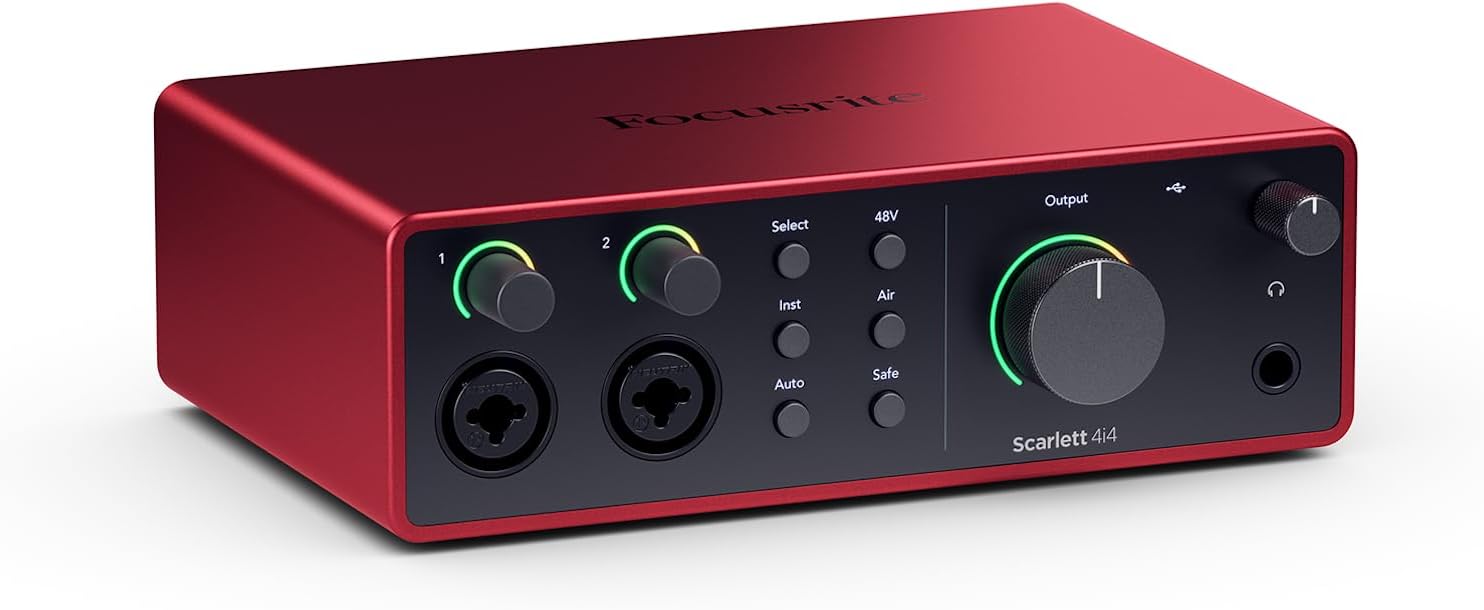
The Focusrite Scarlett 4i4 4th Gen is a professional audio interface designed for musicians, producers, podcasters, and content creators who need reliable, studio-quality sound capture. This USB-C interface combines professional-grade audio converters with intelligent recording features that make it accessible to beginners while satisfying experienced engineers.
The standout feature is the dual ultra-low-noise Scarlett 4th Gen mic preamps paired with studio-grade converters boasting a massive 120dB dynamic range, matching equipment found in the world's biggest recording studios. The innovative Air mode adds musical presence and harmonic richness to vocals and guitars, while Auto Gain and Clip Safe features automatically set perfect recording levels and prevent clipping, meaning you capture keeper takes without obsessing over gain staging.
Build quality is solid and compact, measuring just 7.09 inches wide and weighing 2.2 pounds, making it portable for mobile recording setups. The interface offers versatile I/O with 2 Hi-Z instrument inputs for guitars and synths, 4 line inputs, 4 line outputs, and MIDI I/O to accommodate any recording scenario. USB-C connectivity delivers low-latency performance critical for streaming and real-time monitoring.
The included software bundle is exceptional value, featuring Pro Tools Intro+, Ableton Live Lite, Cubase LE, and the Hitmaker Expansion with professional plugins from XLN Audio, Softube, and Native Instruments. Some users report occasional driver crashes with certain gaming software, though this appears rare and resolved with system restart.
The Scarlett 4i4 4th Gen delivers professional audio quality and intelligent features at a mid-range price point, backed by a 3-year warranty and round-the-clock support. Whether you're recording music, podcasts, or content, this interface provides the tools and sound quality to produce broadcast-ready results.
Audio Performance: 120dB dynamic range, 24-bit/192kHz maximum sample rate, 20kHz frequency response. Dual ultra-low-noise Scarlett 4th Gen mic preamps with Air mode.
I/O Configuration: 2 Scarlett 4th Gen mic preamps, 2 Hi-Z instrument inputs, 4 line inputs, 4 line outputs, MIDI In/Out, headphone output with high-impedance support.
Connectivity: USB-C with included USB-C to USB-A adaptor and 5V 3A power supply. Compatible with Mac OS, Windows OS, and iOS.
Physical Specs: 7.09 inches wide x 5.08 inches deep x 2.32 inches tall, 2.2 pounds. Includes USB-C cable and power supply.
Software Included: Pro Tools Intro+, Ableton Live Lite, Cubase LE, Hitmaker Expansion with premium plugins and virtual instruments.
Best For: Musicians recording guitars, vocals, and keyboards; music producers and beat makers; podcasters and content creators; streamers needing low-latency monitoring; anyone upgrading from budget interfaces who wants professional sound quality.
Consider If You: Need versatile I/O for multiple instruments and MIDI devices simultaneously; want included professional software to start producing immediately; require reliable, crash-free performance for critical recording sessions; value portability and compact design; prefer established brands with excellent customer support.
May Not Be Ideal If: You need more than 2 mic inputs simultaneously; you work exclusively with gaming software that has driver compatibility issues; you require XLR outputs instead of line-level outputs; budget is below $250.

Pros
- MIDAS preamps deliver clean, low-noise signal path comparable to much more expensive interfaces
- Intuitive plug-and-play setup with minimal driver hassle on both Mac and Windows systems
- Robust build quality and metal construction designed to withstand years of studio use
- Four simultaneous inputs and outputs provide flexibility for multi-track recording and live streaming
- Outstanding value proposition offering professional-grade specs at entry-level pricing
Cons
- Some users report occasional driver compatibility issues on certain Windows OS versions
- MIDI functionality may require additional configuration compared to audio I/O setup
- Limited customer support documentation compared to higher-end competitors
The Behringer U-PHORIA UMC404HD is a compact 4x4 USB audio interface engineered for home studio owners, podcasters, content creators, and mobile recording professionals. It delivers professional-grade audio quality at a price point that makes it accessible to anyone serious about recording but budget-conscious. The interface has earned respect from experienced audio engineers and casual users alike for punching well above its price class.
The standout feature is the inclusion of four MIDAS-designed mic preamps with +48V phantom power, which typically appear only on interfaces costing two to three times as much. Users consistently praise the clean, low-noise signal path and the ability to capture vocals and instruments with clarity and detail. The 24-bit/192 kHz resolution ensures future-proof audio quality, while ultra-low latency streaming supports real-time monitoring during recording sessions. Compatibility with Pro Tools, Ableton Live, Cubase, and other major DAWs means you can integrate it into virtually any existing workflow.
Build quality reflects Behringer's partnership with MIDAS and acquisition of Music Tribe assets. The metal chassis feels solid and impact-resistant, designed to handle the rigors of studio use and travel. The interface is compact at just 11.5 inches wide, making it ideal for portable recording setups or tight desk spaces. Balanced XLR and 1/4-inch outputs ensure professional connectivity to studio monitors and mixing equipment.
The main drawbacks involve driver setup on certain Windows systems and MIDI configuration, which some users find less intuitive than audio I/O setup. A small percentage of users report compatibility issues, though this appears to be system-specific rather than a widespread product defect. Driver support for Mac OS is notably streamlined, with native OS integration requiring minimal configuration.
The Behringer UMC404HD represents genuine value in the audio interface market. It combines professional-grade components, solid engineering, and proven reliability at a price that makes it the obvious choice for anyone building a home studio or upgrading from entry-level equipment. Experienced audio professionals and beginners alike will find it a capable, dependable tool that won't compromise recording quality.
Audio Specifications: 24-bit/192 kHz resolution, 10 Hz to 43 kHz frequency response (0/+0.3 dB). Maximum input levels: Microphone -4 dBu, Line +20 dBu, Instrument -3 dBu. Four MIDAS-designed mic preamps with +48V phantom power.
Connectivity: USB 2.0 interface with 4 inputs/4 outputs plus 1x MIDI I/O. Balanced XLR and 1/4-inch TRS connectors for main outputs. Supports both Mac OS X and Windows XP or higher.
Compatibility: Works with Avid Pro Tools, Ableton Live, Steinberg Cubase, Reaper, Audacity, and other major DAWs. Native driver support for Mac OS, simple driver installation for Windows.
Physical Dimensions: 11.5 inches D x 5.12 inches W x 1.81 inches H. Weight: 2.7 pounds. Rugged metal chassis with impact-resistant construction.
Ideal For: Home studio owners, podcasters, content creators, musicians recording at home, audio engineers on a budget, and anyone upgrading from entry-level USB interfaces. Perfect for mobile recording setups and professional use in tight spaces.
Experience Level: Suitable for beginners through advanced users. The plug-and-play setup welcomes newcomers, while the professional-grade preamps and specifications satisfy experienced engineers.
Use Cases: Music production and multi-track recording, podcast and voiceover recording, live streaming with high-quality audio, instrument recording, vocal tracking, and field recording with a portable setup.

Pros
- Excellent value with included production software and 6GB+ of content
- Hardware monitoring with LCD display eliminates latency issues during recording sessions
- USB-C connection provides reliable, fast performance and works across Mac, PC, and iOS platforms
- Compact and portable design makes it ideal for bedroom studios, home offices, and mobile recording
- Two quality microphone preamps handle both vocals and instruments without additional gear
Cons
- Limited to 4 simultaneous inputs, which may feel restrictive for larger band recordings or complex setups
- USB-C only means you'll need adapters if using older USB-A devices or hubs
- Learning curve on some features like loopback routing for users new to audio interfaces
The MOTU M4 is a 4-in/4-out USB-C audio interface built for modern producers, podcasters, musicians, and content creators who need professional-grade sound quality without the bulk or price tag of larger mixing consoles. It's the perfect middle ground between entry-level USB interfaces and expensive studio-grade equipment, delivering serious features in a compact footprint.
What makes the M4 truly stand out is its combination of hardware monitoring with an LCD screen, which eliminates the frustrating latency that plagues many budget interfaces. The two dedicated microphone preamps deliver clean, professional recordings for vocals and instruments, while the loopback feature opens up possibilities for streaming, podcasting, and music production without needing external hardware. The included 6GB+ of free software and content transforms this from a simple interface into a complete production toolkit.
Build quality is solid and straightforward. The aluminum chassis feels durable despite its lightweight, portable design, making it suitable for both stationary studios and traveling musicians. The USB-C connection is modern and reliable, though it does require adapters for older devices. Navigation through the LCD screen is intuitive, and setup across Mac, Windows, and iOS platforms is refreshingly painless.
The main limitation is the 4-input cap, which restricts simultaneous recording to four sources. For solo artists and small projects this is fine, but larger band recordings or complex setups may feel constrained. Additionally, some users new to audio interfaces may find the loopback routing requires a learning curve to master.
The MOTU M4 earns its 4.6-star rating by delivering genuine professional features at an accessible price point. It's an excellent choice for anyone serious about recording who wants reliability, portability, and included software to get started immediately.
Connectivity: USB-C, compatible with Mac, Windows, and iOS devices
I/O Configuration: 4 inputs and 4 outputs with 2 dedicated microphone preamps
Total Channels: 8 channels
Features: Hardware monitoring with LCD screen, loopback functionality, zero-latency input monitoring
Included Software: 6GB+ of free content including Performer Lite and Live Lite production software
Design: Compact, portable aluminum chassis suitable for studio or mobile use
Who Should Buy: The MOTU M4 is ideal for home studio musicians, podcasters, content creators, and producers who need reliable multi-channel recording in a portable package. It's perfect for upgrading from basic USB audio solutions while staying budget-conscious.
Who Might Want to Look Elsewhere: If you need more than 4 simultaneous inputs for large ensemble recording, or if you prefer a purely software-based solution without hardware monitoring, consider larger interfaces or alternative options.
Setup Considerations: Ensure your computer has an available USB-C port or budget for a USB-C hub adapter. The included software requires internet connection for initial download and activation. Allow 30 minutes for complete setup and driver installation.
Value Assessment: At its price point, the M4 offers exceptional value when factoring in the included 6GB+ of production software. The hardware monitoring alone justifies the investment for serious recording work, as it eliminates the latency issues that frustrate users on cheaper interfaces.

Pros
- Exceptional value with $1000+ in included professional recording software
- True zero-latency monitoring lets you hear yourself clearly while recording
- Class A mic preamps deliver studio-quality sound at an affordable price point
- Bus-powered via USB means no external power supply needed for mobile recording
- Works seamlessly with Mac, Windows, iOS, and iPadOS devices
Cons
- Only 2 channels limits simultaneous recording of multiple instruments or band setups
- USB 2.0 connection may feel dated compared to newer USB-C interfaces
- Limited physical I/O compared to larger interfaces, though sufficient for solo and small ensemble recording
The PreSonus AudioBox USB 96 25th Anniversary Edition is a compact, bus-powered audio interface designed for musicians, podcasters, and content creators who need professional recording capabilities without the bulk or expense of larger studio setups. This interface delivers everything an aspiring recordist needs to capture high-quality audio, from the bedroom to the road.
The standout feature is the inclusion of Studio One Artist, Ableton Live Lite, and the Studio Magic Plug-in Suite, representing over $1000 in software value. Combined with two Class A mic preamps, 24-bit/96 kHz recording resolution, and a zero-latency mixer control, the AudioBox 96 punches well above its price point. The phantom power support accommodates professional condenser microphones, while the instrument inputs handle guitars, basses, and line-level devices with ease.
Build quality is solid, with a heavy-duty steel chassis that feels durable enough for frequent travel and gigging. The compact footprint (5.5 x 5.5 x 1.75 inches) makes it genuinely portable, and USB bus-power eliminates the need for an external adapter. The headphone output is genuinely loud and clear, crucial for accurate monitoring in less-than-ideal environments.
The main limitation is the 2-channel configuration, which restricts simultaneous recording to stereo pairs or single instruments. The USB 2.0 connection is also showing its age in an era of USB-C interfaces, though bandwidth remains adequate for the interface's capabilities. For solo artists, podcasters, and singer-songwriters, these limitations are negligible.
The PreSonus AudioBox USB 96 is an excellent entry point into professional recording that doesn't compromise on quality or software. Whether you're recording your first podcast or adding a portable interface to an existing setup, this 25th Anniversary Edition delivers professional results at a consumer-friendly price.
Audio I/O 2 combo mic/instrument inputs, 2 balanced line-level outputs, 1 headphone output, MIDI I/O
Recording Specs 24-bit/96 kHz resolution, Class A mic preamps with 48V phantom power, 51 ohm impedance
Connectivity USB 2.0 Type-A to Type-B cable included, USB class-compliant, compatible with Windows, macOS, iOS, and iPadOS
Physical 5.5 x 5.5 x 1.75 inches, 2 pounds, heavy-duty steel chassis, bus-powered
Software Included Studio One Artist, Ableton Live Lite, Studio Magic Plug-in Suite, plus access to Studio One Pro upgrade path
Warranty 1 year manufacturer warranty
Who Should Buy This? Solo musicians, singer-songwriters, podcasters, bedroom producers, and anyone needing portable professional recording. Ideal for creators stepping up from smartphone recording or adding a mobile interface to their toolkit.
Who Might Want to Look Elsewhere? If you need more than 2 simultaneous recording channels, multi-band setups, or prefer USB-C connectivity, consider larger interfaces like the PreSonus Quantum series. For extremely budget-conscious buyers, entry-level 2-channel interfaces exist, though you'd sacrifice the included software value.
Software Compatibility Works with Studio One Pro, Ableton Live, FL Studio, Cubase, Pro Tools, Logic Pro, Reaper, and most major DAWs. The included Studio One Artist is a full-featured DAW suitable for complete production workflows.
Real-World Use The zero-latency mixer control is crucial for comfortable recording sessions. The loud headphone output ensures you can monitor clearly anywhere. The steel chassis handles travel well, though a protective case is recommended for frequent transport.

Pros
- Exceptional audio quality with no background noise, even at budget price point
- Truly plug-and-play functionality works immediately on Windows, Mac, and Linux systems
- Dual combo jacks provide maximum flexibility for microphones, guitars, and line-level sources
- Lightweight and compact form factor ideal for desk space and portability
- Zero-latency monitoring enables confident tracking without hearing delay or echo
Cons
- LED illumination on gain knobs does not function as prominently displayed in product images
- Requires careful gain adjustment when connecting instruments with built-in preamps to avoid clipping
- Limited to 2 input channels, which may not suit users needing more simultaneous inputs
The PIYONE Q2 is a 2x2 USB-C audio interface designed for home recordists, podcasters, guitarists, and content creators who want professional-grade sound without complexity. It bridges the gap between budget-friendly and professional-quality recording, making it an ideal first interface for beginners or a secondary interface for established creators.
The standout feature is its genuine plug-and-play operation. Simply connect the USB-C cable to your computer, and the interface is recognized immediately on Windows, Mac, and Linux systems without any driver installation. The 24-bit/192kHz audio resolution captures professional-quality recordings with excellent clarity and minimal noise. The zero-latency direct monitoring feature eliminates tracking delays, allowing you to hear yourself in real-time without the frustrating latency that plagues cheaper interfaces. Dual XLR/TRS combo inputs with 48V phantom power provide flexibility for condenser microphones, dynamic mics, guitars, and line-level sources.
Build quality and design are impressive for the price. The compact form factor fits easily on any desk without consuming valuable space. The illuminated control knobs create a modern, professional aesthetic that looks great in any studio setup. The interface feels solid and well-constructed, with ergonomic knobs and buttons positioned for comfortable operation during long recording sessions.
One notable drawback is that the LED illumination on the gain knobs does not function as prominently as shown in product images, which may disappoint users specifically drawn to this visual feature. Additionally, users must exercise caution when adjusting gain levels with instruments that have built-in preamps, as excessive gain can cause clipping. The 2-channel limitation means this interface cannot handle multiple simultaneous inputs beyond two sources.
Verdict: The PIYONE Q2 delivers exceptional value for beginners and budget-conscious creators seeking professional audio quality without complexity. Its combination of studio-grade sound, zero-latency monitoring, and truly plug-and-play setup makes it an excellent choice for home recording, podcasting, and content creation. Recommended for anyone starting their recording journey or needing a reliable portable interface.
Audio Quality: 24-bit resolution, 192kHz maximum sample rate, high-performance converters, low-noise design
Connectivity: USB-C port (handles both data transfer and bus power), 3.5mm headphone jack
Inputs: 2 XLR/TRS combo jacks, 48V phantom power supply
Channels: 2 input channels, 2 output channels
Features: Zero-latency direct monitoring, monitor mix function, loopback capability, illuminated control knobs, class-compliant design
Compatibility: Mac, Windows PC, Linux, iOS (via USB-C adapter)
Physical: Compact portable design, 0.74 kg weight, Alloy Red finish
Warranty: 2-year limited warranty
Ideal For: Beginner recording artists, podcasters, singer-songwriters, content creators, home studio enthusiasts, and anyone seeking professional audio quality without complex setup requirements.
Perfect Use Cases: Recording vocals with condenser microphones, capturing acoustic guitar performances, podcasting and voice-over work, streaming with professional audio quality, music production on a budget, portable recording for travel or mobile content creation.
Not Ideal For: Users requiring more than 2 simultaneous inputs, professional studios with extensive I/O requirements, or those specifically seeking prominent LED illumination effects on control knobs.
How to Choose an Audio Interface with MIDI
Input/Output Configuration and Future-Proofing
Your current setup is just the beginning. Consider how many microphones, instruments, and outboard gear you might add later. A 2-input interface suits solo vocalists, while a 4×4 configuration handles full bands or multiple synthesizers. MIDI I/O is non-negotiable for controlling hardware synths or receiving data from drum pads.
Think about output needs for studio monitors and headphone mixes. More outputs allow for complex cue mixes or surround sound. The physical connection type also matters. USB-C is the modern standard for speed and convenience, widely covered in our audio interfaces category.
Sound Quality and Converter Performance
Professional recordings start with clean preamps and high-resolution converters. Look for a high dynamic range rating, typically above 110dB, to capture quiet nuances and loud transients without noise or distortion. This spec is more telling than just the sample rate. The preamp character also affects your sound, with some interfaces offering color or ‘air’ modes for vocal presence.
Low-latency monitoring is essential for recording vocals or instruments in real time. This relies on both the interface’s hardware design and its driver stability. A dedicated mix control or software mixer, like the loopback feature found in some models, provides creative flexibility for streamers and content creators. Learn more about this specific function in our guide to the best audio interfaces with loopback.
Software Bundle and Driver Support
The included software can add tremendous value, effectively reducing your overall startup cost. Bundles often include a digital audio workstation like Ableton Live Lite, virtual instruments, and plugin effects. Verify that the interface is class-compliant for Mac/iOS or has stable ASIO/Windows drivers for reliable performance.
Long-term driver support from the manufacturer is crucial for operating system updates. A robust, metal chassis and reliable knobs and jacks indicate a unit built for daily use. For those exploring all connection types, our comparison of the best USB audio interfaces is a valuable resource, as is our look at best thunderbolt audio interfaces for maximum speed.
Final Thoughts
Selecting the right audio interface with MIDI hinges on matching its capabilities to your creative workflow. For the musician seeking pro-grade sound and intelligent features in a compact unit, the Focusrite Scarlett 4i4 4th Gen USB-C Audio is an outstanding choice. If your priority is maximum connectivity on a strict budget, the Behringer U-PHORIA UMC404HD Audiophile 4×4 delivers remarkable value and robust construction. Any of these reviewed interfaces will serve as a reliable foundation for your productions.
Frequently Asked Questions
Why do I need MIDI on my audio interface?
MIDI ports allow you to connect hardware synthesizers, drum machines, and MIDI controllers directly to your computer. This lets you record musical note data, control parameters, and sync tempo between your digital audio workstation and your external gear, which is essential for modern music production.
Can I use a separate MIDI interface instead?
Yes, you can use a dedicated USB MIDI interface if your audio interface lacks MIDI ports. However, combining audio and MIDI connectivity into a single device reduces cable clutter, saves a USB port on your computer, and often provides more streamlined setup and lower latency within your system.
What is the difference between 24-bit/96kHz and 24-bit/192kHz?
These numbers refer to the bit depth and sample rate, which determine the theoretical resolution and frequency range of your recordings. For most home studio applications in 2026, 24-bit/96kHz provides excellent fidelity. Higher sample rates like 192kHz are more relevant for specific professional mastering workflows but demand more storage and processing power.
Is an audio interface with MIDI good for podcasting?
Absolutely. While podcasters may not use the MIDI ports immediately, they provide future flexibility for adding soundboards or musical elements. The primary benefits are the high-quality microphone preamps, stable drivers, and dedicated monitor controls, which improve audio clarity and reliability for any vocal recording.


Write Your Review
No reviews yet. Be the first to share your experience!