

Are you trying to connect a digital mixer, a high-end synthesizer, or an external effects processor to your computer? If your gear uses a digital optical (Toslink) or coaxial S/PDIF connection, a standard USB audio interface won’t cut it. You need a hub that bridges the analog and digital worlds seamlessly.
This guide is for musicians, podcasters, and producers looking to expand their studio’s capabilities. We have evaluated and reviewed six of the leading audio interfaces that feature optical input. Our selections cater to various needs, from expansive hybrid studios to simple desktop setups requiring pristine digital conversion.

Pros
- Exceptional mic preamp quality with +75 dB gain handles demanding microphones and delicate ribbon mics without external boosters
- Flexible I/O configuration supports multi-mic drums, full bands, synth-heavy setups, and hardware-focused workflows
- DC-coupled outputs and 5-pin MIDI I/O provide tight integration with modular synths, keyboards, and drum machines
- Standalone mixer and mic pre modes enable operation without a computer for live mixing or classroom use
- Included Fender Studio Pro DAW with premium amp modeling eliminates need for additional software purchases
Cons
- Large 19-inch width requires dedicated desk space and may not suit compact or portable studio setups
- No reviews currently available to validate real-world performance and user experiences
The Fender Quantum LT 16 is a flagship audio interface designed for professional studios, hybrid setups, and creators who need expansive I/O without sacrificing quality. This 16-in, 8-out USB-C interface targets multi-instrument musicians, electronic producers, recording engineers, and anyone integrating substantial outboard gear into their workflow.
At the heart of the LT 16 are eight MAX-HD microphone preamps delivering an impressive +75 dB of clean, low-noise gain. This transparency and headroom make capturing drum kits, full orchestras, Foley sessions, and fragile ribbon microphones effortless without external preamp boosters. Combined with six front-panel XLR/TRS combo inputs and eight rear-panel TRS line inputs with selectable +4 dBu / -10 dBV operation, the interface provides extraordinary flexibility for integrating synthesizers, mixers, outboard effects, and multi-mic setups.
Build quality reflects Fender's professional heritage, with a solid 19-inch wide chassis, balanced TRS outputs, and a powerful headphone amplifier for accurate monitoring. The inclusion of DC-coupled outputs unlocks direct CV control for modular and analog synth rigs, while 5-pin MIDI I/O ensures tight hardware synchronization. Custom low-latency drivers and pristine converters deliver responsive monitoring ideal for tracking, mixing, and streaming. Advanced standalone functionality including Mixer Mode and Mic Pre Mode allows operation without a computer for live mixing or classroom applications.
The primary drawback is the $399.99 price tag and 19-inch width, which may challenge bedroom producers or those with compact desk space. Additionally, the interface currently lacks user reviews to validate real-world performance claims, though specifications and feature set are comprehensive.
The Fender Quantum LT 16 is an exceptional choice for professional and semi-professional studios prioritizing I/O flexibility, preamp quality, and hybrid workflow integration. The included Fender Studio Pro DAW with premium amp modeling adds significant value. Recommended for recording engineers, electronic musicians, and multi-instrument creators who demand maximum connectivity and professional sound quality.
Connectivity and I/O: 16 inputs, 8 outputs via USB-C. Six front-panel XLR/TRS combo inputs, eight rear-panel TRS line inputs, two Fender-designed instrument inputs, balanced TRS outputs, 5-pin MIDI I/O, DC-coupled outputs for CV control.
Microphone Preamps: Eight MAX-HD mic preamps with +75 dB of gain, low-noise design, selectable +4 dBu / -10 dBV operation on line inputs.
Audio Quality: Maximum sample rate 192 kHz, high-quality converters, low-latency custom drivers, powerful headphone amplifier with high headroom.
Physical Specifications: Dimensions 19 inches wide x 5 inches deep x 1.75 inches tall. Weight 4.8 pounds.
Compatibility: USB-C connection, compatible with Windows and macOS. Supports Fender Studio Pro and all major audio recording software.
Warranty: 2-year manufacturer warranty included.
Who Should Buy: Professional recording engineers, electronic musicians, multi-instrument creators, podcast producers, livestreamers, and anyone building a hybrid studio with substantial outboard gear. Ideal for drum recording, ensemble tracking, synth-heavy production, and hardware-focused workflows.
Who May Want to Consider Alternatives: Bedroom producers on tight budgets, mobile musicians requiring portability, or those needing fewer than eight mic inputs. Beginners may find the extensive I/O overwhelming if not planning to expand their setup.
Key Considerations: Verify your desk has adequate space for the 19-inch width. Ensure USB-C compatibility with your computer. The included Fender Studio Pro DAW provides excellent value, but compatibility with your preferred DAW is important. The DC-coupled outputs and MIDI I/O are valuable for synth integration but unnecessary for basic recording setups.
Value Assessment: At $399.99, the LT 16 offers professional-grade preamp quality, exceptional I/O flexibility, standalone functionality, and included premium software. The price is competitive for interfaces in this I/O class and represents strong value for serious creators planning long-term studio growth.
Pros
- Exceptional audio quality with studio-grade converters and 192kHz sample rate capability
- Intelligent recording features like Auto Gain and Clip Safe eliminate guesswork and failed takes
- Air mode adds musical presence and harmonic richness to vocals and guitars
- Included software suite provides professional recording, production, and mastering tools immediately
- Reliable performance with zero driver issues reported in customer reviews
Cons
- Requires high-impedance headphones for optimal headphone output performance, limiting some accessory choices
- Some gaming and specialized software can cause driver crashes requiring system restart
- Learning curve involved in configuring MIDI and audio routing within DAW software
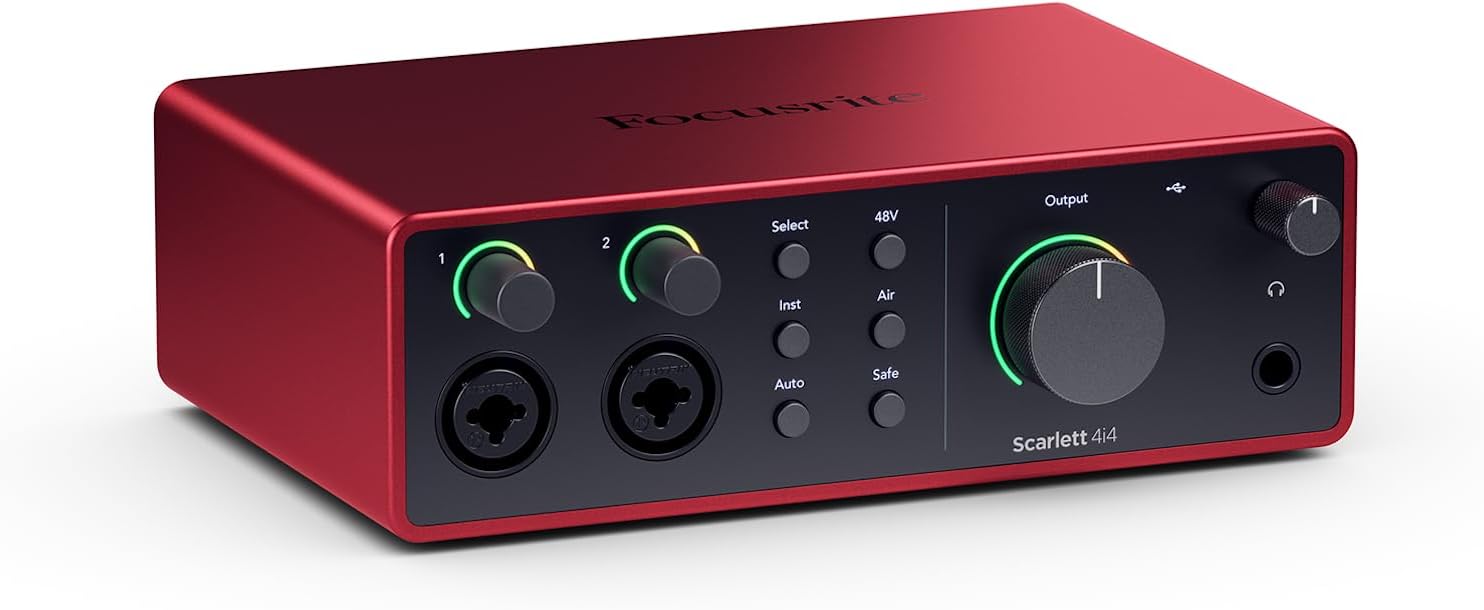
The Focusrite Scarlett 4i4 4th Gen is a professional audio interface designed for musicians, producers, podcasters, and content creators who need reliable, studio-quality sound capture. This USB-C interface combines professional-grade audio converters with intelligent recording features that make it accessible to beginners while satisfying experienced engineers.
The standout feature is the dual ultra-low-noise Scarlett 4th Gen mic preamps paired with studio-grade converters boasting a massive 120dB dynamic range, matching equipment found in the world's biggest recording studios. The innovative Air mode adds musical presence and harmonic richness to vocals and guitars, while Auto Gain and Clip Safe features automatically set perfect recording levels and prevent clipping, meaning you capture keeper takes without obsessing over gain staging.
Build quality is solid and compact, measuring just 7.09 inches wide and weighing 2.2 pounds, making it portable for mobile recording setups. The interface offers versatile I/O with 2 Hi-Z instrument inputs for guitars and synths, 4 line inputs, 4 line outputs, and MIDI I/O to accommodate any recording scenario. USB-C connectivity delivers low-latency performance critical for streaming and real-time monitoring.
The included software bundle is exceptional value, featuring Pro Tools Intro+, Ableton Live Lite, Cubase LE, and the Hitmaker Expansion with professional plugins from XLN Audio, Softube, and Native Instruments. Some users report occasional driver crashes with certain gaming software, though this appears rare and resolved with system restart.
The Scarlett 4i4 4th Gen delivers professional audio quality and intelligent features at a mid-range price point, backed by a 3-year warranty and round-the-clock support. Whether you're recording music, podcasts, or content, this interface provides the tools and sound quality to produce broadcast-ready results.
Audio Performance: 120dB dynamic range, 24-bit/192kHz maximum sample rate, 20kHz frequency response. Dual ultra-low-noise Scarlett 4th Gen mic preamps with Air mode.
I/O Configuration: 2 Scarlett 4th Gen mic preamps, 2 Hi-Z instrument inputs, 4 line inputs, 4 line outputs, MIDI In/Out, headphone output with high-impedance support.
Connectivity: USB-C with included USB-C to USB-A adaptor and 5V 3A power supply. Compatible with Mac OS, Windows OS, and iOS.
Physical Specs: 7.09 inches wide x 5.08 inches deep x 2.32 inches tall, 2.2 pounds. Includes USB-C cable and power supply.
Software Included: Pro Tools Intro+, Ableton Live Lite, Cubase LE, Hitmaker Expansion with premium plugins and virtual instruments.
Best For: Musicians recording guitars, vocals, and keyboards; music producers and beat makers; podcasters and content creators; streamers needing low-latency monitoring; anyone upgrading from budget interfaces who wants professional sound quality.
Consider If You: Need versatile I/O for multiple instruments and MIDI devices simultaneously; want included professional software to start producing immediately; require reliable, crash-free performance for critical recording sessions; value portability and compact design; prefer established brands with excellent customer support.
May Not Be Ideal If: You need more than 2 mic inputs simultaneously; you work exclusively with gaming software that has driver compatibility issues; you require XLR outputs instead of line-level outputs; budget is below $250.

Pros
- MIDAS preamps deliver clean, low-noise signal path comparable to much more expensive interfaces
- Intuitive plug-and-play setup with minimal driver hassle on both Mac and Windows systems
- Robust build quality and metal construction designed to withstand years of studio use
- Four simultaneous inputs and outputs provide flexibility for multi-track recording and live streaming
- Outstanding value proposition offering professional-grade specs at entry-level pricing
Cons
- Some users report occasional driver compatibility issues on certain Windows OS versions
- MIDI functionality may require additional configuration compared to audio I/O setup
- Limited customer support documentation compared to higher-end competitors
The Behringer U-PHORIA UMC404HD is a compact 4x4 USB audio interface engineered for home studio owners, podcasters, content creators, and mobile recording professionals. It delivers professional-grade audio quality at a price point that makes it accessible to anyone serious about recording but budget-conscious. The interface has earned respect from experienced audio engineers and casual users alike for punching well above its price class.
The standout feature is the inclusion of four MIDAS-designed mic preamps with +48V phantom power, which typically appear only on interfaces costing two to three times as much. Users consistently praise the clean, low-noise signal path and the ability to capture vocals and instruments with clarity and detail. The 24-bit/192 kHz resolution ensures future-proof audio quality, while ultra-low latency streaming supports real-time monitoring during recording sessions. Compatibility with Pro Tools, Ableton Live, Cubase, and other major DAWs means you can integrate it into virtually any existing workflow.
Build quality reflects Behringer's partnership with MIDAS and acquisition of Music Tribe assets. The metal chassis feels solid and impact-resistant, designed to handle the rigors of studio use and travel. The interface is compact at just 11.5 inches wide, making it ideal for portable recording setups or tight desk spaces. Balanced XLR and 1/4-inch outputs ensure professional connectivity to studio monitors and mixing equipment.
The main drawbacks involve driver setup on certain Windows systems and MIDI configuration, which some users find less intuitive than audio I/O setup. A small percentage of users report compatibility issues, though this appears to be system-specific rather than a widespread product defect. Driver support for Mac OS is notably streamlined, with native OS integration requiring minimal configuration.
The Behringer UMC404HD represents genuine value in the audio interface market. It combines professional-grade components, solid engineering, and proven reliability at a price that makes it the obvious choice for anyone building a home studio or upgrading from entry-level equipment. Experienced audio professionals and beginners alike will find it a capable, dependable tool that won't compromise recording quality.
Audio Specifications: 24-bit/192 kHz resolution, 10 Hz to 43 kHz frequency response (0/+0.3 dB). Maximum input levels: Microphone -4 dBu, Line +20 dBu, Instrument -3 dBu. Four MIDAS-designed mic preamps with +48V phantom power.
Connectivity: USB 2.0 interface with 4 inputs/4 outputs plus 1x MIDI I/O. Balanced XLR and 1/4-inch TRS connectors for main outputs. Supports both Mac OS X and Windows XP or higher.
Compatibility: Works with Avid Pro Tools, Ableton Live, Steinberg Cubase, Reaper, Audacity, and other major DAWs. Native driver support for Mac OS, simple driver installation for Windows.
Physical Dimensions: 11.5 inches D x 5.12 inches W x 1.81 inches H. Weight: 2.7 pounds. Rugged metal chassis with impact-resistant construction.
Ideal For: Home studio owners, podcasters, content creators, musicians recording at home, audio engineers on a budget, and anyone upgrading from entry-level USB interfaces. Perfect for mobile recording setups and professional use in tight spaces.
Experience Level: Suitable for beginners through advanced users. The plug-and-play setup welcomes newcomers, while the professional-grade preamps and specifications satisfy experienced engineers.
Use Cases: Music production and multi-track recording, podcast and voiceover recording, live streaming with high-quality audio, instrument recording, vocal tracking, and field recording with a portable setup.

Pros
- Exceptional sound quality with noticeably wider soundstage and cleaner tonality after break-in period
- Multiple connectivity options cover virtually every audio source from TVs to computers to smartphones
- Excellent build quality with premium components and thoughtful design details throughout
- Remote control with preamp bypass switch offers convenient volume management and system flexibility
- Outstanding value for high-resolution audio capability, punching well above its price point
Cons
- Learning curve for beginners unfamiliar with balanced audio connections and DAC functionality
- Stock op-amps provide clean sound but may lack bass heft compared to upgraded alternatives for critical listeners
The Fosi Audio ZD3 is a flagship desktop DAC preamp engineered for audiophiles, music producers, and home theater enthusiasts seeking high-resolution audio conversion without excessive complexity. It bridges the gap between entry-level and professional-grade equipment, offering studio-quality sound at an accessible price point. Whether you're upgrading dusty studio monitors, building a dedicated listening system, or integrating multiple audio sources into one cohesive setup, the ZD3 delivers the connectivity and performance to make it happen.
At the heart of the ZD3 lies an impressive quad-chipset architecture: XMOS XU316 for digital processing, ES9039Q2M for analog conversion, QCC3031 for Bluetooth, and LME49720 op-amps for amplification. This combination supports DSD512 and PCM up to 32bit/768kHz, ensuring you hear every detail your music files contain. Real-world users report a noticeably airier soundstage with reduced listening fatigue, suggesting the ZD3 truly extracts performance from high-resolution sources. The fully balanced signal path minimizes noise and distortion, while five input options (USB, Bluetooth, Optical, Coax, HDMI ARC) mean you'll never need another converter.
The design philosophy emphasizes both form and function. The compact chassis features an elegant 1.5-inch OLED display showing input selection and volume levels with crystal clarity. The included remote control eliminates the need to reach the unit, while the preamp bypass switch lets you integrate the ZD3 into existing systems without compromising signal integrity. Build quality feels premium throughout, with audiophile-grade components and thoughtful details like 12V trigger connectors for synchronized power management with other equipment.
The primary limitation is the learning curve for newcomers unfamiliar with balanced audio connections and DAC operation. Additionally, while the stock TI op-amps deliver clean, clear sound, some critical listeners upgrading from higher-end equipment may find the bass response slightly less hefty than desired, though this remains a minor consideration at this price level. The ZD3 also requires careful cable selection to maximize performance, which adds a small additional investment.
The Fosi Audio ZD3 represents exceptional value for anyone seeking high-resolution audio conversion with genuine versatility. Its combination of premium chipset, multiple connectivity options, intuitive controls, and outstanding build quality make it the ideal centerpiece for modern home audio systems. Whether paired with powered speakers, integrated into a stereo amplifier setup, or used as a TV audio hub, the ZD3 consistently delivers sound quality that exceeds expectations and justifies its position as a best-seller in the digital audio conversion category.
Audio Processing Chipset: XMOS XU316 + ES9039Q2M + QCC3031 + LME49720
Maximum Audio Resolution: DSD512, PCM 32bit/768kHz
Inputs: USB, Bluetooth 5.0, Optical (TOSLINK), Coaxial (RCA), HDMI ARC
Outputs: Balanced XLR (2), Unbalanced RCA (2)
Display: 1.5-inch OLED display
Control: Remote control included, preamp bypass switch, 12V trigger in/out
Channels: 2 (stereo)
Dimensions: Compact desktop form factor
Weight: 2.7 pounds
Warranty: 24 months manufacturer warranty
Who Should Buy the ZD3: The ZD3 is ideal for music enthusiasts upgrading from basic audio setups, home theater installers seeking TV integration, music producers working with studio monitors, and anyone wanting to unlock high-resolution audio from their digital music library. It's perfect for those with multiple audio sources who want one elegant solution.
Who Might Want to Look Elsewhere: If you need headphone-only output without speaker connections, or if you require extreme bass response from stock components, consider alternative options. Those with extremely tight budgets may find entry-level DACs sufficient, though the ZD3's versatility often justifies the investment.
Setup Tips: Allow 50+ hours of break-in time for optimal sound quality. Use quality interconnect cables to maximize the balanced XLR outputs. The HDMI ARC input eliminates cable clutter when connecting modern TVs. The preamp bypass mode works best when integrating with existing preamps or receivers.
Pairing Recommendations: The ZD3 pairs exceptionally well with the Fosi Audio ZA3 amplifier for a complete, cohesive system. It also integrates seamlessly with powered speakers, traditional stereo amplifiers, and modern AV receivers.
Pros
- Exceptional value at this price point with dual XLR inputs that competitors charge significantly more for
- Compact 7.5-inch width and lightweight design make it genuinely portable for on-the-go recording
- Zero-latency monitoring via USB/Direct switch eliminates the frustration of hearing delayed playback while recording new parts
- Included software suite jumpstarts your production immediately without additional purchases
- Transparent preamps deliver clean, professional-grade audio from entry-level to mid-range microphones
Cons
- Plastic construction feels lightweight, which some users perceive as lower build quality despite reliable performance
- 48kHz maximum sample rate is lower than some competing interfaces, limiting high-resolution audio work
- Gain staging may require careful management with certain microphones, as some users report insufficient gain at maximum levels
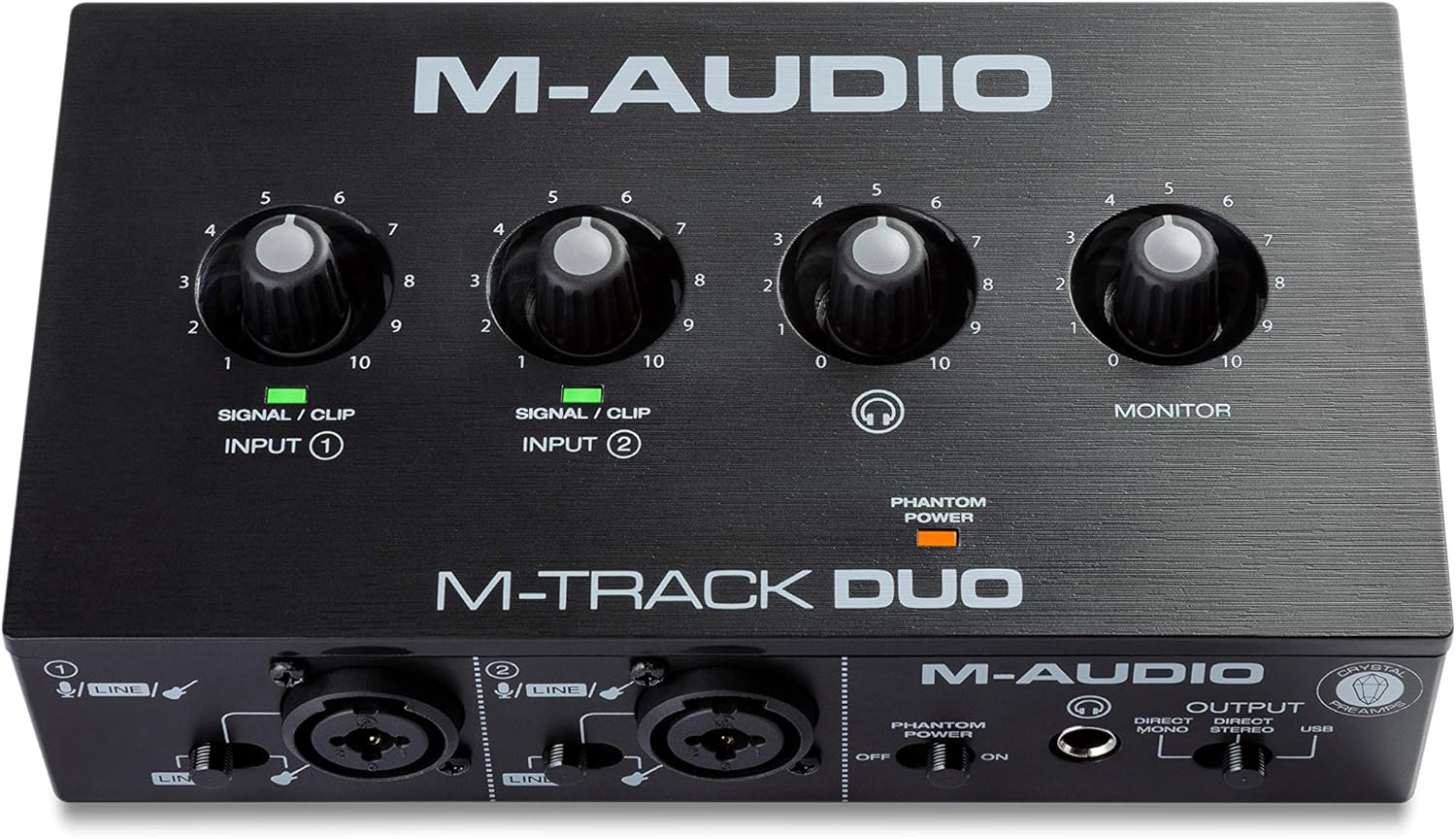
The M-Track Duo is a compact USB audio interface designed for podcasters, musicians, and content creators who need professional recording capabilities without the complexity or cost of larger studio setups. With dual XLR combo inputs, phantom power, and integrated instrument switching, this interface handles vocals, acoustic instruments, guitars, keyboards, and line-level devices with equal competence. It's the kind of gear that lets you go from idea to finished recording in minutes rather than hours.
What sets the M-Track Duo apart is its zero-latency direct monitoring feature, which eliminates the maddening delay that plagues cheaper interfaces. The USB/Direct switch lets you blend your live input signal with playback from your DAW, making it easy to record layered parts or add instruments to existing compositions. The transparent Crystal Preamps deliver clean, detailed audio that punches above its weight class, and phantom power support means you can work with professional condenser microphones without compromise.
Build quality is straightforward plastic construction that feels lightweight but proves durable in real-world use. The compact 7.5-inch width and 0.3kg weight make it genuinely portable, fitting easily into a laptop bag. All connections are professional-grade balanced XLR and quarter-inch TRS connectors, with a headphone output that supports standard stereo headphones via a quarter-inch adapter.
The main limitation is the 48kHz maximum sample rate, which is lower than some competing interfaces in higher price brackets. Additionally, some users report that gain staging requires careful management depending on your microphone, though this is rarely a dealbreaker for entry-level recording. The included MPC Beats software and ProTools First bundle provide legitimate production tools, though you'll likely graduate to more advanced DAWs as your skills develop.
The M-Track Duo delivers genuine value and reliability for anyone starting their recording journey or needing a portable backup interface. It handles its core mission of capturing clean, professional audio without fuss, making it an excellent choice for podcasters, singer-songwriters, and bedroom producers with realistic budgets.
Audio Specifications: Maximum sample rate of 48kHz with 16-bit resolution, 20kHz frequency response, and 1 megaohm impedance. Two channels of audio input and output.
Connectivity: Dual balanced XLR microphone inputs with phantom power, balanced quarter-inch line inputs, unbalanced quarter-inch instrument inputs, stereo quarter-inch main outputs, quarter-inch TRS headphone output, and USB Type B connection for computer and compatible iOS devices.
Dimensions and Weight: 7.5 inches wide by 4.34 inches deep by 2.13 inches tall, weighing just 0.3kg for maximum portability. Completely USB-powered with no external power supply required.
Compatibility: Works with Windows 7 and later via ASIO drivers, Mac OS High Sierra through Big Sur with class-compliant support, iOS with Apple Lightning to USB3 adapter, and Android devices. Compatible with all major DAWs including Logic Pro, ProTools, GarageBand, Studio One, Cubase, and Ableton Live.
Included Accessories: USB Type B to Type A cable, software download cards for MPC Beats and ProTools First, user guide, and safety documentation. Backed by a one-year manufacturer warranty.
Ideal For: This interface is perfect for podcasters launching their first show, musicians recording demos at home, content creators adding professional audio to videos, and anyone needing portable recording capability. It's also excellent for experienced engineers who need a reliable backup interface or travel-friendly setup.
Consider Alternatives If: You require sample rates above 48kHz for professional mastering work, need more than two simultaneous inputs, or demand premium metal construction and extensive onboard controls. However, for the vast majority of recording scenarios, the M-Track Duo delivers everything you need.
Budget Consideration: At this price point, the M-Track Duo offers exceptional value compared to single-channel competitors and provides genuine professional features like phantom power and zero-latency monitoring that many similarly-priced interfaces omit entirely.

Pros
- Exceptional audio quality with no background noise, even at budget price point
- Truly plug-and-play functionality works immediately on Windows, Mac, and Linux systems
- Dual combo jacks provide maximum flexibility for microphones, guitars, and line-level sources
- Lightweight and compact form factor ideal for desk space and portability
- Zero-latency monitoring enables confident tracking without hearing delay or echo
Cons
- LED illumination on gain knobs does not function as prominently displayed in product images
- Requires careful gain adjustment when connecting instruments with built-in preamps to avoid clipping
- Limited to 2 input channels, which may not suit users needing more simultaneous inputs
The PIYONE Q2 is a 2x2 USB-C audio interface designed for home recordists, podcasters, guitarists, and content creators who want professional-grade sound without complexity. It bridges the gap between budget-friendly and professional-quality recording, making it an ideal first interface for beginners or a secondary interface for established creators.
The standout feature is its genuine plug-and-play operation. Simply connect the USB-C cable to your computer, and the interface is recognized immediately on Windows, Mac, and Linux systems without any driver installation. The 24-bit/192kHz audio resolution captures professional-quality recordings with excellent clarity and minimal noise. The zero-latency direct monitoring feature eliminates tracking delays, allowing you to hear yourself in real-time without the frustrating latency that plagues cheaper interfaces. Dual XLR/TRS combo inputs with 48V phantom power provide flexibility for condenser microphones, dynamic mics, guitars, and line-level sources.
Build quality and design are impressive for the price. The compact form factor fits easily on any desk without consuming valuable space. The illuminated control knobs create a modern, professional aesthetic that looks great in any studio setup. The interface feels solid and well-constructed, with ergonomic knobs and buttons positioned for comfortable operation during long recording sessions.
One notable drawback is that the LED illumination on the gain knobs does not function as prominently as shown in product images, which may disappoint users specifically drawn to this visual feature. Additionally, users must exercise caution when adjusting gain levels with instruments that have built-in preamps, as excessive gain can cause clipping. The 2-channel limitation means this interface cannot handle multiple simultaneous inputs beyond two sources.
Verdict: The PIYONE Q2 delivers exceptional value for beginners and budget-conscious creators seeking professional audio quality without complexity. Its combination of studio-grade sound, zero-latency monitoring, and truly plug-and-play setup makes it an excellent choice for home recording, podcasting, and content creation. Recommended for anyone starting their recording journey or needing a reliable portable interface.
Audio Quality: 24-bit resolution, 192kHz maximum sample rate, high-performance converters, low-noise design
Connectivity: USB-C port (handles both data transfer and bus power), 3.5mm headphone jack
Inputs: 2 XLR/TRS combo jacks, 48V phantom power supply
Channels: 2 input channels, 2 output channels
Features: Zero-latency direct monitoring, monitor mix function, loopback capability, illuminated control knobs, class-compliant design
Compatibility: Mac, Windows PC, Linux, iOS (via USB-C adapter)
Physical: Compact portable design, 0.74 kg weight, Alloy Red finish
Warranty: 2-year limited warranty
Ideal For: Beginner recording artists, podcasters, singer-songwriters, content creators, home studio enthusiasts, and anyone seeking professional audio quality without complex setup requirements.
Perfect Use Cases: Recording vocals with condenser microphones, capturing acoustic guitar performances, podcasting and voice-over work, streaming with professional audio quality, music production on a budget, portable recording for travel or mobile content creation.
Not Ideal For: Users requiring more than 2 simultaneous inputs, professional studios with extensive I/O requirements, or those specifically seeking prominent LED illumination effects on control knobs.
How to Choose an Audio Interface with Optical Input
Understand Your Digital Connection Needs
First, confirm what type of digital output your external gear has. Optical (Toslink) and coaxial (RCA) are the two common S/PDIF formats. Some interfaces support only one, while higher-end models might offer both. Ensure compatibility to avoid needing extra converters.
Consider how many channels you need to transfer digitally. A standard S/PDIF connection carries two channels of uncompressed audio. If you need to connect an 8-channel digital mixer, you’ll require an interface with ADAT optical input, which uses the same port but supports multiple channels. This is a key distinction for expanding your USB audio interface setup.
Evaluate Overall I/O and Expandability
The optical input is just one part of the puzzle. Look at the total input and output count. How many microphones, instruments, and line-level devices do you need to connect simultaneously? An interface like the Fender Quantum LT 16 offers massive analog I/O alongside its digital capabilities for large hybrid studios.
Think about future growth. If you plan to add more outboard gear or microphones, choose an interface with ample analog inputs and outputs. Features like MIDI I/O are also crucial for integrating hardware synthesizers and controllers, making your setup more versatile.
Prioritize Sound Quality and Converter Performance
The quality of the analog-to-digital and digital-to-analog converters directly impacts your sound. Look for interfaces with high sample rates (like 192 kHz) and bit depths (24-bit is standard). A wide dynamic range, such as the 120dB offered by the Focusrite Scarlett 4i4 4th Gen, ensures cleaner recordings with more detail.
Pay attention to the microphone preamps. They should be transparent and offer sufficient gain for dynamic mics. If you record vocals or acoustic instruments often, pristine preamps are non-negotiable. This quality is validated across all the interfaces in our audio interfaces category.
Check for Workflow and Monitoring Features
Your daily workflow depends on intuitive controls. Look for dedicated monitor mix knobs, pad switches, and phantom power buttons. For podcasters and streamers, a loopback function is essential for routing computer audio back into your recording software seamlessly.
Low-latency monitoring is critical for recording. Ensure the interface has robust drivers or a direct monitoring switch to hear yourself without distracting delay. Also, consider connectivity; a USB-C audio interface offers faster data transfer and modern cable compatibility for laptops and newer computers.
Final Thoughts
Choosing the right interface with optical input unlocks professional digital integration for your studio. For creators building a comprehensive hybrid setup with extensive analog and digital I/O, the Fender Quantum LT 16 | 16-in 8-out USB-C Audio is a formidable hub. If your priority is legendary preamp clarity, reliable performance, and a streamlined workflow in a compact unit, the Focusrite Scarlett 4i4 4th Gen USB-C Audio remains a benchmark choice for musicians and producers at any level.
Frequently Asked Questions
What is the main use for an optical input on an audio interface?
An optical input, often labeled S/PDIF or ADAT, allows you to connect external digital audio gear directly to your interface. This is used for digital mixers, CD players, certain synthesizers, or another interface, transferring audio in a pristine digital format without additional analog conversion that can degrade quality.
Can I use an optical input to connect my studio monitors?
Typically, no. Studio monitors usually connect via analog TRS or XLR cables from your interface’s main outputs. The optical input is for receiving a digital audio signal from another source device, not for sending signal to speakers. You would use the interface’s analog outputs or a dedicated digital output for compatible monitors.
What’s the difference between S/PDIF optical and ADAT optical?
They use the same physical Toslink cable and port but carry different data. S/PDIF optical transfers two channels of audio, often for consumer or stereo professional gear. ADAT optical can transfer up to eight channels of audio at 48kHz, making it essential for expanding your interface’s input count with a digital preamp or another interface.
Do I need special drivers for an interface with optical input?
It depends on the interface. Most require you to install specific drivers from the manufacturer’s website for full functionality and lowest latency, especially on Windows. Some class-compliant models work plug-and-play on Mac and sometimes PC, but always check the product specifications for the best performance in 2026.



Write Your Review
No reviews yet. Be the first to share your experience!