

You have the perfect beat sketched out in your head, a vocal melody ready to go, and FL Studio open on your screen. The only thing standing between you and a finished track is capturing that sound with clarity and punch. An audio interface is the critical bridge that transforms your musical ideas into professional-grade recordings within your DAW. For FL Studio users, this choice is especially important, as the right interface ensures stable performance, low latency for real-time VST instruments, and the pristine audio quality your productions deserve.
This guide cuts through the noise to present the top audio interfaces validated for seamless work with FL Studio. Whether you’re a bedroom producer laying down your first vocals or a seasoned musician tracking a full band, we have evaluated key factors like driver stability, preamp quality, and connectivity to match you with the perfect tool. Let’s find the interface that will become the reliable heart of your studio.
Pros
- Excellent preamp quality produces bright, clear recordings with minimal noise floor
- Air mode adds professional polish to vocal and acoustic recordings without additional equipment
- Compact design perfect for home studios, bedroom producers, and mobile recording setups
- Included software suite eliminates need for expensive DAW purchases
- Highly reliable brand with strong reputation in professional audio industry
Cons
- Single microphone input limits simultaneous multi-instrument recording capabilities
- May require audio driver updates for optimal performance on some Windows systems
- Learning curve for beginners unfamiliar with audio interface operation and gain staging
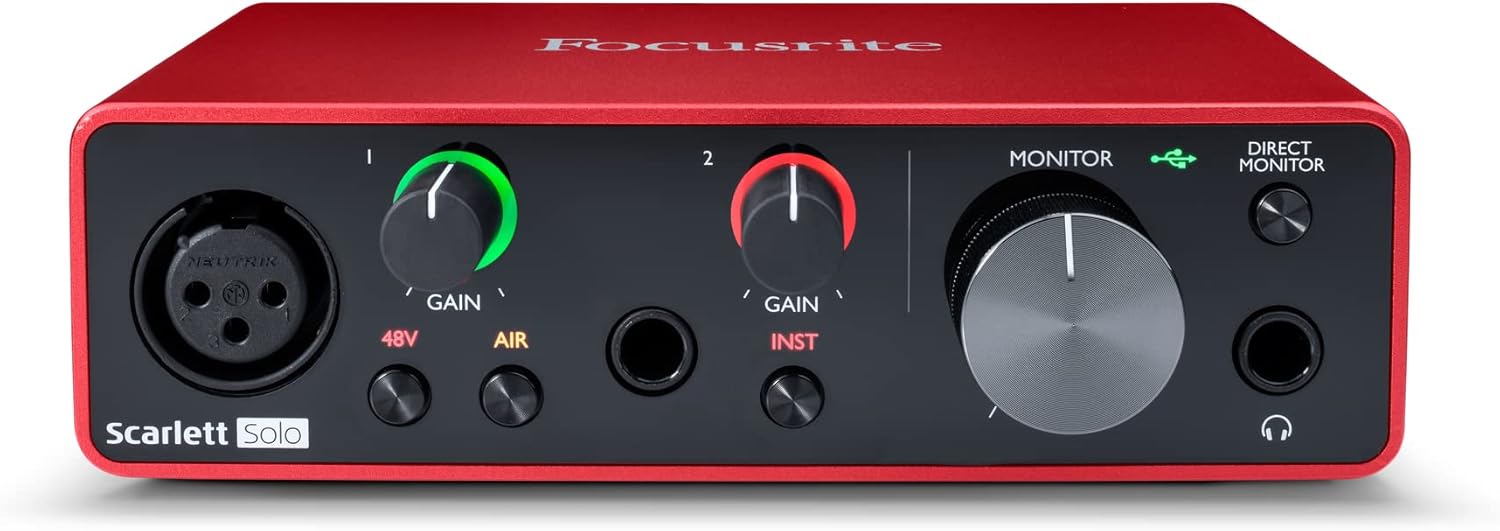
The Focusrite Scarlett Solo 3rd Gen is a professional USB audio interface designed for musicians, podcasters, and content creators who demand studio-quality recordings without the complexity of larger mixing consoles. This compact device bridges the gap between budget-friendly entry-level gear and expensive professional equipment, making it ideal for home studios, bedroom producers, and anyone serious about capturing professional-grade audio.
The standout feature is undoubtedly the high-performance microphone preamp paired with the innovative Air mode, which adds extra clarity and presence to vocals and acoustic instruments. The two high-headroom instrument inputs eliminate clipping and distortion, ensuring your guitar, bass, and other instruments shine through with clarity. Recording at up to 24-bit/192kHz resolution means your productions retain all sonic nuances, while the Gain Halo visual feedback system helps you nail perfect levels every time.
Build quality reflects Focusrite's professional heritage, with a solid metal chassis and intuitive front-panel controls that feel responsive and durable. The USB-C connectivity provides fast, reliable data transfer and modern compatibility with both Mac and Windows systems. The included software bundle (Pro Tools Intro+, Ableton Live Lite, Cubase LE) gives you everything needed to start producing immediately without additional software purchases.
The primary limitation is the single microphone input, which restricts simultaneous multi-track vocal or acoustic recording. Additionally, some Windows users report requiring driver updates for optimal performance. The learning curve for gain staging and audio interface operation may challenge complete beginners, though the included documentation is comprehensive.
The Focusrite Scarlett Solo 3rd Gen represents exceptional value for serious hobbyists and semi-professional creators. Its combination of pristine preamp quality, professional converters, intuitive design, and included software makes it the go-to choice for anyone upgrading from computer microphones or entry-level interfaces. The three-year warranty provides confidence in your investment.
Audio I/O: 1 XLR microphone input, 2 high-impedance instrument inputs, 2 balanced line outputs, headphone output
Audio Quality: 24-bit/192kHz recording and playback resolution with high-performance converters
Connectivity: USB-C to computer, compatible with all major audio recording software
Channels: 2 channels (stereo)
Features: Switchable Air mode, Gain Halo visual feedback, low-noise outputs, headphone monitoring
Software Included: Pro Tools Intro+, Ableton Live Lite, Cubase LE, Hitmaker Expansion
Warranty: 3-year manufacturer warranty worldwide
Compatible Devices: Microphones, instruments, personal computers, headphones, studio monitors
Who Should Buy: Musicians recording at home, podcasters seeking professional audio quality, guitarists and bassists needing quality instrument preamps, content creators upgrading from built-in computer audio, and producers working with limited space.
Who Should Look Elsewhere: Users needing simultaneous multi-microphone recording, those requiring extensive analog mixing features, or professionals running high-channel-count studios requiring more I/O options.
Setup Tips: Ensure your computer meets USB-C requirements and install drivers before first use. Spend time learning gain staging with the Gain Halo visual indicator to avoid clipping. Experiment with Air mode on different sources to understand its impact on your recordings.
Value Comparison: At this price point, the Scarlett Solo 3rd Gen outperforms competitors by offering superior preamp quality, professional software bundle, and proven brand reliability. The included software alone typically costs $200+ if purchased separately.

Pros
- MIDAS preamps deliver clean, low-noise signal path comparable to much more expensive interfaces
- Intuitive plug-and-play setup with minimal driver hassle on both Mac and Windows systems
- Robust build quality and metal construction designed to withstand years of studio use
- Four simultaneous inputs and outputs provide flexibility for multi-track recording and live streaming
- Outstanding value proposition offering professional-grade specs at entry-level pricing
Cons
- Some users report occasional driver compatibility issues on certain Windows OS versions
- MIDI functionality may require additional configuration compared to audio I/O setup
- Limited customer support documentation compared to higher-end competitors
The Behringer U-PHORIA UMC404HD is a compact 4x4 USB audio interface engineered for home studio owners, podcasters, content creators, and mobile recording professionals. It delivers professional-grade audio quality at a price point that makes it accessible to anyone serious about recording but budget-conscious. The interface has earned respect from experienced audio engineers and casual users alike for punching well above its price class.
The standout feature is the inclusion of four MIDAS-designed mic preamps with +48V phantom power, which typically appear only on interfaces costing two to three times as much. Users consistently praise the clean, low-noise signal path and the ability to capture vocals and instruments with clarity and detail. The 24-bit/192 kHz resolution ensures future-proof audio quality, while ultra-low latency streaming supports real-time monitoring during recording sessions. Compatibility with Pro Tools, Ableton Live, Cubase, and other major DAWs means you can integrate it into virtually any existing workflow.
Build quality reflects Behringer's partnership with MIDAS and acquisition of Music Tribe assets. The metal chassis feels solid and impact-resistant, designed to handle the rigors of studio use and travel. The interface is compact at just 11.5 inches wide, making it ideal for portable recording setups or tight desk spaces. Balanced XLR and 1/4-inch outputs ensure professional connectivity to studio monitors and mixing equipment.
The main drawbacks involve driver setup on certain Windows systems and MIDI configuration, which some users find less intuitive than audio I/O setup. A small percentage of users report compatibility issues, though this appears to be system-specific rather than a widespread product defect. Driver support for Mac OS is notably streamlined, with native OS integration requiring minimal configuration.
The Behringer UMC404HD represents genuine value in the audio interface market. It combines professional-grade components, solid engineering, and proven reliability at a price that makes it the obvious choice for anyone building a home studio or upgrading from entry-level equipment. Experienced audio professionals and beginners alike will find it a capable, dependable tool that won't compromise recording quality.
Audio Specifications: 24-bit/192 kHz resolution, 10 Hz to 43 kHz frequency response (0/+0.3 dB). Maximum input levels: Microphone -4 dBu, Line +20 dBu, Instrument -3 dBu. Four MIDAS-designed mic preamps with +48V phantom power.
Connectivity: USB 2.0 interface with 4 inputs/4 outputs plus 1x MIDI I/O. Balanced XLR and 1/4-inch TRS connectors for main outputs. Supports both Mac OS X and Windows XP or higher.
Compatibility: Works with Avid Pro Tools, Ableton Live, Steinberg Cubase, Reaper, Audacity, and other major DAWs. Native driver support for Mac OS, simple driver installation for Windows.
Physical Dimensions: 11.5 inches D x 5.12 inches W x 1.81 inches H. Weight: 2.7 pounds. Rugged metal chassis with impact-resistant construction.
Ideal For: Home studio owners, podcasters, content creators, musicians recording at home, audio engineers on a budget, and anyone upgrading from entry-level USB interfaces. Perfect for mobile recording setups and professional use in tight spaces.
Experience Level: Suitable for beginners through advanced users. The plug-and-play setup welcomes newcomers, while the professional-grade preamps and specifications satisfy experienced engineers.
Use Cases: Music production and multi-track recording, podcast and voiceover recording, live streaming with high-quality audio, instrument recording, vocal tracking, and field recording with a portable setup.
Pros
- Exceptional value with included professional-grade plugins and DAW software
- Vintage preamp mode delivers warm, analog character that enhances vocal and instrument recordings
- Extremely user-friendly with plug-and-play setup and low learning curve for beginners
- Compact, lightweight design with premium metal construction feels durable and portable
- Excellent cross-platform compatibility including iOS and iPad support
Cons
- Limited to 1 input and 2 outputs, which may feel restrictive for multi-track recording setups
- Requires external power supply and takes up two USB ports when connected to computer
- Vintage preamp mode can introduce distortion if input gain is set too high
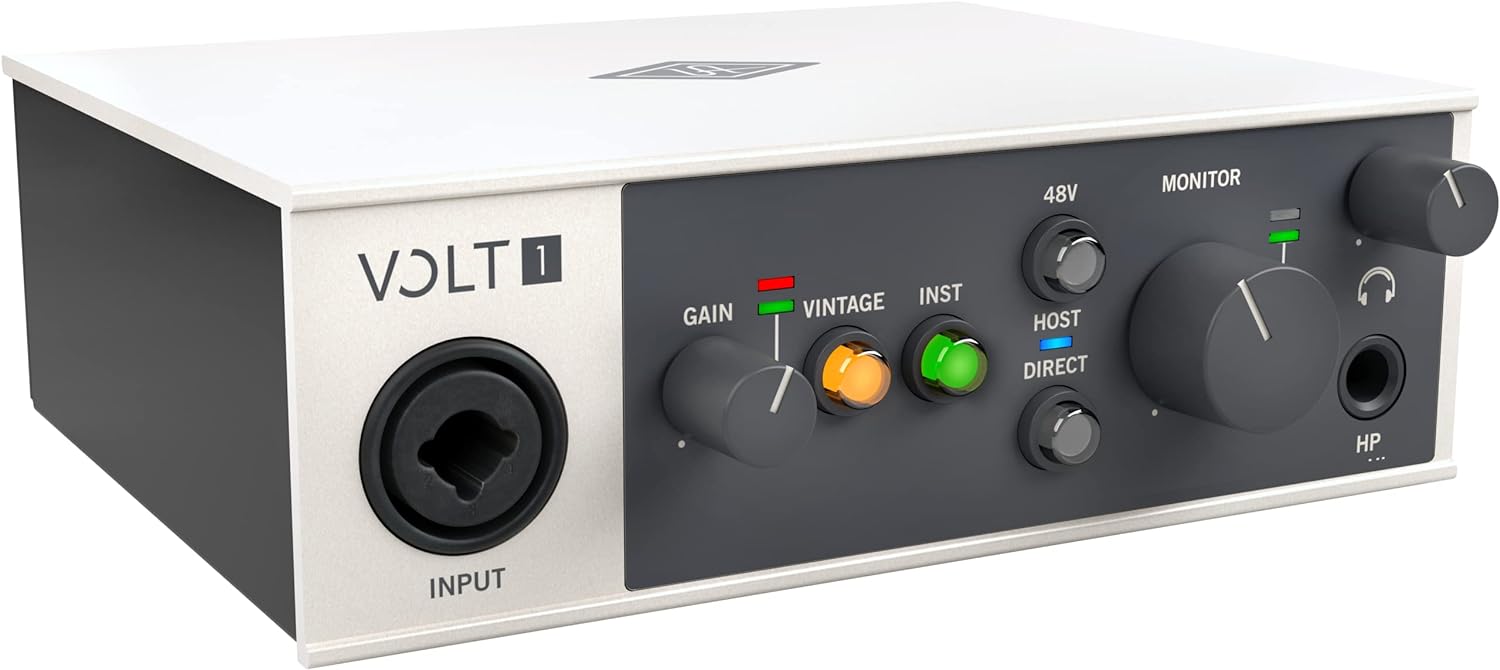
The Universal Audio Volt 1 is a professional-grade USB audio interface designed specifically for home recording enthusiasts, singers, songwriters, guitarists, livestreamers, and podcasters. At its core, it delivers studio-quality sound in a compact form factor that works across Mac, Windows, iPad, and iPhone, making it an ideal choice for anyone looking to start or upgrade their recording setup without breaking the bank.
What truly sets the Volt 1 apart is its inclusion of Universal Audio's legendary 610 tube preamp emulation in Vintage mode, combined with a suite of professional UAD plugins and the award-winning LUNA Digital Audio Workstation. You get access to industry-standard tools like the LA-2A and 1176 compressors, Pultec EQs, and more, which normally cost hundreds of dollars separately. The interface captures audio at up to 24-bit/192kHz resolution with crystal-clear converters, ensuring every detail and nuance of your performance is preserved.
The build quality is impressive for the price range, featuring a solid metal construction with a sleek grey finish, premium knobs, and a compact footprint measuring just 5.71 inches wide. Users consistently praise its durability, low noise floor on monitoring levels, and minimal latency, making it reliable whether you're tracking vocals, instruments, or streaming live content. The plug-and-play setup means you'll be recording within minutes of unboxing.
The main limitation is its 1-in/2-out configuration, which restricts simultaneous multi-track recording and may feel constraining as your skills advance. Additionally, the vintage preamp can introduce unwanted distortion if you push the input gain too aggressively, and the interface requires both an external power supply and two USB ports, which some users find inconvenient.
The Universal Audio Volt 1 represents exceptional value for beginners and intermediate recordists. Its combination of professional sound quality, included software, and ease of use makes it one of the best audio interfaces in its price range. Whether you're building your first home studio or looking for a portable recording solution, the Volt 1 delivers the sound and reliability you'd expect from Universal Audio's heritage.
Audio Quality: 24-bit/192kHz maximum sample rate with high-quality converters for pristine audio capture.
Connectivity: USB connection with support for Mac, Windows, iPad, and iPhone (iOS 14 and later). Requires external power supply and Lightning to USB adapter for iPhone compatibility.
I/O Configuration: 1 audio input and 2 audio outputs, compatible with microphones, electric guitars, and MIDI devices.
Physical Design: Dimensions of 5.71 inches wide by 5.12 inches deep by 1.97 inches high, weighing 544 grams, with premium metal construction.
Included Software: LUNA Digital Audio Workstation, UAD plugins including LA-2A, 1176, Pultec EQs, PolyMAX Synth, Century Tube Channel Strip, and Oxide Tape Recorder.
Warranty: 1-year manufacturer warranty included.
Ideal For: The Volt 1 is perfect for singers, songwriters, guitarists, podcasters, and livestreamers who want professional recording quality without the complexity or cost of larger interfaces. It's an excellent choice for beginners building their first home studio, as well as established musicians looking for a portable, secondary recording solution.
Best Use Cases: Home vocal and guitar recording, podcast production, live streaming with Discord or similar platforms, songwriting and demo creation, and mobile recording on iPad or iPhone. The included software suite makes it particularly valuable for users who want to learn mixing and production without purchasing additional plugins.
Not Ideal For: Musicians who need multiple simultaneous inputs for full band recording or complex multi-track setups should consider larger interfaces with more I/O options. Those with strict USB port limitations on their computer may find the dual USB requirement inconvenient.
Pros
- Exceptional build quality proven by long-term user reliability in 24/7 studio environments
- Easiest setup process compared to competing brands like Behringer, Mackie, and Focusrite
- Excellent value with included professional DAW software and plug-in suite
- Pristine audio quality with clean, natural sound reproduction across all input types
- Compact footprint makes it ideal for home studios, mobile recording, and travel production
Cons
- Limited to 2x2 simultaneous I/O, which may constrain users needing more input/output channels
- Insufficient power delivery from tablet USB-C ports requires external hub for iPad compatibility
- Learning curve for Studio One software may require time investment for beginners despite easy setup
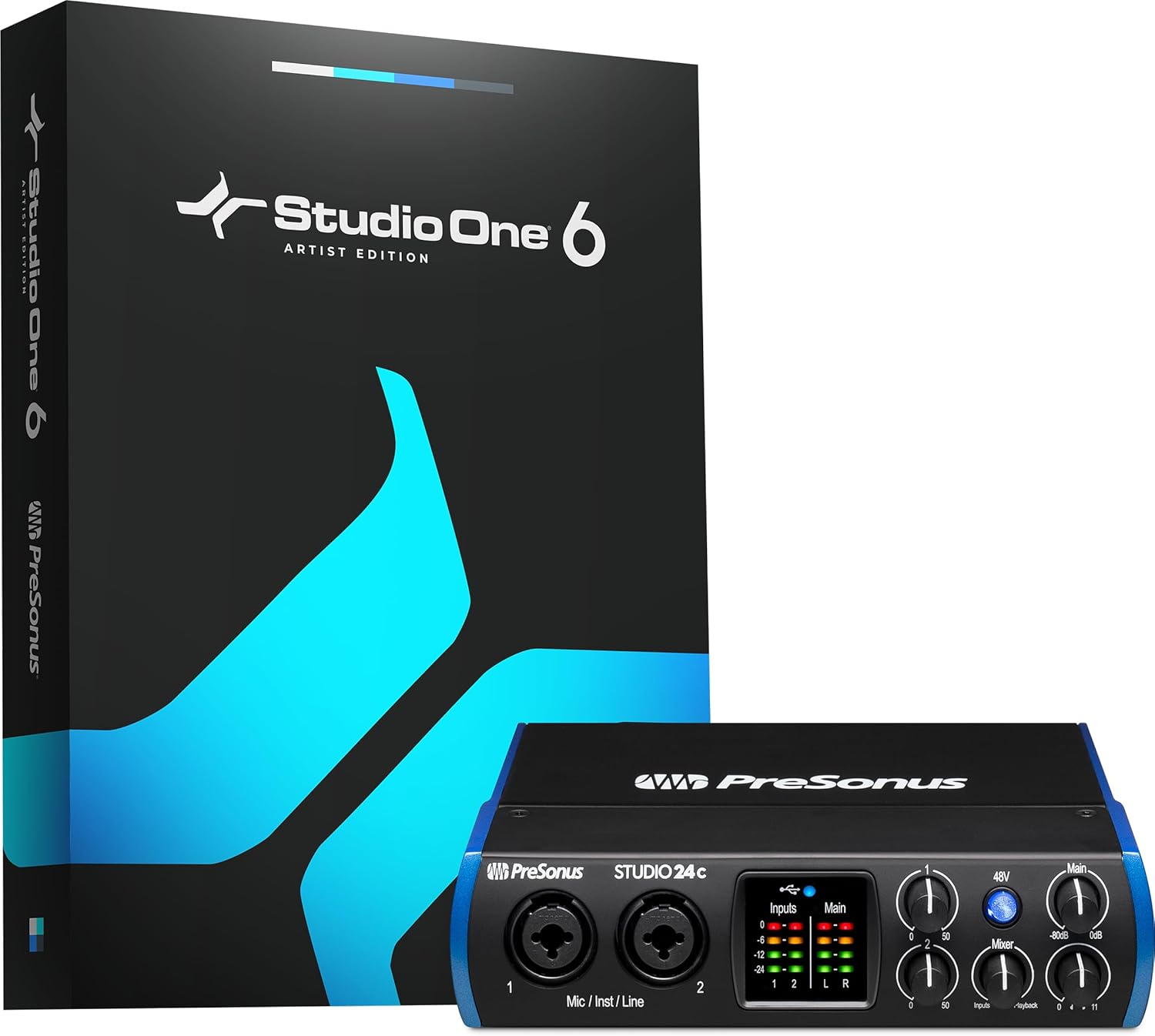
The PreSonus Studio 24c is a compact 2x2 USB-C audio interface designed for home studio recording, podcasting, and mobile music production. It combines professional-grade components with beginner-friendly setup, making it suitable for first-time recordists and seasoned producers seeking a portable solution. The included Studio One 6 Artist Edition transforms it into a complete recording package out of the box.
The standout feature is PreSonus' XMAX-L solid-state mic preamps, which deliver pristine sound quality comparable to interfaces costing significantly more. The 24-bit/192kHz recording resolution captures complex musical harmonics smoothly, while the high-power headphone output and mixer knob enable professional low-latency monitoring. Users consistently praise the interface for crisp, clean audio performance across vocals, guitars, bass, and podcasting applications, with one long-term user reporting six years of continuous 24/7 operation without failure.
The design excels in both form and function. The rugged compact chassis measures just 6.3 inches deep, making it ideal for cramped home studios or travel setups. Front-panel LED metering on inputs and main outputs provides visual feedback during recording, while the included USB-C to USB-A and USB-C to USB-C cables ensure compatibility with virtually all modern computers. Setup is remarkably straightforward, with users noting it's the easiest interface they've configured compared to Behringer, Mackie, M-Audio, and Focusrite alternatives.
The primary limitation is the 2x2 channel configuration, which restricts simultaneous recording to two sources. Additionally, iPad users should note that Apple tablets cannot supply sufficient power through their USB-C ports, requiring an external powered hub for operation. The learning curve for Studio One software, while manageable, requires time investment despite the interface's plug-and-play setup.
The PreSonus Studio 24c delivers exceptional value for home recordists, podcasters, and musicians needing portable professional audio capture. Its combination of premium preamps, high-resolution recording, included software, and proven reliability makes it an outstanding choice at this price point. Recommended for anyone serious about recording quality without requiring advanced multi-track capabilities.
Audio I/O: 2 mic/instrument/line inputs with XMAX-L preamps, 2 balanced 1/4-inch TRS outputs, high-power headphone output, MIDI In/Out
Audio Quality: 24-bit resolution, 44.1 kHz to 192 kHz sampling rates (44.1, 48, 88.2, 96, 176.4, 192 kHz)
Connectivity: USB-C (bus-powered), includes USB-C to USB-A and USB-C to USB-C cables
Metering: 4 ladder-style LED level meters (2 input, 2 main output) with front-panel controls
Monitoring: Mixer knob for low-latency direct input monitoring and blend of analog inputs with computer playback
Dimensions: 6.3 inches deep x 7.09 inches wide x 1.77 inches high, 16 ounces
Compatibility: macOS and Windows, works with Studio One Pro, Ableton Live, FL Studio, Cubase, Pro Tools, Logic Pro, Reaper, and more
Included Software: Studio One 6 Artist Edition, Studio Magic Plug-in Suite
Warranty: 1-year manufacturer warranty
Who Should Buy: First-time home recordists, podcasters, singer-songwriters, and mobile producers seeking professional sound quality without complexity. Also ideal for experienced producers wanting a portable secondary interface. Not recommended for users requiring more than 2 simultaneous inputs or advanced multi-track recording capabilities.
Best Use Cases: Home music recording, podcast production, guitar and bass recording, vocal tracking, mobile studio setups, and travel recording. The bus-powered design and compact form factor make it perfect for bedroom studios and on-location recording sessions.
Setup Considerations: Windows and macOS compatible. Requires USB-C port on computer. iPad users need external powered hub due to insufficient tablet power delivery. Registration at PreSonus website unlocks warranty benefits and driver downloads.
Software Learning: Studio One 6 Artist Edition is intuitive but requires time to master. Beginners can make basic recordings immediately, though full feature exploration takes additional practice. Upgrade path to Studio One Pro available when ready for advanced capabilities.
Alternative Consideration: If you need more than 2 simultaneous inputs, consider larger PreSonus interfaces or competing multi-channel models. For iPad-only recording, verify mobile compatibility before purchase.

Pros
- Exceptional value for budget-conscious beginners and experienced musicians on tight budgets
- Midas preamp technology ensures professional-grade sound quality that punches above its price class
- Straightforward setup requires minimal technical knowledge, making it ideal for first-time users
- Durable metal casing and proven track record provide confidence in long-term reliability
- Direct monitor switch and headphone output enable comfortable tracking without latency issues
Cons
- Monitor output quality is noticeably lower than higher-end interfaces, limiting mixing accuracy
- Signal and clipping indicator lights only activate above 50% gain, potentially missing some input issues
- Limited to 48 kHz base sample rate, though it can handle up to 96 kHz with some DAWs
The Behringer UMC22 is a compact 2x2 USB audio interface designed for solo musicians, podcasters, home recordists, and anyone entering the world of digital audio production. This interface brings professional recording capabilities to your laptop or desktop computer without the complexity or expense of high-end gear. It is specifically built for creators who prioritize simplicity, affordability, and reliable performance over flashy features.
The standout feature is undoubtedly the Midas-designed mic preamp, which carries decades of professional audio heritage into this budget-friendly package. Users consistently report that the preamp delivers surprisingly clean, detailed recordings of vocals and acoustic instruments. The combination XLR/TRS input jack accommodates both microphones and line-level gear, while the dedicated 1/4 inch instrument input lets you connect guitars or keyboards without needing external adapters. Direct monitoring capability allows you to hear yourself in real-time during recording, dramatically improving performance quality and reducing latency frustration.
Build quality is solid with an all-metal chassis that feels more durable than competitors at this price point. The interface requires no external power supply thanks to USB bus power, and driver installation is straightforward on both Windows and Mac systems. Setup takes minutes rather than hours, and the device integrates seamlessly with Pro Tools, Ableton Live, Cubase, and virtually every other major DAW on the market. The compact size makes it genuinely portable for mobile recording sessions or travel.
The main limitations are that the monitor output quality is noticeably compromised compared to higher-tier interfaces, and the signal indicator lights require above 50% gain to function properly. The base sample rate tops out at 48 kHz, though some configurations support up to 96 kHz. These tradeoffs are reasonable given the price point and intended use case.
The UMC22 remains an excellent first interface or backup solution for anyone serious about recording but unwilling to spend hundreds of dollars. After a decade on the market with thousands of satisfied users, it has proven its reliability and value proposition repeatedly. For under fifty dollars, you get professional-grade preamp technology, plug-and-play simplicity, and genuine recording capability that will not disappoint beginners or budget-conscious professionals alike.
Audio Connectivity: 2 inputs via combination XLR/TRS jack plus 1/4 inch instrument input, 2 outputs via 1/4 inch TRS jacks, USB 2.0 connection
Audio Quality: 48 kHz sample rate standard, up to 96 kHz maximum, 24-bit resolution, Midas-designed mic preamp with phantom power support
Physical Specs: Ultra-compact all-metal housing, USB bus powered, no external power supply required, weight approximately 16 ounces
Compatibility: Windows and Mac computers, compatible with Pro Tools, Ableton Live, Cubase, and all major DAW software
Features: Direct monitor select switch, headphone output with dedicated volume control, signal and clip indicator LEDs, +48V phantom power switch
Who Should Buy: This interface is perfect for beginners making their first recording setup investment, podcasters needing reliable voice capture, home musicians recording guitar or vocals, and experienced engineers seeking an affordable backup interface. It excels for solo artists working in small spaces or mobile recording situations.
Who Should Look Elsewhere: If you need professional mixing and mastering capabilities with pristine monitor output, or if you require more than two simultaneous inputs, consider stepping up to a higher-tier interface. Producers working at 192 kHz or requiring FireWire connectivity should also explore alternatives.
Setup Tips: Install drivers before connecting the device. Use quality balanced XLR cables for microphone connections to minimize noise. Position the interface on a stable surface away from magnetic interference. Adjust input gain so the signal peaks around 75% to avoid clipping while maintaining headroom.
Best Use Cases: Home recording studios, podcasting setups, guitar and vocal recording, bedroom producer setups, educational environments, and as a portable backup interface for traveling musicians.
Pros
- Exceptional value at this price point with dual XLR inputs that competitors charge significantly more for
- Compact 7.5-inch width and lightweight design make it genuinely portable for on-the-go recording
- Zero-latency monitoring via USB/Direct switch eliminates the frustration of hearing delayed playback while recording new parts
- Included software suite jumpstarts your production immediately without additional purchases
- Transparent preamps deliver clean, professional-grade audio from entry-level to mid-range microphones
Cons
- Plastic construction feels lightweight, which some users perceive as lower build quality despite reliable performance
- 48kHz maximum sample rate is lower than some competing interfaces, limiting high-resolution audio work
- Gain staging may require careful management with certain microphones, as some users report insufficient gain at maximum levels
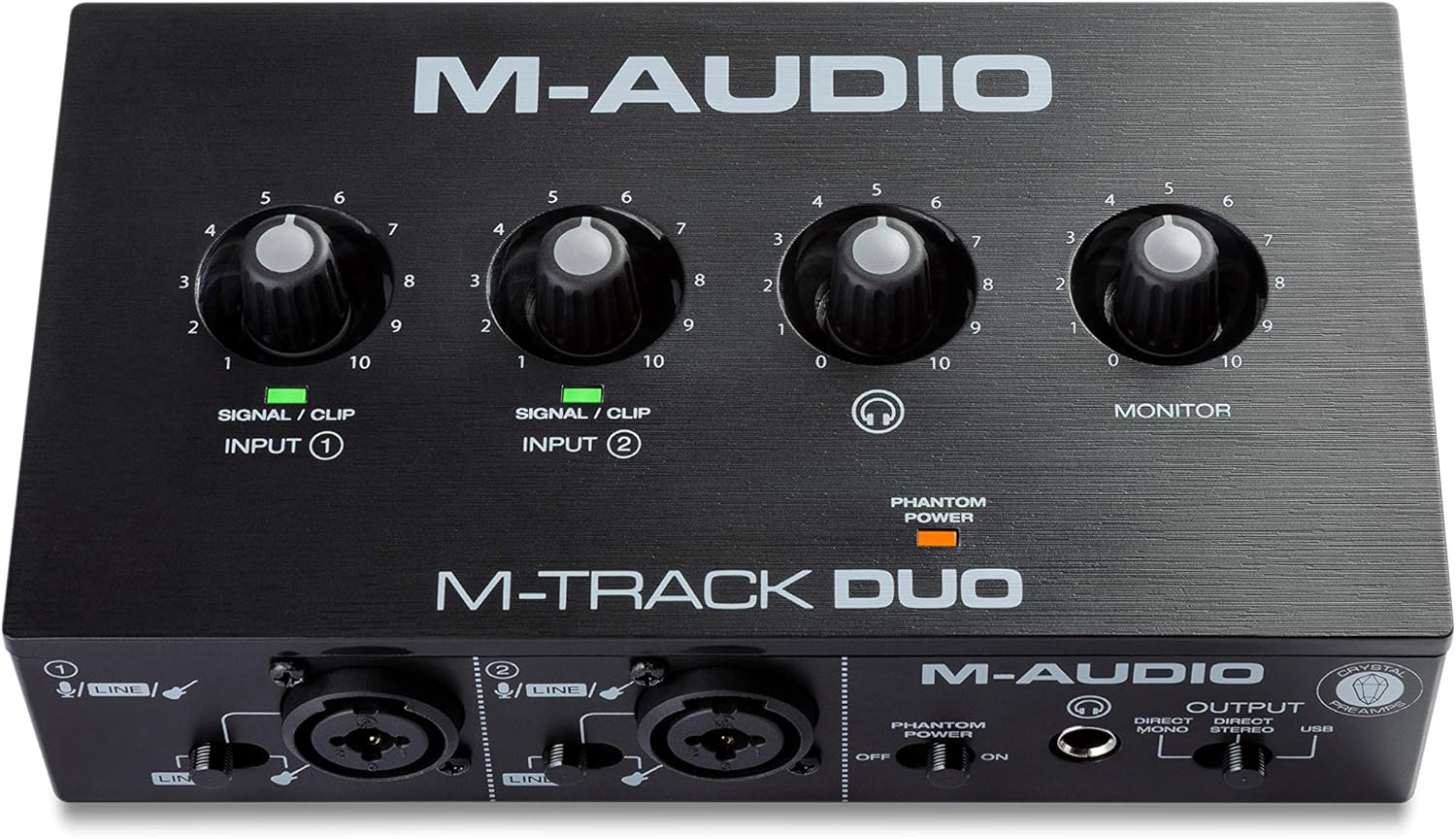
The M-Track Duo is a compact USB audio interface designed for podcasters, musicians, and content creators who need professional recording capabilities without the complexity or cost of larger studio setups. With dual XLR combo inputs, phantom power, and integrated instrument switching, this interface handles vocals, acoustic instruments, guitars, keyboards, and line-level devices with equal competence. It's the kind of gear that lets you go from idea to finished recording in minutes rather than hours.
What sets the M-Track Duo apart is its zero-latency direct monitoring feature, which eliminates the maddening delay that plagues cheaper interfaces. The USB/Direct switch lets you blend your live input signal with playback from your DAW, making it easy to record layered parts or add instruments to existing compositions. The transparent Crystal Preamps deliver clean, detailed audio that punches above its weight class, and phantom power support means you can work with professional condenser microphones without compromise.
Build quality is straightforward plastic construction that feels lightweight but proves durable in real-world use. The compact 7.5-inch width and 0.3kg weight make it genuinely portable, fitting easily into a laptop bag. All connections are professional-grade balanced XLR and quarter-inch TRS connectors, with a headphone output that supports standard stereo headphones via a quarter-inch adapter.
The main limitation is the 48kHz maximum sample rate, which is lower than some competing interfaces in higher price brackets. Additionally, some users report that gain staging requires careful management depending on your microphone, though this is rarely a dealbreaker for entry-level recording. The included MPC Beats software and ProTools First bundle provide legitimate production tools, though you'll likely graduate to more advanced DAWs as your skills develop.
The M-Track Duo delivers genuine value and reliability for anyone starting their recording journey or needing a portable backup interface. It handles its core mission of capturing clean, professional audio without fuss, making it an excellent choice for podcasters, singer-songwriters, and bedroom producers with realistic budgets.
Audio Specifications: Maximum sample rate of 48kHz with 16-bit resolution, 20kHz frequency response, and 1 megaohm impedance. Two channels of audio input and output.
Connectivity: Dual balanced XLR microphone inputs with phantom power, balanced quarter-inch line inputs, unbalanced quarter-inch instrument inputs, stereo quarter-inch main outputs, quarter-inch TRS headphone output, and USB Type B connection for computer and compatible iOS devices.
Dimensions and Weight: 7.5 inches wide by 4.34 inches deep by 2.13 inches tall, weighing just 0.3kg for maximum portability. Completely USB-powered with no external power supply required.
Compatibility: Works with Windows 7 and later via ASIO drivers, Mac OS High Sierra through Big Sur with class-compliant support, iOS with Apple Lightning to USB3 adapter, and Android devices. Compatible with all major DAWs including Logic Pro, ProTools, GarageBand, Studio One, Cubase, and Ableton Live.
Included Accessories: USB Type B to Type A cable, software download cards for MPC Beats and ProTools First, user guide, and safety documentation. Backed by a one-year manufacturer warranty.
Ideal For: This interface is perfect for podcasters launching their first show, musicians recording demos at home, content creators adding professional audio to videos, and anyone needing portable recording capability. It's also excellent for experienced engineers who need a reliable backup interface or travel-friendly setup.
Consider Alternatives If: You require sample rates above 48kHz for professional mastering work, need more than two simultaneous inputs, or demand premium metal construction and extensive onboard controls. However, for the vast majority of recording scenarios, the M-Track Duo delivers everything you need.
Budget Consideration: At this price point, the M-Track Duo offers exceptional value compared to single-channel competitors and provides genuine professional features like phantom power and zero-latency monitoring that many similarly-priced interfaces omit entirely.

Pros
- Exceptional value with $1000+ in included professional recording software
- True zero-latency monitoring lets you hear yourself clearly while recording
- Class A mic preamps deliver studio-quality sound at an affordable price point
- Bus-powered via USB means no external power supply needed for mobile recording
- Works seamlessly with Mac, Windows, iOS, and iPadOS devices
Cons
- Only 2 channels limits simultaneous recording of multiple instruments or band setups
- USB 2.0 connection may feel dated compared to newer USB-C interfaces
- Limited physical I/O compared to larger interfaces, though sufficient for solo and small ensemble recording
The PreSonus AudioBox USB 96 25th Anniversary Edition is a compact, bus-powered audio interface designed for musicians, podcasters, and content creators who need professional recording capabilities without the bulk or expense of larger studio setups. This interface delivers everything an aspiring recordist needs to capture high-quality audio, from the bedroom to the road.
The standout feature is the inclusion of Studio One Artist, Ableton Live Lite, and the Studio Magic Plug-in Suite, representing over $1000 in software value. Combined with two Class A mic preamps, 24-bit/96 kHz recording resolution, and a zero-latency mixer control, the AudioBox 96 punches well above its price point. The phantom power support accommodates professional condenser microphones, while the instrument inputs handle guitars, basses, and line-level devices with ease.
Build quality is solid, with a heavy-duty steel chassis that feels durable enough for frequent travel and gigging. The compact footprint (5.5 x 5.5 x 1.75 inches) makes it genuinely portable, and USB bus-power eliminates the need for an external adapter. The headphone output is genuinely loud and clear, crucial for accurate monitoring in less-than-ideal environments.
The main limitation is the 2-channel configuration, which restricts simultaneous recording to stereo pairs or single instruments. The USB 2.0 connection is also showing its age in an era of USB-C interfaces, though bandwidth remains adequate for the interface's capabilities. For solo artists, podcasters, and singer-songwriters, these limitations are negligible.
The PreSonus AudioBox USB 96 is an excellent entry point into professional recording that doesn't compromise on quality or software. Whether you're recording your first podcast or adding a portable interface to an existing setup, this 25th Anniversary Edition delivers professional results at a consumer-friendly price.
Audio I/O 2 combo mic/instrument inputs, 2 balanced line-level outputs, 1 headphone output, MIDI I/O
Recording Specs 24-bit/96 kHz resolution, Class A mic preamps with 48V phantom power, 51 ohm impedance
Connectivity USB 2.0 Type-A to Type-B cable included, USB class-compliant, compatible with Windows, macOS, iOS, and iPadOS
Physical 5.5 x 5.5 x 1.75 inches, 2 pounds, heavy-duty steel chassis, bus-powered
Software Included Studio One Artist, Ableton Live Lite, Studio Magic Plug-in Suite, plus access to Studio One Pro upgrade path
Warranty 1 year manufacturer warranty
Who Should Buy This? Solo musicians, singer-songwriters, podcasters, bedroom producers, and anyone needing portable professional recording. Ideal for creators stepping up from smartphone recording or adding a mobile interface to their toolkit.
Who Might Want to Look Elsewhere? If you need more than 2 simultaneous recording channels, multi-band setups, or prefer USB-C connectivity, consider larger interfaces like the PreSonus Quantum series. For extremely budget-conscious buyers, entry-level 2-channel interfaces exist, though you'd sacrifice the included software value.
Software Compatibility Works with Studio One Pro, Ableton Live, FL Studio, Cubase, Pro Tools, Logic Pro, Reaper, and most major DAWs. The included Studio One Artist is a full-featured DAW suitable for complete production workflows.
Real-World Use The zero-latency mixer control is crucial for comfortable recording sessions. The loud headphone output ensures you can monitor clearly anywhere. The steel chassis handles travel well, though a protective case is recommended for frequent transport.

Pros
- Exceptional I/O flexibility with ADAT, S/PDIF, and MIDI support for integrating external gear
- Intelligent gain management tools eliminate guesswork and reduce recording errors
- Professional converter quality rivals interfaces costing significantly more
- Includes substantial software bundle that adds real production value
- Reliable Focusrite build quality with 3-year manufacturer warranty
Cons
- Some users report a learning curve with continuous-turn knobs requiring visual confirmation of settings
- Rare power delivery issues reported by isolated users, though Amazon return policy provides protection
- Premium price point may be steep for hobbyists just starting out
The Focusrite Scarlett 18i16 4th Gen is a professional audio interface designed for serious home studio producers, recording engineers, and musicians who need extensive I/O connectivity and studio-grade sound quality. With 18 inputs and 16 outputs, this interface serves as the central hub for complex recording setups, hardware integration, and multitrack production workflows.
What sets this interface apart is its combination of professional-grade components and intelligent workflow tools. The four 4th generation microphone preamps deliver an impressive 69dB of gain, capable of capturing everything from whisper-quiet vocals to hard-hitting drums without compromise. The 24-bit/192kHz converters sourced from Focusrite's flagship RedNet range provide a 122dB dynamic range that rivals much more expensive interfaces. The Air modes add harmonic character and presence that gives recordings the polish of classic studio consoles, while Auto Gain and Clip Safe modes handle real-time level optimization so you can concentrate on the performance rather than technical adjustments.
Build quality is solid throughout, with a compact footprint that doesn't consume excessive desk real estate despite its impressive feature set. The interface connects via USB-C and works seamlessly across Mac, Windows, and iOS platforms. The included software bundle, featuring Pro Tools Intro+, Ableton Live Lite, Cubase LE, and professional effects, provides immediate production capability without additional software purchases.
The primary drawback involves the continuous-turn knobs on the interface, which require you to reference the display indicators for level confirmation rather than relying on tactile stops. This takes minor adjustment time for users transitioning from older Scarlett models. Additionally, while extremely rare, a small number of users have reported power delivery issues, though Amazon's return policy ensures protection against defective units.
The Focusrite Scarlett 18i16 4th Gen delivers exceptional value for professional and semi-professional studios. Its extensive connectivity, superior audio quality, and intelligent gain management make it an excellent choice for recording, mixing, and complex hardware integration. This interface rewards serious producers with the tools and sound quality needed to create professional recordings at home.
Connectivity and I/O: 18 inputs and 16 outputs including four XLR microphone inputs, two Hi-Z instrument inputs, eight line inputs, ADAT, S/PDIF, and MIDI I/O. USB-C connection supports Mac OS, Windows OS, and iOS.
Audio Quality: 24-bit resolution at up to 192kHz sample rate. 122dB dynamic range. Four 4th generation mic preamps with 69dB gain. Hi-Z inputs for direct instrument connection.
Physical Specifications: Dimensions 9.43 inches wide by 6.66 inches deep by 2.38 inches tall. Weight 3.8 pounds. Includes external power supply and USB cable.
Software and Support: Compatible with all audio recording software. Includes Pro Tools Intro+, Ableton Live Lite, Cubase LE, and Hitmaker Expansion. Three-year manufacturer warranty included.
Ideal For: Recording engineers and producers who need extensive I/O for multitrack recording, hardware integration, and complex routing. Musicians and producers working with multiple external instruments, processors, and effects. Anyone seeking professional-grade audio quality without the expense of traditional studio consoles.
Consider Alternatives If: You're a beginner looking for a simple 2-in/2-out interface for basic recording. You need Thunderbolt connectivity instead of USB-C. You require more than four microphone preamps on a single interface.

Pros
- Exceptional audio quality with no background noise, even at budget price point
- Truly plug-and-play functionality works immediately on Windows, Mac, and Linux systems
- Dual combo jacks provide maximum flexibility for microphones, guitars, and line-level sources
- Lightweight and compact form factor ideal for desk space and portability
- Zero-latency monitoring enables confident tracking without hearing delay or echo
Cons
- LED illumination on gain knobs does not function as prominently displayed in product images
- Requires careful gain adjustment when connecting instruments with built-in preamps to avoid clipping
- Limited to 2 input channels, which may not suit users needing more simultaneous inputs
The PIYONE Q2 is a 2x2 USB-C audio interface designed for home recordists, podcasters, guitarists, and content creators who want professional-grade sound without complexity. It bridges the gap between budget-friendly and professional-quality recording, making it an ideal first interface for beginners or a secondary interface for established creators.
The standout feature is its genuine plug-and-play operation. Simply connect the USB-C cable to your computer, and the interface is recognized immediately on Windows, Mac, and Linux systems without any driver installation. The 24-bit/192kHz audio resolution captures professional-quality recordings with excellent clarity and minimal noise. The zero-latency direct monitoring feature eliminates tracking delays, allowing you to hear yourself in real-time without the frustrating latency that plagues cheaper interfaces. Dual XLR/TRS combo inputs with 48V phantom power provide flexibility for condenser microphones, dynamic mics, guitars, and line-level sources.
Build quality and design are impressive for the price. The compact form factor fits easily on any desk without consuming valuable space. The illuminated control knobs create a modern, professional aesthetic that looks great in any studio setup. The interface feels solid and well-constructed, with ergonomic knobs and buttons positioned for comfortable operation during long recording sessions.
One notable drawback is that the LED illumination on the gain knobs does not function as prominently as shown in product images, which may disappoint users specifically drawn to this visual feature. Additionally, users must exercise caution when adjusting gain levels with instruments that have built-in preamps, as excessive gain can cause clipping. The 2-channel limitation means this interface cannot handle multiple simultaneous inputs beyond two sources.
Verdict: The PIYONE Q2 delivers exceptional value for beginners and budget-conscious creators seeking professional audio quality without complexity. Its combination of studio-grade sound, zero-latency monitoring, and truly plug-and-play setup makes it an excellent choice for home recording, podcasting, and content creation. Recommended for anyone starting their recording journey or needing a reliable portable interface.
Audio Quality: 24-bit resolution, 192kHz maximum sample rate, high-performance converters, low-noise design
Connectivity: USB-C port (handles both data transfer and bus power), 3.5mm headphone jack
Inputs: 2 XLR/TRS combo jacks, 48V phantom power supply
Channels: 2 input channels, 2 output channels
Features: Zero-latency direct monitoring, monitor mix function, loopback capability, illuminated control knobs, class-compliant design
Compatibility: Mac, Windows PC, Linux, iOS (via USB-C adapter)
Physical: Compact portable design, 0.74 kg weight, Alloy Red finish
Warranty: 2-year limited warranty
Ideal For: Beginner recording artists, podcasters, singer-songwriters, content creators, home studio enthusiasts, and anyone seeking professional audio quality without complex setup requirements.
Perfect Use Cases: Recording vocals with condenser microphones, capturing acoustic guitar performances, podcasting and voice-over work, streaming with professional audio quality, music production on a budget, portable recording for travel or mobile content creation.
Not Ideal For: Users requiring more than 2 simultaneous inputs, professional studios with extensive I/O requirements, or those specifically seeking prominent LED illumination effects on control knobs.

Pros
- Professional audio quality at an affordable price point, delivering 24-bit/192kHz resolution comparable to interfaces costing twice as much
- Versatile connectivity with both XLR and instrument inputs plus headphone monitoring allows handling multiple audio sources and use cases
- Included ProStudio software and ASIO driver support unlock advanced routing and low-latency capabilities for serious streamers and producers
- Genuinely portable and compact design with intuitive controls makes it practical for home studios, mobile setups, and travel
- Strong cross-platform compatibility and DAW support ensure this interface works with virtually any modern recording or streaming software
Cons
- Limited to 2 channels, restricting simultaneous recording of multiple instruments or complex multi-track setups without additional gear
- Phantom power and preamp features depend on proper driver installation and software configuration, which may challenge complete beginners
- No built-in effects or processing, requiring external plugins or software for audio enhancement beyond basic routing and monitoring
The MAONO PS22 Lite is a compact USB audio interface designed for recording enthusiasts, podcasters, guitarists, and content creators who demand professional sound quality without the complexity or expense of larger systems. This device punches well above its weight, offering studio-grade specifications in a palm-sized form factor that fits any creative workspace.
The standout feature is undoubtedly the 24-bit/192kHz recording capability paired with a 106dB dynamic range, ensuring every nuance of your performance is captured with clarity and depth. The dual-input design handles both XLR microphones (with 56dB preamp gain and 48V phantom power) and guitar or line-level instruments, making it genuinely versatile for mixed creative work. The included ProStudio Routing Software with ASIO driver support opens possibilities for live streamers, enabling virtual channels and loopbacks for complex broadcast scenarios without latency issues.
Build quality reflects the premium positioning, with an ergonomic design featuring a dynamic light ring that indicates input status and a side-mounted headphone jack reducing cable clutter. The intuitive preset modes for recording, live broadcast, and instruments mean switching between creative tasks takes seconds, while the plug-and-play functionality works across Mac, Windows, and iPad platforms. Direct monitoring provides real-time audio feedback essential for getting performances right on the first take.
The primary limitation is the 2-channel configuration, which restricts simultaneous multi-track recording unless you're layering overdubs. Additionally, while the interface excels at capture and routing, it lacks onboard effects or processing, meaning you'll rely on software plugins for audio enhancement. Setup requires proper driver installation and software configuration, which may initially challenge absolute beginners despite the intuitive interface design.
The MAONO PS22 Lite delivers exceptional value for podcasters, guitarists, vocalists, and streamers seeking professional audio quality in a portable, user-friendly package. Its combination of high-resolution recording, versatile inputs, advanced routing software, and cross-platform compatibility makes it a smart investment for anyone serious about audio production without the premium price tag.
Audio Quality: 24-bit/192kHz recording resolution with 106dB dynamic range for professional-grade sound capture.
Inputs: 1 XLR input for microphones with 56dB preamp gain and 48V phantom power, 1 dedicated instrument input with impedance adjustment for guitars and line-level sources.
Connectivity: USB connection with included USB-A/USB-C to USB-C cable. Plug-and-play compatibility with Mac, Windows, and iPad.
Channels: 2-channel interface for stereo recording and monitoring.
Software Support: ASIO drivers, ProStudio Routing Software included. Compatible with Avid Pro Tools, Ableton Live, Logic Pro, Cubase, GarageBand, FL Studio, Studio One, plus streaming platforms like OBS, Twitch, YouTube, TikTok, and Discord.
Design: Compact palm-sized form factor with dynamic light ring indicator, ergonomic construction, and side-mounted headphone monitoring jack.
Best For: Podcasters and voice actors seeking warm, clear vocals with minimal noise. Guitarists and musicians recording demos or full productions. Content creators streaming to Twitch, YouTube, or TikTok. Home studio builders wanting professional results on a budget. Anyone transitioning from built-in computer audio to proper recording equipment.
Consider This If: You need simultaneous recording of multiple instruments, look elsewhere for 4+ channel interfaces. You want onboard effects and processing, you'll need to budget for software plugins. You're a complete beginner, allow time to learn driver installation and basic DAW setup.
Why Choose PS22 Lite Over Alternatives: The combination of 24-bit/192kHz recording, dual-input versatility, included ProStudio software, and compact design offers exceptional value. Many competitors at this price lack phantom power or advanced routing capabilities. The cross-platform compatibility and extensive DAW support ensure future-proof investment.
Buying Guide: Choosing Your FL Studio Audio Interface
Input/Output Count and Type
Start by assessing your recording needs. A solo vocalist or guitarist can thrive with a simple 2-in/2-out interface like the Focusrite Scarlett Solo. If you plan to record drums, a full band, or multiple microphones simultaneously, you’ll need more inputs. Look for models with four or more combo jacks, like the Behringer U-PHORIA UMC404HD, or consider interfaces with ADAT expansion for future growth. Also, confirm you have enough outputs for your studio monitors and headphone mixes.
Think about the sources you’ll record. Most interfaces offer combo XLR/TRS jacks for microphones and instruments. A dedicated high-impedance (Hi-Z) input is essential for recording electric guitar or bass directly without a DI box. For broader compatibility with different types of gear, exploring our guide on the best audio interfaces for DAW can provide additional insights into versatile connectivity.
Audio Quality and Preamps
The quality of your recordings hinges on the interface’s analog-to-digital converters and microphone preamplifiers. Look for a minimum of 24-bit resolution and a 96kHz or 192kHz sample rate for detailed, professional sound. The preamps should be clean, quiet, and offer sufficient gain for dynamic microphones. Features like Focusrite’s ‘Air’ mode or Universal Audio’s ‘Vintage’ circuit add desirable color and character to vocals and instruments right at the source.
A transparent preamp captures your performance accurately, which is the foundation of a great mix. Brands like Focusrite, PreSonus, and Universal Audio are renowned for their high-quality preamp designs. This is particularly crucial if you are recording acoustic sources like vocals or guitars, where every nuance matters. For more specific advice on capturing stringed instruments, our review of the best audio interfaces for guitar recording offers targeted recommendations.
Driver Stability and Latency
For a smooth FL Studio experience, rock-solid drivers are non-negotiable. You need an interface with reliable ASIO drivers on Windows or Core Audio on Mac to ensure low-latency monitoring. High latency causes a distracting delay between playing a note and hearing it, which can ruin a recording session or make playing software instruments feel sluggish. Established brands typically invest heavily in driver development for long-term stability.
Many modern interfaces also offer a direct monitor function. This allows you to hear your live input with zero latency by routing it directly to the headphone output before it hits your computer. This is invaluable for recording vocals or instruments without any delay. When evaluating options, check user reviews specifically for comments on driver issues with the latest operating systems. For users of other popular DAWs, understanding driver performance is also key, as discussed in our feature on the best audio interfaces for ableton live.
Final Thoughts
Selecting the right audio interface is a foundational step toward professional-sounding productions in FL Studio. Our evaluation confirms that both the Focusrite Scarlett Solo 3rd Gen USB-C Audio for its exceptional balance of quality and simplicity, and the Behringer U-PHORIA UMC404HD Audiophile 4×4 for its impressive channel count and value, stand out as excellent choices to elevate your music. Whichever model you choose, you’re investing in the crucial link that brings your creativity to life with clarity and reliability.
Frequently Asked Questions
Do I need a specific audio interface for FL Studio?
FL Studio works with any class-compliant USB audio interface on Mac and any interface with stable ASIO drivers on Windows. There is no brand-specific requirement. The key is to choose an interface with proven driver stability and low latency to ensure a smooth workflow within the DAW.
What is the most important spec for an audio interface?
While sample rate and bit depth are important, the quality of the preamplifiers and the stability of the drivers are often more critical in practice. Clean preamps capture better recordings, and reliable drivers prevent crashes and glitches during critical sessions. Always prioritize these practical aspects over theoretical maximum specs.
Can I use an audio interface for streaming and podcasting with FL Studio?
Absolutely. Many interfaces, like the MAONO PS22 Lite, include features specifically for streaming, such as loopback functionality. This allows you to route computer audio and your microphone signal together to broadcasting software. An audio interface will provide far superior microphone sound quality compared to a computer’s built-in input. For a deeper dive into interface categories, visit our main audio interfaces page.
How do I reduce latency in FL Studio with my new interface?
First, ensure you have installed the latest drivers from the manufacturer’s website. Within FL Studio, go to Audio Settings and select your interface’s ASIO driver as the device. Then, adjust the buffer size; a lower setting (like 128 or 256 samples) reduces latency but requires more CPU power. Find the lowest stable buffer size your computer can handle without audio dropouts.


Write Your Review
No reviews yet. Be the first to share your experience!