

Your voice is your most powerful tool in a virtual meeting, yet the built-in microphone on your laptop often fails to do it justice. Muffled tones, distracting background noise, and inconsistent volume can undermine your professionalism on critical Zoom calls. The right audio interface acts as a dedicated command center for your audio, connecting professional microphones and headphones to your computer for broadcast-ready sound.
This guide is for professionals, podcasters, educators, and anyone who relies on clear communication online. We have assessed the leading interfaces that prioritize ease of use, reliability, and superior audio quality specifically for video conferencing platforms like Zoom. For a broader look at voice-focused gear, explore our guide on the best audio interfaces for voiceovers.

Pros
- Exceptional audio quality with professional-grade XLR inputs and phantom power support for dynamic and condenser microphones
- Compact, portable design with battery operation provides flexibility to record podcasts anywhere, anytime
- Four independent headphone outputs with individual volume control ensure each participant hears their own custom mix
- Automatic Mix-Minus functionality simplifies remote interviews by eliminating echo and feedback issues automatically
- Intuitive controls and straightforward setup mean you can start recording quality content within minutes
Cons
- Volume meters on the 2-inch screen can be difficult to read clearly in bright lighting conditions
- USB Mix-Minus mode requires recording to SD card first rather than directly to computer, adding an extra workflow step
- Limited battery life of 3.5 hours may require AA battery changes during extended recording sessions
The Zoom PodTrak P4 is a portable multitrack recorder designed specifically for podcasters, remote interviewers, and content creators who need professional audio capture without studio complexity. It bridges the gap between consumer-level USB microphones and expensive broadcast equipment, offering genuine professional features at an accessible price point that appeals to both beginners launching their first podcast and experienced producers upgrading their setup.
The standout feature is its four independent XLR microphone inputs combined with four separate headphone outputs, each with individual volume control. This architecture enables multi-guest recording where every participant hears their own custom mix, while the device captures each voice on a separate track for editing flexibility. The automatic Mix-Minus function eliminates the common problem of echo during remote interviews, and the programmable sound pads let you trigger intro music, jingles, and effects on demand without stopping the recording.
Build quality feels solid and professional despite the compact form factor. The device weighs just 130 grams and measures 6.1 inches wide, making it genuinely portable for location recording or travel. Battery operation via two AA batteries provides up to 3.5 hours of recording time, though extended sessions may require battery changes. The 2-inch screen displays recording levels and settings, though some users report the meters can be hard to read in bright conditions.
One consideration is the USB Mix-Minus workflow, which requires recording to SD card first before transferring files to your computer, rather than streaming directly to recording software. Additionally, the 3.5-hour battery life means you'll need spare AA batteries for longer sessions. Despite these minor limitations, the intuitive interface means most users need no manual reading to start capturing professional-quality audio.
The Zoom PodTrak P4 delivers exceptional value for podcasters and remote interviewers seeking multi-track recording capability, professional audio quality, and genuine portability. It's the right choice if you need to record multiple microphones with independent control, conduct remote interviews, or stream content with professional audio handling. For anyone serious about podcast production on a realistic budget, this device represents a significant upgrade that truly improves audio quality and creative possibilities.
4 XLR Microphone Inputs with Phantom Power: Connect professional microphones directly without adapters. Phantom power supports condenser microphones that require it, expanding your microphone options significantly.
4 Independent Headphone Outputs: Each guest or participant gets their own headphone jack with individual volume control. This means the host can hear one mix while a remote guest hears a different mix, eliminating confusion and creating a professional interview experience.
Automatic Mix-Minus for Remote Interviews: When recording Zoom calls or phone interviews, the device automatically removes your voice from the guest's headphone feed, preventing echo and feedback issues that plague amateur remote recordings.
Programmable Sound Pads: Assign up to 4 audio clips to trigger on demand. Use this for intro music, transition effects, or sound stings that enhance production value without editing after recording.
USB Audio Interface Mode: Connect to your computer to use the P4 as a complete audio interface for streaming platforms like Twitch or Anchor, or for recording directly into DAW software with all four XLR channels available.
Battery Powered Portability: Two AA batteries provide up to 3.5 hours of recording time, making this device genuinely portable for field recording, location interviews, or travel podcast sessions without requiring AC power.
Podcast Producers: If you're recording a show with multiple guests or hosts, the P4's four XLR inputs and independent headphone outputs create a professional multi-track setup that rivals much more expensive equipment.
Remote Interviewers: The built-in Mix-Minus and phone input make recording remote guests via Zoom, Skype, or phone calls dramatically easier and higher quality than trying to record computer audio or phone calls through a USB microphone.
Content Creators and Streamers: Use the P4 as a complete audio interface for streaming to Twitch, YouTube, or other platforms. The sound pads let you add production elements live, while the USB connection handles all four channels simultaneously.
Location Sound Recordists: Journalists, filmmakers, and documentary producers benefit from the compact, battery-powered design that captures professional audio anywhere. XLR inputs accept industry-standard microphones, and the multitrack recording preserves audio options during editing.
Podcasters Upgrading from USB Microphones: If you've outgrown a single USB microphone and want to add guest microphones or improve audio quality, the P4 is the logical next step that costs less than buying multiple USB microphones and still delivers better quality.
Pros
- Excellent preamp quality produces bright, clear recordings with minimal noise floor
- Air mode adds professional polish to vocal and acoustic recordings without additional equipment
- Compact design perfect for home studios, bedroom producers, and mobile recording setups
- Included software suite eliminates need for expensive DAW purchases
- Highly reliable brand with strong reputation in professional audio industry
Cons
- Single microphone input limits simultaneous multi-instrument recording capabilities
- May require audio driver updates for optimal performance on some Windows systems
- Learning curve for beginners unfamiliar with audio interface operation and gain staging
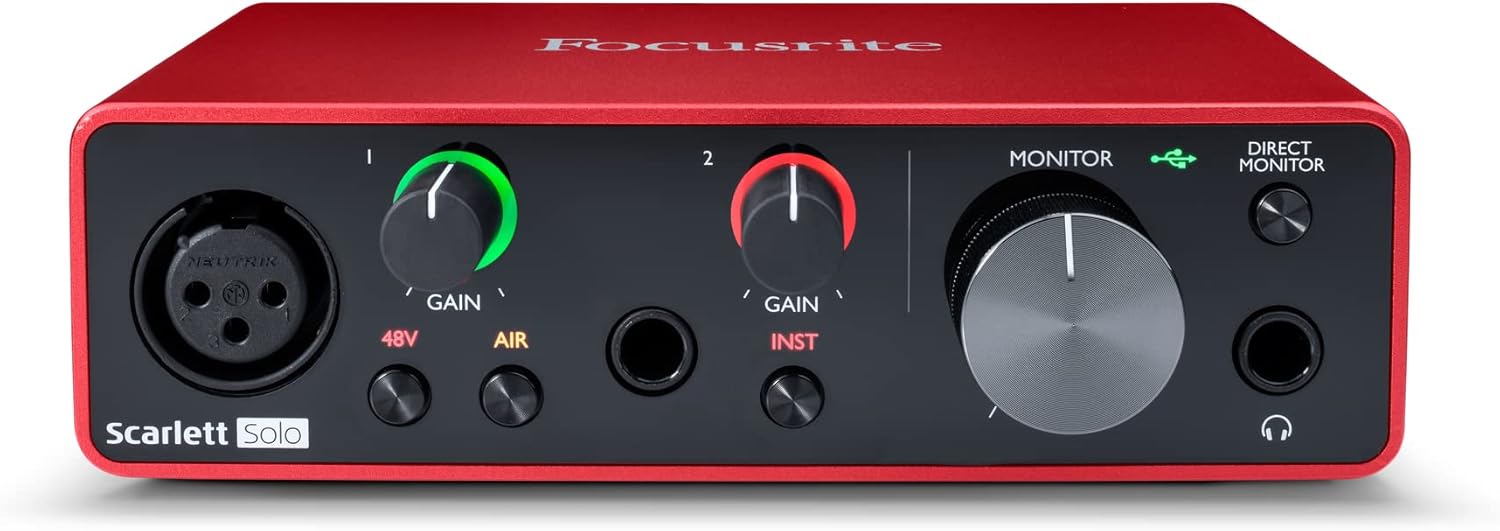
The Focusrite Scarlett Solo 3rd Gen is a professional USB audio interface designed for musicians, podcasters, and content creators who demand studio-quality recordings without the complexity of larger mixing consoles. This compact device bridges the gap between budget-friendly entry-level gear and expensive professional equipment, making it ideal for home studios, bedroom producers, and anyone serious about capturing professional-grade audio.
The standout feature is undoubtedly the high-performance microphone preamp paired with the innovative Air mode, which adds extra clarity and presence to vocals and acoustic instruments. The two high-headroom instrument inputs eliminate clipping and distortion, ensuring your guitar, bass, and other instruments shine through with clarity. Recording at up to 24-bit/192kHz resolution means your productions retain all sonic nuances, while the Gain Halo visual feedback system helps you nail perfect levels every time.
Build quality reflects Focusrite's professional heritage, with a solid metal chassis and intuitive front-panel controls that feel responsive and durable. The USB-C connectivity provides fast, reliable data transfer and modern compatibility with both Mac and Windows systems. The included software bundle (Pro Tools Intro+, Ableton Live Lite, Cubase LE) gives you everything needed to start producing immediately without additional software purchases.
The primary limitation is the single microphone input, which restricts simultaneous multi-track vocal or acoustic recording. Additionally, some Windows users report requiring driver updates for optimal performance. The learning curve for gain staging and audio interface operation may challenge complete beginners, though the included documentation is comprehensive.
The Focusrite Scarlett Solo 3rd Gen represents exceptional value for serious hobbyists and semi-professional creators. Its combination of pristine preamp quality, professional converters, intuitive design, and included software makes it the go-to choice for anyone upgrading from computer microphones or entry-level interfaces. The three-year warranty provides confidence in your investment.
Audio I/O: 1 XLR microphone input, 2 high-impedance instrument inputs, 2 balanced line outputs, headphone output
Audio Quality: 24-bit/192kHz recording and playback resolution with high-performance converters
Connectivity: USB-C to computer, compatible with all major audio recording software
Channels: 2 channels (stereo)
Features: Switchable Air mode, Gain Halo visual feedback, low-noise outputs, headphone monitoring
Software Included: Pro Tools Intro+, Ableton Live Lite, Cubase LE, Hitmaker Expansion
Warranty: 3-year manufacturer warranty worldwide
Compatible Devices: Microphones, instruments, personal computers, headphones, studio monitors
Who Should Buy: Musicians recording at home, podcasters seeking professional audio quality, guitarists and bassists needing quality instrument preamps, content creators upgrading from built-in computer audio, and producers working with limited space.
Who Should Look Elsewhere: Users needing simultaneous multi-microphone recording, those requiring extensive analog mixing features, or professionals running high-channel-count studios requiring more I/O options.
Setup Tips: Ensure your computer meets USB-C requirements and install drivers before first use. Spend time learning gain staging with the Gain Halo visual indicator to avoid clipping. Experiment with Air mode on different sources to understand its impact on your recordings.
Value Comparison: At this price point, the Scarlett Solo 3rd Gen outperforms competitors by offering superior preamp quality, professional software bundle, and proven brand reliability. The included software alone typically costs $200+ if purchased separately.

Pros
- Innovative dual-mode switching eliminates the need for separate hardware setups for recording versus streaming
- Two independent headphone outputs allow musicians and vocalists to monitor different mix levels simultaneously
- Bus-powered operation keeps your setup portable and eliminates cable clutter from power adapters
- Broad software compatibility ensures integration with professional DAWs and popular streaming platforms
- Direct monitoring with hardware control provides zero-latency feedback for confident performance
Cons
- Limited to 48 kHz sample rate, which may not meet requirements for professional mastering or high-resolution audio work
- Only 2 XLR/TRS inputs may feel restrictive for users wanting to record multiple instruments or group vocals simultaneously
- Relatively compact size means learning curve for accessing all features through hardware switches rather than software controls
The Zoom AMS-24 is a purpose-built USB audio interface targeting a specific market segment: musicians and content creators who juggle both music production and live streaming. Unlike general-purpose interfaces, the AMS-24 acknowledges that these workflows have fundamentally different routing needs, and it addresses this with an innovative Music/Streaming mode switch that physically reconfigures the signal flow.
The standout feature is undoubtedly the dual-mode architecture. In Music mode, the interface sends individual tracks to your DAW while offering two independent headphone mixes, allowing a vocalist and instrumentalist to monitor completely different content simultaneously. Streaming mode consolidates all inputs into a single feed, perfect for broadcasting to Twitch, YouTube, or other platforms. This eliminates the frustration of reconfiguring software settings between sessions.
Build quality reflects Zoom's reputation for rugged, field-tested equipment. The AMS-24 feels solid despite its compact footprint, and the bus-powered design means you can record anywhere without hunting for power outlets. The XLR/TRS inputs provide professional connectivity, with one input specifically accommodating guitar cables, making it genuinely useful for singer-songwriters and small bands.
The 48 kHz sample rate is the primary limitation here. Professional studios and mastering engineers will want higher resolution, but for streaming and standard music production, this specification is adequate. The two-input limitation also means you cannot simultaneously record more than two audio sources, which may feel restrictive in larger band scenarios.
The AMS-24 excels as a specialized tool for its intended audience: podcasters who occasionally record music, musicians who stream their work, and content creators who refuse to compromise on either workflow. It delivers genuine innovation in mode switching and dual monitoring rather than simply scaling down a larger interface. For this specific use case, it represents strong value.
Connectivity and Compatibility: USB connectivity with universal support for Windows PC, Mac, iOS, and Android devices. Bus-powered operation requires no external power supply.
Audio Specifications: 2 XLR/TRS combo inputs (one guitar-compatible), 2 dedicated headphone outputs, 2 main TRS outputs. Maximum sample rate of 48 kHz with 2-channel recording capability.
Physical Specifications: Weighs 280 grams with compact form factor suitable for portable recording. Includes 1-year replacement warranty covering manufacturing defects.
Software Integration: Compatible with professional DAWs including Pro Tools, Cubase, and GarageBand, plus streaming platforms like Twitch, YouTube, Facebook, Instagram, and Patreon.
Ideal For: Musicians and podcasters who split time between music production and live streaming, content creators seeking portable multitrack recording, and small ensembles needing simplified routing without complex software management.
Consider Alternatives If: You require sample rates above 48 kHz, need more than two simultaneous inputs, or prioritize ultra-compact size over connectivity options. Professional studios may prefer interfaces with more I/O flexibility.
Best Use Cases: Solo artists recording and streaming performances, podcasters adding music production to their workflow, small bands recording demos with simultaneous broadcast capability, and musicians who travel frequently and need reliable portable recording.

Pros
- Simple one-switch toggle between recording and streaming modes eliminates software configuration headaches
- Loopback feature combines input and computer audio without third-party software, saving time and reducing CPU load
- Bus-powered USB-C connection provides true plug-and-play convenience with minimal setup
- Direct monitoring with zero-latency input monitoring enables confident real-time performance
- Compact form factor and lightweight design make it ideal for mobile studios and travel
Cons
- Limited to 48 kHz sample rate, which may not satisfy professional studios requiring higher resolution audio
- Single XLR input limits simultaneous capture of multiple instruments or microphones without external mixing
- Stereo 3.5mm input is less professional than dedicated XLR connectors for secondary audio sources
The Zoom AMS-22 is a compact, bus-powered audio interface designed for content creators who need reliable, professional-quality audio without unnecessary complexity. Whether you're a podcaster recording solo interviews, a musician capturing guitar and vocals, or a streamer broadcasting to multiple platforms simultaneously, this interface delivers the essential tools in a lightweight, portable package.
What sets the AMS-22 apart is its intelligent dual-mode design and software-free features. The one-switch toggle between Studio Mode and Stream Mode eliminates the need to reconfigure your setup when transitioning between recording and live streaming. The loopback function seamlessly combines your input signal with computer playback, perfect for streaming with background music or game audio. Direct monitoring provides zero-latency input monitoring, so you hear exactly what's being captured without delay or need for additional software.
The interface's build quality is solid and professional. The XLR/TRS combo input with Hi-Z support accommodates microphones, guitars, and line-level sources, while the stereo 3.5mm input provides flexibility for secondary audio sources. The USB-C bus-powered connection means you can literally plug it into your computer and start recording or streaming within seconds. At just 230 grams, it's genuinely portable for mobile recording and remote streaming scenarios.
The main limitation is the 48 kHz maximum sample rate, which is standard for streaming but may disappoint audiophiles or professional studio engineers seeking higher resolution. The single XLR input also means you cannot simultaneously capture multiple microphones or instruments without external mixing equipment. These constraints are reasonable trade-offs for the price point and intended use cases.
The Zoom AMS-22 is an excellent choice for solo podcasters, independent musicians, and content creators who prioritize simplicity, portability, and reliable performance over advanced multi-channel capabilities. Its intuitive design and software-free features make it one of the most accessible audio interfaces available for streaming and recording.
Connectivity: USB-C (bus-powered), XLR/TRS combo input, stereo 3.5mm line input, 2 outputs
Audio Performance: Maximum sample rate 48 kHz, 2 input channels, 2 output channels
Compatibility: Windows, macOS, iOS, Android. Works with Pro Tools, Cubase, GarageBand, YouTube, Twitch, Instagram, and other major DAWs and streaming platforms
Physical: Weight 230 grams, compact portable design
Warranty: 1-year replacement warranty
Podcasters: The AMS-22 excels for solo podcast recording and streaming with its loopback feature and direct monitoring capabilities.
Musicians & Guitarists: The Hi-Z XLR/TRS input handles guitars and keyboards perfectly, with dual-mode operation supporting both DAW recording and live streaming.
Content Creators: Streamers on Twitch, YouTube, Instagram, and other platforms benefit from the one-switch Stream Mode that combines all inputs into a single signal without software configuration.
Remote Workers: The portable, bus-powered design makes it ideal for mobile recording studios, home offices, and on-location content creation.
How to Choose Your Zoom Audio Interface
Inputs and Connectivity
Consider how many sound sources you need to connect. A solo presenter might only need one XLR input for a microphone. If you host interviews or panels, look for multiple inputs like those on the Zoom PodTrak P4 Podcast Recorder with 4 XLR Mic. Also, verify compatibility with your computer; most interfaces use USB, but some offer USB-C for modern laptops.
Ease of Use and Streaming Features
For a seamless Zoom experience, you need an interface that works without complex software configuration. Features like a dedicated loopback function, found on the Zoom AMS models, allow you to mix computer audio (like presentation slides or video clips) with your microphone feed effortlessly. Direct monitoring switches let you hear your own voice in real-time, eliminating distracting lag.
Sound Quality and Preamp Performance
The primary job of an interface is to convert your analog voice signal into pristine digital audio. High-quality preamps, like the renowned Focusrite Scarlett series, provide clean gain without introducing hiss or noise. This ensures your voice sounds full, clear, and natural to everyone on the call, making a significant difference in how you are perceived. For other high-fidelity applications, our review of the best audio interfaces for audiophiles delves deeper into premium sound.
Portability and Power
If your setup moves between a home office and a co-working space, portability is key. Bus-powered interfaces draw energy from your computer’s USB port, requiring no bulky power adapter. The battery-operated option of the Zoom PodTrak P4 offers ultimate flexibility for recording or calling from anywhere, completely untethered from an outlet.
Final Thoughts
Investing in a dedicated audio interface is one of the most effective ways to elevate your virtual communication. For the solo professional seeking legendary plug-and-play simplicity and sound, the Focusrite Scarlett Solo 3rd Gen USB-C Audio remains a benchmark choice. Conversely, if your needs involve remote interviews, multiple hosts, or on-the-go recording, the versatile feature set of the Zoom PodTrak P4 Podcast Recorder with 4 XLR Mic provides an unparalleled all-in-one solution for professional Zoom calls and beyond.
Frequently Asked Questions
Do I need an audio interface for Zoom if I have a USB microphone?
A USB microphone has a basic built-in audio interface. A dedicated external interface typically offers superior microphone preamps, more connectivity options for multiple mics or instruments, and greater control over your audio signal. It is a recommended upgrade for consistent, professional-grade results.
Can I use these interfaces with other conferencing software like Teams or Google Meet?
Absolutely. Once configured as your computer’s default audio input device, these interfaces will work with any software that uses your system audio, including Microsoft Teams, Google Meet, Skype, and streaming platforms like Twitch or YouTube Live. The principles of clear audio apply universally.
How do I set up an audio interface for a Zoom call?
First, connect the interface to your computer via USB and attach your microphone and headphones. Then, within Zoom’s audio settings, select the interface as both your microphone and speaker. Enable direct monitoring on the interface if available, and perform a quick test call to adjust your microphone gain level. For Windows users, specific guidance can be found in our resource on the best audio interfaces for windows.
What is the advantage of a loopback feature for Zoom?
Loopback allows the audio playing from your computer (such as a video clip, music, or sound effect) to be routed back into your microphone output signal. This means you can share media with perfect audio quality during a Zoom presentation without relying on unreliable screen sharing for audio, creating a much more polished and professional broadcast.


Write Your Review
No reviews yet. Be the first to share your experience!