

You’ve invested in a great pair of studio monitors and a powerful subwoofer to hear every detail of your mix, from the deepest bass notes to the crispest highs. But when you go to connect it all, you hit a roadblock: your current audio interface lacks the dedicated outputs needed to integrate that subwoofer properly. This common frustration leaves many producers and content creators with an incomplete monitoring environment, making accurate low-end judgment a guessing game.
This guide is for anyone building a professional or semi-professional studio where full-range monitoring is non-negotiable. We will explore audio interfaces that offer the necessary output flexibility, specifically focusing on models with multiple balanced outputs that allow you to route signal to your main monitors and a subwoofer independently. Whether you’re mixing music, mastering audio, or producing immersive content, the right interface is the central hub that makes it all possible. For a broader look at output options, you can explore our guide on the best audio interfaces with balanced outputs.
Top Audio Interfaces with Subwoofer Output Flexibility

Pros
- Exceptional mic preamp quality with +75 dB gain handles demanding microphones and delicate ribbon mics without external boosters
- Flexible I/O configuration supports multi-mic drums, full bands, synth-heavy setups, and hardware-focused workflows
- DC-coupled outputs and 5-pin MIDI I/O provide tight integration with modular synths, keyboards, and drum machines
- Standalone mixer and mic pre modes enable operation without a computer for live mixing or classroom use
- Included Fender Studio Pro DAW with premium amp modeling eliminates need for additional software purchases
Cons
- Large 19-inch width requires dedicated desk space and may not suit compact or portable studio setups
- No reviews currently available to validate real-world performance and user experiences
The Fender Quantum LT 16 is a flagship audio interface designed for professional studios, hybrid setups, and creators who need expansive I/O without sacrificing quality. This 16-in, 8-out USB-C interface targets multi-instrument musicians, electronic producers, recording engineers, and anyone integrating substantial outboard gear into their workflow.
At the heart of the LT 16 are eight MAX-HD microphone preamps delivering an impressive +75 dB of clean, low-noise gain. This transparency and headroom make capturing drum kits, full orchestras, Foley sessions, and fragile ribbon microphones effortless without external preamp boosters. Combined with six front-panel XLR/TRS combo inputs and eight rear-panel TRS line inputs with selectable +4 dBu / -10 dBV operation, the interface provides extraordinary flexibility for integrating synthesizers, mixers, outboard effects, and multi-mic setups.
Build quality reflects Fender's professional heritage, with a solid 19-inch wide chassis, balanced TRS outputs, and a powerful headphone amplifier for accurate monitoring. The inclusion of DC-coupled outputs unlocks direct CV control for modular and analog synth rigs, while 5-pin MIDI I/O ensures tight hardware synchronization. Custom low-latency drivers and pristine converters deliver responsive monitoring ideal for tracking, mixing, and streaming. Advanced standalone functionality including Mixer Mode and Mic Pre Mode allows operation without a computer for live mixing or classroom applications.
The primary drawback is the $399.99 price tag and 19-inch width, which may challenge bedroom producers or those with compact desk space. Additionally, the interface currently lacks user reviews to validate real-world performance claims, though specifications and feature set are comprehensive.
The Fender Quantum LT 16 is an exceptional choice for professional and semi-professional studios prioritizing I/O flexibility, preamp quality, and hybrid workflow integration. The included Fender Studio Pro DAW with premium amp modeling adds significant value. Recommended for recording engineers, electronic musicians, and multi-instrument creators who demand maximum connectivity and professional sound quality.
Connectivity and I/O: 16 inputs, 8 outputs via USB-C. Six front-panel XLR/TRS combo inputs, eight rear-panel TRS line inputs, two Fender-designed instrument inputs, balanced TRS outputs, 5-pin MIDI I/O, DC-coupled outputs for CV control.
Microphone Preamps: Eight MAX-HD mic preamps with +75 dB of gain, low-noise design, selectable +4 dBu / -10 dBV operation on line inputs.
Audio Quality: Maximum sample rate 192 kHz, high-quality converters, low-latency custom drivers, powerful headphone amplifier with high headroom.
Physical Specifications: Dimensions 19 inches wide x 5 inches deep x 1.75 inches tall. Weight 4.8 pounds.
Compatibility: USB-C connection, compatible with Windows and macOS. Supports Fender Studio Pro and all major audio recording software.
Warranty: 2-year manufacturer warranty included.
Who Should Buy: Professional recording engineers, electronic musicians, multi-instrument creators, podcast producers, livestreamers, and anyone building a hybrid studio with substantial outboard gear. Ideal for drum recording, ensemble tracking, synth-heavy production, and hardware-focused workflows.
Who May Want to Consider Alternatives: Bedroom producers on tight budgets, mobile musicians requiring portability, or those needing fewer than eight mic inputs. Beginners may find the extensive I/O overwhelming if not planning to expand their setup.
Key Considerations: Verify your desk has adequate space for the 19-inch width. Ensure USB-C compatibility with your computer. The included Fender Studio Pro DAW provides excellent value, but compatibility with your preferred DAW is important. The DC-coupled outputs and MIDI I/O are valuable for synth integration but unnecessary for basic recording setups.
Value Assessment: At $399.99, the LT 16 offers professional-grade preamp quality, exceptional I/O flexibility, standalone functionality, and included premium software. The price is competitive for interfaces in this I/O class and represents strong value for serious creators planning long-term studio growth.
Pros
- Exceptional zero-latency performance eliminates monitoring delay for real-time recording
- Dual independent headphone outputs with separate volume controls enable simultaneous different mixes
- Built-in DI functionality on front inputs removes need for external DI boxes for guitars and keyboards
- Legacy 4K analog enhancement adds professional SSL character to vocal and instrument tracking
- Premium analog interface with physical knobs and buttons preferred by professional engineers over touchscreens
Cons
- Microphone preamp gain requires careful calibration and runs near maximum on some condenser mics
- Main volume knob is plastic rather than metal, which may feel less durable than expected at this price point
- Limited to 2x4 I/O configuration, which may constrain users needing more simultaneous inputs or outputs
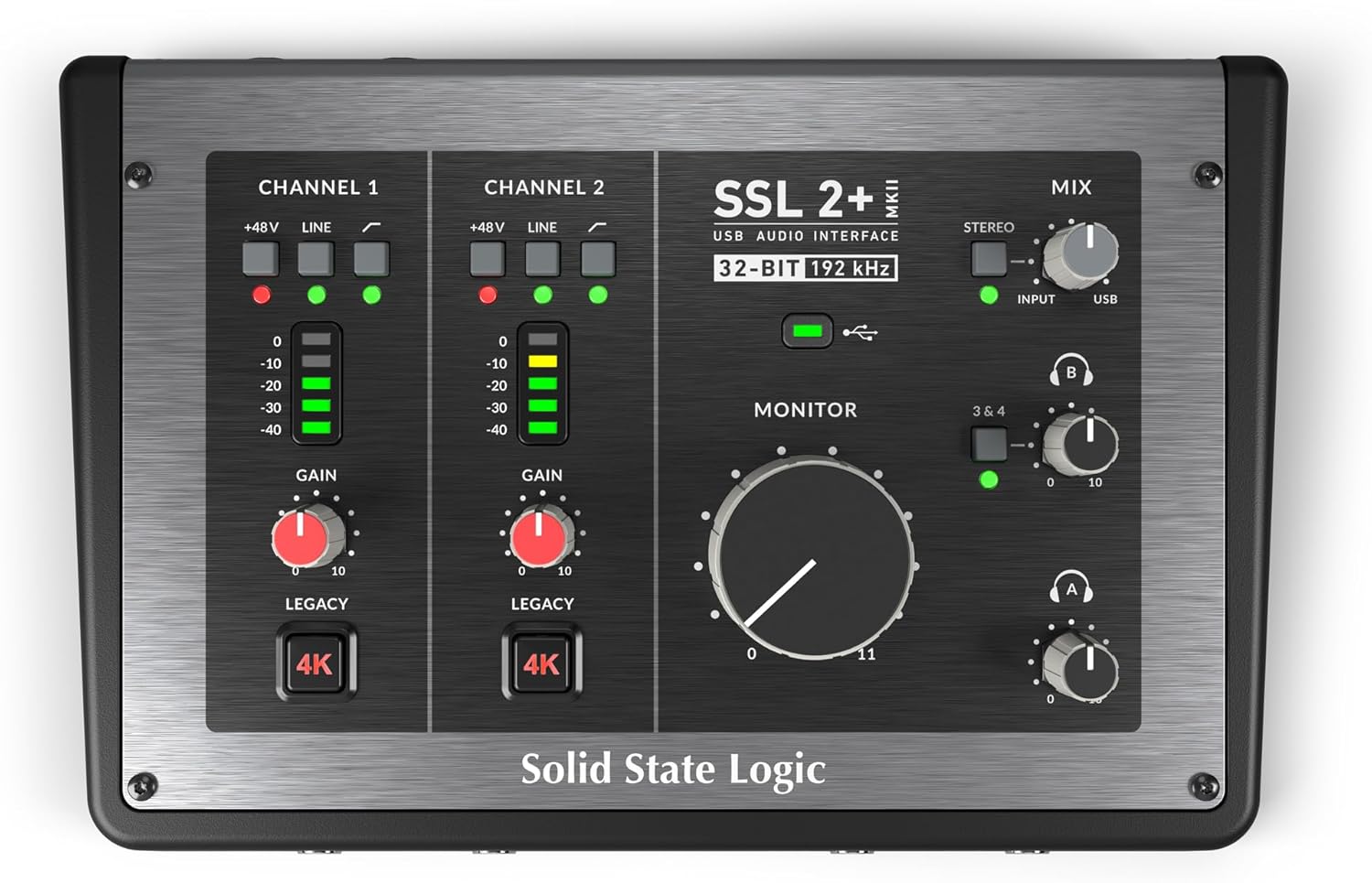
The SSL 2+ MKII is a professional audio interface that brings decades of SSL's mixing console heritage into a compact, bus-powered format. Designed for producers, podcasters, engineers, and musicians, this interface prioritizes sound quality and ease of use without requiring external power supplies or complex setup procedures.
The standout feature is genuine zero-latency monitoring combined with dual independent headphone outputs, each with its own volume control. This enables real-time recording without monitoring delay and allows collaborative sessions where artists and producers hear different mixes simultaneously. The 32-bit/192 kHz converters with Legacy 4K analog enhancement deliver the classic SSL "air" and harmonic character that professionals have relied on for decades, adding polish to vocals and instruments without additional plugins.
Build quality impresses with premium analog controls, stainless steel construction, and responsive knobs and buttons that feel substantial and professional. The interface includes built-in DI functionality on front 1/4" inputs, eliminating the need for external DI boxes when connecting guitars, keyboards, or other high-impedance instruments. The dual XLR mic preamps and four 1/4" line outputs provide flexible routing for most home studio and portable recording scenarios.
The primary consideration is that microphone preamp gain operates near maximum on some condenser microphones, leaving limited headroom for gain adjustment. Additionally, the main volume knob uses plastic rather than metal construction, which some users may find less durable than expected. The 2x4 I/O configuration works well for solo recording but may feel limiting for those requiring simultaneous multi-track recording or more complex routing.
The SSL 2+ MKII delivers professional audio quality, intuitive analog controls, and genuine zero-latency performance in a portable package. It represents excellent value for producers and engineers upgrading from entry-level interfaces while remaining accessible for musicians beginning their recording journey.
Audio I/O: 2 XLR mic preamps, 2 x 1/4" line/hi-Z inputs, 2 discrete headphone outputs, 4 x 1/4" line outputs
Audio Specifications: 32-bit/192 kHz AD/DA converters, 48V phantom power, high-pass filters, stereo loopback, Legacy 4K analog enhancement
Connectivity: USB-C bus-powered, MIDI I/O on 5-pin DIN jacks, compatible with Windows and macOS
Physical: Stainless steel construction, 6.18 x 9.21 x 2.76 inches, 1.94 pounds
Software: SSL Production Pack software bundle included, supports major DAWs including Cubase Pro
Best For: Home studio producers, music engineers, podcasters, and musicians who prioritize audio quality and zero-latency monitoring. Ideal for those upgrading from entry-level interfaces or working in collaborative tracking sessions.
Perfect If You: Record vocals and instruments simultaneously, need independent headphone mixes for artist and producer, prefer analog controls over digital displays, work with guitars and keyboards requiring DI connectivity, or want professional SSL sound without purchasing a mixing console.
Consider Alternatives If: You require more than 4 simultaneous audio inputs, need extensive MIDI connectivity beyond basic I/O, or prioritize the lowest possible price over sound quality and features.
Pros
- Excellent preamp quality produces bright, clear recordings with minimal noise floor
- Air mode adds professional polish to vocal and acoustic recordings without additional equipment
- Compact design perfect for home studios, bedroom producers, and mobile recording setups
- Included software suite eliminates need for expensive DAW purchases
- Highly reliable brand with strong reputation in professional audio industry
Cons
- Single microphone input limits simultaneous multi-instrument recording capabilities
- May require audio driver updates for optimal performance on some Windows systems
- Learning curve for beginners unfamiliar with audio interface operation and gain staging
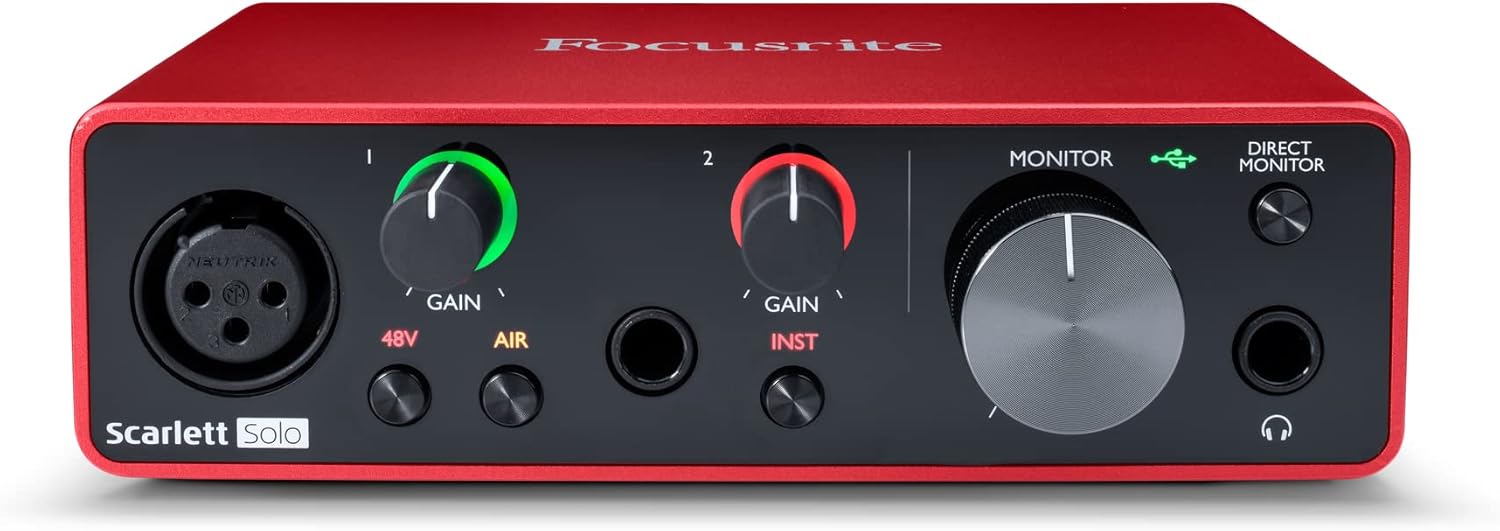
The Focusrite Scarlett Solo 3rd Gen is a professional USB audio interface designed for musicians, podcasters, and content creators who demand studio-quality recordings without the complexity of larger mixing consoles. This compact device bridges the gap between budget-friendly entry-level gear and expensive professional equipment, making it ideal for home studios, bedroom producers, and anyone serious about capturing professional-grade audio.
The standout feature is undoubtedly the high-performance microphone preamp paired with the innovative Air mode, which adds extra clarity and presence to vocals and acoustic instruments. The two high-headroom instrument inputs eliminate clipping and distortion, ensuring your guitar, bass, and other instruments shine through with clarity. Recording at up to 24-bit/192kHz resolution means your productions retain all sonic nuances, while the Gain Halo visual feedback system helps you nail perfect levels every time.
Build quality reflects Focusrite's professional heritage, with a solid metal chassis and intuitive front-panel controls that feel responsive and durable. The USB-C connectivity provides fast, reliable data transfer and modern compatibility with both Mac and Windows systems. The included software bundle (Pro Tools Intro+, Ableton Live Lite, Cubase LE) gives you everything needed to start producing immediately without additional software purchases.
The primary limitation is the single microphone input, which restricts simultaneous multi-track vocal or acoustic recording. Additionally, some Windows users report requiring driver updates for optimal performance. The learning curve for gain staging and audio interface operation may challenge complete beginners, though the included documentation is comprehensive.
The Focusrite Scarlett Solo 3rd Gen represents exceptional value for serious hobbyists and semi-professional creators. Its combination of pristine preamp quality, professional converters, intuitive design, and included software makes it the go-to choice for anyone upgrading from computer microphones or entry-level interfaces. The three-year warranty provides confidence in your investment.
Audio I/O: 1 XLR microphone input, 2 high-impedance instrument inputs, 2 balanced line outputs, headphone output
Audio Quality: 24-bit/192kHz recording and playback resolution with high-performance converters
Connectivity: USB-C to computer, compatible with all major audio recording software
Channels: 2 channels (stereo)
Features: Switchable Air mode, Gain Halo visual feedback, low-noise outputs, headphone monitoring
Software Included: Pro Tools Intro+, Ableton Live Lite, Cubase LE, Hitmaker Expansion
Warranty: 3-year manufacturer warranty worldwide
Compatible Devices: Microphones, instruments, personal computers, headphones, studio monitors
Who Should Buy: Musicians recording at home, podcasters seeking professional audio quality, guitarists and bassists needing quality instrument preamps, content creators upgrading from built-in computer audio, and producers working with limited space.
Who Should Look Elsewhere: Users needing simultaneous multi-microphone recording, those requiring extensive analog mixing features, or professionals running high-channel-count studios requiring more I/O options.
Setup Tips: Ensure your computer meets USB-C requirements and install drivers before first use. Spend time learning gain staging with the Gain Halo visual indicator to avoid clipping. Experiment with Air mode on different sources to understand its impact on your recordings.
Value Comparison: At this price point, the Scarlett Solo 3rd Gen outperforms competitors by offering superior preamp quality, professional software bundle, and proven brand reliability. The included software alone typically costs $200+ if purchased separately.

Pros
- MIDAS preamps deliver clean, low-noise signal path comparable to much more expensive interfaces
- Intuitive plug-and-play setup with minimal driver hassle on both Mac and Windows systems
- Robust build quality and metal construction designed to withstand years of studio use
- Four simultaneous inputs and outputs provide flexibility for multi-track recording and live streaming
- Outstanding value proposition offering professional-grade specs at entry-level pricing
Cons
- Some users report occasional driver compatibility issues on certain Windows OS versions
- MIDI functionality may require additional configuration compared to audio I/O setup
- Limited customer support documentation compared to higher-end competitors
The Behringer U-PHORIA UMC404HD is a compact 4x4 USB audio interface engineered for home studio owners, podcasters, content creators, and mobile recording professionals. It delivers professional-grade audio quality at a price point that makes it accessible to anyone serious about recording but budget-conscious. The interface has earned respect from experienced audio engineers and casual users alike for punching well above its price class.
The standout feature is the inclusion of four MIDAS-designed mic preamps with +48V phantom power, which typically appear only on interfaces costing two to three times as much. Users consistently praise the clean, low-noise signal path and the ability to capture vocals and instruments with clarity and detail. The 24-bit/192 kHz resolution ensures future-proof audio quality, while ultra-low latency streaming supports real-time monitoring during recording sessions. Compatibility with Pro Tools, Ableton Live, Cubase, and other major DAWs means you can integrate it into virtually any existing workflow.
Build quality reflects Behringer's partnership with MIDAS and acquisition of Music Tribe assets. The metal chassis feels solid and impact-resistant, designed to handle the rigors of studio use and travel. The interface is compact at just 11.5 inches wide, making it ideal for portable recording setups or tight desk spaces. Balanced XLR and 1/4-inch outputs ensure professional connectivity to studio monitors and mixing equipment.
The main drawbacks involve driver setup on certain Windows systems and MIDI configuration, which some users find less intuitive than audio I/O setup. A small percentage of users report compatibility issues, though this appears to be system-specific rather than a widespread product defect. Driver support for Mac OS is notably streamlined, with native OS integration requiring minimal configuration.
The Behringer UMC404HD represents genuine value in the audio interface market. It combines professional-grade components, solid engineering, and proven reliability at a price that makes it the obvious choice for anyone building a home studio or upgrading from entry-level equipment. Experienced audio professionals and beginners alike will find it a capable, dependable tool that won't compromise recording quality.
Audio Specifications: 24-bit/192 kHz resolution, 10 Hz to 43 kHz frequency response (0/+0.3 dB). Maximum input levels: Microphone -4 dBu, Line +20 dBu, Instrument -3 dBu. Four MIDAS-designed mic preamps with +48V phantom power.
Connectivity: USB 2.0 interface with 4 inputs/4 outputs plus 1x MIDI I/O. Balanced XLR and 1/4-inch TRS connectors for main outputs. Supports both Mac OS X and Windows XP or higher.
Compatibility: Works with Avid Pro Tools, Ableton Live, Steinberg Cubase, Reaper, Audacity, and other major DAWs. Native driver support for Mac OS, simple driver installation for Windows.
Physical Dimensions: 11.5 inches D x 5.12 inches W x 1.81 inches H. Weight: 2.7 pounds. Rugged metal chassis with impact-resistant construction.
Ideal For: Home studio owners, podcasters, content creators, musicians recording at home, audio engineers on a budget, and anyone upgrading from entry-level USB interfaces. Perfect for mobile recording setups and professional use in tight spaces.
Experience Level: Suitable for beginners through advanced users. The plug-and-play setup welcomes newcomers, while the professional-grade preamps and specifications satisfy experienced engineers.
Use Cases: Music production and multi-track recording, podcast and voiceover recording, live streaming with high-quality audio, instrument recording, vocal tracking, and field recording with a portable setup.


Pros
- Exceptional I/O flexibility with ADAT, S/PDIF, and MIDI support for integrating external gear
- Intelligent gain management tools eliminate guesswork and reduce recording errors
- Professional converter quality rivals interfaces costing significantly more
- Includes substantial software bundle that adds real production value
- Reliable Focusrite build quality with 3-year manufacturer warranty
Cons
- Some users report a learning curve with continuous-turn knobs requiring visual confirmation of settings
- Rare power delivery issues reported by isolated users, though Amazon return policy provides protection
- Premium price point may be steep for hobbyists just starting out
The Focusrite Scarlett 18i16 4th Gen is a professional audio interface designed for serious home studio producers, recording engineers, and musicians who need extensive I/O connectivity and studio-grade sound quality. With 18 inputs and 16 outputs, this interface serves as the central hub for complex recording setups, hardware integration, and multitrack production workflows.
What sets this interface apart is its combination of professional-grade components and intelligent workflow tools. The four 4th generation microphone preamps deliver an impressive 69dB of gain, capable of capturing everything from whisper-quiet vocals to hard-hitting drums without compromise. The 24-bit/192kHz converters sourced from Focusrite's flagship RedNet range provide a 122dB dynamic range that rivals much more expensive interfaces. The Air modes add harmonic character and presence that gives recordings the polish of classic studio consoles, while Auto Gain and Clip Safe modes handle real-time level optimization so you can concentrate on the performance rather than technical adjustments.
Build quality is solid throughout, with a compact footprint that doesn't consume excessive desk real estate despite its impressive feature set. The interface connects via USB-C and works seamlessly across Mac, Windows, and iOS platforms. The included software bundle, featuring Pro Tools Intro+, Ableton Live Lite, Cubase LE, and professional effects, provides immediate production capability without additional software purchases.
The primary drawback involves the continuous-turn knobs on the interface, which require you to reference the display indicators for level confirmation rather than relying on tactile stops. This takes minor adjustment time for users transitioning from older Scarlett models. Additionally, while extremely rare, a small number of users have reported power delivery issues, though Amazon's return policy ensures protection against defective units.
The Focusrite Scarlett 18i16 4th Gen delivers exceptional value for professional and semi-professional studios. Its extensive connectivity, superior audio quality, and intelligent gain management make it an excellent choice for recording, mixing, and complex hardware integration. This interface rewards serious producers with the tools and sound quality needed to create professional recordings at home.
Connectivity and I/O: 18 inputs and 16 outputs including four XLR microphone inputs, two Hi-Z instrument inputs, eight line inputs, ADAT, S/PDIF, and MIDI I/O. USB-C connection supports Mac OS, Windows OS, and iOS.
Audio Quality: 24-bit resolution at up to 192kHz sample rate. 122dB dynamic range. Four 4th generation mic preamps with 69dB gain. Hi-Z inputs for direct instrument connection.
Physical Specifications: Dimensions 9.43 inches wide by 6.66 inches deep by 2.38 inches tall. Weight 3.8 pounds. Includes external power supply and USB cable.
Software and Support: Compatible with all audio recording software. Includes Pro Tools Intro+, Ableton Live Lite, Cubase LE, and Hitmaker Expansion. Three-year manufacturer warranty included.
Ideal For: Recording engineers and producers who need extensive I/O for multitrack recording, hardware integration, and complex routing. Musicians and producers working with multiple external instruments, processors, and effects. Anyone seeking professional-grade audio quality without the expense of traditional studio consoles.
Consider Alternatives If: You're a beginner looking for a simple 2-in/2-out interface for basic recording. You need Thunderbolt connectivity instead of USB-C. You require more than four microphone preamps on a single interface.

Pros
- Outstanding value for the price with more I/O options than comparable competitors
- Crystal clear sound quality perfect for recording music, podcasts, and vocals
- Solid metal construction built to withstand frequent use and transport
- Easy setup with no drivers required, compatible with Windows and Mac systems
- Versatile mixer-interface hybrid design works for recording, live performance, and streaming
Cons
- Output volume levels reported as slightly weak by some users, may require external amplification
- Windows-focused software support, limited compatibility with Linux operating systems
- Steep learning curve for beginners unfamiliar with audio interface controls and effect selection
The Pyle PMUX9 is a professional USB audio interface designed for musicians, podcasters, and content creators who need reliable recording capabilities without breaking the bank. This hybrid mixer-interface device bridges the gap between entry-level interfaces and professional mixing consoles, making it ideal for home studios, small venues, and portable recording setups.
What sets the PMUX9 apart is its impressive feature set: 24 onboard digital effects, 48V phantom power, and extensive connectivity options including XLR combo jacks, 6.35mm guitar inputs, 3.5mm auxiliary, and RCA stereo inputs. The 24-bit, 48kHz recording resolution delivers crystal-clear audio quality, while independent control knobs for each input and output channel provide precise mixing capabilities directly on the unit without relying on computer software.
The build quality is exceptional for the price point. The rugged metal housing feels solid and durable, while the compact dimensions (1.5 x 6.8 x 4.7 inches) make it perfect for small spaces and easy transport between locations. Setup is straightforward with no complex driver installations required, and the unit works seamlessly with both Windows and Mac systems.
The main drawback is that output volume levels run slightly lower than some users prefer, potentially requiring external amplification for certain applications. Additionally, Linux users may encounter compatibility issues. Despite these minor limitations, the PMUX9 delivers exceptional value with more I/O connectivity and built-in effects than competing interfaces at similar price points.
The Pyle PMUX9 is a smart investment for anyone serious about home recording, live streaming, or music production on a budget. Its combination of solid build quality, versatile connectivity, onboard effects, and professional audio quality makes it a compelling choice for beginners and intermediate users alike.
Audio Performance: 24-bit, 48kHz resolution with ultra-low noise design and less than 0.5% THD at +4dBu. Frequency response of plus or minus 1dB at +4dBu and 1kHz.
Connectivity: USB 2.0 Type-B connection. Input: 2 combo XLR and 6.35mm jacks, 1 additional 6.35mm jack, 1 AUX 3.5mm jack, 1 RCA stereo pair. Output: 6.35mm headphone jack, 3.5mm stereo headphone jack, 3.5mm stereo output, 1 RCA monitor pair.
Power and Effects: DC 5V power supply with 7W power consumption and 1A output current. Includes 48V phantom power with LED indicator. Features 24 preset digital effects including reverb, delay, echo, phaser, flanger, chorus, tremolo, wah-wah, and pitch change.
Physical Specifications: Compact dimensions of 1.5 x 6.8 x 4.7 inches. Weight: 0.89 kg. Rugged metal housing. 2 independent channels.
Home Recording: Perfect for recording guitars, vocals, and instruments directly to your computer with professional sound quality and onboard effects.
Podcasting: Multiple microphone inputs and phantom power support make this ideal for podcast production with clean, clear audio capture.
Live Streaming: The mixer-interface hybrid design with independent controls and effects works great for YouTube, Twitch, and social media streaming applications.
Music Production: Beginner and intermediate music producers benefit from the 24 onboard effects and multiple input options without needing additional hardware.
Portable Recording: The compact size and rugged metal construction make this excellent for musicians who record in different locations or perform live with backing tracks.

Pros
- Professional audio quality at an affordable price point, delivering 24-bit/192kHz resolution comparable to interfaces costing twice as much
- Versatile connectivity with both XLR and instrument inputs plus headphone monitoring allows handling multiple audio sources and use cases
- Included ProStudio software and ASIO driver support unlock advanced routing and low-latency capabilities for serious streamers and producers
- Genuinely portable and compact design with intuitive controls makes it practical for home studios, mobile setups, and travel
- Strong cross-platform compatibility and DAW support ensure this interface works with virtually any modern recording or streaming software
Cons
- Limited to 2 channels, restricting simultaneous recording of multiple instruments or complex multi-track setups without additional gear
- Phantom power and preamp features depend on proper driver installation and software configuration, which may challenge complete beginners
- No built-in effects or processing, requiring external plugins or software for audio enhancement beyond basic routing and monitoring
The MAONO PS22 Lite is a compact USB audio interface designed for recording enthusiasts, podcasters, guitarists, and content creators who demand professional sound quality without the complexity or expense of larger systems. This device punches well above its weight, offering studio-grade specifications in a palm-sized form factor that fits any creative workspace.
The standout feature is undoubtedly the 24-bit/192kHz recording capability paired with a 106dB dynamic range, ensuring every nuance of your performance is captured with clarity and depth. The dual-input design handles both XLR microphones (with 56dB preamp gain and 48V phantom power) and guitar or line-level instruments, making it genuinely versatile for mixed creative work. The included ProStudio Routing Software with ASIO driver support opens possibilities for live streamers, enabling virtual channels and loopbacks for complex broadcast scenarios without latency issues.
Build quality reflects the premium positioning, with an ergonomic design featuring a dynamic light ring that indicates input status and a side-mounted headphone jack reducing cable clutter. The intuitive preset modes for recording, live broadcast, and instruments mean switching between creative tasks takes seconds, while the plug-and-play functionality works across Mac, Windows, and iPad platforms. Direct monitoring provides real-time audio feedback essential for getting performances right on the first take.
The primary limitation is the 2-channel configuration, which restricts simultaneous multi-track recording unless you're layering overdubs. Additionally, while the interface excels at capture and routing, it lacks onboard effects or processing, meaning you'll rely on software plugins for audio enhancement. Setup requires proper driver installation and software configuration, which may initially challenge absolute beginners despite the intuitive interface design.
The MAONO PS22 Lite delivers exceptional value for podcasters, guitarists, vocalists, and streamers seeking professional audio quality in a portable, user-friendly package. Its combination of high-resolution recording, versatile inputs, advanced routing software, and cross-platform compatibility makes it a smart investment for anyone serious about audio production without the premium price tag.
Audio Quality: 24-bit/192kHz recording resolution with 106dB dynamic range for professional-grade sound capture.
Inputs: 1 XLR input for microphones with 56dB preamp gain and 48V phantom power, 1 dedicated instrument input with impedance adjustment for guitars and line-level sources.
Connectivity: USB connection with included USB-A/USB-C to USB-C cable. Plug-and-play compatibility with Mac, Windows, and iPad.
Channels: 2-channel interface for stereo recording and monitoring.
Software Support: ASIO drivers, ProStudio Routing Software included. Compatible with Avid Pro Tools, Ableton Live, Logic Pro, Cubase, GarageBand, FL Studio, Studio One, plus streaming platforms like OBS, Twitch, YouTube, TikTok, and Discord.
Design: Compact palm-sized form factor with dynamic light ring indicator, ergonomic construction, and side-mounted headphone monitoring jack.
Best For: Podcasters and voice actors seeking warm, clear vocals with minimal noise. Guitarists and musicians recording demos or full productions. Content creators streaming to Twitch, YouTube, or TikTok. Home studio builders wanting professional results on a budget. Anyone transitioning from built-in computer audio to proper recording equipment.
Consider This If: You need simultaneous recording of multiple instruments, look elsewhere for 4+ channel interfaces. You want onboard effects and processing, you'll need to budget for software plugins. You're a complete beginner, allow time to learn driver installation and basic DAW setup.
Why Choose PS22 Lite Over Alternatives: The combination of 24-bit/192kHz recording, dual-input versatility, included ProStudio software, and compact design offers exceptional value. Many competitors at this price lack phantom power or advanced routing capabilities. The cross-platform compatibility and extensive DAW support ensure future-proof investment.

Pros
- Exceptional value for money with professional-grade features typically found in higher-priced interfaces
- Intuitive one-touch controls and comprehensive manual make setup quick even for beginners
- Compact, portable form factor is perfect for mobile podcasters and content creators on the go
- Rich ecosystem of sound effects and voice processing tools enable creative content differentiation
- Solid build quality and widespread software compatibility ensure long-term usability
Cons
- Sound effect pads limited to 20 seconds of storage with no expandable storage or SD card support
- Noise gate feature could be more sophisticated for advanced audio engineers
- No internal storage capacity for recording directly to the device without a computer connection
The MAONO E2 Gen2 is an all-in-one podcast and streaming interface designed for content creators who want professional audio quality without the complexity or price tag of traditional studio setups. This compact mixer is perfect for solo podcasters, co-hosted shows, live streamers, and musicians looking to upgrade their home recording capabilities.
The standout feature is the dual XLR combo inputs paired with 60dB low-noise preamps that deliver crystal-clear audio suitable for dynamic microphones and professional-grade recordings. The 8 customizable sound effect pads add genuine value for content creators, allowing you to upload intro music, sound bites, or effects to enhance audience engagement. The loopback function simplifies live streaming workflows, and the included voice effects like pitch-changing and reverb presets provide creative flexibility without needing additional software.
Build quality feels solid and purposeful, with an intuitive layout that minimizes the learning curve. The 8-hour battery makes this interface genuinely portable, and the multiple connectivity options (Bluetooth, USB-C, 3.5mm, XLR) ensure compatibility with virtually any device or workflow. Setup is straightforward, and the included manual is comprehensive with online support available.
The main limitation is the 20-second storage limit on sound effect pads and lack of expandable storage options. The noise gate, while functional, may not satisfy advanced audio engineers seeking granular control. Additionally, this is an audio interface only and does not support phone charging or power delivery functions.
Overall, the MAONO E2 Gen2 represents excellent value for podcasters and streamers at any skill level. It successfully balances affordability with professional features, making it an ideal entry point for those starting their podcasting journey or a solid secondary interface for established creators who need portability and flexibility.
Connectivity: Dual XLR combo inputs, Bluetooth, USB-C, 3.5mm audio jack, dual stream outputs
Audio Performance: 60dB gain preamps, 48 kHz maximum sample rate, 20 kHz frequency response, built-in noise reduction
Sound Effects: 8 customizable pads (up to 20 seconds each), 6 preset reverbs, pitch-changing effects, SingAlong mode
Battery: Built-in 1500mA battery providing up to 8 hours of operation
Compatibility: Windows, macOS, iOS, Android. Works with OBS, Discord, Zoom, Audacity, YouTube, Facebook, TikTok, Twitch
Physical: 9.64 inches D x 6.18 inches W x 2.16 inches H, weighs 0.89 kg. Includes USB-A/USB-C cable, 3.5mm cable, and user manual
Warranty: 1 year manufacturer warranty
Best For: Podcasters (solo or co-hosted), live streamers, content creators, musicians, and anyone needing portable, professional audio recording and mixing capabilities.
Consider This If: You need dual microphone inputs for co-hosted shows, want to add custom sound effects to your content, require portability with battery backup, or work across multiple platforms and devices simultaneously.
Skip This If: You need unlimited internal storage for sound pads, require advanced noise gate control, or need a device that supports phone charging or power delivery functions.
Setup Tips: Download the MAONO website resources and tutorial videos before your first session. Pre-record and test your sound effects before going live. Use the loopback function for seamless computer-based streaming workflows. The intuitive layout means most users can be production-ready within 30 minutes.
Value Comparison: This interface delivers features comparable to interfaces priced 50-100 dollars higher, making it an exceptional value for budget-conscious creators without sacrificing professional audio quality or functionality.
Buying Guide for Interfaces with Subwoofer Outputs
Output Configuration and Flexibility
The primary requirement is having enough independent, balanced line outputs. You typically need at least four: two for your left and right main monitors, and two for a stereo subwoofer input or a dedicated mono sub out. Interfaces like the Focusrite Scarlett 18i16 4th Gen USB-C Audio offer ample outputs for complex setups. Look for interfaces that label these clearly, often as Main Outs, Line Outs 3/4, or similar.
This configuration allows you to set up a proper crossover within your DAW or use an external subwoofer’s internal filters. It provides full control over what frequencies are sent to your sub versus your mains, which is crucial for achieving a flat, accurate frequency response in your room. Without this routing capability, you’re often forced to use a subwoofer’s passthrough, which can color the sound.
Signal Quality and Converter Performance
The quality of the digital-to-analog converters (DACs) driving these outputs is paramount. High-resolution converters ensure the signal sent to your expensive monitors and subwoofer is clean, detailed, and free from artifacts. Specifications like 24-bit/192kHz resolution and a wide dynamic range, as seen in the Solid State Logic 2 MKII Plus USB-C Audio, indicate a capable interface.
Low-noise, balanced outputs are essential to prevent hum and interference over the cable runs to your speakers. This clean signal path means you hear your mix, not the interface’s limitations. For those also considering input quality, our review of the best audio interfaces with high gain preamps covers that critical aspect.
Software Routing and Mixing Features
An interface’s accompanying software mixer is often the key to unlocking flexible subwoofer integration. Look for interfaces that offer software where you can create separate output mixes. This allows you to route a specific blend of your DAW’s output and computer audio to your subwoofer independently from your mains.
Features like loopback, which is useful for streaming, and zero-latency monitoring paths are often managed within this software. A robust software mixer, such as those provided with Focusrite or Behringer interfaces, gives you the control needed for both creative and technical monitoring setups. This level of control complements having the right physical connections, which you can also explore in our list of the best audio interfaces with main outputs.
Connectivity and Expandability
Consider your future needs. If you plan to add more outboard gear or expand with additional microphone preamps via ADAT, ensure your interface has those digital connectivity options. The Fender Quantum LT 16 | 16-in 8-out USB-C Audio, for example, offers extensive connectivity for a growing studio.
Also, check the physical connection types on the outputs. Balanced 1/4″ TRS or XLR outputs are professional standards that provide the best noise rejection. Ensure these match the inputs on your active monitors and subwoofer. Having the right connections from the start prevents adapter clutter and potential signal degradation.
Final Thoughts
Selecting an audio interface with proper subwoofer output capability is a strategic decision that elevates your entire production workflow. For those seeking professional-grade expandability and pristine output quality, the Focusrite Scarlett 18i16 4th Gen USB-C Audio is a standout choice. If your needs are more centered on exceptional value and proven reliability in a compact format, the Behringer U-PHORIA UMC404HD Audiophile 4×4 remains a highly recommended workhorse. By prioritizing flexible outputs and clean signal paths, you invest in the accuracy your creative work deserves.
Frequently Asked Questions
Can I use any audio interface with a subwoofer?
You can physically connect a subwoofer to many interfaces, but optimal integration requires specific outputs. For proper setup, you need an interface with multiple independent balanced outputs. This allows you to send a dedicated signal to the subwoofer, often using a crossover, rather than just daisy-chaining through your monitors. This is key for accurate bass management.
What is the difference between balanced and unbalanced outputs for subwoofers?
Balanced outputs use a three-conductor design (like TRS or XLR) to cancel out noise and interference over long cable runs. Unbalanced outputs (like RCA or TS) are more susceptible to hum and buzz. For the low-frequency signals sent to a subwoofer, which often require longer cables due to room placement, balanced connections are strongly recommended to maintain a clean, noise-free signal.
Do I need a special interface for studio monitors and a subwoofer?
You need an interface with sufficient output channels. A standard 2-output interface only connects left and right monitors. To add a subwoofer without using passthroughs, you generally need an interface with at least four discrete outputs. Many interfaces categorized for larger setups or with “4×4” or higher I/O counts, like those suitable for line level inputs, naturally provide this capability.
How do I set up the crossover between my interface and subwoofer?
The setup method depends on your gear. With a multi-output interface, you can set up a crossover digitally within your DAW by using separate output buses and applying high-pass filters to your monitor mix and low-pass filters to your subwoofer mix. Alternatively, many active subwoofers have built-in crossovers that filter the signal they receive and provide a filtered passthrough to your mains, though this often requires a specific output configuration from the interface.


Write Your Review
No reviews yet. Be the first to share your experience!